
HBTM44B - Headphones GoGen - Free user manual and instructions
Find the device manual for free HBTM44B GoGen in PDF.


| Product Type | Wireless Bluetooth Headphones |
| Brand | GoGen |
| Model | HBTM44B |
| Bluetooth Version | V 5.3 |
| Bluetooth Profiles | HFP, A2DP, AVRCP |
| Audio Codecs | SBC, AAC |
| Frequency Range | 2400 MHz - 2480 MHz |
| Operating Range | 10 m |
| Frequency Response | 20 Hz - 20 KHz |
| Rated Power | 11 mW |
| Sensitivity | 100 dB (±3 dB) @ 1 KHz |
| Impedance | 32 Ω ± 15% |
| EIRP | 4 dBm |
| Water Resistance | IPX4 |
| Battery Type | Lithium 400 mAh |
| Music Playing Time | Up to 63 hours |
| Charging Voltage | 5V / 400 mA |
| Weight | 243 g |
| Package Contents | Headphones, USB Charge Cable |
| Controls | Multi-function button, Volume +/-, Extra Bass button |
| Special Features | Extra Bass mode, Low-latency mode (Game mode) |
| Cleaning | Use soft and dry cotton cloth |
| Operating Temperature | -10°C to 40°C |
| Safety Warnings | Adjust volume carefully; avoid use while driving; keep away from children; do not immerse in water |
| Waste Disposal | Do not dispose as household waste; recycle at applicable collection point |
Frequently Asked Questions - HBTM44B GoGen
User questions about HBTM44B GoGen
0 question about this device. Answer the ones you know or ask your own.
Ask a new question about this device
Download the instructions for your Headphones in PDF format for free! Find your manual HBTM44B - GoGen and take your electronic device back in hand. On this page are published all the documents necessary for the use of your device. HBTM44B by GoGen.
USER MANUAL HBTM44B GoGen
natural_image
Black Gogee headphones with black headband and white earpluses (no visible text or symbols)BEZPEČNOSTNÍ OPATŘENÍ
In order to have a proper and safe use of the headset, please read this user manual in detail and save it. Be aware of the following guidelines when using your headset:
WARNING
- You should adjust the volume carefully when using the headset to prevent hearing damage.
- Please stop using the headset in potentially hazardous situations to ensure your safety.
- Please avoid using the headset to listen to music, make or receive calls which may cause a distraction while driving.
- Put this product and its accessories somewhere out of the reach of children, to avoid a fatal danger caused by inappropriate use.
- You should keep water from entering the headset, which may cause damage to the sound quality or the headset.
- You should avoid turning the volume so high that you can't hear anything around you. If you feel a tinnitus or the volume is too high, please reduce the volume.
- Stop using the headset if you feel obvious discomfort, irritation or have other adverse reactions.
- The headset should not be stored or used at temperatures below -10°C or above 40°C which may shorten headset or battery life.
TECHNICAL SPECIFICATIONS
- Bluetooth Version: V 5.3
- Bluetooth Profile: HFP, A2DP, AVRCP
• Audio codecs: SBC, AAC
• Frequency range: 2400 MHz - 2480 MHz - Operating range: 10 m
• Frequency Response: 20 Hz - 20 KHz - Rated Power: 11m W
- Sensitivity: 100 dB (±3 dB) @ 1 KHz
- Impedance: 32 ± 15%
- EIRP: 4 dBm
- Resistance: IPX4
- Battery: Lithium 400 mAh
• Music playing time: up to 63 hours
• N.W.: 243 g
PACKAGE CONTENTS
Headphones, USB Charge Cable
DEVICE LAYOUT
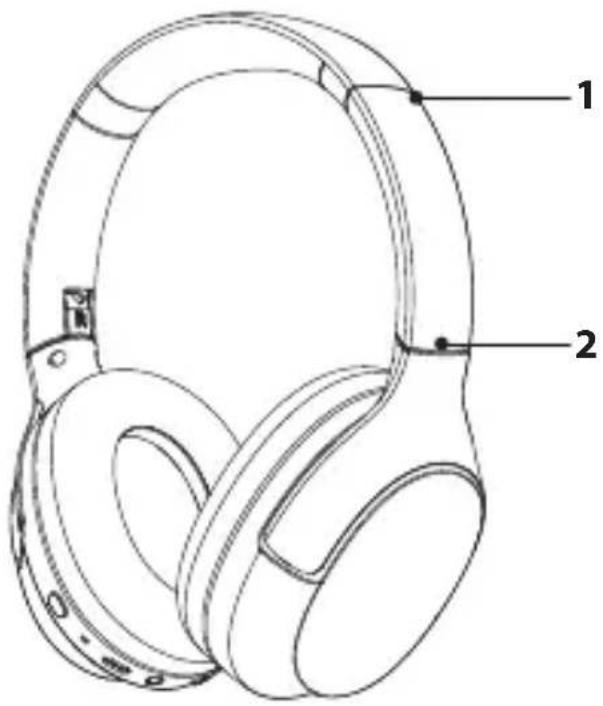
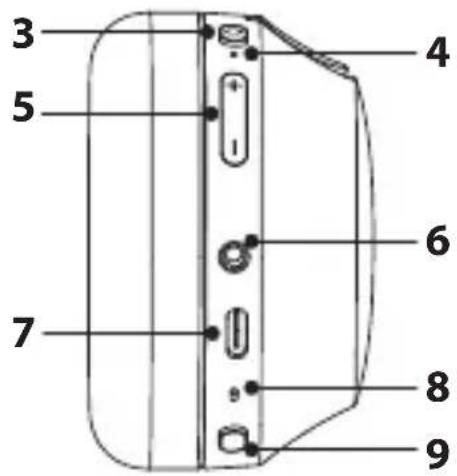
- Adjustable slider
- Folding bracket
- Multi-function button
- LED light
-
Volume + / -
-
3,5 ~mm AUX input
- USB-C charging input
- Microphone
- Extra bass button
POWER ON & PAIRING
Press and hold the Multi-function button for 2 seconds to power on the headphones. It will auto-turn connectable. The LED light will blink red and white during pairing.
Note: If you need to make the headphones connectable again, power off and hold the multi-function button for 4 seconds.
BLUETOOTH CONNECTION STEPS
- Please keep your headphones and mobile phone as close as you can, within 1 meter.
- Turn on "Bluetooth" in setting on your phone or other devices, and then find and select GOGHBTM44B.
- Click on GOGHBTM44B and Bluetooth Headset gets connected with your phone or devices automatically. (Some may require pass code which is "0000" (4 zeros)).
- After a successful pairing of the headphones, the LED blinks white every 10 seconds.
RESET
In case of failure pairing or unnormal working, you need to RESET the headphones as following: Power on the headphones, and press and hold both the volume + and – buttons until the LED light blinks red 5 times.
HEADPHONES CONTROL INSTRUCTIONS
| FUNCTION ACTION | |
| POWER ON Hold the Multi-function button for 2 seconds | |
| POWER OFF Hold the Multi-function button for 4 seconds | |
| ACTIVATOR ON Double-press the Multi-function button | |
| ANSWER/END CALL Press Multi-function button | |
| REJECT CALL Long press the Multi-function button | |
| PLAY & PAUSE MUSIC Press Multi-function button | |
| PREVIOUS TRACK Long press Volume - | |
| NEXT TRACK Long press Volume + | |
| VOLUME UP Press Volume + | |
| VOLUME DOWN Press Volume - | |
| EXTRA BASS MODE Press the Bass button. LED will be light solid white. | |
| LOW-LATENCY MODE (game mode) Press 3 times the Multi-function button | |
CHARGING
Connect the USB cable to the headphones. Connect the other end of the USB cable to a computer or charger. The LED indicator on the headphones glows red during charging. It glows solid white when fully charged.
WARNING:
- You must select a qualified charger from a regular manufacturer. (Charging Voltage: 5V Charging Current: 400mA for charging case)
- A fully charged headset will lose its power automatically if left unused. It is recommended to charge the headset each three months.
- Do not leave the headset in a too hot or too cold condition (best between -10^ and +40^ ) which may affect the headset's operations although it is fully.
- Please wear this Headset properly for best tone quality. Do not disassemble hardware. Please use soft and dry cottons for cleaning.
- Make sure the headset is fully charged before first use.
- This Headset is not waterproof. Do not use it while swimming or diving.
- If do not use this Headset for long time, please charge once a week to extend battery life.
- Keep your Headset and device as close as you can to avoid interference of signal path
WARRANTY
The warranty does not apply to a decrease in the accumulator's effective capacity caused by its use or age. Effective capacity gradually decreases depending on the method of use of the accumulator.
We reserve the right to change technical specifications.


TO AVOID DANGER OF SUFFOCATION, KEEP THE PLASTIC BAG AWAY FROM BABIES AND CHILDREN. DO NOT USE THIS BAG IN CRIBS, BEDS, CARRIAGES OR PLAYPENS. THIS BAG IS NOT A TOY.
Disposal of old Electrical & Electronic Equipment (Applicable in the European Union and other European countries with separate collection systems)
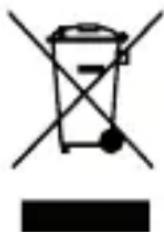
This symbol on the product or on its packaging indicates that this product shall not be treated as household waste. Instead it shall be handed over to the applicable collection point for the recycling of electrical and electronic equipment. By ensuring this product is disposed of correctly, you will help prevent potential negative consequences for the environment and human health, which could otherwise be caused by inappropriate waste handling of this product. The recycling of materials will help to conserve natural
resources. For more detailed information about recycling of this product, please contact your local Civic Office, your household waste disposal service or the shop where you purchased the product.
Hereby, ETA a.s. declares that the radio equipment type HBTM44B is in compliance with Directive 2014/53/EU. The full text of the EU declaration of conformity is available at the following internet address: http://www.gogen.cz/declaration_of_conformity
BIZTONSÁGI ÓVINTÉZKEDÉSEK
natural_image
Abstract black and white circular logo with stylized white lines (no text or symbols)Brand : GoGen
Model : HBTM44B
Category : Headphones