
AudioConverter XS - Uncategorized Evolveo - Free user manual and instructions
Find the device manual for free AudioConverter XS Evolveo in PDF.


| Product Type | Wireless audio transmitter & receiver |
| Brand | Evolveo |
| Model | AudioConverter XS |
| Bluetooth Version | 5.0 |
| Supported Audio Codecs | SBC, aptX, aptX Low Latency, aptX HD |
| Operating Range | Indoor: up to 50–70 m (without obstacles); Outdoor: up to 197 m (without obstacles) |
| Input Voltage / Current | Micro USB DC 5.0V, 600mA |
| Operating Temperature | +10°C to +45°C |
| Storage Temperature | -20°C to 60°C |
| Sample Rate (Optical Mode) | Up to 48kHz |
| Dimensions | 126 x 94 x 29 mm |
| Weight | 124 g |
| Modes | Transmitter (TX), Receiver (RX), Bypass (non-Bluetooth) |
| Simultaneous Pairing | Up to 2 devices (in TX or RX mode) |
| Audio Delay (with aptX LL headphones) | ~40ms |
| Audio Delay (with aptX headphones) | ~70ms |
| Audio Delay (with SBC headphones) | ~220ms |
| LED Indicators | RX/TX/Bypass mode status; pairing flash (blue/red) |
| Package Contents | AudioConverter XS, power adapter (optional), USB power cable, optical cable, 3.5mm audio cable, 3.5mm female to RCA male cable, user manual, quick guide |
| Supported Audio Inputs | Optical (Toslink), AUX (3.5mm), RCA (via included cable) |
| Power Source | Micro USB (from TV USB, PC USB, or power adapter) |
| NFC Support | Yes (for quick pairing with NFC-enabled phones) |
| Restore Factory Defaults | Press and hold button for 5 seconds |
| Compliance | FCC Part 15, CE |
Frequently Asked Questions - AudioConverter XS Evolveo
User questions about AudioConverter XS Evolveo
0 question about this device. Answer the ones you know or ask your own.
Ask a new question about this device
Download the instructions for your Uncategorized in PDF format for free! Find your manual AudioConverter XS - Evolveo and take your electronic device back in hand. On this page are published all the documents necessary for the use of your device. AudioConverter XS by Evolveo.
USER MANUAL AudioConverter XS Evolveo
| Contents1. Product Specifications2. Package Contents3. Product Overview & Control Functions4. LED indications5. Use as a transmitter (TX mode) Installation diagram6. Use as a Receiver (RX mode) Installation diagram7. Bypass mode (non-Bluetooth) Installation diagram8. Pair and Conventional Device Simultaneously9. Restore Factory Default Settings10. Troubleshooting11. Warmings12. FCC Notice-1- | Product SpecificationsEVOLVEO AudioConverter XS is a wireless long range audio transmitter & receiver incorporating the latent "apX, low-latency" technology for CD-like quality sound with virtually no delay. Multifunctional, supporting nominal and bypass. Providing the best solution to enable your TV or home audio system to wirelessly stream hit audio directly to any wireless headphones or speakers.· BT version: 5.0· Supports profiles: A2DP, AVRCP· Audios codes: SBC aptX, aptX+LL, aptX+HD· Operational range: indoors: up to 50-70T (without obstacles) outdoors: up to 197T (without obstacles)· Input voltage current: Micro USB DC5.0V m600mA· Operating temperature: +10°C ~ +45°C· Storage temperature: -20°C ~ 60°C· Support sampling rate in optical mode: 648Hz· Product size: 126+94+29mm· Product weight: 124g-2- | apX® Low LatencyTo take advantage of the better performance of the apX Low Latency Codec; the other side device must support the same codec. If the other side device only supports the normal apX codec, or the SBC one, those codecs will be carried out. Audio delay when paired with different headphones/receiver. Headphones/receiver support - The audio delay will beapX: Low Latency codec - 40msapX: codec - 70msSBC codec (most standard Bluetooth audio) - 220ms-3- | Package Contents:A. EVOLVEO AudioConverter XSB. Power adapter(optional)C. Si power cableD. Optical cableE. 3.5mm audio cableF. 3.5mm female to RCA male cableG. User manualH. Quick user guide[IMAGE] |
3. Product Overview & Control Functions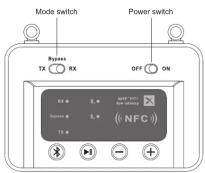 -5- -5- | Button Function OperationsPower switch Slide to "ON" to turn on the device. Power onPower off Slide to "OFF" to turn off the deviceMode switchTransmitter mode Slide to TX to enter transmitting modeReceiver mode Slide to RX to enter receiving modeBypass mode Slide to "Bypass" to enter Bypass modes.Enter pairing mode Hold this button for about 3 secondsShort press once:ReconnectPlay / Place Short press this button once to play pause music; (TX mode doesn't support).Volume down/ Previous song In AUX audio mode, short press once (TX mode doesn't support),Volume up/ Next song In AUX audio mode, short press once (TX mode doesn't support)-6.- | 4. LED indications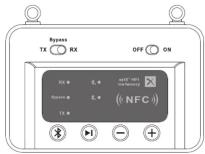 -7- -7- | Indicator StatusRxIn receiving modeFlashes Blue and Red alternately to indicate device is in pairing modeTXIn transmitting modeFlashes Blue and Red alternately to indicate device is in pairing modeBypass Bypass modeDevice 1 successfully pairedDevice 2 successfully paired-8- |
5. Use as a transmitter (TX mode) Installation diagram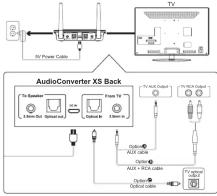 | 1) Connect audio source (TV, DVD etc.) to AudioConverter XS "From TV" port with the audio cables provided (optical or AUX/RCA).2) Connect AudioConverter XS to a power source (TV, PC USB socket or power adapter) with a USB cable.3) Slide Power switch to the "ON" position.4) Slide Mode switch to the "TX" position.5) Pairing: Pair AudioConverter XS with your Bluetooth-enabled headsets/ Speakers.· Set AudioConverter XS into pairing mode, TX LED flash Blue / Red alternately fast.· First-time use AudioConverter XS will auto enter pairing mode (with clear memory).· Afterward press Button for 3 seconds.· Set your headsets/speakers to pairing mode refer to its user manual.· Wait until connected (For quick pairing, better keep them within 1 meter when pairing)-10~9- | 6. Use as a Receiver (RX mode) Installation diagram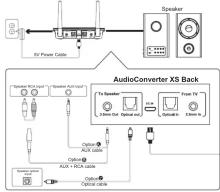 -11- -11- | 1) Connect your speaker to AudioConverter XS "To Speaker" port with the audio cable provided (optical or AUX/RCA).2) Connect AudioConverter XS to a power source with USB cable and adapter.3) Slide Power switch to the "ON" position.4) Slide Mode switch to the "RX" position.5) Pairing - Pair AudioConverter XS with your Bluetooth-enabled phone/PC/finallet.· Set AudioConverter XS into pairing mode, RX LED flash Blue / Red alternately fast.· First-time use AudioConverter XS will auto enter pairing mode (with clear memory).· Afterward press Button for 3 seconds.· Active Bluetooth on your phone or another device to find "EVO-X5" to connect.· Wait and connected (For quick pairing, better keep them within 1 meter when pairing).· NFC enabled phones can connect this device easily with Near Field Communication (NFC) function.-12- |
| 7. Bypass mode (Non-Bluetooth) Installation diagram[IMAGE]-13- | Bypassing means using AudioConverter XS as a non-Bluetooth device which connects the TV and speaker via wires directly. This design enables you to switch between wired (Bypass mode) and wireless (Bluetooth mode) with just one switch without the need to disconnect any cables.1) Connect audio source (DVD etc.) to AudioConverter XS "From TV" port with the audio cables provided (optical or AUX/RCA).2) Connect your speaker to AudioConverter XS "To Speaker" port with your own audio cable (optical or AUX/RCA).3) Connect AudioConverter XS to a power source with USB cable and adapter.4) Slide Power switch to the "ON" position.5) Slide the Mode switch to the "Bypass" position.6) Ready for use. | 8. Pair and Connect two Devices SimultaneouslyIn TX mode1) Pair with the first device by following the previous instructions in the "Use as a transmitter (TX mode) section.2) Pair with the second device.· Set second headphones/speaker to pairing mode.· Set devices for audioConverter X-ray press (1) flashes Blue and Red.· Wall until connected.Notes: For improved compatibility and sound quality, we suggest that you use Bluetooth devices with CDR chipset.In RX mode1) Pair with the first device by following the previous instructions in the "Use as a Receiver (RX mode) section.2) Pair with the second device.· Set device to pairing mode again, press Button for 3s until the RX LED flashes Blue and Red.· Active Bluetooth on the second device to find "EVO-X5" to connect.· Wait until connectedNote: Only one device can play music at any time. You must stop the music on one device to play on the other.-15- | 9. Restore Factory Default SettingsForm may need to read device to do not working as expected. When device is reset to factory default settings, all the paired device information will be cleared.· Press and hold the 3 buttons 5s until the RVTX LED flashes Blue and Red.10. Troubleshooting1) I am having trouble pairing and connecting to my Bluetooth device. Please check the following:1. I am having trouble pairing and connecting to my Bluetooth device. Please check the following:1. B03 and your device are next to each other or within 3 feet / 1 meter.2. Make sure both AudioConverter XS and the wireless device are in pairing mode.2)After connecting and pairing with my wireless device, I cannot hear any music from my sound system.1. Make sure to remove the protective head on optical cable.2. In Optical mode, AudioConverter XS support device with sampling rate under 48kHz.Note: Next to make sure TV audio format is set to PCM(Fig17-1) and TV sound out as "External Speakers"(Fig 17-2)-16- |
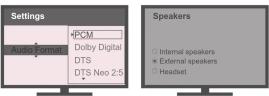 Fig17-1 Set your TV Audio Format to "POP/(IMPORTANT) Fig17-2 Set your TV Speaker to "External Speaker"-17~19- Fig17-1 Set your TV Audio Format to "POP/(IMPORTANT) Fig17-2 Set your TV Speaker to "External Speaker"-17~19- | 11. WarmingsWarranty service is limited to normal use. Any main-made damages such as from connecting to an unsuitable power source, using an unsuitable device, or not following the instructions, as well as damages that did not occur during shipping, repairs and adjustments not approved by the company, damages from misuse, instention, or improper installation may cause the warranty to be ineffective. Indirectivity. This warranty does not include shipping fees.12. FCC NoticeThis device complies with Part 15 of the FCC Rules. Operation is subject to the following procedure:(1) This device may not cause harmful interference, and (2) this device must accept any interference received, including interference that may cause underserved operation. NOTE: 1. This equipment has been locked and found to comply with this limits for a Case B digital device, pursuant to part 15 of the FCC Rules. These limits are designed to provide reasonable protection against harmful interference in a residential installation.-18- | This equipment generates, uses and can radiate radio frequency energy and, if not installed and used in accordance with the instructions, may cause harmful interference to radio communications. However, there is no guarantee that interference will not occur in a particular installation. If this equipment does cause harmful interference to radio or television reception, which can be determined by turning the equipment off and on. The user is encouraged to try to correct the interference by one or more of the following measures:- Reorient or relocate the receiving antenna.- Increase the separation between the equipment and receiver.- Connect the equipment into an outlet on a circuit different from that to which the necessary line remains unchanged.- Consult the dealer or an experienced radio/TV technician for help.NOTE: 2. Any changes or modifications to this unit not expressly approved by the party responsible for compliance could visit the user's authority to operate the equipment. | Disposal: The symbol of crossed out container on the product, in the literature or on the wrapping means that in the European Union all the electric and electronic products, batteries and accumulators must be placed into the separate salvage after finishing their lifetime. Do not throw these products into the unsorted municipal wasteCEDECLARATION OF CONFORMITYHerely, the company Abacus Electrix, s.r.o. declares that the EVOLVEO AudioConverter XS is in compliance with the requirements of the standards and regulations, relevant for the given type of device.Find the complete text of Declaration of Conformity at ffp/ftp.evolveo.comiceCopyright © Abacus Electrix, s.r.o.www.evolveo.comwww.facebook.com/EvolvecCZAll rights reserved.Design and specification may be changed without prior notice.-20- |
7 .. 19 .
| Button | Function | Operation |
| Power switch | Slide to "ON" to turn on the device. Power on | |
| Power off | Slide to "OFF" to turn off the device. | |
| Mode switch | Transmitter mode | Slide to TX to enter transmitting mode. |
| Receiver mode | Slide to RX to enter receiving mode. | |
| Bypass mode | Slide to "Bypass" to enter Bypass mode. | |
| ☒ | Enter paring mode | Hold this button for about 3 seconds. |
| Short press once:Reconnect | ||
| ☒ | Play / Pause | Short press this button once to play pause music, (TX mode doesn't support). |
| ⊖ | Volume down? Previous song | In AUX audio mode, short press once (TX mode doesn't support). |
| ⊕ | Volume up? Next song | In AUX audio mode, short press once. (TX mode doesn't support). |
-6-
-7-
| Indicator Status | |
| RX | In receiving mode |
| Flashes Blue and Red alternately to indicate device is in pairing mode | |
| TX | In transmitting mode |
| Flashes Blue and Red alternately to indicate device is in pairing mode | |
| Bypass | Bypass mode |
| 束 | Device 1 successfully paired |
| 束 | Device 2 successfully paired |
-8-
-11-
1) Connect your speaker to AudioConverter XS "To Speaker" port with the audio cable provided (optical or AUX/RCA).
2) Connect AudioConverter XS to a power source with USB cable and adapter.
3) Slide Power switch to the "ONE" position
4) Slide Mode switch to the "RX" position.
5) Pairing - Pair AudioConverter XS with your Bluetooth-enabled phone/PC/
- Set AudioConverter XS into pairing mode, RX LED flash Blue / Red
alternately fast
- First-time use: AudioConverter XS will auto enter pairing mode (with clear reward).
- Afterward
Active Bluetooth on your phone or another device to find "EVO-XS" to
connect.
- Wait and connected (For quick pairing, better keep them within 1 meter
when pairing)
- NFC enabled phones can connect this device easily with Near Field Communication (NFC) for time
-12
9. Restore Factory Default Settings
16
[NO TEXT]
①cc
-20


Brand : Evolveo
Model : AudioConverter XS
Category : Uncategorized