
MultiMedia Box A4 - Media player Evolveo - Free user manual and instructions
Find the device manual for free MultiMedia Box A4 Evolveo in PDF.


| Product Type | Media Player / Android TV Box |
| Brand | Evolveo |
| Model | MultiMedia Box A4 |
| Operating System | Android 11.0 (AOSP) |
| Processor | Amlogic S905Y4, 64-bit quad-core ARM Cortex A35 |
| GPU | ARM Mali G31 MP2 |
| Memory | 4 GB RAM |
| Storage | 32 GB (internal) |
| Video Output | HDMI 2.1, 4Kx2K@60fps, HDR10, HLG, HDR10+ |
| Audio Output | Via HDMI (multi-channel) |
| Network | Ethernet RJ-45 10/100Mbps, Wi-Fi 802.11a/b/g/n/ac dual-band |
| USB Ports | 2 x USB 2.0 |
| Card Slot | Micro SDHC/SDXC |
| Power Supply | DC 12V / 1A, input AC 100-240V 50/60Hz |
| Dimensions (approx.) | 110 x 110 x 20 mm |
| Weight (approx.) | 180 g |
| Remote Control | Infrared (IR) with Google Assistant button and hotkeys |
| Included Accessories | Remote control, HDMI cable, power adapter, user manual |
| Safety Class | Class II (double insulation) |
| Operating Temperature | 0°C to 35°C (recommended) |
| Cleaning | Use a soft, dry cloth; do not use liquid or aerosol cleaners |
| Repairs | Only by authorized service center; no user-serviceable parts |
Frequently Asked Questions - MultiMedia Box A4 Evolveo
User questions about MultiMedia Box A4 Evolveo
0 question about this device. Answer the ones you know or ask your own.
Ask a new question about this device
Download the instructions for your Media player in PDF format for free! Find your manual MultiMedia Box A4 - Evolveo and take your electronic device back in hand. On this page are published all the documents necessary for the use of your device. MultiMedia Box A4 by Evolveo.
USER MANUAL MultiMedia Box A4 Evolveo
natural_image
Exterior view of a black EVOLVE streaming device and its own remote control (no text or symbols on device body)BEZPEČNOSTNÍ UPOZORNĚNÍ A POKYNY
natural_image
Line drawing of a rectangular electronic device with a vertical blue line labeled '1' pointing to the side (no text or symbols on the device itself)1) LED indikátor
Postranní panel
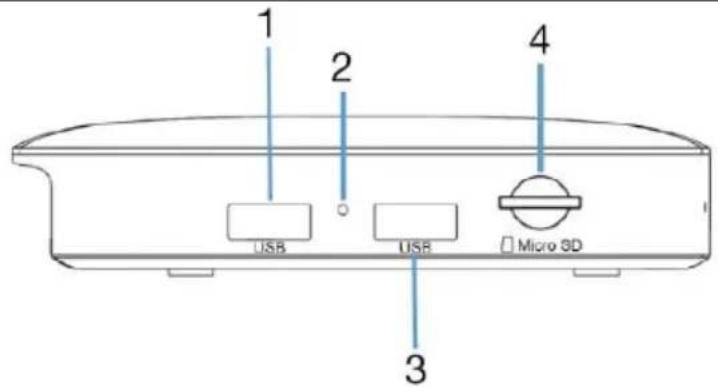
1) USB
2) Reset
3) USB
4) Micro SD karta
Zadní panel
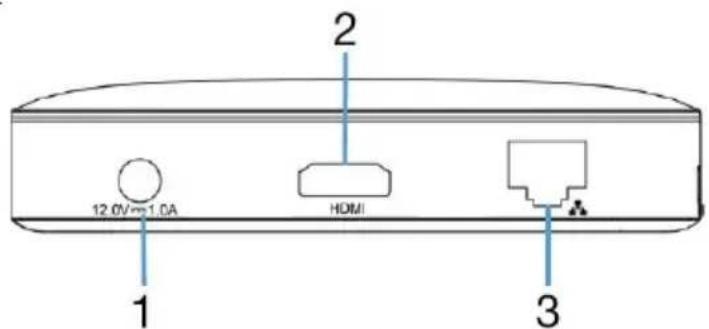
1) DC vstup
2) HDMI výstup
3) Ethernet
Copyright © Abacus Electric, s.r.o.
www.evolveo.com, www.facebook.com/EvolveoCZ
BEZPEČNOSTNÉ UPOZORNENIA A POKYNY
thank you for choosing EVOLVEO MultiMedia Box A4. We believe it will bring you a lot of fun and satisfaction. Read the user manual before using the device. Android and Android TV are trademarks of Google LLC.
WELCOME TO THE EVOLVEO FAMILY OF PRODUCTS
- Before putting this product into operation, please read this entire user manual carefully through to the end, even if you are familiar with the use of a similar type of product in the past.
- Keep this user manual for future reference - it is an integral part of the product and may contain important instructions on commissioning, operation and care of the product.
• Make sure that other people who will use this product read this user manual. - If you give, donate or sell this product to others, please give them this user manual together with this product and remind them to read it.
- During the warranty period, we recommend that you keep the original packaging of the product - this way the product will be protected in the best possible way in case of transport.
THE MOST UP-TO-DATE VERSION OF THE USER MANUAL
Due to the ongoing innovation of EVOLVEO products and changes in legislation, you can always find the most up-to-date version of this user manual on the website www.evolveo.com or by simply scanning the QR code shown below with your mobile phone:
SAFETY WARNINGS AND INSTRUCTIONS
• Use the product only as specified in this user manual.
- This product may be used by children aged 8 years and older and persons with reduced physical, sensory or mental abilities or lack of experience and knowledge, provided they are supervised or have been instructed in the safe use of the appliance and understand the potential hazards.
- Unpack the product carefully and be careful not to throw away any part of the packaging material before you have found all the components of the product.
- Remove all packaging and marketing materials from the product before first use.
- Exercise extra caution if the product will be used around children. Always place the product out of their reach. Children should be supervised to ensure that they do not play with the product.
- Do not allow the product to be used as a toy.
• Always install the product on a flat, hard, dry and stable place.
- Never place the product on inclined surfaces.
- The product is designed for use in homes, offices and similar areas. Do not use it for commercial, medical or other purposes.
- This product is designed for indoor use, do not use it outdoors.
- Never use accessories that are not supplied with or intended for this product.
- Before each use, make sure that the selected accessory is not damaged. Never use the product with damaged accessories.
- Never repair the product yourself or make any modifications to it! Entrust all repairs and
adjustments to this product to a professional company/service. Tampering with the product while the warranty is in effect puts you at risk of losing warranty benefits.
- Do not shake the product and make sure it does not fall to the ground.
- Never use the product if it is not working properly, if it has fallen on the ground and become damaged, or if it has fallen into water. In this case, have it repaired by a professional company/service.
- Use and store the product away from explosive gases, flammable, combustible and volatile substances (solvents, paints, adhesives, etc.).
- Do not expose the product to extreme temperatures, direct sunlight, excessive humidity (e.g. bathroom, sauna, swimming pool, etc.) or place it in excessively dusty environments.
- Do not place the product near heaters, open flames or other appliances or equipment that are sources of heat.
- Do not use the product within the range of a strong electromagnetic field (e.g. microwave oven).
- Do not place the product or its accessories on or near an electric or gas cooker or on the edge of a table or kitchen worktop.
- Do not use the product for purposes other than those for which it is intended.
- Do not spray or rinse the product with water or other liquid, or immerse it in water or other liquid, even partially.
- If the product falls into water, do not use it under any circumstances and hand it over to an authorised service centre for inspection.
- The manufacturer is not liable for any damage caused by improper use of the appliance and its accessories.
- Do not use the product to store objects and ensure that no other objects are placed on the product when storing it.
- Before connecting the product to an electrical outlet, make sure that the voltage on the product's rating plate matches the voltage in your electrical outlet.
• Fully unwind the power cord before using the product. - Do not wrap the power cord around the product.
- Do not connect or disconnect the product's power cord from the electrical outlet with wet hands.
- Make sure that the fork of the power cord does not come into contact with moisture, water or other liquids. If this still happens, dry the fork carefully before using it again.
- Do not disconnect the product from the power outlet by pulling the power cord. Damage to the power cord or electrical outlet could occur. Disconnect the power cord from the power outlet by pulling the plug.
- Do not place heavy objects on the power cord. Make sure that the power cord does not hang over the edge of the table or touch hot surfaces or sharp objects.
• Always clean the power cord with a dry cloth only, never wash it with water. - Always switch off and unplug the product when not in use, when left unattended and before cleaning, maintenance or storage.
- Keep the supply cable dry.
- Only connect the product to a properly grounded outlet.
- If the supply cable is damaged, have it replaced by a qualified service centre to avoid a dangerous situation. It is forbidden to use the product with a damaged power cord.
Degree of protection against electric shock:
Class II - Protection against electric shock is provided by double or reinforced insulation.
List of accessories
| Android TV BoxNetwork adapterRemote control | HDMI cableUser manual |
Hardware
Front panel
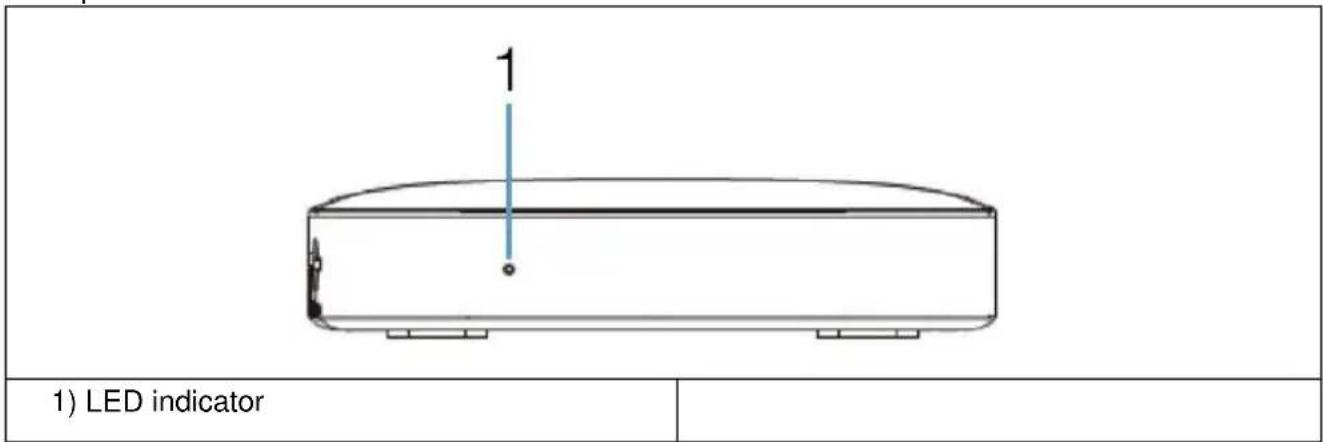
Side panel
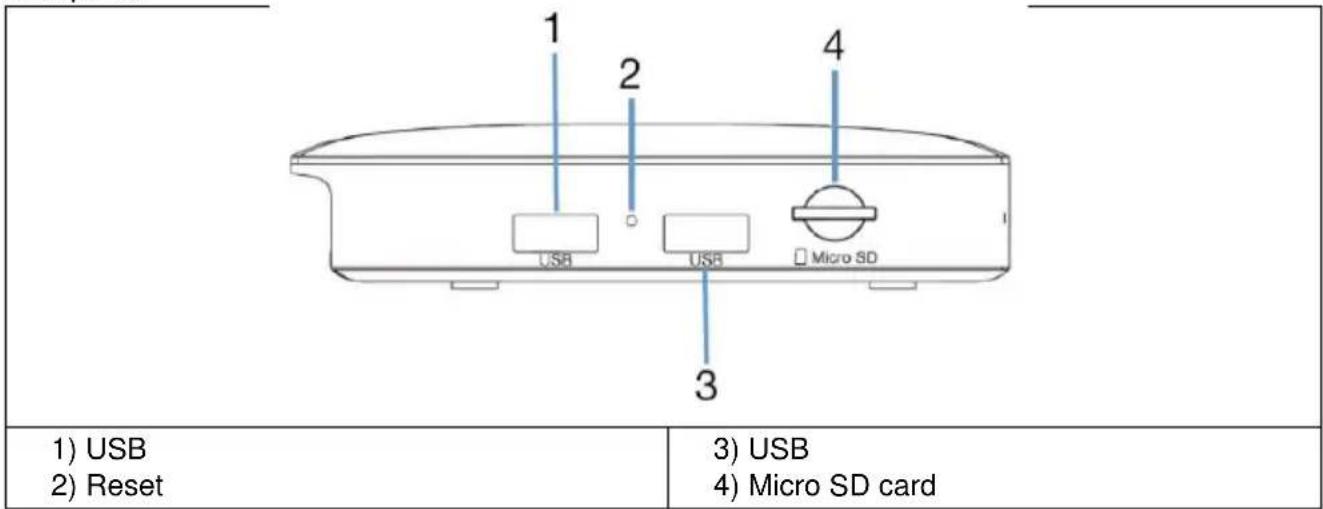
Rear panel
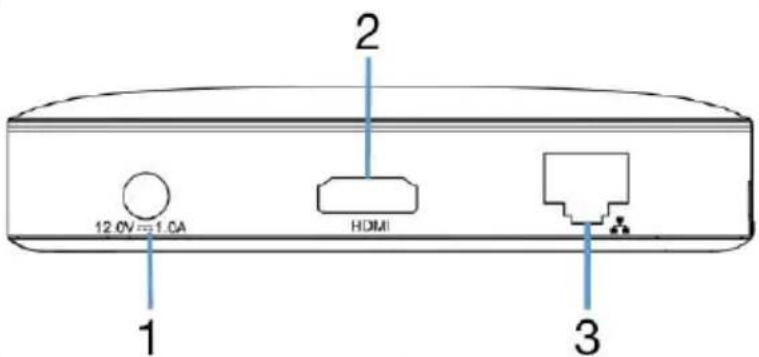
1) DC input
2) HDMI output
3) Ethernet
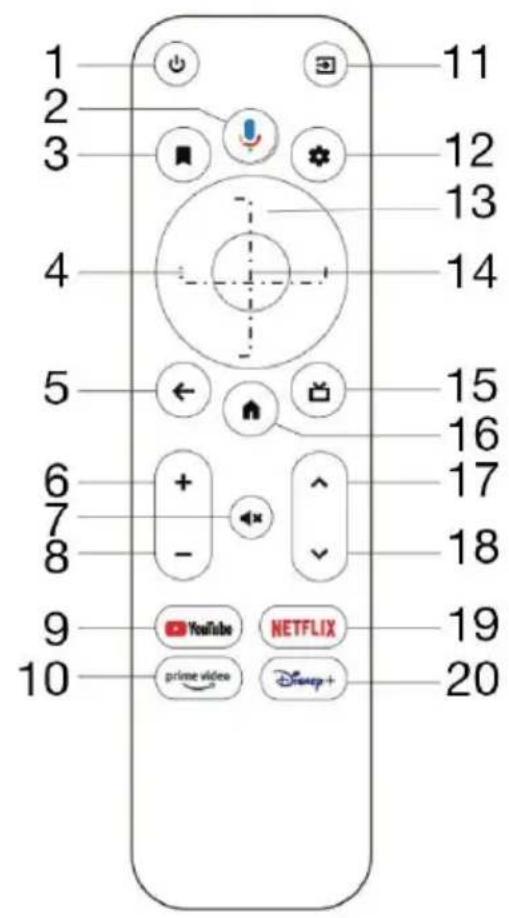
Remote control
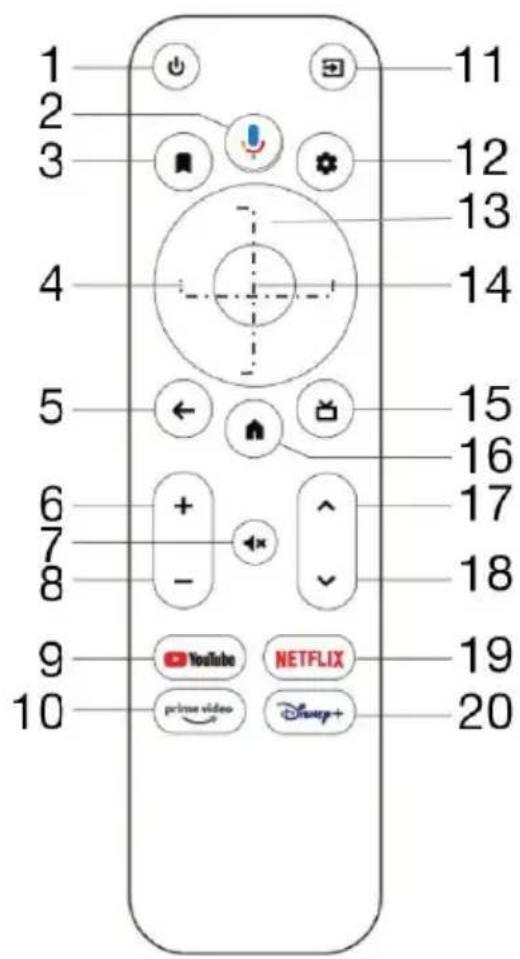
Follow the pictures and instructions below to connect to the TV, power supply, network and other devices. Remark: Before connecting, switch to all connected devices (for example, this device and the TV source)
Connecting to TV:
Plug the HDMI/AV cable into the HDMI/AV port on the Android TV Box and TV.
Network connection
Plug the Ethernet cable into the LAN port of the Android TV Box and the other side into the LAN port of your router or the Ethernet port of your home broadband network.
Connection to the source
Plug the AC adapter into the Android TV Box. When you switch on the device, it starts automatically.
Wireless keyboard and mouse support
The EVOLVEO MultiMedia Box A4 supports the 2.4GHz wireless standard for connecting a keyboard or mouse.
Remark: Before switching on, switch the TV signal input to the correct source.
Tip: The Android TV Box also supports Wi-Fi connectivity. Go to Settings-Network and select the correct SSID. Select connect and enter your Wi-Fi password.
Technical specifications
- Android 11.0 AOSP
SoC Amlogic S905Y4 - 64-bit quad-core ARM Cortex A35 processor
• ARM Mali G31 MP2 GPU processor
• 4GB RAM, 32GB storage
• Dual-band WiFi 2.4/5G, 802.11a/b/g/n/ac
• 4Kx2K@60fps H.265/H.264/VP9/AV1/MPEG-2 - DC input 12 V/1 A
- 2 x USB 2.0
• Micro SDHC/SDXC card slot
• HDMI 2.1, HDR 10, HLG, HDR 10+
• RJ-45 LAN 10M/100M - Adapter AC100-240V, 50/60Hz
Troubleshooting
| The Problem | Possible cause | Solution |
| After switching on, the display does not appear | Power is not connected, or the socket is not energized | Connect the plug, make sure the electrical outlet has normal voltage |
| The TV shows a picture, but you can't hear the sound | The audio cable is not connected.Android TV Box is in SILENT modeToo muted volume | Reconnect the audio cablePress the mute buttonIncrease the volume |
| Unable to connect to the network | Cable connection is not usualWi-Fi is off or the signal is too weak | Reconnect to the internetRestart Wi-Fi or change the router's location |
| Remote control failure | Remote control is not in the right directionThe remote control is deadThe remote control is broken | Aim at the front panel sensor and try againReplace the batteriesSend the equipment for maintenance |
Android 11 User Guide
For detailed instructions on how to use the Android operating system, please visit the website: http://support.google.com
Do you still need advice after reading this guide?
First, read the "FAQ" at: www.evolveo.com or contact EVOLVEO technical Support.
Warranty and post-warranty service
Repairs and servicing may only be carried out by an authorised
service point for EVOLVEO products (see www.evolveo.com for more information), otherwise you may damage the multimedia centre and lose your warranty.
The warranty does NOT cover:
- using the equipment for purposes other than those for which it is designed,
- installing firmware other than that installed on the device
- electrical or mechanical damage caused by improper use
- damage caused by natural elements such as water, fire, static electricity, power surges, etc. 13
- damage caused by repairs carried out by an unqualified person
- illegible serial number
- battery capacity drops after 6 months of use (6 month battery life guarantee)
Disposal
The crossed-out container symbol on the product, in the accompanying documentation or on the packaging reminds you that in EU countries, all electrical and electronic equipment, batteries and accumulators must be disposed of separately at the end of their useful life as part of sorted waste. Do not dispose of these products in unsorted municipal waste.


DECLARATION OF CONFORMITY
The company Abacus Electric, s.r.o. hereby declares that the product EVOLVEO Multimedia Box A4 meets the requirements of the standards and regulations that are relevant for the given type of equipment.
The full text of the Declaration of Conformity can be found at http://ftp.evolveo.com/ce/
Importer / Manufacturer - Abacus Electric, s.r.o., Planá 2, 370 01, Czech Republic
Made in China - Copyright © Abacus Electric, s.r.o. www.evolveo.com, www.facebook.com/EvolveoCZ
All rights reserved.
The appearance and technical specifications of the product are subject to change without notice.
BEVEZETÉS
Kedves Ügyfél,
natural_image
Simple line drawing of a rectangular container with a vertical dimension labeled '1' and base marked 'o' (no text or symbols beyond the label)1) LED kijelző
Oldalpanel
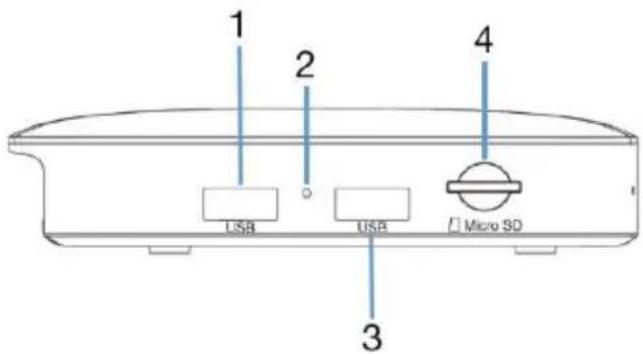
1) USB
2) Reset
3) USB
4) Micro SD kártya
Hátsó panel
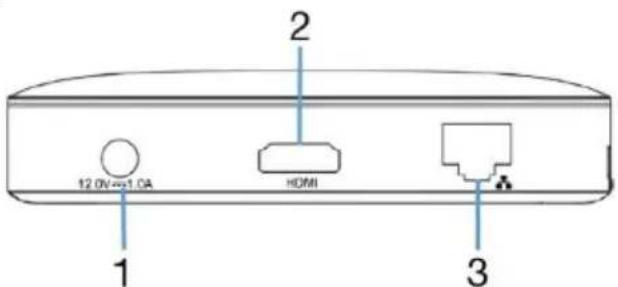
1) DC bemenet
2) HDMI kimenet
3) Ethernet
Távirányító
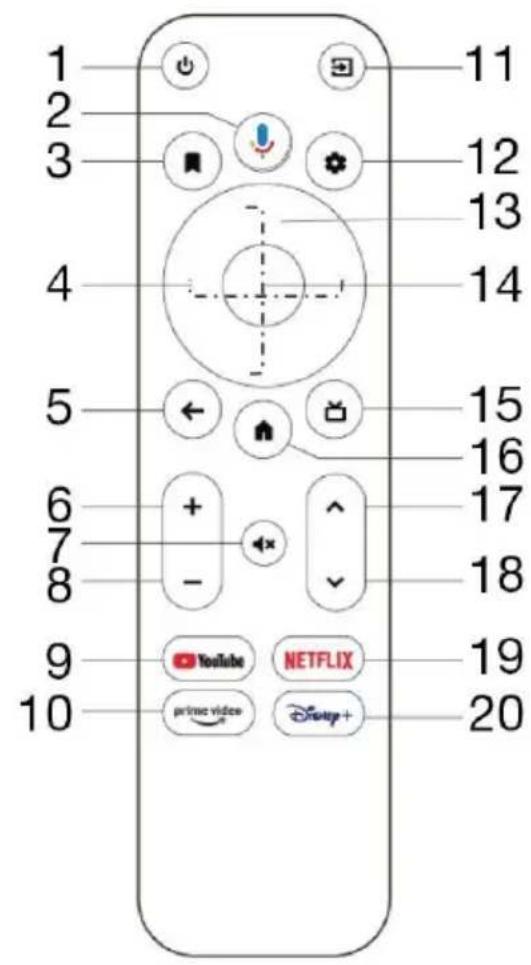
1) Be/Ki
2) Google Assistant
3) Figyelólista
Copyright © Abacus Electric, s.r.o.
www.evolveo.com, www.facebook.com/EvolveoCZ
AVERTISMENTE ŞI INSTRUCTIUNI DE SIGURANTĂ
Copyright © Abacus Electric, s.r.o.
www.evolveo.com, www.facebook.com/EvolveoCZ
Copyright © Abacus Electric, s.r.o.
www.evolveo.com
www.facebook.com/EvolveoCZ
VARNOSTNA OPOZORILA IN NAVODILA
natural_image
Simple line drawing of a rectangular container with a vertical line labeled '1' and a small circular mark at the bottom (no text or symbols beyond the number)1) LED indikator
Stranska plošča
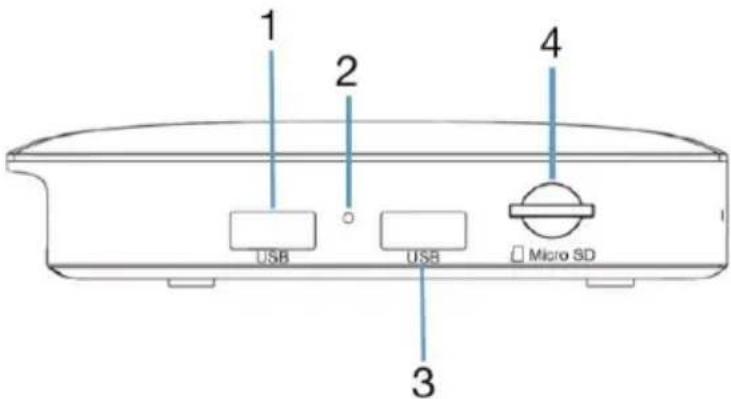
1) USB
2) Ponastavitev
Copyright © Abacus Electric, s.r.o.
www.evolveo.com, www.facebook.com/EvolveoCZ
Vse pravice pridržane.
- BEZPEČNOSTNÍ UPOZORNĚNÍ A POKYNY
- BEZPEČNOSTNÉ UPOZORNENIA A POKYNY
- WELCOME TO THE EVOLVEO FAMILY OF PRODUCTS
- THE MOST UP-TO-DATE VERSION OF THE USER MANUAL
- SAFETY WARNINGS AND INSTRUCTIONS
- Degree of protection against electric shock:
- Hardware
- Connecting to TV:
- Network connection
- Connection to the source
- Wireless keyboard and mouse support
- Technical specifications
- Android 11 User Guide
- Do you still need advice after reading this guide?
- Warranty and post-warranty service
- The warranty does NOT cover:
- Disposal
- DECLARATION OF CONFORMITY
- BEVEZETÉS
- Kedves Ügyfél,
- Távirányító
- AVERTISMENTE ŞI INSTRUCTIUNI DE SIGURANTĂ
- VARNOSTNA OPOZORILA IN NAVODILA
- Stranska plošča
Brand : Evolveo
Model : MultiMedia Box A4
Category : Media player