
PowerCharge 1000 - Battery charger Evolveo - Free user manual and instructions
Find the device manual for free PowerCharge 1000 Evolveo in PDF.


| Product Type | Portable Power Station (Battery Charger) |
| Brand | Evolveo |
| Model | PowerCharge 1000 |
| Battery Type | LiFePO4 (Lithium Iron Phosphate) Rechargeable Battery |
| Battery Capacity | 25.6 V, 40.5 Ah, 1036.8 Wh |
| Rated Power Input | 1000 W |
| Peak Power | 2000 W |
| Total AC Output Power | 1000 W |
| AC Output Ports | 2x 100-230 V, 50/60 Hz (Pure Sine Wave) |
| DC Output Ports | 4x USB-A (5-20 V, 18 W each), 1x USB-C (5-20 V, max 18 W PD), 1x DC 12 V (5 A), 1x Cigarette Port 12 V (7 A) |
| Charging Methods | Mains Charging (AC 100-240 V, 50/60 Hz, 200 W) and Solar Charging (DC 12-30 V, max 200 W, MPPT) |
| Inverter Waveform | Pure Sine Wave |
| Dimensions (W x D x H) | 385 x 165 x 173 mm |
| Weight | 13.50 kg |
| Operating Temperature | 0-40 °C |
| Degree of Protection Against Electric Shock | Class II (Double Insulation) |
| Safety Features | Overheating Warning, Overload Warning, Cooling Fan, Automatic Shutdown |
| Package Contents | User Manual, Power Adapter, Charging Cable, Solar Charging Cable, Car Charging Cable |
| Maintenance | Charge fully every 6 months; store in cool, dry place; do not charge below 0°C |
Frequently Asked Questions - PowerCharge 1000 Evolveo
User questions about PowerCharge 1000 Evolveo
0 question about this device. Answer the ones you know or ask your own.
Ask a new question about this device
Download the instructions for your Battery charger in PDF format for free! Find your manual PowerCharge 1000 - Evolveo and take your electronic device back in hand. On this page are published all the documents necessary for the use of your device. PowerCharge 1000 by Evolveo.
USER MANUAL PowerCharge 1000 Evolveo
BEZPEČNOSTNÍ UPOZORNĚNÍ A POKYNY
natural_image
Black rectangular electronic device with a grid-patterned vent and a label pointing to the number 17 (no text or symbols on the device itself)natural_image
Line drawing of a portable appliance with two power outlets and a front-mounted control unit (no text or symbols)flowchart
graph TD
    A["Solar Panel"] --> B["Output"]
Copyright © Abacus Electric, s.r.o.
www.evolveo.com
BEZPEČNOSTNÉ UPOZORNENIA A POKYNY
natural_image
Black rectangular electronic device with a grid-patterned vent and a label pointing to the number 17 (no text or symbols on the device itself)natural_image
Line drawing of a portable electronic device with control panel and buttons (no text or symbols)Copyright © Abacus Electric, s.r.o.
www.evolveo.com
SAFETY WARNINGS AND INSTRUCTIONS....28
DEGREE OF PROTECTION AGAINST ELECTRIC SHOCK: 30
SPECIFICATIONS 31
PACKAGING CONTENT 31
DESCRIPTION OF PARTS 32
REACHING 33
SERVICE 34
ALARMS....36
STORAGE AND MAINTENANCE DURING SHUTDOWNS 37
EN
- Before putting this product into operation, please read this entire user manual carefully through to the end, even if you are familiar with the use of a similar type of product in the past.
- Keep this user manual for future reference - it is an integral part of the product and may contain important instructions on commissioning, operation and care of the product.
- Make sure that other people who will use this product read this user manual.
- If you give, donate or sell this product to others, please give them this user manual together with this product and remind them to read it.
- During the warranty period, we recommend that you keep the original packaging of the product - this way the product will be protected in the best possible way in case of transport.
THE MOST UP-TO-DATE VERSION OF THE USER MANUAL
Due to the ongoing innovation of EVOLVEO products and changes in legislation, you can always find the most up-to-date version of this user manual on the website www.evolveo.com or by simply scanning the QR code shown below with your mobile phone:

SAFETY WARNINGS AND INSTRUCTIONS
- Use the product only as specified in this user manual.
- This product may be used by children aged 8 years or older and persons with reduced physical, sensory or mental abilities or lack of experience and knowledge, provided they are supervised or have been instructed in the safe use of the appliance and understand the potential hazards.
- Unpack the product carefully and be careful not to throw away any part of the packaging material before you have found all the components of the product.
- Remove all packaging and marketing materials from the product before first use.
- Exercise extra caution if the product will be used around children. Always place the product out of their reach. Children should be supervised to ensure that they do not play with the product.
- Do not allow the product to be used as a toy.
• Always install the product on a flat, hard, dry and stable place.
- Never place the product on inclined surfaces.
- The product is designed for use in homes, offices and similar areas. Do not use it for commercial, medical or other purposes.
- Never use accessories that are not supplied with or intended for this product.
- Before each use, make sure that the selected accessory is not damaged. Never use the product with damaged accessories.
- Never repair the product yourself or make any modifications to it! Entrust all repairs and adjustments to this product to a professional company/service Tampering with the product while the warranty is in effect puts you at risk of losing warranty benefits.
- Do not shake the product and make sure it does not fall to the ground.
- Never use the product if it is not working properly, if it has fallen on the ground and become damaged, or if it has fallen into water. In this case, have it repaired by a professional company/service.
- Use and store the product away from explosive gases, flammable, combustible and volatile substances (solvents, paints, adhesives, etc.).
- Do not expose the product to extreme temperatures, direct sunlight, excessive humidity (e.g. bathroom, sauna, swimming pool, etc.) or place it in excessively dusty environments.
- Do not place the product near heaters, open flames or other appliances equipment that are sources of heat.
- Do not use the product within the range of a strong electromagnetic field (e.g. microwave oven).
- Do not place the product or its accessories on or near an electric or gas cooker or on the edge of a table or kitchen worktop.
- Do not use the product for purposes other than those for which it is intended.
- Do not spray or rinse the product with water or other liquid, or immerse it in water or other liquid, even partially.
- If the product falls into water, do not use it under any circumstances and hand it over to an authorised service centre for inspection.
- The manufacturer is not liable for any damage caused by improper use of the appliance and its accessories.
- Do not use the product to store objects and ensure that no other objects are placed on the product when storing it.
- Keep the product clean. When cleaning, follow the instructions in the Cleaning and Maintenance chapter.
- Cleaning and maintenance by the user must not be carried out by children unless they are at least 8 years old and supervised. Children under 8 years of age must stay away from the product.
- Before connecting the product to an electrical outlet, make sure that the voltage on the product's rating plate matches the voltage in your electrical outlet.
- Fully unwind the power cord before using the product.
- Do not wrap the power cord around the product.
- Do not connect or disconnect the product's power cord from the electrical outlet with wet hands.
- Make sure that the fork of the power cord does not come into contact with moisture, water or other liquids. If this still happens, dry the fork carefully before using it again.
- Do not disconnect the product from the power outlet by pulling the power cord. Damage to the power cord or electrical outlet could occur. Disconnect the power cord from the power outlet by pulling the plug.
- Do not place heavy objects on the power cord. Make sure that the power cord does not hang over the edge of the table or touch hot surfaces or sharp objects.
- Always clean the power cord with a dry cloth only, never wash it with water.
- Always switch off and unplug the product when not in use, when left unattended and before cleaning, maintenance or storage.
- Keep the supply cable dry.
- Only connect the product to a properly grounded outlet.
- Do not plug the product into an extension cord.
- If the supply cable is damaged, have it replaced by a qualified service centre to avoid a dangerous situation. It is forbidden to use the product with a damaged power cord.
- This product is not intended to be controlled by a programmer, external time switch or remote control.
- Always switch off the product and disconnect it from the power outlet after use.
DEGREE OF PROTECTION AGAINST ELECTRIC SHOCK:
Class II - protection against electric shock is provided by basic insulation and additional insulation (in some cases, basic and additional insulation is replaced by reinforced insulation in appliances of this class).
SPECIFICATIONS
| Model: | PowerCharge 500 | PowerCharge 1000 |
| Capacity: | 25.6 V, 20 Ah, 512 Wh | 25.6 V, 40.5 Ah, 1036.8 Wh |
| Battery type: | Lifepo4 rechargeable battery | |
| Rated power input: | 500 W | 1000 W |
| Peak power: | 1000 W | 2000 W |
| Total AC output power: | 700 W | 1000 W |
| AC output ports: | 2x 100-230 V, 50/60 Hz | |
| DC output ports: | 4x USB-A port / 1x USB Type-C port / 1x DC 12 V port / 1x cigarette port | |
| Inverter waveform: | Pure sine wave (2x AC port) | |
| AC output: | AC 230 V, 3 A, 700 W | AC 230 V, 4,35 A, 1000 W |
| USB-A port: | DC 5-20 V, 18 W | |
| Port Type C: | DC 5-20 V, Max. 18 W PD | |
| Port DC 12 V: | DC 12 V, 5 A | |
| Cigarette port DC 12 V: | DC 12 V, 7 A | |
| Charging methods: | Mains charging and solar charging (MPPT type) | |
| Mains charging: | AC 100-240 V, 50/60 Hz, 200 W | |
| Solar charging: | DC 12-30 V, max. 200W (MPPT) | DC 12-30 V, max. 200W (MPPT) |
| Operating temperature: | 0-40 °C | |
| Dimensions: | 250*165*173 mm | 385*165*173 mm |
| Weight: | 7,6 kg | 13,50 kg |
PACKAGING CONTENT
- Instructions for use
- Power adapter
- Charging cable
- Solar charging cable
- Car charging cable
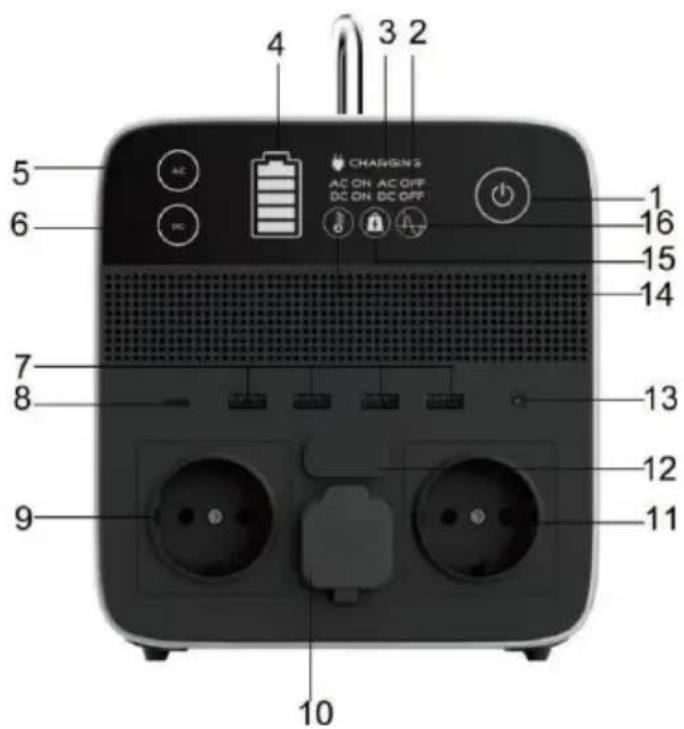
1) Main switch
2) AC/DC on/off status
3) Charging indicator
4) Remaining energy
5) On/Off button
alternating current
6) DC on/off button
7) USB-A outputs
natural_image
Black square electronic device with a grid-patterned vent and a label pointing to the number 17 (no text or symbols on the device itself)8) USB-C output
9) AC socket
10) Cigarette port AC 12V
11) AC socket
12) Input port "7909"
13) DC 12V output port
14) Overheating warning
15) Excessive load warning
16) Pure sine wave
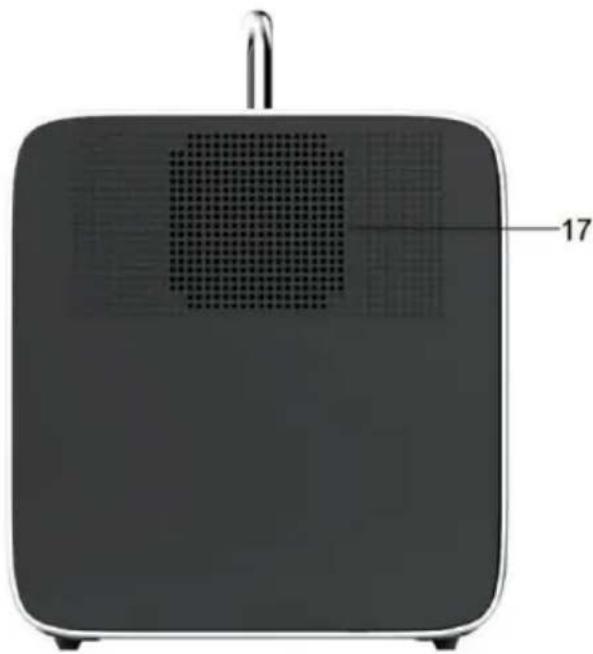
17) Cooling fan
REACHING
a) Mains charging
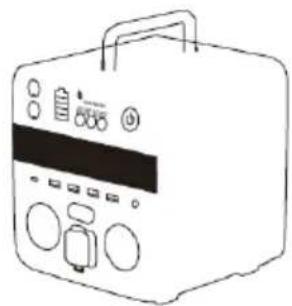
Plug the charging cable into the socket, then connect the other end to the 7909 input port (12) of the portable charging station, the charging indicator will light up green (3),(4).
Charging from a socket
natural_image
Line drawing of a portable electronic device with control panel and buttons (no text or symbols)b) Solar panel charging
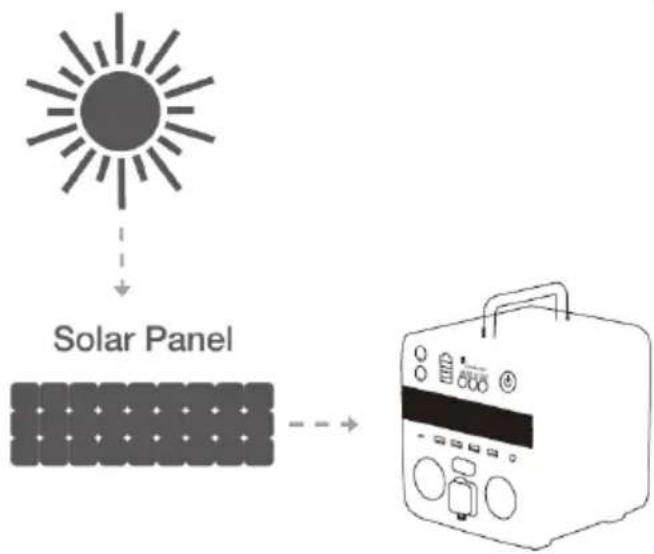
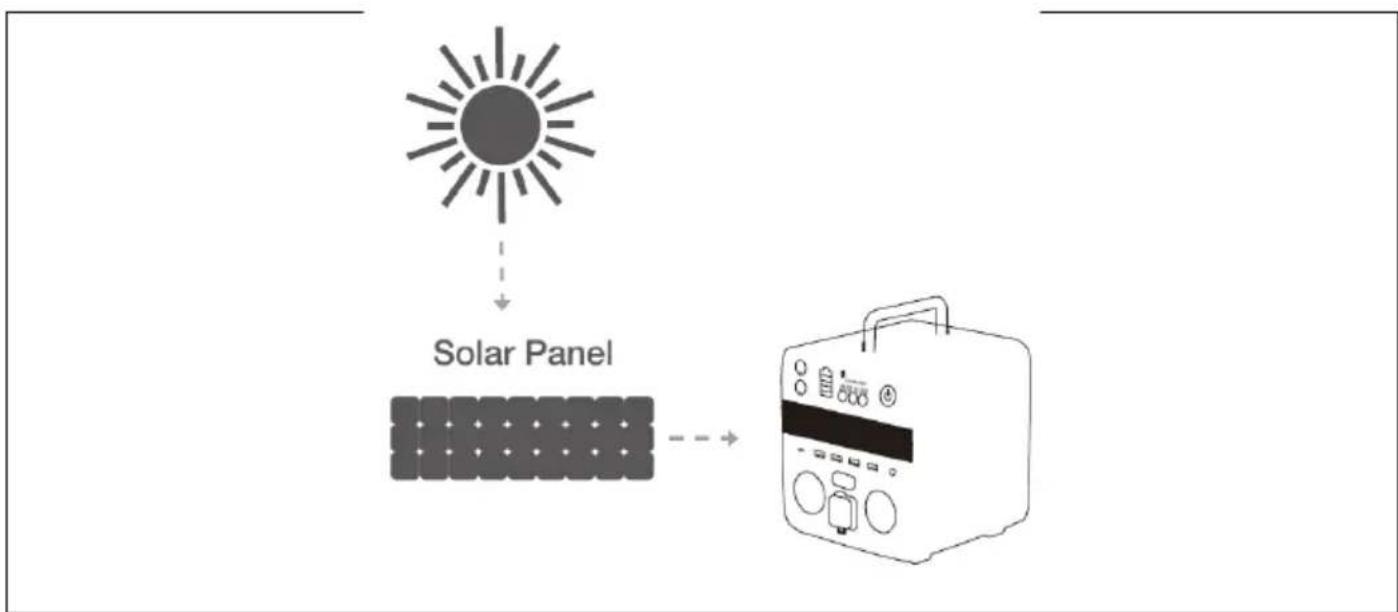
Place the solar panel where it can receive as much direct sunlight as possible. Connect the solar charger with the solar charging cable, then connect the cable with the 7909 connector to the input port (12). The charging status is indicated by (4) on the LCD display. Charging stops when the battery is full.
Solar panel
c) Charging from the car
Connect one end of the charger to the cigarette lighter car port, connect the other end to the 7909 input port (12), charging (3) and (4) will light up green.

COMMENT:
- Only use the charger specified by the manufacturer when charging from the mains.
- For solar charging, it is recommended to use a solar charger according to the following specification.
• DC output: 12-30 V, max. 200 W
- Charging type: MPPT
- Connector: DC connector 7909
SERVICE
- To switch on the charging station, touch the main switch for 1-2 seconds. The screen lights up when you switch it on.
- AC/DC on/off status: When AC is turned on, "AC ON" lights up green; when AC is turned off, "AC OFF" lights up red; when DC is turned on, "DC ON" lights up green; when DC is turned off, "DC OFF" lights up red.
- Charging indicator: Indicates when the power station is charging.
- Remaining energy: It shows the remaining energy.
- AC on/off button: Touch the button to switch the AC output on/off.
- DC on/off button: Touch the button to switch the DC output on/off.
- USB-A outputs: Charge a wide range of devices such as your mobile phone, tablet, camera equipment, speakers or anything else that charges via the USB-A port.
- USB C output: USB-C for charging devices such as select laptops, select Android phones, and any other device that charges through a USB-C port.
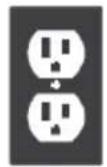
- AC outlet: Plug in devices that require AC power (100V-110V/220V-240V) such as drones, laptops, TVs, fans, etc.
- Cigarette port AC 12V: Charge devices that require a 12V cigarette port, such as a car refrigerator.
-
AC outlet: Plug in devices that require AC power (100V-110V/220V-240V) such as drones, laptops, TVs, fans, etc.
-
Input port 7909: Connect this port to recharge the power station using a charger with an AC adapter.
- DC 12V output port: Charge devices that require a 12V DC power supply.
- Overheating warning: If the battery temperature is too high, it will turn red and an alarm will sound. AC, DC stop working and the cooling fan starts automatically: you cannot switch off the power station at this time. Once the battery has cooled down, it can resume operation.
- Overload warning: When the power drawn from the AC outlets consistently exceeds the maximum AC power, it turns red: unplug the device from the outlet.
- Clear sine wave: The power supply from the socket is purely sinusoidal.
- Cooling fan: A cooling fan prevents the power station from overheating. The fan will start working automatically if the machine temperature is high.
A) Station use - AC current
The portable station can power up to 2 appliances simultaneously with AC power, provided the total power does not exceed 700 W for the PowerCharge 500 and 1000 W for the PowerCharge 1000.
- Press the main switch long enough to switch the station on. The main switch light and the display light up.
- Insert the power plug of the appliance power supply into the power socket in the station.
- Press the AC button to switch on the AC power to the appliance.
- When you are finished using it, press the AC button to turn off the power. Pull the power plug of the appliance out of the mains socket.
- To switch off the station completely, press the main switch for a long time.
B) Station use - DC
- Press the main switch long enough to switch the station on. The main switch light and the display light up.
- Plug the cable end of the device you want to charge into the DC connector.
- Press the DC button to turn on the DC power to the appliance.
- When you are finished using it, press the DC button to turn off the power. Pull the power plug of the appliance out of the mains socket.
- To switch off the station completely, press the main switch for a long time.
C) Station use - USB-A/USB Type C (DC)
- Press the main switch long enough to switch the station on. The main switch light and the display light up.
- Plug the cable end of the device you want to charge into the USB-A/USB Type-C DC port.
- Press the DC button to turn on the DC power to the device.
- When you are finished using it, press the DC button to turn off the power. Pull the device's power connector out of the port.
- To switch off the station completely, press the main switch for a long time.
COMMENT:
- If the battery voltage is less than 2.5 V, both AC and DC current will stop working. Turn off the charging station to protect the battery from damage and loss of voltage.
- When the voltage is less than or equal to 3%, the battery level symbol turns from green to red.
- If possible, keep the charging station fully charged before a long shutdown. (For long-term use, recharge the charging station at least every 6 months)
ALARMS
Overload:
When the output power in use is higher than the specified output power allowed by the model, the "OVERLOAD" indicator lights up red. It is necessary to reduce the power of electrical equipment. If the AC output is on at this time, press the AC ON/OFF button again to restart the AC output.
High temperature:
If the indoor temperature is higher than 35 °C or the output power is higher than 500 W, the cooling fan will start working. When the internal temperature is above 85 °C, a temperature alarm is triggered. When the AC and DC outputs are triggered, the "OVERHEAT" indicator lights up red, causing the charging station to stop working immediately. To restart, wait until the temperature drops below 35 °C.
STORAGE AND MAINTENANCE DURING SHUTDOWNS
Failure to maintain the charging station according to the following steps may result in damage to the battery.
- Before storing, charge the charging station and keep it fully charged every 6 months. Store it in a cool, dry place.
- If the main power supply automatically shuts down due to lower battery capacity, recharge the charging station within 3 months. Otherwise, the battery capacity will not be restored.

Remark:
Low temperatures (below freezing) can affect the battery capacity of the charging station. If you live in sub-zero conditions, you can drain the energy out of it. Never charge it in sub-freezing conditions as this will damage the battery and its capacity may not be restored.
Disposal: If the information leaflet, packaging or product label contains a crossed-out bin symbol, this means that in the European Union all electrical and electronic products, batteries and accumulators marked in this way must be placed in separate waste containers at the end of their life. Do not dispose of these products in unsorted municipal waste.


DECLARATION OF CONFORMITY
Abacus Electric, s.r.o. hereby declares that the EVOLVEO PowerCharge product meets the requirements of the standards and regulations applicable to this type of equipment. The full text of the Declaration of Conformity can be found at http://ftp.evolveo.com/CE/.
Importer / Manufacturer
Abacus Electric, s.r.o.
Planá 2, 370 01, Czech Republic
Made in P.R.C.
Copyright © Abacus Electric, s.r.o.
www.evolveo.com
All rights reserved.
Design and appearance are subject to change without notice.
Tartalomjegyzék
BEVEZETÉS 40
A FELHASZNÁLÓI KÉZIKÖNYV LEGFRISSEBB VERZIÓJA 40
natural_image
Black rectangular electronic device with a grid-patterned vent and a label pointing to the number 17 (no text or symbols on the device itself)natural_image
Line drawing of a portable appliance with two power outlets and a front-mounted device (no text or symbols)b) Napelemes töltés
flowchart
graph TD
    A["Solar Panel"] --> B["Output"]
Copyright © Abacus Electric, s.r.o.
www.evolveo.com
Minden jog fenntartva.
AVERTISMENTE ȘI INSTRUCTIUNI DE SIGURANTĂ
natural_image
Black square electronic device with a grid-patterned vent and a label pointing to the number 17 (no visible text or symbols on the device itself)natural_image
Line drawing of a portable electronic device with control panel and buttons (no text or symbols)Copyright © Abacus Electric, s.r.o.
www.evolveo.com
natural_image
Black rectangular electronic device with a grid-patterned vent and a label pointing to the number 17 (no text or symbols on the device itself)natural_image
Line drawing of a portable electronic device with control panel and buttons (no text or symbols)Copyright © Abacus Electric, s.r.o.
www.evolveo.com
natural_image
Black square electronic device with a grid-patterned vent and a label pointing to the number 17 (no text or symbols on the device itself)natural_image
Line drawing of a portable electronic device with control panel and buttons (no text or symbols)b) Ricarica del pannello solare
Copyright © Abacus Electric, s.r.o.
www.evolveo.com
VARNOSTNA OPOZORILA IN NAVODILA
natural_image
Black rectangular electronic device with a grid-patterned vent and a label pointing to the number 17 (no text or symbols on the device itself)natural_image
Line drawing of a portable appliance with two power outlets and a front-mounted control unit (no text or symbols)flowchart
graph TD
    A["Solar Panel"] --> B["Output"]
flowchart
graph TD
    A["Solar Panel"] --> B["Input"]
    B --> C["Output"]
Copyright © Abacus Electric, s.r.o.
www.evolveo.com
V se pravice pridržane.
- BEZPEČNOSTNÍ UPOZORNĚNÍ A POKYNY
- BEZPEČNOSTNÉ UPOZORNENIA A POKYNY
- THE MOST UP-TO-DATE VERSION OF THE USER MANUAL
- SAFETY WARNINGS AND INSTRUCTIONS
- DEGREE OF PROTECTION AGAINST ELECTRIC SHOCK:
- PACKAGING CONTENT
- REACHING
- a) Mains charging
- b) Solar panel charging
- c) Charging from the car
- COMMENT:
- SERVICE
- A) Station use - AC current
- B) Station use - DC
- C) Station use - USB-A/USB Type C (DC)
- ALARMS
- Overload:
- High temperature:
- STORAGE AND MAINTENANCE DURING SHUTDOWNS
- Remark:
- DECLARATION OF CONFORMITY
- Importer / Manufacturer
- Tartalomjegyzék
- b) Napelemes töltés
- AVERTISMENTE ȘI INSTRUCTIUNI DE SIGURANTĂ
- b) Ricarica del pannello solare
- VARNOSTNA OPOZORILA IN NAVODILA
Brand : Evolveo
Model : PowerCharge 1000
Category : Battery charger