
RAV-GM1601DTP-A - Air-conditioner TOSHIBA - Free user manual and instructions
Find the device manual for free RAV-GM1601DTP-A TOSHIBA in PDF.


| Product Type | Concealed Duct High Static Pressure Air Conditioner |
| Model Number | RAV-GM1601DTP-A |
| Refrigerant | R32 (HFC, ozone-friendly) |
| Operation Modes | Cooling, Heating, Fan Only, Auto Changeover |
| Remote Controller | Wired remote controller (controls up to 8 indoor units) |
| Timer Functions | Off Timer, On Timer, Repeat Off Timer (up to 168 hours) |
| Power Saving Mode | Adjustable capacity limiting (50% to 100%, default 75%) |
| 8°C Heating Operation | Set heating to maintain room temperature around 8°C |
| Defrost Operation | Automatic defrost during heating (2-10 minutes) |
| Filter Indicator | Displays on remote controller to remind cleaning |
| Safety Protections | Overload protection, 3-minute restart delay, high-voltage areas |
| Installation Requirements | Must be installed by qualified installer per local regulations |
| Maintenance | Regular filter cleaning; professional maintenance recommended annually |
| Operating Temp (Cooling) | Outdoor: -15°C to 46°C DB; Indoor: 21°C to 32°C DB |
| Operating Temp (Heating) | Outdoor: -15°C to 15°C WB; Indoor: 15°C to 28°C DB |
| Max Humidity (Cooling) | Less than 80% RH to avoid condensation |
| Remote Controller Sensor | Optional temperature sensing at remote controller location |
| Error Display | Error codes shown on remote controller LCD for troubleshooting |
| Compliance | EN 60335-1, IEC 60335-1, Machinery Directive 2006/42/EC |
| Intended Use | Shops, light industry, commercial use by lay persons |
Frequently Asked Questions - RAV-GM1601DTP-A TOSHIBA
User questions about RAV-GM1601DTP-A TOSHIBA
0 question about this device. Answer the ones you know or ask your own.
Ask a new question about this device
Download the instructions for your Air-conditioner in PDF format for free! Find your manual RAV-GM1601DTP-A - TOSHIBA and take your electronic device back in hand. On this page are published all the documents necessary for the use of your device. RAV-GM1601DTP-A by TOSHIBA.
USER MANUAL RAV-GM1601DTP-A TOSHIBA
Concealed Duct High Static Pressure Type
RAV-GM561DTP-A
RAV-GM801DTP-A
RAV-GM1101DTP-A
RAV-GM1401DTP-A
RAV-GM1601DTP-A
R32
1116950249
natural_image
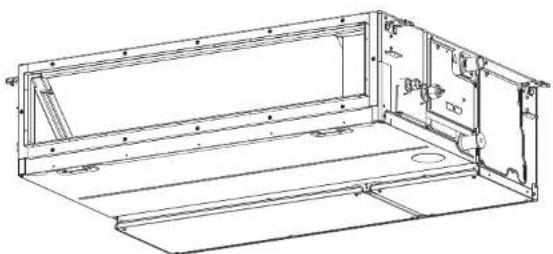
Technical line drawing of a mechanical assembly frame with mounting brackets and internal components (no text or symbols)English
Original instruction
ADOPTION OF R32 REFRIGERANT
This Air Conditioner has adopted a refrigerant HFC (R32) which does not destroy the ozone layer.
According to EN 60335-1
This appliance can be used by children aged from 8 years and above and persons with reduced physical, sensory or mental capabilities or lack of experience and knowledge if they have been given supervision or instruction concerning use of the appliance in a safe way and understand the hazards involved. Children shall not play with the appliance. Cleaning and user maintenance shall not be made by children without supervision.
According to IEC 60335-1
This appliance is not intended for use by persons (including children) with reduced physical, sensory or mental capabilities, or lack of experience and knowledge, unless they have been given supervision or instruction concerning use of the appliance by a person responsible for their safety. Children should be supervised to ensure that they do not play with the appliance.
-1-
Contents
1 Precautions for safety ....3
2 Part names 7
3 Wired remote controller 8
4 Correct usage 9
5 Timer operation ....10
6 Power saving mode 11
7 Maintenance....11
8 Troubleshooting 12
9 Operations and performance ....13
10 Installation ....14
Thank you for purchasing this Toshiba air conditioner.
Please read carefully through these instructions that contain important information which complies with the Machinery Directive (Directive 2006/42/EC), and ensure that you understand them.
After reading these instructions, be sure to keep them in a safe place together with the Installation Manual supplied with your product.
Generic Denomination: Air Conditioner
Definition of Qualified Installer or Qualified Service Person
The air conditioner must be installed, maintained, repaired and removed by a qualified installer or qualified service person. When any of these jobs is to be done, ask a qualified installer or qualified service person to do them for you. A qualified installer or qualified service person is an agent who has the qualifications and knowledge described in the following table.
| Agent Qualifications and knowledge which the agent must have | |
| Qualified installer | The qualified installer is a person who installs, maintains, relocates and removes the air conditioners made by Toshiba Carrier Corporation. He or she has been trained to install, maintain, relocate and remove the air conditioners made by Toshiba Carrier Corporation or, alternatively, he or she has been instructed in such operations by an individual or individuals who have been trained and is thus thoroughly acquainted with the knowledge related to these operations.The qualified installer who is allowed to do the electrical work involved in installation, relocation and removal has the qualifications pertaining to this electrical work as stipulated by the local laws and regulations, and he or she is a person who has been trained in matters relating to electrical work on the air conditioners made by Toshiba Carrier Corporation or, alternatively, he or she has been instructed in such matters by an individual or individuals who have been trained and is thus thoroughly acquainted with the knowledge related to this work.The qualified installer who is allowed to do the refrigerant handling and piping work involved in installation, relocation and removal has the qualifications pertaining to this refrigerant handling and piping work as stipulated by the local laws and regulations, and he or she is a person who has been trained in matters relating to refrigerant handling and piping work on the air conditioners made by Toshiba Carrier Corporation or, alternatively, he or she has been instructed in such matters by an individual or individuals who have been trained and is thus thoroughly acquainted with the knowledge related to this work.The qualified installer who is allowed to work at heights has been trained in matters relating to working at heights with the air conditioners made by Toshiba Carrier Corporation or, alternatively, he or she has been instructed in such matters by an individual or individuals who have been trained and is thus thoroughly acquainted with the knowledge related to this work. |
| Qualified service person | The qualified service person is a person who installs, repairs, maintains, relocates and removes the air conditioners made by Toshiba Carrier Corporation. He or she has been trained to install, repair, maintain, relocate and remove the air conditioners made by Toshiba Carrier Corporation or, alternatively, he or she has been instructed in such operations by an individual or individuals who have been trained and is thus thoroughly acquainted with the knowledge related to these operations.The qualified service person who is allowed to do the electrical work involved in installation, repair, relocation and removal has the qualifications pertaining to this electrical work as stipulated by the local laws and regulations, and he or she is a person who has been trained in matters relating to electrical work on the air conditioners made by Toshiba Carrier Corporation or, alternatively, he or she has been instructed in such matters by an individual or individuals who have been trained and is thus thoroughly acquainted with the knowledge related to this work.The qualified service person who is allowed to do the refrigerant handling and piping work involved in installation, repair, relocation and removal has the qualifications pertaining to this refrigerant handling and piping work as stipulated by the local laws and regulations, and he or she is a person who has been trained in matters relating to refrigerant handling and piping work on the air conditioners made by Toshiba Carrier Corporation or, alternatively, he or she has been instructed in such matters by an individual or individuals who have been trained and is thus thoroughly acquainted with the knowledge related to this work.The qualified service person who is allowed to work at heights has been trained in matters relating to working at heights with the air conditioners made by Toshiba Carrier Corporation or, alternatively, he or she has been instructed in such matters by an individual or individuals who have been trained and is thus thoroughly acquainted with the knowledge related to this work. |
These safety cautions describe important matters concerning safety to prevent injury to users or other people and damages to property. Please read through this manual after understanding the contents below (meanings of indications), and be sure to follow the description.
| Indication Meaning of Indication | |
| WARNING | Text set off in this manner indicates that failure to adhere to the directions in the warning could result in serious bodily harm (*1) or loss of life if the product is handled improperly. |
| CAUTION | Text set off in this manner indicates that failure to adhere to the directions in the caution could result in slight injury (*2) or damage (*3) to property if the product is handled improperly. |
*1: Serious bodily harm indicates loss of eyesight, injury, burns, electric shock, bone fracture, poisoning, and
other injuries which leave aftereffect and require hospitalization or long-term treatment, as an outpatient.
*2: Slight injury indicates injury, burns, electric shock, and other injuries which do not require hospitalization or
*3: Damage to property indicates damage extending to buildings, household effects, domestic livestock, and pets.
MEANINGS OF SYMBOLS DISPLAYED ON THE UNIT
| WARNING(Risk of fire) | This mark is for R32 refrigerant only.In case that refrigerant type is R32, this unit uses a flammable refrigerant.If refrigerant leaks and comes in contact with fire or heating part, it will create harmful gas and there is risk of fire. | |
| Read the OWNER'S MANUAL carefully before operation. | ||
| Service personnel are required to carefully read the OWNER'S MANUAL and INSTALLATION MANUAL before operation. | ||
| Further information is available in the OWNER'S MANUAL, INSTALLATION MANUAL, and the like. | ||
■ Warning indications on the air conditioner unit
| Warning indication Description | ||
 | WARNING | WARNING ELECTRICAL SHOCK HAZARD Disconnect all remote electric power supplies before servicing. |
| ELECTRICAL SHOCK HAZARD Disconnect all remote electric power supplies before servicing. | ||
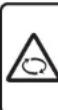 | WARNING | WARNING Moving parts. Do not operate unit with grille removed. Stop the unit before the servicing. |
| Moving parts. Do not operate unit with grille removed. Stop the unit before the servicing. | ||
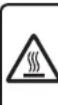 | CAUTION | CAUTION High temperature parts. You might get burned when removing this panel. |
| High temperature parts. You might get burned when removing this panel. | ||
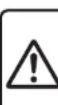 | CAUTION | CAUTION Do not touch the aluminium fins of the unit. Doing so may result in injury. |
| Do not touch the aluminium fins of the unit. | ||
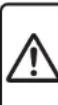 | CAUTION | CAUTION BURST HAZARD Open the service valves before the operation, otherwise there might be the burst. |
| BURST HAZARD | ||
1Precautions for safety
The manufacturer shall not assume any liability for the damage caused by not observing the description of this manual.
WARNING
General
- Carefully read Owner's Manual before starting the air conditioner. There are many important things to keep in mind for daily operation.
- Ask for installation to be performed by the dealer or a professional. Only a qualified installer(*1) is able to install an air conditioner. If a non-qualified person installs an air conditioner, it may result in problems such as fire, electric shock, injury, water leakage, noise and vibration.
- Do not use any refrigerant different from the one specified for complement or replacement. Otherwise, abnormally high pressure may be generated in the refrigeration cycle, which may result in a failure or explosion of the product or an injury to your body.
- Places where the operation sound of the outdoor unit may cause a disturbance. (Especially at the boundary line with a neighbour, install the air conditioner while considering the noise.)
- This appliance is intended to be used by expert or trained users in shops, in light industry, or for commercial use by lay persons.
Transportation and storage
- To transport the air conditioner, wear shoes with protective toe caps, protective gloves, and other protective clothing.
- To transport the air conditioner, do not take hold of the bands around the packing carton. You may injure yourself if the bands should break.
-
Before stacking the packing cartons for storage or transportation, heed the precautions written on the packing cartons. Failure to heed the precautions may cause the stack to collapse.
-
The air conditioner must be transported in stable condition. If any part of the product broken, contact your dealer.
- When the air conditioner must be transported by hand, carry it by two or more people.
Installation
- Only a qualified installer(*1) or qualified service person(*1) is allowed to carry out the electrical work of the air conditioner. Under no circumstances must this work be done by an unqualified individual since failure to carry out the work properly may result in electric shocks and / or electrical leaks.
- After the installation work has been completed, have the installer explain about the circuit breaker positions. In the event that trouble has occurred in the air conditioner, set the circuit breaker to the OFF position, and contact a service person.
- If the unit is installed in a small room, take appropriate measures to prevent the refrigerant from exceeding the limit concentration even if it leaks. Consult the dealer from whom you purchased the air conditioner when you implement the measures. Accumulation of highly concentrated refrigerant may cause an oxygen deficiency accident.
- Do not install the air conditioner in a location that may be subject to a risk of expire to a combustible gas. If a combustible gas leaks and becomes concentrated around the unit, a fire may occur.
- Use the company-specified products for the separately purchased parts. Use of non-specified products may result in fire, electric shock, water leakage or other trouble. Have the installation performed by a professional.
- Confirm that earthing is performed correctly.
Operation
- Before opening the electrical control box cover of the indoor unit or service panel of the outdoor unit, set the circuit breaker to the OFF position. Failure to set the circuit breaker to the OFF position may result in electric shocks through contact with the interior parts. Only a qualified installer(*1) or qualified service person(*1) is allowed to remove the electrical control box cover of the indoor unit or service panel of the outdoor unit and do the work required.
- Inside the air conditioner are high-voltage areas and rotating parts. Due to the danger of electric shocks or of your fingers or physical objects becoming trapped in the rotating parts, do not remove service panel of the outdoor unit. When work involving the removal of these parts is required, contact a qualified installer(*1) or a qualified service person(*1).
- Do not move or repair any unit by yourself. Since there is high voltage inside the unit, you may get electric shock when removing the cover and main unit.
- Use of a stand more than 50 cm high to clean the filter of the indoor unit or to carry out other such jobs constitutes working at heights. Due to the danger of falling off the stand and injuring yourself while working at heights, this kind of work should not be done by unqualified individuals. When this kind of work must be carried out, do not do it yourself but ask a qualified installer(*1) or a qualified service person(*1) to do it for you.
- Do not touch the aluminum fin of the outdoor unit. You may injure yourself if you do so. If the fin must be touched, do not touch it yourself but contact a qualified installer(*1) or a qualified service person(*1).
- Do not climb onto or place objects on top of the outdoor unit. You may fall or the objects may fall off of the outdoor unit and result in injury.
-
Do not place any combustion appliance in a place where it is directly exposed to the wind of air conditioner, otherwise it may cause imperfect combustion.
-
When the air conditioner is operated with a combustion appliance in the same place, ventilate the room sufficiently. Poor ventilation causes oxygen shortage.
- When the air conditioner is used in a closed room, sufficiently ventilate the room. Poor ventilation causes oxygen shortage.
- Do not expose your body to cool air directly for a long time and do not cool yourself excessively.
Doing so may result in deteriorated physical condition and ill health. - Do not insert your finger or a stick into the air intake or discharge. Doing so may result injury as the fan is rotating at high speed inside the unit.
- Consult the shop where you purchased the air conditioner if air conditioning (cooling and heating) is not performed properly as a refrigerant leakage may be the cause. Confirm the repair details with a qualified service person(*1) when the repair includes additional charging of the refrigerant.
- Stop running the air conditioner and turn off the breaker before cleaning.
Otherwise, injury may result as the fan is rotating at high speed inside the unit.
Repairs
- If there is any kind of trouble (such as when an error display has appeared, there is a smell of burning, abnormal sounds are heard, the air conditioner fails to cool or heat or water is leaking) has occurred in the air conditioner, do not touch the air conditioner yourself but set the circuit breaker to the OFF position, and contact a qualified service person(*1). Take steps to ensure that the power will not be turned on (by marking "out of service" near the circuit breaker, for instance) until qualified service person(*1) arrives. Continuing to use the air conditioner in the trouble status may cause mechanical problems to escalate or result in electric shocks or other trouble.
- If the fan grille is damaged, do not approach the outdoor unit but set the circuit breaker to the OFF position, and contact a qualified service person(*1) to have the repairs done. Do not set the circuit breaker to the ON position until the repairs are completed.
- If there is a danger of the indoor unit's falling, do not approach the indoor unit but set the circuit breaker to the OFF position, and contact a qualified installer(*1) or a qualified service person(*1) to refi t the unit. Do not set the circuit breaker to the ON position until the unit has been refi tted.
- If there is a danger of the outdoor unit's toppling over, do not approach the outdoor unit but set the circuit breaker to the OFF position, and contact a qualified installer(*1) or a qualified service person(*1) to have the improvements or refi tting done. Do not set the circuit breaker to the ON position until the improvements or refi tting is completed.
- Do not modify the products. Do not also disassemble or modify the parts. It may cause a fire, electric shock or injury.
Relocation
- When the air conditioner is to be relocated, do not relocate it yourself but contact a qualified installer(*1) or a qualified service person(*1). Failure to relocate the air conditioner properly may result in electric shocks and / or a fire.
CAUTION
To disconnect the appliance from the mains supply.
- This appliance must be connected to the mains by means of a switch with a contact separation of at least 3 mm.
The installation fuse (all types can be sued) must be used for the power supply line of this air conditioner.
Installation
- Certainly lay the drain hose for perfect draining. Improper drainage may cause flooding in the house and getting furniture wet.
- Connect the air conditioner to an exclusive power supply of the rated voltage, otherwise the unit may break down or cause a fi re.
- Confirm that the outdoor unit are fixed on the base. Otherwise, falling down of the units or other accidents may occur.
Operation
- Do not use this air conditioner for special purpose such as preserving food, precision instruments, art objects, breeding animals, car, vessel.
- Do not touch any switches with wet fi nger, otherwise you may get an electric shock.
- If the air conditioner will not be used for a considerably long time, turn off the main switch or the circuit breaker, for safety.
- To make the air conditioner operate in its original performance, operate it within the range of the operating temperature specified in the instructions. Otherwise it may cause a malfunction, or water leak from the unit.
- Prevent any liquid from falling into the remote controller. Do not spill juice, water or any kind of liquid.
-
Do not wash the air conditioner. Doing so may result in electric shock.
-
Check whether the installation base and other equipment have become deteriorated after being used for a long time. Leaving them such condition may result in the unit's falling down and causing injury.
- Do not leave flammable sprays or other flammable materials near the air conditioner, and do not spray fl ammable aerosol directly to the air conditioner. They may catch fi re.
- Stop running the air conditioner and turn off the breaker before cleaning. Otherwise, injury may result as the fan is rotating at high speed inside the unit.
- Ask for cleaning of the air conditioner to be performed by the dealer.
Cleaning the air conditioner in an improper manner may cause damage to plastic parts, insulation failure of electric parts or other parts, and result in a malfunction. In the worst case, it may result in water leakage, electric shock, smoke emission or fire. - Do not put a water container such as a vase on the unit. Water intrusion into the unit may occur and it may cause deterioration of electric insulation and result in electric shock.
(*1) Refer to the "Definition of Qualified Installer or Qualified Service Person."
■ Information on the transportation, handling and storage of the carton
◆ Examples of indication on the carton
| Symbol Description Symbol Description | |||
 | Keep dry Do not drop |  | |
 | Fragile Do not lay down |  | |
 — 5 cartons — 5 cartons | Slacking height(6 cartons can be stackedin this case) | 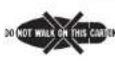 | Do not walk on this carton |
 | This side up Do not step |  | |
 | Handle with care | ||
| Other cautions Description | ||
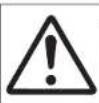 | CautionInjury possibility.Don't handle with packing band,or may get injured in case of broken band. | CAUTIONInjury possibility.Don't handle with packing band, or may get injured in case ofbroken band. |
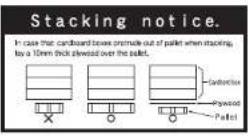 | Stacking notice.In case that cardboard boxes protrude out of pallet when stacking.Lay a 10 mm thick plywood over the pallet. | |
2 Part names
■ Indoor unit
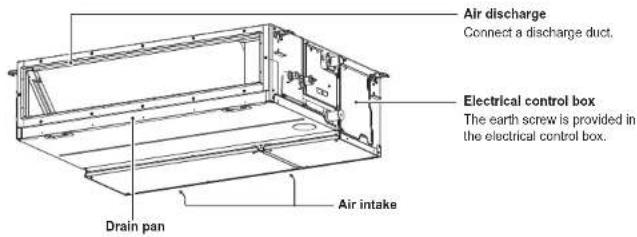
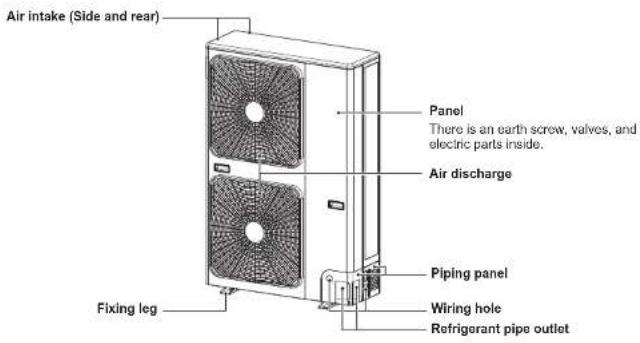
■ Outdoor unit (The design varies depending on the outdoor unit. The following illustration shows an example.)
3 Wired remote controller
This remote controller can control the operation of up to 8 indoor units.
■ Display section
In the display illustration below all the icons are shown. When the unit is in operation, only relevant icons will be displayed.
- When the leak breaker is turned on at the first time, SETTING flashes on the display part of the remote controller.
- While this icon is flashing, the model is being automatically confirmed. Wait till 98:74:0 has disappeared to use the remote controller.
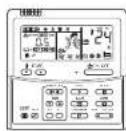
Display section
Operation section
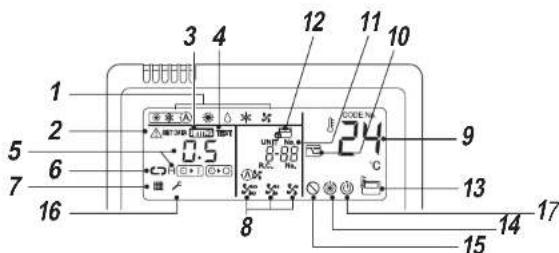
1 Operation mode
The selected operation mode is displayed
2 Error display
Displayed while the protective device works or an error occurs.
3 SETTING display
Displayed during setup of the timer or other settings.
4 TEST run display
Displayed during a test run.
5 Timer display
The selected timer time is displayed.
When an error occurs, error code is displayed.
6 Timer mode display
The selected timer mode is displayed.
7 Filter display
Reminder to clean the air filter
8 Fan speed display
The selected fan speed mode is displayed.
9 Set temperature display
The selected set temperature is displayed.
10 Power saving mode display
Limits compressor speed (capacity) to save energy.
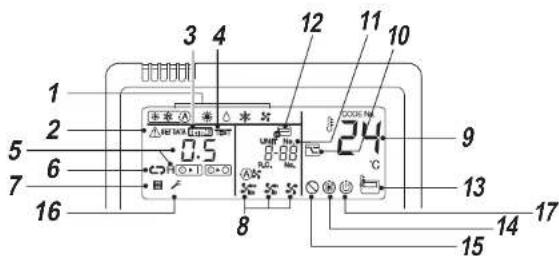
11 UNIT No. display
The selected indoor unit number is displayed. Also number of indoor or outdoor unit which an error occurs is displayed.
12 Central control display
Displayed when the air conditioner is used under the central control in combination with a central control remote controller.
In case the remote controller is disabled by the central control system. 📄 fl ashes. The button operation is not accepted.
Even when ON/OFF, MODE, or TEMP. button is pushed, and the button operation is not accepted. (Settings made by the remote controller vary with the central control mode. For details, refer to the Owner's Manual of the central control remote controller.)
13 Remote controller sensor display
Displayed while the sensor of the remote controller is used.
14 Pre-heat display
Displayed when the heating mode is energized or defrost cycle is initiated. While this icon is displayed, the indoor fan stops
15 No function display
Displayed when the function requested is not available on that model.
16 Service display
17 Operation ready display
This display appears on some models.
■ Operation section
Push each button to select a desired operation.
- The control saves commands in memory and after the initial setting, there is no need for any additional settings unless changes are desired. The air conditioner can be operated by pushing the ON/OFF button.
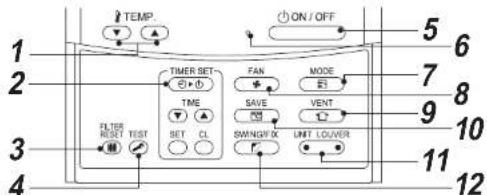
1
button (Temperature set button)
Adjusts the set point.
Select the desired set point by pushing |TEMP or |TEMP.
2
TIMER SET button (Timer set button)
Use to setup the timer.
3
button (Filter reset button)
Resets *■display after cleaning filter.
4
button (Test button)
Use only for service.
(During normal operation, do not use this button.)
5
button
When the button is pushed, the operation starts, and it stops by pushing the button again. When the operation has stopped, the operation lamp and all the displays disappear.
6
Operation lamp
Green light illuminates when unit is on. Although it'll ashes when operating the protection device or an error occurs.
7
MODE button (Operation mode button) Selects desired operation mode.
8
FAN button (Fan speed button)
Selects the desired Fan speed
9
button (Ventilation button)
Use when a power ventilation kit (locally procured) is connected.
If ⚙ is displayed on the remote controller when this button is pushed, no vent kit connected.
10
button (Power save operation)
Use to initiate power saving mode.
11
UNIT Louver button (Unit / Louver select button)
Selects a unit number (left) and louver number (right).
Selects an indoor unit when multiple indoor units are controlled with one remote controller.
LOUVER
No Function.
12
button (Swing / Louver direction
button)
No Function.
OPTION:
Remote controller sensor
Usually the temperature sensor of the indoor unit senses the temperature. The temperature on the surrounding of the remote controller can also be sensed.
For details, contact the dealer from which you have purchased the air conditioner.
-9-
4
Correct usage
When the air conditioner is used for the first time or when the setting is changed, follow the steps below. Settings are saved in memory and are displayed anytime the unit is turned on by pushing the button.
■ Preparation
- When the circuit breaker is turned on, the partition lines are displayed on the remote controller.
* After the circuit breaker is turned on, the remote controller does not accept any commands for approx. 1 minute, this is not a failure.
REQUIREMENT
When the air conditioner is re-powered after it has not been used for a long period, turn on the circuit breaker at least 12 hours before starting the air conditioner.
Start
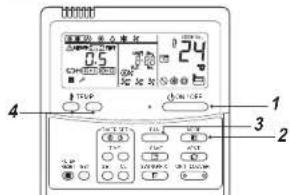
1 Push button
The operation lamp illuminates, and the operation starts.
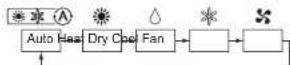
2 Select an operation mode with the "F" button.
One push of the button, and the display changes in the order shown below.
3
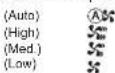
Select fan speed with " " button.
One push of the button, and the display changes in the order shown below.

- When fan is in "Auto", fan speed is adjusted based on difference between set point and room temperature.
- In heating operation, if the room temperature is not heated sufficiently with speed Low operation, select "Wed." or "High" operation.
- The temperature sensor detects the return air temperature at the indoor unit, which differs from the room temperature depending on the installation condition.
Set point is a target of room temperature.
(A) "Auto" is not selectable in the Fan mode.)
4
Select the set point temperature by pushing the "TEMP." or "TEMP." buttons.
Stop
Push button.
The operation lamp goes off, and the operation stops.
NOTE
Auto Changeover
- During Auto Mode, the unit selects the operating mode (cooling, heating or fan only) based on the user set point temperature.
- If the Auto mode is uncomfortable, you can select the desired conditions manually.
Heating
- If there is a demand for heating, unit will start approximately 3 to 5 minutes after the mode is selected.
• After the heating operation has stopped, fan may continue to run for approx. 30 seconds.
- When the room temperature reaches the set temperature, the outdoor unit stops and the indoor unit fan runs at extremely low speed.
During defrost operation, the fan stops so that cool air is not discharged. ("Pre-heat is displayed.")
When operation is restarted after stop
- When attempting to restart the unit immediately after it was stopped, the unit can not start for approx. 3 minutes this is to protect the compressor.
■ 8°C operation (For object pre-heating)
The air conditioner can control the heating temperature to about 8°C in the heating mode.
The 8°C heating operation requires settings with the wired remote controller. Ask the installer or dealer for the settings according to the installation manual of the indoor unit.
Start
-
Set the displayed temperature to 18°C in the heating mode by pushing TEMP. Button.
-
Set the displayed temperature to 8°C by pushing TEMP. Button for at least 4 seconds.
Stop
- Set the displayed temperature to 18°C by pushing TEMP. (button)
- The air conditioner returns to the normal HEAT mode. Select a desired temperature and operation mode.
NOTE
- The discharged air temperature is lower than that in the normal heating operation.
- The room temperature may not be heated evenly depending on the remote controller installation location.
- The room temperature may not reach 8°C depending on the room size of the installation conditions.
- Setting for fan speed is available during the 8°C heating operation.
The 6-10 floating operations is cancelled in the following cases:
- When operation is stopped with ☐ button
- When another operation mode is selected with 📄 button
- When temperature setting or operation mode is changed or operation is started / stopped by the wireless
remote controller or the central control remote controller.
- When this operation mode is used, observe proper operating hours and we recommend that you ask service staff for periodic maintenance of the air conditioner.
5 Timer operation
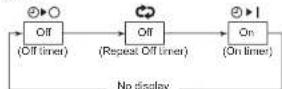
Three timer modes are available: (Setting of up to 168 hours is enabled.)
Off timer : The unit stops when the set time is reached.
Repeat Off timer : The unit stops daily when the set time is reached.
On timer : The unit starts when the set time is reached.
Set
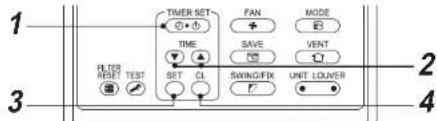
1 Push button.
The timer mode changes with every push of the button.
• SITR#imer display fl ashes.
2 Push to select "set time".
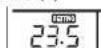
- With every push of ⚠ button, the set time increases by 0.5 hr (30 minutes). When a time more than 24 hours is set for timer operation, timer can be set in increments of 1 hr. The maximum set time is 168hr (7 days). The remote control displays the set time with time (between 0.5 and 23.5 hours) (*) or number of days and time (24 hours or more) (*) as shown below.
With every push of button, the set time decreases by 0.5 hr (30 minutes) (0.5 - 23.5 hours) or 1 hr (24 - 168 hours).
Example of remote control display
• 23.5 hours ( ^*1 )
• 34 hours (2)
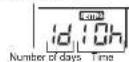
id shows 1 day (24 hours). 10h shows 10 hours. (Total 34 hours)
3 Push 📋 button.
SETTING display disappears and time display goes on, and 📊r→display@ashes.
(When On timer is activated, time and On timer are displays and other displays disappear.)
4 Cancel timer operation
Push 📁 button. Timer display disappears.
NOTE
- When the operation stops after the timer reached the preset time, the Repeat Off timer resumes the operation by pushing button and stops the operation after the time of the timer has reached the set time.
When GANGU is pushed while the Off timer function of the air conditioner is active, the indication of the timer function disappears and then appears again after about 5 seconds.
This is due to normal processing of the remote controller.
6 Power saving mode
The power saving mode saves energy by limiting the maximum current which will affect heating or cooling capacity that the unit can generate.
Push 📄 button during operation.
• The air conditioner enters power saving mode.
• Appears on the display.
Power saving mode will stay in effect until it is cancelled.
To cancel the power saving mode, push 📄 button again.
disappears.
■ To configure the power saving settings
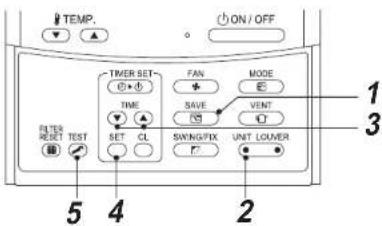
1 Push button for at least 4 seconds when the air conditioner is not working. SETTING flashes.
2 Push (left side of the button) to select an indoor unit to be set. • Each time the button is pushed, UNIT No. change as follows:
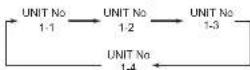
The fan of the selected unit runs.
3 Push TIME buttons, to adjust the setting of power level.
- Each push of the button changes the power level by 1% within the range from 100% to 50% . - The factory default is 75% .
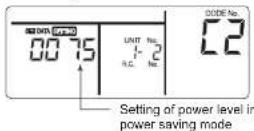
4 Push button.
5 Push button to complete the setting.
NOTE
- When other electric appliances are used at the same time, to avoid triggering the circuit breaker, power saving mode is recommended. Of course you can use power saying mode to save energy as well.
- Power saving mode consumes less energy, but may not heat / cool the room as much as normal mode.
(The maximum current is limited to approximately 75% (factory default) of the normal mode.) - To adjust the power-save settings, see "To configure the power saving settings" in Power saving mode.
- Even when operation start / stop, operation mode change, or power reset is performed during the power saving mode, the power saving mode is retained until the next operation.
7 Maintenance
WARNING
Cleaning the air filter and other parts of the air filter involves dangerous work in high places, so be sure to have a qualified installer or qualified service person to do it. Do not attempt it by yourself.
▼ Cleaning air filters
Clogged air filters will reduce the cooling and heating performance.
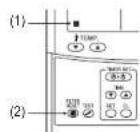
1) If "■" is displayed on the remote controller, clean the air filters.
2) When the cleaning of air filters has been completed, push button. *disappears.
◆When not used for a long time
- Perform the fan operation for a couple of hours to dry inside.
- Push button on the remote controller to stop running, and turn off the circuit breaker.
- Clean the air filters and reinstall them.
◆ Before the cooling season
Clean the drain pan
- Contact the dealer where you purchased the product.
(Drain does not work if the drain pan or vent is clogged. In some cases the drain may overflow and wet the wall or floor. Clean the drain pan before the cooling season.)
◆ Check periodically
- If the unit is used for a long time, parts may deteriorate and cause malfunction or bad drainage of dehumidified water depending on the heat, humidity, or dust.
- In addition to the usual maintenance, it is recommended that you have the unit checked and maintained by the dealer where you purchased it.
NOTE
For environmental conservation, it is strongly recommended that the indoor and outdoor units of the air conditioner in use be cleaned and maintained regularly to ensure efficient operation of the air conditioner.
When the air conditioner is operated for a long time, periodic maintenance (once a year) is recommended. Furthermore, regularly check the outdoor unit for rust and scratches, and remove them or apply rustproof treatment, if necessary.
As a general rule, when an indoor unit is operated for 8 hours or more daily, clean the indoor unit and outdoor unit at least once every 3 months. Ask a professional for this cleaning / maintenance work.
Such maintenance can extend the life of the product though it involves the owner's expense. Failure to clean the indoor and outdoor units regularly will result in poor performance, freezing, water leakage, and even compressor failure.
▼ Maintenance List
| Part Unit Check (visual / auditory) Maintenance | |||
| Heat exchanger | Indoor / outdoor | Dust / dirt clogging, scratches | Wash the heat exchanger when it is clogged. |
| Fan motor | Indoor / outdoor | Sound | Take appropriate measures when abnormal sound is generated. |
| Filler | Indoor | Dust / dirt, breakage | Wash the filter with water when it is contaminated.Replace it when it is damaged. |
| Fan | Indoor | Vibration, balanceDust / dirt, appearance | Replace the fan when vibration or balance is terrible.Brush or wash the fan when it is contaminated. |
| Air intake / discharge grilles | Indoor / outdoor | Dust / dirt, scratches | Fix or replace them when they are deformed or damaged. |
| Drain pan | Indoor | Dust / dirt clogging, drain contamination | Clean the drain pan and check the downward slope for smooth drainage. |
| Ornamental panel, louvers | Indoor | Dust / dirt, scratches | Wash them when they are contaminated or apply repair coating. |
| Exterior | outdoor | Rust, peeling of insulatorPeeling / lift of coat | Apply repair coating. |
8 Troubleshooting
Check the points described below before requesting repair.
| Symptom Cause | ||
| It is not a malfunction. | Outdoor unitWhite, misty, cold air or water comes outSometimes the noise of air leaking is heard.A noise is heard when the power is turned on. | The fan of the outdoor unit is automatically stopped and defrosting is performed.The solenoid valve works when defrosting starts or stops.The outdoor unit is preparing for running. |
| Indoor unitSometimes a swishing is heard.When the unit starts running, during operation, or immediately after the unit stops running, a sound such as water flowing may be heard, or the operation sound may become louder for a couple of minutes immediately after the unit starts running. This is the sound of the refrigerant flowing or the dehumidifier draining.A clacking sound is heard.This is a sound generated when the heat exchanger or other part expands and contracts slightly due to temperature change.Discharged air smells unusual.Various smells from the walls, carpet, clothes, cigarette, cosmetics or other things adhere to the air conditioner. | ||
| The unit does not run.Has a blackout occurred?Has the circuit breaker blown?Has the protective device been activated?(The operation indicator andon the remote controller are blinking.) | ||
| Check again. | The room does not cool down or warm up. | Is the air intake or discharge of the outdoor unit clogged?Is a door or window open?Is the air filter clogged with dust?Is the air volume set to “LOW”? Or is the operation mode set to “FAN”?Is the setup temperature appropriate? |
If there is something unusual even after checking the above, stop running the unit, turn off the circuit breaker, and inform the dealer where you purchased the product of the product number and symptom. Do not attempt to repair the unit by yourself as doing so is dangerous. If the check indicator (e.g. ECD, FAD) is displayed on the remote controller LCD, inform the dealer of its content as well.
If any of the following occur, stop running the unit immediately, turn off the circuit breaker, and contact the dealer where you purchased the product.
• The switch does not work properly.
- You unintentionally put a foreign object or water inside.
- The unit cannot be run even after the cause of the protective device activation is removed.
• Other unusual conditions are found.
■ Confirmation and check
When an error occurred in the air conditioner, error code and indoor UNIT No. appear on the display part of the remote controller. The error code is only displayed during the operation. If the display disappears, operate the air conditioner according to the following "Confir rmation of error log" for confir rmation.
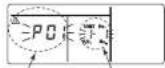
Error code
Indoor UNIT No. in which
an error occurred
■ Confirmation of error log
When an error occurred on the air conditioner, the error log can be confirmed with the following procedure. (The error log is stored in memory up to 4 errors.) The log can be confirmed from both operating status and stop status.
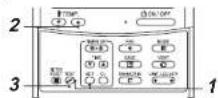
1 Push and buttons simultaneously for 4 seconds or more, the following display appears. If is displayed, the mode enters in the error log mode. • [01: Order of error log] is displayed in CODE No. • [Error code] is displayed in CHECK. • [Indoor unit address in which an error occurred is displayed in UNIT No.
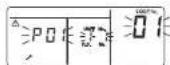
2 Every pushing of button used to set temperature, the error log stored in memory is displayed in order. The numbers in CODE No. indicate CODE No. [01] (latest) → [04] (oldest).
REQUIREMENT
Do not push 🔒 button because all the error log of the indoor unit will be deleted.
3 After confirmation, push ⏻ button to return to the usual display.
9 Operations and performance
▼ Check before running
- Check whether the earth wire is cut or disconnected
- Check whether the air filter is installed.
- Turn on the circuit breaker 12 hours or more before starting operation.
▼ 3 minutes protection function
3-minutes protection function prevents the air conditioner from starting for initial 3 minutes after the main power switch / circuit breaker is turned on for restarting the air conditioner.
▼ Power failure
Power failure during operation will stop the unit completely.
• To restart the operation, push the ON / OFF button on the remote controller.
• Lightning or a wireless car telephone operating nearby may cause the unit to malfunction. Turn off the main power switch or circuit breaker and then turn them on again. Push the ON / OFF button on the remote controller to restart.
▼ Defrosting operation
If the outdoor unit is frosted during the heating operation, defrosting starts automatically (for approximately 2 to 10 minutes) to maintain the heating capacity.
- The fans in both indoor and outdoor units will stop during the defrosting operation.
- During the defrostling operation, the defrosled water will be drained from the bottom plate of the outdoor unit.
▼ Heating capacity
In the heating operation, the heat is absorbed from the outside and brought into the room. This way of heating is called heat pump system. When the outside temperature is too low, it is recommended to use another heating apparatus in combination with the air conditioner.
▼ Protective device
• Stops operation when the air-conditioner is
overloaded
- If the protective device is activated, the unit stops running, and the operation indicator and check indicator on the remote controller blink.
▼ If the protective device is activated
- Turn off the circuit breaker and perform a checkup. Continued running may cause a malfunction. - Check whether the air filter is installed. If not, the heat exchanger may be clogged with dust and water leakage may occur.
▼ During cooling
- The air intake or discharge of the outdoor unit is clogged.
• Strong wind continuously blows against the outlet of the outdoor unit.
During heating
- The air filter is clogged with a large amount of dust. - The air intake or discharge of the indoor unit is clogged.
▼ Do not turn off the circuit breaker
- During the air-conditioning season, leave the circuit breaker turned on, and use the ON/OFF key on the remote controller.
▼ Attention to snowfall and freeze on the
outdoor unit
- In snowy areas, the air intake and air discharge of the outdoor unit are often covered with snow or frozen up.
If snow or freeze on the outdoor unit is left as it is, it may cause machine failure or poor warming.
- In cold areas, pay attention to the drain hose so that it perfectly drains water without water remaining inside for freeze prevention. If water freezes in the drain hose or inside the outdoor unit, it may cause machine failure or poor warming.
▼ Air conditioner operating conditions
For proper performance, operate the air conditioner under the following temperature conditions:
| Cooling operation | Outdoor temperature : -15°C to 46°C (Dry bulb temp.) |
| Room temperature : 21°C to 32°C (Dry bulb temp.). 15°C to 24°C (Wet bulb temp.) | |
| [CAUTION] Room relative humidity – less than 80%. If the air conditioner operates in excess of this figure, the surface of the air conditioner may cause dewing. | |
| Heating operation | Outdoor temperature : -15°C to 15°C (Wet bulb temp.) |
| Room temperature : 15°C to 28°C (Dry bulb temp.) |
If air conditioner is used outside of the above conditions, safety protection may work.
10 Installation
Do not install the air conditioner in the following places
- Do not install the air conditioner in any place within 1 m from a TV, stereo, or radio set. If the unit is installed in such place, noise transmitted from the air conditioner affects the operation of these appliances.
Do not install the air conditioner near a high frequency appliance (such as sewing machine or massager for business use), otherwise the air conditioner may malfunction. - Places where iron or other metal dust is present. If iron or other metal dust adheres to or collects on the interior of the air conditioner, it may spontaneously combust and start a fire.
- Do not install the air conditioner in a humid or oily place, or in a place where steam, scot, or corrosive gas is generated.
- Do not install the air conditioner in a salty place such as seaside area.
- Do not install the air conditioner in a place where a great deal of machine oil is used.
- Do not install the air conditioner in a place where it is usually exposed to strong wind such as in seaside area.
- Do not install the air conditioner in a place where sulfureous gas generated such as in a spa.
• Do not install the air conditioner in a vessel or mobile crane. - Do not install the air conditioner in an acidic or alkaline atmosphere (in a hot-spring area or near a chemicals factory, or in a place subject to combustion emissions). Corrosion may be generated on the aluminum fin and copper pipe of the heat exchanger.
- Do not install the air conditioner near an obstacle (such as air vent, lighting equipment) that disturbs discharge air. (Turbulent airflow may reduce the performance or disable devices.)
- Do not use the air conditioner for special purposes such as preserving food, precision instruments, or art objects, or where breeding animals or growing plants are kept.
(This may degrade the quality of preserved materials.) - Do not install the air conditioner over an object that must not get wet. (Condensation may drop from the indoor unit at a humidity of 80% or more or when the drain port is clogged.)
- Do not install the air conditioner in a place where an organic solvent is used.
- Do not install the air conditioner near a door or window subject to humid outside air.
Condensation may form on the air conditioner. - Do not install the air conditioner in a place where special spray is used frequently.
Be careful with noise or vibrations
- Do not install the air conditioner in a place where noise by outdoor unit or hot air from its air discharge annoys your neighbours.
• Install the air conditioner on a solid and stable foundation so that it prevents transmission of resonating.
operation noise and vibration
• If one indoor unit is operating, some sound may be audible from other indoor units that are not operating.
MEMO
......
The image contains only dotted lines, which are stylistic or background elements and not text. According to the correction guidelines, such lines must be ignored. Therefore, the correct OCR output is empty.
(no text)
MEMO
......
The image contains only dotted lines, which are stylistic or background elements and not text. According to the correction guidelines, such lines must be ignored. Therefore, the correct OCR output is empty.
(no text)
MEMO
......
The image contains only dotted lines, which are stylistic or background elements and not text. According to the correction guidelines, such lines must be ignored. Therefore, the correct OCR output is empty.
(no text)
1116950249
144 / 9 Mioo's, Bangkadi industrial park, Tavanon Road, Templeb Bangkadi, Amphur Muang, Patnumbani 12000, Thailand
Toshiba Carrier (Thailand) Co., Ltd.