
KM0818 - Radio Krüger&Matz - Free user manual and instructions
Find the device manual for free KM0818 Krüger&Matz in PDF.


| Product Type | Portable Radio |
| Brand | Krüger&Matz |
| Model | KM0818 |
| Dimensions (W x H x D) | 200 x 120 x 50 mm |
| Weight | 0.5 kg |
| Power Supply | 2 x AA batteries (not included) or USB DC 5V |
| Frequency Range FM | 87.5 - 108 MHz |
| Frequency Range AM | 520 - 1710 kHz |
| Speaker Power | 3 W |
| Antenna | Telescopic |
| Headphone Jack | 3.5 mm |
| Additional Functions | Clock, Alarm, Sleep Timer |
| Display | LCD |
| Tuning Type | Digital |
| Memory Presets | 20 stations |
| Care and Cleaning | Wipe with a soft, dry cloth. Do not use liquid or aerosol cleaners. |
| Safety | Keep away from heat sources and moisture. Not suitable for children under 3 years. |
| Spare Parts and Repairability | Contact authorized service center. No user-serviceable parts inside. |
| General Information | KRÜGER&MATZ KM0818 is a portable radio with digital tuning, LCD display, and multiple power options. |
Frequently Asked Questions - KM0818 Krüger&Matz
User questions about KM0818 Krüger&Matz
0 question about this device. Answer the ones you know or ask your own.
Ask a new question about this device
Download the instructions for your Radio in PDF format for free! Find your manual KM0818 - Krüger&Matz and take your electronic device back in hand. On this page are published all the documents necessary for the use of your device. KM0818 by Krüger&Matz.
USER MANUAL KM0818 Krüger&Matz
Internet radio KM0818

NÁVOD K OBSLUZE CS
BEDIENUNGSANLEITUNG
DE
OWNER'S MANUAL
EN
ΕΓΧΕΙΡΙΔΙΟ ΧΡΗΣΤΗ
GR
INSTRUKCJA OBSŁUGI
PL
MANUAL DE UTILIZARE
RO
BEZPEČNOSTNÍ POKYNY
Read this instruction manual and keep it for future reference. Producer does not claim liability for any damage caused by inappropriate use and handling or any mechanical damage.
-
Protect this device from water, humidity and other liquids. Avoid using/storing it in the strong magnetic environment. Do not expose it to direct sunlight and other sources of heat.
-
Device for indoor use only.
-
Do not handle this device with wet hands.
-
Before connecting the device to power supply socket, make sure the voltage indicated on the device corresponds to the voltage in the power supply socket.
-
Disconnect from power outlet if the device is not going to be used for a long time.
-
When you disconnect the power cord of the device, grasp and pull the plug, not the cord/cable.
-
Use only authorized accessories. This device may be used only with original power adapter.
-
This appliance may be used by children who are above 8 years old and by persons with reduced physical, sensory or mental capabilities, or lack of experience and knowledge, if they are supervised and guided by a person who is responsible for their safety in a cautious manner for all the safety precautions being understood and followed. Children should be supervised to ensure that they do not play with the appliance. Children should not perform cleaning and servicing of the device unsupervised.
-
Keep the volume at a reasonable level throughout entire time of using the speaker. To prevent damage to your hearing, do not raise the volume too high.
-
Never use this device if the power adapter or the device itself is damaged.
-
Do not disassemble nor repair this device yourself. The device has no user serviceable parts inside. In case of damage, contact authorized service point for check-up or repair.
-
Always disconnect the product from the power source before cleaning. Clean the device with a soft, slightly damp cloth. Do not use any chemical agents to clean this device.
PRODUCT DESCRIPTION

- Display
- Standby button
- Volume / select knob
- Menu button
- Left / Back navigation button
- Right navigation button / switch to submenu
- Favourites button
- Local stations button
EN
Krüger&Matz
Owner's manual Owner's manual
Krüger&Matz
FIRST STEPS
- Connect the device to power supply mains with an included power adapter: plug the supplied power adapter into the DC-in socket (on the rear of the device) and the other end into a power mains socket.
- Press the standby button on the device to switch on the device on. The screen will display Kruger&Matz KM 0818 notification.
- When switched on for the first time, the radio will scan for available networks. User can configure network manually, via WPS or withhold from connecting with a network. Use volume / select knob on the device to navigate through options:
- Select "Yes" to configure network manually: Choose the desired network you want to connect. Then enter password if necessary. Enter each by rotating volume / select knob on the device and press right navigation button on the device to move to next sign. Press rotating volume / select knob on the device to confirm.
- Select "Yes (WPS)" to configure network with use of WPS function: the KM0818 will request pressing the WPS button on your router within 120 seconds When pressed, the device will automatically connect with network
- Select "No" to withhold from connecting to network.
- When connected successfully, you will see the Wi-Fi logo in the upper left corner.
OPERATION
Standby
EN B Press the standby button on the front panel to wake up the unit or switch to the standby mode..
Note: the device has to be connected to power supply beforehand!
Menu
Press the menu button on the front panel to enter the menu. Press left / right navigation buttons or selection knob to select appropriate option
Volume
Use volume / select knob on the front panel to adjust the volume.
SETTINGS
Press the volume knob on the front panel or use the direction buttons on the remote control to select settings; press volume / select knob to enter.
Time display
Select analog or digital clock.
Manage my MediaU
Enter My MediaU and manage the account. Note: before using this function for the first time, you need register in http://www.mediayou.net and set up account (otherwise the display will show information that the link to a account is not valid). Enter related data of the device into yo account. You will need to add the device to the list: name ar the series number (SN number is available in Information Center > System Information > Wireless Info; SN is the MAC address).
Network
- Wireless network configuration Select the tab to configure your network. The device will automatically scan for available wireless networks. Once displayed, select desired network and press volume / select knob on the device. The device will prompt you to input password (use volume / select knob to input a letter/num and press it to move to next letter - note correct capitalization!). When the full password has been input, press volume / select knob on the device to confirm. The device will automatically connect with the network, and a network symbol will be displayed in the upper left corner of the screen.
Krüger&Matz
- Wireless Network (WPS PBC)
For WPS connection with router, enter the tab and follow instructions displayed on the radio's screen.
- Manual configuration
Enter the tab to manually connect with a network (DHCP: on/off; Enter SSID; Manage: Select the Wi-Fi and either delete or not).
- Check network when power on (enable or disable).
Date and time:
User can manually set date and time, select automatic detection (automatic detection is only available only when connected to a network), set the time format, set date format and set daylight saving time (only when time and date have been set manually).
Alarm
User can set 2 alarms. When alarm set to ON, you can adjust repetition mode, time of the alarm and its sound. User can also adjust nap time and alarm volume.
- Note: when set the alarm sound to Internet radio, there have to be saved favorites beforehand.
- Nap alarm will issue sound after a certain, previously selected time will pass. You can choose from 5, 10, 20, 30, 60, 90, 120 minutes.
- Press any key to activate snooze. Press standby button to switch off alarm when it's ringing.
- Note: If alarm is set to wake you up with an internet station, but it does not work in 1 minute, the device will automatically switch to buzzer.
Timer
Press left / right navigation buttons to adjust the time. You will hear the sound until the countdown is over.
Owner's manual Owner's manual
Krüger&Matz
Scheduled Playback
Select the time of switching on and off the selected radio station from the list of favorites, as well as the frequency pe week.
Language
Open the tab to change device language settings.
Dimmer
Select display dimmer mode: power saving (after pressing a button, the backlight will be on. When no button is pressed within 15 seconds the backlight will be dimmed) / turn on (th brightness will be in the set level. It will in power saving level when is in standby).
Display
Select color or monochrome.
Power management
Select power management settings (the device will turn off automatically after set period when there is no sound output): off, 5 minutes, 15 minutes, 30 minutes.
NOTE: This unit will enter STANDBY mode automatically after minutes of inactivity by default. Press the Standby button to wake the unit.
Sleep timer
Set a predefined time to enter standby mode automatically: of 15 minutes, 30 minutes, 60 minutes, 90 minutes, 120 minutes, 150 minutes, 180 minutes.
Equalizer
Select the appropriate EQ option using the Volume / Select knob.
Weather
Select location, temperature unit, and whether to display the information when on standby.
Krüger&Matz
Owner's manual Owner's manual
Krüger&Matz
Local radio setup
Select method of localization setup (manual or automatic)
Playback setup
Select playback repeat mode (off, repeat all, repeat one, shuffle). Function supported only in UPnP mode.
Menu
To select which options will be displayed in the main menu, highlight the desired option and mark it by pressing the volume knob.
Device
- Rename: user can change default name of the device.
- AirMusic Control App: Scan the QR code from the display (Google Play or AppStore according to your mobile device operating system). Download and install the app on your mobile device to manage the device through the mobile app.
Resume when power on
Allows to resume the last radio station after turning the radio on.
Software Update
Enter this tab to check whether an update is available. Note: do not disconnect the device from power supply during software update, as this may damage the unit.
Reset to Default
Select yes to reset to default settings.
EN B
AIRMUSIC CONTROL APP
Once the user downloads and installs the app on theirs mobile device, the app serves for remote managing of the device. Please note, the KM0818 radio and the mobile device with the AirMusic Control app need to be connected to the same network, otherwise the two devices won't be able to connect with each other Open the app and there will be displayed list of available devices. Click on the appropriate to connect.
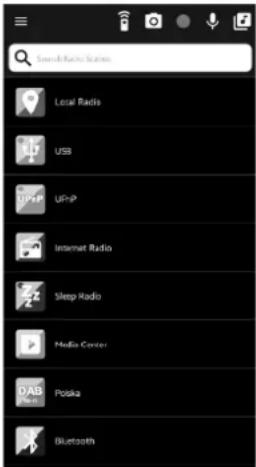
Note: the device will automatically adjust language of the KM0818 radio to the language set in the mobile device with AirMusic Control app.
The app lets user control the device via mobile phone:
- Choose appropriate tab to manage the radio.
- Press icon — to display side tab. Select Settings to enter more options (change device name, check software updates, scan for other devices or display information).
- Press 📄 to enter remote control mode. The app will serve as a remote control, and the mobile device with AirMusic Control App will display remote control buttons.
Krüger&Matz
Owner's manual Owner's manual
Krüger&Matz
- Standby mode
- Direction buttons
- OK button
- Menu button
- Mode button
- Alarm
- Sleep timer
- Play / pause
- Previous
10.Numeric buttons - Next
- Lightning settings
- Favourites
- Volume buttons
- Mute

EN

- Press to enter standby screen selection setting. Then choose or take a picture to set as a screen saver on the standby display.
- Press to enter voice message option. Press and hold to record voice message; release to stop recording. The red flashing circle will be displayed on the upper left corner of the screen of the radio. To play the voice message, enter any tab in menu recording will be streamed via radio speaker.
-
Press to enter voice message option. Press and hold to record voice message; release to stop recording. The red flashing circle will be displayed on the upper left corner of the screen of the radio. To play the voice message, enter any tab in menu recording will be streamed via radio speaker.
-
Press to enter intercom option. Press and hold to record; release to stop recording. The recording will be streamed via radio speaker.
- Press to enter local music directory stored on the mobile device to stream through the radio.
INTERNET RADIO
While in the menu, select Internet radio using the Volume / Select knob.
- My favorite::
Enter the tab or press the favourites button on the front pan to display your stored favorite stations.
When listening to a radio station, press and hold favourites button to store the station.
- Radio Station / Music
User can select the one of four station type: Global Top 20, Genre, Country/Location or Highlight, and press the volume / select knob to enter. Select the radio station you want to listen.
- Local Radio
Select your location beforehand and choose one of the station to listen.
- History
Lists history of played stations.
-
Service
-
User can search for radio stations by using the number buttons on the mobile app or by using the volume / select knob.
- Using the numeric buttons on the mobile application or the volume / selection knob, you can add a new radi station (enter a new address link).
Krüger&Matz
Owner's manual Owner's manual
Krüger&Matz
BLUETOOTH
Prior to use via Bluetooth, pair the KM0818 with an external Bluetooth device, to play the music through the radio speaker. Once the devices are paired, the KM0818 will automatically connect with the external device whenever within operational range and both appliances will have Bluetooth function ON. To pair the KM0818 with an external device:
- Press the volume / select knob button to switch to the Bluetooth mode.
- Place your mobile device within operational range (the closer the better). Turn ON the Bluetooth on the mobile device.
- Search for other BT devices on your mobile device and pair it with the KM0818.
- Input default password "0000" if necessary.
NOTE: The KM0818 can only connect with one device at a time. To connect to a different device, disconnect from the device that has been paired as a first one and follow the pairing procedure once again with the new device.
MEDIA CENTER
This device connects with shared folder on your PC through UPnP. Note: the device and your computer must be connected to the same network and in the homegroup
EN B
In order to share music files with the KM0818, you need to install an appropriate UPnP media server on your computer. If you operate on Windows PC, Windows Media Player (11 or later) works as an UPnP sharing server.
Note: Ensure to disable Windows firewall from blocking access for sharing files. Don't confuse your PC firewall with your routers firewall - do not switch off your routers firewall.
Within Windows Media Player 12, click the „stream“ and make sure „automatically allow devices to play my media“ is enabled.
Make sure the KM0818 device is in the same homegroup as your PC with the shared folder, and is allowed to stream from other devices (Homegroup settings in Control Panel).
After configuring WMP and home group settings, enter Media Center and go to UPnP. The device will scan for all available UPnP servers.
Notes:
- It may take a few seconds for scanning. The radio will display "Empty" before it's completed.
- The device supports only: AAC, WMA, MP3, WAV, FLAC, LPCM formats.
INFORMATION CENTER
Press menu button and use volume / select knob to go to Information center tab. Then use the volume / select knob to select a sub-menu and press the knob to enter weather, financial information and system information.
Weather information
This option gives you insight to 5 days weather forecast in a chosen place.
Add to Standby Display
You can also add the chosen location weather forecast to standby display. After selecting desired location, press knob when the city is highlighted. The screen will display "Add to standby display", press knob again to confirm.
Financial information
Option allows you to stay in touch with current the information of stock markets all over the world.
System information
Entry consists of information on Version / Wireless Info.
Krüger&Matz
Owner's manual Owner's manual
Krüger&Matz
CLEANING AND MAINTENANCE
To clean the casing, unplug the unit and wipe it with a soft, damp cloth (do not use abrasive polishes nor other chemicals)
specification
Main parameters
• Around 25000 internet stations
• Color display 2,4"
- Playing music from a smartphone
• Radio operation via the AirMusic Control mobile application
• Supported formats: AAC, WMA, MP3, WAV, FLAC, LPCM
Speakers
- Drivers: 2,5"
• Output power: 3,5 W
• Impedance: 3,2 Ohm ± 15% - THD: < 10%
• Sensitivity: 95 ± 3 dB
Connectivity
• Wi-Fi: 802.11 a/b/g/n
• UPnP/DLNA: supported
- Bluetooth: 5.0
- Bluetooth range: up to 10 m
- App compatibility: Android, IOS
I/O
EN B
- DC-in
- USB socket
Functions
- Clock
• DAB - Dual alarm
-
Weather station
• Financial informations -
Timer
- Sleep timer
- Internet radio preset memory: 250
Power supply
- AC/DC adapter:
• Input: AC 100 - 240 V 50/60 Hz
• Output: DC 5 V / 1 A
• Power consumption: 1,3 W
Body
• Dimensions: 100 x 115 x 165 mm
- Weight: 475 g
Set includes
- Radio
- AC/DC adapter
Krüger&Matz
Owner's manual
Εγχειρίδιο χρήστη
Krüger&Matz
Lechpol Electronics Sp. z o.o. Sp.k. hereby declares that Internet radio KM0818 is consistent with directive 2014/53/UE. Full text of the EU Declaration of Conformity is available at following Internet address: www.lechpol.pl
LEARN MORE
For more information on this device visit: www.krugermatz.com. Read owner's manual carefully before using. Visit www.krugermatz.com website for more products and accessories. In case of any doubts or questions reach out to our Frequently Asked Questions section.

English
Correct Disposal of This Product (Waste Electrical & Electronic Equipment)

(Applicable in the European Union and other European countries with separate collection systems) This marking shown on the product or its literature, indicates that it should not be disposed with other household wastes at the end of its working life. To prevent possible harm to the environment or human health from uncontrolled waste disposal, please separate this from other types of wastes and recycle it responsibly to promote the sustainable reuse of material resources. Household users should contact either the retailer where they purchased this product, or their local government office, for details of where and how they can take this item for environmentally safe recycling. Business users should contact their supplier and check the terms and conditions of the purchase contract. This product should not be mixed with other commercial wastes for disposal.
Made in China for LECHPOL ELECTRONICS Sp. z o.o. Sp.k., ul. Garwolińska 1, 08-400 Miętne.
ΟΔΗΓΙΕΣ ΑΣΦΑΛΕΙΑΣ
Select method of localization setup (manual or automatic)


CENTRUM INFORMACYJNE
natural_image
Completely dark image with no visible content, text, or symbols.
line
| X | Y | |---|---| | 0.0 | 0.0 | | 0.1 | 0.1 | | 0.2 | 0.2 | | 0.3 | 0.3 | | 0.4 | 0.4 | | 0.5 | 0.5 | | 0.6 | 0.6 | | 0.7 | 0.7 | | 0.8 | 0.8 | | 0.9 | 0.9 | | 1.0 | 1.0 | | 1.1 | 0.9 | | 1.2 | 0.8 | | 1.3 | 0.7 | | 1.4 | 0.6 | | 1.5 | 0.5 | | 1.6 | 0.4 | | 1.7 | 0.3 | | 1.8 | 0.2 | | 1.9 | 0.1 | | 2.0 | 0.0 |
www.krugermatz.com
Krüger&Matz is a registered trademark


- Internet radio KM0818
- BEZPEČNOSTNÍ POKYNY
- PRODUCT DESCRIPTION
- EN
- Krüger&Matz
- Owner's manual Owner's manual
- FIRST STEPS
- OPERATION
- Standby
- Menu
- Volume
- SETTINGS
- Time display
- Manage my MediaU
- Network
- Date and time:
- Alarm
- Timer
- Scheduled Playback
- Language
- Dimmer
- Display
- Power management
- Sleep timer
- Equalizer
- Weather
- Local radio setup
- Playback setup
- Device
- Resume when power on
- Software Update
- Reset to Default
- AIRMUSIC CONTROL APP
- INTERNET RADIO
- BLUETOOTH
- MEDIA CENTER
- EN B
- Notes:
- INFORMATION CENTER
- Weather information
- Add to Standby Display
- Financial information
- System information
- CLEANING AND MAINTENANCE
- specification
- Main parameters
- Speakers
- Connectivity
- I/O
- Functions
- Power supply
- Body
- Set includes
- Owner's manual
- Εγχειρίδιο χρήστη
- LEARN MORE
- English
- Correct Disposal of This Product (Waste Electrical & Electronic Equipment)
- ΟΔΗΓΙΕΣ ΑΣΦΑΛΕΙΑΣ
- CENTRUM INFORMACYJNE
Brand : Krüger&Matz
Model : KM0818
Category : Radio