
Pure Air LXPA705 - Air purifier LTC - Free user manual and instructions
Find the device manual for free Pure Air LXPA705 LTC in PDF.


| Product Type | Air Purifier |
| Brand | LTC |
| Model | Pure Air LXPA705 |
| Air Purification Capacity (CADR) | 150 m³/h |
| Recommended Room Size | 18 m² |
| Maximum Noise Level | 58 dB |
| Power Consumption | 25 W |
| Speed Modes | 3 (High/Medium/Low) |
| Anion Generation | Yes |
| Filter Type | Replaceable (remove plastic bag before use) |
| Aroma Function | Yes (uses aroma cotton) |
| Filter Replacement Reminder | Yes |
| Control Panel | ON/OFF button, Anion generation switch, Filter reset switch, Speed mode indicators |
| Filter Reset | Press and hold for 3 seconds |
| Maintenance | Clean casing monthly with dry cloth; do not use water |
| Safety Features | Do not use near flammable substances; keep away from heat sources; do not touch with wet hands |
| Set Contents | 1 Air purifier, 1 User manual, 3 Aroma cotton, 1 Filter |
Frequently Asked Questions - Pure Air LXPA705 LTC
User questions about Pure Air LXPA705 LTC
0 question about this device. Answer the ones you know or ask your own.
Ask a new question about this device
Download the instructions for your Air purifier in PDF format for free! Find your manual Pure Air LXPA705 - LTC and take your electronic device back in hand. On this page are published all the documents necessary for the use of your device. Pure Air LXPA705 by LTC.
USER MANUAL Pure Air LXPA705 LTC
natural_image
Line drawing of a cylindrical smart air purifier with ventilation grilles and control buttons (no text or symbols)Instrukcja obsługi
Zawartość zestawu
natural_image
Line drawing of a cylindrical smart air purifier with ventilation grilles and control buttons (no text or symbols)User manual
Set contents
| Item | Quantity (in pcs) | Notes |
| Air purifier | 1 | |
| User manual | 1 | |
| Aroma cotton | 3 | |
| Filter | 1 | Before use, remove the filter from the plastic bag! |
Table of contents
| Precautions | 2 |
| Device diagram | 3 |
| Aroma/filter installation | 4 |
| Device operation | 5 |
| Troubleshooting | 6 |
| Notes on power supply | 7 |
| Device maintenance and specification | 8 |
| Disposal information | 9 |
Precautions
Thank you for buying the device. Please read this manual carefully before use and keep it for future use.
Before using the device for the first time, remove the plastic filter bag! Follow the instructions in the section "Aroma/filter installation"!

Prohibited
Anything marked with this sign is absolutely forbidden, otherwise it may damage the device or endanger the safety of the user.

Must comply
In the case of content bearing this mark, the safety of the product and the personal safety of the user is dependent on strict adherence to the recommendations contained therein.

This device may not be used by persons with reduced physical or mental ability or have no experience or knowledge of the equipment.

The children are forbidden to operate the device.

It is forbidden to put any objects into the device.

Do not use the device near flammable gases, vapours or liquids. Avoid contact devices with heat sources or strong sunlight.

Do not touch the device with wet hands.

Check and replace the filter regularly. Filter's condition has an impact on energy consumption and the effectiveness of the device. A blocked filter may even cause malfunction.

When cleaning and maintaining the unit, switch it off and disconnect it first from power. Use a soft, dry cloth to clean the device.

In case of improper operation of the device, please follow the instructions included in the "troubleshooting" section.

For proper operation, keep the air inlet and outlet accessible by placing them away from walls, curtains, etc. with a minimum distance of 50cm.

The device is intended for household and indoor use only.
Device diagram

Aroma/filter installation
Before installation, make sure that the unit is disconnected from the power supply!
-
To release the filter cover, grasp the handle and turn the counter clockwise. [direction indicated by the padlock arrow.]
-
Remove the filter from the unit.

natural_image
Diagram showing a circular component with internal structure and an inset view of a truck on a road (no text or symbols)
-
Remove the filter from the plastic packaging before using the device for the first time or replacing it with a new filter.
-
Place a new filter inside the unit. Close the cover by turning it clockwise.


natural_image
Diagram showing a circular component with internal structure and an inset view of a vehicle (no text or symbols)- Upon filter change completion, press and hold the "Filter Reset Switch" for 3 seconds. When the command is successfully completed, the device will emit an audible message and the indicator will go out.
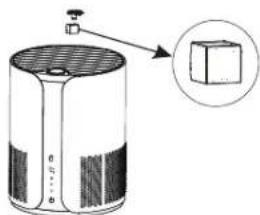
The aroma cotton is placed in the device. To replace or fill the cotton with fragrance oil, open the cover on top of the unit.
Device operation
Control panel indicators and operation:
When the power is first turned on, the device will emit a sound and all the buttons on the control panel will light up and the indicator will go out.
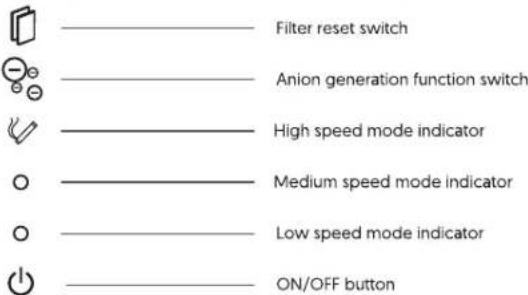
ON/OFF button
In standby mode, press the ON/OFF button to turn on the unit. When switched on, the unit automatically switches to low speed mode. Pressing the on ON/OFF button again cycles through speed modes. Press the ON/OFF button for about 3 seconds to turn off the unit.
The anion generation switch is responsible for switching on and off the anion generation function.
When the filter change reminder light comes on, turn off the unit and replace or clean the filter. When the filter change is complete, press and hold the "Filter Reset Switch" for 3 seconds. When the command is successful, the unit will emit an audible message and the indicator will go out.
Troubleshooting
| Problem | Cause | Solution |
| No device activity | The device is not turned on | Press the ON/OFF button |
| No power supply | Connect the device to the power supply | |
| Unpleasant smell | Filter contamination | Replace or clean the filter |
| insufficient device performance | The air in the room is too dry | Increase air humidity |
| The air outlet/air inlet is blocked by other objects | Relocate the device | |
| No air is blowing out | Foreign bodies in the air outlet/air inlet | Remove foreign bodies |
| Filter has not been removed from the packaging | Remove the filter packaging |
If the problem cannot be resolved, contact a repair service.
Notes on power supply
Notes on power supply
Before connecting the device to the mains socket, check if the voltage and current of the power supply are in accordance with the values given on the device label.
Do not unplug the power plug by pulling on the cable, it may cause damage to the cable, cause short circuit, electric shock or fire.
Check that the cable or outlet to which the unit is to be connected is not damaged. Do not bend or twist the power cord.
Do not press the cable with heavy objects.
If the cable is damaged, it must be repaired by qualified personnel. Do not connect the unit to the power supply if the power cord is damaged.
To prevent damage to the power cord, avoid contact with sharp edges or hot surfaces.

WARNING
TO REDUCE THE RISK OF ELECTROCUTION, DO NOT ATTEMPT REPAIRING THE DEVICE BY YOURSELF, IT SHOULD BE REPAIRED ONLY BY QUALIFIED PERSONNEL!
Device maintenance
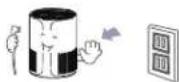
When cleaning the device, first switch it off and pull out the power plug. Do not operate the device or plug with wet hands, it may cause an electric shock.
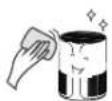
The casing of the device should at least Once a month, clean with a dry, soft cloth.
Do not use water or detergents when cleaning the unit; they may damage the unit.

Specification
Air purification capacity CADR: 150m³/h Recommended maximum room size: 18m² Max noise level: 58dB Power: 25W Working speed modes: 3 (high/medium/lo) Anion generation function: Yes
Disposal information

The elements and chemical compounds contained in the device may have a negative impact on the environment and human health. Waste electrical and electronic equipment marked with the crossed-out wheeled bin symbol must not be placed in municipal waste bins. Such equipment is subject to collection and recycling. Obligations resulting from the Waste Electrical and Electronic Equipment Act were taken over by the Recovery Organization on behalf of the entrepreneur, in accordance with the relevant agreement.
Due to the harmful substances they contain for the environment, used batteries should be delivered to a disposal plant or to the producer in accordance with the regulations on hazardous waste disposal.


Made in P.R.C. for Lamex

- Zawartość zestawu
- Precautions
- Before using the device for the first time, remove the plastic filter bag! Follow the instructions in the section "Aroma/filter installation"!
- Prohibited
- Must comply
- Aroma/filter installation
- Device operation
- ON/OFF button
- Notes on power supply
- WARNING
- Device maintenance
- Specification
- Disposal information
Brand : LTC
Model : Pure Air LXPA705
Category : Air purifier