
NV6353BGSSR - Oven SAMSUNG - Free user manual and instructions
Find the device manual for free NV6353BGSSR SAMSUNG in PDF.


| Product Type | Built-in Electric Oven |
| Brand | Samsung |
| Model | NV6353BGSSR |
| Usable Volume | 66 L |
| Net Weight | approx. 30.5 kg |
| Gross Weight (with packaging) | approx. 35.5 kg |
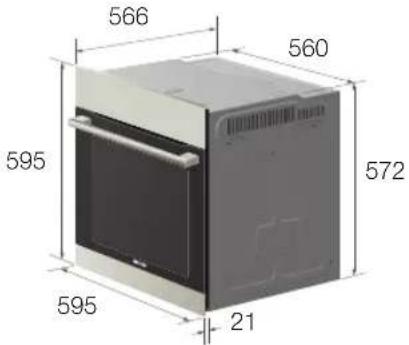
| Housing Dimensions (W x H x D) | 595 x 595 x 566 mm |
| Oven Interior Dimensions (W x H x D) | 440 x 365 x 405 mm |
| Power Supply | 230 V ~ 50 Hz |
| Maximum Power Rating | 3400 W |
| Cooking Functions | Conventional, Convection, Top Heat + Convection, Bottom Heat + Convection, Large Grill, Fan + Grill, Intensive Heat |
| Automatic Programs | 15 (pizza, chips, lasagne, meats, cakes, etc.) |
| Child Lock | Yes (activate by holding Time + Temperature keys) |
| Self-Cleaning | Catalytic enamel (optional), manual cleaning |
| Door Glass Panels | 3 (removable for cleaning) |
| Oven Light | 25 W, 230 V, 300 °C heat-resistant bulb (replaceable) |
| Accessories Included | Big grid, Small grid (optional), Baking tray (optional), Dripping tray (optional), Grill spit (optional), Rotisserie spit (optional), Telescopic slide guide (optional) |
| Installation Type | Built-in (upper or lower cabinet) |
| Cooling Fan | Yes (runs after use until oven cools) |
| Tone Signal | Adjustable (activate/deactivate via Alrm + End Time keys) |
Frequently Asked Questions - NV6353BGSSR SAMSUNG
User questions about NV6353BGSSR SAMSUNG
0 question about this device. Answer the ones you know or ask your own.
Ask a new question about this device
Download the instructions for your Oven in PDF format for free! Find your manual NV6353BGSSR - SAMSUNG and take your electronic device back in hand. On this page are published all the documents necessary for the use of your device. NV6353BGSSR by SAMSUNG.
USER MANUAL NV6353BGSSR SAMSUNG
natural_image
3D rendering of a white object on a dark surface with a blue arrow indicating rotation (no text or symbols)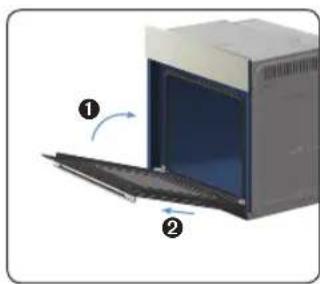
natural_image
Diagram of a computer tower with an open screen and two directional arrows indicating orientation (no text or symbols present)natural_image
Top-down schematic of a double door with a circular vent and a magnified inset showing a small object (no text or symbols)natural_image
Diagram of a rectangular device with internal fan and circular pattern (no text or symbols)natural_image
Diagram of a mechanical component inside a housing, showing internal structure with a directional arrow (no text or symbols)natural_image
3D diagram of a rectangular object with two side supports and directional arrows indicating orientation (no text or symbols)natural_image
Pure technical diagram of a mechanical component with no text or symbolsnatural_image
Close-up of a mechanical knob or dial with an arrow indicating rotation (no text or symbols visible)
natural_image
Two horizontal bar designs with grayscale shades and a central crosshair symbol (no text or labels)notatki


PRAWIDŁOWE USUWANIE PRODUKTU (ZUŻYTY SPRZĘT ELEKTRYCZNY I ELEKTRONICZNY)
natural_image
3D rendering of a mechanical component with a curved arrow indicating motion (no text or symbols)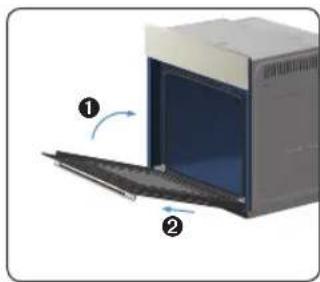
natural_image
Diagram of a computer oven with labeled parts (① and ②), showing internal components and airflow direction (no text or symbols beyond labels)natural_image
Diagram of a microwave oven interior with a circular vent and a magnified view of the vent (no text or symbols)natural_image
Diagram of a rectangular device with internal components and a central circular element (no text or symbols)natural_image
Diagram of a mechanical component with a central gear and directional arrow (no text or symbols)natural_image
3D diagram of a rectangular object with two side supports and directional arrows indicating force or movement (no text or symbols)natural_image
Pure technical diagram of a mechanical component with no text, numbers, or symbolsnatural_image
Close-up of a mechanical knob or dial with an arrow indicating rotation (no text or symbols visible)
natural_image
Two horizontal bar designs with grayscale shades and a central crosshair symbol (no text or labels)jegyzet


A TERMÉK HULLADÉKBA HELYEZÉSÉNEK MÓDSZERE (WEEE – ELEKTROMOS ÉS ELEKTRONIKUS BERENDEZÉSEK HULLADÉKAI)
POKYNY PRE LIKVIDÁCIU
Montáž do skrinky
natural_image
Close-up of a mechanical component with a blue arrow indicating rotation, no visible text or symbols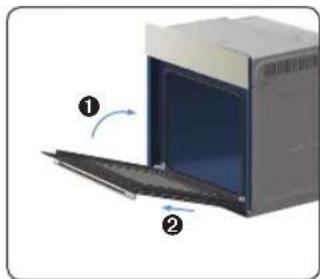
natural_image
Diagram of a kitchen appliance with labeled parts (① and ②), showing a closed door and keyboard (no text or symbols beyond labels)natural_image
Interior view of a microwave oven with a circular vent and a magnified inset showing a small object (no text or symbols)natural_image
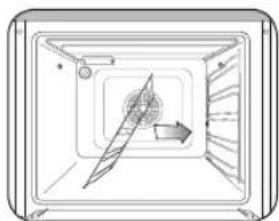
Diagram of a rectangular device with internal components and a central circular element (no text or symbols)- Otočte vodiacu lištu o približne 45°.
natural_image
Diagram of a mechanical component with a central blade and directional arrow (no text or symbols)- Potiahnite a vytiahnite vodiacu lištu zo spodných dvoch otvorov.

natural_image
3D diagram of a rectangular object with two arrows indicating direction, no text or symbols presentnatural_image
3D diagram of a mechanical assembly with layered components and a central rod (no text or symbols)natural_image
Pure technical diagram of a mechanical component with no text, numbers, or symbolsnatural_image
Close-up of a mechanical knob with an arrow indicating rotation (no text or symbols visible)
natural_image
Color palette bar with grayscale shades and a central crosshair symbol (no text or labels)poznámky


SPRÁVNA LIKVIDÁCIA TOHOTO VÝROBKU (ELEKTROTECHNICKÝ A ELEKTRONICKÝ ODPAD)
natural_image
Circular mechanical component with a central knob and two horizontal lines above it (no text or symbols)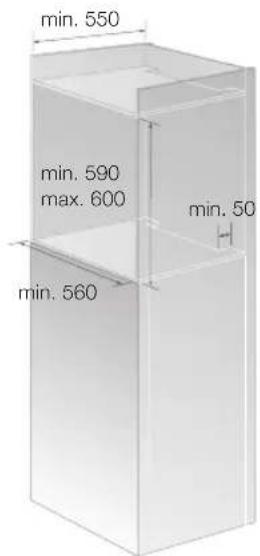
natural_image
Illustration of a robotic arm interacting with a vehicle (no text or symbols visible)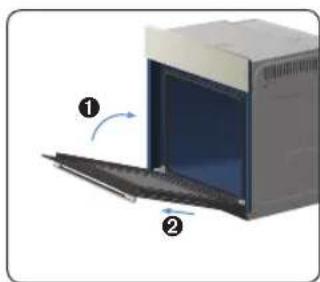
natural_image
Diagram of a kitchen appliance with two labeled parts (① and ②), showing a closed door and a side panel (no text or symbols beyond labels)natural_image
Diagram of a double door with a circular vent and a magnified inset showing internal components (no text or symbols)natural_image
Diagram of a rectangular device with internal components and airflow indicators (no text or symbols)natural_image
Diagram of a mechanical component inside a rectangular chamber, showing internal structure and directional arrow (no text or symbols)natural_image
3D diagram of a rectangular electronic component with mounting flanges and directional arrows indicating orientation (no text or symbols)natural_image
Pure technical diagram of a mechanical component with no text, numbers, or symbolsnatural_image
Close-up of a mechanical knob or dial with an arrow indicating rotation (no text or symbols visible)
natural_image
Two horizontal color swatches with a central crosshair symbol, no text or labels present.poznámky


SPRÁVNÁ LIKVIDACE VÝROBKU (ELEKTRICKÝ A ELEKTRONICKÝ ODPAD)
This manual is made with 100% recycled paper.
imagine the possibilities
ENGLISH
Thank you for purchasing this Samsung product.
Please register your product at
www.samsung.com/register
SAMSUNG
using this manual
Thank you for choosing a SAMSUNG Built - In Oven.
This user Manual contains important information on safety and instructions intended to assist you in the operation and maintenance of your appliance.
Please take the time to read this Owner's Manual before using your oven and keep this book for future reference.
The following symbols are used in the text of this Owner's Manual:

WARNING or CAUTION Important Note


safety instructions
Installation of this oven must be performed only by a licensed electrician. The installer is responsible for connecting the appliance to the mains power supply in observance of the relevant safety recommendations.
ELECTRICAL SAFETY
If the oven has been damaged in transport, do not connect it.
- This appliance must be connected to the mains power supply only by a specially licensed electrician.
- In the event of a fault or damage to the appliance, do not attempt to operate it.
- Repairs should be performed by a licensed technician only. Improper repair may result in considerable danger to you and others. If your oven needs repair, contact a SAMSUNG Service Centre or your dealer.
- If the supply cord is defective, it must be replaced by a special cord or assembly available from the manufacturer or an authorised service agent. (Fixed wiring type appliance only)
- If the supply cord is damaged, it must be replaced by the manufacturer, its service agent or similarly qualified persons in order to avoid a hazard. (power cord type appliance only)
- Electrical leads and cables should not be allowed to touch the oven.
- The oven should be connected to the mains power supply by means of an approved circuit breaker or fuse. Never use multiple plug adapters or extension leads.
- The rating plate is located on the right side of the door.
- The power supply of the appliance should be turned off when it is being repaired or cleaned.
• Take care when connecting electrical appliances to sockets near the oven. - This appliance is not intended for use by persons (including children) with reduced physical, sensory or mental capabilities, or lack of experience and knowledge, unless they have been given supervision or instruction concerning use of the appliance by a person responsible for their safety.
- It should allow to disconnection of the appliance from the supply after installation. The disconnection may be achieved by having the plug accessible or by incorporating a switch in the fixed wiring in accordance with the wiring rules.

WARNING: Accessible parts may become hot during use. To avoid burns young children should be kept away.

WARNING: The appliance and its accessible parts become hot during use. Care should be taken to avoid touching heating elements inside the oven. Children less than 8 years of age shall be kept away unless continuously supervised.

WARNING: Ensure that the appliance is switched off before replacing the lamp to avoid the possibility of electric shock.
SAFETY DURING OPERATION
- This oven has been designed only for the cooking of household foods.
- During use, the oven interior surfaces become hot enough to cause burns. Do not touch heating elements or interior surfaces of the oven until they have had time to cool.
- Never store flammable materials in the oven.
- The oven surfaces become hot when the appliance is operated at a high temperature for an extended period of time.
2\_using this manual
- When cooking, take care when opening the oven door as hot air and steam can escape rapidly.
- When cooking dishes that contain alcohol, the alcohol may evaporate due to the high temperatures and the vapour can catch fire if it comes into contact with a hot part of the oven.
- For your safety, do not use high-pressure water cleaners or steam jet cleaners.
• Children should be kept at a safe distance when the oven is in use. - Frozen foods such as pizzas should be cooked on the Big grid. If the baking tray is used, it may become deformed due to the great variation in temperatures.
- Do not pour water into the oven bottom when it is hot. This could cause damage to the enamel surface.
• The oven door must be closed during cooking. - Do not line the oven bottom with aluminium foil and do not place any baking trays or tins on it. The aluminium foil blocks the heat, which may result in damage to the enamel surfaces and cause poor cooking results.
- Fruit juices will leave stains, which can become indelible on the enamel surfaces of the oven. When cooking very moist cakes, use the deep pan.
- Do not rest bakeware on the open oven door.
- Young children should be supervised to ensure that they do not play with the appliance.
- During use the appliance becomes hot. Care should be taken to avoid touching heating elements inside the oven.
- If the supply cord is damaged, it must be replaced by the manufacturer, its service agent or similarly qualified persons in order to avoid a hazard.
• Children should be supervised to ensure that they do not play with the appliance - appliances are not intended to be operated by means of an external timer or separate remote-control system.
- Do not use harsh abrasive cleaners or sharp metal scrapers to clean the oven door glass since they can scratch the surface, which may result in shattering of the glass
- This appliance can be used by children aged from 8 years and above and persons with reduced physical, sensory or mental capabilities or lack of experience and knowledge if they have been given supervision or instruction concerning use of the appliance in a safe way and understand the hazards involved. Children shall not play with the appliance. Cleaning and user maintenance shall not be made by children without supervision.
- For your safety, do not use high-pressure water cleaners or steam jet cleaners.
- during cleaning conditions the surfaces may get hotter than usual and children should be kept away
- Excess spillage must be removed before cleaning and utensils which state in cleaning manual can be left in the oven during cleaning.
- If this appliance has steam or self cleaning function, excess spillage must be removed before cleaning and all utensils should not be left in the oven during steam cleaning or self cleaning.
- If this appliance has self cleaning function, during self cleaning the surfaces may get hotter than usual and children should be kept away.
- Do not step, lean, sit or place heavy stuff on the door.
- Do not open the door with unnecessarily strong power.

WARNING: Do not disconnect the appliance from the main power supply even after the cooking process is completed.

WARNING: Do not leave the door open while oven is cooking.
DISPOSAL INSTRUCTIONS
Disposing of the packaging material
- The material used to package this appliance is recyclable.
- Dispose of the packaging materials in the appropriate container at your local waste disposal facility.
Disposing of old appliances

WARNING: Before disposing of old appliances, make them inoperable so that they cannot be a source of danger.
To do this, disconnect the appliance from the mains supply and remove the mains lead.
To protect the environment, it is important that old appliances are disposed of in the correct manner.
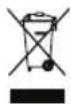
- The appliance must not be disposed of with household rubbish.
- You can obtain information about collection dates and public refuse disposal sites from your local refuse department or council.
safety instructions_3


contents
OveN CONTROIs
5 Oven controls

ACCessORy
5 Accessory

TesT dishes
7 Test dishes

fFUNCTIONs
8 Functions

UsING The COOKING mOde
8 Using the cooking mode

seTTINGs
9 Time setting
9 Set cooking time
9 set end time
10 Change times set
10 Change temperature
10 Set alarm
10 Deactive alarm
10 Time display
11 Tone signal
11 Lamp
11 Child lock
AUTOMATIC COOKING
12 Auto cook programmes

INsTALIATION & mAINTeNANCE
14 Installation
15 Initial setup
15 Troubleshooting
15 Information codes
CleANING & CARE
16 Rapid drying
16 Catalytic enamel surface (Optional)
16 Hand cleaning
17 Door removal
18 Detaching the side runners (Optional)
18 Door Glass Removal
18 Bulb exchange
4_contents

oven controls
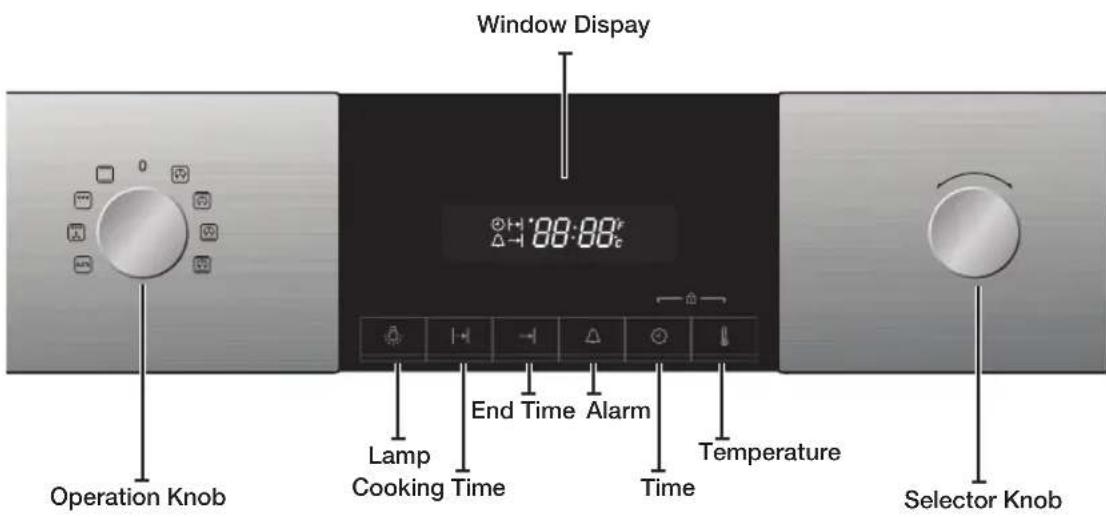
Front design
The front panel is available in various material and color options including stainless steel, white, black and glass. For purposes of quality improvement, the appearance may be subject to change.
The Function Select Knob and the Time Control Knob are pop - up knobs. Simply push to turn. (Optional)
accessory
Your new Samsung oven comes with a lot of accessories that should become very helpful during the preparation of different meals.
CAUTION: Be sure to attach the accessory correctly to the racks. Trays need to have at least 2 cm space towards the bottom of the oven, otherwise the enamel surface could be damaged.
WARNING: Be very careful removing meals and/or accessories out of the oven. Hot meals, accessories and surfaces can burn you!
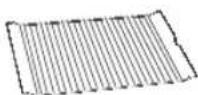
Small grid (Optional)
The small grid should be used for grilling and roasting meals. It can be used in combination with the dripping tray to prevent liquids from dropping onto the bottom of the oven.
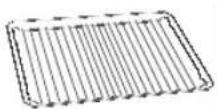
Big grid
The big grid should be used for grilling and roasting meals. You could use it with casseroles and other baking pots. Please put the bent up frame side to the back, in order to support the restposition when cooking big loads.
oven controls_5
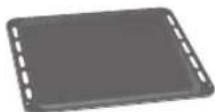
Baking tray (Optional)
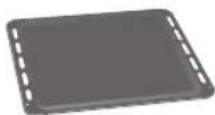
The (flat) baking tray could be used for the preparation of cakes, cookies and other pastries. Please put the slanted side to the front.
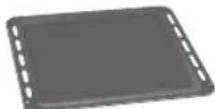
Dripping tray (Optional)
The (deep) dripping tray is good for roasting. It can be used in combination with the small grid to prevent liquids from dropping onto the bottom of the oven. Please put the slanted side to the front.
Extra dripping tray (Optional)
The extra dripping tray is good for large amount of food. Please put the slanted side to the front.
Grill spit (Optional)
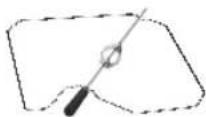
The grill spit could be used for grilling fowls such as chicken. The grill spit can only be used in single mode on rack 3, because its spit has to be attached to an adapter on the back plane. Remove black handle while cooking.
Rotisserie spit and Shasilik (Optional)
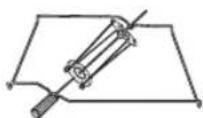
To use it :
- Place the deep pan (no trivet) at level 1 to collect the cooking juices or on the bottom of the oven if the piece of meat to be roasted is too big.
- Slide one of the forks onto the spit; put the piece of meat to be roasted onto the spit;
- Parboiled potatoes and vegetables can be placed around the edge of the deep pan to roast at the same time.
- Place the cradle on the middle shelf and position with the "v" shape at the front.
- To help insert the spit, the handle can be screwed onto the blunt end.
- Rest the spit onto the cradle with the pointed end towards the back and gently push until the tip of the spit entres the turning mechanism at the back of the oven. The blunt end of the spit must rest on the "v" shape. (The spit has two lugs which should be nearest to the oven door so to stop the spit going forward, the lugs also act as a grip for the handle.)
- Before cooking unscrew the handle. After cooking screw the handle back on to help remove the spit from the cradle.
Telescopic slide guide (Optional)
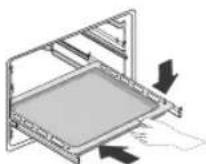
- To insert the grid, baking or roasting pan, first slide out the telescopic guides for one particular level.
- Place the tray or pan on the guides and push them back completely into the oven.
Close the oven door only after you have pushed the telescopic guides into the oven
6\_accessory
test dishes
According to standard EN 60350
1. Baking
The recommendations for baking refer to preheated oven.
| Type of food | Dish & Notes | Shelf level | Cooking mode | Temp. (°C) | Cooking time (min.) |
| Shortbread | Baking tray 3 Conventional 160-170 20-30 | ||||
| Baking tray + Dripping tray | 1+4 Convection 140-160 | 25-35 | |||
| Small Cakes | Baking tray 3 Conventional 160-180 15-25 | ||||
| Baking tray + Dripping tray | 1+4 Convection 150-170 | 25-35 | |||
| Fatless Sponge Cake | Springform cake tin on Big grid (Dark coated, ø 26 cm) | 2 Conventional 160-180 | 20-30 | ||
| Baking tray + Big grid + 2 Springform cake tins ** (Dark coated, ø 26 cm) | 1+4 Convection 140-160 | 35-45 | |||
| Apple Pie | Big grid + 2 Springform cake tins * (Dark coated, ø 20 cm) | 1 Placed diagonally | Convectional | 170-190 70-90 | |
| Baking tray + Big grid + 2 Springform cake tins ** (Dark coated, ø 20 cm) | 1+4 Convection 150-170 | 90-110 | |||
* Two cakes are arranged on the grid at the back left and at the front right.
** Two cakes are arranged in the center on top of each other.
2. Grilling
Preheat the empty oven for 5 minutes using the Large Grill function.
| Type of food | Dish & Notes | Shelf level | Cooking mode | Temp. (°C) | Cooking time (min.) |
| White Bread Toasts | Big grid 5 Large grill 270 °C | 1st 1-2 | 2nd 1-1 12 | ||
| Beef Burgers * (12 ea) | Small grid on baking tray | 4 Large grill 270 °C 1st | 1st 14-16 | 2nd 4-6 |
* Beef Burgers: Preheat the empty oven for 15 minutes using Large Grill function.
test dishes_7
functions

Conventional
Heat is emitted from the top and bottom heating system. This function should be used for standard baking and roasting of almost any type of dishes. Suggested temperature: 200^

Convection
The heat generated by the convection is shared evenly in the oven by fans. This function should be used for frozen dishes and baking. Suggested temperature : 170 °C

Top Heat + Convection
The heat generated by the top heating system and the convection is shared evenly in the oven by fans. This function should be used for roasting crusty dishes like meat. Suggested temperature : 190 °C

Bottom Heat + Convection
The heat generated by the bottom heating system and the convection is shared evenly in the oven by fans. This function should be used for pizzas, bread and cakes. Suggested temperature : 190 °C

Large grill
Heat is emitted from the large area grill. This function should be used for scalloped dishes like lasagne and grilling meat. Suggested temperature : 240 °C

Fan + Grill
The heat generated by the two top heating elements is distributed by the fan. This mode can be used for grilling meat and fish. Suggested temperature : 240 °C

Intensive heat
This mode activates all heating elements such as upper, lower and convection fan alternately. The heat is distributed evenly in the oven. This mode is suitable for big quantities of which need heat supply, such as large gratins and pies. Suggested temperature : 170 °C
Using the cooking mode
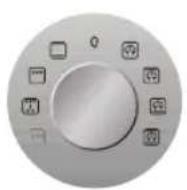
01 | Select Cooking mode
Turn the Operation knob to select the desired oven function.
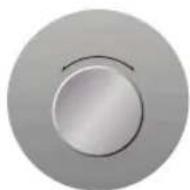
02 | Set temperature
Turn the Selector knob to apply desired temperature.

03 | Confirm temperature
Press the Temperature key to set the desired temperature.
8\_functions
settings
TIME SETTING

12:00
Set hours | 01
Press Time key, hours figure will blink.

13:00
Set minutes | 02
Press Time key, minutes figure will blink.
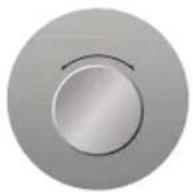
Turn Selector knob, set time.

13:25
03 | Confirm time
Press Time key again, to set the current time.
SET COOKING TIME

0:00
Set cooking time | 01
Press Cooking time key, cooking time figure will blink.
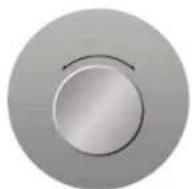
Turn Selector knob, apply specific setting.

1:30
02 | Confirm cooking time
Press Cooking time key again, or wait 4\~5 seconds.
SET END TIME

12:00
Set end time | 01
Press End time key, end time figure will blink.
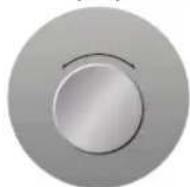
Turn Selector knob, set specific time.

13:45
02 | Confirm end time
Press End time time key again, or wait 3 seconds.
settings_9
CHANGE TIMES SET

or or

Select time to change | 01
Press End time or cooking time key, time figure will blink.
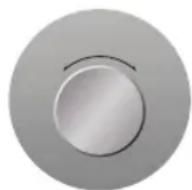
Turn Selector knob.

02 | Confirm changed time

Press End time or cooking time key, time figure will blink.
CHANGE TEMPERATURE

200°C 800°F 800°C
Set temperature | 01
Press Temperature key, temperature figure will blink.
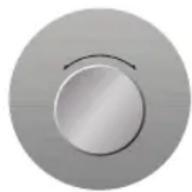
Turn Selector knob, set new temperature.

180 ^ c 888 ^ F 888 ^ c
02 | Confirm temperature
Wait 4\~5 seconds, then the new temperature is set.
SET ALARM

12:00
Set alarm | 01
Press Alarm key, Alarm figure will blink.
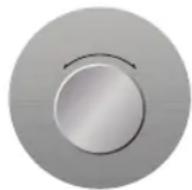
Turn Selector knob, set timer time.

13:15
02 | Confirm alarm
Press Alarm key again or wait 3 seconds, and Alarm is set.
DEACTIVE ALARM

Press and hold Alarm key for two seconds, the alarm figure will fade and time is displayed.
TIME DISPLAY

During Cooking process, press Time key to see the clock time.
10_settings
TONE SIGNAL


To activate or deactivate the tone signal, press and hold the Alarm and the End time key for 3 seconds.
LAMP

Press Lamp key 1x for lamp and 2x to turn it off.
CHILD LOCK


To activate or deactivate the child lock function, press and hold the Time and the Temperature key for 3 seconds. The child lock figure shows child lock activity.
automatic cooking
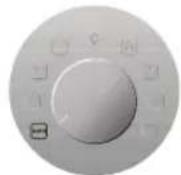
In auto cook mode you can select 15 Auto Programmes for cooking, roasting and baking.
Select Auto cook mode | 01
Set recipe | 02
Select the desired recipe by turning Selector knob.
03 | Set weight
Select the desired weight by turning Selector knob.
AUTO COOK PROGRAMMES
The following table presents 15 Auto Programmes for Cooking, Roasting and Baking.
It contains its quantities, weight ranges and appropriate recommendations.
Cooking Modes and times have been pre-programmed for your convenience.
Please refer to these recommendations. Always insert food in cold oven.
Use oven gloves when taking out!
| No | Food item Weight | Weight/kg Accessory | Shelf level | Recommendation |
| 1 | Frozen Pizza 0.3-0.6 | 0.7-1.0 | Big grid 3 Put frozen | pizza in the middle of the big grid. |
| 2 | Frozen Oven Chips | 0.3-0.5 (thin)0.6-0.8 (thick) | Baking tray 3 | Distribute frozen oven chips evenly on the baking tray. First setting is for thin French fries, the second setting is for thick oven chips. |
| 3 | Homemade Lasagne | 0.3-0.50.8-1.0 | Big grid 3 Prepare fresh lasagne or use ready prepared product and put into a suitable sized ovenproof dish. Put dish in the centre of oven. | |
| 4 | Homemade Pizza | 1.0-1.21.3-1.5 | Baking tray 3 Put pizza | on the tray. The weight ranges include topping such as sauce, vegetables, ham and cheese. Setting 1 (1.0-1.2kg) is for thin pizzas and setting 2 (1.3-1.5kg) is for pizza with much topping. |
| 5 | Beef Steaks 0.3-0.6 | 0.6-0.8 | Dripping tray with small grid | 4 Put marinated beef steaks side by side on the small grid. Turn over, as soon as the oven beeps. The first setting is for thin beef steaks, the second setting is for thick beef steaks. |
| 6 | Roast Beef 0.6-0.8 | 0.9-1.1 | Dripping tray with small grid | 2 Put marinated roast beef on small grid. Turn over, as soon as the oven beeps. |
| 7 | Roast Pork 0.6-0.8 | 0.9-1.1 | Dripping tray with small grid | 2 Put marinated roast pork on small grid with the rind side down. Turn over as soon as the oven beeps. |
| 8 | Lamb Chops 0.3-0.4 | 0.5-0.6 | Dripping tray with small grid | 4 Marinate lamb chops. Put lamp chops on small grid. Turn over, as soon as the oven beeps. The first setting is for thin chops, the second setting is for thick chops. |
| 9 | Chicken Pieces | 0.5-0.71.0-1.2 | Dripping tray with small grid | 4 Brush chicken pieces with oil and spices. Put chicken pieces side by side on the small grid. Turn over, as soon as the oven beeps. The first setting is for 2-3 chicken pieces the second setting for 4-5 chicken pieces. |
12_automatic cooking
| No | Food item Weight/kg Accessory | Shelf level | Recommendation | ||
| 10 | Whole Chicken | 1.0-1.11.2-1.3 | Dripping tray with small grid | 2 Brush | whole chicken with oil and spices.Put chicken on the small grid with the breast side down. Turn over, as soon as the oven beeps. |
| 11 | Roast Fish 0.5-0.7 | 0.8-1.0 | Dripping tray with small grid | 4 Put | fishes head to tail on the small grid.First setting is for 2 fishes, the second setting is for 4 fishes. Turn over, as soon as the oven beeps.The programme is suitable for whole fishes, like trout, pikeperch or gilthead. |
| 12 | Roast Vegetables | 0.4-0.50.8-1.0 | Dripping tray 4 | Put vegetables | such as sliced courgette, pieces of pepper, sliced aubergine, mushrooms and cherry tomatoes into dripping tray. Brush with a mixture of olive oil, herbs and spices. |
| 13 | Marble Cake 0.5-0.6 | 0.7-0.80.9-1.0 | Big grid 2 Put dough | into a suitable sized buttered baking dish for bundt cake. | |
| 14 | Fruit Flan Base | 0.3-0.4 (large)0.2-0.3 (tartlets) | Big grid 3 Put dough | into buttered baking dish for cake base. First setting is for one fruit flan base, the second setting is for 5-6 small tartlets. | |
| 15 | Muffins | 0.5-0.60.7-0.8 | Big grid 3 Put dough | into black metal baking dish for 12 muffins. First setting is for small muffins, the second setting is for large muffins. | |
automatic cooking_13
installation & maintenance
INSTALLATION

Safety instructions for the installation
This oven may be installed only by an approved electrician. The installer is responsible for connecting the appliance to the mains and in so doing for observing the relevant safety regulations.
- Ensure protection from live parts when installing the oven.
- The kitchen cabinet in which the oven is built in must satisfy stability requirements as specified in DIN 68930.
Technical specifications
Input voltage/Frequency
Volume (usable capacity)
Output rating
Net weight
Weight with packaging
Housing (W x H x D)
Oven interior (W x H x D)
230 V \~ 50 Hz
66 L
max. 3400 W
approx. 30.5 kg
approx. 35.5 kg
595 × 595 × 566 mm
440×365×405mm
Power connection
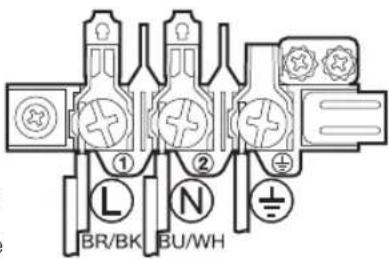
If the appliance is not connected to the mains with a plug, a multi-pole isolator switch (with at least 3 mm contact spacing) must be provided in order to satisfy safety regulations. The power cable H05 RR-F or H05 VV-F, min.1.5 m, 1.5 \~ 2.5 mm ^2 ) must be of sufficient length to be connected to the oven, even if the oven stands on the floor in front of its built-in cabinet. Open the rear connection cover of the oven with a screwdriver and loosen the screws of the cable clamp before you connect the power lines to the relevant connection terminals. The oven is earthed via the (⊥)-terminal. If the oven is connected to the mains with a plug, this plug must remain accessible after the oven is installed. Samsung will take no responsibility for accidents that originate from a missing or faulty earth connection.
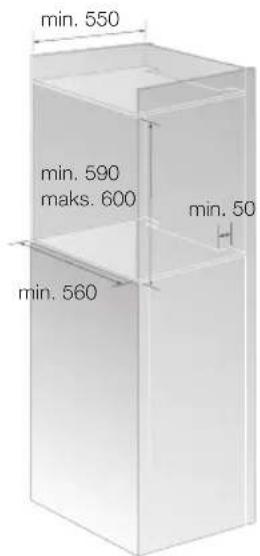
Installation in the cabinet
This is a built-in oven, which needs to be installed into an upper or lower cabinet.
- Observe minimum distances.
• Fix oven on both sides using screws
After installation, remove the vinyl protective film from the door to the appliance and the protective film from the interior surfaces of the oven.
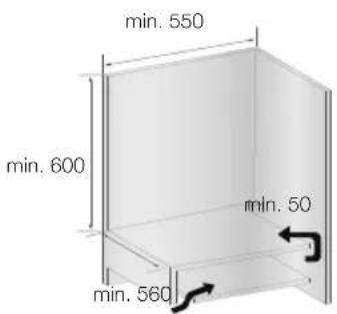
14 installation & maintenance
INITIAL SETUP
Initial cleaning
Before the oven is used for the first time, it should be cleaned thoroughly. Do not use any abrasive cleaning agents, cloths or substances, because they could damage the oven surfaces. Use warm water, detergent and soft clean cloth to clean the baking tray, dripping tray, grids and the other accessories, as well as the internal compartment and the guide rails at the oven sides. The front should be cleaned with damp, soft and clean cloth.
Check if the oven clock is set correctly and remove all accessories from the oven. Run oven in single mode with convection for one hour at 200 °C. This procedure will burn any remaining production substances in the oven with an unmistakable odour. This is normal, though make sure your kitchen is well ventilated during that time.
TROUBLESHOOTING
| PROBLEM SOLUTION | |
| What should I do if the oven doesn't heat up? | The oven may not be switched on. Switch the oven on.The clock may not be set. Set the clock.Check to see if the required settings have been applied.A household fuse may have blown or a circuit breaker may has tripped. Replace the fuses or reset the circuit. If this happens repeatedly, call an electrician. |
| What should I do if the oven doesn't heat up even after the function and temperature have been set? | There may be problems with the internal electrical connections. Call your local service centre. |
| What should I do if an error code appears and the oven does not heat up? | There is a fault in the internal electrical circuit connection. Call your local service centre. |
| What should I do if the time display is blinking? | There has been a power failure. Set the clock. |
| What should I do if the oven light doesn't illuminate? | The oven light is faulty. Call your local service centre. |
| What should I do if the oven's fan is running without having been set? | After use, the oven's fan runs until the oven has cooled down. Call your local service centre if the fan continues to run after the oven has cooled down. |
INFORMATION CODES
| COde PROBLEM SOLUTION | ||
| S-01 | Safety shut off. The oven continues operating at the set temperature for a prolonged time. | Turn oven off and remove food. Allow oven to cool before using it again. |
| SE | Key is pressed for over 10 seconds. Call your local SAMSUNG Customer Care Centre. | |
| E-**^1) | An oven error may cause low performance and problems in safety. Stop using the oven immediately. | Call your local SAMSUNG Customer Care Centre. |
1) ** refers to all numbers.
installation & maintenance_15
cleaning & care
RAPID DRYING
- Leave the oven door ajar at approximately 30^ .
- Set the operation knob to single mode.
- Press the function button.
- Select convection with the selector knob.
- Set a cooking time of about 5 minutes and a temperature of 50 °C .
- Switch the oven off at the end of this period.
CATALYTIC ENAMEL SURFACE (OPTIONAL)
The removable cover casing is coated with a dark gray catalytic enamel this can become coated with oil and fat distributed by circulating air during convection heating. These deposits will burn off at oven temperatures of 200 °C and higher, for example, while baking or roasting. Higher temperatures will result in faster burning.
- Remove all accessories from the oven.
- Clean all interior oven surfaces as described in the hand cleaning section.
- Set the oven to conventional.
- Set the heat to 250^ C.
- Run the oven for approximately 1 hour. The length of time depends on the degree of soiling. Any remaining soil will gradually disappear with each subsequent use of the oven at high temperatures.
HAND CLEANING

CAUTION: MAKE SURE THE OVEN AND ACCESSORY IS COOL BEFORE CLEANING
Oven Interior
- For cleaning the interior of the oven, use a clean cloth and a mild cleaning agent or warm soapy water.
- Do not hand-clean the door seal.
- Do not use scouring pads or cleaning sponges.
- To avoid damaging the enameled oven surfaces, use customary oven cleaners.
- To remove stubborn soil, use a special oven cleaner.
Do not use abrasive cleaning agents, hard brushes, scouring pads or cloths, steel wool, knives or other abrasive materials.
Oven exterior
- For cleaning the exterior of the oven, use a clean cloth and a mild cleaning agent or warm soapy water.
- Dry with kitchen roll or a dry towel.
- Do not use scourers, caustic cleaners or abrasive products.
Stainless steel oven fronts
- Do not use steel wool, scouring pads or other abrasives. They may damage the finish.
Aluminum oven fronts
- Wipe the surface gently with a soft clean cloth or micro fiber cloth and a mild window cleaning detergent.
Accessory
Wash the accessory after every use and dry it with a kitchen towel. If necessary, lay in warm soapy water for about 30 minutes for easier cleaning.
16_cleaning & care
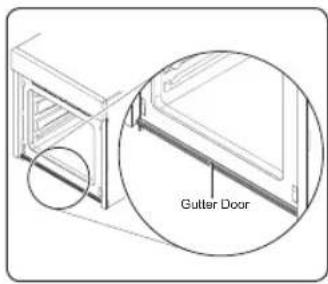
Gutter door
- The gutter door is for collecting the water from the moisture when oven is operating and it protects furniture. Clean the gutter door after cooking.
DOOR REMOVAL
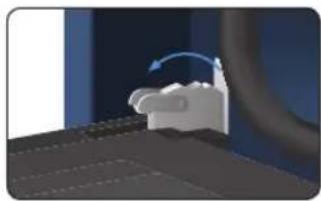
For normal use, the oven door must not be removed but if removal is necessary, for example, for cleaning purposes, follow these instructions.

CAUTION: The oven door is heavy.
natural_image
3D rendering of a mechanical component with a curved arrow indicating rotation (no text or symbols)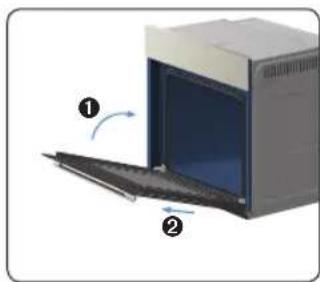
natural_image
Diagram of a kitchen appliance showing a door opening with a blue interior and two directional arrows indicating motion (no text or symbols)-
Open the door and flip open the clips at both hinges completely.
-
Close the door by approximately 70°. With both hands, grasp the sides of the oven door at its middle and pull-lift until the hinges can be taken out.

DETACHING THE SIDE RUNNERS (OPTIONAL)
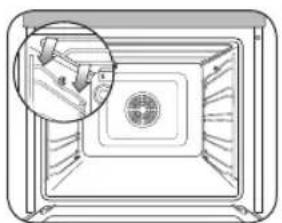
natural_image
Diagram of a microwave oven interior with a circular vent and a magnified inset showing a small component (no text or symbols)- Press central part of the side runner top portion.
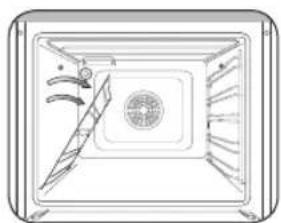
natural_image
Diagram of a rectangular device with internal components and curved arrows indicating flow or movement (no text or symbols)- Rotate the side runner by approximately 45°.
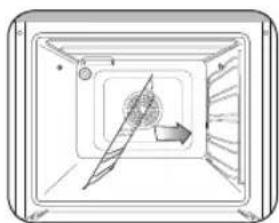
natural_image
Diagram of a mechanical component with a central rotating element and directional arrow (no text or symbols)- Pull and remove the side runner from bottom two holes.

ATTACHING: Repeat steps 1, 2 and 3 in reverse order.
DOOR GLASS REMOVAL
The oven door is equipped with three sheets of glass placed against each other. These sheets can be removed for cleaning.
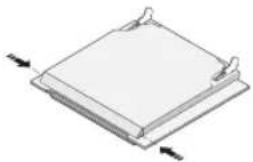
natural_image
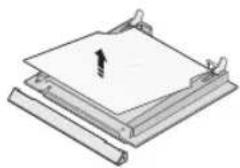
3D diagram of a rectangular object with two side supports and directional arrows indicating orientation (no text or symbols)1 Press the both buttons on the left and right sides of the door.
natural_image
Isometric line drawing of a mechanical assembly with layered components and a central arrow (no text or symbols)2 Detach the covering and remove glass 1 from the door.
natural_image
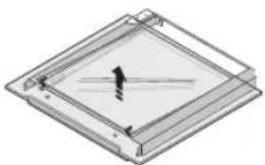
Isometric view of a square frame with internal diagonal lines and a small black arrow on the top surface (no text or symbols)3 Lift glass 2 and Clean the sheets with warm water or washing-up liquid and polish dry them with a soft clean cloth.

The Door-Glass is different from 2 EA to 4 EA model by model. But, the method of the disassembly and assembly is same.

When assembly the inner glass 1, put printing to direction below.
BULB EXCHANGE

Danger of electric shock! Before replacing any of the oven bulbs, take the following steps:
- Switch oven Off.
- Disconnect the oven from the mains.
- Protect the oven light bulb and the glass cap by laying a cloth on the bottom of the oven compartment.
- Bulbs can be purchased from the SAMSUNG Service Centre.
Rear oven lamp
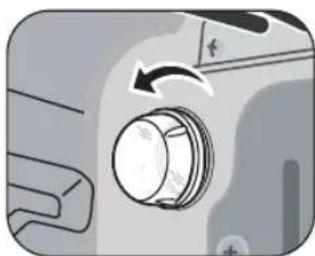
- Remove cap by turning anticlockwise and remove the metal ring, the sheet ring and clean the glass cap. If necessary, replace the bulb with a 25 watt, 230 V, 300 °C heat-resistant oven light bulb.
- Clean the glass cap, the metal ring and the sheet ring if necessary.
- Fit the metal and the sheet ring to the glass cap.
- Place glass cap where you have removed it in step 1 and turn it clockwise to keep it in place.
18_cleaning & care
natural_image
Close-up of a mechanical knob or dial with an arrow indicating rotation (no text or symbols visible)
natural_image
Two horizontal bar designs with grayscale shades and a central crosshair symbol (no text or labels)memo


cOrrEcT diSpOSal Of ThiS prOducT (WaSTE EIEcTrical & EIEcTrONic EQuipMENT)
(Applicable in the European Union and other European countries with separate collection systems)
This marking on the product, accessories or literature indicates that the product and its electronic accessories (e.g. charger, headset, USB cable) should not be disposed of with other household waste at the end of their working life. To prevent possible harm to the environment or human health from uncontrolled waste disposal, please separate these items from other types of waste and recycle them responsibly to promote the sustainable reuse of material resources.
Household users should contact either the retailer where they purchased this product, or their local government office, for details of where and how they can take these items for environmentally safe recycling.
Business users should contact their supplier and check the terms and conditions of the purchase contract. This product and its electronic accessories should not be mixed with other commercial wastes for disposal.
SAMSUNG
QUESTIONS OR COMMENTS
| COUNTRY | CALL | OR VISIT US ONLINE AT |
| ALBANIA | 42 27 5755 | www.samsung.com |
| BOSNIA | 05 133 1999 | |
| BULGARIA | 07001 33 11 | |
| CROATIA | 062 - SAMSUNG (062-726-7864) | |
| CZECH | 800 - SAMSUNG (800-726786) | |
| HUNGARY | 06-80-SAMSUNG(726-7864) | |
| KOSOVO +381 0113 | 216899 | |
| MACEDONIA | 023 207 777 | |
| MONTENEGRO 020 405 | 888 | |
| POLAND | 0 801 1SAMSUNG(172678)+48 22 607-93-33 | |
| RUMANIA | 08010 SAMSUNG (08010 726 7864) onlyfrom landline (+40) 21 206 01 10from mobile and land line | |
| SERBIA | 0700 Samsung (0700 726 7864) | |
| SLOVAKIA | 0800 - SAMSUNG(0800-726 786) | |
| LITHUANIA | 8-800-77777 | |
| LATVIA | 8000-7267 | |
| ESTONIA 800-7267 |
Code No.: DG68-00191L