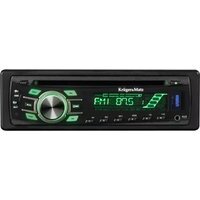
KM2007 - Receiver Krüger&Matz - Free user manual and instructions
Find the device manual for free KM2007 Krüger&Matz in PDF.


| Product Type | Car Stereo Receiver (2 DIN) |
| Brand / Model | Krüger&Matz KM2007 |
| Dimensions | 2 DIN standard (approx. 100 x 178 x 160 mm) |
| Weight | Approx. 1.5 kg |
| Power Supply | 10.8–16 V DC, fuse <10 A |
| Max. Power Output | 4 x 40 W |
| RMS Power Output | 4 x 25 W |
| Display | 7" TFT resistive touchscreen, 800x480 px |
| Supported Audio Formats | MP3, AAC, WMA, FLAC, WAV |
| Supported Video Formats | MP4, DIVX, AVI, RMVB, MKV |
| Supported Image Formats | JPG, PNG, GIF |
| Bluetooth | Version 2.1, hands-free calling, audio streaming, phonebook sync |
| Tuner | Analog FM/AM with RDS (AF/TP/TA/EON/PTY) |
| Equalizer | Pop/Rock/Classic/Flat/Jazz/Electro/User |
| Steering Wheel Control | Yes (analogue, programmable) |
| Inputs/Outputs | USB (2.1, up to 32 GB), AUX (3.5 mm), 2x RCA line output, subwoofer output, front/rear camera input, video input/output |
| Operating System | WIN CE 6.0, 64 MB RAM |
| Remote Control | Included, CR2025 battery |
| Microphone | Built-in |
| Phone Link | Android 5.0+ via USB (Autolink app) |
| Installation Angle | Up to 30° from horizontal for optimal performance |
| Operating Temperature | -20 to +60 °C |
| Storage Temperature | -20 to +70 °C |
| Safety & Maintenance | Do not disassemble; clean with soft damp cloth; ensure ventilation; proper fuse replacement |
| Warranty Note | Up to 5 defective display pixels not covered under warranty |
Frequently Asked Questions - KM2007 Krüger&Matz
User questions about KM2007 Krüger&Matz
0 question about this device. Answer the ones you know or ask your own.
Ask a new question about this device
Download the instructions for your Receiver in PDF format for free! Find your manual KM2007 - Krüger&Matz and take your electronic device back in hand. On this page are published all the documents necessary for the use of your device. KM2007 by Krüger&Matz.
USER MANUAL KM2007 Krüger&Matz
- This unit is designed to operate on 10,8-16 V DC power supply. If your vehicle does not have this system, a voltage inverter is required. The device also requires connecting to negative of the car.
- Choose the mounting location where the unit will not interfere with the normal driving function of the driver. Install the unit where it does not get in the driver's way and cannot injure the passenger if there is a sudden stop. DO NOT install the unit or any cable in a location where:
- it may obstruct the steering wheel and gearshift lever operations.
- it may obstruct the operation of safety devices such as air bags
- it may obstruct visibility
there is not enough ventilation provided
- Avoid installing the unit where it would be subject to high temperature, such as from direct sunlight, hot air, or a heater, or where it would be subject to dust, dirt or excessive vibration. Do not expose this equipment to rain or moisture nor use near strong magnetic fields. Do not handle this appliance with wet hands.
- Make sure all the connections are executed in a proper manner. Reversed connection will cause short circuit and damage.
- If installation angle exceeds 30 from horizontal, the unit might not give its optimum performance.
- Before finally installing the unit, connect the wiring temporarily and make sure it is all connected up properly and the unit and the system work properly.
- If the fuse blows, check the power connection and replace the fuse with one of the same specified rating. If the fuse blows frequently, consult an authorized service point for check-up/repair.
- It is recommended to connect speakers with impedance of 4 Ω.
• To prevent short circuits, cover the terminals of the UNUSED leads with insulating tape.
• Make sure that the ignition is off before connecting the device. - Make sure to connect the yellow and red power supply cables after all other cables are already connected.
• The heat sink becomes very hot after use. Be careful not to touch it when removing this unit. - At the time of installation, be sure to fix all wires (wires both from this unit and from the car itself) in a way that any wires cannot come into contact with heat sinks on the rear and side of the unit.
- Installation illustrations show a typical installation. However, you should make adjustments corresponding to your specific car. If you have any questions or require information regarding installation kits, consult your car dealer.
- If you are not sure how to install this unit correctly, have it installed by a qualified technician. Producer does not claim liability of incorrect mounting/installation nor for inappropriate handling and use disregarding this user's manual.
- When mounting the unit, be sure to use the screws provided, as instructed. If other screws are used, parts could become loose or damaged. Use only the parts included with the unit to ensure proper installation. The use of unauthorized parts can cause malfunctions.
- When tightening screws or bolts, be careful not to pinch any connection cord.
• Make sure not to block the ventilation outlets. - DO NOT connect the speaker leads of the power cord to the car battery; otherwise, the unit will be seriously damaged.
- BEFORE connecting the speaker leads, check the speaker wiring in your car.
-
Consult with your nearest dealer if installation requires the drilling of holes or other modifications of the vehicle. In case of any doubts concerning place of installation, contact your vehicle's dealer. Before drilling the holes in vehicle's body, make sure it will not damage any electrical cables or other components. During installation keep in mind, that any loose parts may pose danger in case of an accident – make sure to install every piece properly to ensure safety.
-
Do not remove the housing/disassemble the device. The device has no user-serviceable parts inside.
• In case of damage, contact an authorized service point for check-up/repair.
Temperature
- If the vehicle has been parked for a long time in hot or cold environment, wait until the temperature in the vehicle becomes normal before operating the unit.
- When installing, to ensure proper heat dispersal when using this unit, make sure to leave some space behind the rear panel and wrap any loose cables so they are not blocking the ventilation outlets.
Safety Instructions
- DO NOT operate this device while driving, as this may lead to a traffic accident.
• The driver must not watch the monitor while driving.
- Stop the car before performing any operations! Do not perform any activities that may distract from cautious driving, such as managing playlist.
- Do not raise the volume level too much, as this will block outside sounds, making driving dangerous.
- Clean with soft, slightly damp cloth only.
- When inserting batteries, please note the correct polarity.
- If the remote is not used for an extended period of time, remove the battery to prevent possible damage from battery leakage.
Hearing safety
- Listen at a moderate volume. Sound can be deceiving. Over time your hearing "comfort level" adapts to higher volumes of sound. So after prolonged listening, what sounds "normal" can actually be loud and harmful to your hearing. To guard against this, set your volume to a safe level before your hearing adapts and leave it there.
- Listen for reasonable periods of time:
Prolonged exposure to sound, even at normally "safe" levels, can also cause hearing loss. Be sure to use your equipment reasonably and take appropriate breaks.
Notes on external memory
- Use the memory drive only as indicated in its user's manual
- Do not touch USB port / plug with bare hand; do not touch with metal objects.
- Do not expose memory drive to shocks.
- Do not bend, drop, disassemble, modify the memory drive. Protect from water and humidity.
- Do not store memory drive inside the vehicle where it will be exposed to direct sunlight, high temperatures, high humidity or corrosive substances.
• Make sure the connected USB drive does not obstruct unhindered vehicle driving. - Memory drive may not function properly in extremely high/low temperature environments.
- Use only authorized memory drives. Please note, the producer does not guarantee compatibility with every external memory.
- Files protected against copying (copyright protection) may not be played.
- In some cases, start of the playback may be delayed, but does not constitute of any malfunction or damage.
- Producer does not claim any liability for any data loss.
- Do not unplug external memory while playback. Change the sound source before disconnecting the memory drive from this device.
Wiring diagram

Description of front panel buttons
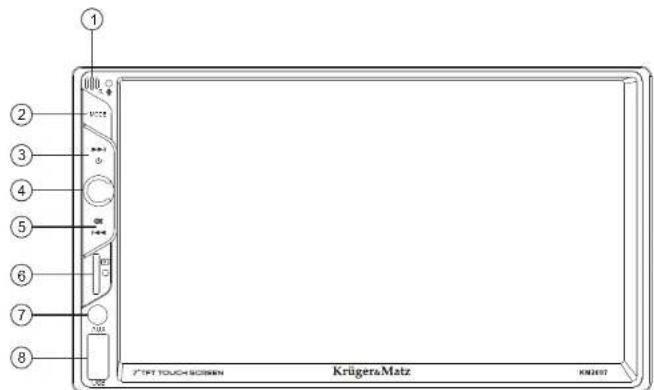
- IR sensor
- Mode button
- Next song
- Power on (short press) / Power off (long press); mute (short press on turned on device)
- Previous song
- SD card slot
- AUX Input
- USB slot
Operation
Operation of the main menu on the device's display is based on touch function. Touch/slide to perform desired actions. Here are some basic movements in general operation of the radio:
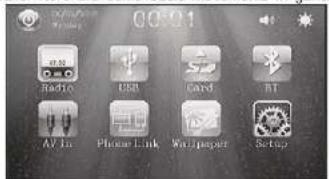
- Press to return to the main menu.
- Touch one of the mode icons on the main menu vertical slide bar to enter directly.
Krüger&Matz
Owner's manual Owner's manual
Krüger&Matz
- Press to return to previous screen.
- Press to change background picture
-
Press to change brightness adjustments:
-
Daytime mode
. Nightfall mode
Night mode - User mode (press the ✗ to adjust brightness level - all modes will change accordingly)
Screen close mode (the screen will be off, press any button to restore to daytime
mode)
- Press □ to enter screen close mode directly
- Press to enter setting window (once in menu, rotate the knob on the front panel to change adjustments; press the knob to confirm and go to another setting. In case of not operation within 5 seconds, the window will disappear)
Radio Menu


- Enter radio mode.
- Conduct band switching by touching FM1 icon on the radio menu:
- Press the icon on the radio menu to browse the pre-set frequency of the radio.
- Drag the radio frequency pointer to set desired frequency.
- Press Icon to start automatic decrease stations search. Press and hold the or press
<icon to go 0.05 MHz down.
- Press ▶ icon to start automatic increase stations search. Press and hold the ▶ or press ▶ icon to go 0,05 MHz up.
- Press 📄 to search and store stations automatically (press again to stop scanning and play the current channel).
- Turn on/off stereo by touching icon on the radio menu.
- Press the 🔒 to turn on/off local function.
- Press PTY to select program type
- Press TA to turn on/off traffic announcement function
- Press AF for frequency replacement table switching
- Touch the pre-set frequency unit cell on radio menu to listen to the radio frequency stored in the cell.
- Press and hold down the pre-set frequency unit cell for three seconds on the radio menu to store frequency played currently.
USB/SD basic buttons description
Note: slide the toolbar at the bottom to the left/right to show next options.
Press one of the icons to perform desired action/enter/enable:
- menu list - enter to display :
. ♪ song list menu
- image list menu
- video list menu
list menu
- press ◀◀ to go to previous song / press and hold to fast reverse
• playpause
- press ➞ to go to next song / press and hold to fast forward
- change playback mode (repeat one / repeat folder / repeat all)
- random playback
- change stereo settings (mono right / mono left / stereo)
- stop
Bluetooth
Prior to use via Bluetooth, pair the radio with an external Bluetooth device. To pair the radio with an external device:
- Enter Bluetooth mode from the main screen.
- Enable Bluetooth function on your external device. Remember to enable its visibility.
- Conduct pairing on the external device. Input default password if necessary: 0000.
Once connected, press one of the icons to perform desired action/enter/enable:

Dial interface (during call, user can mute the microphone and switch between radio and phone)

Calls records

Phonebook (by default, the phonebook is not loaded into the radio. Press to load the contacts. Please note, the phone may ask you to confirm whether to allow radio to see contacts. Press 📄den the keypad to search a record.)

BT music (press to enter audio streaming interface. Please note, you have to start music playback from the external device first to manage the playback.)

BT connection settings
Setting interface
Enter Setup tab to manage your device. Touch one of the icons on the bottom tab to enter:

System settings
• Area (select appropriate)
• Language (select appropriate)
- Front camera (on/off)
• Rear camera (on/off)
• Headlamp detection (on/off)
- Brake detection (on/off)
- Subwoofer (on/off)
- Beep (on/off)

Audio settings
• EQ (select appropriate)
• Field (adjust appropriately)
• Loudness (on/off)

Display settings
• Type (select appropriate)
- Adjust (adjust appropriately)

Media settings
- Aspect ratio (select appropriate)

BT settings
- BT (on/off)
• Name (change accordingly)
• PIN code (change accordingly. default password is „0000”)
- Auto link (automatic connection on/off; note: when the function is ON, the radio will automatically connect with the external device when within operational range, and both have BT function on)
• Auto answer (automatic incoming call answering on/off)
• Auto loading records (on/off)
• Auto loading phonebooks (on/off)
- Call volume (on/off)

Time
- Display mode (select appropriate date format)
• Display format (select appropriate time format)
- Adjust (input date and time)

ght
- Backlight adjust (adjust appropriately)
• Color light (select appropriate)
• Auto cycle time (select appropriate)

SWC (steering wheel control)
- Steering wheel (on/off)
• Study (enter to program steering wheel control function)

Touch
- Touch for calibration (touch to perform display calibration)
NOTE! Factory reset password: 123456
Steering wheel setting menu
- Enter "Setup" on main menu and then "SWC" and "Study" tab for steering wheel control learning menu.
• To program the buttons: - Press and hold the functional button of the steering wheel, and then press and hold selected function key icon on the steering wheel setting interface.
- After the learning is successful, the learning box will be lightened, which indicates successful learning.
- Set subsequent buttons to be set as described until setting is completed.
- After successful learning, click the icon to save the learning result automatically.
- To reprogram the buttons or remove the mistaken learning, click icon. The system will cancel the learning function of all keys.
Wiring operation for steering wheel control
Single wiring for steering wheel control: connect KEY1 (brown) and KEYGND (black) in the wire bundle of power cord of the system with KEY1 (brown) and KEYGND (black) in steering wheel of cars. The schematic diagram is as the following:

Steering wheel control KEY1
Steering wheel control GND
Double wiring for steering wheel control: connect KEY1 (brown) KEY2 (brownish black), KEYGND (black) in the wire bundle of power cord with KEY1 (brown), KEY2 (brownish black) and KEYGND (black) in steering wheel of cars. The schematic diagram is as the following:

Steering wheel control KEY1

Steering wheel control GND
Steering wheel control KEY2
Wallpaper picture change
- Press on the main menu to change background picture.
PHONE LINK
Note:
- app is compatible with mobile devices running Android 5.0 (and higher). It's not compatible with iOS devices.
-
USB debugging of your mobile device shall be turned on.
-
Download and install Vehicle multimedia entertainment APP Autolink from Google Play Store.

- Enter "Phone link" on the main menu of the radio receiver to scan the QR code, or go directly to the Google Play Store on your mobile phone to download the app. - Note: If the installation has failed, check whether security apps on your mobile device have stopped the installation.
- Connect your mobile device to the radio receiver via USB cable. A notification will show on your mobile device: "Open Autolink when this USB accessory is connected?" Please click "OK". User can also enable the default usage here.
- On your mobile device screen a note may appear about capturing everything that is displayed on your screen. Approve to proceed.
- The radio receiver screen will display what's on your mobile phone's screen.
Description of Phone Link Menu:
- When the Phone Link has been connected successfully, you'll see 📄. Press it and you'll see menu. You can close the Phone Link menu by clicking areas outside the menu.
- Exit Phone Link and return to the main menu.
- Back
- ☒: Turn on or off the screen display.
- Go to main screen of your phone.
- ☐: Allow screen rotation (screen rotation on your phone must be enabled first).
- Adjust volume and mute.


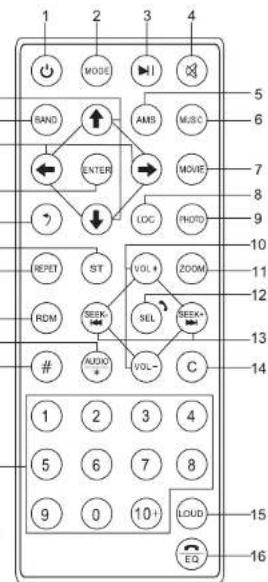
Remote control operation
- (Power switch) button: press this button to switch on or off the power supply.
- (Mode conversion) button: press this button to switch the different modes in cycle.
- (Play/pause) button: under the sound playing state, press this button to switch between playing and pause; under the pause state, p this button to play.
- (Mute) button: press this button to close the volume output. Press it again to restore the former volume level.
- AMS button: in radio mode, press to do the preset scan / press and hold to perform radio station searching and store automatically into those preset numbers.
- MUSIC button: in USB/SD mode, press to enter the menu of the MP3 directory. 20
- MOVIE button: in USB/SD mode, press to enter the menu of the movie directory. 18-
- Local button: in radio mode, press to switch between Local and Distance radio stations.
- PHOTO button: in USB/SD mode, press to enter the menu of the picture directory.
- Volume Up / Down buttons: adjust the volume up/down. 17-
- Zoom button: zoom in images
- Select/Answer button: multi function button to set Volume / Treble / Base / Balance / Fader; press to answer/redial last number the call in BT mode
-
Seek Up / Down button
-
in radio mode, press to auto search the radio station up or down respectively. Press and
hold one of these buttons for manual search of radio stations. -
in audio and video playback mode, press and hold to fast forward or backward respectively. Briefly press one of these buttons to change to next / previous track.
-
Backspace button
- Loudness button
- EQ button / press to reject/end call in BT mode
- Numeric keyboard buttons
-
button
- Audio button: in video mode, it can select different language audio track of the video
- RDM button: in USB / SD mode, randomly plays video track
- REPET button: in USB / SD mode, repeats video track playback
- ST button: in tuner mode, switches between audio with stereo and mono channel
- Return button
- Enter button: confirm selection of menu options
- Left / Right buttons: browse menu left and right
- Band button:
• in radio mode, switch between the AM and FM bands - Up / Down buttons: browse menu up and down
REPLACING THE REMOTE BATTERY
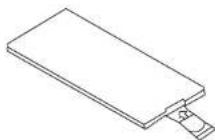
Replace CR2025 battery in the remote control with a new one whenever its operational range is shortened or the device does not respond to the remote. Please note: before first operation remove the insulation strip from the battery compartment.
- Retrieve battery compartment

- Insert the CR2025 battery into battery compartment. Put the battery with (+) mark upward (when the remote is with buttons facing downward). Pay attention to correct polarity.

- Insert the battery compartment back into the remote.
Krüger&Matz
Owner's manual Owner's manual
Krüger&Matz
SPECIFICATION:
Technical parameters
• Max. power: 4 x 40 W
• RMS power: 4 x 25 W
• S/N ratio: >55 dB
• Channel separation: >55 dB
• Frequency response: 16 Hz-25 kHz
• Power supply: 10.8-16 V DC
- Load impedance: 4 Ohm
- Fuse: <10 A
Display
- Size: 7"
- Panel: TFT
• Resolution: 800x480 px - Touchscreen: Resistive
• Display brightness: Adjustable
Main features
- Size: 2 DIN
• Supported formats
• Audio: MP3, AAC, WMA, FLAC, WAV
• Video: MP4, DIVX, AVI, RMVB, MKV
• Picture: JPG, PNG, GIF
• Equalizer: Pop/Rock/Classic/Flat/Jazz/Electro/User
- Operating system: WIN CE 6.0
• RAM: 64 MB
• Supported standard: PAL/NTSC
• Steering wheel control: Yes (analogue)
- Tone controls:
• Bass (at 100 Hz): +/- 7 dB
• Treble (at 100 kHz): +/- 7 dB
- Keys backlight: RGB
- Microphone: Yes
• App compatibility: Android 5.0 and later
Bluetooth
- Version: 2.1
• Phone call management: Yes
• Phonebook synchronization: Yes
• Audio streaming: Yes
Analogue radio tuner
• FM frequency range: 87.5 - 108 MHz
• AM frequency range: 522 - 1620 kHz
• FM preset memory: 18
• AM preset memory: 12
• RDS: Yes (AF/TP/TA/EON/PTY)
• Frequency search: automatic / manual
- Stereo separation: >40 dB
I/O
• USB port: 2.1 (max. capacity: 32 GB)
• AUX socket: Jack 3,5 mm
• RCA output: 2x RCA low impedance line output at 1,2 V
- Subwoofer line output: Yes
- Front view camera input: Yes
- Rear view camera input: Yes
• Audio input: 2x RCA
• Video input: Yes
• Video output: Yes
Environmental
- Operating temperature: -20\~60°C
• Storage temperature: -20\~70°C
IMPORTANT: The producer allows the possibility for minor variations in display brightness and color between individual devices. There may be visible light or dark spots on the display. Up to 5 defective pixels are acceptable to be present on the display of the device. Above mentioned cases concerning device's display are not covered under warranty nor statutory warranty rights.
Producer reserves rights to change product overview and specifications without prior notice.
Please note: illustrations and descriptions concerning operating system are for reference only, and may vary actual software on your device! Any information included in this manual are subject to change without prior Lechpol Electronics Sp. z o.o. Sp.k. hereby declares that car receiver KM2007 is consistent with directive 2014/53/UE. Full text of the EU Declaration of Conformity is available at following Internet address: www.lechpol.eu.

English
Correct Disposal of This Product
(Waste Electrical & Electronic Equipment)
(Applicable in the European Union and other European countries with separate collection systems) This marking shown on the product or its literature, indicates that it should not be disposed with other household wastes at the end of its working life. To prevent possible harm to the environment or human health from uncontrolled waste disposal, please separate this from other types of wastes and recycle it responsibly to promote the sustainable reuse of material resources. Household users should contact either the retailer where they purchased this product, or their local government office, for details of where and how they can take this item for environmentally safe recycling. Business users should contact their supplier and check the terms and conditions of the purchase contract. This product should not be mixed with other commercial wastes for disposal.
Made in China for LECHPOL ELECTRONICS Sp. z o.o. Sp.k., ul. Garwolińska 1, 08-400 Miętna.
KWESTIE BEZPIECZEŃSTWA

Tuner radio analogic


www.krugermatz.com
Krüger&Matz is a registered trademark



- TEMPERATURE
- SAFETY INSTRUCTIONS
- HEARING SAFETY
- NOTES ON EXTERNAL MEMORY
- OPERATION
- KRÜGER&MATZ
- OWNER'S MANUAL OWNER'S MANUAL
- RADIO MENU
- USB/SD BASIC BUTTONS DESCRIPTION
- BLUETOOTH
- SETTING INTERFACE
- SYSTEM SETTINGS
- AUDIO SETTINGS
- DISPLAY SETTINGS
- MEDIA SETTINGS
- BT SETTINGS
- TIME
- GHT
- SWC (STEERING WHEEL CONTROL)
- TOUCH
- STEERING WHEEL SETTING MENU
- WIRING OPERATION FOR STEERING WHEEL CONTROL
- WALLPAPER PICTURE CHANGE
- PHONE LINK
- REMOTE CONTROL OPERATION
- BUTTON
- AUTO
- REPLACING THE REMOTE BATTERY
- SPECIFICATION
- TECHNICAL PARAMETERS
- DISPLAY
- MAIN FEATURES
- ANALOGUE RADIO TUNER
- I/O
- ENVIRONMENTAL
- ENGLISH
- KWESTIE BEZPIECZEŃSTWA
- TUNER RADIO ANALOGIC
Brand : Krüger&Matz
Model : KM2007
Category : Receiver