
CRP8 - Alarm Clock BLAUPUNKT - Free user manual and instructions
Find the device manual for free CRP8 BLAUPUNKT in PDF.
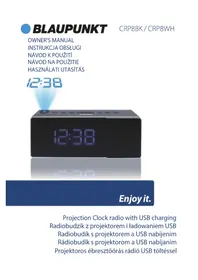


| Product Type | Alarm clock radio with projection |
| Brand | Blaupunkt |
| Model | CRP8 |
| Power Supply | AC/DC adaptor 5.5V, 550mA; backup battery CR2032 (not included) |
| Alarm Functions | Dual alarms with wake-to-radio or wake-to-buzzer; snooze (5-60 min); nap timer (5-90 min); sleep timer (5-90 min) |
| Radio | FM radio with 10 preset memories |
| Projection | Projection of time on ceiling or wall; can be flipped 180° and rotated 90° |
| Audio Input | AUX line-in for external devices (e.g., iPhone, iPod, MP3) |
| Charging | USB charging output: 5V, 500mA |
| Display | LED time display with HI-LO dimmer |
| Time Format | 12/24 hour selectable |
| Care and Cleaning | Clean with soft cloth moistened only with mild soap and water; unplug before cleaning |
| Safety Precautions | Do not expose to water, moisture, or heat; keep away from magnetic fields; use only specified replacement parts; refer servicing to qualified personnel |
| Environmental Compliance | Complies with CE and WEEE directives; batteries must be disposed separately |
Frequently Asked Questions - CRP8 BLAUPUNKT
User questions about CRP8 BLAUPUNKT
0 question about this device. Answer the ones you know or ask your own.
Ask a new question about this device
Download the instructions for your Alarm Clock in PDF format for free! Find your manual CRP8 - BLAUPUNKT and take your electronic device back in hand. On this page are published all the documents necessary for the use of your device. CRP8 by BLAUPUNKT.
USER MANUAL CRP8 BLAUPUNKT
Enjoy it.
Projection Clock Radio with USB Charging
IMPORTANT NOTES
• This safety and operating instruction should be retained for future reference.
• The apparatus should not be exposed to dripping or splashing or placed in a humid atmosphere such as a bathroom.
• Do not install the product in the following areas:
o Places exposed to direct sunlight or close to radiators.
o On top of other stereo equipment that radiate too much heat. o Blocking ventilation or in a dusty area.
o Areas where there is constant vibration.
o Humid or moist places.
o Do not place near candles or other naked flames.
• Operate the product only as instructed in this manual.
• Before turning on the power for the first time, make sure the power adaptor is properly connected.
- Plug in the USB stick directly or use a USB extension cable which is not longer than 25 cm.
For safety reasons, do not remove any covers or attempt to gain access to the inside of the product. Refer any servicing to qualified personnel.
Do not attempt to remove any screws or open the casing of the unit; there are no user-serviceable parts inside. Refer all servicing to qualified service personnel.
SAFETY INSTRUCTIONS
- Read Instructions - All safety and operating instructions must be read before the product is operated.
- Retain Instructions - The safety and operating instructions should be kept with the product for future reference.
- Heed Warnings - All warnings on the product and in the operating instructions should be adhered to.
- Follow Instructions - All operating and user instructions should be followed.
- Water and Moisture - To reduce the risk of fire or electric shock, do not expose the product to rain, dripping, splashing, or excessive moisture such as in a sauna or bathroom. Do not use this product near water, for example, near a bathtub, washbowl, kitchen sink, laundry tub, in a wet basement, or near a swimming pool (or similar).
- Object and Liquid Entry - Never push objects of any kind into this product through openings, as they may touch dangerous voltage points or short-circuit parts that could result in a fire or electric shock. Never spill liquid of any kind on the product. Do not place any object containing liquid on top of the product.
- Servicing - Do not attempt to service this product yourself, as opening or removing covers may expose you to dangerous voltage or other hazards. Refer all servicing to qualified service personnel.
- Replacement parts - When replacement parts are required, ensure that the service technician has used replacement parts specified by the manufacturer or have the same characteristics as the original part. Unauthorized substitutions may result in fire, electric shock or other hazards.
- Place your clock radio on a stable surface, away from sources of direct sunlight or excessive heat or moisture.
- Protect your furniture when placing your units on a natural wood and lacquered finish by using a cloth or protective material between it and the furniture.
- Clean your unit with a soft cloth moistened only with mild soap and water. Stronger agents such as Benzine, thinner or similar materials can damage the surface of the unit. Make sure the unit is unplugged before cleaning.
12. Battery
1). The batteries must not be exposed to excessive heat such as sunshine, fire or the like. 2). The batteries should be drawn to the environmental aspects of battery disposal. 3). Battery usage CAUTION - to prevent battery leakage which may result in body injuries, property damage, or damage to the apparatus:
- Install all batteries correctly, + and - as marked on the apparatus.
- Remove batteries when the unit is not used for a long time.
WARNING
This appliance is not intended for use by persons (including children) with reduced physical sensory or mental capabilities, or lack of experience and knowledge, unless they have been given supervision or instruction concerning use of the appliance by a person responsible for their safety. Children should be supervised to ensure that they do not play with the appliance.
- The apparatus must not be exposed to dripping or splashing, and objects filled with liquids, such as vases, must not be placed on the apparatus.
- To prevent fire or shock hazard, do not expose this equipment to hot places, rain, moisture, or dust.
- Do not locate this unit near any water sources, e.g., taps, bathtubs, washing machines, or swimming pools. Ensure that you place the unit on a dry, stable surface.
- Do not place this unit close to a strong magnetic field.
- Do not place the unit on an amplifier or receiver.
- Do not place this unit in a damp area, as the moisture will affect the life of electric components.
- If the clock is brought directly from a cold to a warm location, or is placed in a damp room, moisture may condense on the lens inside the player. If this occurs, the system will not operate properly. Please leave the system turned on for about an hour until the moisture evaporates.
- Do not attempt to clean the unit with chemical solvents, as this might damage the finish. Wipe with a clean, dry or slightly damp cloth.
NOTICE
CE
This product complies with the radio interference requirements of the European Community.

Your product is designed and manufactured with high quality materials and components, which can be recycled and reused.
When this crossed-out wheeled bin symbol is attached to a product, it means that the product is covered by the European Directive 2002/96/EC. Please inform yourself about the local separate collection system for electrical and electronic products. Please act according to your local rules and do not dispose of your old products with your normal household waste. Correct disposal of your old product helps to prevent potential negative consequences for the environment and human health.
Your product contains batteries covered by the European Directive 2006/66/EC, which cannot be disposed of with normal household waste. Please inform yourself about the local rules on separate collection of batteries, because correct disposal helps to prevent negative consequences for the environment and human health.
Environmental information
All unnecessary packaging has been omitted. We have tried to make the packaging easy to separate into three materials: cardboard (box), polystyrene foam (buffer) and poly ethylene (bags, protective foam sheet). Your system consists of material which can be recycled and reused if disassembled by a specialized company. Please observe the local regulations regarding the disposal of packaging materials, exhausted batteries and old equipment. Recording and playback of material might require consent. See Copyright Act 1956 and The Performer's Protection Acts 1958 to 1972.
CONTROLS AND FUNCTION
TOP VIEW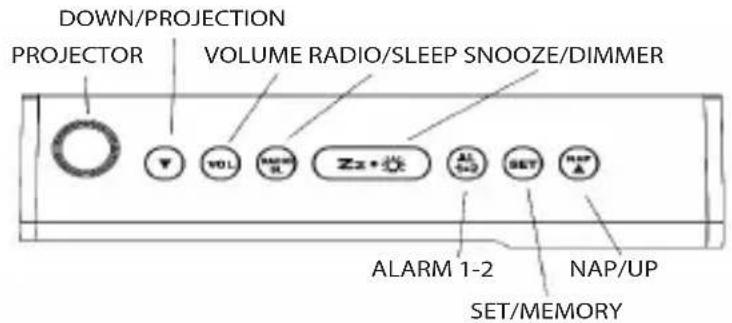
FRONT VIEW
BACK VIEW
INSTALLATION
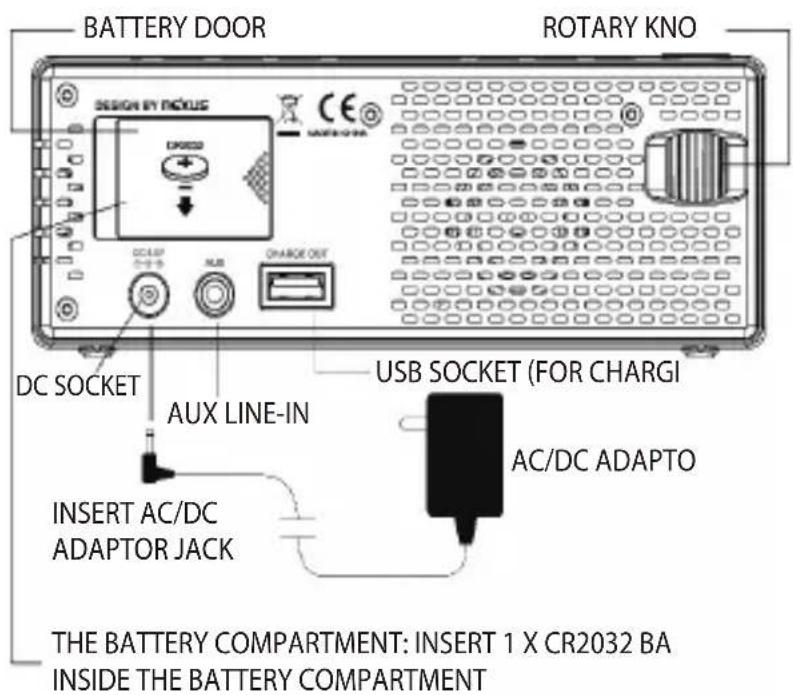
Plug the AC/DC adaptor to an AC household outlet, and then plug the DC jack to the back of the unit. Your clock radio is ready to work for you.
BACKUP BATTERY INSTALLATION
Your clock radio requires one CR2032 lithium battery (not included) to provide backup power to the clock in the event of a temporary power interruption.
- Place your unit face down on a flat surface.
- Slide and remove the battery cover at the bottom of your unit.
- Insert one new CR2032 lithium battery into the battery compartment with the "+" side facing up as indicated.
- Replace the battery cover.
If AC power is interrupted, the LED display will go off and both the radio and the alarm will not function. The backup battery will keep the time and all settings of your unit.
Make sure a fresh CR2032 lithium battery is used. A fresh CR2032 battery could backup your clock continuously.
SETTING TIME, 12/24HR TIME AND THE SNOOZE DURATION
- Press SET once, the hour digits flash. Press ▲ or ▼ to set the current hour (hold to advance rapidly).
- Press SET again, the minute digits flash. Press ▲ or ▼ to set minutes.
- Press SET again, the display shows "24H" and flashes, press ▲ or ▼ to select "12H" or "24H" time format.
- Press SET again, the display shows "05" and flashes, press ▲ or ▼ to select your snooze time from 5 to 60 minutes.
- Press SET again or if no key pressed for approx. 10 seconds to exit the setting mode.
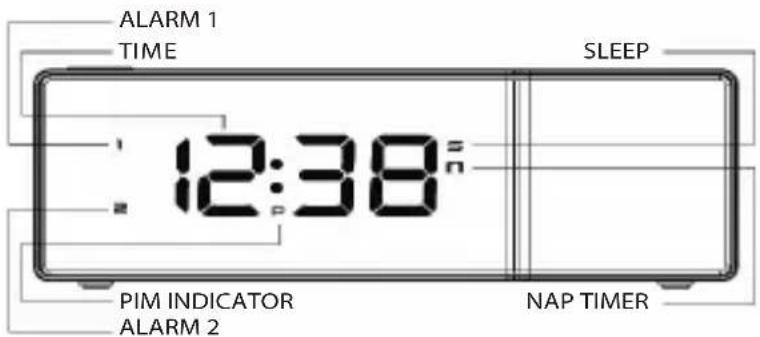
Note: when 12-hour time format is selected, the P (PM) icon will appear on middle time display to indicate the afternoon time; there is no AM indicator.
SETTING THE ALARMS
- Press AL 1.2 once, the 1 icon and the hour digits flash. Press ▲ or ▼ to set the alarm 1 hours.
- Press AL 1.2 again to adjust minutes. Press ▲ or ▼ to set the alarm 1 minutes.
- Press AL 1.2 again, LED displays "OFF" (alarm off). To select wake to sound sources, press ▲ or ▼ to select :- rd = wake-by-radio bu = wake-by-buzzer OFF = alarm off
- Press AL 1.2 again, the 2 icon and the hour digits flash. Press ▲ or ▼ to set the alarm 2 hours.
- Repeat step 2) and 3) to set alarm 2.
- Press AL1.2 again or do not press any button for about 10 seconds to exit alarm setting mode. When wake-to-radio or wake-to-buzzer is selected, the related alarm is turned on, indicated by the appearance of the 1 and/or the 2 icon on the left side of the display.
STOPPING AND RESETTING THE ALARM TO COME ON THE NEXT DAY
When alarm 1 or 2 is sounding, the related 1 or 2 icon flashes. Press the AL1.2 button once to stop the alarm and reset it to come on the following day. After that, the 1 or 2 icon remains lit on the display.
Note: When the alarm is sounding, pressing the ▲ / NAP or RADIO / SLEEP button will activate the nap timer or the radio and stop the alarm for the day. Do not plug in the AUX cable to the unit overnight as this will prohibit the alarms from functioning.
SNOOZE OPERATION (default snooze duration is 5 minutes)
When the alarm is sounding, press the snooze button once. The alarm will be silenced and will come on again after the set snooze duration.
Note: If your second alarm activates while the first alarm is sounding or it is in the snooze mode, the second alarm overrides the first alarm (the first alarm is reset to come on the next day).
USING THE HI-LO DIMMER
Press the dimmer button to adjust the brightness of the LED display. This can only be done when the radio is off or the unit is not sounding.
USING THE NAP TIMER
The NAP Timer allows you to rest and automatically wake up in 5, 15, 30, 45, 60, 75, or 90 minutes.
- Press ▲ / NAP once. The display shows the nap icon and the default naptime "05" (5 minutes).
- Press ▲ / NAP again to select your desired naptime. It will exit to time display if no button is pressed for 5 seconds.
- The nap icon lights up when the nap timer is counting. When the nap timer reaches 0, the alarm will sound and the nap icon will flash. Press ▲ / NAP once to stop the nap alarm, the nap icon will go off.
Note: If the nap time is set up then your alarm is sounding, your nap time will be cancelled automatically.
SETTING UP THE FM ANTENNA
Extend the FM wire antenna fully and vary the direction for best FM reception. Do not strip, alter, or attach to other antennas.
LISTENING TO THE FM RADIO
- To turn on the radio, press SLEEP/RADIO once. The display shows "ON" and then the radio frequency readings in MHz.
- Press ▲ or ▼ to tune the radio to a desired station. Press and hold ▲ or ▼ to scan for the next clear station.
- To adjust the volume, press VOL once. The display shows "L07". Press ▲ or ▼ to adjust volume from L01 (minimum) to L15 (maximum).
- Press zz• to turn off the radio.
Remark: Keep your radio away from fluorescent lamps or other electronic devices, which may cause interference to the radio.
USING THE PRESET MEMORY
This clock radio features a total of 10 preset memories of FM stations. These allow you to preset your favorite stations and access them quickly.
- Turn on the radio and select a radio station you like to memorize.
- Press and hold SET. "01" flashes. Press SET once to store Memory 1.
- Press ▲ or ▼ to select another station you like to memorize. Then press and hold SET. "01" flashes. Press ▲ or ▼ once, "02" appears. Press SET once to store Memory 02.
- Repeat Step 2 to 3 to preset memories 3 through 10.
- To access a preset station at any time, press the SET one at a time while the radio is on.
- To edit a preset station, select another station and then repeat Step 2 to 4. This overrides the original settings.
USING THE SLEEP TIMER
- Press the RADIO/SLEEP twice to enter the sleep mode. The sleep icon "L" and the sleep time "05" (5 minutes) will flash on the display.
- Press the RADIO/SLEEP again as needed to adjust the sleep timer from 15, 30, 45, 60, 75 or 90 minutes.
- When the display changes back to show the time, press the RADIO/SLEEP once to show the sleep time remaining.
- The radio will play for the programmed sleep time and then shut off.
- To turn off the radio before the sleep time has elapsed, press zz• once.
USING THE PROJECTION
Press ▼ once at the left side of your unit to turn on or off the projection. When the projection is on, press and hold ▼ to flip the projected time upside down. At the back of your unit, turn the rotary knob to rotate the projected time by 90 degrees.
TO USE THE AUX FUNCTION TO PLAY MUSIC IN YOUR IPHONE, IPOD OR MP3
You can play the music in your iPhone, iPod or MP3 device by using the AUX function. 1. Plug in the AUX cable to the AUX Line-in socket at the back of your Radio Alarm Clock and one end to the earphone socket of your iPhone, iPod or MP3 device. 2. Turn on your MP3, iPhone or iPod to play the music you like.
Note: when you plug in the AUX cable, the RADIO/SLEEP function will not work, and the volume of the unit cannot be adjusted when it is in AUX function. Do not plug in the AUX cable to the unit overnight as this will prohibit the alarms from functioning.
USB charging your mobile phones:
Plug the USB cable into the USB Charge Out port, then connect the opposite end to your phone for charging.
Note: The USB charge spec. is 5.0V/500MA; the original USB cable is required for charging. Using an illegal cable may cause damage.
TROUBLESHOOTING
If your clock displays irrelevant time or does not function properly, which may be caused by electrostatic discharge or other interference, unplug the DC jack to disconnect the AC power (and remove the backup battery). The clock radio will be reset to default settings and you need to set it again.
SPECIFICATIONS
Alarm duration: 1 hour (3-minute on, 9-minute off interval)
Snooze duration: 5 to 60 minutes
Nap timer duration: 5 minutes. Nap timer selections: 5, 15, 30, 45, 60, 75, 90 minutes to OFF
Sleep timer selections: 5, 15, 30, 45, 60, 75, 90 minutes to OFF
Volume: L01 (minimum) to L15 (maximum)
Preset memories of radio: 10
USB charging: 5V, 500mA
Power adaptor: 5.5V, 550mA
Default settings:-
Time format: 24 hour
Time: 0:00
Alarm 1 and 2: 0:00
Volume: L07 (Level 7)
Snooze duration: 05 (5 minutes)
IMPORTANT INFORMATION
Competence Centre Audio
2N-Everpol Sp. z o.o.
ul. Puławska 403A
02-801 Warsaw, Poland
phone: +48 22 331 99 59
e-mail: info@everpol.pl
www.blaupunkt.com
In case of questions or problems
please contact our service.
Tel. 00 48 22 331 99 53
E-mail: info@blaupunkt-audio.pl
All rights reserved. All brand names are registered trademarks of their
respective owners. Specifications are subject to change without prior notice.
Enjoy it.



- IMPORTANT NOTES
- SAFETY INSTRUCTIONS
- BATTERY
- WARNING
- NOTICE
- CE
- ENVIRONMENTAL INFORMATION
- CONTROLS AND FUNCTION
- BACK VIEW
- INSTALLATION
- BACKUP BATTERY INSTALLATION
- SETTING TIME, 12/24HR TIME AND THE SNOOZE DURATION
- SETTING THE ALARMS
- STOPPING AND RESETTING THE ALARM TO COME ON THE NEXT DAY
- SNOOZE OPERATION (DEFAULT SNOOZE DURATION IS 5 MINUTES)
- USING THE HI-LO DIMMER
- USING THE NAP TIMER
- SETTING UP THE FM ANTENNA
- LISTENING TO THE FM RADIO
- USING THE PRESET MEMORY
- USING THE SLEEP TIMER
- USING THE PROJECTION
- TO USE THE AUX FUNCTION TO PLAY MUSIC IN YOUR IPHONE, IPOD OR MP
- USB CHARGING YOUR MOBILE PHONES
- TROUBLESHOOTING
- SPECIFICATIONS
- IMPORTANT INFORMATION
- ENJOY IT
Brand : BLAUPUNKT
Model : CRP8
Category : Alarm Clock