BP-ZD01A - Alarm Clock BLAUPUNKT - Free user manual and instructions
Find the device manual for free BP-ZD01A BLAUPUNKT in PDF.


Pick your language and provide your email: we'll send you a specifically translated version.
| Product Type | Alarm Clock with FM Radio |
| Brand | Blaupunkt |
| Model | BP-ZD01A |
| Dimensions (approx.) | 10 x 6 x 10 cm |
| Weight (approx.) | 200 g |
| Power Supply | AC adapter (included) or 2x AAA batteries (not included) |
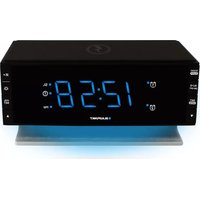
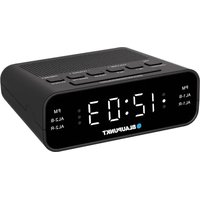
| Display Type | LED digital display with adjustable brightness |
| Alarm Features | Single alarm with snooze function (9-minute snooze) |
| Radio | FM radio with manual tuning and preset storage |
| Time Format | 12/24 hour selectable |
| Backup Battery | Retains settings during power loss |
| Bedside Features | Gradual wake-up beep or radio, dimmer control |
| Cleaning Instructions | Wipe with a soft, dry cloth. Do not use liquid cleaners. |
| Safety Precautions | Do not expose to water or moisture. Use only the supplied AC adapter. |
| Spare Parts Availability | Not available; contact support for replacement units. |
| Reparability | Not user-serviceable. Do not attempt to open the device. |
| Warranty | 1 year limited warranty |
Frequently Asked Questions - BP-ZD01A BLAUPUNKT
How do I set the alarm on my Blaupunkt BP-ZD01A?
Press the ALARM button repeatedly to enter alarm time setting mode. Use the + and - buttons to adjust hours and minutes. Press ALARM again to confirm and exit. Ensure the alarm switch on the side is set to ON.
Why is the display dim or blank?
Check if the AC adapter is properly connected and the wall outlet is working. If using batteries, they may be depleted. The display brightness can be adjusted using the DIMMER button.
How do I change from 12-hour to 24-hour time format?
While the clock is in normal display mode, press and hold the TIME SET button for about 3 seconds. The hour digits will flash; press the + or - button to toggle between 12H and 24H. Press TIME SET again to save.
How does the snooze function work?
When the alarm sounds, press the SNOOZE button (large top button). The alarm will stop and ring again after 9 minutes. You can snooze multiple times.
Can I wake up to the radio instead of the beep?
Yes. Set the alarm as usual, then press the MODE button to select radio alarm. The radio will turn on at the alarm time. Make sure the volume is set high enough.
How do I set the correct time?
Press and hold the TIME SET button until the hour digits flash. Use + / - to set the hour, press TIME SET again to set minutes, then press once more to exit.
What type of batteries does it use for backup?
The backup battery compartment requires 2 x AAA alkaline batteries (not included). They maintain time and alarm settings during a power outage.
How do I reset the clock to factory settings?
With the AC adapter connected, press and hold the TIME SET and ALARM buttons simultaneously for 5 seconds. The display will reset to 12:00.
Can I store my favorite FM stations?
Yes. Tune to a station manually, then press and hold one of the preset buttons (1-5) until the display shows 'P01' (or similar). Repeat for other presets.
Why doesn't the alarm sound?
Check that the alarm switch on the side is set to ON. Ensure the alarm time is correctly set. If using radio alarm, verify the radio volume is not turned down. Replace backup batteries if display shows low battery icon.
User questions about BP-ZD01A BLAUPUNKT
0 question about this device. Answer the ones you know or ask your own.
Ask a new question about this device
No questions yet. Be the first to ask one.
Download the instructions for your Alarm Clock in PDF format for free! Find your manual BP-ZD01A - BLAUPUNKT and take your electronic device back in hand. On this page are published all the documents necessary for the use of your device. BP-ZD01A by BLAUPUNKT.
USER MANUAL BP-ZD01A BLAUPUNKT



Manual assistant
Powered by Anthropic
Waiting for your message
Product information
Brand : BLAUPUNKT
Model : BP-ZD01A
Category : Alarm Clock