
UM100.3 - Refrigerator AMICA - Free user manual and instructions
Find the device manual for free UM100.3 AMICA in PDF.


| Product Type | Refrigerator (Fridge) |
| Brand | Amica |
| Model | UM100.3 |
| Height | 850 mm |
| Width | 596 mm |
| Depth | 550 mm |
| Weight | 30 kg |
| Energy Supply | 220-240 V, 50 Hz |
| Annual Energy Consumption | 152 kWh/year |
| Capacity | 100 L |
| Noise Level | 40 dB(A) |
| Climate Class | N-ST (16-38 °C) |
| Defrost Type | Manual |
| Temperature Control | Mechanical thermostat |
| Door Reversibility | Yes |
| Shelves | 3 glass shelves |
| Door Bins | 2 |
| Crisper Drawer | 1 |
| Refrigerant | R600a (Isobutane) |
| Recommended Cleaning | Mild detergent and water |
Frequently Asked Questions - UM100.3 AMICA
User questions about UM100.3 AMICA
0 question about this device. Answer the ones you know or ask your own.
Ask a new question about this device
Download the instructions for your Refrigerator in PDF format for free! Find your manual UM100.3 - AMICA and take your electronic device back in hand. On this page are published all the documents necessary for the use of your device. UM100.3 by AMICA.
USER MANUAL UM100.3 AMICA
natural_image
Exterior view of a modern office building (no signage)UM100.3 / UKS 16147
PL - INSTRUKCJA OBSŁUGI....2
DE - GEBRAUCHSANWEISUNG......22
EN - OPERATING MANUAL....42
CZ - NÁVOD K OBSLUZE....61
SK - NÁVOD NA OBSLUHU....81
BG - ИНСТРУКЦИЯ ЗА УПОТРЕБА....101
HU - HASZNÁLATI ÚTMUTATÓ....121
RO - INSTRUCTIUNI DE FOLOSIRE....141
Szanowni Państwo,
model UM100.3 / UKS 16147

natural_image
Simple line drawing of a rectangular tray with six circular indentations and a numbered circle (6) on top left, no text or symbols present.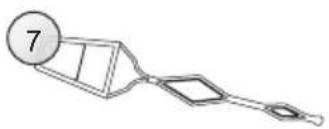
natural_image
Simple line drawing of a funnel-like object with a circular label containing the number 7 (no text or symbols on the object itself)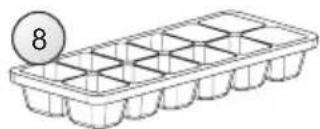
natural_image
Line drawing of a grid-based storage tray with a circular badge labeled '8' (no text or symbols on the tray itself)
natural_image
Pure technical line drawing of two rectangular panels with mounting feet, no text or symbols present1
natural_image
Diagram showing a double-headed arrow pointing upward and downward to stacked blocks inside a circle (no text or symbols)
natural_image
Line drawing of a wall socket and electrical plug (no text or symbols)3
Panel sterujący

natural_image
Diagram of a mechanical component with a magnified inset showing a pin or tool (no text or symbols present)4
natural_image
Diagram of a refrigerator with two upward arrows and one downward arrow, no text or symbols present5
Wymiana żarówki
natural_image
Illustration of a stylized white object with a circular opening and a curved arrow pointing left (no text or symbols)6
natural_image
Simple black-and-white line drawing of a tree with cloud-like canopy and two wavy lines at base (no text or symbols)natural_image
Simple line drawing of a recycling symbol (three chasing arrows), no text or labels present.natural_image
Simple line drawing of a rectangular object with six circular holes and a numbered circle (6) on the top left, no text or symbols present.
natural_image
Simple line drawing of a mechanical component with a numbered circle (7) and no text or symbols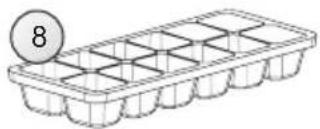
natural_image
Line drawing of a seed tray with a numbered label (8) on top, no text or symbols present.
natural_image
Pure technical line drawing of a tilted rectangular panel or frame structure without any text, numbers, or symbols1
natural_image
Diagram showing a mechanical or structural assembly with stacked blocks and an upward arrow, enclosed in a circle (no text or symbols)2

natural_image
Line drawing of a wall socket and hand holding a plug (no text or symbols)natural_image
Diagram of a mechanical component with a magnified inset showing a tool interacting with a housing (no text or symbols)natural_image
Diagram of a cabinet or shelf with directional arrows indicating movement (no text or symbols)5
natural_image
Illustration of a stylized white object with a circular hole and vertical stripes, emitting a black arrow (no text or symbols)6
natural_image
Simple line drawing of a recycling symbol (three chasing arrows), no text or labels present.The Amica appliance is a combination of exceptional user-friendliness and excellent efficiency. Prior to dispatch, each unit was carefully checked for its safety and operating capabilities.

Before starting the appliance, please read this operating manual carefully.

Note!
This fridge-freezer is intended for use at home only.
The manufacturer reserves the right to introduce modifications, which do not affect the operation of the appliance. The changes in the equipment, as well as the inside and outside decoration, which do not affect its functionality and safety are permissible.
TABLE OF CONTENTS
Additional equipment

natural_image
Simple line drawing of a rectangular mold with six circular cavities and a numbered circle (6) on the top left corner.
natural_image
Simple line drawing of a tool or device with a numbered circle and two rectangular components (no text or symbols)
natural_image
Line drawing of a grid-patterned storage tray with a numbered circle (8) above it, no text or symbols present.
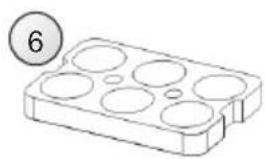
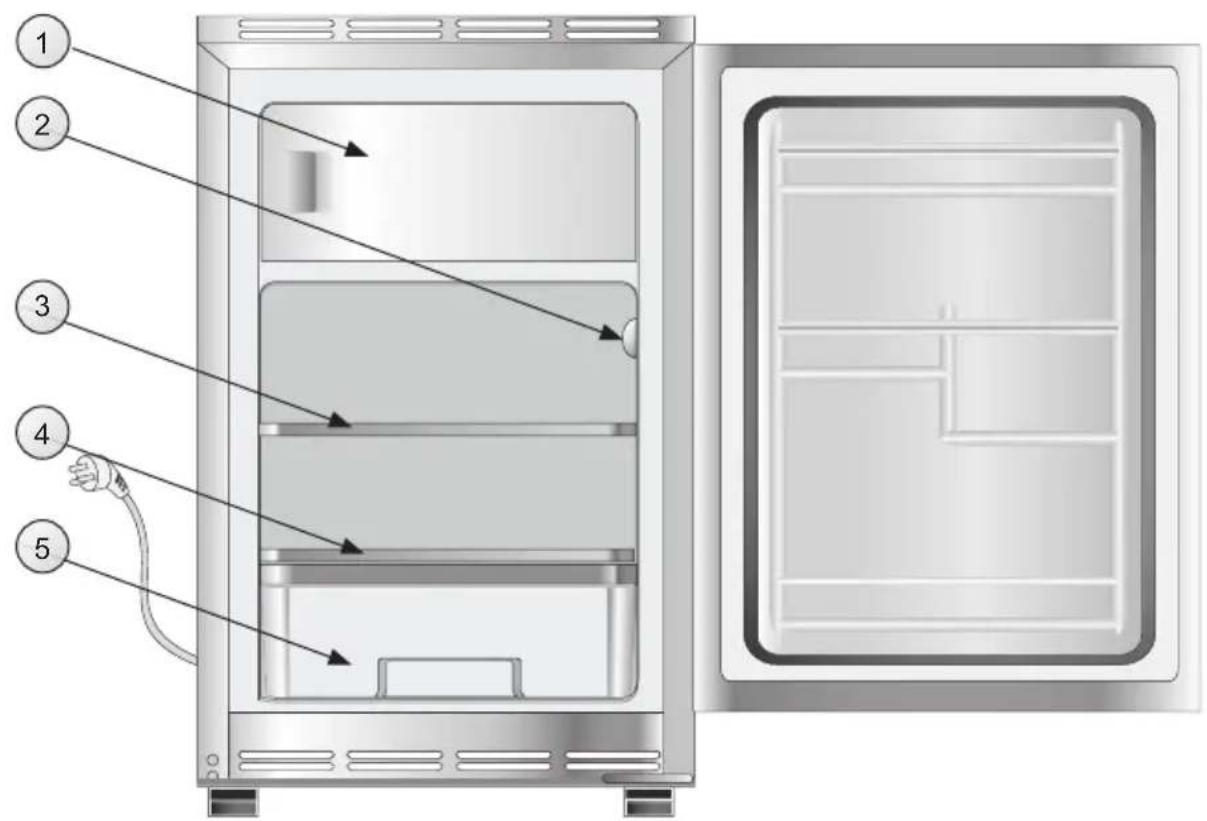
The accurate description of the equipment for the model of the fridge-freezer purchased by you may be found in the tables on next pages.
- Low temperature chamber ( ^ / ^** )
- Controls
- Glass shelf
- Glass container lid
- Container
- Egg tray
- Pusher
- Ice tray
| Items of equipment | UM100.3 / UKS 16147 |
| Glass shelf 1 | |
| Glass container lid 1 | |
| Container 1 | |
| Type of lighting bulb | |
| Plunger yes | |
| Egg tray 1 | |
| Ice cube tray 1 |

- The Manufacturer shall not be held liable for the damage arising from the failure to observe the principles contained in this manual.
- Keep this manual for future reference, or to pass it over to the possible next user.
- This appliance is not intended for use by persons (including children) with limited physical, sensual or psychical capabilities and persons who lack experience or familiarity with the appliance, unless attended or in accordance with the operating manual for the appliance delivered by persons responsible for their safety.
- Do not allow the unattended children to use the appliance. Do not allow them to play with the appliance. They must climb inside the drawers and swing on the doors.
- The fridge-freezer operates properly at the N-ST ambient temperature. Do not use it in the cellar, unheated summer cottage during autumn and winter.
- When placing, moving, lifting the appliance, do not hold the door handles, pull the condenser at the rear part of the refrigerator and touch the compressor unit.
- When transporting, moving or placing the fridge-freezer do not tilt it by more than 40° from the vertical position. Should such a situation occur, the appliance may be switched on after minimum 2 hours from its placement in the right position (fig.1).


natural_image
Pure technical line drawing of a tilted rectangular panel or frame with mounting feet (no text or symbols)1
- Pull the plug out from the mains socket before each maintenance activity. Do not pull the cord, but hold the body of the plug instead.
- The cracking-like sound, which the appliance may emit is caused by expansion and shrinking of parts as a result of temperature variations.
- For safety reasons do not repair the appliance on your own. Repairs carried out by persons who do not have required qualifications may constitute a serious hazard for the user of the appliance.
● Air the room in which the appliance is placed for a few minutes (the size of the room for a product containing isobuthane/R600a must be at least 4m3) in case of the damage of the cooling system.
● Make sure you do not damage the cooling system, by punching the refrigerant pipes in the evaporator or breaking the pipes. The refrigerant splashes are flammable. Rinse the eyes with clean water and call for medical assistance immediately in case of their contact with the refrigerant.
INSTALLATION AND OPERATING CONDITIONS OF THE APPLIANCE
Installation before using the appliance for the first time
- Take the product out of the package, remove the scotch tapes protecting the door and the equipment. The possibly remaining adhesive stains may be removed with a mild washing agent.
- Do not throw away the polystyrene elements of the packaging. In the case of the necessity to transport the fridge-freezer, pack it in the polystyrene elements and film, as well as protect it with a scotch tape.
- Clean the interior surface of the fridge-freezer and the elements of the equipment with a washing agent dissolved in lukewarm water, then wipe it dry.
-
Place the fridge-freezer on an even, flat and stable surface, in dry, aired and shadowy room, far from the heat sources such as an oven, cooktop, central heating radiator, central heating pipe, hot water installation, etc.
-
Ensure that the product is level by adjusting the 4 adjustable legs (fig. 2).

natural_image
Diagram showing a double-headed arrow pointing upward and downward to stacked blocks inside a circle (no text or symbols)2

The back of the appliance, particularly the condenser and other parts of the cooling system, must not be touching other objects which could damage them, particularly the central heating pipe or the water pipe.

Minimal distances from the heat sources
- from the electric gas and other ovens
- 30 mm,
- from oil or coal fired ovens - 300 mm,
- from in-built ovens - 50 mm
Observe minimum clearances and fit in recess appropriate for the appliance dimensions (Fig. 3).
If there is no possibility to ensure the above-mentioned distances, provide an appropriate insulation board.
INSTALLATION AND OPERATING CONDITIONS OF THE APPLIANCE

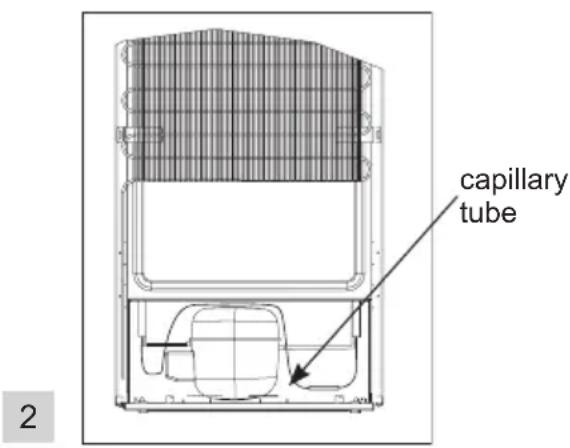
It is prohibited to readjust or modify any parts of the unit. It is crucial not to damage the capillary tube visible in the compressor recess. The tube may not be bent, straightened and wound.
If the capillary tube is damaged by the user the guarantee will be void (fig. 2).

Do not use adapters, multiple sockets and two-wire extension leads. If it is necessary to use the extension lead, it must be equipped with a protection ring and a single socket and must have VDE/GS safety certificate.
Mains connection
Before the appliance is connected to the mains, set the adjustment knob to the "0" position.
- The appliance should be connected to AC 230V, 50Hz supply socket. The socket must be fitted properly and must be supplied with an earthing conduit and 10 A fuse.
-
The earthing of the appliance is required by the law. The manufacturer will not be held liable for any damage, which can be incurred by persons or objects as a consequence of the failure to fulfil the requirement imposed by this regulation.
-
If the extension lead (with a protection ring and a safety symbol) is applied, its socket must be located at a safe distance from sinks and may not be exposed to water and other wastewater flooding.
- The data is provided on the rated plate located at the bottom of the wall inside the chamber.
Mains disconnection
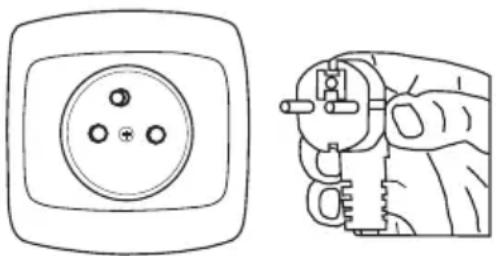
- Ensure the possibility of disconnecting the appliance from the mains by pulling out the plug or switching the two-pole switch off (fig. 3).
3
natural_image
Line drawing of a wall socket and hand holding a plug (no text or symbols)Control panel

Temperature adjustment
Change in the knob adjustment causes temperature change in the fridge-freezer. Possible knob adjustment
● appliance switched off - OFF setting
● maximum temperature - setting 1
● optimal temperature - 2-5 setting
● minimum temperature - 6 setting

Do not put food into the fridge freezer before it has reached its operating temperature, which takes minimum 4 hours.
Temperature inside the fridge / LCT (\*/\*\*\*)
Do not change the temperature settings due to the change in the season of the year. The ambient temperature increase will be detected by the sensor and the compressor will be switched on automatically for a longer period of time in order to maintain the temperature set inside the chambers.
Minor changes in temperature
The slight changes in temperature are perfectly normal and may occur, for instance during the storage of great quantities of fresh products in the fridge, or when the door is open for a longer period of time. This will not affect the condition of the stored foodstuff, and the temperature will quickly return to its set value.
Storage of food in the fridge (LCT \*/\*\*\*
Observe the following recommendations to ensure the food remains fresh.
- The products should be placed on plates in containers or packed in food wrap.
Distribute them evenly all over the she- lves. - Pay attention whether the food contacts the rear wall, if so, it may cause frosting or wetting of the products.
- Do not put dishes with hot content into the fridge
● Products which take over foreign flavours easily such as butter, milk, white cheese and products with intense flavour, such as fish, smoked meat, hard cheese must be placed on shelves, packed in food wrap or in tightly sealed containers.
● Storage of vegetables containing significant quantity of water will cause the deposition of water steam on the vegetable containers, it does not impact the proper functioning of the fridge. - Before putting the vegetables into the fridge, dry them well.
- Excessive moisture shortens the shelf life of vegetables, especially the leafed vegetables.
- Do not wash the vegetables before storing in the refrigerator. Washing removes the natural protection, therefore it is better to wash the vegetables directly before consumption.
Freezing food
- Practically all the food products, except for vegetables consumed raw, such as lettuce can be frozen.
- Only food products of the highest quality, divided into small portions for single use, should be frozen.
- Products should be packed in materials that are odourless, resistant to air and moisture penetration, and not susceptible to fat. Plastic bags, polyethylene and aluminium sheets are the best wrapping materials.
- The packaging should be tight and should stick to the frozen products. Do not use glass containers.
- Keep the fresh and warm foodstuff at ambient temperature away from the products, which have already been frozen.
- We advise not to place more than 2 kg of fresh food at a time to the freezer per day (see table on page 77).
- In order to maintain good quality of the frozen food, reorganise the food that is in the middle of the freezer, so that it does not touch the products that are not frozen yet.
- It is recommended to move the already frozen products to one side and place the fresh products that are to be frozen to the opposite side, as close to the rear and side walls as possible.
OPERATION AND FUNCTIONS
The time of storage of the frozen products depends on their quality when fresh, before freezing and on the storage temperature.
The following storage periods are recommended when the temperature of -18^ or lower is maintained:
| Products Months | |
| Beef 6-8 | |
| Veal 3-6 | |
| Giblets 1-2 | |
| Pork 3-6 | |
| Poultry 6-8 | |
| Eggs 3-6 | |
| Fish 3-6 | |
| Vegetables 10-12 | |
| Fruit 10-12 |
Practical everyday tips
- Do not place fridges or freezers next to radiators, heaters, stoves or in direct sunlight.
● Make sure that air vents are not covered up and clean the dust off them once or twice a year. - Select the right temperature: 6 to 8°C in your refrigerator and -18°C in your freezer is sufficient.
- When on holiday, turn up the temperature in your fridge.
- Only open your fridge or freezer when necessary. It helps if you know what food they contain and where it is located. Return food to the fridge or freezer as soon as possible after you have used it so that it doesn't warm up too much.
- Wipe out the inside of your fridge regularly with a cloth soaked in a mild detergent. Appliances which are not self-defrosting will require regular defrosting. Don't allow frost layers thicker than 10 mm to form.
- Keep the seal around the door clean, otherwise it won't shut properly. Always replace broken seals.
Understanding the stars
* Temperature is at least -6°C; sufficient to store frozen food for about a week. Drawers or compartments marked with one star used to be a feature of (mostly) cheaper fridges.
** Food can be stored at -12°C or below for 1-2 weeks without losing their taste. Not suitable for freezing food.
*** Mainly used to store foods at -18°C or below. Can also be used to freeze up to 1 kilogram of fresh food.
****This appliance is suitable for storing foods at -18°C or below and freezing larger quantities of fresh foods.
USING THE REFRIGERATOR EFFICIENTLY
Storage zones in the refrigerator
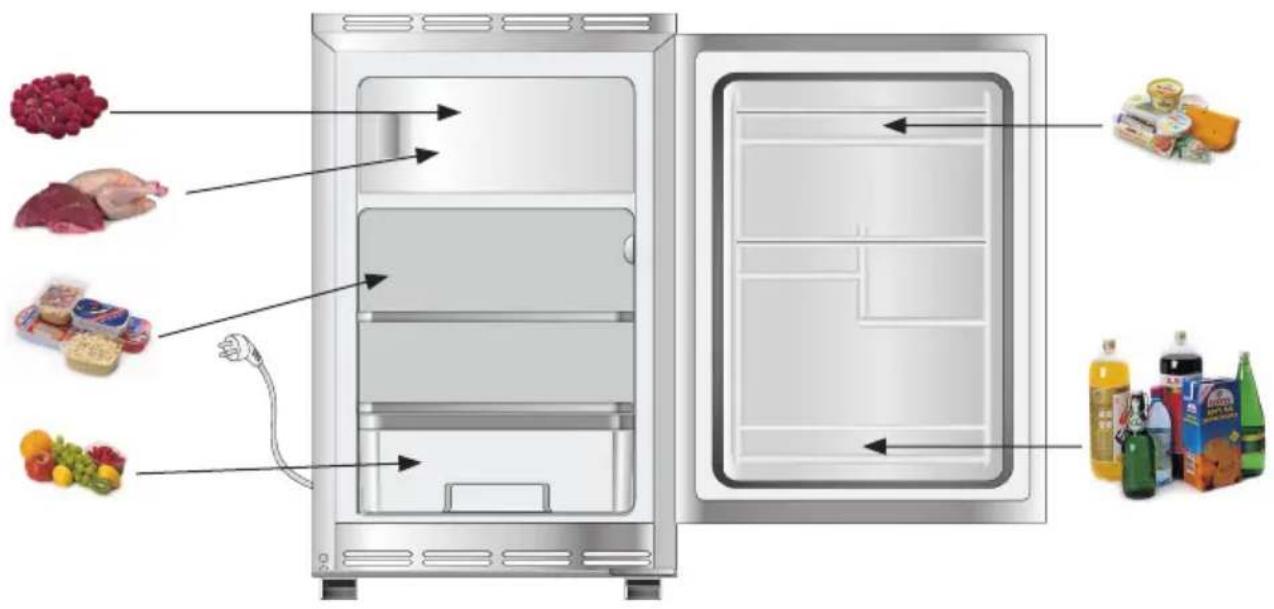
- Due to the natural circulation of the air in the appliance, there are different temperature zones in the refrigerator chamber. - The coldest area is directly above the vegetables drawers. Use this area for all delicate and highly perishable food e.g.
- Fish, meat, poultry
- Sausage products, ready meals
- Dishes or baked goods containing eggs or cream
- Fresh dough, cake mixtures
- Pre-packed vegetable and other fresh food with a label stating it should be kept at a temperature of approx 4^ C.
- The warmest area is in the top section of the door. Use this for storing butter and cheese.
Food that should not be stored in a refrigerator
● Not all food is suitable for storing in the refrigerator. These include:
- Fruit and vegetables which are sensitive to cold, such as bananas, avocado, papaya, passion fruit, aubergines, peppers, tomatoes and cucumbers.
- Fruit which is not yet ripe
- Potatoes
Defrosting the fridge
Frost settles on the rear wall of the fridge chamber. It is removed automatically. During the defrosting, the condensate, which contains contaminants may clog the opening in the through. Should it occur, carefully unclog the opening with the cleaning plug (fig. 4).

natural_image
Diagram of a mechanical component with a magnified inset showing a pin or tool (no text or symbols present)- The appliance operates in cycles: it refrigerates (then the frost settles on the rear wall), and defrosts (water flows down the rear wall).

Disconnect the appliance from the mains before cleaning by removing the plug from the mains socket or switching off the fuse. Prevent water from penetrating the control panel or the light.
- Do not use defrosting aerosols. They may cause the formation of explosive mixture, or contain slovents which may damage the plastic components of the appliance and even be harmful to health.
● Make sure the water used for cleaning does not flow into the evaporation container through the discharge opening. - The whole appliance, except for the door gasket must be cleaned with a mild cleaning detergent. The door gasket should be cleaned with water and wiped dry.
- Wash all the accessories (vegetable containers, door shelves, glass shelves, etc.).
Defrosting the freezer (LCT)
- It is recommended to combine defrosting the appliance with washing it.
- Excessive accumulation of ice on the freezing areas impairs the appliance's freezing capacity and increases the energy consumption.
- Defrost the appliance at least once or twice a year.
- If there is food in the freezer, set the knob to the max. position about 4 hours before the planned defrosting. This will ensure the possibility of storing the food at the ambient temperature for a longer time.
- After taking the food out of the freezer, put it in a container, wrap it with several layers of paper, a blanket and store it at a cool place.
- The defrosting operation should last as short as possible. Long storage of food at the ambient temperature shortens their shelf life.
You must not put an electric heater, a heating fan or a hair dryer into the freezer by any means.
Taking out and putting in the shelves
Slide the shelf out, then slide it in as much as possible so that its clamp could fit the guide groove (fig. 5).

Do not use bulbs of greater or smaller power, apply only the bulbs of parameters given above.

natural_image
Simple line drawing of a two-tiered storage cabinet with arrows indicating flow or movement (no text or symbols)Replacement bulb
- Set the knob to "0" position and unplug the appliance from the mains socket.
- Pull away the bulb cover bracket and remove it
- Replace the bulb with a new one observing the following parameters: 220-240 V, max. 15 W, E14 thread, maximum bulb dimensions: diameter - 26 mm, length - 55 mm.
- Put the caver back and fit it in (fig. 6).

natural_image
Illustration of a stylized object with a circular hole and curved arrow, no text or symbols present.6
TROUBLE-SHOOTING
| Problems Possible | causes Remedies | |
| The appliance does not work | Electric circuit rupture - | check whether the plug is properly inserted into the socket- check whether the power cable of the appliance is not damaged- check whether there is voltage in the socket, by plugging another appliance, e.g. a night lamp- check whether the appliance is switched on by setting the thermostat to a position above 0. |
| The lighting inside the chamber does not work | The bulb is loose or fused | - see the point above “The appliance does not work” – fit the bulb correctly or replace it. |
| Temperature inside the appliance is not low enough | Incorrect setting of the adjustment knob | - reset the knob to a higher position |
| The ambient temperature is higher or lower than the N-ST climate range | - the appliance is adapted to operation in the N-ST climate range. | |
| The appliance is located at the sunlit place or near the heat sources | - move the appliance to another place. Observe the guidelines contained in the manual | |
| Too much warm food loaded at a time | - wait 72 hours until the food becomes cool (freezes) and the required temperature is reached inside the chamber | |
| Internal air circulation hindered | - place the food and containers in such a way that they do not touch the rear wall of the fridge | |
| The air circulation at the back of the appliance is hindered | - move the appliance min. 30 mm away from the wall | |
| Too much white frost accumulated on the freezing elements | defrost the freezer chamber | |
| The door of the fridge/freezer are opened too often and/or remain open for too long | - reduce the frequency of opening the door and/or shorten the time when door remains open | |
| The door does not close completely | - place the food and containers so that they would not interfere with door closed |
TROUBLE-SHOOTING
| Problems Possible causes | Remedies | |
| The compressor is switched on too rarely | - check whether the ambient temperature is not lower than 16°C | |
| Door gasket inserted incorrectly | - press the gasket in | |
| The appliance works continuously | Incorrect setting of the adjustment knob | - reset the knob to a lower position |
| See. "Temperature inside the appliance is not low enough for description of other possible causes | See. "Temperature inside the appliance is not low enough for description of other possible remedies | |
| Water collects in the lower part of the appliance | The water discharge opening is clogged | - clean the discharge opening (see the operating manual – chapter entitled "Defrosting the fridge") |
| Internal air circulation hindered | - place the food and containers in such a way as that they do not touch the rear wall of the fridge | |
| The appliance generates unusual noise | Incorrect levelling of the appliance | - level the appliance properly |
| The appliance touches furniture and/or other objects | - place the appliance at a location that ensures proper clearances around it |
Certain sounds can be heard during normal use of the refrigerator, which do not affect its correct operation.
Sounds, which can be easily prevented:
- noise caused by the appliance which is not level - adjust the position with the adjustable turn-in front feet. Alternatively, place pads made of soft material under the rear rollers, especially when the appliance is placed on tiles.
- touching the adjacent piece of furniture - move the refrigerator away.
- creaking of the drawers or shelves - take out and put back the drawer or shelf.
●sounds of clinking bottles - move bottles apart.
Sounds heard during normal use are mainly due to operation of the thermostat, compressor (switching on) and cooling system (thermal expansion and contraction of the radiator caused by flow of the cooling agent).
Ozone layer protection

natural_image
Simple black-and-white line drawing of a tree with two roots and wavy lines at the base (no text or symbols)The refrigerants and fo-aming agents, which are 100% free of FCKW and FKW have been used for manufacturing our product. Therefore we help protecting the ozone layer and prevent the greenhouse effect increase. On the other hand, the innovative technology and environmentally friendly insulation help in reducing energy consumption.
Recycling of the packaging

natural_image
Simple line drawing of a recycling symbol (three chasing arrows), no text or labels present.Our packaging are made of environmentally friendly materials, which can be reused:
- The external packaging is made of cardboard/foil
● The FCKW free shape of foamed polystyrene (PS)
● Polyethylene (PE) foils and bags
Elimination / disposal of the equipment
If the appliance is no longer in use, cut the connecting conduit off the used equipment before its scrapping.

This appliance is marked with a symbol of the crossed out waste container in conformance with the European Directive 2002/96/EC. Such marking informs that the equipment may not be kept together with other waste coming from the household after the period of its use. The user is obliged to dispose of the appliance at the waste collection point. The local waste collection points, shops and communal units form an appropriate system enabling the disposal of the equipment.
Handling the used electrical and electronic equipment properly contributes to the avoidance of consequences harmful to the human health and natural environment, resulting from the presence of hazardous substances and improper storage and processing of such equipment.
SPECIFICATION
| TYPE | UM100.3 / UKS 16147 |
| Manufacturer | AMICA WRONKI S.A. |
| Type of the appliance fridge-freezer LCT | |
| Energy class ^1 A+ | |
| Annual power consumption kWh/year ^2 | 168 |
| Net usable volume (l) 85 | |
| Fridge 68 | |
| Freezer - | |
| Freezing chamber star classification (LTC) | 17 |
| Freezing chamber star classification ^3 | */**** |
| Storage time (hrs), at no power supply 11 | |
| Freezing capacity (kg/24h) 2 | |
| Climate range ^4 | N-ST |
| Noise level [dB(A) re1pW] 40 dB (A) | |
| Supply voltage V/Hz 220-240V~/50Hz | |
| H x W x D 816x495x550 | |
| Appliance weight (kg) 34 |
^1) A++/A+ (=low consumption) to G (=high consumption).
^2) The energy consumption refers to the yearly consumption in kWh, indicated according to DIN EN 153. Deviations may occur in the practical operation of the appliance, depending on the use and place of its location.
3)*= storage room of approximately. -6°C
(**) = storage room of approximately. -12°C
(^) = freezing storage room of approximately -18^
(^/) = freezing storage room of approximately -18^ or below
^4) Climate range means that your set temperature is maintained at "normal" ambient temperature. Should the room temperature drop significantly below the defined scope, the appliance does not work so often and the undesirable temperature increase may occur dojść do niepożądanego wzrostu temperatury.
The information about the climate range of the appliance is provided on the rated plate. It indicates at which ambient temperature (that is, room temperature, in which the appliance is working) the operation of the appliance is optimal (proper).
| Climate range Permissible ambient temperature | |
| SN from +10°C to +32°C | |
| N from +16°C to +32°C | |
| ST from +16°C to +38°C | |
| T from +16°C to +43°C | |
Manufacturer's declaration
The manufacturer hereby declares that the appliance fulfils the requirements of the following European directives:
● The Low Voltage Directive 2006/95/EC,
● The Electromagnetic Compatibility Directive 2004/108/EC,
and therefore it has been marked with a CC and assigned a declaration of conformity, which is made available to the market supervising authorities.
Vážení klienti,
Doplňky vybavení
natural_image
Simple line drawing of a rectangular object with six circular holes and a numbered circle (6) on the top left corner.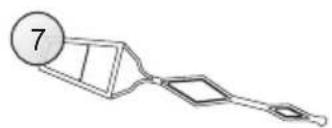
natural_image
Simple line drawing of a mechanical tool or device with a numbered circle (7) on the top left, no text or symbols present.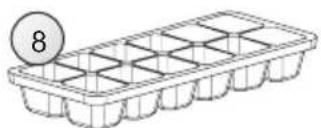
natural_image
Line drawing of a grid-based storage tray with a circular label containing the number 8 (no text or symbols on the tray itself)
natural_image
Pure technical line drawing of a tilted rectangular panel or frame structure without any text, numbers, or symbols1
natural_image
Diagram showing a mechanical or structural assembly with stacked blocks and an upward arrow, enclosed in a circle (no text or symbols)2

natural_image
Line drawing of a wall socket and electrical plug (no text or symbols)3
Ovládací panel

natural_image
Diagram of a mechanical component with a magnified inset showing a pin inserted into a housing (no text or symbols)4
natural_image
Diagram of a refrigerator with two doors and hanging arrows indicating airflow or movement (no text or symbols)Výměna žárovky
natural_image
Illustration of a stylized white object with a circular opening and vertical grooves, emitting a black arrow (no text or symbols)6
Určování závad
natural_image
Simple black-and-white line drawing of a cloud with two wavy lines at the base (no text or symbols)natural_image
Simple line drawing of a recycling symbol (three chasing arrows), no text or labels present.model UM100.3 / UKS 16147
natural_image
Simple line drawing of a rectangular object with six circular holes and a numbered circle (6) on the top left, no text or symbols present.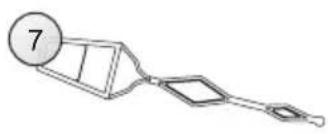
natural_image
Simple line drawing of a mechanical device with a numbered circle and two connected components (no text or symbols)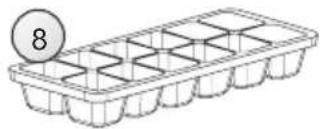
natural_image
Line drawing of a 3D tray with internal grid pattern and a numbered circle (8) on top, no text or symbols present.
natural_image
Pure technical line drawing of a mechanical component or bracket (no text or symbols)1
natural_image
Diagram showing a mechanical or structural assembly with three blocks and an upward arrow, enclosed in a circle (no text or symbols)2
natural_image
Line drawing of a wall socket and electrical plug (no text or symbols)3
OBSLUHA A FUNKCIE
Ovládací panel

Storage of food in the fridge (PNT x/xxx)
Odmrazovanie chladničky
natural_image
Diagram of a mechanical device with a magnified inset showing a tool interacting with a component (no text or symbols present)4
natural_image
Diagram of a refrigerator with two doors and directional arrows indicating flow or movement (no text or symbols)5
Výmena žiarovky
natural_image
Illustration of a stylized white object with a circular hole and a curved arrow, no text or symbols present.6
LOKALIZÁCIA ZÁVAD
natural_image
Simple black-and-white line drawing of a cloud with two wavy lines at the base (no text or symbols)natural_image
Simple line drawing of a recycling symbol (three chasing arrows), no text or labels present.natural_image
Simple line drawing of a rectangular object with six circular holes and a numbered circle (6) on the top left corner.
natural_image
Simple line drawing of a mechanical device with a numbered circle and two connected components (no text or symbols)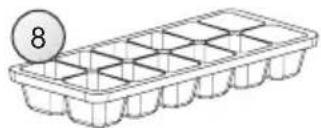
natural_image
Illustration of a grid-patterned storage tray with a coin labeled '8' on top (no text or symbols on the tray itself)
natural_image
Pure technical line drawing of a tilted rectangular panel or frame structure without any text, numbers, or symbols1
natural_image
Diagram showing a double-headed arrow pointing upward and downward over stacked blocks inside a circle (no text or symbols)2

natural_image
Line drawing of a wall socket and electrical plug (no text or symbols)3
Панел на управление

natural_image
Diagram of a mechanical component with a magnified inset showing a tool interacting with a housing (no text or symbols)4
natural_image
Diagram of a refrigerator with two doors and directional arrows indicating flow or movement (no text or symbols)5
natural_image
Illustration of a stylized white object with a circular opening and vertical grooves, emitting a black arrow (no text or symbols)6
natural_image
Simple black-and-white line drawing of a tree with two wavy lines at the base (no text or symbols)natural_image
Simple line drawing of a recycling symbol (three chasing arrows), no text or labels present.natural_image
Simple line drawing of a rectangular object with six circular holes and a numbered circle (6) on the top left corner.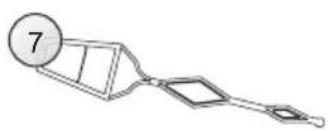
natural_image
Simple line drawing of a mechanical device with a numbered circle and handle (no text or symbols)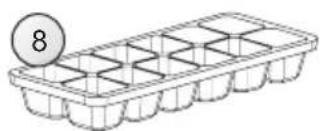
natural_image
Line drawing of a grid-based storage tray with a numbered circle (8) above it, no text or symbols present.
natural_image
Pure technical line drawing of two rectangular panels with mounting feet, no text or symbols present1
natural_image
Diagram showing a mechanical or structural assembly with three blocks and an upward arrow, enclosed in a circle (no text or symbols)2

natural_image
Line drawing of a wall socket and hand holding a plug (no text or symbols)3
Vezérlőpanel

Hűtő leolvasztása
natural_image
Diagram of a mechanical component with a magnified inset showing a tool interacting with a housing (no text or symbols)natural_image
Diagram of a cabinet or shelf with directional arrows indicating movement (no text or symbols)5
Izzócsere
natural_image
Illustration of a stylized white object with a circular hole and vertical grooves, emitting a black arrow (no text or symbols)6
HIBÁK LOKALIZÁCIÓJA
natural_image
Simple black-and-white line drawing of a cloud with two wavy lines at the base (no text or symbols)natural_image
Simple line drawing of a recycling symbol (three chasing arrows), no text or labels present.natural_image
Simple line drawing of a rectangular object with six circular holes and a numbered circle (6) on top left, no text or symbols present.
natural_image
Simple line drawing of a mechanical tool or device with a numbered circle and two angled components (no text or symbols)
natural_image
Line drawing of a seed tray with 8 labeled circular marker (no text or symbols on the tray itself)
natural_image
Pure technical line drawing of a tilted rectangular panel or frame structure without any text, numbers, or symbols1
natural_image
Diagram showing a double-headed arrow pointing upward and downward over stacked blocks inside a circle (no text or symbols)2

natural_image
Line drawing of a wall socket and hand holding a plug (no text or symbols)3
Panoul de comandă

natural_image
Diagram of a mechanical component with a magnified inset showing a pin inserted into a housing (no text or symbols)natural_image
Diagram of a refrigerator with two doors and directional arrows indicating flow or movement (no text or symbols)5
Schimbarea becului
natural_image
Illustration of a stylized white object with a circular hole and curved arrow, no text or symbols present.6
natural_image
Simple black-and-white line drawing of a tree with cloud-like canopy and two wavy lines at base (no text or symbols)natural_image
Simple line drawing of a recycling symbol (three chasing arrows), no text or labels present.- Szanowni Państwo,
- 1
- 4
- Wymiana żarówki
- Note!
- TABLE OF CONTENTS
- INSTALLATION AND OPERATING CONDITIONS OF THE APPLIANCE
- Installation before using the appliance for the first time
- Minimal distances from the heat sources
- Mains connection
- Mains disconnection
- Control panel
- Temperature adjustment
- Temperature inside the fridge / LCT (\*/\*\*\*)
- Minor changes in temperature
- Storage of food in the fridge (LCT \*/\*\*\*
- Observe the following recommendations to ensure the food remains fresh.
- Freezing food
- OPERATION AND FUNCTIONS
- Practical everyday tips
- Understanding the stars
- USING THE REFRIGERATOR EFFICIENTLY
- Storage zones in the refrigerator
- Food that should not be stored in a refrigerator
- Defrosting the fridge
- Defrosting the freezer (LCT)
- Taking out and putting in the shelves
- Replacement bulb
- TROUBLE-SHOOTING
- Sounds, which can be easily prevented:
- Ozone layer protection
- Recycling of the packaging
- Elimination / disposal of the equipment
- SPECIFICATION
- Manufacturer's declaration
- Vážení klienti,
- Ovládací panel
- Výměna žárovky
- Určování závad
- OBSLUHA A FUNKCIE
- Storage of food in the fridge (PNT x/xxx)
- Odmrazovanie chladničky
- Výmena žiarovky
- LOKALIZÁCIA ZÁVAD
- 3
- Панел на управление
- Vezérlőpanel
- Hűtő leolvasztása
- Izzócsere
- Panoul de comandă
- Schimbarea becului
Brand : AMICA
Model : UM100.3
Category : Refrigerator