
ZZ 35 - Humidifier ECG - Free user manual and instructions
Find the device manual for free ZZ 35 ECG in PDF.


| Type | Ultrasonic air humidifier with heating function |
| Model | ECG ZZ 35 |
| Recommended room size | Up to 20 m² |
| Humidifying capacity | 250 ml/hour |
| Tank volume | 3,500 ml |
| Operating duration (low) | Approximately 60 hours |
| Operating duration (medium) | Approximately 30 hours |
| Operating duration (high) | Approximately 20 hours |
| Operating duration (high + heating) | Approximately 11 hours |
| Mist levels | 3 (low, medium, high) |
| Modes | Automatic, Noiseless (night), Manual |
| Timer | Up to 8 hours (1-hour increments) |
| Humidity setting range | 40% – 80% (5% steps) |
| Steam nozzle | 360° rotatable |
| Heating function | Warm mist (average 40°C), separate control |
| Display | Digital with humidity, mist level, timer, water level indicator |
| Auto shut-off | When water tank is empty |
| Noise level | Silent operation (suitable for bedroom) |
| Rated voltage | 230 V ~ 50 Hz |
| Rated power | 85 W |
| Dimensions (H × W × D) | 340 × 204 × 185 mm |
| Weight | 2980 g |
| Cleaning | Regular cleaning of atomizer, float, tank; descale weekly; use soft cloth |
| Safety | Automatic shut-off, overheat protection, child supervision required |
Frequently Asked Questions - ZZ 35 ECG
User questions about ZZ 35 ECG
0 question about this device. Answer the ones you know or ask your own.
Ask a new question about this device
Download the instructions for your Humidifier in PDF format for free! Find your manual ZZ 35 - ECG and take your electronic device back in hand. On this page are published all the documents necessary for the use of your device. ZZ 35 by ECG.
USER MANUAL ZZ 35 ECG
natural_image
Exterior view of a silver ECG air purifier with digital display and control knob (no text or symbols on main body)ECG
ULTRAZVUKOVÝ ZVLHČOVAČ VZDUCHU
ZZ 35
NÁVOD K OBSLUZE
natural_image
Exterior view of a silver ECG air purifier with digital display and control knob (no text or symbols on main body)ECG
ULTRAZVUKOVÝ ZVLHČOVAČ VZDUCHU
ZZ 35
NÁVOD NA OBSLUHU
natural_image
Exterior view of a silver ECG air purifier with digital display and control knob (no text or symbols on main body)ECG
natural_image
Exterior view of a silver ECG air purifier with digital display and control knob (no text or symbols on main body)ECG
ULTR ASONIC AIR HUMIDIFIER
ZZ 35
OPER ATING MANUAL
Always read the safety&use instructions carefully before using your appliance for the first time. The user's manual must be always included.
SAFETY INSTRUCTIONS
Read carefully and save for future use!
Warning: The safety measures and instructions, contained in this manual, do not include all conditions and situations possible. The user must understand that common sense, caution and care are factors that cannot be integrated into any product. Therefore, these factors shall be ensured by the user/s using and operating this appliance. We are not liable for damages caused during shipping, by incorrect use, voltage fluctuation or the modification or adjustment of any part of the appliance. Non-adherence to safety instructions can bring about injuries of persons, damages to property, fire or electric shock.
To protect against a risk of fire or electric shock, basic precautions shall be taken while using electrical appliances, including the following:
-
Make sure the voltage in your outlet corresponds to the voltage provided on the appliance label and that the socket is properly grounded. The outlet must be installed according to valid safety instructions.
-
Never use the appliance if the input cable is damaged or if the appliance does not function properly. All repairs or adjustments including cord replacements shall be performed by a professional service centre! Do not remove protective covers of the appliance, risk of electric shock!
-
Protect the appliance from direct contact with water and other liquids, to prevent potential electric shocks or fires. Do not immerse appliance, cord or plug in water!
-
Do not use the air humidifier outside, nor in the areas where there are employed other electric appliances, computers or other delicate appliances. The humidity or steam residues can damage them. Do not expose the appliance to direct solar radiation and do not situate it in the vicinity of heating appliances. Do not touch the input cord or appliance with wet hands. Risk of electric shock.
-
The plug of the supply cord must remain accessible easily. Do not shorten the cable and do not use branch pieces in electric sockets. The supply cable must not touch hot parts, pass across sharp edges, lie under a carpet nor hang from a shelf or table.
-
Do not turn the device on or off by plugging or unplugging the power cord.
-
Close supervision is necessary for operating the device close to children!
-
Never insert anything into the orifices or into the steam nozzle, nor cover them.
-
Protect your skin and eyes from long-time effect of moist air.
-
If an unusual smell or smoke begins to come from the device, disconnect the device immediately and visit a service centre.
-
Do not clean the appliance with water.
-
Clean the appliance regularly, and before cleaning, always switch it off and disconnect it from electric mains.
-
Do not direct the stream of air on home pets, children, walls or furniture.
-
Never tilt nor shift the appliance, and do not try to empty the water tank while the device is in operation!
-
Do not step on the appliance and do not put anything on it.
-
Use the humidifier only in accordance with the instructions given in this manual. The manufacturer is not liable for damages caused by the improper use of this appliance.
-
This appliance is intended for household use and similar areas, including:
-
kitchen corners in markets, offices and other workplaces
– appliances used in agricultural industry
– appliances used by guests in hotels, motels and other residential areas
– appliances used in bed and breakfast facilities -
Te appliance must not be used as a substitute for rehabilitation devices for medicinal purposes.
-
This appliance shall not be used by persons (including children), whose physical, sense or mental inability or insufficient experience and skills prevent him from safely using the appliance, if they are not supervised or if they have not been instructed regarding the use of the appliance by a person responsible for their safety. Child supervision is essential to prevent them from playing with the appliance.
dDESCRIPTION
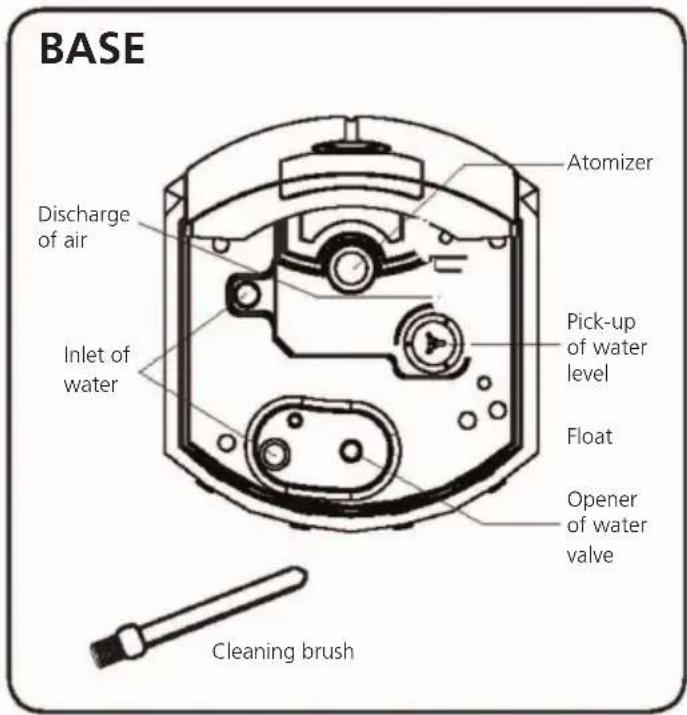
USE
The appliance must be laid always on a flat and even surface, out of reach of direct solar radiation. Do not aim the steam nozzle on computers and other delicate electronic devices, walls and furniture
- Combination of ultrasonic and thermal principles of generation of water steam.
- A micro-computer picks up the humidity of air automatically and adjusts the operation of the appliance accordingly. The information of the air humidity is of orienting nature only, and cannot be considered a directive indicator.
• A digital display visualises operating conditions. - Selection of several operating regimes.
- The timer clock allows adjusting the operation of the appliance in advance, for as much as 8 hours.
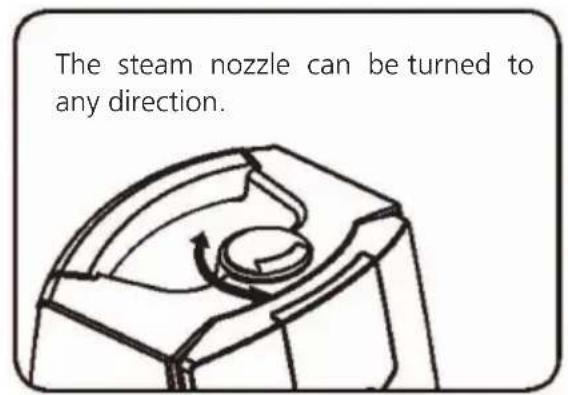
- The steam nozzle reversible in 360^ allows governing the direction of steam.
- Suitable for children with acute bronchitis, asthmatics or persons suffering from respiration difficulties.
Filling of the water tank
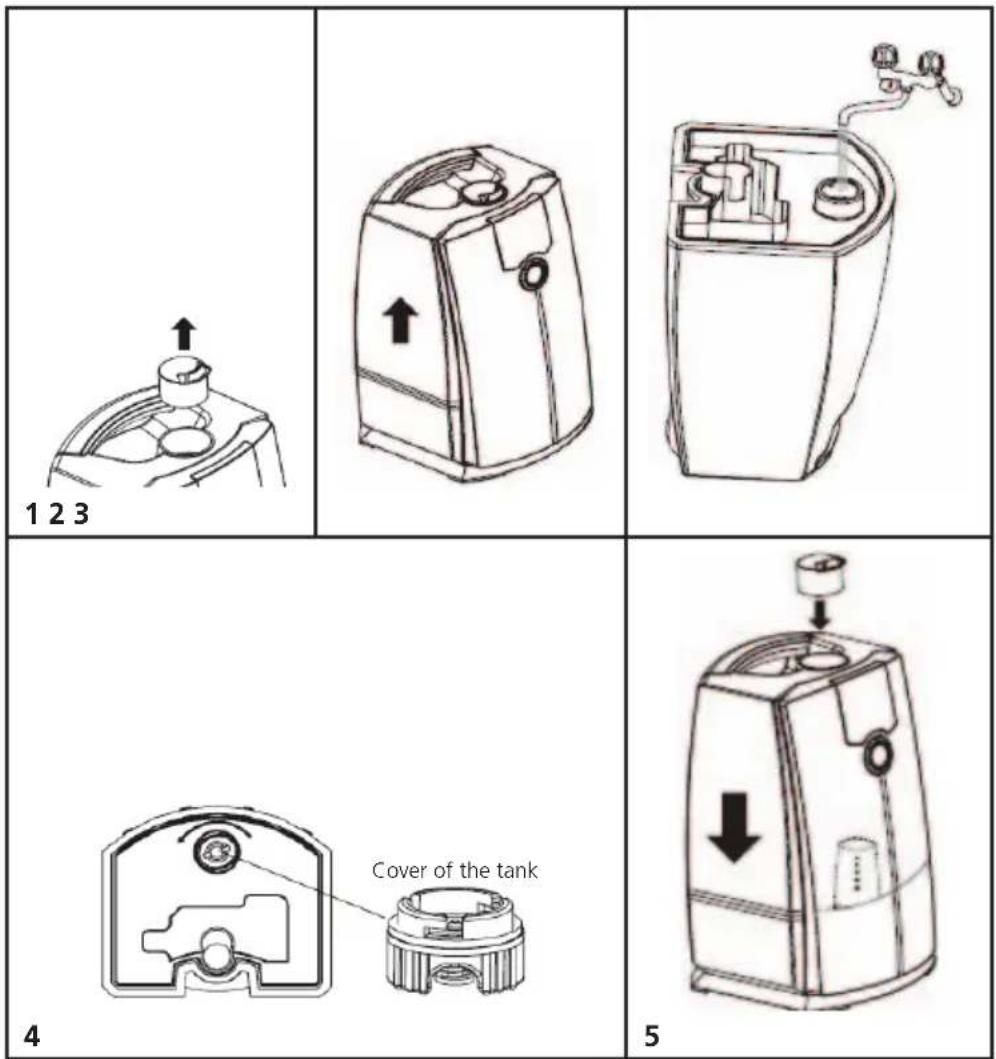
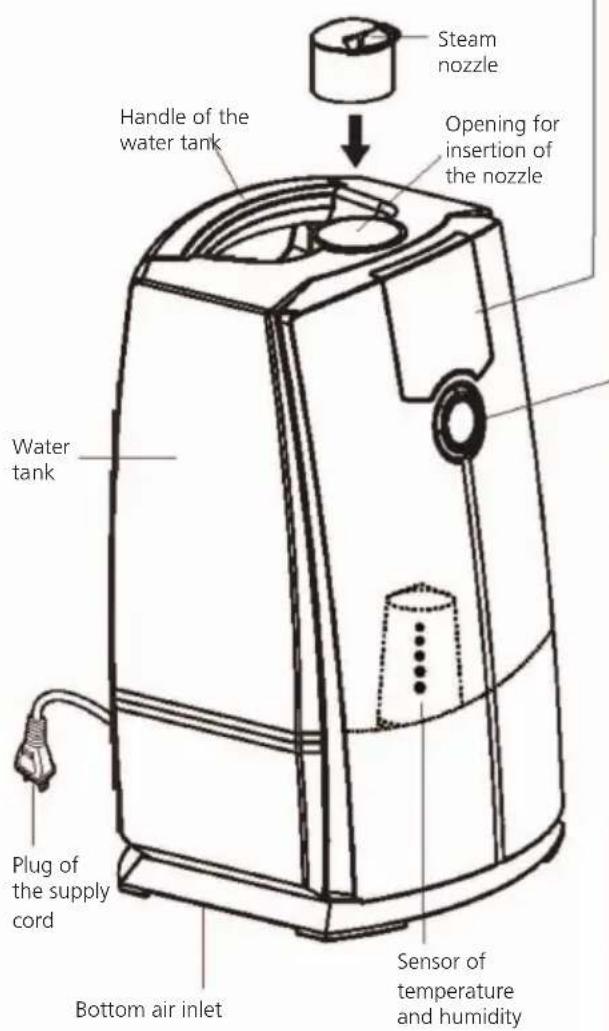
- Remove the steam nozzle from the water tank; in the contrary case, it would fall out when turning the tank upside down.
- Take the water tank out of the appliance; gripping its handle and pulling it upwards, you will dismount it from the base. Unscrew the tank cover in anti-clockwise direction.
Attention: When moving the appliance, do not pull at the handle of water tank. Grasp the appliance and support it from below.
- Fill the tank with water from the tap (we recommend distilled water). Never overfill the tank!
Attention:
- Do not add into the tank such substances as essentials oils, perfumes, surfactants, chemicals, mineral waters and similar inhalation essences, medicines or hot water (more than 40 °C) etc. In the contrary case, the water tank or interior parts of the appliance can suffer damage.
- Do not fill water into the appliance base directly, or into the steam nozzle. Water inside the appliance can bring about a breakdown.
- Protect the water tank from falls and impacts. It could suffer damage and cause escape of water. In case of a hard blow to water tank, stop using the appliance.
-
Fill the tank with clean water every day, and keep both the tank and the appliance clean.
-
Before fitting the tank back into the base of the appliance, do not forget to screw on its cover tightly.
Make sure that you have fitted the rubber ring on the tank cover, and screw in the cover tightly in clockwise direction. If you fail to do so, the water can run out and cause a breakdown.
- Fit the water tank on the base, and insert the steam nozzle.
Once you have mounted the water tank, do not shift the appliance any more. Do not remove the water tank with water too often; an escape of water resulting in a breakdown could come about.
Attention:
Should the appliance be operated without mounted steam nozzle, water steam will moisten the appliance and its surrounding. Before employing the appliance, do not forget to insert the steam nozzle properly.
OPERATING REGIMES
After connecting the appliance to electric socket, an acoustic signal will be heard.
Never switch on the appliance without water or turned upside down!
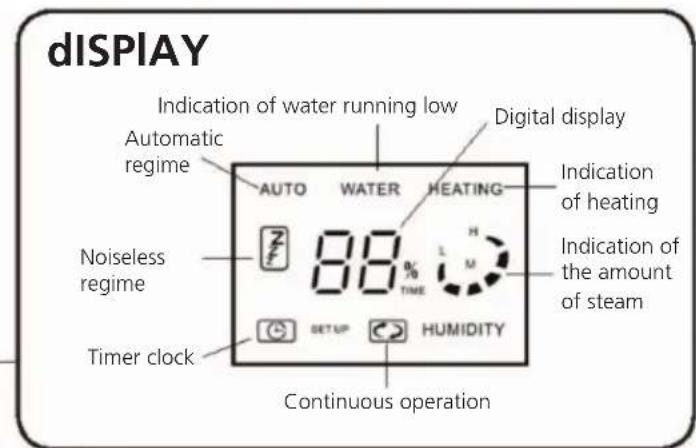
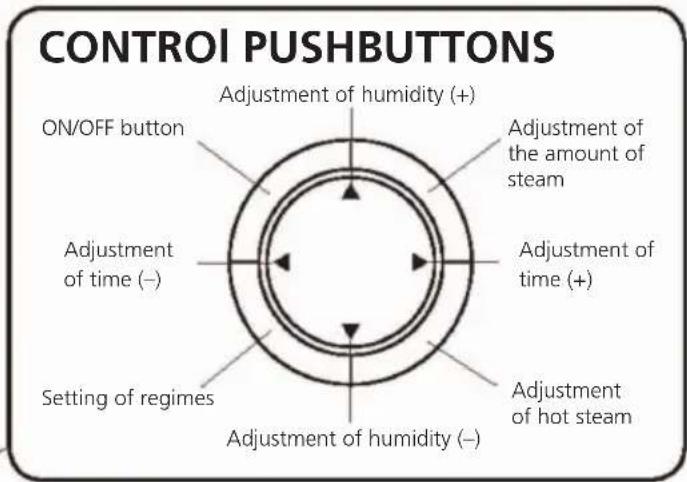
- After depressing the push-button ON/OFF, an acoustic signal will be heard and in the display there will appear AUTO (automatic regime), signalling that the device is in operation. Steam starts coming out from the steam nozzle.
- On the display there will appear the present level of humidity. The heat generation of steam starts automatically. Ten seconds after depressing the push-button ON/OFF approximately, the indicator of the amount of steam starts flickering (getting ready for operation).
At the start of the operation, the amount of steam can be unstable, due to differences in temperature and quality of water. The atomizer needs a certain time to convert water in steam, as well as to maintain its stable output. The amount of steam steadies after 10 – 25 minutes of operation.
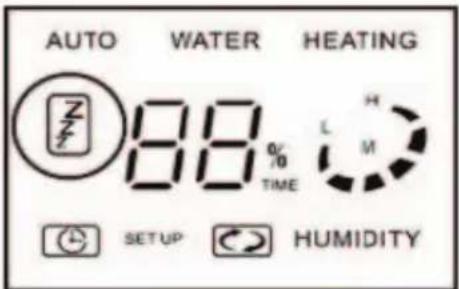
- By depressing the push-button SET UP (adjustment of regimes) you change over between the regimes AUTO (automatic operation), ZZZ (noiseless operation) and personal adjustment.
Automatic regime
A sensor of temperature and humidity is installed in the appliance. By means of it, the appliance is set up to an optimum humidity, and starts functioning in conformity with the room temperature (surrounding temperature).
| Surrounding temperature (degrees of Celsius) Ideal level of humidity | |
| <19 °C 65% | |
| 20 ~ 21 °C 60% | |
| 22 ~ 24 °C 55% | |
| >25 °C 50% | |
The amount of steam is set up automatically based on the difference between the measured humidity and the ideal one.
After filling the tank with water, the operation is started automatically after 2 – 5 minutes, irrespective of the reading of the indicator WATER (the water needs 2 – 5 minutes to run down from the tank to the suction slot, and the appliance does not function in the meantime).
Noiseless regime
Depress the push-button ON/OFF, and afterwards, during automatic operation, depress the push-
button SET UP (adjustment of regime) and select ZZZ (Noiseless operation) in order to change to noiseless regime. Ideal humidity in night regime is set up to 50 % and the maximum operating time is 6 hours.
The heat generation of steam (indicated by the symbol HEATING) is stopped after 6 hours.
Should the water run out from the tank during night regime, there appears the symbol WATER and the humidifier is switched off. (The acoustic advice of the shortage of water does not sound.)
| Difference between ideal humidity of 50% and the actual one | Steam generation |
| >16 | High output |
| 15 ~ 4 | Mean output |
| <3 | Low output |
| Actual humidity is higher than the ideal one | Stop |
Regime of personal adjustment
Switch on the appliance by depressing the push-button ON/OFF, and afterwards, depress the push-button SET UP and change to regime of personal adjustment.
During operation in this regime, you can adjust freely the amount of steam, to switch on and off the heat generation of steam, to adjust the most convenient humidity and the operation governed by the timer.
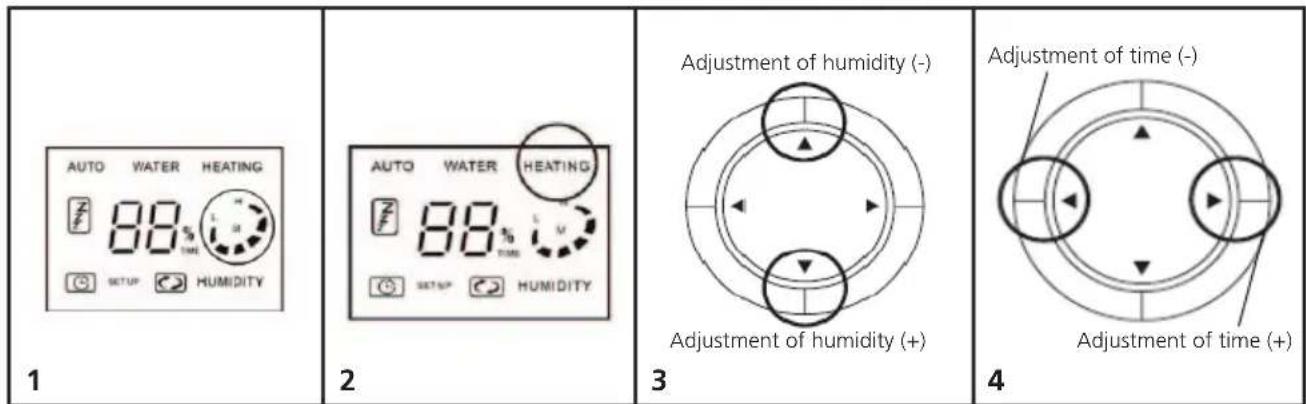
1. Adjustment of the amount of steam
By repeated depressing of the push-button MIST CAPACITY (adjustment of the amount of steam) set up the required amount of steam. You can choose one of following three adjustments: low (L) - mean (M) - high (H). The selected level is visualised in the display.
Irrespective of the adjusted amount of steam, the steam nozzle will not atomize steam if the humidity in the room exceeds the adjusted one.
2. Switching on/off of the heat generation of steam
By depressing the push-button HEATING, you switch on/off the heat generation of steam.
If the heat generation of steam is actuated, steam is generated by means of the incorporated heating body of the appliance.
3. Adjustment of humidity
The most convenient humidity can be set up by means of upper and lower HUMIDITY push-buttons (adjustment of humidity). The humidity can be adjusted in the range from 40 to 80%, in 5% increments.
4. Timer clock
By means of the push-buttons TIME (+) and TIME (-), you can adjust the time of operation in advance, for as much as 8 hours.
The adjustment is by 1 hour always.
Heat generation of steam
By means of the inner heating body, the water from the water tank is heated, and after passing through the atomizer, it forms a warm mist. The efficiency of humidification increases if employing a combined humidifier. The effect of warm mist does not increase the environment temperature.
- The time required by the appliance to start producing warm mist is of 10 - 20 minutes approximately.
- The average temperature of warm mist is 40^ C. Because of the differences in the surrounding temperature and humidity, it is difficult to feel the temperature of the mist sometimes.
Switching off the humidifier
Switch off the humidifier by depressing the push-button ON/OFF. If you depress the push-button once only, you will just dim the display; however, the appliance has not been switched off.
-
An acoustic signal is heard, and the tell-tale lamp in the display goes out.
-
Disconnect the appliance from the socket.
Capacity of steam with full water tank
Humidifier in the following regime:
Low output – humidification for about 60 hours
Mean output – humidification for about 30 hours
High output – humidification for about 20 hours
In the regime of heat generation of steam (high output), the appliance can humidify for about 11 hours.
After depleting the water in the tank, an acoustic signal is heard repeatedly, and the indicator WATER starts flickering. If you wish to go on using the humidifier, refill water according to instructions.
When removing the water tank from the base, water can drip from the bottom of the tank. After removing the water tank from the base, wipe its bottom with a rag, in order to avoid soiling of the floor or of the furniture.
Attention:
- After a certain period of operation, scale will deposit in the suction slot and in the atomizer. If you go on using the appliance in such a condition, the appliance may not operate properly, or a breakdown can occur. Clean the suction slot and the atomizer once or twice a week.
- Change the water in the tank every day. Pay attention to quality of water. The left-over water should be removed from the tank after every use, in order to prevent proliferation of bacteria.
MAINTENANCE AND CLEANING
Before cleaning, do not forget to disconnect the appliance from the electric mains and wait until the water cools down completely; in the contrary case, you could scald yourself.
Maintenance of the outside of the appliance
For wiping the outside of the appliance, use a soft moistened rag.
Attention:
- Do not submerge the appliance in water; risk of an electric shock.
- Do not use thinners, organic solvents, benzine, spirit and other aggressive agents, agents with abrasive effect nor brushes. You could damage the surface finish of the appliance.
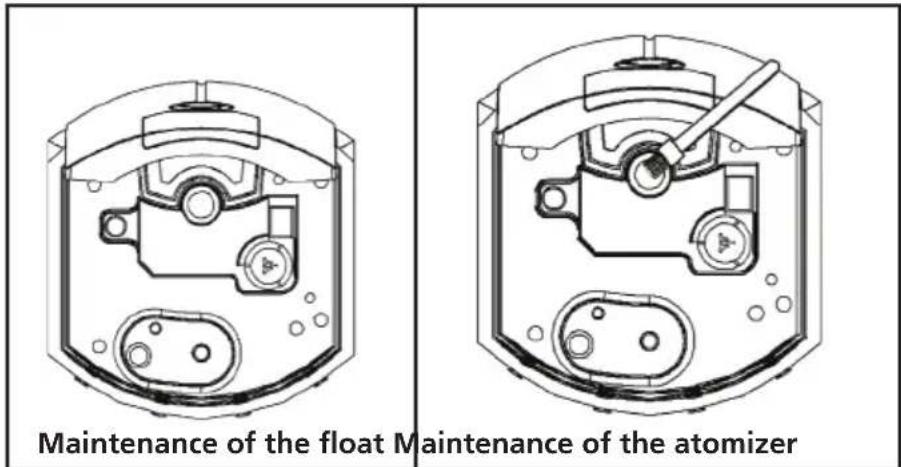
Maintenance of the float
- Using a soft wet rag, wipe off the water deposits inside the suction slot.
For the elimination of deposits on tiny parts, you can use the enclosed brush, and afterwards, wipe them again with a soft rag.
Maintenance of the atomizer
- By means of the enclosed brush, wipe off the deposits from the surface of the atomizer, and afterwards, wipe them again with a soft rag.
Attention: For wiping the surface of the atomizer, do not use metal brushes, metal blades, rubbing brushes or grinding dust. It could bring about a deformation, and the chafing of the surface could result in lower steam output or other defect.
Maintenance of the water tank and steam nozzle
- Take out the steam nozzle, and remove the cover of the water tank situated in the lower section of the tank, turning it in clockwise direction, and pour remaining water out. The steam nozzle would fall out when turning the water tank upside down; therefore, remove it still before taking out the water tank.
- Clean the water tank and cover with clean water. Clean the cover of the water tank carefully. Do not apply too much force while cleaning; in case of distorting the tank, water could leak through the cover.
- After wiping off the deposits from the surface of the steam nozzle, dry it with a soft rag. Clean the outer surface with a soft moistened rag.
Attention: Protect the water tank from bumps. A damaged tank could leak. If you notice a water leak, interrupt the operation of the appliance immediately.
Maintenance before storing the appliance
- Once you have cleaned the appliance, wipe off water and do not fail to allow the water tank and the body of the appliance to dry until they are dry completely.
- Make sure that no water has been left in the tank and on the appliance.
- Assemble the tank with the body of the appliance, and place them in a plastic bag. Next, pack the appliance into its original box, and store it in a place with low humidity level.
Attention:
- The storing of the appliance without previous complete drying can bring about formation of mildews or a defect of the appliance. Before storing the appliance, make sure that it has been dried perfectly.
- For clearing the surface, do not use acid or alkaline solvents and clearing agents. The rests of solvent in the atomizer can generate harmful gas, which can bring about defects or accidents.
ELIMINATING PROBLEMS
In case that the appliance does not operate in the expected manner, please check the following short tips.
| Problem Possible cause | Correction | |
| No steam generated. Is the plug of the mains cord connected into the socket properly? | Connect the mains plug properly. | |
| The red tell-tale lamp "refill water" is flickering? | ||
| Low steam output. Is the appliance not operating in the low regime output?(In the display there is indicated the regime of low output). | It is not any defect. If you wish to set up high output, depress the push-button of steam output in the regime of personal adjustment, and set up high output. | |
| Is the atomizer not clogged with scale? | ||
| The heating of steam does not function. | Have you switched on the heating of water in the regime of personal adjustment? | In the regime of personal adjustment, depress the push-button switching on the heating body. |
| Is the appliance not switched on for short time only? | It is not any defect. It takes 10 – 20 minutes approximately before hot steam is let out.(Time necessary for heating of water by heating body). | |
| The difference between the actual humidity and the reading of the humidity meter is too high. | Is the air inlet not clogged with dust? | Clean the inlet of air. Even in a single room, the humidity can vary in its different sections. |
| Do you not operate the appliance in places where it could be affected by its environment easily, for example close to a window? | Install the appliance in a place where the impacts of environment are less probable. | |
| The mist has an unusual odour. | Do you not use old water? C | Mean the appliance according to instructions, and change water regularly. |
| Is the suction slot or the atomizer not clogged with scale? | ||
TECHNICAL INFORMATION
Combination of ultrasound and heat principles
Built-in electronic heat and humidity sensor
Automatic or manual humidifying power control
Recommended room size up to 20 m ^4 .
Humidifying power 250 ml/hour
3 humidifying modes – low, medium and high power
Digital display with humidity control
Timer for setting the operation time (up to 8 hours in advance)
Absolutely silent operation (suitable for bedroom use)
Operating duration reaching 60 hours without the need to replace water
Automatically switches off for an insufficient amount of water in the tank
Special filter limiting the formation of scale
Nominal voltage: 230 V\~ 50 Hz
Nominal input power: 85 W
Volume of the tank: 3,500 ml
Weight: 2980 g
Dimensions: 340 × 204 × 185 mm (h × w × l)
USE AND DISPOSAL OF WASTE
Wrapping paper and corrugated paperboard – deliver to scrapyard. Packing foil, PE bags, plastic elements – throw into plastic recycling containers.
DISPOSAL OF PRODUCTS AT THE END OF LIFETIME
Disposal of electric and electronic equipment (valid in EU member countries and other European countries with an implemented recycling system)
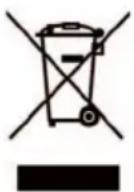
The represented symbol on the product or package means the product shall not be treated as domestic waste. Hand over the product to the specified location for recycling electric and electronic equipment.
Prevent negative impacts on human health and the environment by properly recycling your product.
Recycling contributes to preserving natural resources. For more information on the recycling of this product, refer to your local authority, domestic waste processing organization or store, where you purchased the product.
08/05
K+B Progres, a.s. (dále jen K+B), IČO: 61860123
natural_image
Completely dark image with no visible content, text, or symbols.
natural_image
Blank white image with no visible content, text, or symbols
natural_image
Completely dark image with no visible content, text, or symbols.
natural_image
Blank white image with no visible content, text, or symbols
natural_image
Completely dark image with no visible content, text, or symbols.
natural_image
Blank white image with no visible content, text, or symbolsECG
The importer takes no responsibility for printing errors contained in the product's user's manual.

- ECG
- SAFETY INSTRUCTIONS
- Read carefully and save for future use!
- dDESCRIPTION
- USE
- Filling of the water tank
- Attention:
- OPERATING REGIMES
- Automatic regime
- Noiseless regime
- Regime of personal adjustment
- Adjustment of the amount of steam
- Switching on/off of the heat generation of steam
- Adjustment of humidity
- Timer clock
- Heat generation of steam
- Switching off the humidifier
- Capacity of steam with full water tank
- Humidifier in the following regime:
- MAINTENANCE AND CLEANING
- Maintenance of the outside of the appliance
- Maintenance of the float
- Maintenance of the atomizer
- Maintenance of the water tank and steam nozzle
- Maintenance before storing the appliance
- ELIMINATING PROBLEMS
- TECHNICAL INFORMATION
- USE AND DISPOSAL OF WASTE
- DISPOSAL OF PRODUCTS AT THE END OF LIFETIME
Brand : ECG
Model : ZZ 35
Category : Humidifier