
MTD 2002 - Microwave ECG - Free user manual and instructions
Find the device manual for free MTD 2002 ECG in PDF.


| Product Type | Microwave Oven |
| Model | MTD 2002 |
| Brand | ECG |
| Dimensions (W x H x D) | 452 x 262 x 333 mm |
| Weight | 10.5 kg |
| Rated Voltage | 230–240 V ~ 50 Hz |
| Rated Input Power | 1200 W |
| Microwave Power Output | 700 W |
| Capacity | 20 L |
| Operating Frequency | 2450 MHz |
| Noise Level | 57 dB |
| Timer Range | Up to 95 minutes |
| Power Levels | 5 levels (0%, 20%, 40%, 60%, 80%, 100%) |
| Defrost Functions | By weight (100–1800 g) and by time |
| Auto Menu | 8 options (Milk/Coffee, Rice, Spaghetti, Potato, Auto Reheat, Fish, Pizza, Popcorn) |
| Multi-Stage Cooking | Up to 2 stages |
| Quick Start | Yes, up to 10 minutes at full power |
| Preset Function | Yes, delayed start |
| Child Lock | Yes |
| Turntable Diameter | 245 mm |
| Accessories Included | Glass turntable, support ring, user manual |
| Cleaning Instructions | Unplug, use damp cloth, clean door seal and interior |
| Safety Features | Door interlocks, overheating protection, child lock |
| Repairability | Repairs by qualified service center only |
Frequently Asked Questions - MTD 2002 ECG
User questions about MTD 2002 ECG
0 question about this device. Answer the ones you know or ask your own.
Ask a new question about this device
Download the instructions for your Microwave in PDF format for free! Find your manual MTD 2002 - ECG and take your electronic device back in hand. On this page are published all the documents necessary for the use of your device. MTD 2002 by ECG.
USER MANUAL MTD 2002 ECG
4 Multi Stage Cooking
(Fázové varenie)
5 Speed Defrost
3 Weight Adjust (Waga)
4 Multi Stage Cooking
(Gotowanie fazowe)
5 Speed Defrost
1 Milk/Coffee (Mleko/Kawa)
2 Rice (Ryż)
3 Spaghetti (Makaron)
4 Potato (Ziemniaki)
Read carefully and save for future use!
Warning: The safety measures and instructions, contained in this manual, do not include all conditions and situations possible. The user must understand that common sense, caution and care are factors that cannot be integrated into any product. Therefore, these factors shall be ensured by the user/s using and operating this appliance. We are not liable for damages caused during shipping, by incorrect use, voltage fluctuation or the modification or adjustment of any part of the appliance.
To protect against a risk of fire or electric shock, basic precautions shall be taken while using electrical appliances, including the following:
- Make sure the voltage in your outlet corresponds to the voltage provided on the appliance label and that the socket is properly grounded. The outlet must be installed according to valid safety instructions.
-
Do not operate the oven if the door is damaged, it does not function correctly or the power cord is damaged. All repairs or adjustments including cord replacements shall be performed by a professional service centre! Do not remove the protective cover from the appliance. Risk of electric shock or exposed to microwave energy. Unplug the cord from outlet before repairing. Removing the cover with the cord plugged in can result in the service technician being exposed to microwave energy or being shocked!
-
Protect the appliance against direct contact with water and other liquids, to prevent potential electric shock. Do not immerse cord or plug in water!
-
Do not operate the microwave oven outdoors or in a moist environment and do not touch the cord or appliance with wet hands. Risk of electric shock.
-
Close supervision is necessary for operating the oven near children!
-
Do not leave the microwave oven running unattended.
-
Leaving the oven cord connected to outlet unattended is not recommended. Disconnect the cord from the electrical outlet prior to performing maintenance. Do not pull the cord from the outlet by yanking the cord. Unplug the cord from the outlet by grasping the plug.
-
Do not use the microwave oven near a source of heat, for example, stove hotplates. Protect the appliance against direct sunlight.
-
Do not allow the cord to touch hot surfaces or lead the cord over sharp edges.
-
Prevent fires inside the oven by observing the following:
a) Do not overheat food.
b) Remove any clips from paper or plastic bags before placing them into the oven.
c) Do not heat frying oils or greases in the oven, for oil temperatures cannot be regulated. Do not fry food inside the oven. Hot oil can damage parts of the oven and kitchen dishes and also cause burns.
d) Wipe the door, door seal and inside of the oven dry using a damp cloth with detergent. All stains, greases and food residue are removed this way.
WARNING: The oven should not be operated, if the door or door seal is damaged, until repaired by a trained individual.
The accumulated grease can overheat and could result in smoke or fire.
Do not use abrasive cleaning agents.
e) If smoke begins to come out of the food being heated or the food catches fire, leave the door open, turn off the oven and unplug the cord from the outlet.
f) Do not leave the oven unattended when using disposable containers made of plastic, paper or other flammable materials.
- Limit the risk of explosion or sudden boil by observing the following:
WARNING: Do not put hermetically sealed containers into the oven. Baby bottles with screw-on caps or pacifiers are also considered as sealed containers. This could lead to an explosion.
a) Use a container with a wide nozzle for heating liquids. After heating the liquid, leave it stand for 20 seconds to prevent an erupting boil.
b) Eggs in shells, hard-boiled eggs, water containing grease or oil and closed glass containers shall not be heated in the microwave oven because they can explode. Potatoes, frankfurters or chestnuts shall be peeled or pricked before inserting them into the oven.
c) Do not remove liquids from the oven directly after heating. Wait a few seconds before removing liquids to prevent them from boiling over.
d) Stir or shake and check the temperature of baby bottles and canned baby food prior to serving to protect against burning.
-
Containers are very hot after being heated. Use oven mitts when removing containers from oven. Be careful not to burn your face and hands by coming into contact with hot steam.
-
Always lift the furthest edge of the lid or food wrap. Open popcorn bags and baking bags at a sufficient distance away from the face.
-
Protecting the turntable against breaking:
a) Let the turntable cool down before cleaning.
b) Do not place hot food or containers on a cold turntable.
c) Do not place frozen food or cold containers on a hot turntable.
-
Make sure the containers do not touch the inside walls of the oven during the heating process.
-
Do not store food or other objects inside the oven. The oven can be switched on spontaneously if the network is struck by lightning.
-
Do not use the oven if it does not contain any food or liquids. This may cause damage to the oven. Do not cover or block any openings on the microwave oven.
-
Use accessories only advised by the manufacturer, otherwise you risk losing the warranty.
-
Use the microwave oven only in accordance with the instructions given in this manual.
This microwave oven is intended for domestic use only. The manufacturer is not liable for damages caused by the improper use of this appliance.
- This appliance shall not be used by persons (including children), whose physical, sense or mental inability or insufficient experience and skills prevent him from safely using the appliance, if they are not supervised or if they have not been instructed regarding the use of the appliance
by a person responsible for their safety. Child supervision is essential to prevent them from playing with the appliance.
Do not expose yourself microwave energy excessively.
- Do not attempt to operate the microwave oven if the door is open. By doing so, you can become exposed to harmful microwave energy. Do not attempt to break or hold safety locks on the oven door.
- Do not insert foreign objects between the oven door. Make sure dirt or residue from cleaning agents are not left on the door seal or sealing elements of the oven.
- Do not use the oven if damaged. The oven door should perfectly tightly upon closing and should not be damaged. Examples of damage caused to the oven door:
a) DENTING the oven door.
b) Loose or broken door HINGES or SAFEGUARDS.
c) OVEN DOOR SEAL OR SEALING AREAS ON THE FRAME HEAD.
Adjustments or repairs to the microwave oven should only be performed by a qualified person.
- As with the majority of appliances intended for baking, strict supervision is necessary to reduce the risk fire around the oven.
In case of fire:
- Do not open oven door.
- Turn off the oven and unplug cord from socket.
- Turn off the master power switch.
CLEANING
Make sure you unplugged the oven from the outlet by disconnecting the plug from the outlet.
- Use a damp cloth and clean the inside of the oven.
- Clean accessories as usual in soap water.
- Clean the door frame, seal and neighbouring parts carefully using a damp cloth dipped into dishwashing
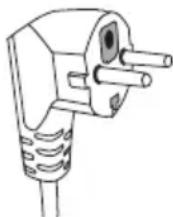
detergent and wipe dry. The microwave oven must be grounded. The plug should be connected only to a properly grounded outlet.
Refer to a qualified electrician or service technician if you have any doubts regarding proper wiring or experience malfunctioning.
- The microwave oven is equipped with a short cord to reduce the risk of tripping or tangling.
- Long extension cords must meet the following requirements:
a) With respect to electric load, the rated values of the extension cord and outlet should comply with the rated values of the microwave oven.
b) The extension cord must be three-wire and the plug must be equipped with a grounding pin.
c) The cord must be sufficiently hidden, not hanging over the kitchen counter, to prevent against tripping over the cord or being pulled out by children.
UTENSILS AND DISHES
CAUTION
Risk of injury
Tightly closed containers can explode when heated. Closed containers must be opened prior to cooking and plastic containers shall be pierced, see Materials to find out what material can and can not be used in the microwave oven. Some non-metal material may not be safely used for oven heating. If you are not sure whether or not the material is safe for oven heating, proceed as follows:
Test the container:
- Fill the container, to be heated in the microwave oven, with cold water (250 ml).
- Heat for 1 minute at maximum cooking power.
- Check the temperature of the tested container carefully. If the tested container is warm, do not use it for oven heating.
- Do not cook more than 1 minute.
Material that can be used in the microwave oven
Containers Notes
| Aluminium foil | Only to cover small parts of food. Covering small amounts of meat or poultry with foil prevents overcooking or burning the food. The foil must be at least 2.5 cm away from the inner oven surface (the foil can bend if too close). |
| Baking trays | Follow the instructions of the manufacturer. The bottom of the baking container must be at least 5 mm above the turntable. Improper handling can lead to cracking the turntable. |
| Plates | Use only plates and dishes specified for microwave oven use. Follow the instructions of the manufacturer. Do not use cracked or otherwise damaged bowls. |
| Glass jars and jugs | Always remove the cover. Only heat the food. Do not cook! Most glass jugs and jars are not resistant to high temperatures and can crack. |
| Glass baking dishes | Use only those glass baking dishes resistant to high temperatures. Make sure the bowl does not have a metal border or other metal objects. Do not use cracked or otherwise damaged bowls. |
| Baking bags | Follow the instructions of the manufacturer. Do not close using metal clips. Leave the bag slightly opened enabling the free release of hot steam. |
| Paper trays | Suitable only for heating or short cooking. Do not leave the oven unattended while cooking. |
| Paper towels Use these to cover food or remove melted grease. Use for short-term cooking only. Do not leave the oven unattended while cooking. | |
| Parchment paper Use for covering food, packing food for stewing and as protection against spattering. | |
| Plastic material | Use only plates and dishes specified for microwave oven use. Follow the instructions of the manufacturer. Plastic material, suitable for microwave oven use, should be equipped with a specific label: “Suitable for microwave ovens” Some plastics become softer as a result of long-term exposure to high temperatures. “Boiling bags” and baking sacks must be cut, pieced or otherwise vented according to the food manufacturer's instructions. |
| Plastic packing foil | Use only plates and dishes specified for microwave oven use. Use them for covering food and to maintain food moist while cooking. Make sure the plastic foil does not touch the food being prepared. |
| Thermometers Use only thermometers suitable for microwave oven use. (Thermometers for meat, bread products and candy.) | |
| Wax paper Use for covering food, as protection against spattering and to maintain food moist while cooking. | |
Material, which may not be used for oven heating
Utensils and dishes Notes
| Aluminium platters and trays | Risk of bending. Move the food to a container suitable for microwave oven use. |
| Food and cardboard boxes with metal holders | Risk of bending. Move the food to a container suitable for microwave oven use. |
| Metal dishes and dishes with metal objects | Metal prevents the penetration of microwave energy. Metal borders can bend. |
| Wired closing rings Risk of bending and fire inside the oven. | |
| Paper bags Risk of catching fire. Risk of fire inside the oven. | |
| Foam material Plastic foam can melt at high temperatures and spoil food. | |
| Wood Wood dries and can crack when cooked. | |
INSTALLING THE TURNTABLE
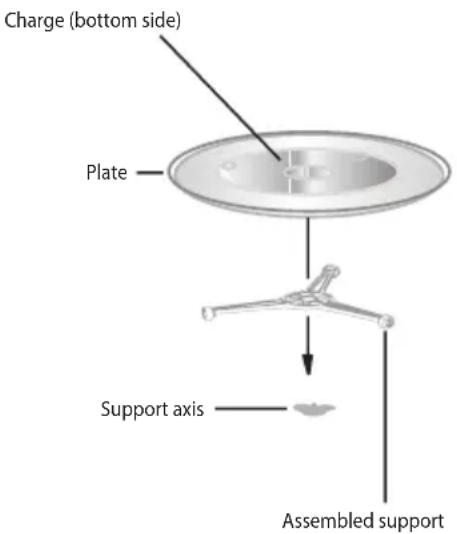
- Do not lay the turntable face down. The turntable must always rotate freely.
- Do not use the oven without the support and turntable.
- All food and containers must always be placed on the turntable.
- Contact your nearest authorized service if the turntable cracks or the support is damaged.
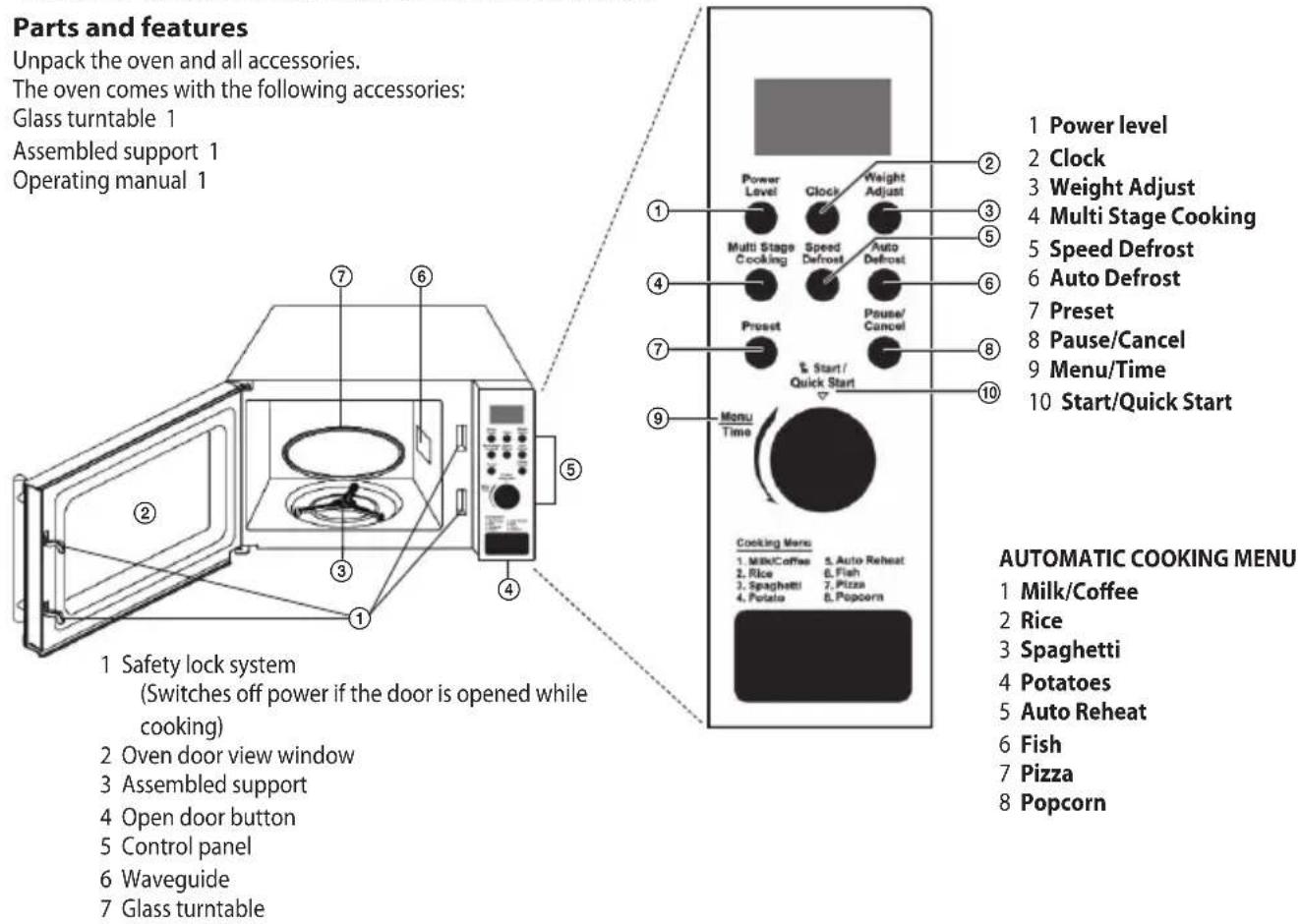
Unpack the oven and all accessories.
The oven comes with the following accessories:
Glass turntable 1
Assembled support 1
Operating manual 1
INSTALLATION
Remove all packaging material and take out all accessories.
Make sure the oven is not damaged in any way (dented or damaged door etc.). Do not install the microwave oven if damaged.
Kitchen counter
Oven body: Remove all protective foil from the oven surface.
Do not remove the light brown foil, screwed to the inside of the oven. This foil protects the oven magnetron.
Installation
- Place the oven on a flat surface with a sufficient amount of space around the appliance to ensure the proper function of exhaust vents.
The minimum distance between the oven and the closest wall must be 7.5 cm.
At least one side must be open space.
a) Leave at east 30 cm of free space above the oven.
b) Do not remove oven legs.
c) Do not block exhaust vents. Blocking the exhaust vents could cause damage.
d) Place the oven as far away from the radio or television as possible.
The microwave oven can interfere with the television and radio signal.
- Connect the oven to a standard electricity network. Make sure the voltage and frequency on the oven label corresponds with the network voltage and frequency.
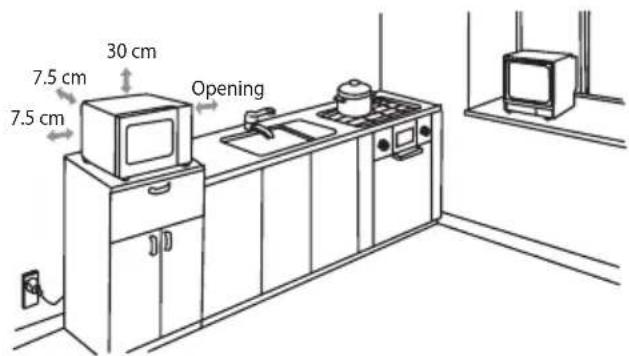
ATTENTION: Do not install the oven above or near the kitchen stove, or near another source of heat. Placing the oven by a heat source could damage the oven and result in losing the warranty. The microwave oven should be used in an open space and should not be placed in a cabinet.
The surface of the microwave oven can become hot during operation.
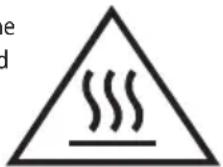
Hot surface!
OVEN FUNCTIONS
Operating instructions
This microwave oven uses modern electronic controlling to configure cooking parameters to better meet your needs.
1. Pause/Cancel settings
Press the Pause/Cancel button to pause a running program, press twice to cancel the program. Also used for setting the Child lock function.
2. Setting the time
Press the Clock button, turn the Menu/Time wheel to the desired hour and confirm by pressing the Clock button.
Set the minutes by turning the Menu/Time wheel and press the Clock button again.
3. Cooking in the microwave oven
1) Press the Power level button to select the desired power.
2) Using the Menu/Time wheel, set the desired cooking time.
3) Confirm by pressing the Start/Quick Start button and the oven will begin cooking.
Cooking power table
| Power level button - number of times pressed | Cooking power Use | |
| 1 100% Heating, milk, boiling water, vegetables, beverages | ||
| 2 80% Rice, fish, chicken, ground meat | ||
| 3 60% Stewing meat, fish | ||
| 4 40% Preparing soups, butter softening | ||
| 5 20% Ice cream softening | ||
| 6 | 0% | |
4. Quick start
Press the Start/Quick Start button to set the cooking duration, the oven will start at full power. The longest possible duration that can be set in this mode is 10 minutes. After the cooking time has elapsed, you will hear a beep and the display will show END.
5. Defrosting according to weight
Defrosting time and power are set automatically after programming the weight. Weight ranges of frozen foods: 100–1800 g.
Example: Defrosting 600 g of shrimps.
1) Press the Auto Defrost button.
2) Press the Weight adjust button and select the weight of the food.
3) Start the defrosting process by pressing the Start/Quick Start button.
Note: During the defrost process, the cycle is interrupted and a sound is signalled - turn the food and continue by pressing the Start/Quick Start button.
6. Defrosting according to time
1) Press the Speed Defrost button.
2) Turn the Menu/Time wheel and set the defrost duration (maximum setting is 95 minutes).
3) Start the defrosting process by pressing the Start/Quick Start button.
7. Cooking in phases
2 different preparation phases at most can be set for cooking.
Example:
phase 1: a cooking time of 10 minutes for a cooking power of 100%.
phase 2: a cooking time of 5 minutes for a cooking power of 40%.
1) Select 1 program phase (identical to setting the cooking options on the microwave). Press the Multi stage cooking button.
2) Enter 2 program phases.
3) Press the Start/Quick Start button.
Note: The Quick start, Automatic and Quick defrost, Automatic cooking functions are not available for phase cooking.
8. Preset
This function enables running one of the pre-programmed oven cycles.
Example: it is 8:00 and you would like to start cooking at 11:30.
1) Select the cooking program.
2) Press the Preset button.
3) Turn the Menu/Time wheel and set the time to 11:00 and confirm by pressing the Preset button.
4) Using the Menu/Time wheel, set the cooking time to 11:30.
5) Press the Start/Quick Start button to start the program.
Note: The Quick start, Automatic and Quick defrost, Automatic cooking functions are not available for the Preset function.
9. Automatic cooking
The cooking power and duration do not have to be set for the following types of food.
Example: cooking 2 potatoes
1) Turn the Menu/Time wheel counter clockwise until 04 appears on the display.
2) Press the Weight adjust button and select the weight of the potatoes.
3) Press the Start/Quick Start button.
| Automatic cooking menu | |
| 01 Milk/Coffee | |
| 02 Rice | |
| 03 Spaghetti | |
| 04 Potato | |
| 05 Auto Reheat | |
| 06 Fish | |
| 07 Pizza | |
| 08 Popcorn | |
Note: The result of automatic cooking depends on factors such as voltage drops, the shape and size of food, your personal preparation preferences etc. If you are not satisfied with the cooking result, adjust the cooking duration accordingly.
10. Child lock
LOCK: Hold the Pause/Cancel button down for 3 seconds, a sound will signal the child lock has been activated and the Child Lock indicator will appear on the display.
UNLOCK: Hold the Pause/Cancel button for 3 seconds, a sound will notify you that the child lock has been deactivated and the time setting will appear on the display. The lock indicator on the display will go off.
ELIMINATING PROBLEMS
| Common | ||
| The microwave oven interferes with the television reception. | The microwave oven can interfere with the radio and television when operating. It is similar to the interference of small electrical appliances such as the blender, vacuum cleaner and electrical ventilator. | |
| The light in the oven dims. The light in the oven | cavity can dim when a lower cooking power is set. | |
| Steam is accumulated on the door, hot air is coming from vents. | Steam can be released from food while cooking. Most of the steam is released through the exhaust vents, though some can accumulate in a cooler place, such as the door. This effect is normal. | |
| The oven was started empty by accident. The oven | ven should not be operated empty. It is very dangerous. | |
| Problem Possible cause Correction | ||
| The oven will not start. | (1) The cord is not firmly plugged into the outlet. | Unplug the cord from the outlet. Plug the cord back into the outlet after approximately 10 seconds. |
| (2) Blown fuse or switched off circuit breaker. | Replace the fuse or reset the circuit breaker (repaired by a service technician from our company). | |
| (3) Problem with the outlet. | Try connecting another electrical appliance into the outlet. | |
| The oven does not heat. (4) Door is not closed correctly. Close the door properly. | ||
| The turntable makes noises when the microwave oven is operating. | (5) The turntable or bottom of oven are dirty. | Clean the oven according to the instructions stated in chapter “Cleaning.” |
TECHNICAL INFORMATION
20 | capacity
Microwave power output 700 W
95 minute timer
Auto menu 8 options
Defrost by time/weight
5 power levels available
Glass turntable ∅ 245 mm
Weight 10.5 kg
Dimensions: 452 × 262 × 333 mm (w × h × d)
Nominal voltage: 230–240 V\~50 Hz
Nominal input power: 1,200 W
Operating frequency: 2,450 MHz
Noise level: 57 dB
USE AND DISPOSAL OF WASTE
Wrapping paper and corrugated paperboard – deliver to scrapyard. Packing foil, PE bags, plastic elements – throw into plastic recycling containers.
DISPOSAL OF PRODUCTS AT THE END OF LIFETIME
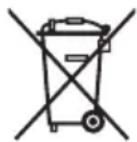
Disposal of electric and electronic equipment (valid in EU member countries and other European countries with an implemented recycling system)
The represented symbol on the product or package means the product shall not be treated as domestic waste. Hand over the product to the specified location for recycling electric and electronic equipment. Prevent negative impacts on human health and the environment by properly recycling your product.
Recycling contributes to preserving natural resources. For more information on the recycling of this product, refer to your local authority, domestic waste processing organization or store, where you purchased the product.
08/05
EN
K+B Progres, a.s. (dále jen K+B), IČO: 61860123



- Read carefully and save for future use!
- Do not expose yourself microwave energy excessively.
- In case of fire:
- CLEANING
- UTENSILS AND DISHES
- CAUTION
- Risk of injury
- Test the container:
- Material that can be used in the microwave oven
- Material, which may not be used for oven heating
- INSTALLING THE TURNTABLE
- INSTALLATION
- Kitchen counter
- OVEN FUNCTIONS
- Operating instructions
- Pause/Cancel settings
- Setting the time
- Cooking in the microwave oven
- Quick start
- Defrosting according to weight
- Defrosting according to time
- Cooking in phases
- Example:
- Preset
- Automatic cooking
- Example: cooking 2 potatoes
- Child lock
- TECHNICAL INFORMATION
- USE AND DISPOSAL OF WASTE
- DISPOSAL OF PRODUCTS AT THE END OF LIFETIME
- Disposal of electric and electronic equipment (valid in EU member countries and other European countries with an implemented recycling system)
Brand : ECG
Model : MTD 2002
Category : Microwave