
RAC 381 B - Radio HYUNDAI - Free user manual and instructions
Find the device manual for free RAC 381 B HYUNDAI in PDF.


| Brand | Hyundai |
| Model | RAC 381 B |
| Product Type | Clock Radio with AM/FM Tuner |
| Power Supply | AC Mains (230V ~ 50Hz typical) |
| Battery Backup | 1 x 9V battery (not included) |
| Frequency Bands | AM and FM |
| Display Type | Digital LED with dimmer (HI/LO) |
| Alarm Functions | Wake to music or buzzer, snooze (9 min) |
| Sleep Timer | Up to 1 hour 59 minutes |
| Time Setting | Manual with Hour and Minute buttons |
| Controls | Volume/Off, Tuning, Function switches |
| Speaker | Built-in monaural speaker |
| Ventilation | Do not block; ensure free airflow |
| Safety | Do not open; refer servicing to qualified personnel |
| Maintenance | Clean with dry cloth; avoid liquids |
| Disposal | Electronic waste; do not dispose as household waste |
Frequently Asked Questions - RAC 381 B HYUNDAI
User questions about RAC 381 B HYUNDAI
0 question about this device. Answer the ones you know or ask your own.
Ask a new question about this device
Download the instructions for your Radio in PDF format for free! Find your manual RAC 381 B - HYUNDAI and take your electronic device back in hand. On this page are published all the documents necessary for the use of your device. RAC 381 B by HYUNDAI.
USER MANUAL RAC 381 B HYUNDAI
Dear customer, thank you for purchasing our product. Please read the operating instructions carefully before putting the appliance into operation and keep the instructions including the warranty, the receipt and, if possible, the box with the internal packing.
Description
- Minute set
- Alarm/off set
- Hour set
- AM-FM switch
- Dimmer switch
- Auto-off-on switch
- Volume/off knob
- Alarm set
- Time set
- Sleep set
- Snooze set
- Dial pointer
- Display
- Tuning knob
- Speaker
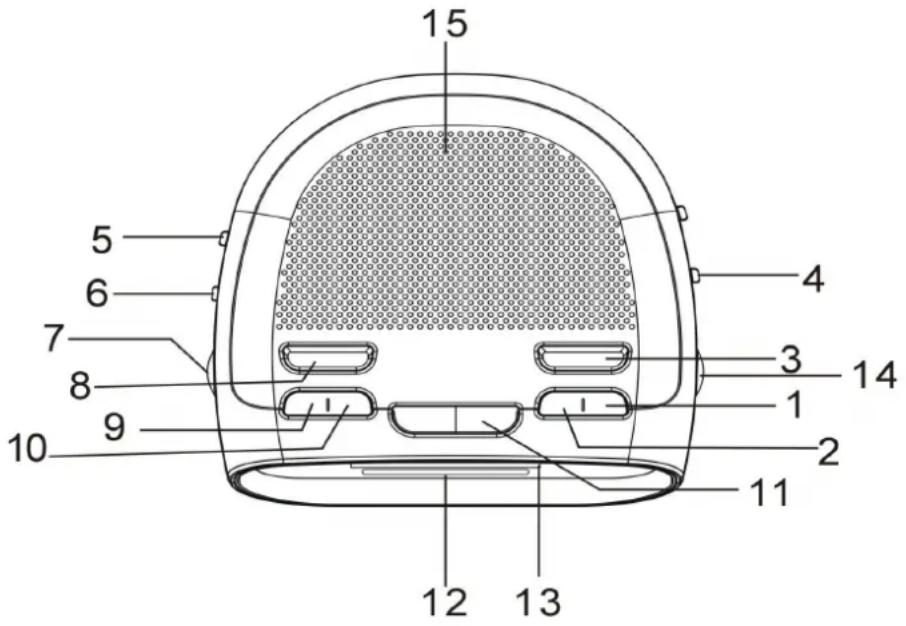
The normal function of the product may be disturbed by strong electro magnetic interference. If so, simply reset the product to resume normal operation by following the instruction manual. In case the function could not resume, please use the product in other location.
Connecting the radio
Plug the ac cord into the power outlet. When electrical power has been interrupted and restored, the clock display will blink. Make sure to reset both the correct time and alarm time for proper operation. The ac mains plug is used as the disconnect device, the disconnect device shall remain readily operable.
Time setting
Press and hold the time set (9). Press the hour set (3) or min set (1) to set the clock display to the correct time. Release the hour set (3) and min set (1) when finished the setting.
Radio operation
Slide the auto-off-on switch (6) to "ON" and turn on the volume. Slide the "AM-FM" switch to "AM" or "FM" position. Adjust tuning knob (14) and volume/off (7) for the desired frequency and listening level.
Sleep to music
Slide the AUTO-OFF-ON (6) to either “OFF” or “AUTO”. Press the sleep set (10) once. You can have 59 minutes playing the radio to accompany you to sleep. Press the sleep set (10) and the hour set (3) simultaneously for one hour and 59 minutes sleep time. Set for a desired period of sleep, simply press and hold sleep set (10) and then press hour set (3) or min set (1) to set the desired period of the sleep function. If you want to turn off the radio before sleep time has expired, press snooze set (11) once.
Wake to music
Press and hold the alarm set (8). Press the hour set (3) or min set (1) to set the desired wake up time. Release the alarm set button (8) to show the current time. Slide the AUTO-OFF-ON (6) to "AUTO". The radio will play automatically at the preset time.
Wake to buzzer alarm
Follow the steps of “wake to music” and turn off the volume. You will be awakened by the buzzer alarm. If you want to stop the alarm, switch AUTO-OFF-ON (6) to “OFF” or press the alarm set (8) once.
Snooze operation
When the alarm is on, press snooze set (11) once. After 9 minutes, the alarm will be on again.
To go to sleep and wake to music
Repeat the steps of “wake to music”. Press sleep set (10) to set for a desired period of radio playing before sleep. The radio will stop automatically and will start again at the preset wake up time.
Dimmer function
To adjust the brightness of the display, simply slide the dimmer switch (5) (hi/low) to "BRIGHT" or "DARK" position.
Battery backup
This clock has a backup power system to ensure continuous operation during power failure. Insert one 9-volt battery and the clock mechanism will continue to maintain the current time and alarm program.
Dripping & ventilation warning
The product shall not be exposed to dripping or splashing and that no objects filled with liquids, such as vases, shall be placed on the product. The normal ventilation of the product shall not be impeded for intended use.
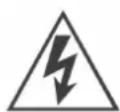
The lightning flash is intended to alert the user to the presence of dangerous voltage within the product's enclosure, and touching the inner parts may result in a risk of electric shock to persons.

The exclamatory mark is intended to alert the user to the presence of important operating instructions.
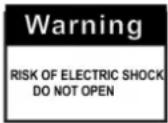
To reduce the risk of electric shock or fire, do not open the cover. Refer servicing to qualified service personnel.
User information about liquidation of electric or electronic devices
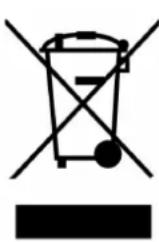
This symbol appearing on the product or on accompanying documentation means that the respective electric or electronic products must not be disposed as household waste. Please deliver the product to designated collection points where they will be taken from you free of charge. Alternatively you may return your products to local dealer when you buy an equivalent new product. By proper liquidation of the product you will preserve valuable natural resources and will help to prevent possible negative impacts on environment and human health, which
might occur as a consequence of improper waste disposal. For detailed information please contact your local authority or the nearest collection point.
If this type of waste is liquidated improperly, penalties pursuant to national regulations may be imposed.
Information about liquidation of electric or electronic device in the European Union
Please ask your dealer for detailed information about proper liquidation of electric or electronic devices.
Information about liquidation of electric or electronic device outside the European Union
The above symbol is valid only in the EU member states. Please ask your local authorities or dealers for detailed information about proper liquidation of electric or electronic devices.
HP Tronic Ústí nad Labem s.r.o. is registered by Asekol s.r.o. under number AK-051447. HP Tronic Ústí nad Labem s.r.o. is registered by Sewa under number EZ 0000213.
Poznámky/ Notatky/Notes:
Poznámky/ Notatky/Notes:
HYUNDAI
CORPORATION
Seoul, Korea
