
DP-20, DP-211 - Voice Recorders OLYMPUS - Free user manual and instructions
Find the device manual for free DP-20, DP-211 OLYMPUS in PDF.


User questions about DP-20, DP-211 OLYMPUS
0 question about this device. Answer the ones you know or ask your own.
Ask a new question about this device
Download the instructions for your Voice Recorders in PDF format for free! Find your manual DP-20, DP-211 - OLYMPUS and take your electronic device back in hand. On this page are published all the documents necessary for the use of your device. DP-20, DP-211 by OLYMPUS.
USER MANUAL DP-20, DP-211 OLYMPUS
Thank you for purchasing an Olympus Digital Voice Recorder. Please read these instructions for information about using the product correctly and safely. Keep the instructions handy for future reference. To ensure successful recordings, we recommend that you test the record function and volume before use.
- The contents of this document may be changed in the future without advanced notice. Contact our Customer Support Center for the latest information relating to product names and model numbers.
- The screen and recorder illustrations shown in this manual were produced during the development stages and may differ from the actual product. The utmost care has been taken to ensure the integrity of the contents of this document. In the unlikely event that a questionable item, error, or omission is found, please contact our Customer Support Center.
- Any liability for passive damages or damage of any kind occurred due to data loss incurred by a defect of the product, repair performed by the third party other than Olympus or an Olympus authorized service station, or any other reason is excluded.
Safe and proper usage
General precautions:
- Do not leave the recorder in hot, humid locations such as inside a closed automobile under direct sunlight or on the beach in the summer.
- Do not store the recorder in places exposed to excessive moisture or dust.
- Do not use organic solvents such as alcohol and lacquer thinner to clean the unit.
- Do not place the recorder on top of or near electric appliances such as TVs or refrigerators.
-
Avoid recording or playing back near cellular phones or other wireless equipment, as they may cause interference and noise. If you experience noise, move to another place, or move the recorder further away from such equipment.
-
Avoid sand or dirt. These can cause irreparable damage.
- Avoid strong vibrations or shocks.
- Do not disassemble, repair or modify the unit yourself.
- Do not operate the unit while operating a vehicle (such as a bicycle, motorcycle, or go-cart).
- Keep the unit out of the reach of children.
Warning regarding data loss:
- Recorded content in memory may be destroyed or erased by operating mistakes, unit malfunction, or during repair work.
- For important recorded content, we recommend you to write it down some where.
- Any liability for passive damages or damage of any kind occurred due to data loss incurred by a defect of the product, repair performed by the third party other than Olympus or an Olympus authorized service station, or any other reasons is excluded from Olympus's liability.
Batteries:
⚠️ Danger:
- Batteries should never be exposed to flame, heat, short-circuited or disassembled.
- Never store batteries where they will be exposed to direct sunlight, or subjected to high temperatures in a hot vehicle, near a heat source, etc.
⚠ Warning:
- Do not solder lead wires or terminals directly onto a battery or modify it.
- Do not connect the and terminals together. This may cause fire, overheating or electric shock.
- When carrying or storing the batteries, be sure to put them in the provided case to protect their terminals. Do not carry or store the batteries with any metal objects (such as key rings).
If this warning is not followed, fire, overheating or electric shock may occur. - Do not insert the batteries with their and terminals reversed.
-
If any liquid from a battery gets into your eyes, promptly wash it off with clean water and consult your doctor at once.
-
Do not attempt to recharge alkaline, lithium or any other non-rechargeable batteries.
- Never use any batteries with a torn or cracked outer cover.
- Keep batteries out of the reach of children.
- If you notice anything unusual when using this product such as abnormal noise, heat, smoke, or a burning odor:
1 remove the batteries immediately while being careful not to burn yourself, and;
2 call your dealer or local Olympus representative for service. - Do not expose the batteries to water. Do not allow water to contact the terminals.
- Do not remove or damage the batteries insulating sheet.
- Do not use the batteries if you find something wrong with them such as leakage, color change or deformity.
- Unplug the charger if the charging is still incomplete after the specified time it should take.
- Should any batteries liquid get on skin or clothing, promptly wash it off with clean water.
- Keep batteries away from fire.
Caution:
- Do not subject batteries to strong shocks.
- When using rechargeable batteries that have not been used for a while, be sure to recharge them before use.
- Rechargeable batteries have a limited lifetime. When the operating time becomes shorter even if the rechargeable battery is fully charged under the specified condition, replace it with a new one.
Getting started
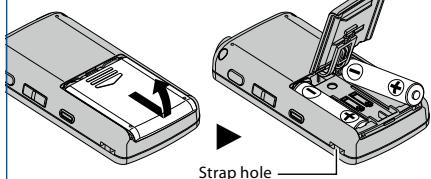
1 Inserting Batteries
text_image
Strap hole- Strap is not supplied.
Battery indicator:
When [☐] appears on the display, replace the batteries as soon as possible. When the batteries are too weak, [☐] and [Battery Low] appears on the display and the recorder shuts down.
2 Turning on the power
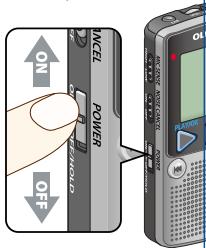
Slide the POWER switch to the [ON] position.
Turning off the power:
While the recorder is in stop mode, slide the POWER switch to the [OFF/HOLD] position.
Power save mode:
If the recorder is on and stops for 10 minutes or longer, the display shuts off and it goes into power save mode. To exit power save mode, press any button.
text_image
ON POWER ON/OLED OFFHOLD:
If you slide the POWER switch to the [OFF/HOLD] position, the current conditions will be preserved, and all buttons and switches will be disabled.
- When you use this recorder for the first time after purchasing, or when you switch it on after removing the batteries for more than 30 minutes when exchanging batteries etc, the time will return to the default setting and the [Set Time & Date] will appear.
Recording
text_image
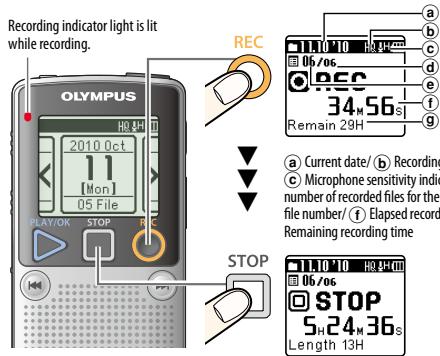
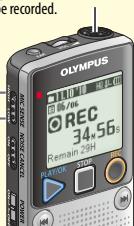
Recording indicator light is lit while recording. REC 11.0 10 Hx 4h 06/06 a b c d e f g rec 34M 56s Remain 29H 2010 Oct 11 [Mon] 05 File Olympus STOP Current date/ b) Recording Microphone sensitivity indic number of recorded files for the file number/ f) Elapsed record Remaining recording time 11.0 10 Hx 4h 06/06 STOP 5H 24M 36s Length 13HIf the recorder is in recording mode and the REC (O) button is pressed, recording pauses. If the REC (O) button is pressed again, recording resumes.
Microphone sensitivity
Turn the microphone in the direction of the source to be recorded.

natural_image
Illustration of a business meeting with three people around a table, one person holding a pointer (no text or symbols visible)High
This is a highly sensitive mode which can record surrounding noises. ( )
text_image
Olympus 06/06 REC 34*56s Remain 29H PLAYOK STOP REC
natural_image
Illustration of a man in a suit holding a smartphone (no text or symbols visible)Low
This is the standard level of microphone sensitivity. ( )
- Recorder will not be able to record anymore when [Memory Full] or [Maximum File Size is reached] appears. Delete any unnecessary files before recording any further.
- When remaining recording time is less than 60 seconds, the recording indicator light starts flashing. When the recording time is decreasing to 30 or 10 seconds, the light flashes faster.
Playback
text_image
OLYMPUS 11:10'10 H0 J4"00 10/26 STOP 5H 24M 36s length 13H PLAY/OK STOP REC PLAY/OK STOP STOP


text_image
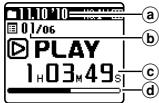
11:10'10 01/06 PLAY 1H03M49S a b c dⒶ Recording date/ ⓑ Current file number/ ⓒ Elapsed playback time/
(d) Playback position bar indicator
text_image
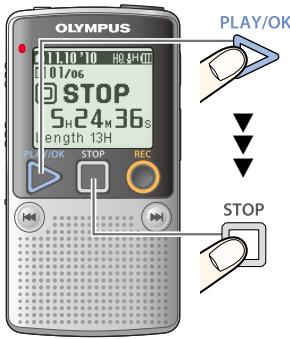
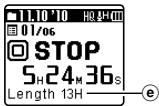
11.10 '10 HQ4H 01/06 STOP 5h24m36s Length 13He Approximate file length
- If the ◀◀◀ or ▶▶▶ I button is pressed and held while the recorder is in playback mode, the file advances with sound.
- If the ◀◀◀ or ▶▶▶ I button is pressed while the recorder is in stop mode, the recorder moves to the beginning of the file.
● Fast forwarding and rewinding are possible beyond the date.
text_image
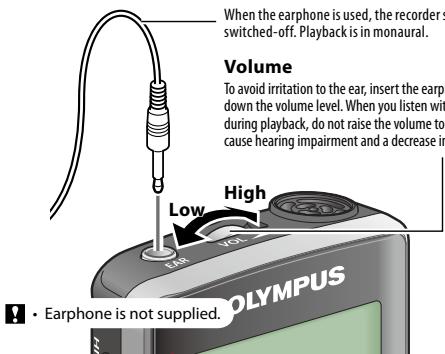
When the earphone is used, the recorder is switched-off. Playback is in monaural. Volume To avoid irritation to the ear, insert the ear down the volume level. When you listen with during playback, do not raise the volume to cause hearing impairment and a decrease in Low High Lear Vol • Earphone is not supplied. OLYMPUSWhen the earphone is used, the recorder speaker will be switched-off. Playback is in monaural.
Volume
To avoid irritation to the ear, insert the earphone after turning down the volume level. When you listen with the earphone during playback, do not raise the volume too much. It may cause hearing impairment and a decrease in hearing ability.
Changing the playback speed
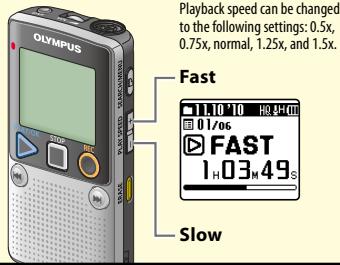
text_image
OLYMPUS Fast 1.10'10 H:24"CL 01/06 FAST 1H03M49s SlowNoise cancel
On
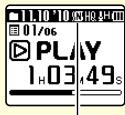
Noise will be reduced in the file when it's played back for better sound quality.
text_image
1.10'10 MSHQ4H 01/06 PLAY 1 H 03 49 sNoise Cancel indicator
Off
The file is played back as it was recorded.
text_image
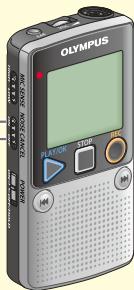
OLYMPUS PLAYTOR STOP RUN- When the NOISE CANCEL switch is set to [ON], playback speed returns to normal playback.
File search
text_image
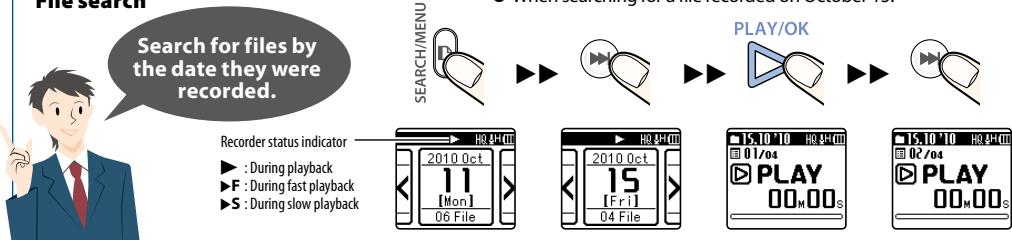
File search Search for files by the date they were recorded. Search/MENU RESEARCH/OK RESEARCH/OPEN RESEARCH/OPEN RESEARCH/OPEN RESEARCH/OPEN RESEARCH/OPEN RESEARCH/OPEN RESEARCH/OPEN RESEARCH/OPEN RESEARCH/OPEN RESEARCH/OPEN RESEARCH/OPEN RESEARCH/OPEN RESEARCH/OPEN RESEARCH/OPEN RESEARCH/OPEN RESEARCH/OPEN RESEARCH/OPEN RESEARCH/OPEN RESEARCH/OPEN RESEARCH/OPEN RESEARCH/ OPEN RESEARCH/OPEN RESEARCH/OPEN RESEARCH/OPEN RESEARCH/OPEN RESEARCH/OPEN RESEARCH/OPEN RESEARCH/OPEN RESEARCH/OPEN RESEARCH/OPEN RESEARCH/OPEN RESEARCH/OPEN RESEARCH/OPEN RESEARCH/OPEN RESEARCH/OPEN RESEARCH/OPEN RESEARCH/OPEN RESEARCH/OPEN RESEARCH/OPEN RESEARCH/OPEN RESEARCH/Open RESEARCH/OPEN RESEARCH/OPEN RESEARCH/OPEN RESEARCH/OPEN RESEARCH/OPEN RESEARCH/OPEN RESEARCH/OPEN RESEARCH/OPEN RESEARCH/OPEN RESEARCH/OPEN RESEARCH/OPEN RESEARCH/OPEN RESEARCH/OPEN RESEARCH/OPEN RESEARCH/OPEN RESEARCH/OPEN RESEARCH/OPEN RESEARCH/OPEN RESEARCH/OPEN RESEARCH/Opening RESEARCH/Opening RESEARCH/Opening RESEARCH/Opening RESEARCH/Opening RESEARCH/Opening RESEARCH/Opening RESEARCH/Opening RESEARCH/Opening RESEARCH/Opening RESEARCH/Opening RESEARCH/Opening RESEARCH/Opening RESEARCH/Opening RESEARCH/Opening RESEARCH/Opening RESEARCH/Opening RESEARCH/Opening RESEARCH/Opening RESEARCH/Opening RESEARCH/ Opening RESEARCH/ Opening RESEARCH/ Opening RESEARCH/ Opening RESEARCH/ Opening RESEARCH/ Opening RESEARCH/ Opening RESEARCH/ Opening RESEARCH/ Opening RESEARCH/ Opening RESEARCH/ Opening RESEARCH/ Opening RESEARCH/ Opening RESEARCH/ Opening RESEARCH/ Opening RESEARCH/ Opening RESEARCH/ Opening RESEARCH/ Opening RESEARCH/ Opening RESEARCH/ Opening RESEARCH/ Open RESEARCH/ Open RESEARCH/ Open RESEARCH/ Open RESEARCH/ Open RESEARCH/ Open RESEARCH/ Open RESEARCH/ Open RESEARCH/ Open RESEARCH/ Open RESEARCH/ Open RESEARCH/ Open RESEARCH/ Open RESEARCH/ Open RESEARCH/ OpenWhile the recorder is in stop mode, press and hold the STOP (☐) button to display the [Time & Date] and [Remain].
- When searching for a file recorded on October 15.

text_image
HQ 4H 00 2010 Oct 11 [Mon] 06 FileThe date display appears.
text_image
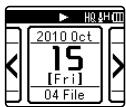
2010 Oct 15 [Fri] 04 FileSelect October 15.

text_image
15.10 '10 HQ 4H 01/04 PLAY 00M00SThe first file is played back.
text_image
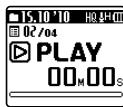
15.10 '10 HQ 4H 02/04 PLAY 00M00SIf the file is skipped, the recorder switches to the next file.
Erase
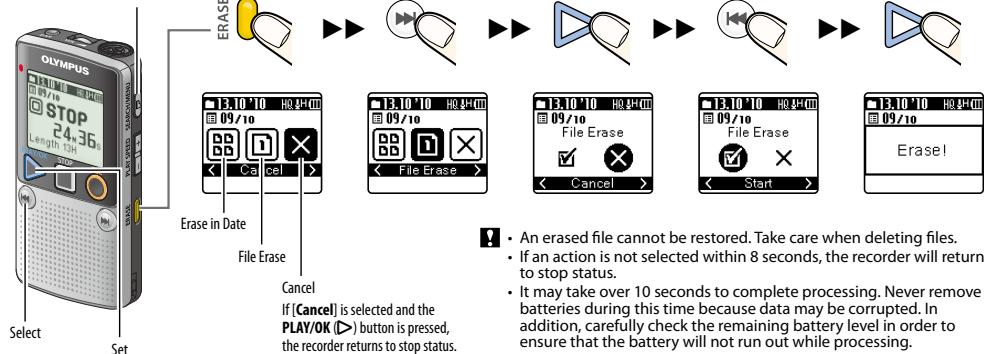
To delete all files of the displayed date, use the SEARCH/MENU button to switch the date display.
flowchart
graph TD
    A["Select"] --> B["Set"]
    B --> C["Erase in Date"]
    B --> D["File Erase"]
    B --> E["Cancel"]
    C --> F["13.10 '10 H0.84' Off"]
    D --> G["13.10 '10 H0.84' Off"]
    E --> H["13.10 '10 H0.84' Off"]
    F --> I["Back to 09/10"]
    G --> J["Back to 09/10"]
    H --> K["Back to 09/10"]
    I --> L["Start"]
    J --> M["Start"]
    K --> N["End"]
- Select the file you want to delete and stop playback ahead of time.
Menu setting method
text_image
OLYMPUS STOP REC PLAYSPEED SPONSIBLE EASE1
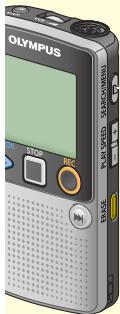
Press and hold the SEARCH/MENU button for 1 second or longer.
SEARCH/MENU

2
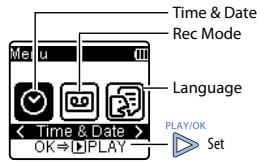
Press the ◀◀◀ or ▶▶◀ button to move the item you want to set.
text_image
Time & Date Rec Mode Language Time & Date > OK ⇒ PLAY PLAY/OK Set
Changing the display language
- English
- Deutsch
• Français - Español
- Italiano
• Polski
• Русский

Setting time and date
Setting the time and date beforehand enables easier file management.

natural_image
Illustration of a man in a suit pointing upward with one finger (no text or symbols)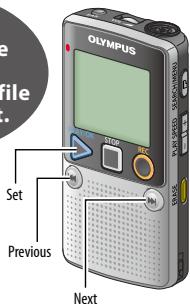
text_image
OLEMPUS Set Previous Next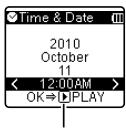
text_image
Time & Date 2010 October 11 < 12:00AM > OK⇒PLAYThe clock will start from the set date and time. Press the PLAY/OK (▷) button according to the time signal.

Changing the recording mode
| Recommended settings by recording condition | ||
| Recording condition | Recommended settings | |
| Rec Mode | MIC SENSE | |
| Dictation with a lot of background noise. | [HQ](high quality sound recording) | [LOW] |
| Recordings for lessons and meetings. | [HQ](high quality sound recording) | [HIGH] |
| Lengthy recordings. | [SP](standard recording) | [HIGH] |
Troubleshooting
Q1: The power cannot be turned on.
A1: • The batteries may be depleted.
- The batteries may be inserted incorrectly. Check and before inserting new batteries. - Are the terminals of the batteries soiled? If so, clean them with a dry cloth.
Q2: Nothing happens when a button is pressed.
A2: • The POWER switch may be set to [OFF/HOLD] position. Slide the POWER switch to the [ON] position.
Q3: No sound or quiet sound is heard from the speaker while playing back.
A3: The earphone plug may be plugged into the recorder. The volume may be set to the minimum level.
Q4: Noise is audible through the recording monitor.
A4: Acoustic feedback is occurring. Conduct adjustments like separating the earphones from the microphone further, do not point the microphone at the earphones, lower the volume on the recording monitor, and so on.
Q5: Recording is not possible.
A5: By pressing the REC (O) button: - Check if the display shows [Memory Full]. - Check if the display shows [Maximum File Size is reached]. Delete any unnecessary files before recording any further. A maximum of 99 files can be recorded within a single day.
Q6: The playback speed is too fast (slow).
A6: The recorder may be set to fast (slow) Playback. Use the PLAY SPEED button to set to normal playback.
Specifications
Recording medium:
Built-in flash memory (1GB)
Overall frequency:
HQ mode: 70 to 13,000 Hz
SP mode: 70 to 8,000 Hz
Guide to recording times:
HQ mode: Approx. 67 h.
SP mode: Approx. 131 h.
Microphone:
Electret Condenser Microphone (monaural)
Speaker:
Built-in ø 36 mm round dynamic speaker
Maximum power:
200 mW
Earphone jack (monaural):
ø 3.5 mm diameter, impedance 8 Ω or more
Power supply:
Two AAA (LR03) batteries or Two Ni-MH rechargeable batteries
Continuous battery:
Guide to alkaline battery life
| Recording mode | HQ | SP |
| During recording mode | approx. 51 h. | approx. 63 h. |
| During playback mode (Built-in speakers) | approx. 21 h. | approx. 21 h. |
| During playback mode (Earphone) | approx. 69 h. | approx. 69 h. |
Dimensions:
95 (L) mm x 50 (W) mm x 18.2 (T) mm
(without protrusions)
Weight:
78 g (including battery)
Operating temperature:
0^ - 42^
- The above-noted recording times indicate times after deletion of the manual data stored in the recorder.
-
Battery life is measured by Olympus. It varies greatly according to the type of batteries used and the conditions of use.
-
Your recorded contents are for your personal use or pleasure only. It is prohibited to record copyrighted material without permission of the copyright holders according to copyright law.
- Specifications and design are subject to change without notice for improvement of performance.
Accessories (optional)
Ni-MH rechargeable battery and charger set:
BC400 (For Europe)
Ni-MH rechargeable battery:
BR401

"CE" mark indicates that this product complies with the European requirements for safety, health, environment and customer protection.

This symbol [crossed-out wheeled bin WEEE Annex IV] indicates separate collection of waste electrical and electronic equipment in the EU countries. Please do not throw the equipment into the domestic refuse. Please use the return and collection systems available in your country for the disposal of this product. Applicable Product : DP-20

This symbol [crossed-out wheeled bin Directive 2006/66/EC Annex II] indicates separate collection of waste batteries in the EU countries. Please do not throw the batteries into the domestic refuse. Please use the return and collection systems available in your country for the disposal of the waste batteries.
OLYMPUS IMAGING CORP.
Shinjuku Monolith, 3-1 Nishi-Shinjuku 2-chome, Shinjuku-ku, Tokyo 163-0914, Japan. Tel. +81 (0)3-3340-2111
http://www.olympus.com
OLYMPUS EUROPA HOLDING GMBH
(Premises/Goods delivery) Wendenstrasse 14-18, 20097 Hamburg, Germany. Tel. +49 (0)40-237730 (Letters) Postfach 10 49 08. 20034 Hamburg, Germany.
http://www.olympus-europa.com