
S675IP - Desk Phone GIGASET - Free user manual and instructions
Find the device manual for free S675IP GIGASET in PDF.


| Product Type | VoIP Desk Phone |
| Brand | Gigaset |
| Model | S675IP |
| Manufacturer | Siemens Home and Office Communication Devices GmbH & Co. KG |
| Connectivity | Ethernet (RJ-45), Wi-Fi 802.11 b/g |
| Display | Color TFT, 2.4 inches |
| Audio | Full-duplex speakerphone, handset |
| Phonebook Capacity | Up to 500 contacts |
| Call Features | Caller ID, call waiting, transfer, conference, hold, mute, redial |
| VoIP Protocols | SIP v2 |
| Power Supply | AC adapter 100-240V, 50/60Hz |
| Dimensions (W x D x H) | 220 x 185 x 140 mm |
| Weight | 0.85 kg |
| Keypad | Alphanumeric keys, navigation buttons |
| Security | AES encryption, TLS |
| Languages | English, German, and others |
| Wall-Mountable | Yes |
| Warranty | 2 years |
| Cleaning and Maintenance | Use a soft, dry cloth. Avoid liquids and abrasives. |
| Safety | Use only specified power adapter. Do not expose to moisture or heat. |
| Spare Parts Availability | Contact authorized service center. Parts: power adapter, handset cord. |
Frequently Asked Questions - S675IP GIGASET
User questions about S675IP GIGASET
0 question about this device. Answer the ones you know or ask your own.
Ask a new question about this device
Download the instructions for your Desk Phone in PDF format for free! Find your manual S675IP - GIGASET and take your electronic device back in hand. On this page are published all the documents necessary for the use of your device. S675IP by GIGASET.
USER MANUAL S675IP GIGASET
natural_image
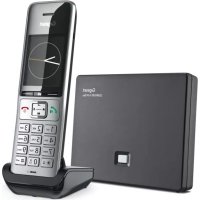
Exterior view of Siemens mobile phone and Wi-Fi card on a wooden table, no visible text or symbols on the devices themselves.Gigaset S675IP
Issued by
Siemens Home and Office Communication Devices GmbH & Co. KG
Schlavenhors: 60
D-46395 Bocholt
S. Sorpera Home and Office Communication Devices GmbH & Co. KG 2007
All rights reserved. Subject to availability
Rights of modification reserved.
www.siemms.com/igipasei
Gigaset
Kundenservice (Customer Care) .... 138
Zulassung 138
Garantie-Urkunde 139
natural_image
Illustration of a car with wheels and a roof-like structure (no text or symbols)natural_image
Diagram of a device's internal components with arrows indicating assembly or disassembly (no text or symbols present)Akkudeckel öffnen
natural_image
3D rendering of a mechanical device with a highlighted internal component and an arrow indicating rotation (no text or symbols)natural_image
Illustration of a car with directional arrows indicating movement or force (no text or symbols)natural_image
Pure electrical circuit symbol for an integrated device (no text or labels)

Brand : GIGASET
Model : S675IP
Category : Desk Phone