
KRC-394 - Car stereo KENWOOD - Free user manual and instructions
Find the device manual for free KRC-394 KENWOOD in PDF.



User questions about KRC-394 KENWOOD
0 question about this device. Answer the ones you know or ask your own.
Ask a new question about this device
Download the instructions for your Car stereo in PDF format for free! Find your manual KRC-394 - KENWOOD and take your electronic device back in hand. On this page are published all the documents necessary for the use of your device. KRC-394 by KENWOOD.
USER MANUAL KRC-394 KENWOOD
Safety precautions. 3
About Cassette tape. 4
About RDS 4
General features 5
Power
Selecting the Source
Volume
Attenuator
Loudness
System Q
Audio Control
Speaker Setting
Switching Display
TEL Mute
Theft Deterrent Faceplate
Tuner features (KRC-394/KRC-37) 8
Tuning
Station Preset Memory
Auto Memory Entry
Preset Tuning
RDS features 10
Traffic Information
Presetting Volume for Traffic Information
PTY (Program Type)
Program Type preset
Changing Language for PTY Function
Tuner features (KRC-31). 13
Tuning Mode
Tuning
Station Preset Memory
Auto Memory Entry
Preset Tuning
Cassette player features. 14
Playing Cassette Tapes
Fast Forwarding and Rewinding
Tape Advance
Blank Skip
Tuner Call
Music Repeat
External disc control features..16
Playing External Disc
Fast Forwarding and Reversing
Track Search
Album Search
Track/Album Repeat
Track Scan
Random Play
Magazine Random Play
Disc Naming (DNPS)
Text/Title Scroll
Menu system. 19
Menu System
Touch Sensor Tone
Manual Clock Adjustment
Synchronize Clock
DSI (Disabled System Indicator)
Selectable Illumination
News Bulletin with Timeout Setting
Local Seek
Tuning Mode
Auto Memory Entry
AF (Alternative Frequency)
Restricting RDS Region
Auto TP Seek
Monaural Reception
Text Scroll
Disc Naming
Power OFF Timer
Accessories 23
Installation Procedure 23
Connecting Wires to
Terminals 24
Installation 26
Troubleshooting Guide 28
Specifications 31
WARNING
To prevent injury and/or fire, take the following precautions:
- Insert the unit all the way until it is fully locked in place. Otherwise it may fly out of place during collisions and other jolts.
- When extending the ignition, battery or ground wires, make sure to use automotive-grade wires or other wires with an area of 0.75mm^2 (AWG18) or more to prevent wire deterioration and damage to the wire coating.
- To prevent short circuits, never put or leave any metallic objects (e.g., coins or metal tools) inside the unit.
- If the unit starts to emit smoke or strange smells, turn off the power immediately and consult your Kenwood dealer.
- Make sure not to get your fingers caught between the faceplate and the unit.
- Be careful not to drop the unit or subject it to strong shock. The unit may break or crack because it contains glass parts.
- Do not touch the liquid crystal fluid if the LCD is damaged or broken due to shock. The liquid crystal fluid may be dangerous to your health or even fatal. If the liquid crystal fluid from the LCD contacts your body or clothing, wash it off with soap immediately.
CAUTION
To prevent damage to the machine, take the following precautions:
Make sure to ground the unit to a negative 12V DC power supply.
- Do not open the top or bottom covers of the unit.
- Do not install the unit in a spot exposed to direct sunlight or excessive heat or humidity. Also avoid places with too much dust or the possibility of water splashing.
- Do not set the removed faceplate or the faceplate case in areas exposed to direct sunlight, excessive heat or humidity. Also avoid places with too much dust or the possibility of water splashing.
- To prevent deterioration, do not touch the terminals of the unit or faceplate with your fingers.
- Do not subject the faceplate to excessive shock, as it is a piece of precision equipment.
- When replacing a fuse, only use a new one with the prescribed rating. Using a fuse with the wrong rating may cause your unit to malfunction.
- To prevent short circuits when replacing a fuse, first disconnect the wiring harness.
- Do not place any object between the faceplate and the unit.
- During installation, do not use any screws except for the ones provided. The use of improper screws might result in damage to the main unit.
IMPORTANT INFORMATION
About CD players/disc changers connected to this unit:
KENWOOD disc changers/ CD players released in 1998 or later can be connected to this unit.
Refer to the catalog or consult your Kenwood dealer for connectable models of disc changers/ CD players.
Note that any KENWOOD disc changers/ CD players released in 1997 or earlier and disc changers made by other makers cannot be connected to this unit.
Unsupported connection may result in damage.
Setting the O-N Switch to the "N" position for the applicable KENWOOD disc changers/ CD players.
The functions that can be used and the information that can be displayed will differ depending on the models being connected.
You can damage both your unit and the CD changer if you connect them incorrectly.
NOTE
If you experience problems during installation, consult your Kenwood dealer.
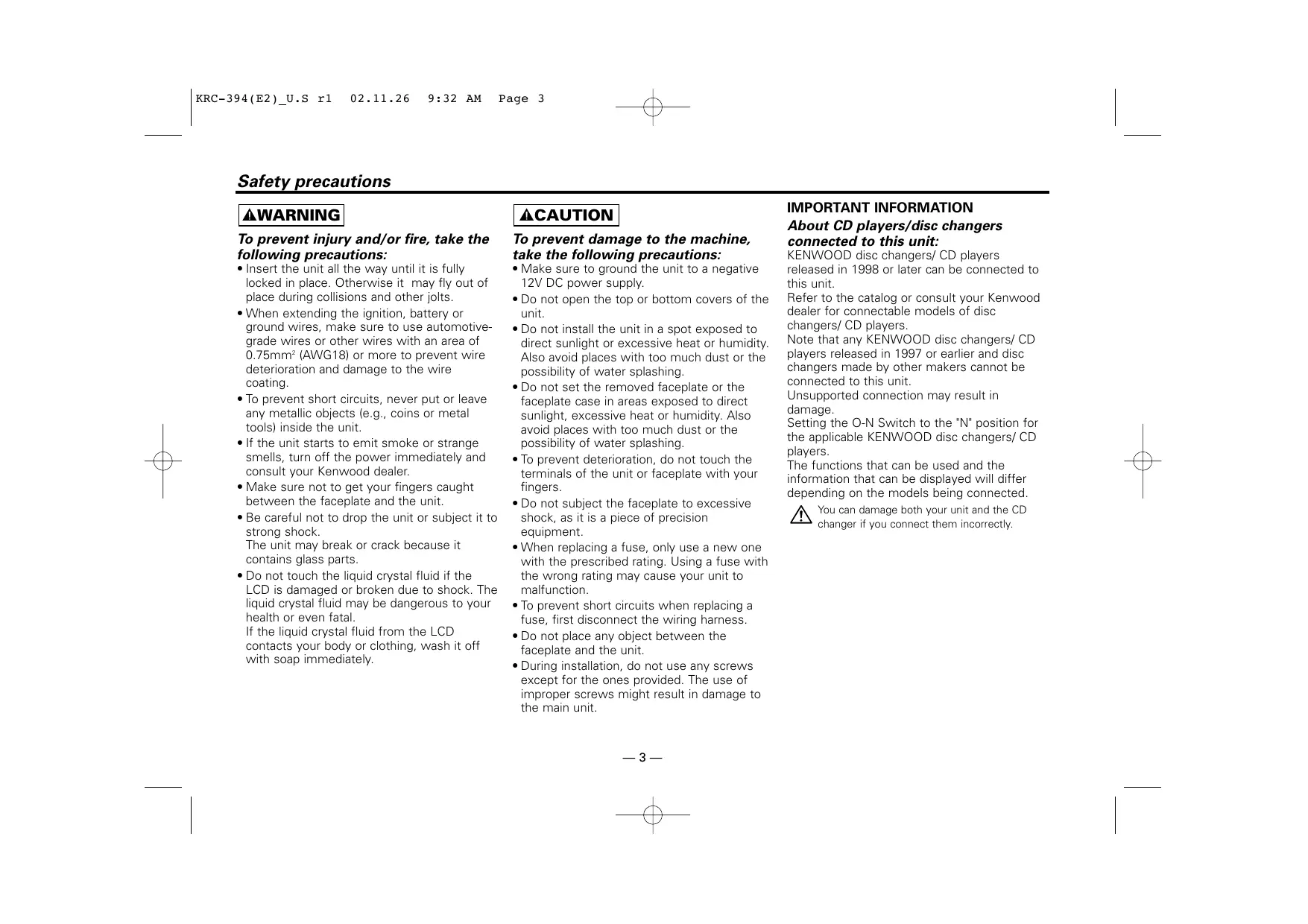
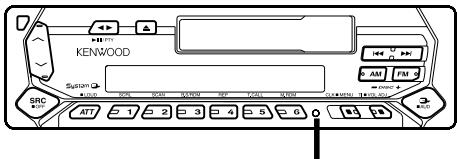
- If the unit does not seem to be working right, try pressing the reset button first. If that does not solve the problem, consult your Kenwood dealer.
- Press the reset button if the Disc auto changer fails to operate correctly. Normal operatin should be restored.
Reset button
- Characters in the LCD may become difficult to read in temperatures below 41^ F ( 5^ C ).
- The illustrations of the display and the panel appearing in this manual are examples used to explain more clearly how the controls are used. Therefore, what appears on the display in the illustrations may differ from what appears on the display on the actual equipment, and some of the illustrations on the display may represent something impossible in actual operation.
Cleaning the Faceplate Terminals
If the terminals on the unit or faceplate get dirty, wipe them with a dry, soft cloth.
Cleaning the Unit
If the faceplate of this unit is stained, wipe it with a dry soft cloth such as a silicon cloth. If the faceplate is stained badly, wipe the stain off with a cloth moistened with neutral cleaner, then wipe neutral detergent off.

Applying spray cleaner directly to the unit may affect its mechanical parts. Wiping the faceplate with a hard cloth or using a volatile liquid such as thinner or alcohol may scratch the surface or erases characters.
About Cassette tape
Cleaning the tape head
When there's noise or the sound quality is bad during tape play the tape head maybe dirty, clean the tape head.
About Cassette tape
- If the tape is slack tighten it.
- If the cassette tape label is peeling off glue it on again.
- Don't use deformed cassette tape.
- Don't place cassette tape on the dashboard etc. where the temperature is high.
- Don't use cassette tape that's 100 minutes long or longer.
About RDS
RDS (Radio Data System)
When listening to an RDS station, the programme service name of the station is displayed, advising you quickly which station is being received.
RDS (Radio Data System) stations also transmit frequency data for the same station. When you are making long trips, this function automatically alternative switches to the particular frequency with the best reception for the particular network of stations that you want to listen to. The data is automatically stored, allowing you to switch quickly to another RDS stations, broadcasting the same programme, that has better reception. These include stations stored in the station preset memory that you often listen to.
Enhanced Other Network
Stations that offer
Alarm
When an emergency transmission (announcing disasters, etc.) is sent, all current functions are interrupted to allow the warning to be received.
Power
Turning ON the Power
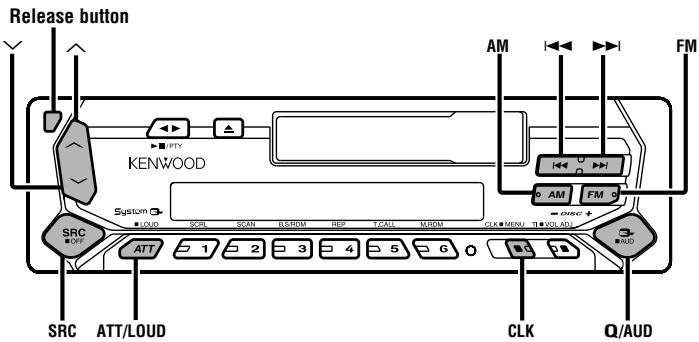
Press the [SRC] button.
Turning OFF the Power
Press the [SRC] button for at least 1 second.
Selecting the Source
Press the [SRC] button.
| Source required | Display |
| Tuner | "TUNER" |
| Tape | "TAPE" |
| External disc | "DISC"/"CD" |
| Standby (Illumination only mode) | "ALL OFF" |

This unit automatically turns full power OFF after 20 minutes lapses in Standby mode in order to save the vehicles battery.
The time until full power OFF can be set in
Volume
Increasing Volume
Press the [] button.
Decreasing Volume
Press the [ ] button.
Attenuator
Turning the volume down quickly.
Press the [ATT] button.
Each time the button is pressed the Attenuator turns ON or OFF.
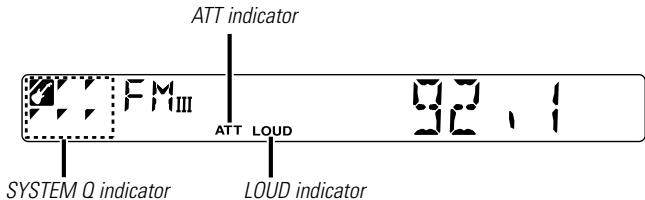
When it's ON, the "ATT" indicator blinks.
Loudness
Compensating for low and high tones during low volume.
Press the [LOUD] button for at least 1 second.
Each time the button is pressed for at least 1 second the
Loudness turns ON or OFF.
When it's ON, "LOUD" indicator is ON.
System Q
You can recall the best sound setting preset for different types of the music.
1 Select the source to set
Press the [SRC] button.
2 Select the Sound type
Press the [Q] button.
Each time the button is pressed the sound setting switches.
| Sound setting | Display |
| Flat | "FLAT" |
| Rock | "ROCK" |
| Top 40 | "TOP40" |
| Pops | "POPS" |
| Jazz | "JAZZ" |
| Easy | "EASY" |
| Scan of Flat — Easy | "SCAN" |

Each setting value is changed with the
First, select the speaker type with the Speaker setting.
- When the System Q setting is changed, the Bass, Middle, and Treble set in audio control replace the System Q values.
Audio Control
1 Select the source for adjustment
Press the [SRC] button.
2 Enter Audio Control mode
Press the [AUD] button for at least 1 second.
3 Select the Audio item for adjustment
Press the [FM] or [AM] button.
Each time the button is pressed the items that can be adjusted switch as shown below.
4 Adjust the Audio item
Press the [I<] or [▶▶] button.
| Adjustment Item | Display | Range |
| Bass level | "BAS" | -8 — +8 |
| Middle level | "MID" | -8 — +8 |
| Treble level | "TRE" | -8 — +8 |
| Balance | "BAL" | L15 — R15 |
| Fader | "FAD" | R15 — F15 |
5 Exit Audio Control mode
Press the [AUD] button.
Speaker Setting
Fine-tuning so that the System Q value is optimal when setting the speaker type.
1 Enter Standby
Press the [SRC] button.
Select the "ALL OFF" display.
2 Enter Speaker Setting mode
Press the [Q] button.
3 Select the Speaker type
Press the [I<] or [▶▶] button.
Each time the button is pressed the setting switches as shown below.
| Speaker type | Display |
| OFF | "SP OFF" |
| For the OEM speaker | "SP OEM" |
| For 6 & 6x9 in. speaker | "SP 6/6x9" |
| For 5 & 4 in. speaker | "SP 5/4" |
4 Exit Speaker Setting mode
Press the [Q] button.
Switching Display
Switching the information displayed.
Press the [CLK] button.
Each time the button is pressed the display switches as shown below.
In Tuner source
Information
Program Service name or Frequency
Clock
In Tape source
Information
Play side
Clock
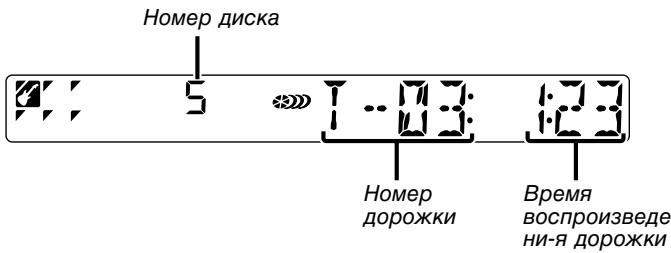
In External disc source
| Information | Display |
| Track Time | |
| Disc name | "D-NAME" |
| Disc title | "D-TITLE" |
| Track title | "T-TITLE" |
| Clock |
TEL Mute
The audio system automatically mutes when a call comes in.
When a call comes in
"CALL" is displayed.
The audio system pauses.
Listening to the audio during a call
Press the [SRC] button.
The "CALL" display disappears and the audio system comes back ON.
When the call ends
Hang up the phone.
The "CALL" display disappears and the audio system comes back ON.
Theft Deterrent Faceplate
The faceplate of the unit can be detached and taken with you, helping to deter theft.
Removing the Faceplate
Press the Release button.
The faceplate is unlocked, allowing you to detach it.

- The faceplate is a precision piece of equipment and can be damaged by shocks or jolts. For that reason, keep the faceplate in its special storage case while detached.
- Do not expose the faceplate or its storage case to direct sunlight or excessive heat or humidity. Also avoid places with too much dust or the possibility of water splashing.
Reattaching the Faceplate
1 Align the projections on the unit with the grooves on the faceplate.

2 Push the faceplate in until it clicks.
The faceplate is locked in place, allowing you to use the unit.
Tuner features
Function of the KRC-394/KRC-37
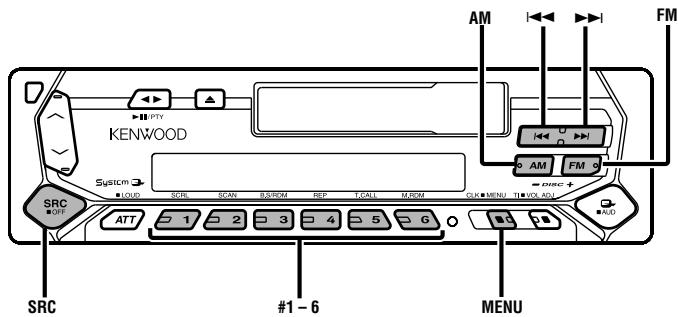
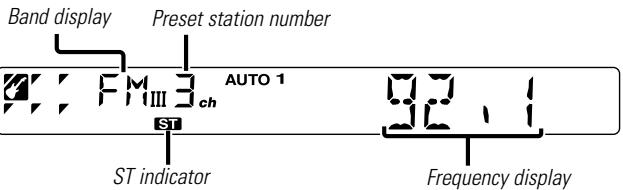
Tuning
Selecting the station.
1 Select tuner source
Press the [SRC] button.
Select the "TUNER" display.
2 Select the band
Press the [FM] or [AM] button.
Each time the [FM] button is pressed it switches between the FM1, FM2, and FM3 bands.
3 Tune up or down band
Press the [I<] or [▶▶] button.

During reception of stereo stations the "ST" indicator is ON.
Station Preset Memory
Putting the station in the memory.
1 Select the band
Press the [FM] or [AM] button.
2 Select the frequency to put in the memory
Press the [I] or [▶] button.
3 Put the frequency in the memory
Press the [#1] — [#6] button for at least 2 seconds.
The preset number display blinks 1 time.
On each band, 1 station can be put in the memory on each [#1] — [#6] button.
Auto Memory Entry
Putting a station with good reception in the memory automatically.
1 Select the band for Auto Memory Entry
Press the [FM] or [AM] button.
2 Enter Menu mode
Press the [MENU] button for at least 1 second.
"MENU" is displayed.
3 Select the Auto Memory Entry mode
Press the [FM] or [AM] button.
Select the "A-MEMORY" display.
4 Open Auto Memory Entry
Press the [I] or [▶] button for at least 2 seconds.
When 6 stations that can be received are put in the memory
Auto Memory Entry closes.

- When the
(page 21) is ON, only RDS stations are put in the memory. - When Auto Memory Entry is done in the FM2 band, the RDS stations preset in the FM1 band aren't put in the memory. Likewise, when it is done in the FM3 band, RDS stations preset in FM1 or FM2 aren't put in the memory.
Preset Tuning
Calling up the stations in the memory.
1 Select the band
Press the [FM] or [AM] button.
2 Call up the station
Press the [#1] — [#6] button.
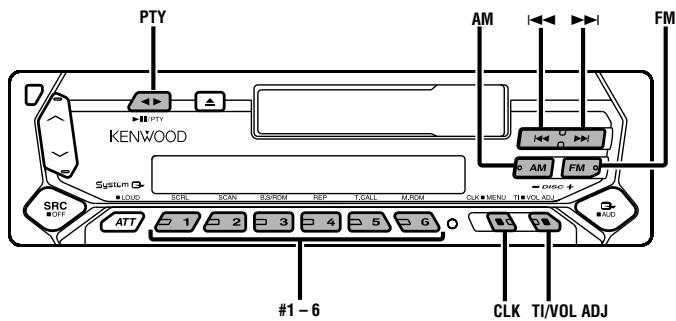
Traffic Information
Switching to traffic information automatically when a traffic bulletin starts even when you aren't listening to the radio.
Press the [TI] button.
Each time the button is pressed the Traffic Information function turns ON or OFF.
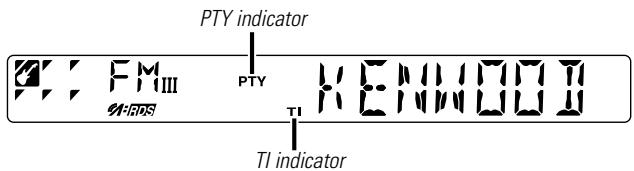
When it's ON, "TI" indicator is ON.
When a traffic information station isn't being received the "TI" indicator blinks.
When a traffic bulletin starts, "TRAFFIC" is displayed it and it switches to traffic information.

During reception of a AM station when the Traffic Information function is turned ON, it switches to a FM station.
Receiving other traffic information stations
Press the [1 1] or [> 1] button.

Traffic information station switching can be done when listening to the radio.
Presetting Volume for Traffic Information
Setting the volume during Traffic Information.
1 Receive the station.
2 Set the volume you want.
3 Preset the volume
Press the [VOL ADJ] button for at least 2 seconds. The volume level display blinks 1 time.
PTY (Program Type)
Selecting the Program Type and searching for a station.
1 Enter PTY mode
Press the [PTY] button.
During PTY mode the "PTY" indicator is ON.

This function can't be used during a traffic bulletin or AM reception.
2 Select the Program Type
Press the [FM] or [AM] button.
Each time the button is pressed the Program Type switches as shown below.
No. Program Type Display
| 1. | Music | "MUSIC" |
| 2. | Speech | "SPEECH" |
| 3. | News | "NEWS" |
| 4. | Current Affairs | "AFFAIRS" |
| 5. | Information | "INFO" |
| 6. | Sport | "SPORT" |
| 7. | Education | "EDUCATE" |
| 8. | Drama | "DRAMA" |
| 9. | Culture | "CULTURE" |
| 10. | Science | "SCIENCE" |
| 11. | Varied | "VARIED" |
| 12. | Pop Music | "POP M" |
| 13. | Rock Music | "ROCK M" |
| 14. | Easy Listening Music | "EASY M" |
| 15. | Light Classical | "LIGHT M" |
| 16. | Serious Classical | "CLASSICS" |
| 17. | Other Music | "OTHER M" |
| 18. | Weather | "WEATHER" |
| 19. | Finance | "FINANCE" |
| 20. | Children's programs | "CHILDREN" |
- Social Affairs "SOCIAL"
- Religion "RELIGION"
- Phone In "PHONE IN"
24.Travel "TRAVEL" - Leisure "LEISURE"
- Jazz Music "JAZZ"
- Country Music "COUNTRY"
- National Music "NATION M"
- Oldies Music "OLDIES"
- Folk Music "FOLK M"
- Documentary "DOCUMENT"

- Speech and Music include the Program type shown below.
Music: No.12 — 17, 26 — 30
Speech: No.3 — 11, 18 — 25, 31 - The Program Type can be put in the [#1]—[#6] button memory and called up quickly. Refer to the
(page 12). - The display language can be changed. Refer to
(page 12).
3 Search for the selected Program Type station
Press the [I<] or [▶▶] button.
When you want to search for other stations press the [I] or [▶] button again.

When the selected Program Type isn't found, "NO PTY" is displayed. Select another Program Type.
4 Exit PTV mode
Press the [PTY] button.
Program Type preset
Putting the Program Type in the Preset button memory and calling it up quickly.
Presetting the Program Type
1 Select the Program Type to preset
Refer to
2 Preset the Program Type
Press the [#1] — [#6] button for at least 2 seconds.
Calling up the preset Program Type
1 Enter PTY mode
Refer to
2 Call up the Program Type
Press the [#1] — [#6] button.
Changing Language for PTY Function
Selecting the Program Type display language.
1 Enter PTY mode
Refer to
2 Enter Changing Language mode
Press the [CLK] button.
3 Select the language
Press the [#1] — [#3] button.
| Button | Language |
| [#1] | English |
| [#2] | French |
| [#3] | German |
4 Exit Changing Language mode
Press the [CLK] button.
Tuning Mode
Choose the tuning mode.
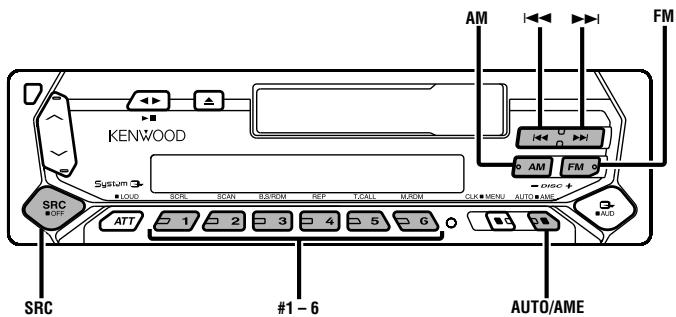
Press the [AUTO] button.
Each time the button is pressed the Tuning mode switches as shown below.
| Tuning mode | Display | Operation |
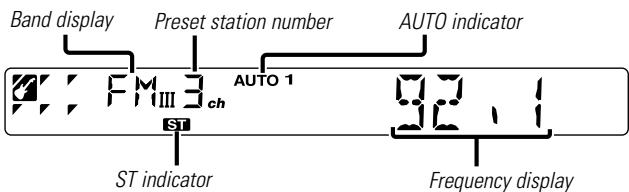
| Auto seek | "AUTO 1" indicator | Automatic search for a station. |
| Preset station seek | "AUTO 2" indicator | Search in order of the stations in the Preset memory. |
| Manual | — | Normal manual tuning control. |
Tuning
Selecting the station.
1 Select tuner source
Press the [SRC] button.
Select the "TUNER" display.
2 Select the band
Press the [FM] or [AM] button.
Each time the [FM] button is pressed it switches between the FM1, FM2, and FM3 bands.
3 Tune up or down band
Press the [I] or [▶] button.

During reception of stereo stations the "ST" indicator is ON.
Station Preset Memory
Putting the station in the memory.
1 Select the band
Press the [FM] or [AM] button.
2 Select the frequency to put in the memory
Press the [I] or [▶] button.
3 Put the frequency in the memory
Press the [#1]—[#6] button for at least 2 seconds.
The preset number display blinks 1 time.
On each band, 1 station can be put in the memory on each [#1] — [#6] button.
Auto Memory Entry
Putting stations with good reception in the memory automatically.
1 Select the band for Auto Memory Entry
Press the [FM] or [AM] button.
2 Open Auto Memory Entry
Press the [AME] button for at least 2 seconds.
When 6 stations that can be received are put in the memory
Auto Memory Entry closes.
Preset Tuning
Calling up the stations in the memory.
1 Select the band
Press the [FM] or [AM] button.
2 Call up the station
Press the [#1] — [#6] button.
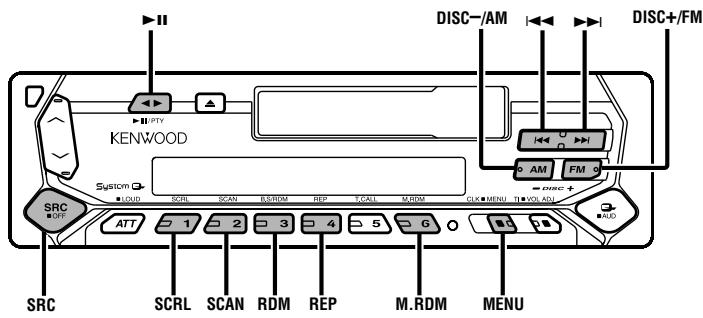
Playing Cassette Tapes
When the Cassette Tape is inserted
Press the [SRC] button.
Select the "TAPE" display.
When you want to listen to the reverse side
Press the [▶] button.
Eject the Cassette Tape
Press the [▲] button.
Fast Forwarding and Rewinding
Fast Forwarding
Press the [FM] button.
When it's stopped press the [▶] button.
Rewinding
Press the [AM] button.
When it's stopped press the [▶] button.
Tape Advance
Skipping to the next song or the start of the current song.
Skipping to the next song
Press the [▶] button.
Skipping to the start of the current song
Press the [ ] button.
Blank Skip
Fast forwarding automatically when an unrecorded portion continues for at least 10 seconds.
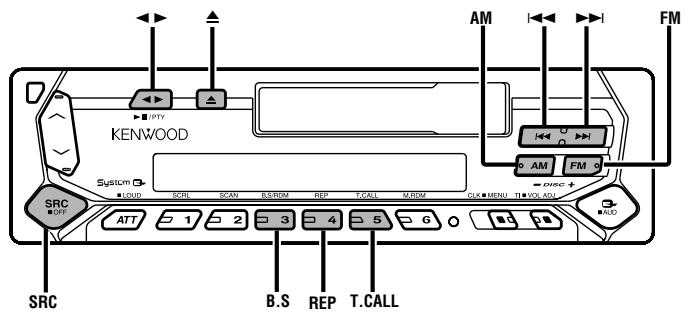
Press the [B.S] button.
Each time the button is pressed the Blank Skip turns ON or OFF.
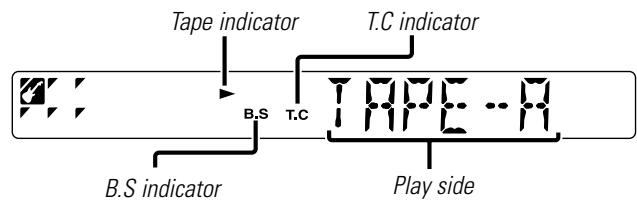
When it's ON, the "B.S" indicator is ON.
Tuner Call
Switching to the radio automatically during Fast Forwarding and Rewinding.
Press the [T.CALL] button.
Each time the button is pressed the Tuner Call turns ON or OFF.
When it's ON, the "T.C" indicator is ON.
Music Repeat
Repeating the present song.
Press the [REP] button.
Each time the button is pressed the Music Repeat turns ON or OFF.
When it's ON, "REP ON" is displayed.
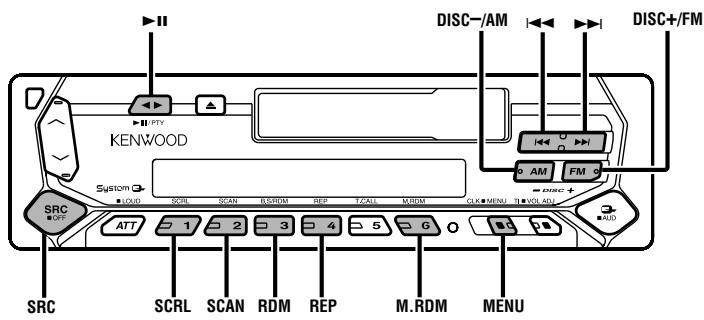
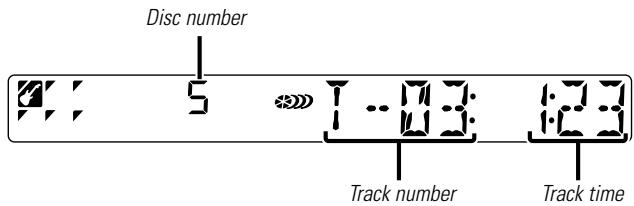
Playing External Disc
Playing discs set in the optional accessory disc player connected to this unit.
Press the [SRC] button.
Select the display for the disc player you want.
Display examples:
| Display | Disc player |
| "CD" | CD player |
| "DISC" | CD changer |
| "DISC" | MD changer |
Pause and play
Press the [▶II] button.
Each time the button is pressed it pauses and plays.

- Disc #10 is displayed as "0".
- The functions that can be used and the information that can be displayed will differ depending on the external disc players being connected.
Fast Forwarding and Reversing
Fast Forwarding
Hold down on the [ ] button.
Release your finger to play the disc at that point.
Reversing
Hold down on the [▶] button.
Release your finger to play the disc at that point.
Track Search
Selecting the song you want to hear.
Press the [i] or [▶] button.
Album Search (Function of disc changer)
Selecting the disc you want to hear.
Press the [DISC-] or [DISC+] button.
Track/Album Repeat
Replaying the track/disc you're listening to.
Press the [REP] button.
Each time the button is pressed the Repeat Play switches as shown below.
Repeat play
Display
| Track Repeat | "TREP ON"/"REP ON" |
| Album Repeat (Function of disc changer) | "DREP ON" |
| OFF | "REP OFF" |
Track Scan
Playing the first part of each song on the disc you are listening to and searching for the song you want to listen to.
1 Start Track Scan
Press the [SCAN] button.
"TSCN/SCAN ON" is displayed.
2 Release it when the song you want to listen to is played Press the [SCAN] button.
Random Play
Playing all the songs on the disc in random order.
Press the [RDM] button.
Each time the button is pressed Random Play turns ON or OFF.
When it's ON, "RDM ON" is displayed.

When the [ ] button is pressed, the next song select starts.
Magazine Random Play
(Function of disc changer)
Play the songs on all the discs in the disc changer in random order.
Press the [M.RDM] button.
Each time the button is pressed the Magazine Random Play turns ON or OFF.
When it's ON, "MRDM ON" is displayed.

When the [ ] button is pressed, the next song select starts.
Disc Naming (DNPS)
Attaching a title to a CD.
1 Play the disc you want to attach a name to

A title can't be attached to a MD.
2 Enter Menu mode
Press the [MENU] button for at least 1 second.
"MENU" is displayed.
3 Select Name set mode
Press the [FM] or [AM] button.
Select the "NAME SET" display.
4 Enter Name set mode
Press the [I<] or [▶] button for at least 2 seconds.
5 Move the cursor to the enter character position
Press the [I<] or [▶▶] button.
6 Select the characters
Press the [FM] or [AM] button.
7 Repeat steps 5 through 6 and attach a name.
8 Exit Menu mode
Press the [MENU] button.

- When operation stops for 10 seconds the name at that time is registered, and Name Set mode closes.
Media that you can attach a name to
-
External CD changer/ player: Varies according to the CD changer/ player. Refer to the CD changer/ player manual.
-
The name of a CD can be changed by the same operation you used to name it.
Text/Title Scroll
Scrolling the displayed CD text or MD title.
Press the [SCRL] button.
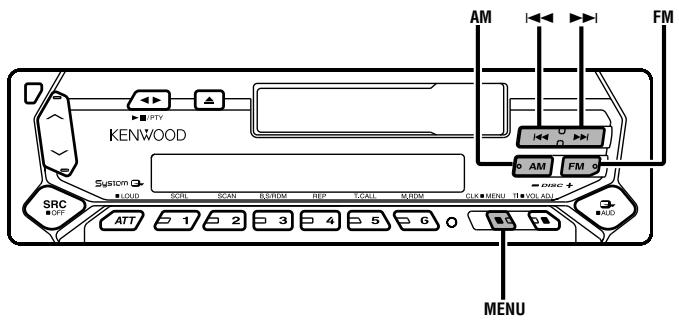
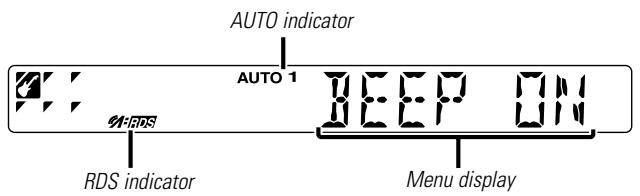
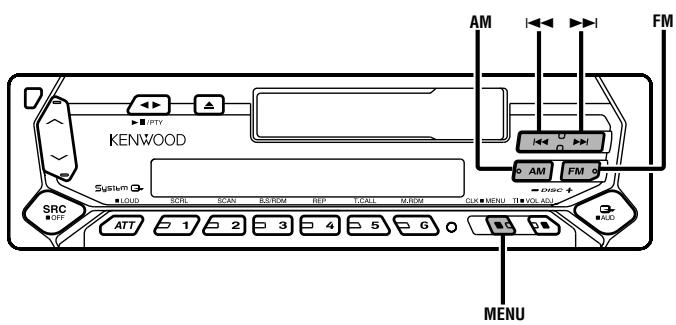
Menu System
Setting during operation beep sound etc. functions. The Menu system basic operation method is explained here. The reference for the Menu items and their setting content is after this operation explanation.
1 Enter Menu mode
Press the [MENU] button for at least 1 second.
"MENU" is displayed.
2 Select the menu item
Press the [FM] or [AM] button.
Example: When you want to set the beep sound select the "BEEP" display.
3 Set the menu item
Press the [ ] or [ ] button.
Example: When "BEEP" is selected, each time the button is pressed it switches "BEEP ON" or "BEEP OFF". Select 1 of them as the setting.
You can continue by returning to step 2 and setting other items.
4 Exit Menu mode
Press the [MENU] button.

When other items that are applicable to the basic operation method above are displayed afterwards their setting content chart is entered. (Normally the uppermost setting in the chart is the original setting.)
Also, the explanation for items that aren't applicable (
Touch Sensor Tone
Setting the operation check sound (beep sound) ON/OFF.
| Display | Setting |
| "BEEP ON" | Beep is heard. |
| "BEEP OFF" | Beep canceled. |
Manual Clock Adjustment

This adjustment can be done when the
1 Select Clock Adjustment mode
Press the [FM] or [AM] button.
Select the "CLK ADJ" display.
2 Enter Clock Adjust mode
Press the [I<] or [▶] button for at least 2 seconds.
The clock display blinks.
3 Adjust the hours
Press the [FM] or [AM] button.
Adjust the minutes
Press the [I<] or [▶▶] button.
4 Exit Clock adjustment mode
Press the [MENU] button.
Function of the KRC-394/KRC-37
Synchronize Clock
Synchronizing the RDS station time data and this unit's clock.
| Display | Setting |
| "SYNC ON" | Synchronizes the time. |
| "SYNC OFF" | Adjust the time manually. |

It takes 3 to 4 minutes to synchronize the clock.
DSI (Disabled System Indicator)
A red indicator will blink on the unit after the faceplate is removed, warning potential thieves.
| Display | Setting |
| "DSI ON" | LED flashes. |
| "DSI OFF" | LED OFF. |
Selectable Illumination
Selecting the button illumination color as green or red.
| Display | Setting |
| "COL GRN" | The illumination color is green. |
| "COL RED" | The illumination color is red. |
Function of the KRC-394/KRC-37
News Bulletin with Timeout Setting
It switches automatically when a news bulletin starts even if the radio isn't being listened to. Also, the time interval when interrupt is prohibited can be set.
Display and Setting
| "NEWS OFF" |
| "NEWS 00M" |
| : |
| "NEWS 90M" |
When "NEWS 00M" — "NEWS 90M" is set, the News Bulletin Interrupt function is ON.
When the news bulletin starts, "NEWS" is displayed, and it switches to the news bulletin.

- If you choose the "20M" setting, further news bulletins will not be received for 20 minutes once the first news bulletin is received.
- The news bulletin volume is the same level that was set for traffic information (page 10).
- This function is only available if the desired station sends PTY-code for news bulletin or belongs to
-Network sending PTY-code for news bulletin. - When the News Bulletin Interrupt function is ON, it switches to an FM station.
Local Seek
Only stations whose reception is good are searched for in auto seek tuning.
| Display | Setting |
| "LO.S OFF" | The local seek function is OFF. |
| "LO.S ON" | The local seek function is ON. |
Function of the KRC-394/KRC-37
Tuning Mode
Sets the tuning mode.
| Tuning mode | Display | Operation |
| Auto seek | "AUTO 1" | Automatic search for a station. |
| Preset station seek | "AUTO 2" | Search in order of the stations in the Preset memory. |
| Manual | "MANUAL" | Normal manual tuning control. |
Function of the KRC-394/KRC-37
Auto Memory Entry
For the operation method refer to
Function of the KRC-394/KRC-37
AF (Alternative Frequency)
When poor reception is experienced, automatically switch to another frequency broadcasting the same program in the same RDS network with better reception.
| Display | Setting |
| "AF ON" | The AF function is ON. |
| "AF OFF" | The AF function is OFF. |
When the AF function is ON, the "RDS" indicator is ON.

When no other stations with stronger reception are available for the same program in the RDS network, you may hear the incoming broadcast in bits and snatches. Turn OFF the AF function in such a case.
Function of the KRC-394/KRC-37
Restricting RDS Region
(Region Restrict Function)
You can choose whether or not to restrict the RDS channels, received with the AF function for a particular network, to a specific region.
Display
Setting
"REG ON"
The Region Restrict Function is ON.
"REG OFF"
The Region Restrict Function is OFF.

Sometimes stations in the same network broadcast different programs or use different program service names.
Function of the KRC-394/KRC-37
Auto TP Seek
When the TI function is ON and poor reception conditions are experienced when listening to a traffic information station, another traffic information station with better reception will be searched for automatically.
Display
Setting
ATPS ON The Auto TP Seek Function is ON.
"ATPS OFF" The Auto TP Seek Function is OFF.
Monaural Reception
Noise can be reduced when stereo broadcasts are received as monaural.
Display
Setting
"MONO OFF" The monaural reception is OFF.
"MONO ON" The monaural reception is ON.
Text Scroll
Setting the displayed text scroll.
Display
Setting
"SCL MANU"
Doesn't scroll.
"SCL AUTO"
Scrolls when the display changes.

The text scrolled is shown below.
- CD text
- MD title
Disc Naming
For the setting method refer to the
Power OFF Timer
Setting the timer to turn this unit's power OFF automatically when Standby mode continues.
Using this setting can save the vehicle's battery power.
Display
Setting
| "OFF -- " | Power OFF Timer function is OFF. | |
| "OFF 20M" (Original setting) | Turns the power OFF after 20 minutes. | |
| "OFF 40M" | Turns the power OFF after 40 minutes. | |
| "OFF 60M" | Turns the power OFF after 60 minutes. | |
| External view | Number of items | |
| ① | 1 | |
| ② | 2 | |
| ③ | 1 | |

The use of any accessories except for those provided might result in damage to the unit. Make sure only to use the accessories shipped with the unit, as shown above.
Installation Procedure
- To prevent short circuits, remove the key from the ignition and disconnect the terminal of the battery.
- Make the proper input and output wire connections for each unit.
- Cars with an ISO connector:
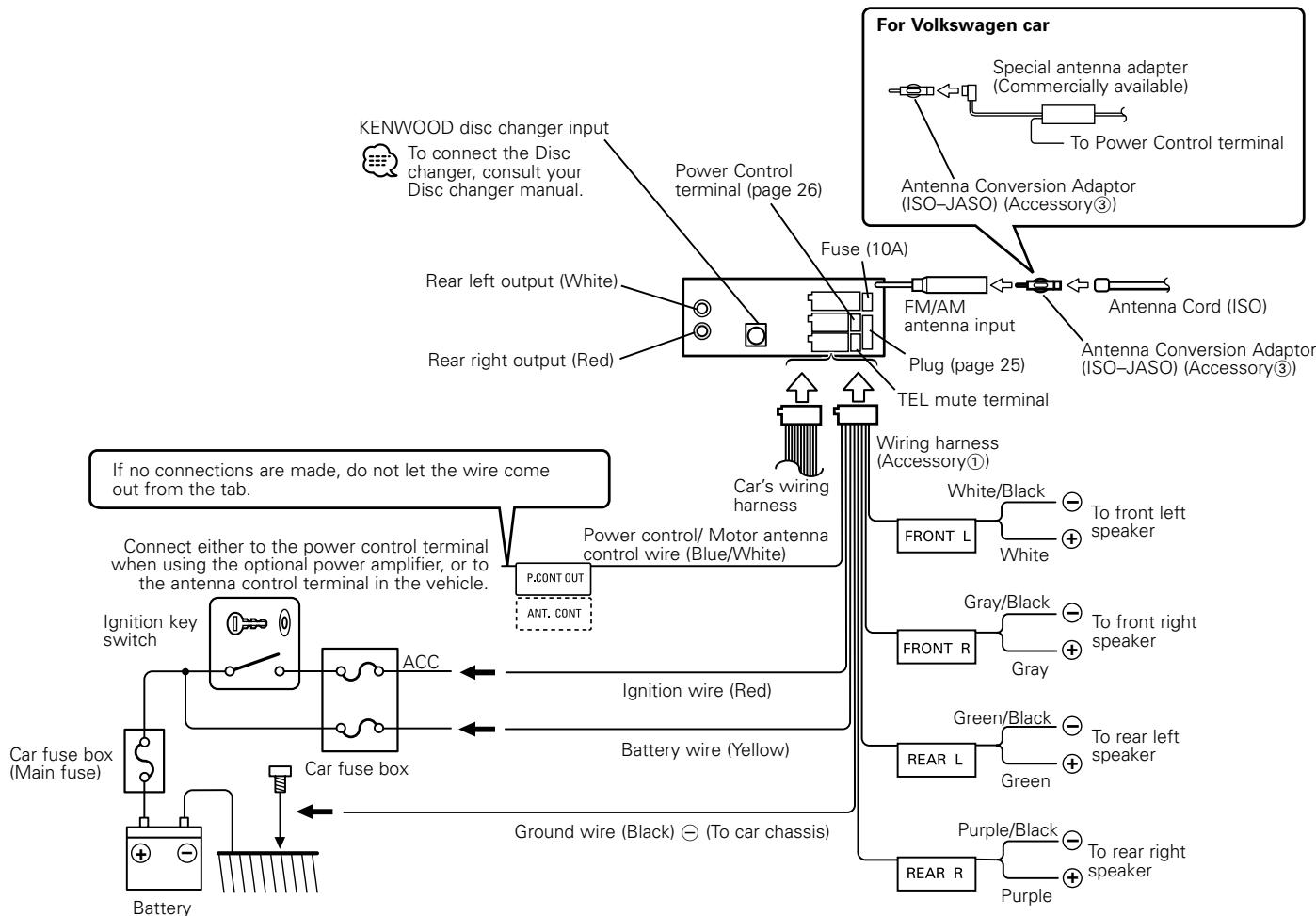
Connect the speaker connector of the car to Connector B of the unit, and then connect the external power connector to Connector A.
Cars without an ISO connector:
First connect the wire of the wiring harness, and then connect the wiring harness connector to the unit.
- Install the unit in your car.
- Reconnect the terminal of the battery.
- Press the reset button.
WARNING
If you connect the ignition wire (red) and the battery wire (yellow) to the car chassis (ground), you may cause a short circuit, that in turn may start a fire. Always connect those wires to the power source running through the fuse box.
CAUTION
- If your car is not prepared for this special connection-system, consult your Kenwood dealer.
- Only use antenna conversion adapters (ISO-JASO) when the antenna cord has an ISO plug.
- Make sure that all wire connections are securely made by inserting jacks until they lock completely.
- If your vehicle's ignition does not have an ACC position, or if the ignition wire is connected to a power source with constant voltage such as a battery wire, the power will not be linked with the ignition (i.e., it will not turn on and off along with the ignition). If you want to link the unit's power with the ignition, connect the ignition wire to a power source that can be turned on and off with the ignition key.
- If the fuse blows, first make sure that the wires have not caused a short circuit, then replace the old fuse with one with the same rating.
- Insulate unconnected wires with vinyl tape or other similar material. To prevent short circuits, also do not remove the caps on the ends of the unconnected wires or the terminals.
- Connect the speaker wires correctly to the terminals to which they correspond. The unit may receive damage or fail to work if you share the wires and/or ground them to any metal part in the car.
- When only two speakers are being connected to the system, connect the connectors either to both the front output terminals or to both the rear output terminals (do not mix front and rear). For example, if you connect the connector of the left speaker to a front output terminal, do not connect the connector to a rear output terminal.
- After the unit is installed, check whether the brake lamps, indicators, wipers, etc. on the car are working properly.
- If the console has a lid, make sure to install the unit so that the faceplate does not hit the lid when closing and opening.
Connector Function Guide
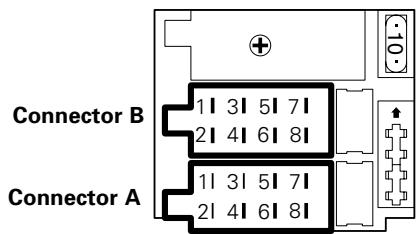
Pin Numbers Plug Functions for ISO Connectors setting*
| <External Power Connector> | ||
| A-4 | 1 | Battery |
| 2 | Ignition (ACC) | |
| A-5 | Power Control | |
| A-7 | 1 | Ignition (ACC) |
| 2 | Battery | |
| A-8 | Earth (Ground) Connection | |
| B-1 | Rear Right (+) |
| B-2 | Rear Right (-) |
| B-3 | Front Right (+) |
| B-4 | Front Right (-) |
| B-5 | Front Left (+) |
| B-6 | Front Left (-) |
| B-7 | Rear Left (+) |
| B-8 | Rear Left (-) |
*Plug setting: See right side.
Plug Setting
△WARNING
Connecting the ISO Connector
The pin arrangement for the ISO connectors depends on the type of vehicle you drive. Make sure to make the proper connections to prevent damage to the unit.
1 The A-7 pin of the vehicle's ISO connector is linked with the ignition, and the A-4 pin is connected to the constant power supply. (Default setting)
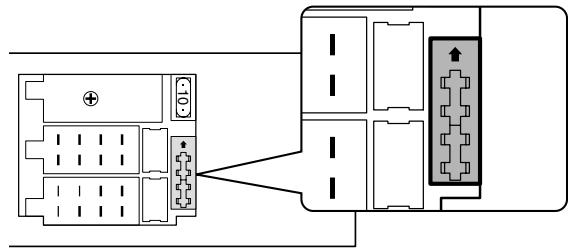
[2] The A-7 pin of the vehicle's ISO connector is connected to the constant power supply, and the A-4 pin is linked to the ignition.
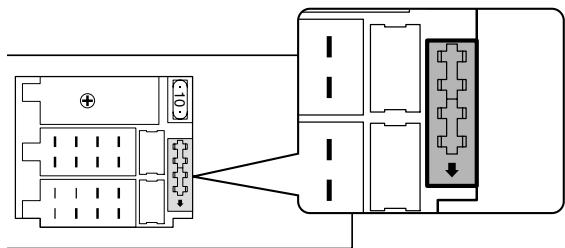

- If both the A-7 pin and A-4 pin are connected to the vehicle constant power supply, use Plug setting 2.
- If the A-7 pin is connected to the vehicle constant power supply, and the A-4 pin isn't connected to anything, wire the unit using the Wiring harness (Accessory ①).
Connecting Wires to Terminals
Power Control Terminal Connections
The output of the Power Control terminal is switched along with the power on/off switching of the unit.
This terminal can be connected to the P.CON (REMOTE) terminal of the amplifier, or used as the power supply of the special antenna adapter for Volkswagen cars. (MAX. 310 mA)
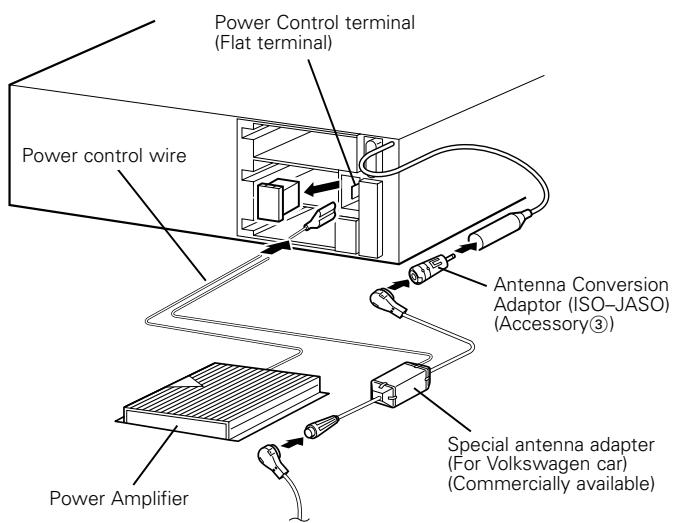
Antenna Cord (ISO)
Installation
Installation
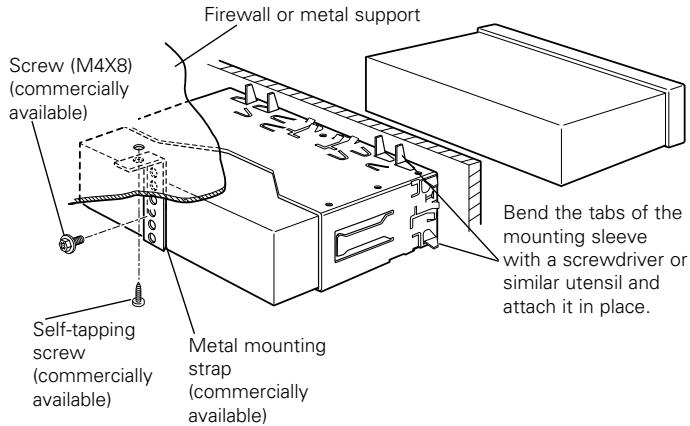
Make sure that the unit is installed securely in place. If the unit is unstable, it may malfunction (eg, the sound may skip).
Removing the hard rubber frame
1 Engage the catch pins on the removal tool and remove the two locks on the lower level.
Lower the frame and pull it forward as shown in the figure.
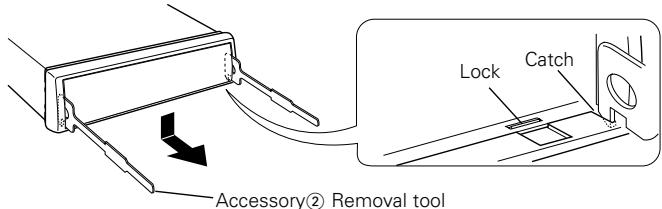
2 When the lower level is removed, remove the upper two locations.
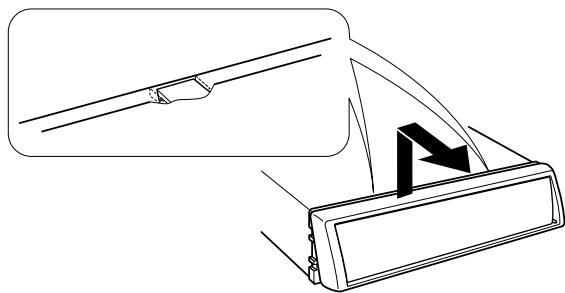

The frame can be removed from the top side in the same manner.
Removing the Unit
1 Refer to the section "Removing the hard rubber frame" and then remove the hard rubber frame.
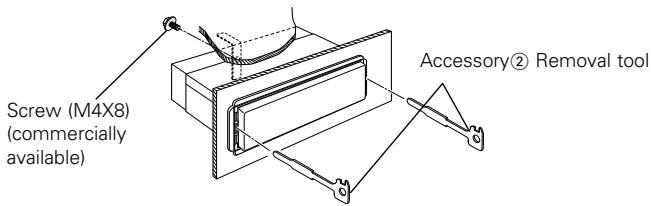
2 Remove the screw (M4× 8) on the back panel.
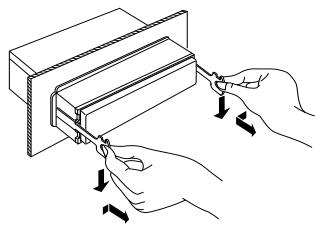
3 Insert the two removal tools deeply into the slots on each side, as shown.
4 Lower the removal tool toward the bottom, and pull out the unit halfway while pressing towards the inside.
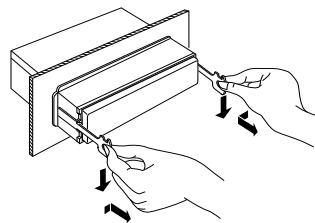
A Be careful to avoid injury from the catch pins on the removal tool.
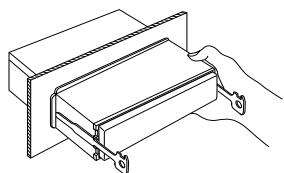
5 Pull the unit all the way out with your hands, being careful not to drop it.
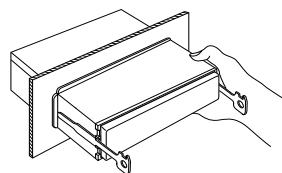
Troubleshooting Guide
What might seem to be a malfunction in your unit may just be the result of slight misoperation or miswiring. Before calling service, first check the following table for possible problems.
General
? The power does not turn ON.
The fuse has blown.
After checking for short circuits in the wires, replace the fuse with one with the same rating.
No ACC position on vehicle ignition.
Connect the same wire to the ignition as the battery wire.
? If you have selected Standby mode, the power will go OFF automatically.
The Power OFF Timer function has been activated.
If you do not want the power to go OFF automatically, cancel the Power OFF Timer function.
? Nothing happens when the buttons are pressed.
The computer chip in the unit is not functioning normally.
Press the reset button on the unit (page 4).
? There's a source you can't switch.
There's no tape inserted.
Set the media you want to listen to. If there's no media in this unit, you can't switch to each source.
The Disc changer isn't connected.
Connect the Disc changer. If the Disc changer isn't connected to it's input terminal, You can't switch to an external disc source.
? The memory is erased when the ignition is turned OFF.
The battery wire has not been connected to the proper terminal.
Connect the wire correctly, referring to the section on
The ignition and battery wire are incorrectly connected.
Connect the wire correctly, referring to the section on
? The TEL mute function does not work.
The TEL mute wire is not connected properly.
Connect the wire correctly, referring to the section on
? The TEL mute function turns ON even though the TEL mute wire is not connected.
The TEL mute wire is touching a metal part of the car.
Pull the TEL mute wire away from the metal part of the car.
? No sound can be heard, or the volume is low.
The fader or balance settings are set all the way to one side.
Center the fader and balance settings.
The input/output wires or wiring harness are connected incorrectly. Reconnect the input/output wires or the wiring harness correctly. See the section on "Connecting Wires to Terminals".
The cassette tape is bad.
Try playing another cassette tape. If works fine, the first tape was bad.
? The sound quality is poor or distorted.
One of the speaker wires is being pinched by a screw in the car.
Check the speaker wiring.
The tape head is dirty.
Clean the tape head.
The speakers are not wired correctly.
Reconnect the speaker wires so that each output terminal is connected to a different speaker.
? The Touch Sensor Tone doesn't sound.
The preout jack is being used.
The Touch Sensor Tone can't be output from the preout jack.
? Even though Synchronize Clock is ON, the clock can't be adjusted.
The received RDS station isn't sending time data.
Receive another RDS station.
Tuner source
? Radio reception is poor.
The car antenna is not extended.
Pull the antenna out all the way.
The antenna control wire is not connected.
Connect the wire correctly, referring to the section on
? It isn't the set Traffic information sound volume.
The set sound volume is less than the tuner sound volume.
If the tuner sound volume is louder than the set sound volume, the tuner sound volume is used.
Cassette tape source
? Can't remove tape.
The cause is that more than 10 minutes has elapsed since the vehicle ACC switch was turned OFF.
The tape can only be removed within 10 minutes of the ACC switch being turned OFF. If more than 10 minutes has elapsed, turn the ACC switch ON again and press the Eject button.
? The Tape Advance and Music Repeat don't operate correctly.
The space between the songs on the tape can't be recognized because it's too short.
Have at least 4 seconds between songs.
- The space between songs can't be recognized because there's too much noise between songs.
Reduce the noise between songs.
? The blank skip doesn't work.
Because noise is too loud, the non-recorded part can't be recognized.
Reduce the noise between songs.
? Blank Skip functions at places that are recorded.
Because the recording level is low, it's recognized as not recorded.
Turn Blank Skip OFF.
Disc source
? "AUX" is displayed without achieving External disc control mode.
O-N switch is set to "O" side.
Set the switch to "N" side.
Unsupported disc changer is connected.
Connect the supported disc changer. (page 3)
? The specified disc does not play, but another one plays instead.
The specified CD is quite dirty.
Clean the CD.
The CD is upside-down.
Load the CD with the labeled side up.
The disc is loaded in a different slot from that specified.
Eject the disc magazine and check the number for the specified disc.
The disc is severely scratched.
Try another disc instead.
? The specified track will not play.
Random play or magazine random play has been selected.
Turn off random play or magazine random play.
? Track repeat, disc repeat, track scan, random play, and magazine random play start by themselves.
The setting is not canceled.
The settings for these functions remain on until the setting to off or the disc ejected, even if the power is turned off or the source changed.
? Cannot play CD-R or CD-RW.
Finalization processing is not being conducted for CD-R/CD-RW.
Conduct finalization processing with CD recorder.
A non-compatible CD changer is being used to play the CD-R/CD-RW.
Use a CD changer compatible with CD-R/CD-RW to play.
?Track Search can't be done.
For the albums first or last song.
For each album, Track Search can't be done in the backward direction for the first song or in the forward direction for the last song.
If the following situations, consult your nearest service center:
- Even though the disc changer is connected, the Disc Changer source is not ON, with "AUX" showing in the display during the Changer Mode.
- Even though no device (KCA-S210A, CA-C1AX, KDC-CPS89, KDC-CPS87, KDC-CX87, KDC-CPS85, KDC-CX85, KDC-CPS82 or KDC-CX82) is connected, the Auxiliary input is entered when switching modes.
The following messages are displayed when your system condition.
EJECT: No disc magazine has been loaded in the changer. The disc magazine is not completely loaded.
Load the disc magazine properly. No CD in the unit.
Insert the CD.
NO DISC: No disc has been loaded in the disc magazine.
Load a disc into the disc magazine.
E-04: No disc has been loaded in the disc magazine.
Load a disc into the disc magazine.
The CD is quite dirty. The CD is upside-down. The CD is scratched a lot.
Clean the CD and load it correctly.
BLANK: Nothing has been recorded on the MD.
NO TRACK: No tracks are recorded on the MD, although it has a title.
NO PANEL: The faceplate of the slave unit being connected to this unit has been removed.
Replace it.
E-77: The unit is malfunctioning for some reason.
Press the reset button on the unit. If the "E-77" code does not disappear, consult your nearest service center.
E-99: Something is wrong with the disc magazine. Or the unit is malfunctioning for some reason.
Check the disc magazine. And then press the reset button on the unit. If the "E-99" code does not disappear, consult your nearest service center.
HOLD: The protective circuit in the unit activates when the temperature inside the automatic disc changer exceeds 60^ (140°F), stopping all operation.
Cool down the unit by opening the windows or turning on the air conditioner. As the temperature falls below 60^ (140°F), the disc will start playing again.
NO NAME: Attempted to display DNPS during the CD play having no disc names preset.
NO TITLE: Attempted to display the disc title or track title while the MD having no MD title is being played.
NO TEXT: Attempted to display the disc text or track text while the CD having no CD text is being played.
LOAD: Discs are being exchanged in the Disc changer.

(Blink):
The tape player section is not operating properly.
- Reinsert the Tape. If the tape cannot be ejected or the display continues to flash even when the tape has been properly reinserted, please switch off the power and consult your nearest service center.
NO ACCES: After setting it in the Disc Changer, DNPP was done without having it been played at least 1 time.
Specifications subject to change without notice.
FM tuner section
Frequency range (50 kHz space) .87.5 MHz - 108.0 MHz
Usable sensitivity (S / N = 26dB) . 0.7~ V / 75
Quieting Sensitivity (S/N = 46dB) 1.6 μV/75 Ω
Frequency response (±3 dB) 30 Hz - 15 kHz
Signal to Noise ratio (MONO) 65 dB
Selectivity (DIN) (± 400kHz) 80 dB
Stereo separation (1 kHz) 35 dB
MWtunersection
Frequency range (9 kHz Space) .531 kHz - 1611 kHz
Usable sensitivity (S / N = 20dB) . 25~ V
LW tuner section
Frequency range 153 kHz - 281 kHz
Usable sensitivity (S / N = 20dB) . 45~ V
Cassette player section
Tape Speed. 4.76 cm/sec.
Wow & Flutter (WRMS) 0.08%
Frequency response (±3 dB) (120 μs). 30 Hz - 14 kHz
Separation (1 kHz) 43 dB
Signal to Noise ratio 54 dB
Audio section
Maximum output power. 45 W x 4
Output power (DIN 45324, +B=14.4V) .28 W x 4
Tone action
Bass: 100 Hz ±10 dB
Middle: 1 kHz ±10 dB
Treble : 10 kHz ±10 dB
Preout level / Load (during disc play) 2000 mV / 10 kΩ
Preout impedance 600 Ω
General
Operating voltage (11 - 16V allowable) 14.4 V
Current consumption. 10 A
Installation Size (W x H x D) 182 x 53 x 152 mm
Weight 1.4 kg
MepbI ppeioctopoxknoctn. 33
OKaccetax 34
ORDS. 34
Obuhe xapaKTepeNCTNKn 35
Питанne
KaK BBb6paTb NCTOCHNK
PpOMKoCTb
ATTeHyatop
YpOBeHb rPOMKoCTn
System Q
UnpabJIeHne aydno
YcTaHOBKa aKcyCTnueeCKo CNCTeMbI
PepaknueHne nncnn
OtkloueHne npn 3BOHKe no TeJefoHy
JIueBaI pIacTHnKa, IpeDoTbpaiaoua KpaJy
CBOHCTBa TIOhepa (KRC-394/KRC-37) 38
Hactpoika
PamrB npedBaPnteHn HacTPOKn CTaHcN
BbOaBTO naMaTb
HacTpoiKa Ha npEaBapnteIbHyU yCTaHOBky
CboiCTBaRDS 40
DopoxhaHnHOpMaun
PpeBapnteJbHaay cTahOBKa rPOMKoCTn dIa DOpOxHoi mHΦopMaun
PTY (Tin nporpaMMbl)
PpeBapnteHna yctaHObKa Tnna npoRpaMMbl
I3meHHe IaIka dIaI cyHKmI PTY
CBOIcTBA TIOhepa (KRC-31) 43
Pexim HacToPiKu
Hactpoika
PamrB npedBaNPteIbHOHacTroKn CTaHcN
BbOaBTO naMaTb
HacTpoiKa Ha npEaBapnteIbHyU yCTaHOBky
CBoHCTBa KaCCeTHOro npOnrpbIbATEJIa. 44
PpOurpbIbAHne MaHHToOpHHbIX KAccET
YcKOpEHnHaI nepeMOTka JIeHTbI Bnepdd Ha3aD
IpoDbXkHeHneJeHTbI BnpeEd
Pponyck npcytbix yuactkoB
BbI3OB TIOHEpa
IbTopeHne My3bIKN
Функции упразавлени BHESHNIM DnCKOM... 46
PpOurpbIbAHne BHeuHero DnCKa
Yckopenhoe nepedBnxKeHne BnepdHa3aD
PonckDopoxke
Ponck aIb6oma
AF (Alternative Frequency)
OrpaHnueHne pernoHa RDS
ABTO nonck TP
MoHocponHueckn npHem
ПюСМОТР TEKENTA
Ha3BaHne DnCKa
TaMep OTKJIIOUeHINIHTAHIN
PpHnHaIeXHoCTn 53
Ppoeecc yctaHOBkn. 53
IopcoeHHeHne Ka6eNe K rHe3dAm DJIPOKJIIOUeHn. 54
YcTaHOBka. 56
Ponck uyctpaHene HencnpaBHOCTe.. 58
Texnueckne xapaKTePncTnKn 61
PNEyPPEKDEHNE
Bo n36exaHne TpaBmbln/nnnoxapa cJepyet 6bpatntb BHHMaHne Ha:
BCTABJIte ycTPOIcTB, noka OHO NOJNHOCTbIO He 3aФИKCNpyETc HA MeCTe. B IpOTINHOM CJIyue AHO MOKET BblJETeTB CO CBOero MecTa BO BpEMA CTOLKHOBHeHIM I dpyrIXCOTPcEHHI.
-При удинени кабелдял залуcka, kaбелеьаразенизамглоших kaбеленседуетnpobepntb,чт npimehnoTcngaToHue Kaebi nlin dpyrme Kaebi,cehene KOTopbix 0,75 MM2 (AWG18) nlin 6oIbIe,чTO6bl pdeotBpaTnTB nobpexdenne Kaebi n obonoochkKaebЯ.
- Bo n36eKaHne KopoTknx 3aMbIkaHn NnKoJa He OCTaBnJIte MetaJIInueckne npEeMtbl (HaNP. MoHeTbl NmMetaJIInueckne INHCTpyMeHTbl) BByTpni annapata.
- Ecnn n3 annapaTa NaHcHT BbIXOaNTb DbIM nn HEnpnaTbI 3anax, CJeNyET HeMeJIneHHo BbIKJIOnuTb NITaHne I o6paTntbC K dInepy n3dEJIIN φnpMbI Kenwood.
CneDNTe 3a TEM, YTObI BaAMn PAnbIbI He IonoJaAIN MEXypeepdNeiNaHEnBIO u yCTpOIMCTOBM.
CneJyETn36eRaTb CnIbHbIX COTprcEHNI annapata,He pOHTb Ha noI. Annapat MoKet CnOMaTb CnIIN TpeChyTb, TAK KAK CoDEpXtN CTKeKNHhBe qactN.
He TporaIte JxNdkOCTb I3 JxNdkNX KpnCTaIIIOB,ecn JXK-DncJIe NOBpeXJDeH INI cIOMaH BCNEcTBNe yDapa. JxNdkOCTb I3 JxNdkNX KpnCTaIIIOB MOKeT CTaTb OAnCHOI dA BaIero 3dOpOBbY INI dJaXe CMePeTbHOJ. EcnI pIOn3oJdET KOHTAKT C JxNdkOCTbO JxNdkNX KpnCTaIIIOB IN3 KK-DncJIe C BaIIM TELOM INI OJExJo, CJeYEt HEmEJIeHNO 3TN MECTa BblMbITb MbIJOM.
BHIMAHNE
Bo n36eXaHne NOBpeXeHn aannapata cJeIyET o6paTb BHNMaHne Ha cJeIyIOUne MEPb I npEOCTOPOXKHOCTN:
CJeNyTeOeHNHbTb3a3EmHe nAnpata c OtpuTaTeNbHbIm 3JekTpOnnTaHnEM 12 B NOCTORHHORO TOKA.
He otKpbIbAte BepxHne IIN HIXHne KpbIshn annapata.
He cneyuET kcnnyaTnpoBaTb annapat B OeHb JxKnN WnBnAxxHbIX MecTx, CneyuET npedoxpAnrYb YcTPOINCTBO OT Bo3dienCTBn npAmbix CONHeuHbIX Jnye. TaKxe N36eraTae CNbHO 3anblJeHHbIX Mecn MeCt, Ie Ha annapat MOry T nonactb 6pbizrN BObl.
He cneyuT pa3MeuTaB CHaTyUc a annapata nepeDnHOIO naHEn IINI yFtNarpeDnei naHEnI B OYeH JxakKmX INI BnAaKbIX MeCTax INI MeCTax, NOBBePraIoUxCSBA 03JeCTBIO npMByix CONNeHbIX LyueY. TaKe X36eRaTe CInbHO 3aNbIeHHbIX MecT I MeCT, IGe Ha annapat MOrY TNONAcT 6bpy3rN BOdIy.
Bo n36bKaHHn yHxuIeHnnaPbOuHx xapaKTePcNtK CTapauTecHe NDeTpaNbAtpCBy pKaAMn BbIOoB annapata nnnepeDHe naHeni.
- PēpeNDHIO NaheIb CneIyET NpeDoxpAraHTb OT cnIbHbIX COTpAcEHN, NocKoJIbKy 3TO OChEB TOHOOYcTPOINCTBO.
-ПиЗзаме He npedoxpaHnte nCneDyET pnpMeHnT HOBbI C yK3a3AHbIM HOMHaJIbHbIM 3NaYeHem. BcJeDCTBne npimHeHnI npedoxpaHnte C HENpBaVIIbHbIM HOMHaJIbHbIM 3NaYeHem MOKTe Ipon3OHTN NOBpeXdHne annapata.
- Bo 36exKaHHe KOpOTKnIX 3aMbKaHn Ipn 3aMeHe npEdoxaHnteI ChauHa cNeJyET OKKnOHTb npOBOa.
- He pa3meuataKe KaKHe-Ni6o npEdMeTbI Mekdy npeednei naHebIO uYcToioCTBOM.
-Пи установке Нпrimеяг Te HнkaKnx BИНТОВ,КРOME BИНТОВ,ЮСТавLEньх BМЕCTe C annapatOM. Пиимеоне ДPyrTnx BИНТОВ MOxET BbI3BaTb NOВрждЕнe OCHOBHOrO annapata.
BAXHbIe INΦOPMALUIN
O IOdcoeHnHReMOM YeHnHexepeDnCKOB:
YctaHOBka NOJoxKeHnnaHeJI.
YctahOBka yrna nn noJoxehn
BnepedHa3aD naneyn ynpableneia.
BoiDnte B pexm yctaHOBn naHenn ynpablenia.
BbIbepeTe cyHKnIO dnerpeyIpOBKn.
Kaxdbi pa3, KOrda HaxnmaeTcK Honka, perynipyemaФнкциpepeKIOuaeTc,KaN pOKa3aHOHKe.
U3MeHHeHne yrna Bnpe.
I3MeHeHne yrna Ha3a.
PAnHeB BbIDBnraeTcBnepEa.
NaHb 3aDbBnraeTcHa3a.
BbIeHte n3 pexIMa yctAHOBKn IonoJKeHN aNaHENs.
PanaHb ynpaBHeMn MOKeT MeMaTa b npu paboTe CpbYaROM nepeKlnOeHn CKOpOCTe Hnn DpyrIMn y3aMn B 3aBcNMOCTn OT yRna YCTaHOBKn paHeN ynpaBHeNn.
YctaHOBnTe TaKoI yToI, YTObI NaHeJIb HnYeM He MeJana.

BcneDCTBHe HnepabnHoro NDOceDInHeHnaBaWero annapaTKa TnpoINpBbIaTeNIO KOMNAKTDAHNCKOB MOXHO NOBpeITb oBa YCTPOINCTBa.
Ppi PpaBnIbHOM Co6IIOJeHN BEx CycOBn 3KcIpyataun N TexHueeCKNX Tpe6oBaHn, yKa3aHHbX B DaHHo MHCtpyku, cPoK cLyk6bl KynIeHoro Bam n3DeNnA COCTaJIaER7 JeT. IapaHTnHbI cPoK 3KcIpytaun IN3DeJNA COOTBeTEByeT cPoKY, yKa3aHHOMy B rapaHTnHOM TaHOne.
B nepno cpoka cnjkbbl kcnnyataunia n xpaheHne n3dienn He MOKET npedctaBnTb onachoctb faBaeJxN3HN,3DOpOBb, pnuHHb BpeB AWeemy mUyseCTby nnn Okpykaohuecpe.
ПРИМЕЧАНЕ
Пилобьх пббмax BO Врмя установский obpaшаiteв К вашему Дінepу n3deni Фпмь Kenwood.
- Ecni yctpoiCTBO pa6oTaET CO c6oAMN, cnachana nonp6oyuTe haxKaTb KhONky C6poc. Ecni nOcne 3toro HeNCnPabHOCtB coxpaHAreTc, o6patNTecb 3a NOMoUbIO K dInIepy n3dEInn fnpMb i Kenwood.
Bcnyae HeKOppeKTHoI pa6Otbl ABTOMaTHeCKORIO pOnrpbIbATEnI KOMNaKTOB-DmCKOB npI nepBOM erO BkLIOeHNI HaxMnte Ha KhONKy C6poc.B pe3yIbTaTe yCTaHOBITcN nepBOHaayJIbHbIe ycNOBIA 3KcPnYatau.
KhoNky C6poc
-ПиТ Temпетатухнже 5°C (41°F) cIMBOBbl, NOBANUHueC ha LCD-dncnlee, MOrYt 6bTb Hpea36OpuHbIM.
- INJIIOCTpaunn DnCnna n NaHIn, NOKa3aHHbI B HACTOUm PYKOBODCTB NO 3KCNyATAuNN, ABJIOCTc PnIMPamN, OBJcHrHOUImN PhHKUN 3JIMHTOB UnpabINH. PoTOMy INHOPMAuN DnCnla, NPdCTABINHNa HA 3TNX INJIIOCTpaunx, MOXT OTNIuHaTbCt ONHOPMAuN, NOBnHOUsCra Ha HAcTOUm DnCnN KOHKPTHO rPi6opa, INKOTOpbl INJIIOCTpaunn Ha DnCnM MOrYT npdCTaBnTb YTO-JIMBO HBO3MOxH0 BO BPM PaKTNUCKOJ 3KCNyATAuNN.
OuNcTa BbIbODB nepeHne NaHEnn B cnYae 3aqrA3HeHn BblbOaB annapata nnI nepeHne NaHEnn npOTpnte nx cyxoi MArKoN TKAhBIO.
OuNTka annapara
Ecni liueba nlaactnka annapata
ncnaqkaeTcra, npOTPme ee MArKOy CxuOH
MaTepeNe, HApnpMe, cnNkoHOBOI
MatepeNe. Ecni liueba nlaactnka cnilbHO
3aRpa3HeHa, npOTPme ee MaTepeNe,
CMOeHHoB N HeuTpaNbHOM UcCTAeM
CpeDCTBe, 3aTeM ydAnite C NOBepXHOCTN 3TO
HeuTpaNbHoe UcTae CpeDCTBO.

HaHeceHHe a3pO30JbHbIX YNCTRAUx cpeDCTB HEnoCpeDCTBeHO Ha annapaT MOKET NOBpeDITb MExAHueckne qactn. IpoTupaHne JInCeBOI pAnactINIKrpy6oMATEPNeu INm INcNoJIb3OBAHne AKTNbIX NcTREUx CpeDCTB Tnna pACTBOpNTeJeN mN cNPTaMOKET NOcapanatb NOBepXHOCt b INn CTpeTe hAaNNC.
O kaccetax
YnCTKa MaHnTHoR rOJOBKn
EcnB OBCPON3BODNTC yM mN yXyDuaeTcA KaeeCTBO 3ByaHnI n3-3a3aPr3HeHrROJOBKn, npOCHNTe ee.
O kaccetax
- Ecnn JnENTa npOBncaeT, HataHnTe e.
- Ecni OTCTaET 3TNIKETKa KACCetbl, npNKneTe ee o6paTHO.
He nCnObn3yIte deOpMnPoBaHnyIeHTy. - He КладитЕ КасстБа Н Консь Рпборов И.T.И.Tam, Гд TemпераТура Вbicoka.
He ncpoIb3yIte kaccety npOJxKITeIbHOCTn 3ByaHn100 MmHy IJI6BoJe.
O RDS
RDS (CnCTema paAnoHaHHbIX)
PnnpocnyuhaBnHcTahCnRDS (t.e.
CTAHUMC B03MOXHOCTMn RDS)HaDNCpnee
BOcnpON3BOoATcNIO3bHBnE IpOrpAMMbI
CTAHUN, YTO DaET Bam BO3MOXHOCTb 6bICTPO
NoHb, KaKaA CTaHUN pInHMaEtCn.
K TOMy JKe CTAHUN RDS (CnCTeMbI
paADOnaDHbIX) nepedaoT dAor ToJ Xe CTAHUN
CACTOTHyU INOpOPMaUIO. PnP DnITeMbHix
NOE3kax DaHNAR yFNHKpeABTOMATueCeKn
peEKIOUaTeCn HA KOHNPETHUO cACTOTy,
OBeCEneHBAUoUHO HauLyUHm IpnEM DJI
KOHKeTHO PAIDOBUEaTEbHO CETn
CTAHUN, KOTOpBLE BbI XOTeLb6blPocLyuTaB.
PnTOM daHbIe ABToMATuYeCKn
3AnOMHaHOTCr, YTO NO3BOJAEam BAM 6bICTPO
peEKIOUaTBcRa Ha DpyrYIO CTAHUN RDS,
TPaHCINpyUOu TY Ke IpOrpAMMy, HO
OBeCEneHBAUoUIO LyuHm IpnEM. K HIM
OTHOCTcNAChUN, XpaHAUeCEB a NamATn
PnpEBAPTEbHOH yCTAHOBKN CTAHUN,
KOTOpBLE BbIPNBkIN CUYuTaB.
Enhanced Other Network
(YnyuweHHaOCTaIbHaCetb)
CTaHcNIO, KOToBle npednaraIOT
3KCTpeHHbIe COO6ueHnA
Korda nocbIaetaTcpoHoe coo6ueHne (onobEuaOooe O kaTaCTPOphiN T.I.). BCE TekyuHne pkyHKm INpepbIbAOTc, NO3BOJRA ONyUHTb pdeynpExdHe.
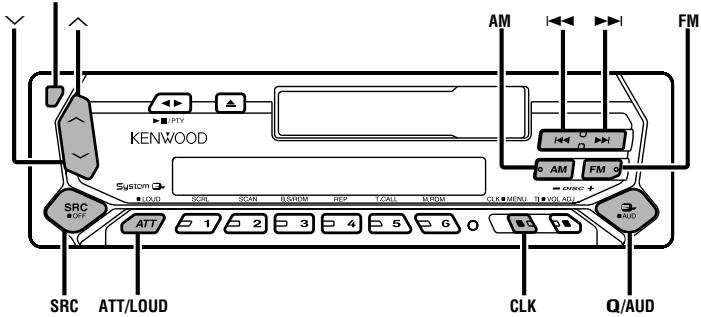
KhONka ocbo6oxkdeHnA
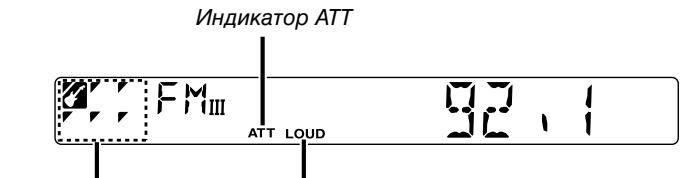
UHdkaTop SYSTEMQ UHdkaTop LOUD
Питуне
BkIIOueHne nTaHnA
HaxMMTe KhoNky [SRC].
BbIKIOUeHne NITaHn
HaxmTe KhoNky [SRC] KaK MInHmym Ha 1 cekyHny.
Kak BbI6paTb MCTOCHNK
HakmTe KhoNky [SRC].
KaKdIbI pa3, KOrda HaxmaeTc8Ta KHOnka KaK MInHmym Ha 1 cKeYHdy, yPOBeHrPOMKOCTN BkJIIOUaTeC9I INI BbIKIOUaTeC9I.
KoIa OH BkIIOueH, BkIIIOuAeTcA INdIKAToP "LOUD".
System Q
Bb moKTe Bbl3BaTb camyo lyu7yio 3apaHee ycTaHOBJIeHHyo yCTaHOBky 3ByuHaHnI dIra pa3JNUHOrO Tnna My3bIKN.
1 Bb6epnte yctaHaBJIbAembI nCTOCHNK
Haxmnte KhoNky [SRC].
2 BbI6epnte Tn3ByuHaHn
HaxmTe KhoNky [Q].
Kakdbi pa3, KOrda haxnmaeTc8 Ta KHOpIka, nepeKJIIOuAeTc8 yCTaHOBk 3ByuHaH.
| Установka 3Byчань | Ди检пл征 |
| ПлOCKА | "FLAT" |
| Рок | "ROCK" |
| Тол 40 | "TOP40" |
| Пол | "POPS" |
| ДжаЗ | "JAZZ" |
| Лжгкая | "EASY" |
| Плостмотр ПлOCKА - Лжгкая | "SCAN" |

- KaJdaYcTaHaBnBaEMaH BEniunHa N3MeHReTc PnI NOMOuN
(CTpaHnca 37).
Счача Л bьбипг Te TnAkCTNueCKO CNTeMbI npn NOMOuYcTaHOBKn AkCTNueCKO CNTeMbI
Korda n3mehnTeCh yctahOBka System Q, HU, C4, u B4, ycTaHOBJIeHHbIe B ynpaBHeHm ayDIO 3aMeHrO T BeINHbI System Q.
UnpabJIeHne aydno
1 BbIbepnte nctouHnK dJIa peryJInpObKn
HaxmTe KhONky [SRC].
2 BoiDnTe B pexkM U npaBHeHna aydno
Haxmnte KhONky [AUD] KaK MInHMym Ha 1 cekyHny.
3Bb6epnte yHKnno aydno dI nperynpOBKn
HaxmTe KhoNky [FM] nI [AM].
KaKdBi pa3, KOrda HaxmMaETcH KOnIka, perynpEmbIe fynKcun nnpepynpOBKn nepeKlIOHaIOcB CneDyIOUeM nopAKe.
4 OtperyIpyIte yHKuHou aydno
HaxmTe KhoNkU [▶] nJn [▶].
| PeruLipuyemamФункцу | Ди检плей | Параметрьl |
| Уразовьн HU | "BAS" | -8 - +8 |
| Уразовьн СY | "MID" | -8 - +8 |
| Уразовьн BY | "TRE" | -8 - +8 |
| Баланс | "BAL" | L15 - R15 |
| Баланс ФразнТ/тыл | "FAD" | R15 - F15 |
5 BbIXoN n3 peXkMa YnpaBLeHnaydno
HaxMMTe KhoNky [AUD].
YctaHObKa akyCTnuecko cnCTeMbI
ToHna yCTaHOBKa TaKIM o6pa30m, YTO BeNCHHa System Q CTaHOBNTc ONTImaJIbHOI BO BpEMr yCTaHOBKn TnPa aKyCTnueCKo CnCTeMbI.
1 BoiDnTe B pexKIM OxndaHnHaXmnte KhoNky [SRC].Bb6nPrTe DncnJe "ALL OFF"
2 BoiDnTe B pexm yctaHOBKn aKycTneCKo CnCTeMbI HaxMnTe KhoNky [Q].
3 BbIbIpTe Tn akycTnecko CnCTeMbI Haxmte KhoNky [I<] nII [▶-]. KaKdbI pa3, kOgda HaxmaeTcK HoNka, peryInpyeMbIe fynKcIIN dJIpepyInpOBKn nepeKJIIOHaOcB BCJeDyUoIeM nopJdKe.
EcnnoctynaerteneoHHb3BOHOK
"CALL" NOBNTcHa DnCnIee.
Aydno CnCTema OTKJIIOHaeTcA.
PpocnyuBauHne ayDn BO BpeM TeIefoHHoro 3BOHka
HaxmTe KhoNky [SRC].
"CALL"ИчебаET c ДиспелЯ aydno CnCTema BkIIOuHaetc CHOBA.
Korda KOHyaetc TeneoHbI pa3roBOp
PobecbTe TeJeDpOH.
"CALL" Ичесает с дистеги aydno систema BKliouaetca CHOba.
JIncBaI pIaTnHka, npEoTbpaauoJy KpaXy
JIuueByIO nIaCTnHKy daHnHO ycTpoNCTBa MoXHO CHaTB N B3rB c co6o, YTO npedotBpaaaeT KpaKy ycTpoNCTBa.
ChrTne IInceBoI nlaCTnHKn
HaxmTe KhoIky,OCbO6oJaIoUyIOIaCeByIOIpaCTnHKy. IJIeBaI pIacTnHka OCbO6oJaEtcN e e MoKHO OTCoeDnHTb.

JIiueBaH pIaCTnHKa RbJIeTcT ToTHbIM nPrcncOc6JIeHem Ie MoKHO IOBpeDITb MEXaHUnCeKn. IIO3TOMy, Iocne ChrTnI, XpaHnTe eB CneuAJIbHOM fytIpe.
He octablante Iuuebyo IIactnHy uNf yTnp dIy xpaHEnHa nI pRanom CoHNeHOM CBety, B MeCTax C NOBbIeHHO TEMepaTypoIN NII BlAxAHcHObTbIO. TaKxe N36eRaTe CnIbHO 3aBJIeHHbIX MeCt I NonaDaHIn BObl.
YctaHObKa JInCeBOI NlaCTnHKN
1 CoBmecTnTe BbICTynbI Ha yCTpOJCTBE C na3amN Ha JInCeBOI nJaCTINHe.
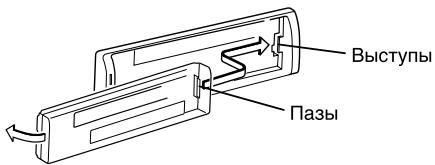
2 BCTaBtE IuIeByIO INaCTnHky Do IeIHaKa.
Пл actинka 3ambykaeTca Ha MeCTe, no3BOJЯ Bam nCnOJIb3OBAt b yctpoIcTBO.
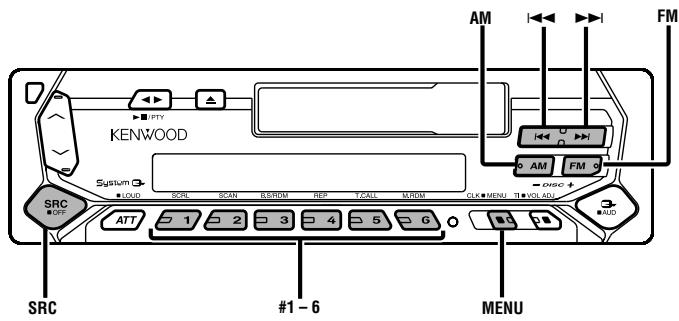
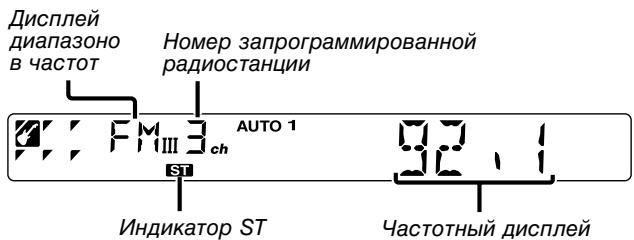
Hactpoika
Bb6op cTahnn.
1 BbI6epnte nctOuHnK TIOHEp
HaxmTe KhONky [SRC].
BbIbePte DnCnnei "TUNER".
2 BbIePeTe dnaa3OH
HaxmTe KhoNkU [FM] uU [AM].
KaЖдь pa3, KOrda Na HaxmjaTeCЯ KHOnka [FM],Диana3OHyI nepeKJIIOUaIoTcЯ MEXdY FM1, FM2, n FM3.
3 HactpoJa dnaana3OHa BBePx nIi BnI3
HaxmTe KhoNkU [I1] uu [▶▶].

BoBpemnepema Ctepeo ctaun, BkIouaetc nHdkatop "ST".
PamrB npedBapnteJbHOn HacTPOKc TAnCm
BbOa CTaHcnn B nAmTb.
1 BbIePeTe dnaHa3OH
HaxmTe KhoNky [FM] nI [AM].
2 Bb6epnte yactOTy IaBBoDa BnamrB
HaxmTe KhoNkU [I1] uu [▶▶].
3 BBeIte YactOTy B IaMrtb
Haxmnte KhoNky [#1] - [#6] KaK MInHmym Ha 2 cekyHdbI.
YcTaHOBJIeHHa YacTota NOBHTca Ha DnCnIee 1 pa3.
B KaKdOm n3 dIana3oHOB, 1 cTaIzIe MoKet 6bITb BBeDeHa B NaMrtb Ha KaKdOu n3 KHOJOK [#1] - [#6].
BbO B aBTO nAMrTb
ABTOMATUeCKN BBOB B NAMrTB CTaHcN C XOPOoMn PnpEOM.
1 BbIbepnTe dnaHa3OH nIa BBoDa BA bATOMaTHueckyIO nAMrTb Haxmnte KhoNkY [FM] nn [AM].
2 BoiDnte BpeKm MeHIO
HaxmTe KhoNky [MENU] KaK MmHmMy Ha 1 cekyHny.
"MENU" NOBNTCA Ha dncnlee.
3 BbIepeItepeKIM BBOJaB aBTOMaTHuecKyo namrTb
HaxmTe KhONky [FM] nnn [AM].
BbIepeTe nCnpei "A-MEMORY".
4 OTKpoIe BBOD BaBTO nAMrTb
HaxmTe KhoNkY [<] nJn [>1] KaK mInHmym Ha 2 cKeYhDbI.
Korda 6 cTanu, KOtOpbIe MorY pInHIMaTbCra, BVeDeHbI B nAMrTb, BBOD BATo nAMrTb 3aKpbIbAeTcra.

Korda BkIIOUeHa
Korla ocuyeBbEh BBOd a bTO nAMrTB b dnaana3oHe FM2, cTahmRDS, 3apahee yctaHOBeHHbIe B dnaana3oHe FM1, He BBOATCB BA mARrB.
AHaIOrnHNo, KOrDa BvOd B aBTo nMaTb OcUeCTBHe B dIana3oHe FM3, cTaHmRDS, 3apaHee yCtahOBneHHbIe B dIana3oHe FM1 mN FM2 He BvOaTcR B nAmrTb.
HactpoKaHa npedBapntelbnyu yctahOBky
Bb3OB cTahun n3 namrtn.
1 BbIePeNTe dnaNa3OH
HaxmTe KhONky [FM] nnn [AM].
2 BbI3OBInTe CTAHUNO
Haxmnte kHonky [#1]—[#6].
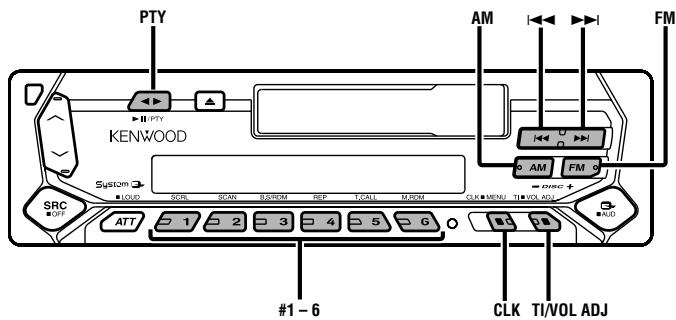
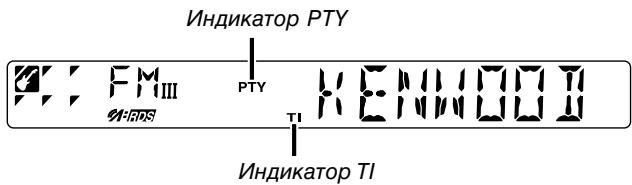
Dopoxha HhOpmau
AbTomatueeckoe nepeKIOUeHne Ha dopoxHyIO uHΦopMauIO, KOrda HauHaet nepedabaTbC8 6OJIteHb C dopoxHOI uHΦopMauei, ecn Bb He cIyuaete padno.
HaKMMTe KhONkY [TI].
KaKdIpa3,KoIdaHaxkmaeTcA3TaKHOnka,fHyHKnIaDopOxHONHΦOpMaunBkJIIOucaTeCnINBbIKIOUaETcA.
Ecnn OHa BkIIOUeHa, BkIIOUaTec nHdNkaTOp "TI".
EcnI He npHnHaMaTcStaHcN, nepeDaIOuaJdOpOxHyo INHopMaUHO, INHdkaTop "TI" Miraet.
Korda haunhaet nepedaBaTbC6IOLIeTeHb c DOpOxHOn IHHopMauei,Ha dinCIIee IOABJIaETcra "TRAFFIC" n OH nepeKluoayaeTcHa DOpOxHyo IHOpMauio.

BoBpMa npEeMa cTAnuMAM,ecnBkIIOeHa fynKuJN dopOKHO INΦOpMaun, pOncxOHT nepeKlnOHeH Na cTaNIO FM.
Pnem dpynx cTaHcN, npepaOxNdoopKHyIO HOpMaIHO HaxmTe KhONKy [1<] uIN []

Mozho ocueeCTbntb nepeKIOueHne cTAUcI, nepeDaIOuxDopOxHyo INΦOpMaunIO, BO BpEMa IPOCnyuBaHnpaIIO.
IpeBapntelbna yctaHOBka rPOMKocTn dIaDopoxHOHOpMaun
UcTaHOBka rPOMKoCTN BO BpeMa DOpOxHo NHΦopMaun.
1 OcyueeCTBnTe npneM cTaHcIM.
2 UctaHOBIne JeJaembl ypoBeHb rPOMKoCTn.
3 3anomhnte ypoBHeb rpmKoCTn
HaxmTe KhoIky [VOL ADJ] KaK MmHmym Ha 2 cekyHdbI.
Icnneyn ypoBn rPOMKoCTn NOBNTc1 pa3.
PTY (Tn nporpaMbl)
Bb6op Tnna nporpaMMbI Nnonck ctaHcnn.
1 BoiDnte B peXm PTY
Haxmnte KhoNkY [PTY].
B pexime PTY BkIIOuaeTcHINdkaTop "PTY".

DAnHyIO FyHKnIO HEnb3r NcN0lb3ObaTb BO BpEm npEma
dopoxho nHOpmaun nn npema AM.
2 BbI6epnte Tn nporpaMMbl
HaxmTe KhONky [FM] uJn [AM].
Kakdibpa3, KOrda haxkmaeTc3Ta KHOpKa, TIN nporpamMbI nepeKlOuHaTc4, KaK pOKa3aHO HnKe.
| No. Тип пэр代表大会 | Дислав |
| 1. Музboa | "MUSIC" |
| 2. Рочь | "SPEECH" |
| 3. Новоста | "NEWS" |
| 4.Tekушке собітney | "AFFAIRS" |
| 5. Информацья | "INFO" |
| 6. Спорг | "SPORT" |
| 7.Образова themselves | "EDUCATE" |
| 8. Драма | "DRAMA" |
| 9. Кубъра | "CULTURE" |
| 10. Hayka | "SCIENCE" |
| 11. Разhoe | "VARIED" |
| 12. Пот музboa | "POP M" |
| 13. Рок музboa | "ROCK M" |
| 14. Легская музboa | "EASY M" |
| 15. Легская кл accrочescая | "LIGHT M" |
| 16. Серъедая кл accrочescая | "CLASSICS" |
| 17. Другая музboa | "OTHER M" |
| 18. Погoda | "WEATHER" |
| 19. Финансы | "FINANCE" |
| 20. Дек_STКЕ пэр代表大会 | "CHILDREN" |
21.ObseCTBeHHbIe cObItnA "SOCIAL"
22.Религия "RELIGION"
23. 3BOHOK BCTyDIO "PHONE IN"
24.Путышень "TRAVEL"
25. OTdblx "LEISURE"
26.Джаэвая музьka "JAZZ"
27. My3bika kaHTpn "COUNTRY"
28. NaioHaJIbHaMy3bIka "NATION M"
29. CtapbIe XnTbl "OLDIES"
30. Hapodhar My3bika "FOLK M"
31.Дokум entaHbIe nporpaMMbl "DOCUMENT"

- Pechи My3bika BKNIOHoiOT TINbI npOprpAMM, NOKa3aHHbIe HnXe. My3bika: No.12 - 17, 26 - 30
Peyb: No.3 - 11, 18 - 25, 31
TINnporpaMMbMOKET6bITbBBeHBNaMHTbKHONOK[#1]—[#6]NJIERKO bI3BaH.CMOTpNTe
- Ra3bIK dncnpe MoKHO n3MeHnTb. CmOTpnte
3ПОИСК CTAHЦИ Bbl6paHHorO TnI nporpaMMbI
HaxmTe KhoNky [1]nI nI.
EcnBbXOTNeHaHTnDpyrHe CTAHcMn, HaxKMnTe KHOKNy [I] nnn [▶] cHOBa.

EcN BbIbpaHbI TnnporpammI He haiDeH,Ha IucPiee noBlaTea "NO PTY".BbIbepnte npryoTn nporpammbl.
4 BbIXoI3 peXkMa PTY
HaxmTe KhoNkY [PTY].
PpeBapntelbna yctaHOBka Tnna nporpaMMbl
BbOJ TnIa nporpaMMbI B nAmrTb KOnIKN N 6bICTpbI eE Bbl3OB.
IpeBapntelbHa yctaHOBKa Tnna nporpaMMbl
1 BbI6epTe TnP npOrpaMMbl dIy npEdbapntelbHou yCTaHOBKn
CMoTpuTe
2 BBeIte TnnporpaMbI B namrTb
HaxmTe KhoNkky [#1]—[#6] KaK MInHMym Ha 2 cKeYhDbI.
Bb3OB npedBaPntelbHo 3anporpaMMnpoBaHHoro Tnna nporpaMMbl
1 BoiDnte BpeKm PTY
BbOa CTaHcnn B nAmrTb.
1 BbIepeTe dnaana3OH
HaxmTe KhoNky [FM] nIa [AM].
2 Bb6epnte yactOTy IaBBoa B namrTb
HaxmTe KhoNkU [1]nI [▶▶].
3 BBeIte YactOTy B IaMrtb
Haxmnte KhONkY [#1] - [#6] KaK MInHMym Ha 2 cKeYHdbI.
YcTaHOBnEHHa Yactota NOABNTca Ha dncnnee 1 pa3.
B KaJDOM n3 dIana3oHOB, 1 CTaHcIy MoKet 6bITb BBeDeHa B NaMrtb Ha KaJDoI n3 KHOnOK [#1] - [#6].
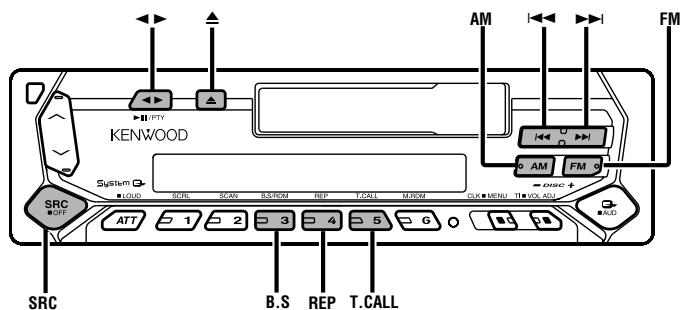
BbD a bTO nAMrTb
ABTOMATNueckn BBOB N pAmrB CTaHcN C XOPOoMm PnpEOM.
1 BbI6epHTe dnaa3OH nIy BBoA B aBtOMaTHueckyIO nAMrTb HaxmTe KhoNky [FM] nn [AM].
2 Otkpoite BBOB a bAToMaTHueCKyH nAmrTb
HaxmTe KhoNky [AME] KaK MInHmym Ha 2 cKeYhDbI.
KoIa 6 cTauHcH, KOtOpbIe MOrTy pInHIMMaTbCra, BVeDeHbI B nAMrTb, BBOD B aBTO nAMrTb 3aKpbIbAeTcra.
Hactpoika Ha npedBapntelbnyu yctaHObky
Bb3OB cTahun n3 namrtn.
1 BbIbepnte dnaana3OH
HaxmTe KhONky [FM] uJIn [AM].
2 BbI3OBITECTAHUHO
HaXMMTe KHOIIky [#1]—[#6].
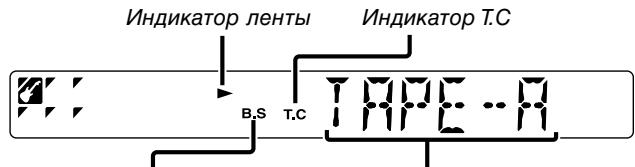
VHdkaTop B.S
CTopoHaJIeHTbI
PonirpbvBaHne MarHnToΦoHHbIX KaccET
EcnBCTaBnHa MarHntofoHHa Kaccta
HaxmTe KhoNky [SRC].
BbIbePeTe dncnnei "TAPE".
Ecnn Bby xotnte npocnywaTb o6paTHyO cTOpohy
HaxmTe KhoNkY [▶].
Bbipoc KacceTbI
HaxmTe KhONkY [A].
Yckopenhna nepemOTka JentbI Bneped Ha3aD
YcKOpHHa NepemOTka Bnpedd
HaxmTe KhoNky [FM].
Korda kacceta octaHOBNTcHaxMMTe KONky [▶].
YckopenHna nepemOTka Ha3a
HaxmTe KhoNky [AM].
Korda kacceta ocTaHOBnTcra, HaxMnte KhoNkY [▶].
PpOdBnXHeHneJeHTbI BnpeEa
Ipeckok Ha cIeDyUOyU neChIO uINI nepeckok hauano npOnrpbIbAemO necHn.
Ipeckok Ha cneyiouyo nechio
HaxmTe KhoNky [▶▶].
IpeckaKnBaet Ha hauaIo npOnrpbIbAeMoN neChN
HaXMMTe KHOKNy [1-].
Pponyck nyctbix yhaCTKOB
ABTOMaTueeCKn nepemaTbIBaet BnepeD,ecIn B TeueHne 10 cekyHd Ha JeHTe HmEro He 3aIncaHo.
Haxmnte KhoNky [B.S].
KaKdbi pa3, KOrda HaxkmaeTc8 Ta KHOnKa, yHKnIa
nponycka nyctbix yuctkoB BkIIOyaeTcra NIN BBKIOyaeTcra.
Ecnn OH BKNIOueH, BKNIOueH INIINKaTOp "B.S".
BbI3OB TIOhepa
A B T O M A T N U C E K O E N epeKnIuOeHne Ha paIIO BO BVpeM yCkOpEHNo NepeMOTKn BnpeJd IIN Ha3a.
Haxmnte KhoNky [T.CALL].
KaKdbi pa3, KOrHaHXImaETc8 Tt KaHONKa, Bbl0B TIOhepa
BKIOUOaETcN NIN BbIKIOuOaETcR.
Ecnn OH BKNIOUeyH, BKNIOUey HNdkaTOp "T.C".
PobtopenHe my3bIKn
Nobtor npourpblBaem nechn.
HaxmTe KhoNky [REP].
KaJdbi pa3, KOrda haxmjaETc3a KHONka, NOBTOp My3bIKN BkHouaETcN JIN BblKlIOuaETc.
Ecnn OH BkIIOueH,Ha dncJIee noka3bIbaeTcra "REP ON".
PpounrpblBaHne BHeuHero Dncka
PpOINrpBbAHaNE dNcKa, yCTaHOBJIeHHoro B DOIOJIHHTeNbHOM npOINrpBbTaTeNe dNcKOB, NOCDoeHNHeHHOM K DaHHOMy ycTpoiCTBy.
HaxMMite KhoNky [SRC].
Bb6epnte nncnne HnyxHoro Bam npoirpbBaTeIaNCKOB.
PpimepbI DnCJIeB:
| Ди检пел | Прочирьовател ДИСКОВ |
| "CD" | Прочирьовател CD |
| "DISC" | Чейнданер CD |
| "DISC" | Чейнданер MD |
Pay3a n npOnrpbIbAHne
HaxmTe KhONky [II].
KaKdIpa3,KoIdaHaxIMaeTc3aKHONKa,IponrpbIBaHne CD octaHaBnBaetcNIIbBO306HOBJIeTc.

-ДиCK№10 noka3bIbaetcHaДиCnIeKaK "O".
ΦyHKUHN, KOTOpbI MOrTy 6bITb NcNlOB3OaHbI, INHΦOpMaUH, KOTopA MoKT 6bITb PnDCTaBnHa Ha DnCnJI 6dT pa3nUaTbCa B 3aBNCIMOCTN OT NOCDOnIHMbIX BHUNHX pONrPBbATJIN DnCKOB.
UckopenHoe nepedBnxHen BpeEHa3aD
YckopenHoe nepeDbNkeHne Bneped
Haxmnte n Čepknte KhoNky [▶▶].
OTnyctnte napeu dna haua npourgpbBaHnA DnCKa C 3TOrO MeCTa.
YckopenHoe nepeBnXKeHne Ha3a
Haxmnte n depknte KhoNky [1-].
OTnyctnte naneu dna hauaIa npourgpbBaHnIa c 3TOrO MeCTa.
Ponck dopoxek
Bb6op nechn, kOtopyo Bbl xotnte nocnyaTb. HaxmTe KhoNkY [i<] nJIn [▶].
Ponck aIb6oma (ФункцЯ чинджета дисьов)
BbI6Op dNcKa, KOTOpbI Bbl XOTnTe npocnyuTaB. Haxmnte KhoNky [DISC-] nnn [DISC+].
PobTop dUcKa/OpOxxKu
Nobtophoe npoirpbyBaHne neChn/Dncka, KOtOpblc Bbl npocnyuBaeTe B daHHbIMOMeHT.
HaxMMTE KhoNky [REP].
KaKdIbI pa3, KOrda HaxkmaeTc8 3Ta KHOIIKa, NOBTOHoe npOnrpbIBaHne nepeKlHouaETc8, KaK noka3aHo HnKe.
8 BbIXoI n3 peXIMa MeHIO
Haxmnte KhoNky [MENU].

Korla pa6oTa ocTahBnBaetcHa 10 cekyH, Ha3BaHne B 3To BpeM perIcTpnpyeTc, n peXIM BbOda Ha3BaHn3aKpbBaTeTc.
- CpeIcTbA, KOTOpbIM MoXHO DaTb Ha3BaHne.
-BheHnH ueHJkep/ npOnrpbIbATEJIb CD:B 3aBNCIMOCtN OT ueHJKepa/ npOnrpbIbATEJIa CD.CmOTPnTe pykoBoCTBO nO 3KcIIpyataunueHJKepe/npOnrpbIbATEJIa CD.
- Ha3BaHne CD MoKHO I3MeHnTb PnI NOMOuToJ Xe Opeaun, YTOI INBBOJa Ha3BaHnJ.
ПюсмотTekCTa/ha3BaHn
IpocMaTpNaBaET NOKa3bIBaEmble Ha dncnJee TeKcTb CD nHa3BaHn MD.
HaxmTe KhoNky [SCRL].
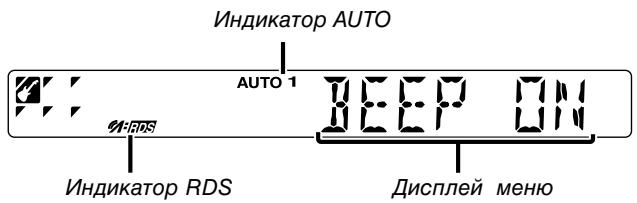
CnCTema MeHIO
YcTaHOBKa BO Bpemr 3ByKOBOro CnHaJa pa6Otbl np. FyHKcui.
OchOBhble cNoocobI pa60bI cnCTeMbI MeHIO onncaHbI 3decb.
CcIINKn dIyHKuM MeHIO uNx yCTaHOBOK HAXOJrTcA NOcNe daHHoro o6bAcHeHn pa6oTbI.
1 BoiDnte BpeKIM MeHIO
HaxmTe KhoNky [MENU] KaK MInHmym Ha 1 cekyHny.
"MENU" NOBNTcHa Daicnlee.
2BbI6epHTeФyHKUHO MeHIO
HaxmTe KhONky [FM] uIN [AM].
Ppimep: Ecnn Bbl XOTnTe yctaHOBntb 3ByKOBoCnHaJ,
BbIepeTe IucnIeN "BEEP".
3 yctaHOBNTe yHKUHO MeHIO
HaxmTe KhoNky [1]nI nI.
OtperynnpyTe MmHyTbI
HaxmTe KhoNky [I▶] nJIn [▶▶].
4 BbIXoI n3 peKIma peryIinpoBkn yacOB
Haxmnte KhoNky [MENU].
ФункцmaMoeJIIN KRC-394/KRC-37
CINxpoHn3auny hacOB
CnHxpoHn3aunBpeMeHN daHHoN CTaHcUN RDS u YacOB daHHoro yCTPOnCTBa.
| Ди检пел | Установka |
| "SYNC ON" | Синхрониригов涞яп. |
| "SYNC OFF" | Отreyларей涞ярь涞яв руном рекиме. |

Tpe6yetc0r3do4MnHyTdIaCnHxpoH3aunuYacOB.
DSI (Disabled System Indicator)
3amnraet KpacnbHmHdkaTOp nocLe TORO, KaK 6ydt cHrTa IInceBaanHKa, npedynpeXdaIOuNn NOTeHuaJIbHbIX BOPOB.
| Ди检пел | Установka |
| "DSI ON" | Магат LED. |
| "DSI OFF" | LED оTKлочн. |
POncBETka Ha BbI6Op
Bb6op noDCBeTK KhoNOK 3eHOrO uN KpaCHOrO zBaTa.
| Ди检пел | Установka |
| "COL GRN" | Зелейный цBet поCBetКи. |
| "COL RED" | Красnéй цBet поCBetКи. |
Функциma moDeJI KRC-394/KRC-37
YctahOBKa 6IOJIeTeH HOBOCTe C TaM-ayTOM
ABTomatueeCKN BKIOUOaETcK, KOrda NaHuaHaetc 6IOJIteHe HOBOCTei, daxe ecIn B3OT MOMENT BbI He cnyuaeTe paAno. TaKxe MoXHO yCTaHOBHTb BpeMeHHo INTEpBaI, KOrda npepbIBaHne He pa3peSeHo.
Ducnne u yctahOBka
| "NEWS OFF" |
| "NEWS 00M" |
| : |
| "NEWS 90M" |
Korda yctahOBHeNo "NEWS 00M" - "NEWS 90M",Функияпръваньбюлteну HOBOCTeB KBJUOyeHa.
Korda haunhaetc6oJIteHb HOBOCTe,Ha DCnIeepoKa3bIbAeTc"NEWS" n npocxOHT nepeKJIouHHe Ha 6oJIteHb HOBOCTe.

- EcnBbYb6epTe yCTaHOBky "20M", nocLeyuOuIe 6IOJIteHn HOBOCTeH He 6yDyT npINHMATbC B TeueHne 20 MmHT nocI npIeMa nepBOrO 6IOJIteHn HOBOCTeH.
- YpOBeHbIrpOMKoCTb IpiEMa bIOJIpeTeHa HOBocTei TOT Xe CaMbII, UTO IN DnIaDopOxHNo INΦOpMauN (CTpaHnua 40).
-Даннанфункци BO3MOxHа TOnbkoВ Tom Cnyae,ecn Жeнлам стained nepedäET kOД PTY ДЯбIoJIneTeHЯ HOBOCTe Ии ппадлжNT K cTeN, пepedaoUeК кОД PTY ДЯбIoJIneTeHЯ HOBOCTe.
Korda BkIIOUeHa cyHKuINIpepbIBaHINHΦOpMaIOHOrO 6oJIteHn, npOcXoJNT nepeKIOUeHne Ha cTaHIO FM.
MecThbI pONCK
ToIbKO XopoOIO npHnMaemble cTaHcN moXHO NCKaTb npi NOMoU NHCTPOIKu ABTomatueckoro NOnCKa.
AF (Alternative Frequency)
Ecn npnem nloxoi, npocxodnt aBtomatueckoe nepekniouhenne Ha dpuyu qactoTy, nepedaioyio 3Tu JKe nporpammy B 3ToJ xe cetn RDS c lywhim npnemom.
| Ди检пл徴 | Установka |
| "AF ON" | Фунkedия AF Вкlioоча. |
| "AF OFF" | Фунkedия AF Вькlioоча. |
Korda BkHoueHaФyHKZnA, BkHIOueHnIHmKaTOp "RDS".

EcHn HET dpyuX CTaHcN C 60JIe e CInbHbIM pIneMOM 3ToI Ke nporpammB B cTeRDS, Bbl 6yJeTe CnyuAt bpeJaCy oTpbIKamn. B 3tOM Cnyae BblKIOUHTe fHyKcHIO AF.
Функцma Mодени KRC-394/KRC-37
OrpaHnueHne perNoHa RDS
- TekCT CD
- Ha3BaHne MD
Ha3BaHne DnCKa
Дл пolyн demopmaци O cnocobax yctahOBkn cmoTpnte
TaHmepOTKJIIOUeHnI NHTAHNIA
A bTOMaTnUcKa yCTaHOBKa TaIMpa OTKIIOuHNHa daHHOrO yCTpOiCTBa B IpoDoJIgKaIOUcMcR pXIM OxNuaHn.
IcnoIb3OBAHnE daHHoY yCTaHOBKn COxpaHReT HAnpJXeHne aKKyMylrTopa TpaHCnOpTHoro CpeDCTBa.
Ducnnei
YctaHOBka
"OFF- - - "
*YcTaHOBkA BnJIKN: CmOTpn npaByIO cToPOHy.
YctaHOBKa BnJIKN
ANPEDUNPEXDEHME PnpcoeunHeHne pa3bema ISO
PacnoIoxeHne uTbpey y pa3beMOB ISO 3aBNCNT OT Tnna aBTOMO6nI, KOtOpbI Bbl BOJNTe. Bo n36eKaHne NOBpeXdHnra annapata cNeDyET pOBeRITb, YTO COeHNHeHnCDeNaHbI npaBnIbHO.
1 1Ttencelb A-7 aBtOMo6nIbHoro pa3bema ISO noDCoeINHeN K 3aJrAHHIO, a Ttencelb A-4 nDcoEHNHeN K NOCTOHHOMY 3NeKTPoNTaHHIO. (CtaHapTHa HacTpOJa)
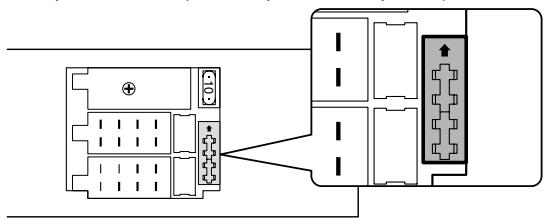
2 17 A-7 aTOMo6nIbHOrO pa3bema ISO noDCoeHNHeK nCTOuHNky NOCToRHHOrO 3JeKTpOnITaHnA, a TTeNCeB A-4 COeHNHeC 3axnHaHnEM.
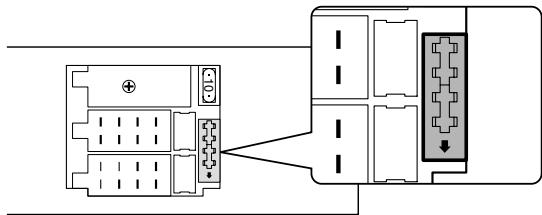
-
Ecni noiCoeHHeBb oBa BbIbOa A-7 nA-4 noiCoeHHeBk NOCToHHOMY NcTOHNY INaTHNA TpaHCnOpTHOrO cpeCTBa, INcNoIb3yTe yCTaHOBky BNIK 2.
-
Ecnn BbIOd A-7 noIcoeHnE H K NOCTOHHOMY NCTOHHKU nITaHn TpaHCnOpTHoro cpeDCTBa, a BbIOd A-4 HN K YEmy He noIcoeHNH, noIKNIOHTe yCTPOJcTB0, IcNOJB3yR KOMPJIeKT npOBQKn (IOnONHtEnbHOe npICNOC6BHeHne ①).
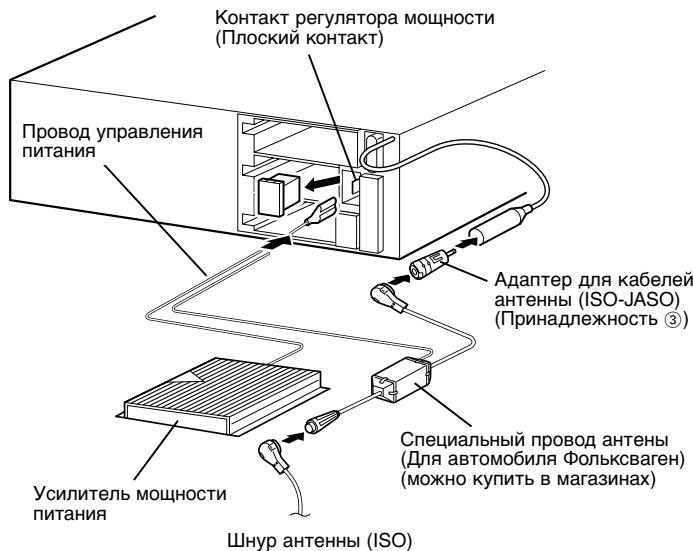
IopKJIouHnKaKtApeyIaTopa MoIHOCTN
HanpJxHeHn KaKToAepeRyIaTopa MoUHOCTN BbIKNouaeTcN BkIOUaTeC BMeCTe C BbIKIOUeHnEM/BKIOUeHnEM NITaHnA annapata. 3TO T KOHTAK MOKeT 6bItb CoEINHeC KOHTAKTom P.CON (DNTACTAHUNOHHbI) ycInNeT INMOKET IcNOB3ObaTcB R KaueCTBe nCTOHNKa NITAHnCeIeMaNbHOro aHTEHORO Ka6JIe DnA ABTOMOBnEi Volkswagen. (MakcmaNaHbI ToK 300 mA)
YctaHOBka
YctaHOBKa
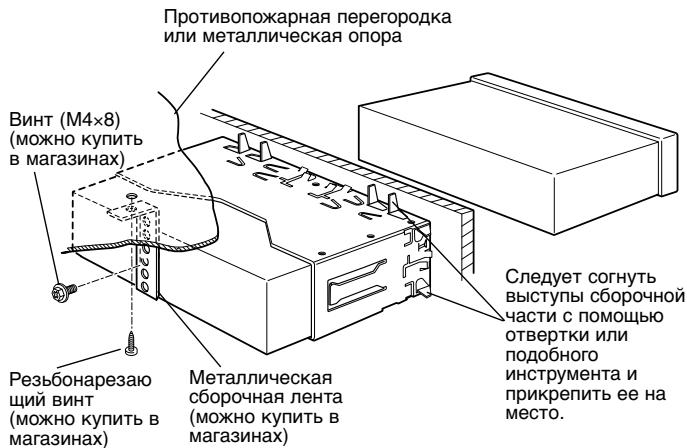

CneyuET npOBepntb, YTO annapaT npOHO yCTaHOBLe H a MeTe. Ecnn annapaT yKpePnIeH HeYCTOuHBO, 3TO MOKeT npBecTn K HeNCpabNcHTo (HaNPmep npOnyck 3Byka).
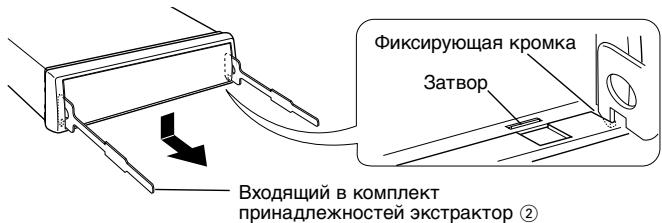
CHaTne JeCtKoI pe3HOBO ONpaBKn
1 HaçaДиTe KpOчКn Ha 3KCTpaKTop n ChIMTe IBa 3aNoPa Ha HnXHem yPOBHe, OCTaBnA 3KCTpaKTop Ha BepxHem yPOBHe. POnaIte OnpaBky BnI3 n BbITaUnTe ee, kak Noka3aHo Ha pncyHke.
2 Pocne ocbo60kJeHnHKeHrO KpaBbINOJIHnTe aHaIOnuHyIO npoceDpy u nIa BepxHnx KpeJIeHn.
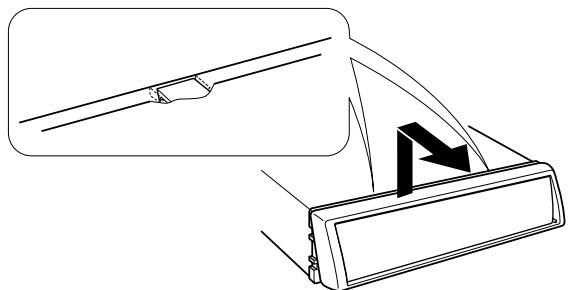

Ecnn NaHnHaTb Onpaun C BepxHero Kpa, To OnpaBka MoKeT 6bTb CHrTa aHaIOnuHbIM 06pa3OM.
Chytne annapata
1 Пюочаite pa3дeн "Снгтпе кесскои ретиново onpaBkn" 3aTeM ChIMITE KeCTKyo pe3HOByO onpaBky.
2 YdaJInte BnHT (M4×8) n3 3aJHe nHaHEnI.
3 BCTaBtBe o6a 3KCTpaKTopa nO yTlOM IN BBeINTe IN xRJy6oKOBOTBepCTnC KaJDoI CTOpOnbI, KaK NOKa3aHO Ha pucynKe.
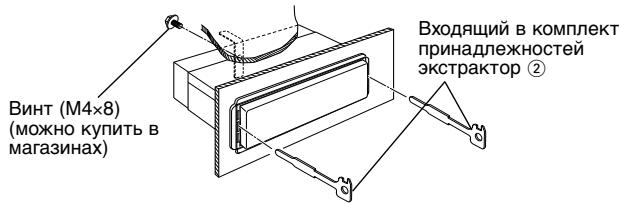
4 OTBeIe TcKCTpaKTop B HIXHHe HAnpaBJIeHne I NOTAHITE yCTPOIcTBO Ha Ce6Ba, BbIDBnHyB erO n3 OTBepCTnHaNoJIOBnHy, HAdaBnBnBa PnI 3TOM Ha erO 6OKOBbIe CTeHKn.
CHIMAR annapat,6yIbTe oCtOpOxHbl,HTo6bl He paHnTb ce6a 3axBaTbBAIOUMM KpUQKaMn.
5 3aTeM cIeNyet BbITaunITb aannapat pykam, cIeJra 3a TEM, UTObI He ypoHnTb erO.
YTo KaKETcHHeNCpBbHbIM DeIcTBnEM BaWero annapata, MoKet 6blT bNtpe3yJbTaTOM He3HaHTeNbHO OUn6OuHOro NcNoJIb3OBaHHn HEnpaBnIbHo BblNOJIHeHHo 3JIeKtpnuecko CXembl. IpexKe cheM o6paTaBcra B cepBnCHyO cnyk6y, npOBepbTe cLeyUOyTO TabnUy HeNCpBaBHOcte.
06une xapaKTepeNtKN
?Питане He BKNIOuaeTcR.
IpeoxaHnteIb neperoep.
PnOcne npOBeRpn KopoTKnx 3aMbIkaHINB Ka6eIHX CNeIyET 3aMeHNrB npEoXpaHITelb HObIM npEoXpaHITeIem OdnHaKOBOrO 3HaueHry.
OTcyTCTBnE P03nCnN ACC B 3aXnraHnn aBTOMO6NJIA.
E7 Cnedyet noCdoeHNHt TaKo Jx Ke Ka6eB K 3axKraHIO, KaK n Ka6eB 6batapei.
?EcmBbIb6paJIpeXUMOXNuaHn,NTaHHeOTKIOHTCABTOMaTHueCKn.
ФункцЯТаимета OTKЛЮЧЕнЯakTNBИрOBaHa.
ECSINBbHEXOTITEABOTAMINECHKOROTOKLNIOHEHNIITAHN,OTMENDEyHKLIOH TAIMePAOTKNIOHEHNI
? Nocne haxatna KhoNKn HnUero He npOcxOaNT.
KomnbHOpTePbHbYINB3OTom annapaTe DeNCTByeT HenpaBnIbHO. HaxmTe KhONky Reset, pacnoJoxEHHyO ha annapaTe (ctp. 34).
? Ectb nCTOuHnK, KOTOpBb Bbl He MoXTe BKIOUHTb.
He BCTaBneHa KaccTeA.
YctaHOBnTE cpeDCTBO, KOTOpOE BbI XOTITNE npOcNHyuBaTb. Ecnn B yCTpoiCTBe HET TAKO cpeDCTBA, BbI He CMOKeTe nepeKJIOUaTB c NCTOCHNKA Ha NCTOHNK.
He noDcoeHHeuHxep DnCKOB.
Плбоэнгдпсчнгдзгдскв.Еснгчнгдзгдснckов He nOdcoeHnH eK KJIemMe BxOda,ByI He cMOKeTe nepeKIIoUaTb Ha BHEwHmNCTOCHNK DNCOB.
?PnBbIKJIOUeHm3aXnraHnCOTpeTcNaMrtb.
Ka6eIb 6aTapeH He NOcOeINHeH K COOTBeTCTBvIOUeMy BbIbOy.
CneNyET npaBnIbHO NOcOeMHNb Ka6Enb COOTBeTCTBEHNO pa3deny
Ka6eI3axKraHnI 6aTapeH HnpeBaNlbHO NOcOeINHebl.
CneNyET npaBnIbHO NOcOeMHNITb Ka6eNt COOTBeTCTBEHNO pa3dEny
? He pa6oTaet yHKun npnIpyuweHn 3Byka npn TepeOHHom Bbl30Be.
HenpaBnIbHO noKJIoueH Ka6eJb TEL mute.
CnEpyET npAubInbHO NOpC0eDmHnTb Ka6eNn COOTBETCTBHeHNO pa3dEny <POnOeDnHHeNe Ka6eNk rHe3dAm dny POnKKnIOHeHnIa.
?JaXe npn OTcoeHHeHOM Ka6ene TEL mute BKNIOuayetcA yHKUa npnIpyueHHN 3Byka npn TepeoHOM BbIOBE.
KaebelTEL mute kacaetcmaTalnuecknx yacte aBtOMoBnIa.
EOTBeIe KaebTEL mute OT metaJIuCheKnx cacteB ABTO6MJIa.
? He cIbIweH 3ByK IIN 3ByuHaHne cInuKOM cna6o.
YctaHOBKn pOHTa/TbIna N 6anaHCA nonHOCTbIO yCTaHOBJIeHb Ha Ondy CTOpOHy.
CzentpyyTe yctaHOBKn pOHTa/TbJa n 6anaHca.
VBOJNHeIe/ByXoNDHbIe Ka6eJIu IINx JxRyT npOBoDn HnpeBnHbHO nOcDOHNHeH.
PnOdoeHNHTE CHOBA npABINbHO BXoHDhIE/BbXoHDhIE Ka6BnU/nNxKryT npOBOOB.CMOTpnte pa3dien
√Плoxаксетнянта.
IopnobyTe Bocpon3BODntb DpyrgyIO KaccetHyIO JeHTy. Ecnn OHa BOCpon3BODNTC6e3 npo6nem, nepBaJ IeHTa 6blya nNoxaar.
? He MoXeT BbIbECTn Kaccety.
PnHIOI 3TOI RJIeTcI NCTeHHe 10 MHyT C MoMeHTa YctAHOBKn IpeKJIIOHaTeJI ACC Ha ABTomObJIe B NOJoxHeJIe BblKIJI.
KacceTa MoXeT 6bITb BbIEeHa TOJbKO BTeueHne 10 MNHyT C MOpHeTa yCTaHOBKn NepeKluOyateIa ACC B nOIOxHne BblKJI. EcIn npoIoo 6oee 10 MNHT, cHOBA yCTaHOBnTe nepeKluOyateIb ACC B nOIOxHne BKl (ON), 3aTeM hAkmnte KhONkY BbIOda DnCKa (Eject).
? HnpeBnIbHo pa6oTaIo fYHKuN NepemOTKn JeHTbI My3bKaJIbHOrO NOBTopa.
V POMeKyTOK MEKdy NcHAMHa KACCete He PaCnO3HaETcA, TAK KaK OH CNIuKOM KOPOTKIN.
EπPOMEXyTOK MEXyIeNCHRIMDOLJxEH 6bITb KAK MNHIMyM 4 CEKYHbI.
ПомекутК мexупесим He paCno3HaetcT,Тak KaK MeXdYпесим CnIshkom MHOTo WMObIx NOMEX.
YMeHbUInTe Wym MExkDy NeCHAMN.
? He pa6oTaet fynKzna nepeckaKaBaNHa nycbIX MeCT.
空 30n3-3a BbICOKO OyOBH yMa, YCTAaYactb Kaccetb He pacno3HaTcR.
YmehbwnTe Wym Mekdy NecHAM.
? He BOCnpoN3BODnTcHyXhBi NDCK, a BOCnpoN3BODnTcHpyroN DnCK.
3aadaHHbKOMnKaT-DnCK CnIbHo 3aarp3HeH.
OuNTe KOMNaKT-DnCK.
KomnaKT-ДиCK npeBepHyT.
E CNeIyET BCTABNTb KOMnAKT-IMCK, HAnpAIBN CTOPOHy C 3TNKETKBI BBEPx.
KomnakT-DnCK BCTaBHeN B HEnpaBnIbHbI Na3.
CnEpyeT BbHytB MaarazHH IN PPOBeprNt HOMep ONpeJeHHOKOMNaKT-IMCKa.
KoMaKT-DnCK CnIbHO noCuapanA.
CneNyET nonpoobabT pyroKOMnakT-ndcK.
? He npoicxoadn npoirpbiBaHne onpeedeHNOI dopoxkN.
BbJN Bb6PbAn pexmI npOrrpbBaHnB a CnyauHOM npOJIKe I nI npOrrpbBaHmE b CnyauHOM npOJIKe IMCCKOB 13 Mara3Ha.
OTKlnIOHTe dyHKLIOH pNOIgBbBAHnB C bCnyaHOM nopRJaKe IIN pNOIRpBbHAHn B cCnyaHOM nopRAKe DnKOB 8 Mara3Ha.
? Nobtopenhe dopoxknoBtOpene nckcKa, cKaHnpoBaHne doDopKoo, npOn3BOJbHOe npOnrPBiBAHne mMaar3HHOE npOn3BOJbHOe npOnrPBiBAHne HauHaHaOTcC CAMOCTORTbHo.
YctaHOBka HE OTMeHeHa.
YctahOBka dIa 3nIX cyHKcun ocTaETcR BkOuEHHo Do Tex nOp, noka He 6ydet npO3BeDeHa yCTAHOBKa Ha BblKJnHn He 6ydet BbIDBnHYT DNCK, dJaXe ECIN BblKJIIOUeHO NITaHne IIN N3MeHEn NCTOHNK.
? He MoXeT npOurpbIbA Tb CD-R nIi CD-RW.
06pa6oTkα ΦHnHaɪn3aún He 6bɪna npɔɪn3BédeHa dɪŋ CD-R/CD-RW.
E PnO3B6DNTe 06pa6oTky ΦHAnIa3aunc 3 aIINCbIBaIOUIM yCTPONCTBOM CD.
VicnoB3yeTcHHeCOBMeCTmblYeHJxep CDIpaonrpblBaHnCD-R/CD-RW.
Icnpb3yteeHdkepCD,COBMeCTmblc CD-R/CD-RW dI npnroPbBAHncreDbT.
?PonckdoopoxKHeIb3aOcuyceCTBnTb.
EJECT: B aBTOMaTnueckn npOnrpbBaTeIb DnCKOB He 6blBCTaBJIeH nCK n3 MaarAnHa DnCKOB. Mara3INH DnCKOB He 3aONJIeH nonHOCTbIO.
3aONHnTe Maraun HnckOB KaK cneNyET.
OTcyTCTBnB B yCTpoIcTBe KOMNaKT-DnCKa.
BCTaBbTe KOMnakT-ДИСК.
NO DISC: B MaRa3InHe NcKOB HET DnCKOB.
BCTaBbTe DNCK B MaRa3IN DNCKOB.
E-04: B MaRa3InHe DnCKOB HeT DnCKOB.
BCTaBbTe DNCK B MaRa3IN DNCKOB.
KOMnKaT-DnCK CnIbHo 3aRp3HeH. KOMnKaT-DnCK npeBepHyT. KOMnKaT-DnCK CnIbHo nOuapaNaH.
OuHCTnTe KOMNaKT-IMCK N BCTaBbTe npaBnJIbHO.
BLANK: Ha MD HnueRo He 3aIncaHo.
NO TRACK: Ha MD He 6bIIO 3aIncaHOn HnKaKxDopOKeK, XoTay HeRo eCTb 3aIJIaBHe.
NO PANEL: IinueBaI naHeIb nOuHHeHHoro 6loKa, nOdknUeHHoro K 3TOMy 6IoKyo, ChraTa.
YCTAHOBITE ee Ha MECTO.
E-77: IIO KaKoi-JIb6 npuHHe annapaT HeucnPpABHO DeiCTByeT.
Haxmnte KhoNky Reset, pacnoJoxeHHyU Ha annapate. Ecn He nCye3net KoD "E-77" 6bpatntecb B 6nXaMuyo CepBncHyO cnjx6y.
E-99: Илиabusмагнstoю Кадон-To пичине pa6oTaet HeuCnpaBHO.
Haxmte KhoNky c6Oca Ha yCToIcTbe. Ecnn Ha nCnPlee He nCyeaet kOd "E-99", o6aTntEcB b 6mKaiuMn CEuNCbI ueHT.
HOLD: 3aunTHaenB aannapaTe aKTHBn3npyeTc, eCNI TemepaTpa BHTPn aBTOMATnueeCKoI npOrrpIBaTeN dNCKOB npeBbICNT 60^ n octaHOBN T deNCTBne annapata.
Annapat cneyet oxnaIb, no3tomy otKpOte OKHa nBkIOHnCe KOHNIOHOPOBaHHe BO3dyxa. KOrDa TEMnepaTpyoNHOIN3rC HnKe 60°C, CHOba NaHHeTc npOnrPbIBaHne DnCKa.
MarHHToΦoHHa CEKua pa6oTaET He DoJXHbIM 06pa30M.
BCTaBbTe KacceTy 3aHOBO. EcInn KaccTe HEnb3a BbHyTb ININ DcNlneB 6ydt npdoONkTaB MMrTaB DaKe, ecInn KaccTe 6blNa BCTaBNeHa npabNbHo, OTKJIOHHTe NCTaHHe n CBxKntEc b CbNxKaIIMC cepBnCHbIM cEHTPOM.
AF (Alternative Frequency)
AF (Alternative Frequency)
Hlasitost (Loudness)
System Q
Ovladani audio
Hlasitost (Loudness)
Vyrovná basu a vyšek pri ztlumené hlasitosti.