
NS1000 - Charger Navitel - Free user manual and instructions
Find the device manual for free NS1000 Navitel in PDF.


| Product type | Car charger |
| Brand | Navitel |
| Model | NS1000 |
| Input voltage | 12-24 V DC |
| Number of USB ports | 2 |
| Output current per port | 5 V / 2.1 A |
| Total output current | 4.2 A |
| Compatibility | Smartphones, tablets, GPS, cameras |
| Protection features | Overcurrent, overvoltage, short circuit, overheat |
| Material | ABS plastic |
| Dimensions | 60 x 30 x 30 mm |
| Weight | 30 g |
| LED indicator | Yes, blue |
| Color | Black |
| Operating temperature | -20 °C to +60 °C |
| Certifications | CE, RoHS |
| Package contents | Charger, user manual |
| Warranty | 1 year |
| Maintenance and cleaning | Wipe with dry cloth; do not use liquids |
| Safety instructions | Do not expose to water; use only in vehicles with 12-24 V system |
Frequently Asked Questions - NS1000 Navitel
User questions about NS1000 Navitel
0 question about this device. Answer the ones you know or ask your own.
Ask a new question about this device
Download the instructions for your Charger in PDF format for free! Find your manual NS1000 - Navitel and take your electronic device back in hand. On this page are published all the documents necessary for the use of your device. NS1000 by Navitel.
USER MANUAL NS1000 Navitel
natural_image
Black and green portable energy storage unit with control panel, buttons, and display (no visible text or symbols)NAVITEL NS1000
PORTABLE POWER STATION
cz Úvod
Funkce tlačítek
Tlačítko napájení
Funkce displeje
Indikátor stavu baterie
Tastenfunktionen
Power-Taste
Anzeigefunktionen
Dear customer! Thank you for purchasing this NAVITEL® product.
NAVITEL NS1000 is a portable power station, which can generate pure sine wave signal with a power of up to 1000 W and has a lot of additional features described in this User manual. Please read the manual carefully before using the device and keep it for future reference.
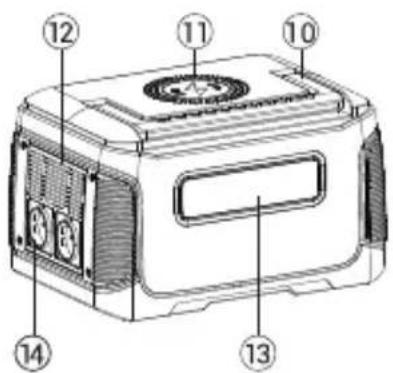
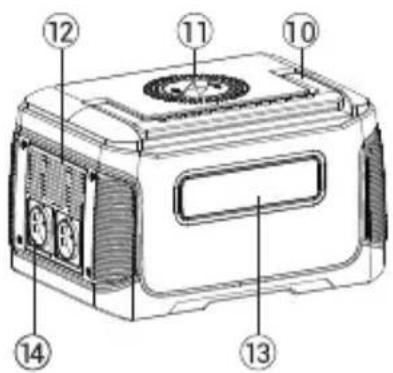
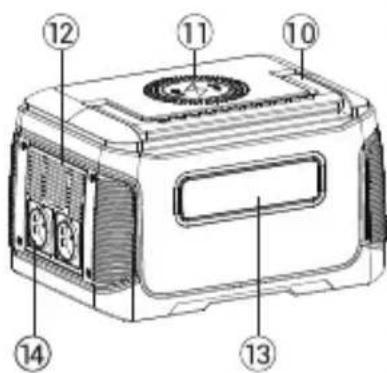
EN Device layout
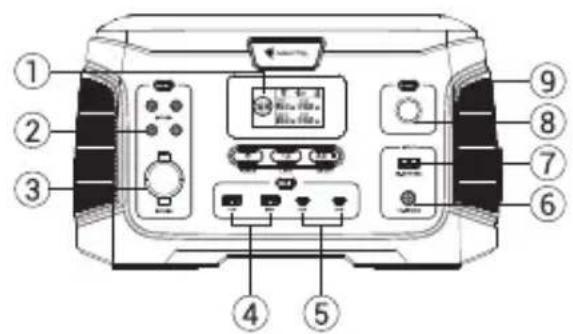
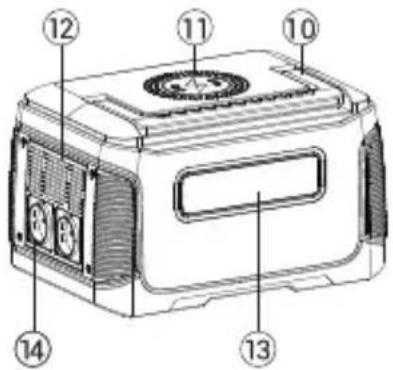
- LCD display
- DC5525 output
- Cigarette lighter output
- USB-A outputs
- USB-C outputs
- DC input/ Car charge input
- PV input
- SOS light
- Anti-collision strip
- Folding handle
- Wireless charge panel
- Air intake vent with cooling fan*
- LED light
- AC outputs

*Important! Do not cover; keep open!
Specifications
| Rated power 1000 W | |
| Rated capacity 808.08 W·h | |
| Overload protection 1050±40 W | |
| Car charge input | 150 W12-26 V ≈8A |
| Anderson 30A solar panel input | 150 W18-23 V ≈10A |
| AC outputs 230 V ± 10%/ 50 Hz | |
| USB-A outputs | 18 W5 V ≈3 A9 V ≈2 A12 V ≈1.5 A |
| USB-C outputs | 60 W5 V=3 A9 V=3 A12 V=3 A15 V=3 A20 V=3 A |
| Cigarette lighter output 14 V 8 A | = |
| DC5525 output 14 V 8 A | = |
| Wireless charge 15 W | |
| Working temperature -10 ~ 40 °C | |
| Weight 8.2 kg | |
| Dimensions 345 x 227 x 203 mm |
Package contents
- Portable power station NAVITEL NS1000
- AC adapter
• 12V car charge cable
• 18V cable with MC4 connector* - User manual
- Warranty card
*when charging from a solar panel, it is recommended to use NAVITEL SP200 solar panels; to find out more about NAVITEL solar panels visit www.navitel.com
Buttons and other elements
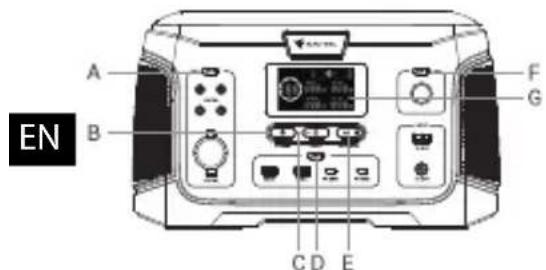
Button features
Power button
Press the button to turn on portable power station. When power is on, DC outputs button, USB outputs button, AC output button and wireless charge function are activated. After use press this button to turn portable power station off.
DC outputs on/off button
Press the button to enable DC outputs. After use press this button to disable DC outputs.
USB outputs on/off button
Press the button to enable USB outputs. After use press this button to disable USB outputs.
A. DC outputs on/off button
B. Power button
C. LED light button
D. USB outputs on/off button
E. AC output on/off button
F. SOS mode button
G. Display
AC outputs on/off button
Press the button to enable AC outputs. After use press this button to disable AC outputs.
LED light button and SOS mode button
LED light and SOS mode functions are available even when portable power station is switched off. To activate/disactivate this functions press corresponding buttons.
Display configuration
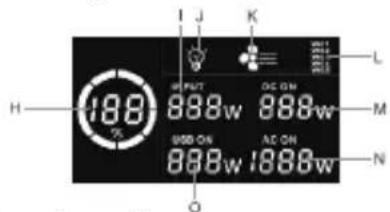
Display features
Battery level indicator
- When charging device is connected to portable power station, this indicator is lit up and shows the current battery level of portable power station.
Input power indicator
- When charging device is connected to portable power station, this indicator is lit up and shows the input charging power level.
DC outputs power indicator
- When DC outputs are activated, this indicator is lit up and shows the DC output power level.
USB outputs power indicator
- When USB outputs are activated, this indicator is lit up and shows the USB output power level.
AC outputs power indicator
- When AC outputs are activated, this indicator is lit up and shows the AC outputs power level.
H. Battery level indicator
- Input power indicator
J. LED light indicator
K. Cooling fan indicator
L. Error code indicator
M. DC outputs power indicator
N. AC outputs power indicator
O. USB outputs power indicator
Error code indicator
- In case of malfunction of the portable power station this indicator is lit up and displays one of the following codes:
W01 - overheating protection;
W02 - freezing protection;
W03 - AC short circuit protection;
W04 - overload protection;
W05 - undervoltage protection.
LED light indicator
- When LED light is turned on, this indicator is lit up.
- When cooling fan is turned on, this indicator is lit up.
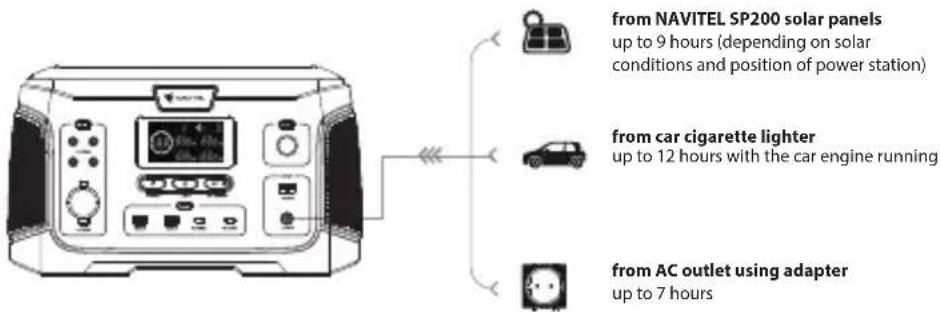
Charging portable power station
- To charge the portable power station from the mains, connect the AC adapter to the DC input socket and plug the adapter into a wall outlet. Charging time - up to 7 hours.
- To charge the portable power station from the car, start the engine, connect the car charge cable to the DC input socket of the power station and the car's cigarette lighter socket. Charging time - up to 12 hours.
- To charge the portable power station from the solar panel, connect the Anderson 30A plug cable from the solar panel to the Anderson 30A socket of the power station. Charging time - up to 9 hours (depending on solar conditions and position of solar panel).
- It is recommended to use NAVITEL SP200 solar panels when charging the portable power station from solar panel.
- When charging the portable power station, the display should be lighted up and show the battery level on the indicator. When the indicator shows "100%", the power station is fully charged.
- It is recommended to fully charge the Portable Power Station once every three months to ensure long battery life.
Charging electronic devices
- To charge an electronic device from a portable power station, activate the needed output port by pressing buttons A, D or E and connect the corresponding cable or adapter to this port.
- When a port is activated, the corresponding button on the portable station is lit up green and the display is enabled to show the status of the corresponding port. When the port is disabled, the button and the display are turned off.
- If there are no devices connected to the output ports within 20 seconds, the portable charging station will enter standby mode. To exit standby mode, connect an electronic device to the station.
• After charging is completed, turn off the output ports by pressing the corresponding buttons. - An advanced battery management system allows you to charge a connected device through the DC output ports and USB output ports while the portable power station is charging.
Do not connect electronic devices to the ac output while the power station is charging!
Portable power station overload
When power station is overloaded:
• AC output will automatically turn off;
- error code indicator will show code W04;
- DC outputs power indicator will remain lit if those ports are activated.
Cleaning portable power station
- Make sure all input and output ports of the power station are disabled.
- Wipe the station with a clean, dry, soft, lint-free cloth.
- Remove debris from both side vents. When cleaning the side vents, do not allow foreign particles to enter the inside of the case; it is not recommended to use compressed air.
- Do not use abrasive cleaners or solvents.
- Do not use metal objects to clean the ports to avoid electric shock.
Portable power station storage
- Store the station in a place protected from the sun at a cool temperature and moderate humidity.
- If stored for more than 1 month, fully charge the station before storage and recharge every 3 months to avoid complete discharge and possible battery failure.
- Storing at high temperatures can result in a significant reduction in life, overheating and fire.
- Storing at low temperatures can result in a significant reduction in battery life and battery failure.
- Avoid exposure to corrosive substances and gases.
• After storage, visually inspect the portable power station for signs damage or dirt.
Precautions
- Do not disassemble the device or repair it yourself.
- Keep children away from the device.
- At the end of its useful life, the device must be handed over to an appropriate collection point for recycling and disposal of electrical and electronic equipment in accordance with federal or local laws.
Troubleshooting
| Problem Possible cause Possible solution | ||
| Portable power station does not charge | Using not supplied AC adapter Use the supplied | AC adapter for charging |
| The AC adapter is not fully connected to the portable power station | Check the connection of the AC adapter to the portable power station | |
| Electronic device is not charging from the portable power station | Output ports are not enabled | Enable the output ports according to the user manual |
| The electronic device does not meet the technical requirements of the portable power station | Check that the electronic device meet the requirements according to this user manual | |
| The portable power station is empty | Check the battery level of the portable power station; if the station is empty, charge it according to this user manual |
Wstep
Funkcje przycisku
Przycisk zasilania
Назначение кнопок
Призначення кнопок


- NAVITEL NS1000
- cz Úvod
- Funkce tlačítek
- Tlačítko napájení
- Funkce displeje
- Indikátor stavu baterie
- Tastenfunktionen
- Power-Taste
- Anzeigefunktionen
- EN Device layout
- Package contents
- Buttons and other elements
- Button features
- Power button
- DC outputs on/off button
- USB outputs on/off button
- AC outputs on/off button
- LED light button and SOS mode button
- Display configuration
- Display features
- Battery level indicator
- Input power indicator
- DC outputs power indicator
- USB outputs power indicator
- AC outputs power indicator
- Error code indicator
- LED light indicator
- Charging portable power station
- Charging electronic devices
- Portable power station overload
- Cleaning portable power station
- Portable power station storage
- Precautions
- Wstep
- Funkcje przycisku
- Przycisk zasilania
- Назначение кнопок
- Призначення кнопок
Brand : Navitel
Model : NS1000
Category : Charger