
PWR10 SUN - Charger Navitel - Free user manual and instructions
Find the device manual for free PWR10 SUN Navitel in PDF.


| Product Type | Power Bank with Solar Panel |
| Brand | Navitel |
| Model | PWR10 SUN |
| Battery Capacity | 10000 mAh |
| USB-C Input | 5V/2A |
| USB-C Output | 5V/2A |
| USB-A Output (x2) | 5V/2A each |
| Solar Panel | Built-in, charges power bank in sunlight |
| Flashlight | Integrated, activated by holding battery check button |
| Carabiner | Yes, built-in for carrying |
| Cable Included | USB-A to USB-C cable |
| Dimensions | 161 x 70 x 20 mm |
| Weight | Approx. 200 g |
| Battery Type | Lithium-ion (rechargeable) |
| Protection Features | Overcharge, overdischarge, short circuit protection (standard) |
| Charging Method | Via USB-C or solar panel |
| Simultaneous Charging | Up to 3 devices via USB-A and USB-C |
| LED Indicator | 4-level battery capacity display |
| Material | Plastic casing with rubber port cover |
| Maintenance | Clean with dry cloth; avoid moisture and high temperatures |
| Repairability | No user-serviceable parts; contact service center for issues |
Frequently Asked Questions - PWR10 SUN Navitel
User questions about PWR10 SUN Navitel
0 question about this device. Answer the ones you know or ask your own.
Ask a new question about this device
Download the instructions for your Charger in PDF format for free! Find your manual PWR10 SUN - Navitel and take your electronic device back in hand. On this page are published all the documents necessary for the use of your device. PWR10 SUN by Navitel.
USER MANUAL PWR10 SUN Navitel
Obsah balení
other
| Category | Value (%) | |---|---| | Světelná indikace | ● ● ● ● | | Kapacita | 100% | | | ○ ● ● ● | | | ○ ○ ● ● | | | ○ ○ ○ ● | | | 75-50% | | | 50-25% | | | 25-0% |Nabíjení powerbanky
Packungsinhalt
Battery capacity LED indication

other
| Category | Value (%) | |---|---| | Lichtanzeige | ● ● ● ● | | Kapazität | 100% | | ○ ● ● ● | 75-50% | | ○ ○ ● ● | 50-25% | | ○ ○ ○ ● | 25-0% |Powerbank aufladen
Dear customer! Thank you for purchasing this NAVITEL® product.
NAVITEL PWR10 SUN is a power bank with a solar battery of 10000 mAh. Three USB outputs allow you to charge several devices simultaneously.
Please, read this manual carefully before using this device and keep it for future reference.
EN
Device layout
-
Capacity indicator
-
Integrated flashlight
-
USB-A output port
-
Battery check button
-
USB-C input/output port
-
Solar panel
-
USB-A output port
-
Carabiner
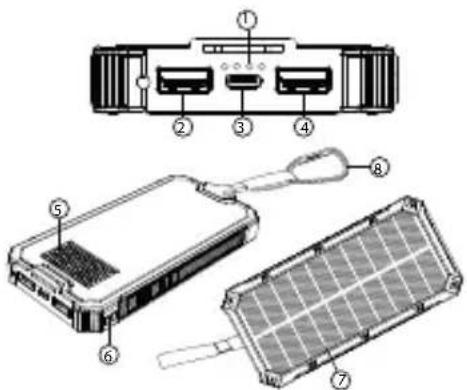
Package contents
• NAVITEL PWR10 SUN power bank
- USB-A/USB-C cable
- User manual
Specifications
| Capacity 10000 mAh | |
| USB-C input 5V/2A | |
| USB-C output 5V/2A | |
| USB-A outputs 5V/2A | |
| Dimensions 161 x 70 x | 20 mm |

NAVITEL
NAVITEL PWR10 SUN
Features
- Press the battery check button to check the remaining battery capacity on the LED indicator.
- When charging the power bank, the LED indicator should be flashing.
- When the power bank is fully charged, 4 steady lights will appear on the LED indicator.
- Hold the battery check button to turn on the flashlight.
Battery capacity LED indication

EN
Charging power bank
- Open the protective rubber plug of the USB port.
- Connect the input port of the power bank to the USB port of a computer, using included USB-A/USB-C cable, or use AC wall adapter (not included) to plug it into the wall outlet.
- When power bank is charged, disconnect USB-A/USB-C cable and close the protective rubber plug.
- If there is no access to the mains, it is possible to recharge the portable charger using the built-in solar panel. Position the portable charger with the solar panel towards the sun, wait until charging is completed.
IMPORTANT! The charging speed depends on the intensity of sunlight and the position of the panel.
Charging devices
- Open the protective rubber plug of the USB port.
- Connect one of the output ports of the power bank to the charging port of a device, using USB cable.
- When device is charged, disconnect USB cable from device and power bank and close the protective rubber plug.
Precautions
• Fully charge the power bank before initial use.
- Do not expose the device to mechanical impact.
- Do not disassemble or repair device by yourself. In case of device failure, contact the service center.
- Do not expose the device to moisture, fire or high temperatures. Exposure to fire or high temperatures may shorten the life of the device or cause a fire or explosion.
- Do not allow children to use device.
Wstęp
Комплектация
Комплектація


Brand : Navitel
Model : PWR10 SUN
Category : Charger