
Déčko přehrávač - Radio GoGen - Free user manual and instructions
Find the device manual for free Déčko přehrávač GoGen in PDF.


| Product Type | Portable Radio with CD/MP3/USB/Bluetooth |
| Brand | GoGen |
| Model | Déčko přehrávač |
| Dimensions (L x W x H) | Approx. 214 mm x 204 mm x 110 mm |
| Weight | Approx. 0.9 kg |
| Power Source | AC 100-240V ~ 50/60 Hz or DC 9V (6 x 1.5V UM-2/C batteries, not included) |
| Power Consumption | 11 Watts |
| Standby Power Consumption | < 0.5 Watts |
| Radio Bands | FM Stereo |
| FM Tuning Range | 87.5 – 108 MHz |
| Bluetooth Version | V5.0 |
| Bluetooth Range | Up to 10 meters (line-of-sight) |
| Audio Output Power | 0.8 Watts x 2 (RMS) |
| Disc Playback | CD, CD-R, CD-RW, MP3, WMA |
| USB Playback | Yes (USB input) |
| AUX Input | 3.5 mm jack |
| Microphone Input | 3.5 mm jack (for karaoke) |
| Preset Stations | 30 (FM) |
| Accessories Included | Instruction booklet, AC cord, microphone |
| Operating Temperature | +5 °C to +35 °C |
Frequently Asked Questions - Déčko přehrávač GoGen
User questions about Déčko přehrávač GoGen
0 question about this device. Answer the ones you know or ask your own.
Ask a new question about this device
Download the instructions for your Radio in PDF format for free! Find your manual Déčko přehrávač - GoGen and take your electronic device back in hand. On this page are published all the documents necessary for the use of your device. Déčko přehrávač by GoGen.
USER MANUAL Déčko přehrávač GoGen
natural_image
Two GoGEN portable radio devices with colorful game-themed screens and a cartoon bee, no visible text or symbols on the devices themselves.
natural_image
Vertical color block image with six horizontal bands of blue, green, yellow, orange, and red (no text or symbols)NÁVOD K POUŽITÍ / NÁVOD NA POUŽITIE INSTRUKCJA OBSŁUGI / HASZNÁLATI UTASÍTÁS INSTALLATION MANUAL / BEDIENUNGSANLEITUNG
ÚVOD
DÔLEŽITÉ BEZPEČNOSTNÉ POKYNY
POZOR
Thank you for buying our product. Please read through these operating instructions, so you will know how to operate your equipment properly. After you finished reading the instructions manual, put it away in a safe place for future reference.
IMPORTANT SAFETY PRECAUTIONS
CAUTION
Use of controls or adjustment or performance of procedures other than those specified herein may result in hazardous radiation exposure.
✗ Avoid installing the unit in locations described below:
Places exposed to direct sunlight or close to heat radiating appliances such as electric heaters, or other equipments that radiate too much heat.
Places subjected to constant vibration.
Unventilated or dusty places.
Humid or moist places.
✗ Operate buttons and switches as instructed in the manual.
✗ Before turning on the power for the first time, make sure that the power cord is properly installed and the voltage switch is correctly set.
✗ Store your CD or other devices in a cool area to avoid damage from heat.
WARNING:
✗ Remove batteries if exhausted or if they will not be used for a long period.
✗ The incorrect use of batteries can cause electrolyte leakage and will corrode the compartment or cause the batteries to burst. Therefore:
Do not mix battery types, e.g. alkaline with zinc carbonate.
When inserting new batteries, replace all batteries at the same time.
✗ The apparatus is used in moderate climates.
✗ The battery shall not be exposed to excessive heat such as sunshine, fire or the like.
✗ The apparatus shall not be exposed to dripping or splashing and that no objects filled with liquids, such as vases, shall be placed on the apparatus.
✗ The main plug is used as the disconnect device, the disconnect device shall remain readily operable.
DANGER
Invisible laser radiation when open and interlock failed or defeated. Avoid direct exposure to beam.
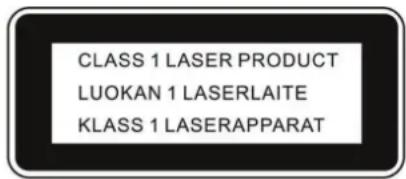
This Compact Disc player is classified as a Class 1 LASER PRODUCT. THE CLASS 1 LASER PRODUCT label is located on the rear exterior.
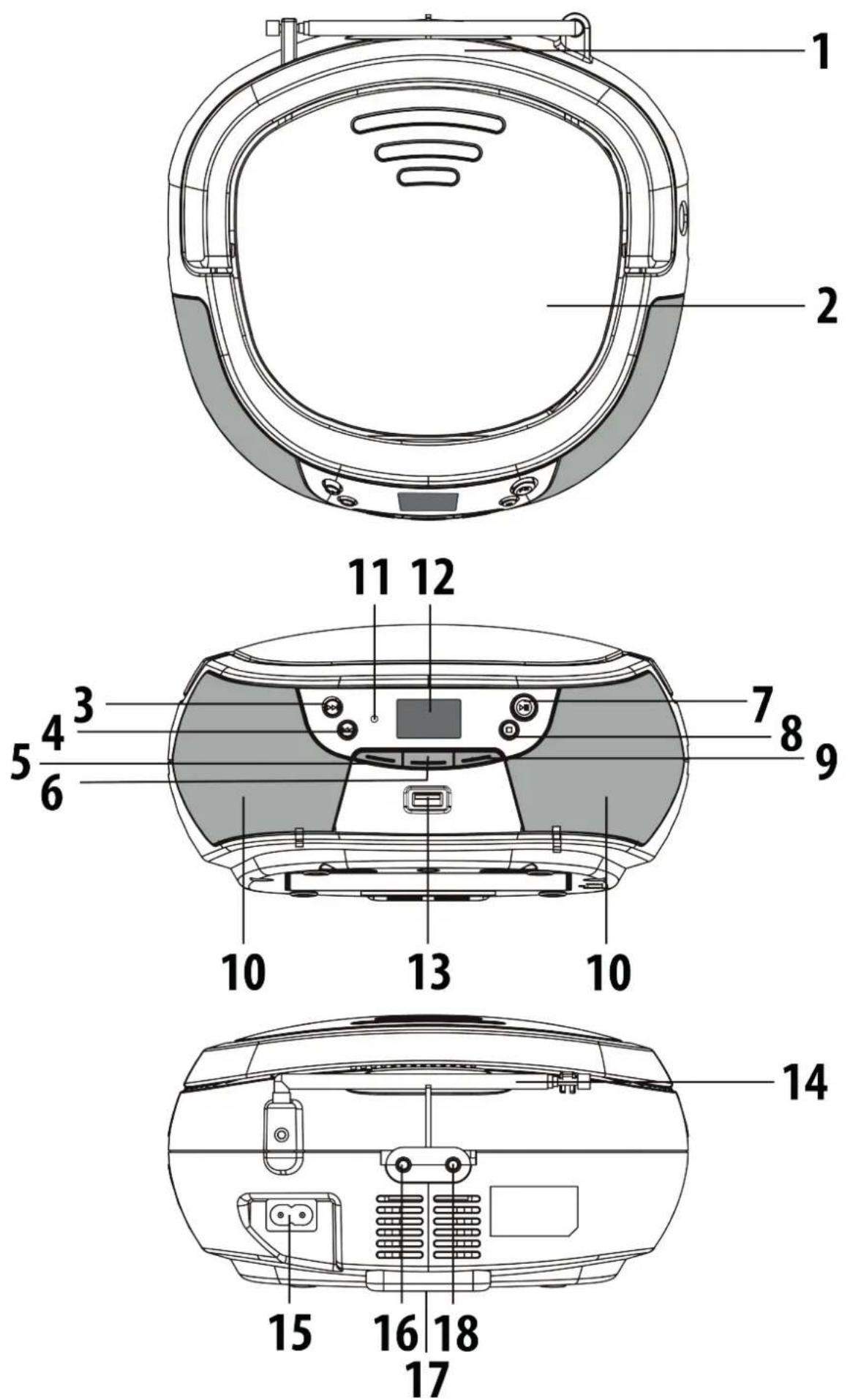
-
HANDLE
-
CD COMPARTMENT
-
▶ / TUN+ / FOL.+ BUTTON
-
/ TUN- / +10 BUTTON
-
VOL-BUTTON
-
/SOURCE BUTTON
-
▶ / P-MODE / SCAN / M.+ / PAIR BUTTON
-
/MEM. / PROG BUTTON
-
VOL+ BUTTON
-
SPEAKERS
-
STB INDICATOR
-
LCD DISPLAY
-
USB PORT
-
FM TELESCOPIC ANTENNA
-
AC SOCKET
-
MIC JACK
-
BATTERY COMPARTMENT
-
AUX IN JACK
GETTING STARTED
CONNECTING POWER
This unit is designed to be operated on AC/DC.
× AC operation
Plug the tail of AC power cord into AC socket on unit and the plug into household AC outlet. The batteries will be automatically disconnected.
× DC operation
Open the battery compartment door. Install 6 pcs UM-2/C size batteries (not included) into compartment. Please follow correct polarities as indicated.
CAUTION: Remove batteries if they are flat or not being used for a long period of time. Batteries contain chemical substances, so they should be disposed of properly.
After connecting the power, press the button to turn the unit ON, press and hold the button to turn the unit OFF.
NOTE: In CD/MP3/USB/AUX/BT mode, when the unit is not providing the main function for 15 minutes, the unit will automatically switch into standby mode.
ESD hints – The product maybe reset or not reset to operation of control due to electrostatic discharge, just switch off and reconnect again.
ADJUSTING VOLUME
Press VOL.+/- button to increase or decrease volume.
RADIO OPERATION
- Press the SOURCE until to select the FM band(this unit is designed for FM ONLY).
- Tune to desired station by press the TUN- or TUN+ on unit, the display will show the band frequency. Example: FM 97.10 MHz.
- Extend FM ANTENNA to its full length and gently move the unit back and forth to get the best reception, or place the unit in an open location.
AUTOMATIC TUNING
Press and hold the ◀/TUN- or ▶/TUN+ to start tuning, Tuning stop automatically when a station is received.
RADIO AUTO SCAN (SEARCH)
Press and hold the SCAN button on unit, the unit will conduct auto scan and program until having found a strong signal. The unit will start to broadcast from the P01 after searching finished.
You may pre-store 30 (FM) radio stations in memory for your preference, so as you can listen to your desired station directly and quickly, no need to tuning and search for again.
-
Press the ◀/TUN- or ▶/TUN+ button to select the first desired station. The press MEM./ PROG button on unit, "P01" will flash and „PROGRAM" will show on the display.
-
Use M.+ button to choose the desired sequence you want to store, then press the MEM./PROG button on unit to enter.
- Search another station, repeat steps (1) & (2) until all desired stations stored. Up to 30 stations can be programmed.
- Press the M.+ to listen to the stored station directly.
BLUETOOTH OPERATION
- Press the SOURCE button to switch to BLUETOOTH function, the LCD will display flashing "bt" at high speed.
- Turn on the Bluetooth function on the device, scan the unit "DECKO PREHRAVAC" and connect, then input the password 0000 if required, the "bt" will show steadily to indicate connection done.
- Press the Button on the unit or play key on the device to start playback.
NOTE: If the unit can't connect the relative Bluetooth within 2 minutes, press and hold the PAIR button on unit to reconnect.
- Press the VOL.+/- buttons to select your desired level.
- Press the ◀/TUN- or ▶/TUN+ on the unit to choose the desired track.
- To interrupt playback, press Button.
- To disconnect the Bluetooth, press and hold the PAIR button.
NOTE: The Bluetooth works best within 10 meters.
USB OPERATION
- Press the SOURCE button to choose USB mode.
- Connect the USB to the USB INPUT. The LCD will show the total number of tracks and folders stored in the USB. After reading the USB, the unit will start playback automatically.
- Press ▶ button to pause and resume playback.
- Press the ■ button to stop playing. The display will show total number of tracks and folders and stop.
- Proceed repeat play (repeat 1- repeat folder - repeat all) /program play/skip up and back operation as the same described in above "CD/MP3 OPERATION".
CAUTION: Do not use any USB extension cable for connecting the USB device to avoid any conflict.
CD/MP3 OPERATION
This system can playback all digital audio CD, MP3, WMA finalized digital audio CD-Recordable (CD-R) discs, finalized digital audio CD-Rewritable (CD-RW) discs and CD-DA format digital audio CD/CD-R/CD-RW discs.
LOADING A DISC
- Press the SOURCE button on until to select "CD" mode.
- Press the PUSH TO OPEN button to open the CD door, "OP" will be shown on the display.
- Place an audio CD DISC into the tray with the front side facing up.
- Close the CD door. The display will show a flashing “---”, then the total number of trackswould be shown and the playback will starts from the first track.
- To remove the CD, press ■ button to turn off the unit, press PUSH TO OPEN button to open CD door, the display will show "OP". Hold the CD by its edges, and carefully take it out.
NOTE: To ensure good system performance; wait until the disc tray completely reads the disc before proceeding. If no disc is loaded into the compartment, or the disc is placed upside down, the display will show „NO DISC“.
PLAYING A DISC
- The unit will start playback from track 1 after reading finished. The “▶” indicator and the current track would be shown on the display.
- To interrupt playback, press the button. The “▶” indicator will flash on the display.
- To resume playback, press the button again.
- To stop playback, press the ■ button, the total number of tracks appear on the display.
SELECTING A DESIRED TRACK/PASSAGE
✗ To select a desired track
Press the ◀/TUN- or ▶/TUN+ button repeatedly in stop mode or during play until the desired track appears on the display. Press the ▶ button to start play.
× To search for a particular passage during playback (track scanning at high speed)
Press and hold ◀/TUN- or ▶/TUN+ the button to scan the current playing track at high speed until desired passage appears, and then release the button. Playback will start again from this point.
✗ To select a song which track number exceeds 10 (for MP3 disc only)
To select a song/track which number exceeds 10, in the stop mode, press and hold the +10 button each time to skip forward/backward 10 tracks, then press the ◀/TUN- or ▶/TUN+ button to select desired track.
× To Select A Desired Folder (for MP3 disc only - if the MP3 disc contains more than one folder)
To skip to the desired folder, in the stop mode press and hold the FOL.+ button for about 2 seconds to skip to next folder.
PROGRAM TRACKS
Programming tracks of disc are possible when playback is stopped. Up to CD 20 tracks / MP3 99 tracks can be stored in the memory in any order.
- In stop mode, press and hold the MEM./PROG button, the "PROGRAM" will flash and the "P01" indicator will be on.
- Press the CD ◀/TUN- or ▶/TUN+ button to select the first desired track to be programmed.
- Press and hold the MEM./PROG button to enter. The display changes to show "P02".
- Repeat steps 2 & 3 to store other desired tracks until all tracks are programmed.
- Press the Button to start playback from the first programmed track.
- Press the Button to stop program playback.
To clear the program, you have two options: Press the ■button when the disc is stopped, or open the CD compartment lid, program will be erased.
REPEAT
You can play one track or all tracks on the disc repeatedly.
✗ To Repeat a Single Track
Press and hold the P-MODE button in play mode, "REPEAT" will flash on the display..
The current track will be played repeatedly until the ■ button is pressed. To cancel Repeat function, press and hold the P-MODE button until the "REPEAT" disappear.
✗ To repeat all the Tracks
Press and hold the P-MODE button in play mode till the "REPEAT" shows steady on the display, all tracks on the disc will be played repeatedly until the ■button is pressed. To cancel Repeat function, press and hold the P-MODE. button until the "REPEAT" disappear.
✗ To repeat the folder (only for MP3 disc which contains more than one folder)
Press and hold the P-MODE button in play mode, till the "REPEAT FOLDER" shows steady on the display, the current folder will be played repeatedly until the ■ button is pressed.
Press and hold the P-MODE button again to cancel.
RANDOM PLAY
Press and hold the P-MODE button in play mode till the "RAM" shows steady on the display, the random play will start from next track automatically(or press CD skip forward button), until all tracks are played over and then stop. Press the P-MODE button once to cancel.
AUX-IN OPERATION
This unit has provided special AUX-IN jack, through this jack other audio sources can be connected to this unit and be amplified.
- Press the SOURCE button to select AUX-IN mode.
- Connect the audio cable into the AUX IN jack and the other end connects to the AUDIO OUT jack of the external audio source.
- Adjust the volume of the main unit to your desired level.
- Press PLAY of the external audio source (eg. MP3 player) to start playback.
This unit provides one 3,5 mm Mic Jack for Karaoke function. Connect 3,5mm microphone to the mic jack, then turn on the microphone. The microphone is available in all modes.
COMPACT DISC MAINTENANCE
- Always use a compact disc bearing the mark as shown.
- Notes on handling discs
Removing the disc from its storage case and loading it. Do not touch the reflective recorded surface. Do not stick paper or write anything on the surface. Do not bend the disc.

- Storage
Store the disc in its case. DO not expose discs to direct sunlight or high temperatures, high humidity or dusty places.
- Cleaning a disc
Should the disc become soiled, wipe off dust, dirt and fingerprints with a soft cloth. The disc should be cleaned from the center to the edge. Never use benzene, thinners, record cleaner fluid or anti-static spray. Be sure to close the CD door, so the lens is not contaminated by dust. Do not touch the lens.
GENERAL
Power Source AC 100 - 240V\~ 50/60 Hz
DC 9 V 1,5 V UM-2/C x 6 pcs
Power consumption 11 Watts
Standby Power Consumption < 0,5 Watts
Weight Approx. 0,9 kg
Dimensions Approx.214 mm (L) x 204 mm (W) x 110 mm (H)
Operation temperature + 5 °C to + 35 °C
RECEIVER SECTION
Receiving Bands FM ST.
Tuning Range FM: 87,5 - 108 MHz
BLUETOOTH SECTION
Bluetooth version V5.0
Reception range 10 meter (line-of-sight distance)
Bluetooth Frequency 2402 – 2480 MHz
EIRP 3,827 dBm
COMPACT DISC SECTION
Optical Pickup 3-Beam Laser
Frequency Response 100 Hz - 16 KHz
AUDIO SECTION
Power output 0,8 Watts x 2 (RMS)
AUX Jack 3,5 mm
MIC Jack 3,5 mm
ACCESSORIES
Instruction Booklet, AC Cord, Microphone
WE RESERVE THE RIGHT TO CHANGE TECHNICAL SPECIFICATIONS.
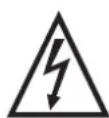
WARNING: DO NOT USE THIS PRODUCT NEAR WATER, IN WET AREAS TO AVOID FIRE OR INJURY OF ELECTRIC CURRENT. ALWAYS TURN OFF THE PRODUCT WHEN YOU DON'T USE IT OR BEFORE A REVISION. THERE AREN'T ANY PARTS IN THIS APPLIANCE WHICH ARE REPARABLE BY CONSUMER. ALWAYS APPEAL TO A QUALIFIED AUTHORIZED SERVICE. THE PRODUCT IS UNDER A DANGEROUS
TENTION.


TO AVOID DANGER OF SUFFOCATION, KEEP THE PLASTIC BAG AWAY FROM BABIES AND CHILDREN. DO NOT USE THIS BAG IN CRIBS, BEDS, CARRIAGES OR PLAYPENS. THIS BAG IS NOT A TOY.
Disposal of old Electrical & Electronic Equipment (Applicable in the European Union and other European countries with separate collection systems).
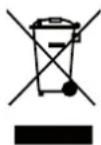
This symbol on the product or on its packaging indicates that this product shall not be treated as household waste. Instead it shall be handed over to the applicable collection point for the recycling of electrical and electronic equipment. By ensuring this product is disposed of correctly, you will help prevent potential negative consequences for the environment and human health, which could otherwise be
caused by inappropriate waste handling of this product. The recycling of materials will help to conserve natural resources. For more detailed information about recycling of this product, please contact your local Civic Office, your household waste disposal service or the shop where you purchased the product.
Hereby, ETA a.s. declares that the radio equipment type DECKOPREHRAVACR, DECKOPREHRAVACB is in compliance with Directive 2014/53/EU. The full text of the EU declaration of conformity is available at the following internet address:
http://www.gogen.cz/declaration_of_conformity
EINLEITUNG
Dimensions Approx.214 mm (L) x 204 mm (W) x 110 mm (H)
Operation temperature + 5 °C to + 35 °C
EMPFÄNGERTEIL
Empfangsbands FM ST.
- ÚVOD
- DÔLEŽITÉ BEZPEČNOSTNÉ POKYNY
- POZOR
- IMPORTANT SAFETY PRECAUTIONS
- CAUTION
- WARNING:
- DANGER
- GETTING STARTED
- CONNECTING POWER
- ADJUSTING VOLUME
- RADIO OPERATION
- AUTOMATIC TUNING
- RADIO AUTO SCAN (SEARCH)
- BLUETOOTH OPERATION
- USB OPERATION
- CD/MP3 OPERATION
- LOADING A DISC
- PLAYING A DISC
- SELECTING A DESIRED TRACK/PASSAGE
- PROGRAM TRACKS
- REPEAT
- RANDOM PLAY
- AUX-IN OPERATION
- COMPACT DISC MAINTENANCE
- GENERAL
- RECEIVER SECTION
- BLUETOOTH SECTION
- COMPACT DISC SECTION
- AUDIO SECTION
- ACCESSORIES
- EINLEITUNG
- EMPFÄNGERTEIL
Brand : GoGen
Model : Déčko přehrávač
Category : Radio