KBCR3886 - Car stereo Kunft - Free user manual and instructions
Find the device manual for free KBCR3886 Kunft in PDF.


| Product Type | Car Stereo (Autoradio) |
| Brand | Kunft |
| Model | KBCR3886 |
| Dimensions (W x H x D) | 178 mm x 50 mm x 98 mm |
| Power Supply Voltage | DC 12V (10-15V negative ground) |
| Output Power | 25W x 4 channels |
| Speaker Impedance | 4 Ω – 8 Ω |
| FM Frequency Range | 87.5 – 108 MHz |
| Bluetooth | Yes, for hands-free calls and music streaming |
| Supported Media | USB drive, SD/MMC/TF card (MP3 format) |
| Audio Inputs | AUX IN (3.5mm), USB, SD card slot |
| Audio Outputs | Front and rear speaker outputs (wired), left/right RCA preouts |
| LCD Display | Yes, with track/time/radio info |
| Equalizer Presets | POP, ROCK, JAZZ, CLASS (in MP3 mode) |
| Clock | 24-hour display, adjustable via volume knob |
| Safety Features | Fuse protection, reverse polarity protection (via correct wiring) |
| Cleaning Instructions | Use a dry soft cloth; do not use water or solvents |
| Warranty | 2 years against manufacturing defects (by Worten) |
| Installation | Professional installation recommended; standard DIN size (single-DIN) |
Frequently Asked Questions - KBCR3886 Kunft
User questions about KBCR3886 Kunft
0 question about this device. Answer the ones you know or ask your own.
Ask a new question about this device
Download the instructions for your Car stereo in PDF format for free! Find your manual KBCR3886 - Kunft and take your electronic device back in hand. On this page are published all the documents necessary for the use of your device. KBCR3886 by Kunft.
USER MANUAL KBCR3886 Kunft
natural_image
Simple line drawing of a rectangular device with a circular button and a screen (no text or symbols)car radio
kunft.®
car radio
KBCR3886
EN
Dear client,
Thank you for purchasing this product.
The quality of this appliance has been certified by several laboratory tests. This instructions manual is provided to simplify the use of the appliance as well as to guarantee a safe use.
Please read carefully the instructions and safety measures described in this manual.
We sincerely hope you will be satisfied when using your new appliance.
INDEX
- SAFETY INSTRUCTIONS .... 4
1.1. Power Supply 5
1.2. Power Cord and Other Cables ...... 6
1.3. Humidity and Water 6
1.4. Cleaning 6
1.5. General Precautions ...... 6
- OPERATING INSTRUCTIONS 8
2.1. Product Description....8
2.2. Product Usage 8
2.3. Troubleshooting 12
- TECHNICAL SPECIFICATIONS .... 13
4 POST-SALE SERVICE 14 - ENVIRONMENTAL PROTECTION 14
2
3
kunft®
1. SAFETY INSTRUCTIONS
| WARNING | ||
| Risk of Electric ShockDo Not Open | ||
| Warning: to avoid the risk of electric shock, do not remove the cover.The interior does not contain any parts that can be repaired by the user.Ask for assistance from the Customer Support Service. | ||
Important Warnings
Before using your appliance read this instructions manual carefully and keep it in a safe place as you may need to consult it in the future.
Before turning on your appliance, and to ensure a safe and correct operation, do not use if:
- It has fallen to the ground;
- You notice any evidence of damage;
- Any anomaly occurs during its operation.
To avoid hazards or deterioration of your appliance through incorrect use it is advisable to read these instructions thoroughly.
Your appliance should not be used for other purposes than the ones intended and solely for household use. Any damage resulting from using the appliance outside this sco-
car radio
KBCR3886
EN
pe, any incorrect use, as well as any manual modifications to the product will not be covered and automatically voids the warranty.
Assistance
In case of malfunction, take your appliance to the Customer Support Service for assistance.
This appliance can be used by children from the age of 8 and by people with reduced physical, sensorial or mental capabilities and/or lack of experience and knowledge if they have been given instructions on using the appliance safely and if they understand the hazards involved. Children may not play with the appliance. Cleaning and maintenance must not be carried out by children without supervision.
These instructions are also available at www.suporteworten.pt
1.1. Power Supply
Make sure the main voltage is compatible with the appliance's. If this is not the case,
kunft®
please consult the Customer Support Service.
1.2. Power Cord and Other Cables
Do not tangle the cord or pull it to disconnect the appliance. Also, keep the cord away from warm surfaces.
Never use the appliance if it has a damaged cable or socket.
Take it to the Customer Support Service for replacement.
1.3. Humidity and Water
Do not use your appliance in humid places. Do not allow the appliance to become wet under any circumstances as this may be dangerous. To avoid fire hazard or electric shock do not expose your appliance to humidity or water. Furthermore, do not place your appliance under water (e.g. for cleaning).
1.4. Cleaning
Before cleaning, be sure to switch off the appliance and remove the plug from the main power supply. Always allow the unit to cool down before cleaning.
To clean the exterior of the product, use a dry soft cloth only.
1.5. General Precautions
- Please follow the instructions in the user manual which will help you to properly ins-
car radio
KBCR3886
EN
tall and operate this product and enjoy its advanced features. Please keep the instructions for future reference.
- Read all instructions before using the product.
- Maintenance and service operations are only to be carried out by authorized professionals.
- Any damage caused by manual modifications to the product is not covered by the warranty.
- If this product is used for other purposes than the ones originally intended, or if it is not correctly connected, the product may become damaged and the warranty will be voided.
kunft®
2. OPERATING INSTRUCTIONS
2.1. Product Description
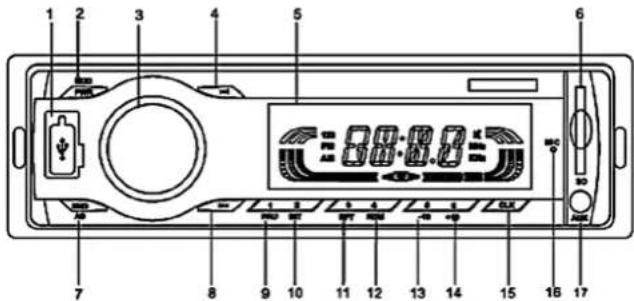
- USB port
- Band/AS 13. 5/-10
- Power / Mode
- Previous 14. 6/+10
- Volume Knob
- 1/Pause 15. Clock
- Next 10. 2/INT 16. MIC
- Display 11. 3/RPT 17. AUXIN
- SD slot 12. 4/RDM
2.2. Product usage
Installation Manual
- Please carefully read the manual before installation.
- Please have professional staff install the unit if possible.
- Do not connect to power cable before other connections are in place.
- To avoid a short circuit, please cover exposed cables with insulating tape.
- Fix all loose cables once the installation has been completed.
- This unit is designed to work with 10V\~15V DC negative ground electrical system only. Please ensure your car meets this requirement.
- Please connect the cables according to the color. Incorrect corrections may lead to damage to the unit and the electrical system of the vehicle.
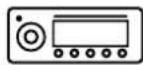
car radio
KBCR3886
EN
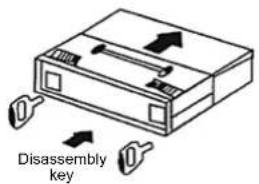
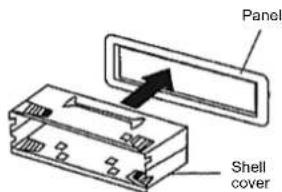
① ②
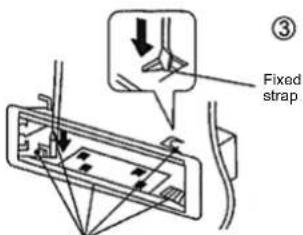
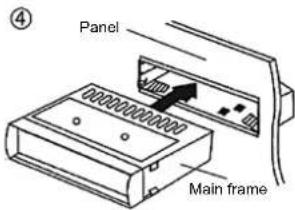
Bend the straps if necessary
Basic operation
1. Power on/off (PWR/MOD key)
Press the PWR/MOD key to turn on; press and hold the PWR/MOD key to turn off.
2. Mode switch (PWR /MOD key)
Insert the U disc or SD/MMC/TF card and press PWR /MOD key to switch between modes as follows:
U disc → SD/MMC/TF card → Radio

Pressing PWR/MOD key is invalid before inserting a U disc or a SD/MMC/TF card.
3. Volume (Volume Knob)
Rotate the volume knob clockwise to increase the volume and counterclockwise to decrease the volume.
4. EQ(EQkey)
In Mp3 mode, press the Volume knob to select one of POP, ROCK, JAZZ, and CLASS in this order.
Radio
1. Band switch (BND/AS)
This device includes only FM1, FM2, and FM3 bands. In radio mode, press the BND/AS key to cyclically switch FM1, FM2 and FM3.
kunft®
car radio
KBCR3886
EN
2. Auto search stations (▶/▶lky)
In radio mode, press the▶▶ or key to automatically search the previous or next stations. If a station is found, the unit will stop searching.
3. Manual search (▶▶key)
In radio mode, press and hold the ▶▶1 key to switch to manual search mode. The device will manually search the previous or next station. When the desired station is close stop holding the key and press either the ▶▶1 key to fine-tune the frequency until you hear your favorite station. If no key is pressed within 5 seconds, the radio will switch to auto search.
4. Auto storage (BND/AS)
In radio mode, long press BND/AS to automatically search channels and store them using keys [1] to [6] under the directory of FM1, FM2 and FM3. Once stored, the radio will play all stored channels in order for 5 seconds. At this point, either long press BND/AS or keys [1] to [6] to select the desired channel.
5. Manual storage (keys 1-6)
In radio mode, press and hold any one of keys 1-6. The current station will be stored.
6. Play the preset stations (keys 1-6)
In radio mode, press any one of keys 1-6 to play the relevant station.
MP3 Player Operation
The MP3 player can read U discs and SD/MMC/TF cards.
In U disc playback mode, the display will show "MP3" or "USB.
In SD/MMC/TF card playback mode, the display will show "MP3" or "SD".
In U disc or SD/MMC/TF card playback mode, the display will also show playback information such as "track number - playback time".
1. Select Single Song (▶▶key)
In MP3 playback mode, press the ▶▶|key◀▶select the next or previous song respectively.
2. FB/FF (▶▶key)
In MP3 playback mode, press and hold the ▶▶key to fast backward or forward.
3. -/+10 (5/-10, 6/+10 key)
In MP3 mode, press 5/-10 or 6/+10 to select the previous 10 songs or the next 10 songs.
4. Pause (1/PAU key)
In MP3 playback mode, press 1/PAU key to pause. The "track number" will flash on the display; press 1/PAU key again to resume playback.
5. INT (2/INT key)
In MP3 mode, press 2/INT key to browse songs (play the first 10 seconds of each song). The "track number" will flash on the display; press 2/INT key again to resume playback.
6. Repeat (3/RPT key)
In MP3 mode, press 3/RPT key to repeat play, "RPT" will show up on the display; press 3/RPT key again to cancel the repeat of play.
7. Random (4/RDM)
In MP3 mode, press 4/RDM key to start random playback. "RDM" will be shown on the display; press 4/RDM key again to cancel random playback.
Bluetooth Function
1. Connect the Phone to the Unit
Place your phone near the unit and switch on your Bluetooth. Search for "CAR-BT". Once found click on it, enter the password if necessary (0000) and connect.
2. Talk directly via Bluetooth
To Make Calls
Once the unit and the phone are connected via Bluetooth, you can make calls directly from the unit.
To Answer Phone Calls:
The unit will ring when there is an incoming call. Press BND/AS to answer the call or you can answer it directly on your phone.
To Hang Up:
Press the "MOD" button to hang up the call or hang up on the phone directly.
3. Playing Music Via Bluetooth
Once the phone and unit are connected via Bluetooth, press the "MOD" key to change the mode to "BT". Enter the music player on your phone and the music will play through the unit.
Clock Operation
1. Clock display
In MP3 playback mode, press the CLK key, the display will show the clock instead of MP3 playback information. Press the CLK key again or the display will switch back to the MP3 playback information if there is no further input within 5 seconds. The clock is a 24-hour clock.
2. Clock adjustment
When the unit is powered ON, continually press the CLK key until the display shows the "hour" information (blinking) instead of MP3 playback information, and then rotate the Volume Knob to adjust the hour. Short press CLK again until the display shows the "Minute"
kunft.®
information (blinking) and then rotate the Volume Knob to adjust the minutes. The unit will display MP3 playback information if no operation is performed within 5 seconds.
Others
AUX IN
Press the PWR/MOD key to switch to AUX IN status, press the PWR/MOD key again to resume.
Connector direction
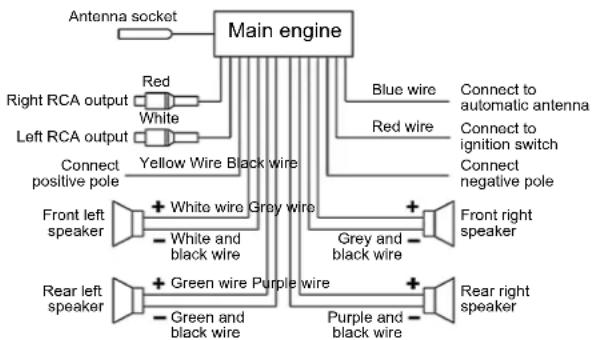
flowchart
graph TD
    A["Main engine"] --> B["Antenna socket"]
    A --> C["Right RCA output"]
    A --> D["Left RCA output"]
    A --> E["Connect positive pole"]
    A --> F["Front left speaker"]
    A --> G["Rear left speaker"]
    A --> H["White and black wire"]
    A --> I["Blue wire"]
    A --> J["Red wire"]
    A --> K["Grey and black wire"]
    A --> L["Purple and black wire"]
    A --> M["Connect to automatic antenna"]
    A --> N["Connect to ignition switch"]
    A --> O["Connect negative pole"]
    A --> P["Front right speaker"]
    A --> Q["Rear right speaker"]
    A --> R["Green wire Purple wire"]
    A --> S["White and black wire"]
Connection diagram of 12V
2.3. Troubleshooting
Fault Reasons Solutions
| Power is off 1. Power supply is not correctly connected.2. Fuse is broken or power wire is open. | Correctly connect power supply.Check fuse or power wire. | |
| No display on LCD | 1. Yellow wire is not connected with positive pole.2. Broken yellow wire fuse. | Ensure the yellow wire is connected with positive pole. Replace the yellow wire fuse. |
| No sound 1. No power supply.2. Speaker wire in open circuit.3. No compatible music in the SD/MMC card or U-disk.4. The SD/MMC card contacts or the U-disk is dirty. | Replace power supply.Check speaker wires.Check the storage of SD/MMC card or U-disk.Clean it with ethyl alcohol. | |
car radio
KBCR3886
EN
| Low sound or not clear | 1. Power resistance is high.2. Antenna is not well connected. | Replace the battery.Tighten the antenna plug. |
| Mono 1. One channel of the speaker wire is open circuit.2. The amplifier circuit is broken. | Check and connect speaker wire.Replace circuit. | |
Note: Technical data is subject to change without prior notice.
3. TECHNICAL SPECIFICATIONS
FM
| Frequency range | 87.5Hz - 108MHz |
| Maximum sensitivity | ≤37dBf |
| Signal to noise ratio | ≥40dB |
| Stereo separation | ≥20dB |
MP3
| Supported format | MP3 |
| Supported memory | U disk, SD/MMC/TF card |
| Frequency response | (100Hz ~ 10 KHz) ±8dB |
| Signal to noise ratio | ≥50dB |
| Channel separation | ≥30dB |
| Voltage harmonic distortion (1 kHz) | ≤5% |
| Playback Stereo channels balance | ≤3dB |
| General | |
| Voltage | DC 12V |
| Output power | 25W*4 |
| Speaker impedance | 4Ω ~ 8Ω |
| Main frame dimensions | 178mm (W) x 50mm (H) x 98mm (D) |
kunft®
autorradio
KBCR3886
ES
4 POST-SALE SERVICE
KUNFT has designed this appliance in order to guarantee maximum reliability. However, if a problem occurs do not attempt to open the appliance - there is a risk of electrical shock. If you are not able to solve the problem, please contact the Customer Support Service of any Worten, Modelo or Continente store in order to be assisted. Worten Equipamentos para o Lar provides a 2-year warranty for manufacturing defects from the date of purchase of the appliance.
WARNING: any attempt to repair the appliance without contacting the manufacturer or seller will void the warranty.
All users must be familiar with these instructions. Knowing what could go wrong can help prevent problems from occurring.
5. ENVIRONMENTAL PROTECTION
In order to protect the environment, we strive to reduce the volume of packaging used, limiting it to three easily sorted materials: cardboard, paper and plastic.

The appliance is manufactured using recyclable materials after disassembled by a specialized company. Please comply with local regulations concerning the recycling of all materials.
Estimado cliente:
Worten hereby declares that this equipment (CAR RADIO BLUETOOTH KUNFT
KBCR3886) is in compliance with Directive 2014/53/EU of the European Parliament
and of the Council of 16 April 2014. The full declaration is available at the following Internet address: www.suporteworten.pt
kunft.®
autorradio
KBCR3886
ES
natural_image
Simple line drawing of a rectangular device with a circular button and a screen (no text or symbols)car radio
is perfectly enough
KBCR3886
Imported, produced and distributed by:
- INDEX
- kunft®
- SAFETY INSTRUCTIONS
- Important Warnings
- Assistance
- Power Supply
- Power Cord and Other Cables
- Humidity and Water
- Cleaning
- General Precautions
- OPERATING INSTRUCTIONS
- Product Description
- Product usage
- Installation Manual
- Basic operation
- Power on/off (PWR/MOD key)
- Mode switch (PWR /MOD key)
- Volume (Volume Knob)
- EQ(EQkey)
- Radio
- Band switch (BND/AS)
- car radio
- Auto search stations (▶/▶lky)
- Manual search (▶▶key)
- Auto storage (BND/AS)
- Manual storage (keys 1-6)
- Play the preset stations (keys 1-6)
- MP3 Player Operation
- Select Single Song (▶▶key)
- FB/FF (▶▶key)
- -/+10 (5/-10, 6/+10 key)
- Pause (1/PAU key)
- INT (2/INT key)
- Repeat (3/RPT key)
- Random (4/RDM)
- Bluetooth Function
- Connect the Phone to the Unit
- Talk directly via Bluetooth
- To Make Calls
- To Answer Phone Calls:
- To Hang Up:
- Playing Music Via Bluetooth
- Clock Operation
- Clock display
- Clock adjustment
- kunft.®
- Others
- AUX IN
- Troubleshooting
- TECHNICAL SPECIFICATIONS
- POST-SALE SERVICE
- ENVIRONMENTAL PROTECTION
Brand : Kunft
Model : KBCR3886
Category : Car stereo