KCR3885 - Car radio Kunft - Free user manual and instructions
Find the device manual for free KCR3885 Kunft in PDF.


| Product Type | Car Stereo |
| Brand | Kunft |
| Model | KCR3885 |
| Dimensions (W x H x D) | 178 x 50 x 160 mm (1 DIN) |
| Weight | 0.8 kg |
| Power Supply | 12V DC (vehicle) |
| Maximum Power Output | 4 x 50 Watts |
| Tuner Bands | AM / FM |
| Preset Stations | 30 FM, 30 AM |
| RDS (Radio Data System) | Yes |
| CD Player | Yes (CD, CD-R, CD-RW, MP3) |
| USB Input | Yes (MP3, WMA playback) |
| AUX Input | Yes (front 3.5 mm) |
| Bluetooth | Yes (hands-free calling & audio streaming) |
| Display | LCD with adjustable illumination |
| Equalizer | Preset EQ modes (Rock, Pop, Classic, etc.) |
| Front Panel | Detachable (security feature) |
| Steering Wheel Control Ready | Yes (requires adapter) |
| Remote Control | Included |
| Supported Audio Formats | CD-Audio, MP3, WMA |
| Installation | Standard DIN, fits most vehicles |
| What's in the Box | Stereo unit, wiring harness, mounting sleeve, trim ring, remote control, manual |
Frequently Asked Questions - KCR3885 Kunft
User questions about KCR3885 Kunft
0 question about this device. Answer the ones you know or ask your own.
Ask a new question about this device
Download the instructions for your Car radio in PDF format for free! Find your manual KCR3885 - Kunft and take your electronic device back in hand. On this page are published all the documents necessary for the use of your device. KCR3885 by Kunft.
USER MANUAL KCR3885 Kunft
Thank you for purchasing this product.
The quality of this appliance has been certified by several laboratory tests. This instructions manual is provided to simplify the use of the appliance as well as to guarantee a safe use.
Please read carefully the instructions and safety measures described in this manual.
We sincerely hope you will be satisfied when using your new appliance.
INDEX
- SAFETY INSTRUCTIONS 4
1.1. Power Supply 5
1.2. Power Cord and Other Cables 6
1.3. Humidity and Water 6
1.4. Cleaning 6
1.5. General Precautions ...... 6
- OPERATING INSTRUCTIONS 8
2.1. Panel Description 8
2.2. Panel Functions 8
2.3. Radio Functions 8
2.4. MP3 Player Functions 9
2.5. Clock 9
2.6. Connection 10
2.7. Installation 10
- TROUBLESHOOTING .....11
- TECHNICAL SPECIFICATIONS ...... 12
- POST-SALE SERVICE 13
- ENVIRONMENTAL PROTECTION .... 13
2
3
kunft®
1. SAFETY INSTRUCTIONS
| WARNING | ||
| Risk of Electric ShockDo Not Open | ||
| Warning: to avoid the risk of electric shock, do not remove the cover.The interior does not contain any parts that can be repaired by the user.Ask for assistance from the Customer Support Service. | ||
Important Warnings
Before using your appliance read this instructions manual carefully and keep it in a safe place as you may need to consult it in the future.
Before turning on your appliance, and to ensure a safe and correct operation, do not use if:
- It has fallen to the ground;
- You notice any evidence of damage;
- Any anomaly occurs during its operation.
To avoid hazards or deterioration of your appliance through incorrect use it is advisable to read these instructions thoroughly.
Your appliance should not be used for other purposes than the ones intended and solely for household use. Any damage resulting from using the appliance outside this sco-
car radio
KCR3885
EN
pe, any incorrect use, as well as any manual modifications to the product will not be covered and automatically voids the warranty.
Assistance
In case of malfunction, take your appliance to the Customer Support Service for assistance.
This appliance can be used by children from the age of 8 and by people with reduced physical, sensorial or mental capabilities and/or lack of experience and knowledge if they have been given instructions on using the appliance safely and if they understand the hazards involved. Children may not play with the appliance. Cleaning and maintenance must not be carried out by children without supervision.
These instructions are also available at www.suporteworten.pt
1.1. Power Supply
Make sure the main voltage is compatible with the appliance's. If this is not the case,
kunft®
please consult the Customer Support Service.
1.2. Power Cord and Other Cables
Do not tangle the cord or pull it to disconnect the appliance. Also, keep the cord away from warm surfaces.
Never use the appliance if it has a damaged cable or socket.
Take it to the Customer Support Service for replacement.
1.3. Humidity and Water
Do not use your appliance in humid places. Do not allow the appliance to become wet under any circumstances as this may be dangerous. To avoid fire hazard or electric shock do not expose your appliance to humidity or water. Furthermore, do not place your appliance under water (e.g. for cleaning).
1.4. Cleaning
Before cleaning, be sure to switch off the appliance and remove the plug from the main power supply. Always allow the unit to cool down before cleaning.
To clean the exterior of the product, use a dry soft cloth only.
1.5. General Precautions
- Please follow the instructions in the user manual which will help you to properly ins-
car radio
KCR3885
EN
tall and operate this product and enjoy its advanced features. Please keep the instructions for future reference..
- Read all instructions before using the product.
- Maintenance and service operations are only to be carried out by authorized professionals.
- Any damage caused by manual modifications to the product is not covered by the warranty.
- If this product is used for other purposes than the ones originally intended, or if it is not correctly connected, the product may become damaged and the warranty will be voided.
kunft.
2. UTILIZATION AND FUNCTIONING
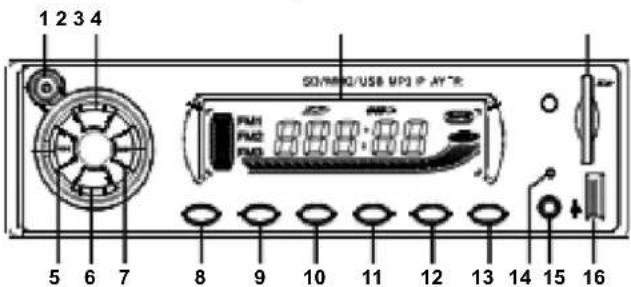
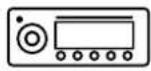
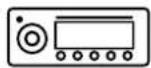
2.1. Panel Description
-
Power/Mode
-
Previous
-
Mute
-
CH +
-
Volume +
-
Volume -
-
Clock
-
Reset
-
Display
-
Next
-
BND/AS
-
AUX
-
SD Card
-
Pause
-
CH -
-
USB
2.2. Panel Functions
1. Power on/off (⏻)
Short press to turn on; in standby status, long press to turn off. In standby status, short press, the selection sequence is as follows: RADIO → USB DISC → SD/MMC/TF Card → AUX → RADIO.
2. Volume (VOL)
Short press VOL+/VOL- to adjust the volume.
3. RST
Note: In standby status, short press MUT to mute, the display will flash and show VOL 00, short press again to resume.
2.3. Radio Functions
1. BAND Switching (B/AS)
The unit has only FM1, FM2, FM3 bands, in radio status, press B/AS to cyclic switch FM1, FM2 and FM3.
2. Auto search channels (▶)
In radio status, short press ▶ or ◀ to automatically search the previous or next channel. If channel is found, the unit will stop searching and play the current channel.
car radio
KCR3885
EN
3. Play the stored channel (CH-/CH+)
In radio status, short press CH- or CH+ to play the previous or next channel which was stored in FM1, FM2 and FM3.
4. Manual search (▶)
In radio status, long press ▶ to switch to manual search and manually search the previous or next channel. When it is near your desired channel, stop searching and short press ▶ to adjust the frequency until you reach the desired channel. The mode will be switched to auto search if there isn't operation within 5 seconds.
5. Auto storage (B/AS)
In radio status, long press B/AS to automatically search channels and store the channels FM1, FM2 and FM3. When storage completed, the unit will play every channel for 5 seconds, then short press B/AS to choose the channel you want.
2.4. MP3 Player Functions
1. Single (▶) ◀◀
In MP3 status, short press ▶ to select the next or previous song.
2. FF/FR (▶)
In MP3 status, long press ▶ar to fast forward/reverse.
3. Pause (PAU)
In MP3 status, short press PAU to pause, the screen will flash display "PAUSE", short press PAU again to resume.
4. +/-10 (CH+/CH-)
In MP3 status, short press CH+ or CH- to select the next 10 songs or the previous 10 songs.
2.5. Clock
1. Clock display
In MP3 or radio status, short press CLK, the screen will display "CLK" instead of MP3 or radio. Short press CLK again or no operation within 5 seconds to enable MP3 or Radio. The clock is 24-hour clock.
2. Clock adjustment
In standby status, long press CLK, the screen will display "hour" point and blink instead of MP3 or radio, and then rotate VOL to adjust hour. Short press CLK again, the screen will display "Minute" point and blink, and then rotate VOL to adjust minute. Long press CLK again or no operation within 5 seconds to enable MP3 or radio.
kunft®
car radio
KCR3885
EN
2.6. Connection 3. TROUBLESHOOTING
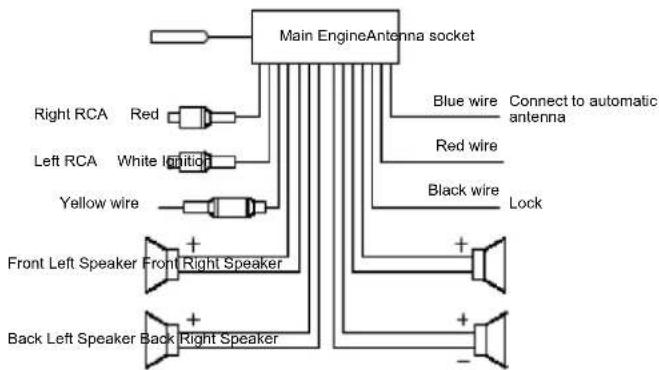
flowchart
graph TD
    A["Main EngineAntenna socket"] --> B["Blue wire"]
    A --> C["Red wire"]
    A --> D["Black wire"]
    B --> E["Connect to automatic antenna"]
    C --> F["White ignition"]
    D --> G["Lock"]
    H["Right RCA Red"] --> I["White ignition"]
    J["Left RCA White ignition"] --> K["White ignition"]
    L["Yellow wire"] --> M["White ignition"]
    N["Front Left Speaker Front Right Speaker"] --> O["Back Left Speaker Back Right Speaker"]
    P["Back Left Speaker Back Right Speaker"] --> Q["Back Left Speaker Back Right Speaker"]
2.7. Installation
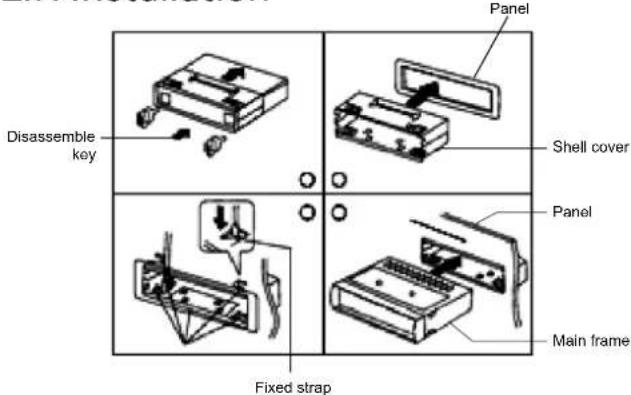
Note: Bend the straps if necessary.
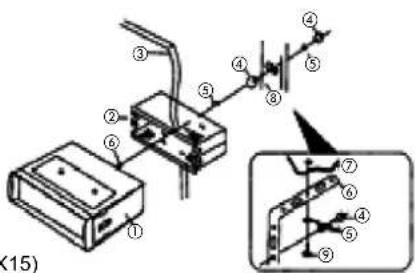
Installation Steps
- Main frame
- Shell cover
- Panel
- Nut
- Dome sheet
- Hex Bolt (HW5X15)
- Partition
- Metal tube
- Tapping screw (BA5X15)
| Problem Possible Cause Solution | ||
| Power is off | 1. Power supply is not correctly connected.2. Fuse is broken or power wire is open. | Correctly connect power supply.Check fuse or power wire. |
| No display on LCD | 1. Yellow wire is not connected with positive pole.2. Fuse of yellow wire is broken. | Yellow wire must be connected with positive pole.Replace yellow wire fuse. |
| No sound | 1. No power supply.2. Speaker wire is open circuit.3. No relevant music in the SD/MMC/TF card or USB-disc.4. Goldfinger of SD/MMC/TF card or USB-disc is dirty and is not well connected. | Replace power supply. Check speaker wires.Check the storage of SD/MMC/ TF card or U-disc.Clean it with ethyl alcohol. |
| Low sound or not clear | 1. Power resistance is high.2. Antenna is not well connected. | Replace battery.Tighten the antenna plug. |
| Mono | 1. One channel of speaker wire is open circuit. | Check and connect speaker wire.Replace circuit. |
kunft®
4. TECHNICAL SPECIFICATIONS
Radio:
FM
Frequency range: 87.5Hz \~ 108MHz.
Maximum sensitivity: ≤37dBF.
Signal to noise ratio: ≥40dB.
Stereo separation: ≥20.
MP3:
Supported format: MP3.
Supported memory: USB disc/SD/MMC/TF.
Frequency response: (100Hz\~10 kHz) ±8dB.
Signal to noise ratio: ≥45dB.
Channel separation: ≥45dB.
General:
Voltage: DC 12V.
Output power: 7WX4.
Speaker impedance: 4Ω-8Ω
Dimension of main frame: 178mm (W) x 50mm (H) x 120mm (D).
car radio
KCR3885
EN
5. POST-SALE SERVICE
KUNFT has designed this appliance in order to guarantee maximum reliability. However, if a problem occurs do not attempt to open the appliance - there is a risk of electrical shock. If you are not able to solve the problem, please contact the Customer Support Service of any Worten, Modelo or Continente store in order to be assisted. Worten Equipamentos para o Lar provides a 2-year warranty for manufacturing defects from the date of purchase of the appliance.
WARNING: any attempt to repair the appliance without contacting the manufacturer or seller will void the warranty.
All users must be familiar with these instructions. Knowing what could go wrong can help prevent problems from occurring.
6. ENVIRONMENTAL PROTECTION
In order to protect the environment, we strive to reduce the volume of packaging used, limiting it to three easily sorted materials: cardboard, paper and plastic.
The appliance is manufactured using recyclable materials after disassembled by a specialized company. Please comply with local regulations concerning the recycling of all materials.
Worten hereby declares that this equipment (CAR RADIO KUNFT KCR3885)
is in compliance with Directive 2014/53/EU of the European Parliament and of the Council
of 16 April 2014. The full declaration is available at the following Internet address:
www.suporteworten.pt
kunft.®
autoradio
KCR3885
ES
Estimado cliente:
178mm (W) x 50mm (H) x 120mm (D).
kunft®
autorrádio
KCR3885
PT
5. SERVICIO POSVENTA
autorrádio
KCR3885
PT
178mm (W) x 50mm (H) x 120mm (D).
5. SERVIÇO PÓS-VENDA
Imported, produced and distributed by:
- INDEX
- kunft®
- SAFETY INSTRUCTIONS
- Important Warnings
- Assistance
- Power Supply
- Power Cord and Other Cables
- Humidity and Water
- Cleaning
- General Precautions
- UTILIZATION AND FUNCTIONING
- Panel Description
- Panel Functions
- Power on/off (⏻)
- Volume (VOL)
- RST
- Radio Functions
- BAND Switching (B/AS)
- Auto search channels (▶)
- Play the stored channel (CH-/CH+)
- Manual search (▶)
- Auto storage (B/AS)
- MP3 Player Functions
- Single (▶) ◀◀
- FF/FR (▶)
- Pause (PAU)
- +/-10 (CH+/CH-)
- Clock
- Clock display
- Clock adjustment
- Connection 3. TROUBLESHOOTING
- Installation
- Installation Steps
- TECHNICAL SPECIFICATIONS
- Radio:
- MP3:
- General:
- POST-SALE SERVICE
- ENVIRONMENTAL PROTECTION
- SERVICIO POSVENTA
- SERVIÇO PÓS-VENDA
Brand : Kunft
Model : KCR3885
Category : Car radio