
LIFE E60032 (MD 82840) - Mp3 player MEDION - Free user manual and instructions
Find the device manual for free LIFE E60032 (MD 82840) MEDION in PDF.


| Product Type | MP3 & WMA Player |
| Brand | Medion |
| Model | LIFE E60032 (MD 82840) |
| Memory Capacity | 4 GB internal flash |
| Supported Formats | MP3 (up to 128 kbps), WMA (up to 64 kbps) |
| Dimensions (W x H x D) | Approx. 29 x 44 x 12.5 mm |
| Weight | Approx. 25 g (estimated) |
| Battery Type | Rechargeable lithium-ion, 3.7 V, 100 mAh |
| Battery Life | Up to 4 hours of music playback |
| Charging Time | Approx. 2 hours via USB |
| Interface | USB 2.0 (Full Speed) |
| Audio Output | 3.5 mm stereo headphone jack |
| Playback Controls | Play/Pause, Previous/Next Track, Volume +/-, Fast Forward/Rewind |
| Additional Features | Clip for attachment, Red/Green LED indicators, On/Off switch, Standby mode |
| System Requirements | Windows 7, Vista, XP; USB 2.0 port; Windows Media Player 10+ |
| Operating Temperature | 5 °C to 40 °C |
| Maintenance | Clean with a dry cloth; avoid moisture and direct sunlight |
| Safety Notes | Do not disassemble; avoid high volume to prevent hearing damage; use only supplied accessories |
| Spare Parts / Repairability | No user-serviceable parts; contact authorized service partners |
| Included Accessories | Stereo earphones, USB cable, user manual, warranty documents |
| Warranty | See www.medion.co.uk/service |
Frequently Asked Questions - LIFE E60032 (MD 82840) MEDION
User questions about LIFE E60032 (MD 82840) MEDION
0 question about this device. Answer the ones you know or ask your own.
Ask a new question about this device
Download the instructions for your Mp3 player in PDF format for free! Find your manual LIFE E60032 (MD 82840) - MEDION and take your electronic device back in hand. On this page are published all the documents necessary for the use of your device. LIFE E60032 (MD 82840) by MEDION.
USER MANUAL LIFE E60032 (MD 82840) MEDION
Design Clip MP3 Player
MEDION® LIFE® E60032 (MD 82840)
MEDION®
natural_image
Silver audio player with playback control knob (no visible text or symbols on device body)Inhalt
Geräteübersicht 2
Über dieses Gerät 4
2
Bringing the device into operation.... 11
Exchanging data with the computer 13
Operation 18
Technical Data 20
Disposal 22
Conditions of Warranty 23
© 2010, All rights reserved. The copyright is the property of the MEDION® Company. Trade marks: All the trade marks used here are the property of their respective owner; technical and visual, and printing errors reserved.
Device Overview
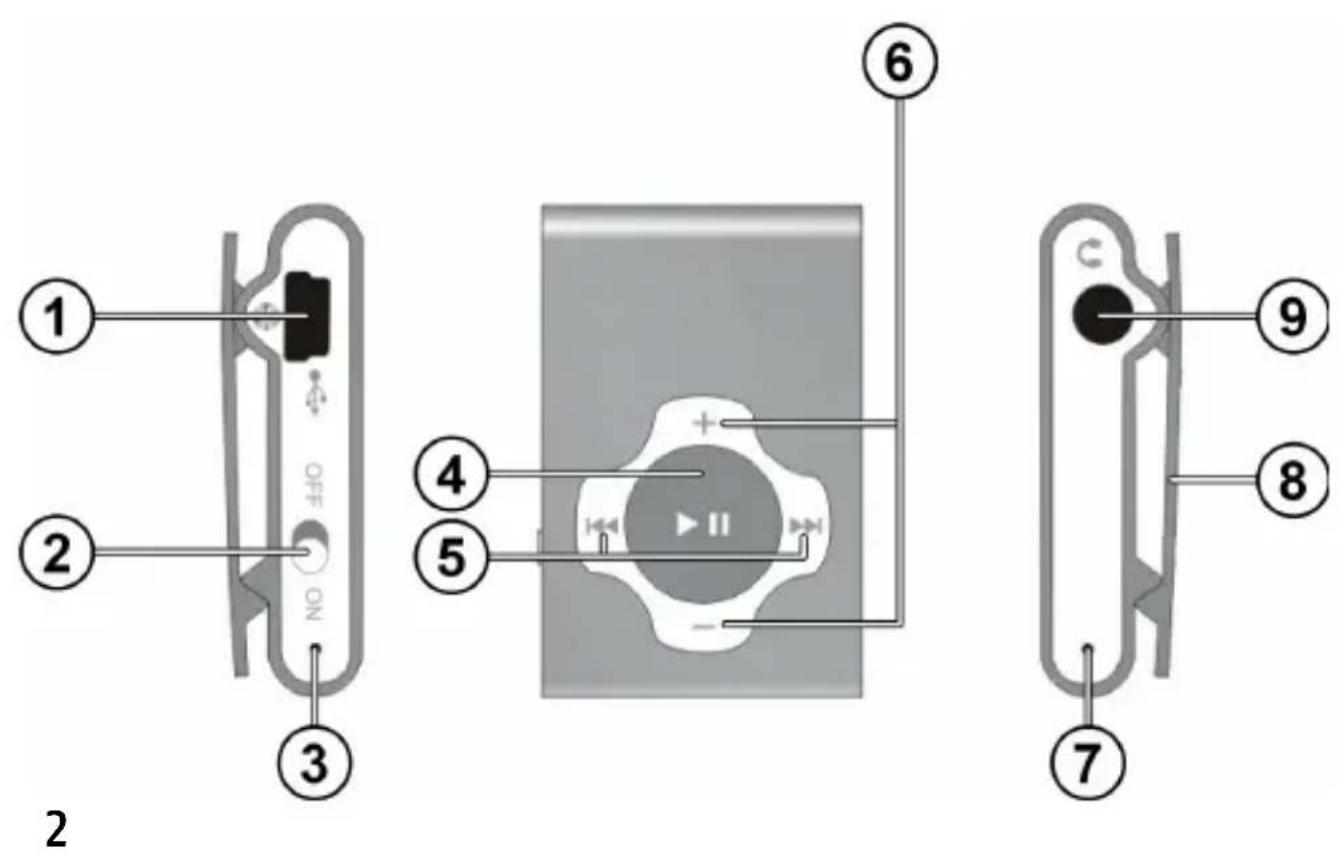
- USB connection
- On/off switch
- Red LED
- Play (Replay) / Pause
- Previous/next track, backwards/forwards search
- Volume -/+
- Green LED
- Attachment clip
- 3.5 mm earphones connection

About this device
Scope of supply
Please check the completeness of the supply and inform us within 14 days if it is not complete. You will have received the following with the packet that you have acquired:
- MP3 player
- Stereo earphones
- USB cable
• These Operating Instructions
• Guarantee documents
4
System Requirements
These requirements must be fulfilled if you want to connect your device to a PC.
- PC with a free 2.0 USB interface, from Pentium P III (PIV recommended) and 1 GB free hard drive space.
- Operating system and software:
- Windows 7, Windows Vista or Windows® XP,
- Windows Media Player 10 or higher.

Safety Information

Please read this Chapter and the whole Instructions carefully and follow all the notes cited there. You will guarantee the reliable operation and a long useful life of your MP player in this way.
Always keep these Operating Instructions close to your device and keep them well, in order to be able to pass them on to a new owner.
Please contact our authorized Service Partners exclusively, if you have problems with the device.
Correct use
This device serves to replay MP3 and WMA audio files that have previously been transferred to the internal memory of the
device through a USB cable. This device is intended exclusively for private use and not for commercial purposes.
Operating safety
- Follow the Instructions for Use of devices that you connect to the MP3 player.
- Avoid vibrations, dust, heat and direct solar radiation, in order to avoid malfunctions. The operating temperature is 5 to 40 °C.
- Never open the casing. This would end any guarantee claim and possibly lead to the destruction of the device.
- This device is not intended to be used by persons with restricted physical, sensory or intellectual abilities or a lack of experience and/or knowledge (including children), unless they are supervised by a person responsible for their safety or have received instructions how the device should

be used from such a person. Children should be supervised to ensure that they do not play with the device.
- Wait until the device has reached the ambient temperature after a transportation. Condensation can cause the formation of moisture, which can result in an electric short-circuit, can arise in the case of wide fluctuations in temperature or moisture.
- Do not place any objects on the device or exert any pressure on the device.
- Only use the USB cable supplied with the device.
- The device is only intended for connection to computers with terminal protection (Limited Power Source in the sense of EN60950).
- Lay the cable so that no-one can step on it or trip over it.
- Do not place any objects on the cable, because it could be damaged in that case.
Do not use the device in the following situations:
• While you are driving a vehicle;
• While you are walking on a road;
- Any situation or environment that requires concentration and attention.

You must not operate the device under extremely dry conditions to avoid static charges. Malfunctions of the device can arise under conditions with an electrostatic charge. It will be necessary to switch the device off and then on again in this case.
Electricity supply
Your MP3 player is equipped with a re-chargeable lithium battery that you can charge at your PC through the USB cable supplied with the device.
Data security
The assertion of claims for compensation for the loss of data and consequential damage is excluded. Make back-up copies on external storage media (e.g. CD-R) after each update of your data.
Electromagnetic compatibility
The guidelines for Electromagnetic Compatibility (EMC) must be observed in the case of the connection. Keep the device away from high-frequency sources of interference (TV device, loudspeakers, mobile phones, etc.), to avoid malfunctions and the loss of data.
Bringing the device into operation
Charging the lithium battery

Switch the MP3 player on before charging the battery, by setting the on/off button to ON.

The high-performance lithium battery should be charged before bringing the device into operation for the first time. The recharging lasts approx. 2 hours. The charging time will increase if you transfer data to the device during the charging process.
▶ Switch the computer on
- Connect the USB cable supplied with the device to the USB connection of the device.
▶ Push the other end of the USB cable into a USB port of the computer. Both LEDs will shine during the charging process.
The charging process will have finished if the green LED has gone out and only the red LED is shining.

Charge the battery when the performance declines (green LED will flash slowly) or if you are not going to use the MP3 player for a longer period (more than 2 months).
Connecting the earphones
Stereo earphones accompany the device.
Push the stereo phono jack of the earphones into the earphones connection. You can also connect a cable (not in the scope of the supply) at this connection to connect your stereo equipment.
Attention!

Excess sound pressure during the use of earphones and headphones can to lead to hearing damage and/or the loss of hearing. Set the volume to the lowest level before the replay.
Only use the earphones supplied with your device.
▶ Start the replay and increase the volume to the level that is comfortable for you.
Exchanging data with the computer

The MP3 player does not contain any data in the status at supply. You will have to copy files from a computer.

Attention!
Make back-up copies on external storage media after each updating of your data. The assertion of claims for compensation for data loss and consequential damage arising from it is excluded.
Connection to the computer
▶ Pull the earphones out of the connection socket, if necessary.
▶ Make sure that the MP3 player is switched on and connect the smaller connector of the cable supplied with the device to the USB connection of the MP3 player.
- Push the other end of the USB cable into a free USB connection of your computer.
The computer will recognize that a new device has been connected and will allocate a drive letter to the MP3 player.
Copying files from the computer to the MP3 player
Copy protection
Only such works in the case of which you are the originator or where you have been granted corresponding rights of use by the originator or the holder of the respective rights may be copied. The danger that the entitled parties will proceed against the potential crime and assert their claims, if you breach these rights. Please pay attention to the legal regulations when using music in the MP3/WMA format. You will receive information about this at the GEMA office responsible for your region or under www.gema.de on the Internet. Please contact the corresponding institutions that are responsible for the rights of artists and of the sound industry if you are using the MP3 device outside Germany.

Please pay attention to the fact that a small part of the memory must be kept free for the system. It will not be possible to switch the MP3 player on correctly otherwise.
Do not break the connection during the data transfer.
▶ Copy audio files in the MP3 and/or the WMA format from the computer to the drive of the MP3 player. You will also be able to copy directories with the files.
You will be able to transfer unprotected files to the MP3 player by Drag & Drop as familiar with Windows® Explorer. Protected files must be transferred with the associated licence.
▶ You will be able to break the contact to the computer when the data transfer has finished.
Transferring files to the computer from the MP3 player
Connect the MP3 player to the computer as described above.
☐ You will be able to replay the files directly on the computer by means of Media Player.
☐ You can also use Media Player to copy audio files to the computer. Alternatively, you can copy files from the drive of the MP3 player to the computer with Windows® Explorer.
Operation
You will be able to attach the MP3 player at your belt or at a jacket or trouser pocket by means of the clip on the back of the device.
Switching the device on and off
- Push the on/off switch to the ON position, to switch on the MP3 player. The replay will start automatically. The red LED will shine; the green LED will flash.
- Push the on/off switch to the OFF position, to switch off the MP3 player.
▶ Hold the Replay, Pause button▶ II pressed down, to switch the MP3 player to Standby. The green LED will go out and the red LED will continue to shine in the Standby mode.
▶ Press Replay, Pause button ▶ II to interrupt the replay. Both LEDs will light up in the Pause mode.
▶ Hold the Replay, Pause button ▶ II pressed down to switch the MP3 player back to the Replay mode.

Switch off the MP3 player with the on/off button, in order to save the battery charge.

Button functions
| Button | Function |
| ▶ II | Start the replay; interrupt the replay |
| ▶▶ | Select the next track; press down to start fast forward |
| ◀◀ | Select the start of the track, or the previous track; press down to start fast rewind |
| —/+ | Reduce the volume / raise the volume |
Technical Data
Description of the device/Model: MP3 player/MD 82840
Memory capacity: 4 GB
Interface: USB 2.0 (full speed)
Earphones connection: 3.5 mm stereo jack
Dimensions: Approx. 29 x 44 x 12.5 mm (WxHxD)
Storage capacity*: Up to 64 hours of music in the MP3
format (128 Kbps)
Up to 128 hours of music in the WMA format (64 Kbps)
* The battery life, the memory capacity and the number of tracks that can be stored will vary, depending on the operating behaviour, the bit rates and other factors.
Battery
(internally consumed): Rechargeable high-performance lithium battery; 3.7 V, 100 mAh
Running time*: Up to 4 hours playing time
Input: 5 V (through USB interface)


Technical and visual changes, and printing errors reserved.
* The battery life, the memory capacity and the number of tracks that can be stored will vary, depending on the operating behaviour, the bit rates and other factors.
Disposal
Packaging

Packaging and packing resources no longer needed can be recycled and should be supplied for recycling in principle.
Device
Do not throw the device into the normal domestic waste under any circumstances. Find out about the possibilities of an environmentally-friendly, proper disposal at your town or communal administration.
Duplication of these Operating Instructions
This document contains legally protected information. All rights reserved. Duplication in mechanical, electronic and any other form is forbidden without the written authorization of the manufacturer.
Conditions of Warranty
Complete conditions of warranty are available under www.medion.co/uk/service.

Inhoud
Interface: USB 2.0 (Full Speed)
Oordopjesaansluiting: 3,5mm stereoklink
Afmetingen: ca. 29 x 44 x 12,5mm (BxHxD)
120 Faraday Park, Faraday Road, Dorcan
Swindon SN3 5JF, Wiltshire
United Kingdom
Hotline: 0871 37 61 020
(costs 7p/min from a BT landline,
calls from mobiles could be higher)
Fax: 01793 71 57 16
To contact us by email please visit
the 'Service and Support' section
of our website at www.medion.co.uk
www.medion.co.uk