
OPC 210CD - Cassette player OK - Free user manual and instructions
Find the device manual for free OPC 210CD OK in PDF.


| Product Type | Portable Cassette Player with CD |
| Brand | OK |
| Model | OPC 210CD |
| Dimensions (approx.) | 280 x 180 x 120 mm |
| Weight (approx.) | 1.2 kg |
| Power Supply | AC 220-240V, 50 Hz or 6 x C batteries (not included) |
| Cassette Mechanism | Auto-stop, play/pause, fast forward, rewind, stop/eject |
| CD Player | Compatible with CD, CD-R/RW, supports MP3 playback |
| Audio Output | Built-in stereo speakers, 2 x 2W RMS |
| Headphone Jack | 3.5 mm stereo |
| Playback Functions | Play, pause, next/previous track, repeat, shuffle |
| Recording | From CD to cassette, built-in microphone |
| Antenna | Built-in FM antenna (if radio is included, assume yes) |
| Display | LCD screen for track/function info |
| Controls | Buttons for all functions, volume wheel, tone control |
| Connectivity | Aux-in (3.5 mm), RCA output (optional) |
| Belt Material | Rubber (for cassette drive) |
| Maintenance | Clean tape heads with isopropyl alcohol; dust with soft cloth |
| Repairability | Access to belt and head via screw removal; spare parts available online |
| Safety | Do not expose to water; allow ventilation; keep away from magnetic sources |
Frequently Asked Questions - OPC 210CD OK
User questions about OPC 210CD OK
0 question about this device. Answer the ones you know or ask your own.
Ask a new question about this device
Download the instructions for your Cassette player in PDF format for free! Find your manual OPC 210CD - OK and take your electronic device back in hand. On this page are published all the documents necessary for the use of your device. OPC 210CD by OK.
USER MANUAL OPC 210CD OK
IM_CPC21000_J61027_v00
www.oh-film.com

morton GmbH | Wankalaabe 9 150-43 Ingelbach, Germany

ok.
OPC 210CD
TRAGBARER CD-SPIELER // PORTABLE CD PLAYER // REPRODUCTOR DE CD PORTÁTIL // LECTEUR CD PORTATIF
natural_image
Close-up of a black industrial device with dual handles and central hub (no visible text or symbols)DE RESEARCH & CONSULTS
21. 金石汇金汇
USB MANUAL 13
MANUAL DE INSTRUCCIONES 10
SH MODE OPENLOWS
HU PELHASZHALGIKEZKOWYZE
IT VANDALE DBLL UTENESS
MI GEORUKSANMUZING 28
FL INSTRUCIA OSEGUO 43
PT MANUAL DE UTILIZAÇÃO-40
10
TR SULLAMM BILAVUZU 58
CLASS I LASER PRODUCT
natural_image
Three sequential line drawings showing hands holding circular objects, no text or symbols presentTECHNISCHE DATEN
Thanks for your purchase of this ok. product.
IMPORTANT SAFETY INSTRUCTIONS. READ CAREFULLY AND KEEP FOR FUTURE REFERENCE.

The product is not intended for children under 3 years old because following hazards, among others, may be present:
-Electrical shock,
-Choking hazard,
-Strangulation hazard,
-Suffocation hazard.
- Observe all safety instructions to avoid damage through improper use! Follow all safety warnings on the appliance and in this instruction manual.
- Keep this instruction manual for future use. Should this appliance be passed on to a third party, then this instruction manual must be included.
- No liability will be accepted for damage resulting from improper use or non-compliance with these instructions.
- Only use this appliance for its intended use. The appliance is not suitable for commercial use. This appliance is only suitable for indoor and household use.
- Do not attempt to repair the appliance yourself. In case of malfunction, repairs are to be conducted by qualified personnel only.
- Warning! Do not immerse the electrical parts of the appliance in water or other liquids. Never hold the appliance under running water.
- Do not open the appliance casing under any circumstances. Do not insert any foreign objects into the inside of the casing.
- Never use accessories which are not recommended by the manufacturer. They could pose a safety risk to the user and might damage the appliance. Only use original parts and accessories.
- Do not place heavy objects on top of the appliance. Do not place objects with open flames (e.g. candles) on top of or beside the appliance. Do not place objects filled with water (e.g. vases) on or near the appliance.
- Keep the appliance away from any hot surfaces and open flames. Always operate the appliance on a level, stable, clean and dry surface. Protect the appliance against heat and cold, dust, direct sunlight, moisture, dripping and splashing water.
- The appliance is only suitable for use at moderate degrees of latitude. Do not use it in the tropics or in particularly humid climates.
- Attention! In the event of a malfunction as a result of electrostatic discharge and momentary electrical surges, unplug the appliance and plug it in again.
Battery safety advice (not included in delivery)
-
Caution! There is danger of explosion from improper replacement of the battery. Replace battery only with the same or equivalent type of battery.
-
Always exchange the entire set of batteries.
-
Different types of batteries or new and used batteries are not to be mixed.
-
Make sure the battery are correctly inserted. Observe the polarity (+) plus / (-) negative on the battery and the housing. Improperly inserted battery can lead to leakage or, in extreme cases, a fire or an explosion.
-
Remove used batteries. Remove the batteries if you know that the product will not be used for a longer period of time. Otherwise, the batteries could leak and cause damage.
-
Non-rechargeable batteries must not be recharged.
-
Pay attention when using rechargeable batteries:
- Rechargebale batteries are to be removed from the product before being charged.
-
Rechargeable batteries are only to be charged under adult supervision.
-
The connections must not be short-circuited.
-
Remove the batteries from the product before disposal.
-
Never expose batteries to excessive heat (e.g. bright sun, fire), and never throw them into fire. The batteries could explode.
EN
- Keep batteries out of reach of small children. If batteries have been swallowed, seek immediate medical attention.
- If the batteries leak, remove them with a cloth and dispose of them accordingly. Prevent battery acid from coming into contact with skin and eyes. If you do get battery acid in your eyes, flush them thoroughly with lots of water and consult a physician immediately. If battery acid comes into contact with your skin, wash the affected area with lots of water and soap.
Use with an external transformer (not included in delivery)
- An external transformer used with the toy is to be regularly examined for damage to the cord, plug, enclosure and other parts. In the event of such damage, it must not be used until the damage has been repaired.
- The product is to be connected to the external transformer, or supplied by battery. It cannot be powered by battery and transformer at the same time.
- The used external transformer must be a safety isolated transformer for toys.
- Transformers are not toys.
- Warning! Not suitable for children under 36 months. Misuse of transformer can cause electrical shock!

Laser safety
- The information on the compact disc is read by a laser through an optical lens (do not touch). If you take the appliance from a cold to a warm room, moisture may condense on the lens, and the playback may be hampered. In this case leave the appliance for one hour at room temperature before use. Take the disc out of the appliance. Should the problem persist, have the appliance checked by qualified personnel.
Headphones

Warning! Excessive sound pressure from earphones and headphones can cause hearing loss. Ensure that children do not turn the volume too high.
CLASS I LASER PRODUCT
This label on the product informs the user that this is a class 1 laser product containing a laser component.
Do not touch the lens inside the disc compartment.
CAUTION! Use of controls or adjustments of procedures other than those specified herein may result in hazardous radiation exposure.
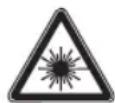
DANGER! Invisible laser radiation when open and safety interlock failed or defeated. Avoid direct exposure to the beam. Do not touch the lens.

CAUTION
RISK OF ELECTRIC SHOCK DO NOT OPEN

WARNING: SHOCK HAZARD - DO NOT OPEN AVIS: RISQUE DE CHOC ÉLECTRIQUE-NE PAS OUVRIR

The lightning flash with arrowhead within an equilateral triangle is intended to alert the user to the presence of uninsulated “dangerous voltage” inside the enclosure of this appliance, which may be of sufficient magnitude to constitute a risk of electric shock to persons and animals.

The exclamation point within an equilateral triangle is intended to alert the user to the presence of important operating and maintenance instructions in the literature accompanying this appliance.
INTENDED USE
This appliance is only intended for audio entertainment and is not intended for children under 3 years. This appliance is only suitable for private household use and it is not designed for commercial purpose. Every other type of use can lead to damage to the appliance or injury.
The Imtron GmbH assumes no liability for damage to the product, for property damage or for personal injury due to careless or improper usage of the product, or usage of product which does not meet the manufacturer's specified purpose.
BEFORE FIRST TIME USE
- Remove all packaging materials.
- Check for completeness and transport damage. In case of damages or incomplete delivery please contact your dealer.
• Clean the appliance (→ Cleaning and care). - Important! Before first use, remove the protective sheet from the disc compartment.
EN
18
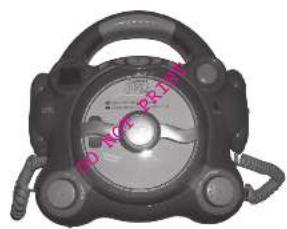
COMPONENTS
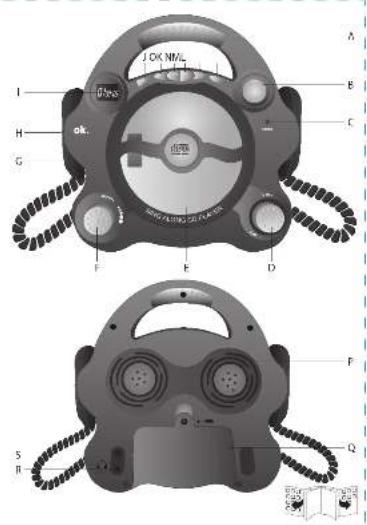
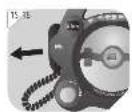
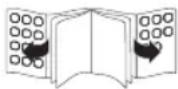
Fold out front and rear page for product illustrations.
Front:
A. Handle
B. Open CD door button (OPEN)
C. POWER indicator
D. On/off, volume control (OFF./-VOL+)
E. CD compartment door
F. Microphone volume control (MIC VOL)
G. Microphone (one on each side of the appliance)
H. Microphone on/off switch (for each microphone)
I. Display
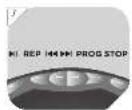
J. Play/Pause CD playback ▶
K. Repeat button (REP)
L. Skip to previous track Press and hold: Fast reverse
M. Skip to next track ▶▶▶ Press and hold: Fast forward
N. Program button (PROG)
O. Stop playback (STOP)
Back:
P. Loudspeaker
Q. Battery compartment
R. Headphone socket (PHONE)
S. Power socket for external transformer

POWER SUPPLY
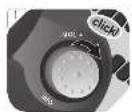
1 Switch the appliance off by rotating the OFF./-VOL+ control in a counter-clockwise direction until a click sound is heard. Only then connect/disconnect the adaptor's power cable or remove/install batteries.
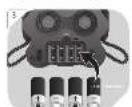
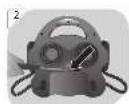
2 Remove the battery compartment cover with a Phillips screwdriver.
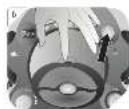
3 Insert 4 batteries (type C / LR14, 1.5 V = - , not included) in the battery compartment. Match the polarities + and -, as indicated on the batteries. Close the battery compartment cover.
or
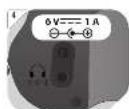
4 Connect a suitable power adaptor (not included, see Technical data) to the power socket. Connect the adaptor plug to a suitable electrical outlet.
CD PLAYBACK
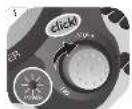
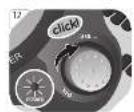
5 Switching on: Rotate the OFF./-VOL+ control in a clockwise direction. The POWER indicator lights up. The music volume can be adjusted anytime using this control.
6 Open CD compartment door: Press the OPEN Button. Insert a CD with label facing towards you. Close the CD compartment door.
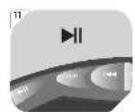
7 1. Start or pause playback: Press ▶II. In pause mode, track number will flash on the display.
-
Stop playback: Press STOP. In stop mode, total number of tracks will flash on the display.
-
Skip to next track: Press ▶▶. Press and hold to fast forward.
-
Skip to previous track: Press ▶. Press and hold to fast reverse.
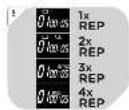
8 During playback: Press REP repeatedly to switch the playback modes:
Press Result
1x 1: Repeat one track
2x All: Repeat all tracks
3x INTRO: Only the first 10 seconds of each song are played.
4x Random (RND): The songs of the CD are played randomly.
5x Normal playback
PROGRAM
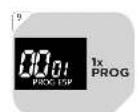
9 Up to 20 tracks can be programmed in a desired sequence.
In stop mode, press the PROG button. 00 and 01 are flashing. The first numeric cluster shows the track of the CD, the second numeric cluster is the track no. of the playlist. The order of track no. is fixed (1, 2, ... 20).
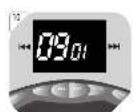
10 Select the desired track with the ◀◀/▶▶! buttons. Confirm selected track by pressing the PROG button again. As example shown is the 9. track of the CD saved as first (01) track in playlist. 00 is flashing and playlist display shows 02. Select additional tracks with the ◀◀ buttons and confirm with PROG. Repeat this procedure until you have saved all desired tracks in desired order. Playback can be started anytime after any number of tracks was saved, by pushing Play button▶. The playlist covers max. 20 tracks. After 20, the playlist displays starts at 01 again.
11 Start program: Press
MICROPHONE
12 Switching on: Rotate the OFF./-VOL+ control in a clockwise direction. The POWER indicator lights up.
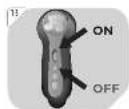
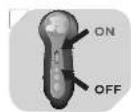
13 Switching on microphone(s): Push the switch up.
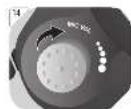
14 Adjusting microphone volume: Rotate the MIC VOL control to the desired volume.
15 Pull one or both of the microphones from their holders and start speaking/singing.
Notes:
• Do not hold the microphone too close to your mouth to achieve a clear sound.
- Pointing the microphone towards the appliance or towards each other will lead to sound distortions.
16 Switching off microphone(s): Pull the switch down.
SING-ALONG FUNCTION
17 Switching on: Rotate the OFF./-VOL+ control in a clockwise direction. The POWER indicator lights up.
18 Open CD compartment door: Press the OPEN Button. Insert a CD with label facing towards you. Close the CD compartment door.
19 Start playback: Press
20 Switching on microphone(s): Push the switch up.
21 Adjusting microphone volume: Rotate the MIC VOL control to the desired volume. Pull one or both of the microphones from their holders and start speaking/singing to the music of the CD.
22 Stop playback: Press STOP.
23 Switching off microphone(s): Pull the switch down.
CONNECTING HEADPHONES
24 Connect headphones with a 3.5 mm plug to the PHONE socket. The loudspeakers are muted whilst the headphones are connected to the appliance.
EN
20
COMPATIBLE CDs
• This appliance reads CD and CD-R discs. Other discs are not supported.
- When playing CD-R discs the playback quality might be influenced by the quality of the burned disc. When burning CD-R disks with audio files we recommend using the slowest burning speed.
CLEANING AND CARE
- WARNING! Before cleaning, always switch off the appliance and remove the batteries. If an external power adaptor is used, disconnect the plug from power.
• Never immerse the appliance in water or other liquids. - Clean the appliance with a soft, slightly damp cloth. Make sure that no moisture is entering the appliance during cleaning.
- Never use corrosive detergents, wire brushes, abrasive scourers, metal or sharp implements to clean your appliance.
• Dry the appliance thoroughly after cleaning.
• Store the appliance in a cool, dry location.
CD MAINTENANCE
- Small amount of dust or scratches will usually not have an impact on the quality of a disc. The discs should, however, be treated with care.
- Protect your compact discs from dust and scratches.
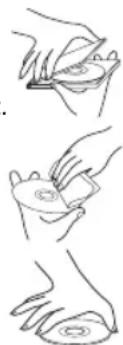
• Store your compact discs in their covers when not in use. - To maintain the original quality of sound, you should occasionally wipe your compact discs with a soft cloth, from the centre to the edge (not with circular movements). Never use gasoline or other solvents for cleaning.
• Only hold a compact disc by its edges!
natural_image
Three-step line drawing showing hand positioning of a circular object on a surface (no text or symbols)SPECIFICATIONS
Power supply: Batteries: 4 x 1.5 V
= - = (type C / LR14) (not included)
Optional external power supply: 6 V = 1 A ⊖ - ⊙ + (not included in delivery) The used external transformer must be a safety isolated transformer for toys.

Supported sound recordings: CD/CD-R
DISPOSAL
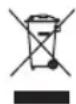
Do not dispose of this appliance as unsorted municipal waste. Return it to a designated collection point for the recycling of WEEE. By doing so, you will help to conserve resources and protect the environment. Contact your retailer or local authorities for more information.

Please dispose of batteries in an environmentally friendly manner Do not put batteries into the household waste. Please use the return and collection systems in your community or contact the dealer where you purchased the product.
- ok.
- CLASS I LASER PRODUCT
- TECHNISCHE DATEN
- IMPORTANT SAFETY INSTRUCTIONS. READ CAREFULLY AND KEEP FOR FUTURE REFERENCE.
- Battery safety advice (not included in delivery)
- EN
- Use with an external transformer (not included in delivery)
- Laser safety
- Headphones
- CAUTION
- INTENDED USE
- BEFORE FIRST TIME USE
- COMPONENTS
- Front:
- Back:
- POWER SUPPLY
- or
- CD PLAYBACK
- Press Result
- PROGRAM
- MICROPHONE
- Notes:
- SING-ALONG FUNCTION
- CONNECTING HEADPHONES
- COMPATIBLE CDs
- CLEANING AND CARE
- CD MAINTENANCE
- SPECIFICATIONS
- DISPOSAL
Brand : OK
Model : OPC 210CD
Category : Cassette player