ManualGo.com
KD-S641 - Car stereo JVC - Free user manual and instructions
Find the device manual for free KD-S641 JVC in PDF.


Download the instructions for your Car stereo in PDF format for free! Find your manual KD-S641 - JVC and take your electronic device back in hand. On this page are published all the documents necessary for the use of your device. KD-S641 by JVC.
USER MANUAL KD-S641 JVC
2.CAUTION: Invisible laser radiation when open and CLASS 1 interlock failed or defeated. Avoid direct exposure to beam 3.CAUTION: Do not open the top cover. There are no user-serviceable parts inside. Leave all servicing to qualified service personnel. Name/Rating plate LASER PRODUCT Caution: : 4.CAUTION: This CD player uses invisible laser radiation This product contains a laser component and is equipped with safety switches to prevent of higher laser class than Class 1 radiation emission when unloading CDs. It is dangerous to defeat the safety switches. 5.CAUTION: Use of controls, adjustments or performance of procedures other than those specified herein may result in hazardous radiation exposure. How to reset your unit Press and hold both the SEL (select) and G/1/ATT (standby/on/attenuator) buttons at the same time for several seconds. This will reset the built-in microcomputer. — d/1HATT (standby/on/attenuator) SEL (select) Notes: + Your preset adjustments—such as preset channels or sound adjustments—will also be erased. + fa CD is in the unit, it will éject when you reset the unit. Be careful not 10 drop the CD. 2 10/9/02, 1:42 PM ENO2-04KD-SG41[E_EXJ.p65 A
Thank you for purchasing a JVC product. Please read all instructions carefully before operation, to ensure your complete understanding and to obtain the best possible performance from the unit. CONTENTS How to reset your unit … How to use the MODE button .
LOCATION OF THE BUTTONS
Control panel . BASIC OPERATIONS Turning on the power . Setting the clock RADIO OPERATIONS Listening to the radio Storing stations in memory Tuning in to a preset station . CD OPERATIONS .11 Playing a CD. Locating a track or a particular portion on a CD 12 Selecting CD playback modes Prohibiting CD ejection . SOUND ADJUSTMENTS Adjusting the sound … Turning on/off the loudness function Using the sound control memory (SCM).. 15 Storing your own sound adjustments …
OTHER MAIN FUNCTIONS
we 10 HRPr 12 RN0 PKPPEPE To use these buttons as number buttons agai If you press MODE, the unit goes into functions mode and the number buttons work as different without pressing any number button until the functions mode is cleared. + Pressing MODE again also clears the functions mode. CT" on ( MORIN ) (RLAUALE Time countdown in after pressing MODE, wait for 5 seconds Note: the units chassis. Keep the card in a safe place, as it For security reasons, a numbered ID card is provided with this unit, and the same ID number is imprinted on will help the authorities 10 identify your unit if stolen BEFORE USE *For safety... + Do not raise the volume level to0 much, as this will block outside sounds, making driving dangerous. + Stop the car before performing any complicated operations. ”] | ENO2-04KD-S6411E_EXJ.p65 3
- Temperature inside the car... If you have parked the car for a long time in hot or cold weather, wait until the temperature in the car becomes normal before operating the unit. 10/2/02, 1:42 PM ENGLISH
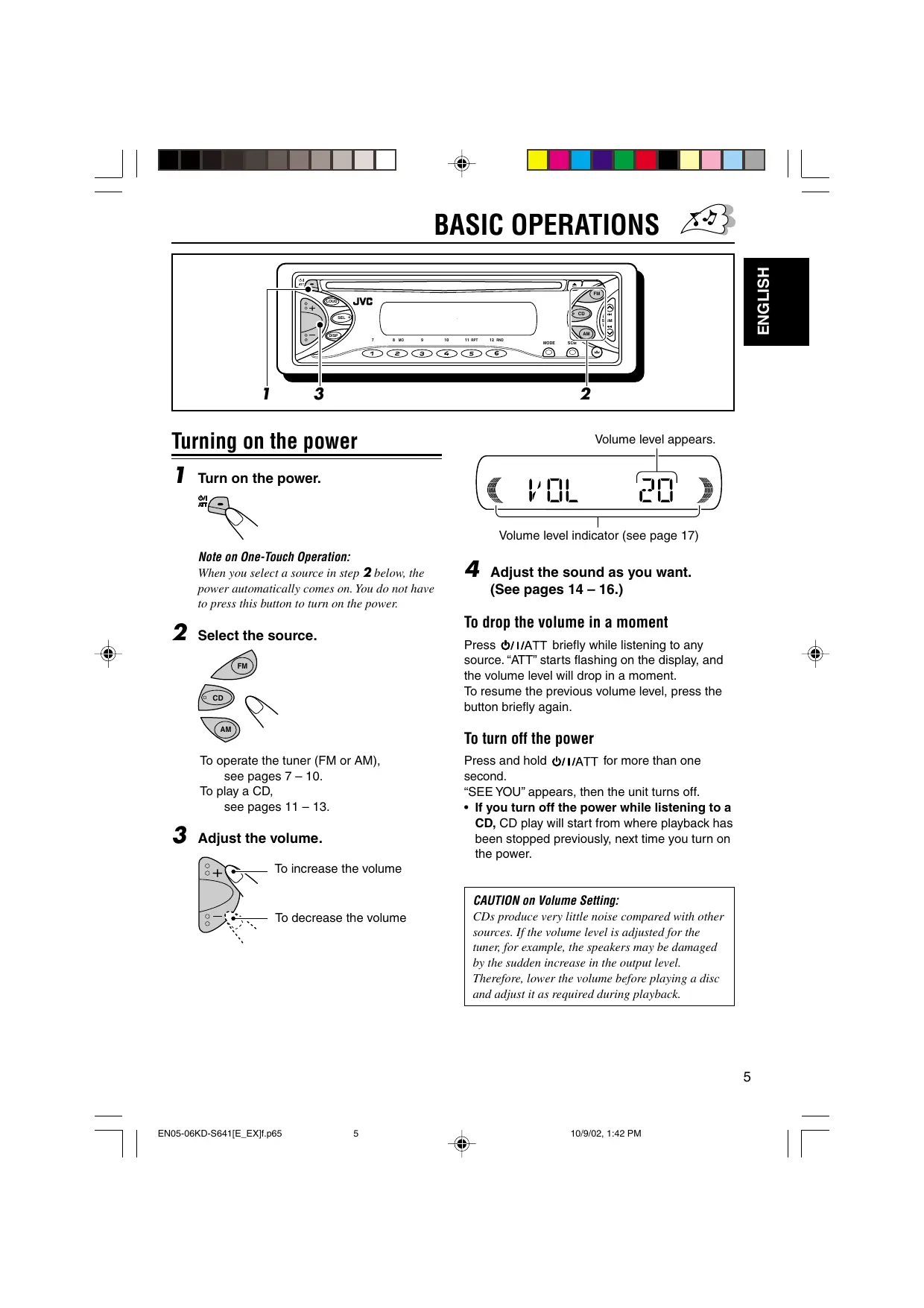
Turning on the power Volume level appears. T rumonthe power.
Note on One-Touch Operation: When you select a source in step 2 below, the power automatically comes on. You do not have 10 press this button to turn on the power 2 Selectthe source. ® À © Ÿ To operate the tuner (FM or AM), see pages 7 — 10. To play a CD, see pages 11-18. 3 Adijust the volume. 2 To increase the volume
To decrease the volume ”] | ENOS-06KD-S6411E_EXI.p65 s Volume level indicator (see page 17) 4 Adjust the sound as you want. (See pages 14 - 16.) To drop the volume in a moment Press &/1/ATT briefly while listening to any source. “ATT” starts flashing on the display, and the volume level will drop in a moment. To resume the previous volume level, press the button briefly again To turn off the power Press and hold G/I/ATT for more than one second. “SEE YOU" appears, then the unit turns off. + If you turn off the power while listening to a CD, CD play will start from where playback has been stopped previously, next time you turn on the power. CAUTION on Volume Setting: CDs produce very litile noise compared with other sources. If the volume level is adjusted for the tuner for example, the speakers may be damaged by the sudden increase in the output level. Therefore, lower the volume before playing a disc and adjust it as required during playback. 10/2/02, 1:42 PM ENGLISH
or] Setting the clock 1 Adjust the minute. T Press and hold SEL (select) for more than 2 seconds. “CLOCK H}“CLOCK M; “SCM LINK} or “LEVEL appears on the display. GO 4 Finish the setting. 2 Setthe hour. [1] Select “CLOCK H” (hour) if not shown on Co) the display. To check the current clock time or change the CLOCKH <> display mode ; Press DISP (display) repeatediy. + Each time you press the button, the display mode . changes as follows [2] Adjust the hour. + During tuner operation: Frequency <— Clock + During CD operation: Elapsed playing time <— Clock 3 Set the minute. [1] Select “CLOCK M” (minute). + During power off: The power turns on and the clock time is <æ CLOCKM shown for 5 seconds, then the power turns ; ! off.
ENGLISH Listening to the radio You can use either automatic searching or manual searching to tune in to a particular station. Searching a station automatically: Auto search T Select the band (FM1- 3, AM).
® N FM —-FM2—-FM3 NO Le Lights up when receiving an FM stereo broadcast with sufficient signal Selected band appears. £ strength. leur al (€ 415 3) Note: This receiver has three FM bands (FMI, FM2, FM3). You can use any one of them to listen 10 an FM broadcast ”] | ENO7-10KD-S6411E_EXI.p65 7 To search stations of lower frequencies When a station is received, searching stops. To stop searching before a station is received, press the same button you have ® pressed for searching AL 10/9/02, 1:43 PM
Searching a station manually: + If you release your finger from the button, ED Manual search the manual mode will automatically turns Ses off after 5 seconds. © + If you hold down the button, the frequency £ T Select the band (FM1 - 3, AM). keeps changing (in 50 kHz intervals for FM and 9 kHz intervals for AM—MW/LW) until À you release the button. FA —>FM2—>FMS When an FM stereo broadcast is hard to No) am receive: a x 1 Press MODE to enter the functions mode while listening Note: to an FM stereo broadcast. This receiver has three FM bands (FMI, FM2, ou FM3). You can use any one of them to listen 10 2 Press MO (monaural), while an FM broadcast. still in the functions mode, so that the MO indicator lights up 2 Press and hold À »»1 or 44 V oi me ceplar w until “M” (manual) starts flashing on ach time you press ne the dis; ( ) ul button, the MO indicator lights Play. up and goes off alternately. CT: nn & € MORT Y Co) L TILIN } When the MO indicator is lit on the display, the Fu sound you hear becomes monaural but the ( € fn 3 M F ) reception will be improved. 3 Tune in to a station you want while “M” (manual) is flashing. 2— To tune in to stations of higher frequencies ù L To tune in to stations of lower frequencies
Storing stations in memory You can use one of the following two methods to store broadcasting stations in memory. + Automatic preset of FM stations: SSM (Strong- station Sequential Memory) + Manual preset of both FM and AM stations FM station automatic preset: SSM You can preset 6 local FM stations in each FM band (FM1, FM2, and FM3). T Select the FM band (FM1 — 3) you want to store FM stations into. FM —-FM2—-FM3 2 Press and hold both buttons for more than 2 seconds.
M. à. APR ES “_-SSM- -" appears, then disappears when automatic preset is over. Local FM stations with the strongest signals are searched and stored automatically in the band number you have selected (FM1, FM2, or FM3). These stations are preset in the number buttons—No.1 (lowest frequency) to No.6 {highest frequency). When automatic preset is over, the station stored in number button 1 will be automatically tuned in. ”] | ENO7-10KD-S6411E_EXI.p65 9 Manual preset You can preset up to 6 stations in each band {FM1, FM2, FMS, and AM) manually. Ex: Storing FM station of 88.3 MHz into the preset number 1 of the FM1 band. T Select the band (FM1 - 3, AM) you want to store stations into (in this example, FM1).
2 Tune in to a station (in this example, of 88.3 MHz). frequencies frequencies &— To tune in to stations of higher à L To tune in to stations of lower (€ 883
3 Press and hold the number button (in this example, 1) for more than 2 seconds.
“P1” flashes for a few seconds. ENGLISH 4 Repeat the above procedure to store other stations into other preset numbers. Notes: + A previously preset station is erased when a new station is stored in the same preset number + Preset stations are erased when the power supply to the memory circuit is interrupted (for example, during battery replacement). If this occurs, preset the stations again.
Tuning in to a preset station You can easily tune in to a preset station. Remember that you must store stations first. If you have not stored them yet, see “Storing stations in memory” on pages 9 and 10. T1 Select the band (FM1 —3, AM).
È FM1—FM2—FM3 Ne” 2 Select the number (1 — 6) for the preset station you want. D ® © © © ©
Playing a CD Insert a CD into the loading slot. The unit turns on, draws the CD and starts playback automatically. Note on One-Touch Operation: When a CD is already in the loading slot, pressing CD turns on the unit and starts playback automatically. The CD-in indicator flashes.
COM 4 To phying time of the inserted disc Total track number of the inserted disc
CŒENONT nn 1 y Ru LE! ii 1 7 T T Elapsed playing time Current track All tracks will be played repeatedly until you stop playback. ”] | EN11-13KD-S6411E_EXI.p65 1“ Note: When a CD is inserted upside down, “EJECT” appears on the display and the CD automatically ejects. To stop play and eject the CD Press A. CD play stops and the CD automatically ejects from the loading slot. The source changes to the tuner (you will hear the last received station.) + If you change the source, CD play also stops {without ejecting the CD). Next time you select “CD” as the source, CD play starts from where playback has been stopped previously. Notes: + Ifthe ejected disc is not removed for about 15 seconds, the disc is automatically inserted again into the loading slot to protect it from dust. (CD play will not start this time.) + You can eject the CD even when the unit is turned off About mistracking: Mistracking may result from driving on extremely rough roads. This does not damage the unit and the CD, but will be annoying. We recommend that you stop CD play while driving on such rough rods. 10/16/02, 1:52 PM ENGLISH
Locating a track or a particular portion on a CD To fast-forward or reverse the track 2— Press and hold A »æ»1, while playing a CD, to fast-forward the track. Press and hold #4 V, while playing a CD, to reverse the track. To go to the next tracks or the previous tracks Press A 1 briefly, while playing a CD, to go ahead to the beginning of the next track. Each time you press the button consecutively, the beginning of the next tracks is located and played back. Press #4 V briefly, while playing a CD, to go back to the beginning of the current track. Each time you press the button consecutively, the beginning of the previous tracks is located and played back. To go to a particular track directly 8 mo s 10 AReT 12 an ee © €
Press the number button corresponding to the track number to start its playback. + To select a track number from 1 — 6: Press 1 (7) — 6 (12) briefly. + To select a track number from 7 — 12: Press and hold 1 (7) — 6 (12) for more than one second. Selecting CD playback modes To play back tracks at random (Random Play) You can play back all tracks on the CD at random. ne 1 Press MODE to enter the functions mode while playing a CD. 12 RNo
2 Press RND (random), while still in the functions mode, so that the RND indicator lights up on the display. Each time you press the button, CD random play mode turns on and off alternately. RND indicator CRT } When Random Play is turned on, the RND indicator lights up on the display and a track randomly selected starts playing. 10/9/02, 1:48 PM
CN 1 To play back tracks repeatedly (Repeat Play) You can play back the current track repeatedly. none
1 Press MODE to enter the functions mode while playing a CD. 2 Press RPT (repeat), while still in the functions mode, so that the RPT indicator lights up on the display. Each time you press the button, CD repeat play mode turns on and off alternately. RPT indicator
5, D Track number of the currently playing track € PT ® When Repeat Play is turned on, the RPT. indicator lights up on the display. ”] | EN11-13KD-S6411E_EXI.p65 Prohibiting CD ejection You can prohibit CD ejection and can lock a CD in the loading slot. ENGLISH While pressing CD, press and hold 4 for more than 2 seconds.
“EJECT" flashes on the display for about 5 seconds, and the CD is locked and cannot be ejected. To cancel the prohibition and unlock the CD, press Æ again for more than 2 seconds, while pressing CD. “EJECT" appears on the display, and the CD ejects from the loading slot. The CD-in indicator flashes. 10/2/02, 1:43 PM
| RRNT OT « LE = BEBE
&' SOUND ADJUSTMENTS
= You can adjust the sound characteristics to your g preference. or] T Select the item you want to adjust. Each time you press the à button, the adjustable items change as follows:
(bass) (treble) (fader) VOL <— BAL (volume) (balance) Indication To do: Range BAS Adjust the bass. |-06 (min.) +06 (max.) TRE Adjust the treble._ |-06 (min.) +06 (max.) FAD* Adjust the front | RO6 (Rear only) & and rear speaker | | La balance. F06 (Front only) BAL Adjust the left LO6 (Left only) and right speaker | | balance. RO6 (Right only) VOL Adjust the volume. | 00 (min.) 50 (max.)
- If you are using a wo-speaker system, set the fader level 10 “00.”
CQTRE ED Note: Normally, the + and buttons work as the volume control buttons. So you do not have to select “VOL” 10 adjust the volume level. Turning on/off the loudness function The human ear is less sensitive to low and high frequencies at low volumes. The loudness function can boost these frequencies to produce a well-balanced sound at low volume levels.
Each time you press LOUD, the loudness function turns on and off alternately. DT = 1 CUIT IN LILI LIN
memory (SCM) SCM OFF | (Flat sound) | 00 | 00 | ON = You can select and store a preset sound BEAT |Rockor | +02 | 00 | ON 2 adjustment suitable for each playback source disco music ui (Advanced SCM). SOFT |Quiet +01 | -03 | OFF background Selecting and storing the sound muse modes POP Light music | +04 | +01 | OFF Once you select a sound mode, it is stored in memory, It will be recalled every time you select Recalling the sound modes the same source and will be shown on the display. When “SCM LINK” is set to “LINK ON; A sound mode can be stored for each of the select the source. following sources—FM1, FM2, FM3, AM, and Each time you change the CD. playback source, the SCM + If you do not want to store the sound mode indicator flashes on the separately for each playback source, but want display. to use the same sound mode for all the sources, see “Canceling Advanced SCM— CT SCM LINK” on page 17. Select the sound mode you want. LT & sou Each time you press the & Ÿ button, the sound mode The sound mode stored in memory for the ®Ÿ a changes as follows: selected source is recalled. Notes: [e SOMOR BEAT-> SORT POP] + You can adjust each 1d mode 10 y ference, just each sound mode to your preference, and store it in memory. ME FMI Lun If you want to adjust and store your original sound — mode, see “Storing your own sound adjustments” HEHT om pa + To adjust the bass and treble reinforcement levels or Ex.: When you select “BEAT” 10 turn on/off the loudness function temporarily, see page 14. (Your adjustments will be canceled if + When “SCM LINK" is set to “LINK ON" the another source is selected.) selected sound mode can be stored in memory for the current source and the effect applies only to the current source. + When “SCM LINK" is set to “LINK OFF: the selected sound mode effect applies to any source.
Storing your own sound adjustments You can adjust the sound modes (BEAT, SOFT, POP) to your preference and store your own adjustments in memory. ENGLISH + There is a time limit in doing the following procedure. If the setting is canceled before you finish, start from step 1 again. 1 can up the sound mode you want to adjust. sou + See page 15 for details. SF? Ex.: When you select “SOFT” 2 To adjust the bass or treble level. & [1] Select “BAS” (bass) or “TRE” (treble).
ŒTOC nn] ( K& FE Li Ex.: When you select TRE” (treble) [2] Adjust the level. CQIRE +06) To turn on or off the loudness function. + See page 14 for details.
3 Repeat step 2 to adjust the other items. Æ Press and hold SCM until the sound mode you have selected in step 1 flashes on the display. sou Your adjustment made for the selected sound mode is stored in memory. 5 Repeat the same procedure to store other sound modes. To reset to the factory settings, repeat the same procedure and reassign the preset values listed in the table on page 15. 10/9/02, 1:48 PM
OTHER MAIN FUNCTIONS ‘862
You can select the level display according to your You can cancel the Advanced SCM (Sound Z preference. Control Memory), and unlink the sound modes Wu When shipped from the factory, “VOL 2” is and the playback sources. selected. When shipped from the factory, a different sound + VOL 1: Shows the volume level indicator. mode can be stored in memory for each source + VOL 2: Alternates “VOL 1” setting and so that you can change the sound modes simply illumination display. by changing the sources. + OFF: Erases the volume level indicator. + LINKON: Advanced SCM (different sound modes for different sources.) T Press and hold SEL (select) for more + LINK OFF: Conventional SCM (one sound than 2 seconds. mode for all sources.) “CLOCK H;"“CLOCK M; “SCM LINK; or “LEVEL" appears on the display. 1 Press and hold SEL (select) for more than 2 seconds. E “CLOCK H;"“CLOCK M;"*SCM LINK; or “LEVEL appears on the display. 2 Select “LEVEL” if not shown on the À display. … > 2 Select“SCM LINK” if not shown on n ® | the display. La LEVEL <> <—+ 3 Selectthe desired mode—“VOL 1} ' > SM LINK “VOL 2; or “OFF” 3 Select “LINK OFF” VOL1 <> VOL2 Le or + [> 4 Finish the setting. E 4 Finish the setting. To activate Advanced SCM (Sound Control Memory), repeat the same procedure and press + to select “LINK ON" in step 3.
”] | EN17-18KD-S6411E_EXI.p65 18 Detaching the control panel You can detach the control panel when leaving the car. When detaching or attaching the control panel, be careful not to damage the connectors on the back of the control panel and on the panel holder. Detaching the control panel Before detaching the control panel, be sure to turn off the power. T Unlock the control panel. 2 Lift and pull the control panel out of the unit. 3 Put the detached control panel into the provided case. Attaching the control panel TL insert the left side of the control panel into the groove on the panel holder. 2 Press the right side of the control panel to fix it to the panel holder. Note on cleaning the connectors: If you frequently detach the control panel, the connectors will deteriorate. To minimize this possibility, periodically wipe the comnectors with a coton swab or cloth moistened with alcohol, being careful not to damage the connectors. Connectors 10/9/02, 1:44 PM
What appears to be trouble is not always serious. Check the following points before calling a service
center. ü Symptoms Causes Remedies g —— [MI + Sound cannot be heard The volume level is set to the | Adjust it to the optimum level. from the speakers. minimum level. Connections are incorrect: Check the cords and connections. & |+ This unit does not work at | The built-in microcomputer Press and hold both SEL $ | all may have functioned (select) and &/1/ATT (standby/ S incorrectly due to noise, etc. | on/attenuator) at the same time for several seconds to reset the unit. (The clock setting and preset stations stored in memory are erased.) (See page 2.) + SSM (Strong-station Signals are too weak. Store stations manually. Sequential Memory) 3 automatic preset does not £ | work. + Static noise while listening | The antenna is not connected | Connect the antenna firmly. to the radio firmly. Ÿ + CD automatically ejects. | CDis inserted upside down. | Insert the CD correctiy. Ÿ + CD-R cannot be played CD-R is not finalized. + Insert a finalized CD-R. back + Tracks on the CD-R cannot + Finalize the CD-R with the be skipped. component which you used for recording. + CD can be neither played | CDis locked Unlock the CD (See page 13.) back nor ejected. The CD player may function | Press &/1/ATT (standby/on/ Ÿ incorrectly. attenuator) and 4 at the same £ time for more than 2 seconds. E Be careful not to drop the CD à when it is ejected. © |+ cD soundis sometimes You are driving on rough Stop playback while driving on interrupted roads. rough roads. CDis scratched. Change the CD. Connections are incorrect: Check the cords and connections. + “NO DISC" appears onthe | No CD in the loading slot. Insert a CD into the loading slot. display, CDis inserted incorrectiy. Insert the CD correctiy.
LE = BEBE Handling discs This unit has been designed to reproduce CDs and CD-Rs (Recordable). + This unit is not compatible with MP3 discs. How to handle discs When removing a disc from its case, press down the center holder of the case and lift the disc out, holding it by the edges. + Always hold the disc by the edges. Do not touch its recording surface. When storing a disc into its case, gently insert the disc around the center holder (with the printed surface facing up). + Make sure to store discs into the cases after use. Center holder To keep discs clean A dirty disc may not play correctiy. If a disc does become dirty, wipe it with a soft cloth in a straight line from center to edge. To play new discs New discs may have some rough spots around the inner and outer edges. If such a disc is used, this unit may reject the disc. To remove these rough spots, rub the edges with a pencil or ball-point pen, etc. Moisture condensation Moisture may condense on the lens inside the disc player in the following cases: + After starting the heater in the car. + Ifit becomes very humid inside the car. Should this occur, the CD player may malfunction. In this case, eject the disc and leave the unit turned on for a few hours until the moisture evaporates. When playing a CD-R Before playing back CD-Rs, read their instructions or cautions carefullÿ. + Use only “finalized” CD-Rs. + Some CD-Rs may not play back on this unit because of their disc characteristics, and for the following reasons: — Discs are dirty or scratched. — Moisture condensation on the lens inside the unit. — The pickup lens inside the unit is dirty. + CD-Rs are susceptible to high temperatures or high humidity, so do not leave them inside your car. + Do not use following CD-Rs: — Discs with stickers, labels, or protective seal stuck to the surface. — Discs on which labels can be directly printed by an ink jet printer. Using these discs under high temperatures or high humidity may cause malfunctions or damage to discs. For example, — Stickers or labels may shrink and warp a disc. — Stickers or labels may peel off so discs cannot be ejected. — Print on discs may get sticky. Read instructions or cautions about labels and printable discs carefully. CD-RW (Rewritable) cannot be played back on this unit. CAUTIONS: + Do not insert 8 cm discs (single CDs) into the loading slot. (Such dises cannot be ejected.) Do not insert any dise of unusual shape—like a heart or flower: otherwise, it will cause a malfunction. Do not expose dises 10 direct sunlight or any heat source or place them in a place subject 10 high temperature and humidity. Do not leave them in a car. Do not use any solvent (for example, conventional record cleaner, spray, thinner, benzine, etc.) 10 clean discs. Sticker Warped disc Æ 27 Sticker resdie Stick-on Disc —< label
Maximum Power Output: Front: 45 W per channel Rear: 45 W per channel Continuous Power Output (RMS): Front: 17 W per channel into 4 Q, 40 Hz to 20 000 Hz at no more than 0.8% total harmonic distortion. Rear: 17 W per channel into 4 Q, 40 Hz to 20 000 Hz at no more than 0.8% total harmonic distortion. Load Impedance: 4 Q (4 Q to 8 Q allowance) Tone Control Range: Bass: +10 dB at 100 Hz Treble: +10 dB at 10 kHz Frequency Response: 40 Hz to 20 000 Hz Signal-to-Noise Ratio: 70 dB Line-Out Level Impedance:
2.0 V/20 KQ load (full scale)
Output Impedance: 1 kQ TUNER SECTION Frequency Range: & FM: 87.5 MHz to 108.0 MHz AM: (MW) 522 kHz to 1 620 kHz (LW) 144 kHz to 279 kHz IFM Tuner] Usable Sensitivity:
11.8 dBf (1.0 uV/75 Q)
50 dB Quieting Sensitivity:
Type: Compact disc player Signal Detection System: Non-contact optical pickup (semiconductor laser) Number of channels: _ 2 channels (stereo) Frequency Response: 5 Hz to 20 000 Hz Dynamic Range: 90 dB Signal-to-Noise Ratio: 95 dB Wow and Flutter: Less than measurable limit ENGLISH GENERAL Power Requirement: Operating Voltage: DC 14.4 V {11 Vto 16 V allowance) Grounding System: Negative ground Allowable Operating Temperature: 0°C to +40°C Dimensions (W x H x D}: Installation Size (approx.): 182 mm x 52 mm x 150 mm Panel Size (approx.): 188 mm x 58 mm x 11 mm Mass (approx.):
1.3 kg (excluding accessories)
Design and specifications are subject to change without notice.
INSTALLATIE (INBOUW IN
- Are the red and black leads connected correctly? + Power cannot be turned on.
- Is the yellow lead connected? + No sound from the speakers.
- Is the speaker output lead short-circuited? + Sounds distorted.
- Is the speaker output lead grounded?