
10464 - Flying toy Playtive - Free user manual and instructions
Find the device manual for free 10464 Playtive in PDF.


| Product Type | Helicopter ball with remote control |
| Model Number | 10464 |
| Remote Control Power Supply | 1 x 3V CR2032 battery (included) |
| Helicopter Ball Power Supply | 3.7V 75mAh LiPo rechargeable battery (integrated) |
| Charging Method | Via USB cable (included), input 5V 500mA |
| Charging Time | Approx. 45 minutes |
| Operating Range | Approx. 3 meters |
| Transmission Type | Infrared (IR) |
| Age Recommendation | 8 years and up |
| Operating Temperature Range | 10°C to 45°C |
| Optimal Storage Temperature | 10°C to 25°C |
| Flight Conditions | Indoor, almost no wind |
| Rotor Blades | Two types: A (clockwise, upper), B (counterclockwise, lower); replaceable |
| Package Contents | Helicopter ball, remote control, USB cable, 2x rotor A, 2x rotor B, 1x CR2032 battery, instructions |
| Safety Certifications | CE, RED Directive 2014/53/EU, RoHS 2011/65/EU |
| Warranty Period | 3 years from purchase date |
Frequently Asked Questions - 10464 Playtive
User questions about 10464 Playtive
0 question about this device. Answer the ones you know or ask your own.
Ask a new question about this device
Download the instructions for your Flying toy in PDF format for free! Find your manual 10464 - Playtive and take your electronic device back in hand. On this page are published all the documents necessary for the use of your device. 10464 by Playtive.
USER MANUAL 10464 Playtive

Operating instructions
PL
KULA Z HELIKOPTEREM
PLANETA/GWIAZDA/KSIĘŻYC
Instrukcja obstugi
SE
HELIKOPTERBOLL
PLANET/STJÄRNA/MÅNE
Användaranvisning
DE AT CH
HELIKOPTER-BALL
PLANET/STERN/MOND
Bedienungsanleitung
CE
IAN 303309_1904



GB
Package contents 6
Technical data 6
Intended use 6
Symbols used 6
Safety information 6-8
Warnings for integrated rechargeable battery 7
Battery warning notices 7-8
Inserting the battery 8
Replacing the battery 8
Charging the rechargeable battery 8
Turning the helicopter ball on/off 8
Turning the remote control on/off 8
Establishing a connection 8-9
Taking off 9
Ending the flight 9
Cleaning, repair and storage .... 9 Replacing the rotor blades .... 9
Disposal 9-10
Notes on the guarantee and service handling 10
Possible errors 11
PL
Zakres dostawy 18
Dane techniczne 18
You have chosen to purchase a high-quality product. Familiarise yourself with the product before using it for the first time.

Read the following operating instructions carefully.
Use the product only as described and only for the specified applications. Store these operating instructions carefully. When passing the product on to third parties, please also hand over all accompanying documents.
Package contents (Fig. A)
1 x helicopter ball (1)
1 x remote control (2)
1 x USB cable (3)
2 x replacement rotor (A)
2 x replacement rotor (B)
1 x battery (3V =€R2032) (4)
1 x operating instructions
Technical data
Remote control power supply (battery):
$$ 1 \times 3 V = C R 2 0 3 2 $$
Helicopter ball power supply (rechargeable battery): 3.7V = 75mAh LiPo
USB charging cable:
Input: 5V = 500mA
Do not use power supply units with an output current of > 500mA
Only use the USB charging cable HB-7266-
CC/HB-7267-CC/HB-7268-CC to charge the product.
Operating temperature range: 10°C to 45°C
Optimum storage temperature: 10°C to 25°C
Range: approx. 3m
Transmission: infrared
□ = protection class II
This product may only be connected to protection class II devices bearing this symbol.
USB charging cable:
III = protection class III

Date of manufacture (month/year): 10/2019
CE Delta-Sport Handelskontor GmbH hereby declares that this product meets the following basic require-
ments, as well as other important regulations:
2014/53/EU - RED Directive
2011/65/EU - RoHS Directive
Full declarations of conformity are available at http://conformity.delta-sport.com/
Symbol for DC voltage
Intended use
This product is a toy for children 8 years and up, intended for private use only. This product was designed for conditions with almost no wind.
Symbols used

WARNING:
The signal word indicates a hazard with a medium risk level, which, if not avoided, can result in death or serious injury.
CAUTION:
The signal word indicates a hazard with low risk level that can result in minor or moderate injury if not avoided.
NOTE:
Further information on the use of the device!

Moving parts.
Hold away from your body!
Safety information
- Warning. Not suitable for children under 36 months. Choking hazard. Small parts.
- Warning. Always use the toy away from your eyes or face.
- Warning. Do not catch the toy with your hands.
- Before using the product for the first time: read through the user information with your child.
-
WARNING: none of the packaging materials or attachments are part of the toy itself, and must always be removed for safety reasons before the product is given to children to play with.
-
Check the product for damage or wear before each use. Only use the product if it is in perfect condition!
- When the rotors are running, make sure that there are no objects or body parts in the rotational and suction area of the rotors. Keep hands, face, hair and loose clothing away from the rotors. Do not touch any moving parts.
- Improper operation can cause serious personal injury and damage to property! For this reason, make sure that you maintain a safe distance from other people, animals and objects when flying.
- No modifications may be made to the product!

WARNINGS FOR INTEGRATED RECHARGEABLE BATTERY (HELICOPTER BALL)
- Never charge the rechargeable battery immediately after use. Always allow the battery to cool down first (at least 5-10 minutes).
- Only use the USB charging cable supplied for charging the rechargeable battery.
- Since the rechargeable battery heats up during the charging process, it is vital to ensure there is adequate ventilation. Never cover up the product!
- If electrolyte solution leaks out of the rechargeable battery or the product, avoid contact with eyes, mucous membranes and skin. Rinse the affected areas immediately with plenty of clean water and seek medical attention. The electrolyte solution can cause irritation.
- Disconnect the product from the charger cable when it is fully charged.
- The product may only be charged in dry, enclosed indoor areas. Never charge or store the product near large heat sources or open fires, as this could result in the battery exploding.
- If the rechargeable battery burns while charging, do not extinguish it with water, but use dry sand (for example).
-
Do not leave the product unattended during the charging process and watch out for possible overheating. Only charge the rechargeable battery in an ambient temperature of 10–45°C.
-
The charging contacts on the device must not be connected by metal objects.
- If the product has been subjected to a heavy blow, store it in a very secure location (e.g. in a metal box) for the next 30 minutes.
- Never try to manipulate, modify or repair the rechargeable battery or the product.
- If the rechargeable battery has reached the end of its lifespan, it must be removed and both the product and the rechargeable battery must be disposed of. Do not try to replace the rechargeable battery.
- Once removed for disposal the rechargeable battery may never be reused or dismantled.

BATTERY WARNING NOTICES (REMOTE CONTROL)
- Remove the batteries when they are flat, or if the product is not in use for an extended period.
- Do not use different types or brands of battery or new and used batteries together or batteries with different capacities as these can leak and cause damage.
- Ensure the polarity (+/-) is correct when inserting the batteries.
- Replace all batteries at the same time and dispose of the old batteries as prescribed.
- Warning! Batteries must not be charged or reactivated by other means, must not be taken apart, thrown into fire or short-circuited.
• Always keep batteries out of reach of children. - Do not use rechargeable AA or AAA batteries!
- Cleaning and maintenance must not be carried out by children without supervision.
- Clean the battery and device contacts as needed and before inserting. Do not expose the batteries to extreme conditions (e.g. radiators or direct sunlight). Otherwise there is an increased risk of leakage.
- Batteries can be life-threatening if swallowed. Therefore, store batteries in a place inaccessible to small children. Medical attention must be sought immediately if a battery is swallowed.
Danger!
- Handle damaged or leaking batteries with extreme caution and dispose of them properly as soon as possible. Wear gloves when doing so.
- If you come into contact with battery acid, wash the affected area with soap and water. If battery acid gets in your eye, rinse it with water and seek medical attention immediately!
- The connection terminals must not be short-circuited.
Inserting the battery (Fig. B)

CAUTION: observe the following instructions to avoid mechanical and electrical damage.
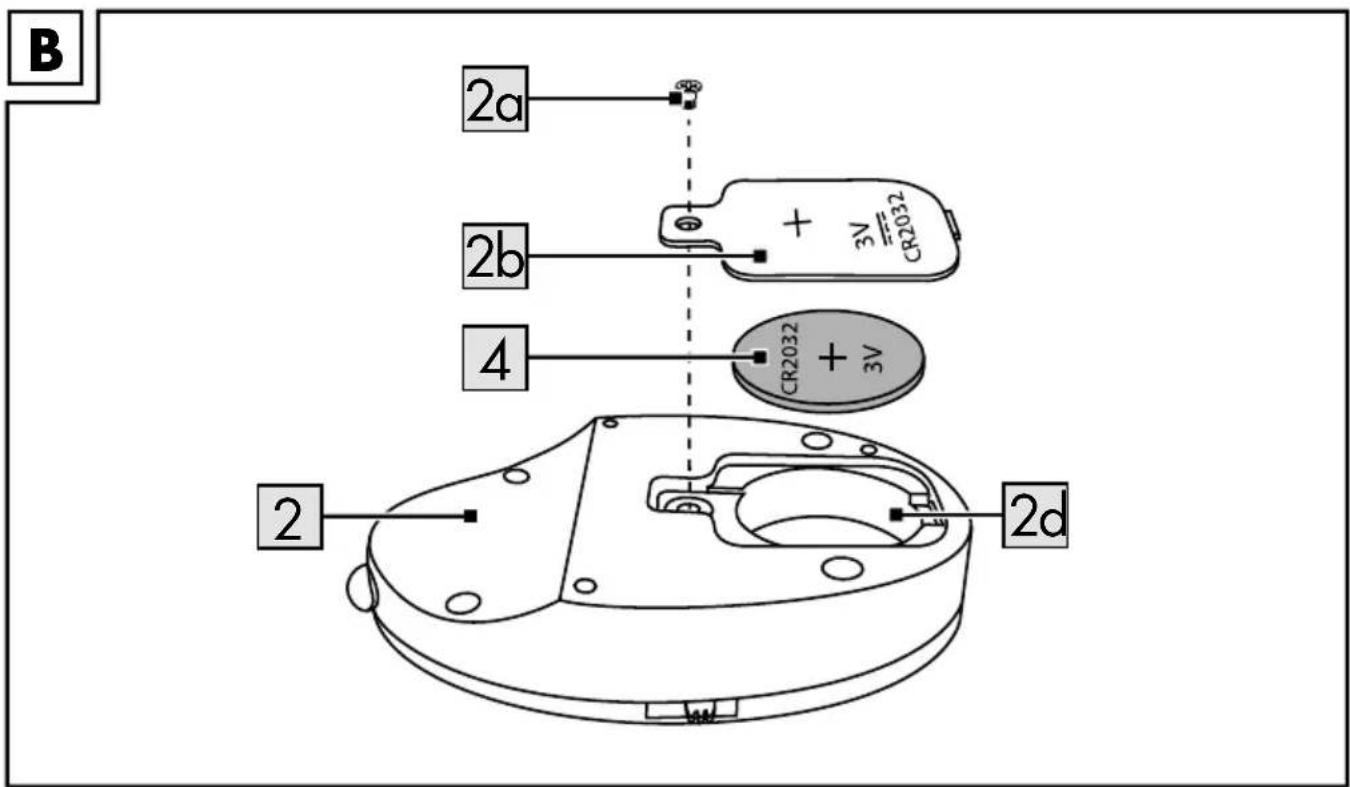
- Using a suitable Phillips screwdriver (not included in the package contents), loosen the screw (2a) of the battery compartment cover (2b) on the back of the remote control (2) and remove the battery compartment cover (2b).
- Insert the battery (4) into the battery compartment (2d).

NOTE: check the plus/minus poles of the battery (4) and make sure you insert it correctly.
- Close the battery compartment (2d) again.
Replacing the battery
If the battery (4) is flat, you can replace it as described in the section on inserting the battery. Remove the flat battery from the battery compartment (2d) before inserting a new one.

WARNING: do not use any tools, such as screwdrivers or similar items, to remove the battery (4) from the battery compartment (2d).

NOTE: gently tap the opened remote control (2) on the palm of your hand or edge of a table so that the battery (4) falls out.
Charging the rechargeable battery (Fig. C)
- Connect the end (3a) of the USB cable (3) to the connection socket of the helicopter ball (1a).
- Plug the other end (3b) of the USB cable (3) into a USB port of a powered-on computer or charging station with a USB port.
- The charging light on the helicopter ball (1) will start to light up.

NOTE: the charging time is approx. 45 minutes. The charging light goes out when the rechargeable battery is fully charged.
- After charging, disconnect the end (3a) of the USB cable (3) from the helicopter ball (1), and the other end (3b) of the USB cable (3) from the USB port.
Turning the helicopter ball on/off (Fig. D)
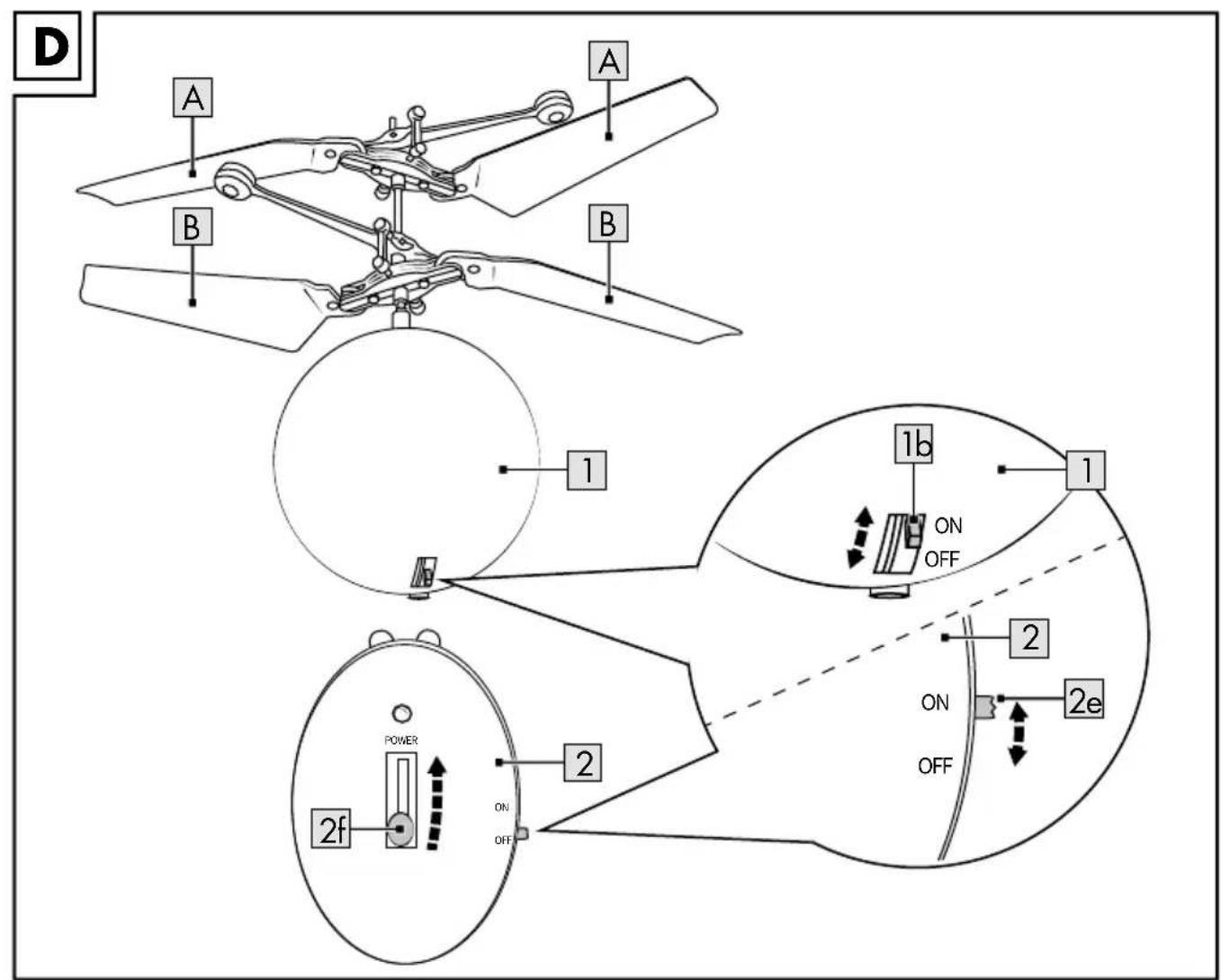
Activate the switch (1b) to turn the helicopter ball (1) ON and OFF.

NOTE: the helicopter ball (1) lights start to flash when it is turned on. The lights go out when you turn the helicopter ball off.
Turning the remote control on/off (Fig. D)
Activate the switch (2e) to turn the remote control (2) ON and OFF.
Establishing a connection
Proceed as follows to establish a connection between the helicopter ball (1) and the remote control (2):
- Turn the helicopter ball (1) on with the switch (1b) (Fig. D).
NOTE: the helicopter ball (1) lights start to flash. - Turn the remote control (2) on with the switch (2e) (Fig. D).
- Briefly push the throttle regulator (2f) upwards in the direction of the arrow (Fig. D).

NOTE: point the remote control (2) directly at the helicopter ball (1) and do not cover the remote control (2) or the helicopter ball (1). Otherwise the infrared signal could be too weak. If a connection has been established, the lights on the helicopter ball (1) light up consistently and the rotors begin to turn.
Taking off
- Turn on the helicopter ball (1) and the remote control (2).
- Establish a connection between the helicopter ball (1) and the remote control (2).
- Activate the throttle regulator (2f) on the remote control (2) to make the helicopter ball (1) ascend or descend.
Ending the flight
- Make the helicopter ball (1) land safely by pushing the throttle regulator (2f) in the opposite direction to the arrow.

NOTE: the further downwards you push the throttle regulator (2f), the slower the rotors will spin until they are entirely still.

CAUTION: in order to prevent potential injuries, do not catch the helicopter ball
with your hands if the rotors are still spinning.
- Turn off the helicopter ball (1).
- Turn off the remote control (2).
Cleaning, repair and storage

CAUTION: the helicopter ball (1) and the remote control (2) must be turned off before any work is performed on them.
The helicopter ball (1) must always be kept dry, and any dirt such as wool fibres, hair, dust, etc., must be removed after every flight.
Use a dry cloth to clean the helicopter ball; the electronics, rechargeable battery and motor must not be exposed to water.
Store the helicopter ball (1) in a dry, dust-free location away from direct sunlight. The optimum storage temperature is between 10^ C and 25^ C. Disconnect the connection to the USB cable (3) when not in use. Remove the battery (4) from the remote control.
Replacing the rotor blades (Fig. D)
Replace the rotor blades (A), (B) as soon as they are damaged.

NOTE: there are two different types of rotor blades (A), (B). The rotor blades (A) rotate clockwise, and the rotor blades (B) rotate anti-clockwise.
Both types have markings on the bottom (A and B) that must be noted when they are being replaced.

WARNING: if the rotor blades (A), (B) are damaged, there is a risk of pieces
falling off during use and causing damage or harming the environment.
Proceed as follows to replace a rotor blade (A), (B):
- Unhook the defective rotor blade from its holder.

NOTE: the rotor blades (A) are on the upper rotor level of the helicopter ball (1), and the rotor blades (B) on the lower rotor level.
- Hook the new rotor blade (A), (B) into the position where the damaged rotor blade (A), (B) was.

CAUTION: Always place the rotor blades marked with A on the
upper rotor level. Place the rotor blades marked with B on the lower rotor level.
Disposal

In the interest of protecting the environment, do not throw your product into the household waste once you are finished with it, but rather take it to a specialty disposal facility. Find out about collection sites and their hours of operation from your local authority.
Defective or used batteries must be recycled pursuant to Directive 2006/66/EC and changes to it. Return batteries and/or the product via the collecting sites provided. Packaging materials, such as plastic bags, must be kept away from children. Keep the packaging materials out of reach of children.

Environmental damage caused by improper disposal of batteries! Batteries may not be disposed of with household. They may contain toxic heavy metals and subject to hazardous waste treatment. The cal symbols of the heavy metals are as: Cd = cadmium, Hg = mercury, Pb = Dispose of used batteries at a municipal ion site.

Dispose of the product and packaging in an environmentally friendly manner.

Note the label on the packaging materials when separating waste, as these are labelled with abbreviations (a) and numbers (b) with the following meaning: 1-7: plastics/20-22: paper and cardboard/80-98: composite materials.
The product and the packaging materials can be recycled, dispose of them separately for better treatment of waste. The Triman logo only applies to France. Find out how to dispose of the used product from your municipal or city administration.
Notes on the guarantee and service handling
The product was produced with great care and under constant supervision. You receive a three-year warranty for this product from the date of purchase. Please retain your receipt.
The warranty applies only to material and workmanship and does not apply to misuse or improper handling. Your statutory rights, especially the warranty rights, are not affected by this warranty.
With regard to complaints, please contact the following service hotline or contact us by e-mail. Our service employees will advise as to the subsequent procedure as quickly as possible. We will be personally available to discuss the situation with you.
Any repairs under the warranty, statutory guarantees or through goodwill do not extend the warranty period. This also applies to replaced and repaired parts. Repairs after the warranty are subject to a charge.
IAN: 303309_1904

Service Great Britain
Tel.: 0800 404 7657
E-Mail: deltasport@lidl.co.uk
Possible errors
Potential errors are listed below, along with their causes and how to rectify them.
| Error Possible cause Remedy | ||
| Remote control (2) does not respond. | Remote control (2) is switched off. | Turn on remote control (2). |
| The battery (4) is inserted incorrectly. | Insert the battery (4) correctly. | |
| The battery (4) is flat. Replace the battery (4). | ||
| The helicopter ball (1) does not respond. | The battery (4) in the remote control (2) is inserted incorrectly or flat. | Check the battery (4) and replace if necessary. |
| The rechargeable battery in the helicopter ball (1) is flat. | Charge the rechargeable battery. | |
| The indicator lights do not flash or light up. | Turn on the helicopter ball (1). Charge the rechargeable battery. | |
| The helicopter ball (1) is out of range. | Make sure that the distance between the remote control (2) and the helicopter ball (1) is not more than 3m. | |
| The helicopter ball (1) cannot be controlled. | Too strong a wind or draught. | The helicopter ball (1) is only suitable for conditions with almost no wind. |
| The helicopter ball (1) will not fly upwards. | Not enough throttle. Push the throttle regulator (2f) further upwards. | |
| Rechargeable battery is flat. | Charge the rechargeable battery. | |
| The rotor blade (A)/(B) is loose. | The helicopter ball (1) has collided with something. | Refasten the rotor blade (A)/(B) or use a replacement rotor blade (A)/(B). |
| The indicator lights of the helicopter ball (1) are flashing on and off. | The helicopter ball (1) has no contact with the remote control (2). | Push the throttle regulator (2f) on the remote control (2) upwards. This process establishes contact between the helicopter ball (1) and the remote control (2). |
| The rechargeable battery of the helicopter ball (1) is almost flat. | Charge the rechargeable battery. | |
Grattis!
□ = klasa ochrony ll


- GB
- PL
- Read the following operating instructions carefully.
- Package contents (Fig. A)
- Technical data
- Intended use
- Symbols used
- WARNING:
- CAUTION:
- NOTE:
- Moving parts.
- Safety information
- WARNINGS FOR INTEGRATED RECHARGEABLE BATTERY (HELICOPTER BALL)
- BATTERY WARNING NOTICES (REMOTE CONTROL)
- Danger!
- Inserting the battery (Fig. B)
- CAUTION: observe the following instructions to avoid mechanical and electrical damage.
- Replacing the battery
- Charging the rechargeable battery (Fig. C)
- Turning the helicopter ball on/off (Fig. D)
- Turning the remote control on/off (Fig. D)
- Establishing a connection
- Taking off
- Ending the flight
- Cleaning, repair and storage
- CAUTION: the helicopter ball (1) and the remote control (2) must be turned off before any work is performed on them.
- Replacing the rotor blades (Fig. D)
- Disposal
- Notes on the guarantee and service handling
- Possible errors
- Grattis!
Brand : Playtive
Model : 10464
Category : Flying toy