
Sense - Air purifier MILL - Free user manual and instructions
Find the device manual for free Sense MILL in PDF.


| Product Type | Indoor Air Quality Monitor |
| Brand | Mill |
| Model | Sense |
| Measured Parameters | Humidity, TVOC, Temperature, eCO2 |
| Humidity Sensor Accuracy | ±2.0% RH |
| Temperature Sensor Accuracy | ±0.15°C |
| Connectivity | Wi-Fi 2.4 GHz, Bluetooth |
| Power Supply | USB Type-C (5V), rechargeable battery |
| Operating Temperature Range | -5°C to +50°C |
| Storage Temperature Range | -10°C to +125°C |
| Wireless Frequency | 2.4 - 2.5 GHz |
| Max Transmitting Power | <20 dBm |
| Mounting | Wall bracket with magnet included |
| Compatible Systems | Mill WiFi heaters (except gen 1), Tibber, Open API |
| Indicator Light | Multi-color: Cold, Good, Warning, Danger |
| Cleaning Instructions | Dry cloth only |
| Calibration Time | 72 hours for full accuracy |
| Warranty | 2 years |
| Usage Location | Indoor only, away from direct sunlight, heat sources, vents and windows |
Frequently Asked Questions - Sense MILL
User questions about Sense MILL
0 question about this device. Answer the ones you know or ask your own.
Ask a new question about this device
Download the instructions for your Air purifier in PDF format for free! Find your manual Sense - MILL and take your electronic device back in hand. On this page are published all the documents necessary for the use of your device. Sense by MILL.
USER MANUAL Sense MILL
natural_image
White square electronic device labeled 'mill' with black and white casing, emitting exhaust (no additional text or symbols visible)Mill Sense is a smart indoor air quality monitor developed by Mill in Norway. Connect the device to your WiFi network and get the status of your indoor clima directly in the MillNorway app on your mobile phone.
Mill Sense measures:

Humidity
Too high levels of humidity can cause mold growth which is harmful for your health, as it can cause asthma and allergies. It is therefore crucial with good ventilation when taking a shower, drying of clothes and cooking. The recommended level of humidity: 30-60%. A humidifier / dehumidifier can be a solution to achieve a recommended humidity level in the home.
• Max Accuracy: Relative humidity sensor ±2.0% RH

TVOC
Total Volatile Organic Compounds are airborne chemicals & toxins emitted from everyday items such as paint, furniture and cleaning products. They can be harmful at a high concentration, causing irritations in eyes, nose and throat. Depending on the level and length of exposure it can also cause more serious damage to liver and kidneys. Recommended TVOC level: < 220 ppb. An air purifier will be able to ensure that the TVOC level is within the recommended level. Mill Sense measures the following VOC's.
- Alcohols
- Aldehydes
- Ketones
- Organic Acids
• Amines
• Aliphatic and aromatic hydrocarbons

Temperature
A consistent temperature in all rooms are important for a healthy indoor climate. It is not recommended to turn the heat completely off in rooms you are not using for instance, as in combination with humidity this can cause mould growing. Temperature affects performance, comfort level and cold or flu symptoms. Connect Mill Sense to Mill WiFi heaters for more precise temperature control. *This way the temperature will automatically adjust to your daily routines. Recommended temperature: 18-25°C.
• Max Accuracy: Temperature sensor ± 0.15°C
*Mill Sense is not compatible with Mill WiFi generation 1 heaters.

eCO2
The eCO2 measurement is calculated from the VOC measurement. The calculation makes some assumptions about the percentage of VOCs that are due to CO2. If there are substantial concentrations of other VOCs present, the eCO2 reading would be higher than the actual CO2 level. Moderate to high levels of carbon dioxide can cause headaches and fatigue, and higher concentrations can produce nausea, dizziness, and vomiting. Loss of consciousness can occur at extremely high concentrations. Good ventilation and regular ventilation are important to maintain a recommended eCO2 level. Recommended eCO2 level: <1200 ppm.
Safety information and correct usage
Mill Sense is intended for indoor use only

Avoid direct exposure to sunlight.

Avoid exposure to direct heat sources.

Place away from vents and windows.
Do not disassemble. If the device is not working as specified or you are in doubt, contact your dealer or visit us at millnorway.com
Use a dry cloth to clean Mill Sense.

Before your start
Make sure:

Your smart phone has a working internet connection

Disable any firewalls or VPN that might block the device from communicating with our server

Bluetooth is enabled


Product specifications


Get started
Download the MillNorway App and create an account

- Indicator light
- ON/OFF button
- Backside with magnet
- Charging port
- Air vent
- Wall-bracket with magnet
- Charging cable USB type C
* Please be aware that when the device is charging, the app will not show any sensor measurements. While the device is charging the sensor measurements will be affected by the heat generated from charging, and will therefore not be accurate. Once the device is fully charged, the sensor measurements will reappear in the app, and the charging cable can stay connected if you prefer
2
Follow in-app instructions to connect the device\*
* Sensors need 72 hours for full calibration and accuracy

natural_image
White square electronic device with black top and bottom edges, no visible text or symbols

3
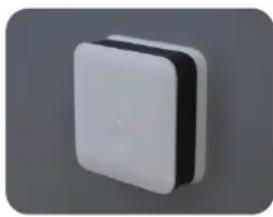
Place the device on a flat surface or attach it to the wall using the provided wall-bracket with double sided tape

Avoid direct exposure to sunlight.
Avoid exposure to direct heat sources.
Place away from vents and windows.
natural_image
3D rendered white square button or connector with black and white sections, isolated on gray background (no text or symbols)
natural_image
3D rendering of a rectangular electronic device with a central screen (no text or symbols visible)!
Press the button on the Mill Sense to understand your air quality levels:

Cold
It is cold in the room, temperature is below 18^ C.

Good
Indoor air quality is good and the sensor values are within recommended level.

Warning
Indoor air quality is approaching poor/moderate levels. Take simple steps such as opening windows to bring fresh air inside.

Danger
One or more of the sensor values are above the recommended level. Actions should be taken to either increase ventilation, dehumidifying or humidifying, depending on what levels needs to be addressed.

Integrations
Mill WiFi heaters:
Automatically calibrate/control your heaters using the Mill Sense accurate temperature to give you a more precise indoor temperature.
Open API:
Mill Sense sensor data is available through the open RES API.
Tibber:
Mill Sense can be added to your Tibber app so that you can view your sensor data. Tibber is a digital energy company that ensures full price transparency and an app to control your total power consumption.

Fully Customizable

Customize sensor trigger ranges when pressing the button (using the MillNorway app)

Change how often Mill Sense uploads new sensor data (using the MillNorway app)

Troubleshooting
Q: How do I reset the device?
A: Hold and press the button for 3 seconds, this will reset the connection and put device back to factory settings. This will also delete the device from the cloud and from the user's account. Device will then go to deep sleep.
Q: Device is not showing accurate temperature or humidity?
A: Make sure device is not near a heat/humidity source, Mill Sense temperature og humidity sensors are pre calibrated.
Limited liability
Mill International AS shall not be liable for damages related to failure or loss of data arising from incorrect operations and handling of the device.
Terms & conditions
millnorway.com/privacy-millnorway-app
For other languages or additional questions go to millnorway.zendesk.com
The Bluetooth word mark and logos are registered trademarks owned by the Bluetooth SIG, Inc. and any use of such marks by Mill International AS is under license.

Specifications
- Max transmitting power: <20 dBm
- Frequency range: 2.4\~2.5 GHz
- Operational temperature: -5c to +50c
- Storage temperature range: -10 to +125°C
Do you have any questions, issues or want to give us feedback?
We are here to help!
Drop us an email: appsupport@millnorway.com
Copyright Mill International AS
Warranty
The warranty is valid for 2 years. The device will be repaired or replaced during this time should any malfunction occur. The warranty applies if the device is used according to these instructions and the customer can present a purchase receipt. If the device malfunctions in any way, please contact the store where it was purchased or the importer.
Waste disposal
The symbol 📄 indicates that this product is not to be disposed of together with household waste. This product must be delivered to a recycling service or container for electrical appliances and electronic equipment. This is done to avoid health risks and prevent harm to the environment. Local businesses (or the environmental station in your neighborhood) are required by law to accept and recycle such products, as a means of environmentally sound disposal.

Efficient recycling process
If you want to contribute to a good and efficient recycling process, you may separate the battery from the product and dispose it at the dedicated container for lithium batteries at the environment station. Please follow the instructions below to remove the battery from the device:
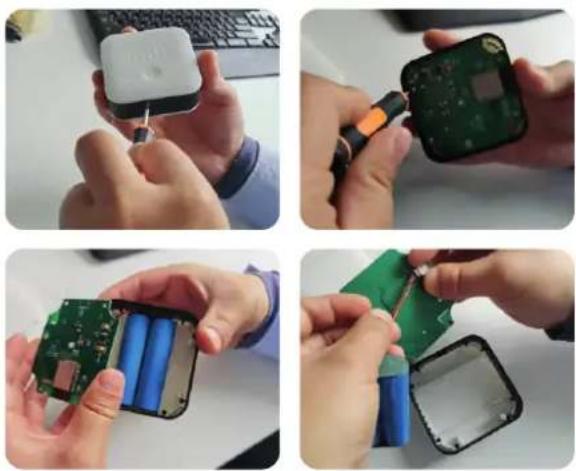
- Use a straight screw driver to disassemble the front shell
- Use a cross screw driver to disassemble four screws
- Remove the PCB by hand
- Remove the battery and dispose the battery
mill
Mill International AS


- Mill Sense measures:
- Humidity
- TVOC
- Temperature
- eCO2
- Safety information and correct usage
- Before your start
- Make sure:
- Product specifications
- Get started
- Follow in-app instructions to connect the device\*
- 3
- Place the device on a flat surface or attach it to the wall using the provided wall-bracket with double sided tape
- !
- Press the button on the Mill Sense to understand your air quality levels:
- Cold
- Good
- Warning
- Danger
- Integrations
- Fully Customizable
- Troubleshooting
- Limited liability
- Terms & conditions
- Specifications
- Do you have any questions, issues or want to give us feedback?
- Warranty
- Waste disposal
- Efficient recycling process
Brand : MILL
Model : Sense
Category : Air purifier