
Blaster S - Loudspeaker Auna - Free user manual and instructions
Find the device manual for free Blaster S Auna in PDF.


| Product Type | Portable Bluetooth Speaker |
| Brand | Auna |
| Model | Blaster S |
| Item Number | 10030678 |
| Protection Rating | IPX4 (splash proof) |
| Speakers | 2 x 3" (∅ 3") |
| Frequency Response | 70 Hz - 18 kHz |
| Battery Capacity | 300 mAh |
| Playtime | 4-5 hours |
| Standby Time | Up to 90 days |
| Charging Time | 4-5 hours |
| Power Supply | DC 5V via Micro USB (adapter not included) |
| Connectivity | Bluetooth, AUX-IN, Micro-SD card, FM Radio |
| Dimensions (W x H x D) | 40 x 185 x 285 mm |
| In the Box | Device, USB charging cable, audio cable, strap, user manual |
| Care Instructions | Clean with a soft, dry cloth; do not use solvents |
| Safety | Do not immerse in water; keep away from heat sources; use only recommended attachments |
| Repair | Only qualified personnel; do not open the device |
Frequently Asked Questions - Blaster S Auna
User questions about Blaster S Auna
0 question about this device. Answer the ones you know or ask your own.
Ask a new question about this device
Download the instructions for your Loudspeaker in PDF format for free! Find your manual Blaster S - Auna and take your electronic device back in hand. On this page are published all the documents necessary for the use of your device. Blaster S by Auna.
USER MANUAL Blaster S Auna
natural_image
Exterior view of a large cylindrical device labeled 'auna' with visible fan blades and ventilation slots (no additional text or symbols)Congratulations on purchasing this product. Please read and follow these instructions, in order to avoid damaging the item. We do not cover any damages that may arise from improper use of the item or the disregard of the safety instructions.
Technical Data
| Item # 10030678 | |
| Protection | PX4 (can get wet, but not submerged in water) |
| Battery capacity | 300mAh (play time: 4-5h; standby time: up to 90 days; charging: 4-5h) |
| Power supply | DC5V (USB; ac/dc adaptor not supplied) |
| Speakers | 2 x ∅ 3" |
| Frequency response | 70Hz - 18kHz |
| Dimensions | 40 x 185 x 285mm (WxHxD) |
| Scope of delivery | Device, USB charging cable, audio cable, strap, user manual |
Important Safety Instructions
- Read all instructions before using.
- Do not place on or near a hot gas or electric burner or in a heated oven.
- To protect against a fire, electric shock or personal injury, do not immerse cord, electric plugs or device in water or other liquids.
- Do not expose the appliance to extreme temperatures. The appliance shall be used in moderate climates.
- Disconnect the appliance from the power source if it is not going to be used for a long time, if there is a thunderstorm or if it isn't working properly.
- The use of attachments that are not recommended by the appliance manufacturer may result in fire, electric shock or personal injury.
- Do not open the unit by removing any cover parts. Do not attempt to repair the unit. Any repairs or servicing should be done by qualified personnel only.
- Only qualified persons may perform technical work on the product. The product may not be opened or changed. The components cannot be serviced by the user. The manufacturer is not responsible for any radio or TV interference caused by unauthorized modifications.
- The appliance is not a toy. Do not let children play with it. Never let children insert foreign objects into the appliance.
- Do not use the appliance for other than intended use. This appliance has been designed solely for domestic use; the manufacturer's liability shall not be engaged in the event of any professional use, by any misuse or by any use not complying with the operating instructions.
- Before turning on the power for the first time, make sure that the power cord is properly installed and the voltage switch is correctly set.
- Never clean the surface of the device with solvents, paint thinners, cleansers or other chemical products. Instead, use a soft, dry cloth or soft brush.
- Save these instructions.
Controls
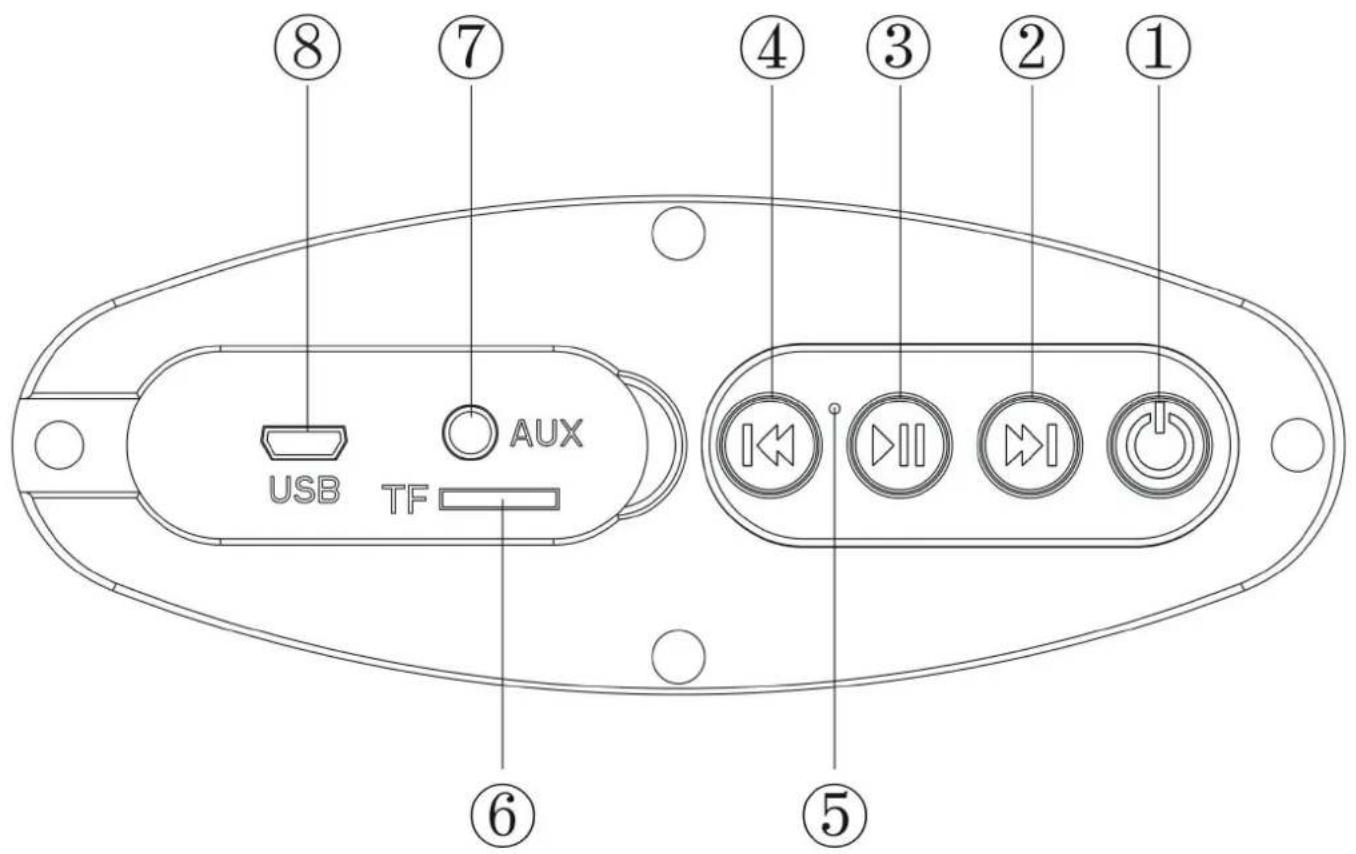
| Power on/off | 15 Status LED | |
| Next (track/station) | 26 Micro-SD card slot | |
| Play/Pause / FM scan | 37 AUX IN | |
| Previous (track/station) | 48 Micro USB charging port (DC 5V) |
Operation
Playing music from Micro-SD card
- Press and hold POWER to switch the BLASTER S on/off.
- Insert Micro-SD card into the slot, the music stored will be played automatically.
- Press Forward or Backward button to select songs you like, long press to fast forward or backward the song.
- Press PLAY/PAUSE to play or pause.
FM Radio
- Press and hold POWER to switch the BLASTER S on/off. Press POWER to switch to FM radio.
- Press PLAY/PAUSE to auto search the FM Channel and store it automatically.
- Press LAST or NEXT button to change the stored FM channel.
- Press POWER to return to BT mode.
BT
- Press and hold the power button to switch the device on. The LED light turn blue and twinkle quickly and beep twice.
- Activate BT of mobile phone and search for "BLASTER S" and pair with it. The blue LED stops flashing.
- Play the music from your mobile phone.
- Press NEXT/PREV/PLAY on the Blaster S or on your phone to operate the playback.
AUX-IN
For other compatible music devices or your MP3/MP4 players, use the supplied audio line cable to connect from the device's "Line Out" to the "Aux In" of this device. When using an external device, all functions will be controlled by the external device.
Remarks: Line-in prior: In the "MUSIC" mode, Line-in function is prior to Micro SD card.
Charging
When the speaker prompts a sound during play, the speaker needs charging. Connect the small end of the Micro USB charging cable to the speaker and the larger end to any free USB port of your computer. The LED indicator lights in red, and the speaker now is in charging mode. When the speaker is completely charged, the LED indicator will shut off. Make sure to close the waterproof cover after charging.
Environment Concerns

According to the European waste regulation 2012/19/EU this symbol on the product or on its packaging indicates that this product may not be treated as household waste. Instead it should be taken to the appropriate collection point for the recycling of electrical and electronic equipment. By ensuring this product is disposed of correctly, you will help prevent potential negative consequences for the environment and human health, which could otherwise be caused by inappropriate waste handling of this product. For more detailed information about recycling of this product, please contact your local council or your household waste disposal service.
Declaration of Conformity
Producer: CHAL-TEC GmbH, Wallstraße 16, 10179 Berlin, Germany
This product is conform to the following European directives:
2014/53/EU (RED)
2011/65/EU (RoHS)
CE
BIC|SWIFT-Code: HYVEDEMM488


Brand : Auna
Model : Blaster S
Category : Loudspeaker