
Dr. Beat - Loudspeaker Auna - Free user manual and instructions
Find the device manual for free Dr. Beat Auna in PDF.


| Product Type | Portable Bluetooth Speaker |
| Brand | Auna |
| Model | Dr. Beat |
| Speaker Configuration | 2-inch Horn + 3-inch Subwoofer |
| Output Power (Horn) | 2W x 2 |
| Output Power (Subwoofer) | 5W |
| Impedance | 4Ω |
| Battery Capacity | 1000mAh |
| Charging Time | 6-8 hours |
| Power Input | DC 5V via Micro USB |
| Wireless Connectivity | Bluetooth (device name "BT speaker") |
| FM Radio | Yes, with auto-scan and storage |
| Playback Sources | USB flash drive, SD card, AUX-IN, Bluetooth, FM |
| Controls | ON/OFF, Mode, Volume Gear, Play/Pause, Next/Previous |
| LED Indicators | Blue LED for Bluetooth and status |
| Dimensions (Approx.) | 18 x 8 x 8 cm |
| Weight (Approx.) | 0.5 kg |
| Accessories Included | Audio cable, USB charging cable, manual |
| Safety | Not for children, read instructions before use |
Frequently Asked Questions - Dr. Beat Auna
User questions about Dr. Beat Auna
0 question about this device. Answer the ones you know or ask your own.
Ask a new question about this device
Download the instructions for your Loudspeaker in PDF format for free! Find your manual Dr. Beat - Auna and take your electronic device back in hand. On this page are published all the documents necessary for the use of your device. Dr. Beat by Auna.
USER MANUAL Dr. Beat Auna
natural_image
Black cylindrical electronic device with speaker grille and control buttons (no visible text or symbols)Warnung
IMPORTANT SAFETY INSTRUCTIONS
-
Read all instructions before using.
-
Do not let the cable hang over edge of table counter or touch hot surface.
-
Close supervision is necessary when any appliance is used by or near children.
-
The appliance is not a toy. Do not let the children play it.
-
The use of attachments that are not recommended by the appliance manufacturer may result in fire, electric shock or personal injury.
-
Do not use the appliance for other than intended use.
-
This appliance is not intended for use by persons (including children) with reduced physical, sensory or mental capabilities, or lack of experience and knowledge, unless they have been given supervision or instruction concerning use of the appliances by a person responsible for their safety.
-
Children should be supervised to ensure that they do not play with the appliance.
-
Save these instructions.
GETTING TO KNOW YOUR UNIT

-
Charging jack
-
- Aux-in jack
-
ON/OFF buon
-
- Forward
-
- Play/Pause
-
- Backward
7.USB port
8.Volume Gear
-
LED indicator
-
SD slot
-
Mode (Switch Bluetooth, USB disk, SD, FM and AUX-IN state)
Playing music from USB disk & SD card
- Turn the Power button to "ON".
- Insert SD card or USB flash disk into slot, the music stored will be played automatically and blue LED light always keep lighting.
- Under playing mode, short press Forward or Backward button to select songs you like, long press to fast forward or backward the song.
- Press PLAY/PAUSE to play or pause.
- Please turn the Power button to "OFF" while without use.
Remark: Under Bluetooth playing mode, insert SD or USB will disconnect the Bluetooth and switch the playing from USB or SD card. You can press the MODE button to switch to Bluetooth mode again.
How to Use FM Radio
- Under FM radio state, the audio cable provided treat as antenal. Please Insert the audio cable to get the best FM signal before using.
- Turn the power button to "ON", press the "MODE" button to switch to FM radio state.
- Under playing mode, short press "Play/pause" button to auto search the FM Channel and store it automatically.
- Press LAST or NEXT button to change the stored FM channel.
How to Use Bluetooth function
- Turn the power button to "ON", The LED light turn blue and twinkle quickly and beep twice.
- Activate Bluetooth of mobile phone and search for device name "BT speaker" then connect it. The blue LED light twinkle slowly and and beep third times once connected successful.
- Play the music from your mobile phone and enjoy.
- Press LAST or NEXT button on the devices or on Mobile phones to select songs you like.
- Press Play/pause button on the devices or on Mobile phones to play/stop the music
- Use the "Volume Gear" to adjust volume up and down. Or adjust the mobile phones' volume.
AUX-IN
For other compatible music devices or your MP3/MP4 players, use the supplied audio line cable to connect from the device's "Line Out" to the "Aux In" of this devices. Then press the "MODE" button to switch to AUX-IN state. Enjoy... When using an external device, all functions will be controlled by the external devise except the "Play/pause" button.
Remarks
- Line-in prior, in the "MUSIC" mode, Line-in function is prior to SD/MMC card or U flash disk.
- Turn the power button to "off" to cut off the power supply while without use.
How to charge
- Power o the unit, put the charge cable into the charge slot of unit, connect the other end to PC or other charger with 5V output (Not included), the charging indicator beside the LED screen will keep lighng.
-
Charge me should be 6—8 hours. When charging full, the indicator light will switch o. In order to prolong the life of baery, please do not exceed 8 hours.
-
Horn Size:2 inch
- Subwoofer Size:3 inch
• Horn output: 2W*2,4Ω - Subwoofer output:5W,4Ω
- Battery Capacity: 1000mAh
Electric and electronic equipment and included batteries contains materials, componentsans substances that can be hazardous to your health and the environment, if the waste material (discarded electric and electronic equipment and batteries) is not handled correctly.
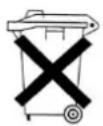
Electric and electronic equipment and batteries is marked with the crossed ou trash can symbol, seen here. This symbol signifies that electric and electronic equipment and batteries should not be disposed of with other household waste, but should be disposed of separately.
As the end user it is important that you submit your used batteries to the appropriate and designated facility. In this manner you make sure that the batteries are recycled in accordance with legislature and will not harm the environment.
All cities have established collection points, where electric and electronic equipment and batteries can either be submitted free of charge at recycling stations and other collection sites, or be collected from the households. Additional information is available at the technical department of your city.


Brand : Auna
Model : Dr. Beat
Category : Loudspeaker