
Technosphere Smart - Air purifier FAKIR - Free user manual and instructions
Find the device manual for free Technosphere Smart FAKIR in PDF.


| Product Type | Air Purifier |
| Brand | Fakir |
| Model | Technosphere Smart |
| Dimensions (L x W x H) | 30 cm x 30 cm x 50 cm |
| Weight | 5 kg |
| Power Supply | AC 220-240V, 50Hz |
| Power Consumption | 30 W |
| Noise Level | 25 - 50 dB |
| Coverage Area | Up to 40 m² |
| Filter Type | HEPA H13 + Activated Carbon Pre-filter |
| Filter Replacement Interval | Every 6-12 months |
| Air Quality Sensor | PM2.5 laser sensor |
| Modes | Auto, Sleep, Turbo, Manual |
| Timer | 1, 2, 4, 8 hours |
| Display | Touch LED display with real-time AQI |
| Smart Features | Wi-Fi, App control (iOS/Android), Voice control (Alexa, Google Assistant) |
| Remote Control | Included |
| Child Lock | Yes |
| Overheat Protection | Yes |
| Filter Replacement Indicator | Yes |
| Spare Parts Available | HEPA filter, Pre-filter, Remote control |
| Repairability | Replaceable filters and components; service centers available |
| Manual Languages | DE, EN, TR |
Frequently Asked Questions - Technosphere Smart FAKIR
User questions about Technosphere Smart FAKIR
0 question about this device. Answer the ones you know or ask your own.
Ask a new question about this device
Download the instructions for your Air purifier in PDF format for free! Find your manual Technosphere Smart - FAKIR and take your electronic device back in hand. On this page are published all the documents necessary for the use of your device. Technosphere Smart by FAKIR.
USER MANUAL Technosphere Smart FAKIR
natural_image
Exterior view of a white air purifier unit with black insulation cover (no visible text or symbols)TECHNOSPHERE Smart
Warranty certificate
Garanti Belgesi
Гарантийный талон
Deutsch 3
English 29
Türkçe.... 53
Русский 77
العربية 103
natural_image
Line drawing of a kitchen appliance next to a wall-mounted electrical outlet, with a window showing sun and curtains in the background (no text or symbols)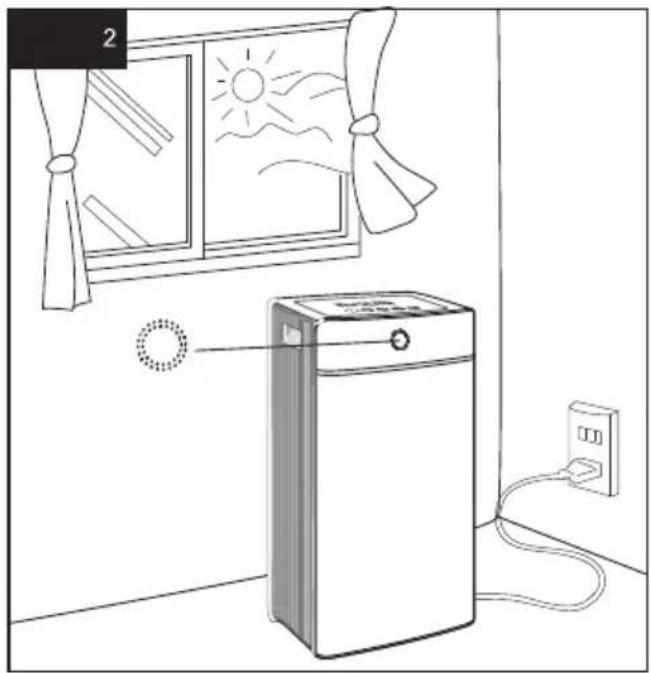
natural_image
Line drawing of a kitchen appliance with a fan window, sun, and power outlet (no text or symbols)→ AUTO → Low → Medium → High
natural_image
Illustration of a closed refrigerator with three doors and a door, showing internal compartments (no text or symbols)About Using Instructions....30
Meanings of the Symbols 30
Liability 30
CE Declaration of Conformity....30
Intended Use 31
Unauthorised Use....31
Safety is important 33
Safety Warnings 34
Unpacking....36
Box Contents 36
Introducing the Appliance 37
Technical Information....37
Sound Level....38
Air Indicator Light Colours 38
Operation....39
Network Connection 42
Add Appliance....42
The Use of the Application....44
Troubleshooting 44
Wireless Access Connection (AP MODE) 45
Cleaning and Maintenance of the Appliance 46
Cleaning of the Pre-Filter 46
Cleaning Air Outlet Grill 49
Recycling 52
Shipping....52
Dear Customer,
We wish you to enjoy your product and thank you for choosing Fakir Hausgeräte which leads the way of innovative technologies.
We hope you to get the best out of Fakir TECHNOSPHERE Smart Air Cleaner, produced with high quality and technology. Therefore, we kindly ask you to read this User Manual carefully before using the product for the first time and keep it safe for future reference.
About Using Instructions
These using instructions are intended for the smooth and safe use of the appliance. For your safety and that of others, please read the user manual carefully before using the appliance for the first time.
Meanings of the Symbols
Below symbols will be used throughout the user manual.

WARNING!
This symbol identifies hazards that could result in injury or death.

CAUTION:
This symbol identifies hazards that may lead to damage or malfunction in your product.

NOTE!
Emphasizes important and useful information in the user manual.
Liability
Fakir Elektrikli Ev Aletleri Dış Tic. A.Ş. does not assume any responsibility for any damage arising from the non-compliance with the instructions in this user manual, the repair of the appliance by anyone other than Fakir Authorised Service and the use of it for any purpose other than its intended use.
CE Declaration of Conformity
This appliance complies with the European Directive 2014/30/EU on Electromagnetic Compatibility and Low Voltage Directive 2014/35/EU. The appliance bears the CE marking on the appliance type label.
Fakir Elektrikli Ev Aletleri Dış Tic. A.Ş. reserves the right to change the design and equipment.
Intended Use
Product model is designed for household use. It is not suitable for business or industrial use. In case of any failure arising from the unintended use, services provided by our authorised services shall be out of warrant coverage.
Unauthorised Use
In cases of unauthorised use specified below, the appliance may be damaged or cause injuries;
- This appliance should not be used by the people who are not mentally stable or who do not have enough information on how to use such appliances. Please do not allow these people to use the appliance.
- The appliance is not a toy. Therefore please do not allow children use the appliance and be more careful when using the appliance near the children.
- Keep such materials as plastic bags and cardboards used for packaging away from children. Otherwise they may harm themselves by swallowing them. Especially playing with packaging bags may cause danger of suffocation-swallowing.

WARNING!
- This appliance can be used by children aged from 8 years and above and persons with reduced physical, sensory or mental capabilities or lack of experience and knowledge if they have been given supervision or instruction concerning use of the appliance in a safe way and understand the hazards involved.
• Children should not play with this appliance. - Cleaning and maintenance of the appliance shall not be carried out by children without supervision.
- Keep the packing materials away from the children. Choking risk!
• Children younger than 3 years shall be kept away from the appliance if they are not supervised constantly. - This appliance may be used by persons (including children) with limited physical, sensory or mental capabilities, or with limited experience and/or knowledge, only under the supervision of a person responsible for their safety, or in accordance with the instructions of that person.
• Children shall be supervised to ensure that they do not play with the appliance.
• This appliance shall not be used for play. - Children older than 3 years and younger than 8 years may switch the appliance on and off only if they are under supervision or are informed of the safe use of the appliance and if they understand the hazards that may be caused by the appliance. In this respect, it is a prerequisite for the appliance to be in normal usage position or that it is installed properly.
• Children older than 3 years and younger than 8 years should not plug the appliance to the electrical outlet, adjust the appliance and perform any cleaning or maintenance operations. - The appliance shall not be used without supervision.
Safety is important
Read the user manual carefully before using the appliance for your safety and others'. Keep this manual in a safe place for future use. If you pass the appliance on, pass on the user manual as well. Remove all the packages; however, keep them until you are sure that the appliance is working.
- Remove the plastic bag of the filter while replacing the filter. Otherwise, the appliance shall operate with noise.
- Do not operate the appliance without a filter, otherwise its efficiency shall be reduced and life cycle of the active carbon filter shall be shortened.
- A plastic smell may occur during the initial operation. We recommend you to ventilate the room for 2 or 3 hours. The smell shall be removed after one day of operation.
- Close the doors and windows while the appliance is operated.
- This appliance is not intended to be used as an external hood or fan during ventilation, vacuum cleaning or cooking.
- Ensure that you have plugged the appliance to an outlet with proper connections.
- Always keep and use the appliance on dry, fixed, flat and level surface.
- Allow clearance of 30 cm minimum at both sides and the rear of the appliance. Prevent damage to the appliance (on the air inlet or outlets in particular) with hard objects.
- Always lift or carry the appliance by the holding points on both sides.
- Do not insert your finger or any object to the air inlet or outlet.
- Do not operate the appliance when a spray type insecticide is used in an environment you are present or where there are waste oil, lit fumes or chemical vapours.
• Always unplug the appliance after any operation and before cleaning. - Do not operate the appliance in a room where temperatures vary at a great extent as this may cause condensation inside the appliance.
-
Do not use the appliance in rooms smaller or bigger than the recommended rooms.
-
To avoid electromagnetic interference, keep the appliance at least 2 meters away from electrical appliances that use radio waves on the air such as TVs, radios or radio clocks.
- We recommend opening the windows to reinforce the air circulation while using the appliance if the ambient air quality is poor (for example, cigarette, food smell). The appliance is suitable for household use only under normal operating conditions.
- Do not operate the appliance at wet surfaces or areas with high ambient temperature such as bathrooms, water closets or kitchens.
- The appliance does remove carbon monoxide (CO).
- Accuracy of the appliance may be reduced if the appliance is not operated for a long period of time. The appliance shall return to normal condition after being operated for 1 or 2 days.
- The appliance complies with all standards relevant with electromagnetic fields (EMF). The use of this appliance is safe under our scientific knowledge we have today when it is operated as intended and as per the instructions specified in this manual.
Safety Warnings
When utilizing an electrical appliance, the precautions below shall always be taken in order to prevent fire, shock or personal injuries;
- Using electrical appliances may be dangerous, so please read the user manual before using the appliance.
- Before plugging the appliance, into the power outlet ensure that the voltage matches the rated value specified in the type label.
- In an event where the appliance or the cord is damaged, do not use the appliance and contact an authorised Fakir service.
- If the appliance cord is damaged, it shall be replaced only by a Fakir authorised service centre.
- Before cleaning the appliance, unplug it.
- Make sure to unplug the appliance when it is not in use, or moving the appliance, or installing or removing parts, and while cleaning.
- Use the appliance only with its authentic accessories.
-
Do not pull from the cord, use the plug to unplug the appliance.
-
Never touch the plug/socket with wet hands.
- The children are not aware of the threats posed by the electrical appliance.
Do not ever let children to play with electrical appliances. Special care must be exercised where children and vulnerable people are present.
- Do not try to place a metal or any other item inside the appliance.
- Installation shall be completed in align with the regulations and manufacturer instructions.
- Do not cover the appliance, otherwise it may cause the appliance to suffer significant damage or start fire!
- Do not spray pesticides or flammable aerosols on the appliance. It may damage the appliance.
- Do not place items at appliance air inlet or outlets. Otherwise it may damage the appliance and may cause electric shock risk.
- Do not place the air outlet right across little children. May cause sickness and affect the children’s health.
- Before operating the appliance ensure the power cord is clean and plugged.
- If there is an unpleasant odour or an abnormal noise, immediately unplug the appliance.
- Do not fold the power cord or place heavy items on it. It may cause short circuiting.
- Do not wash the appliance with water. It may cause short circuiting and damage the appliance.
- Do not use the appliance near bathtubs, shower or near pools.
- Keep the unit away from walls, curtains and other flammable materials to protect against fire.
- Do not try to pry your fingers in through the operating appliance mesh.
- If the appliance will not be operated for extended periods of time or the user will keep it away, turn it off and unplug.
- To avoid electromagnetic interference keep the appliance away from appliances such as TV or radio at least 1 meter away.
EN
- Do not expose appliance to direct sunlight.

WARNING!
Never use defective appliances. There is a risk of electrocution.

CAUTION:
Keep heat sources and direct sunlight. High temperature may damage the appliance.
Unpacking
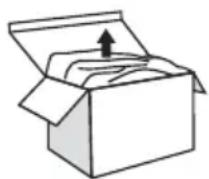
Before first use, unpack the appliance and its accessories, and check for damages and defects. If there is any malfunction or damage to the equipment, do not use the appliance and contact Fakir Authorised Service.
-Repairs shall be undertaken only by Fakir Authorised Service. Repairs which are performed improperly, or by unauthorised personnel may pose harm to the user.
-Do not make a hole or a tear on the on/off switch.
Box Contents
Appliance: 1 piece
Cleaning brush: 3 pieces
Short brush is for cleaning the outside of the appliance: 1 piece
Long brush is for cleaning the collector cell: 2 pieces
User manual: 1 piece
Introducing the Appliance
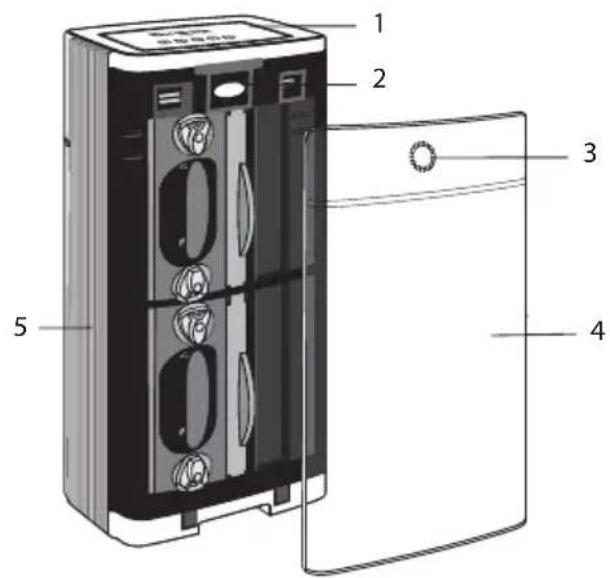
- Control Panel
- Exhaust Grill
- Air Cleaning Indicator
- Front Panel
- Front Grill
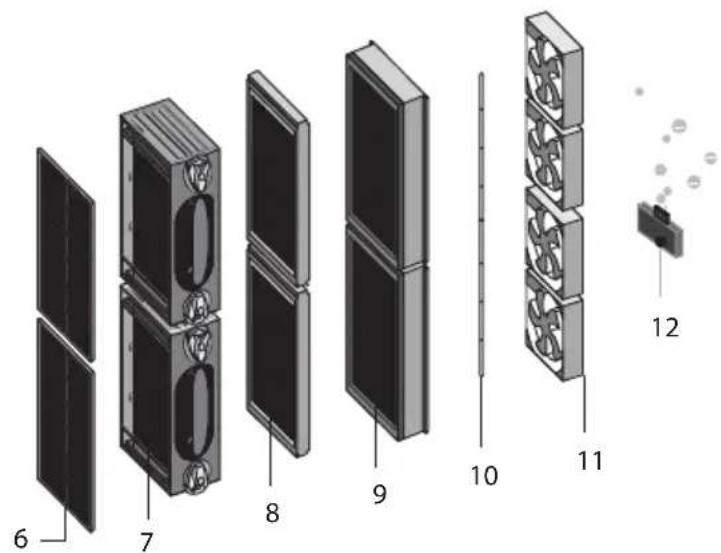
-
Pre-filter
-
Collector Cell
(Electrostatic Filter
Assembly Located in
Different Layers) - Formaldehyde Filter
-
TiO2 Filter
-
UV-C Light
- BLDC Motor Fan
- Ion Generator
Technical Information
Voltage: AC 220-240 V / 50 Hz
Power: 52 W, BL DC Motor
Class: II
Ion Output: 3x10⁶ / cm3
Active Oxygen Output: ≤0.05 ppm
UV Spectrum: 254 nm ± 5, UVC
Dust Collection Rate: 99%
Air Volume: 5.6 m3/min
Intended Use: Up to 120 m2 (after 3 hours of operation indoors)
CADR Value: 400 m3/h
Product Weight: 14.7 kg
Dimensions of Appliance: 390*235*838 mm
Pm 2.5 Filtering Rate: >99%
Service Life: 10 years
Sound Level
Low mode: 40 dB
Medium mode: 52 dB
High mode: 66 dB
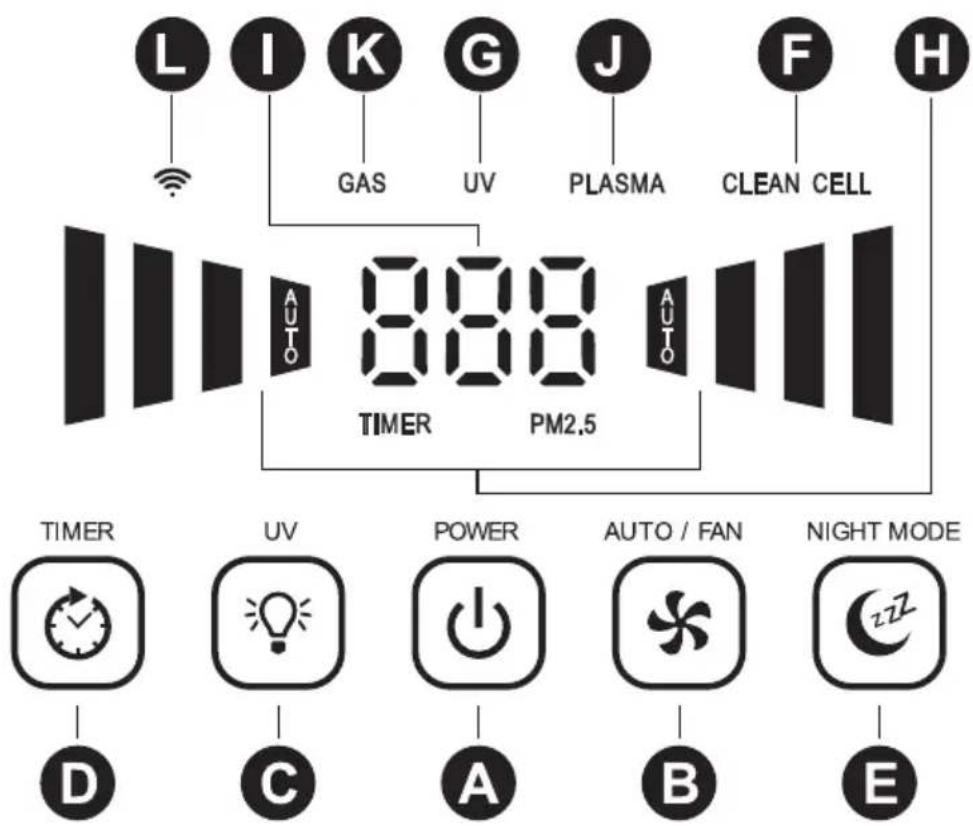
A : On / Off button
B : Mode setting button
C: UV light on/off button
D: Timer button
E : Sleep mode button
F: Cleaning indicator
G: UV indicator
H: Fan Speed Indicator
I : Timer/PM 2.5 indicator
J: Plasma Filter indicator
K: Gas Pollution indicator
L: Wi-Fi connection indicator
Air Indicator Light Colours
Green: Clean
Yellow: Low pollution
Orange: Medium pollution
Red: High pollution
Operation
natural_image
Line drawing of a kitchen appliance next to a wall-mounted electrical outlet, with a window showing sun and curtains in the background (no text or symbols)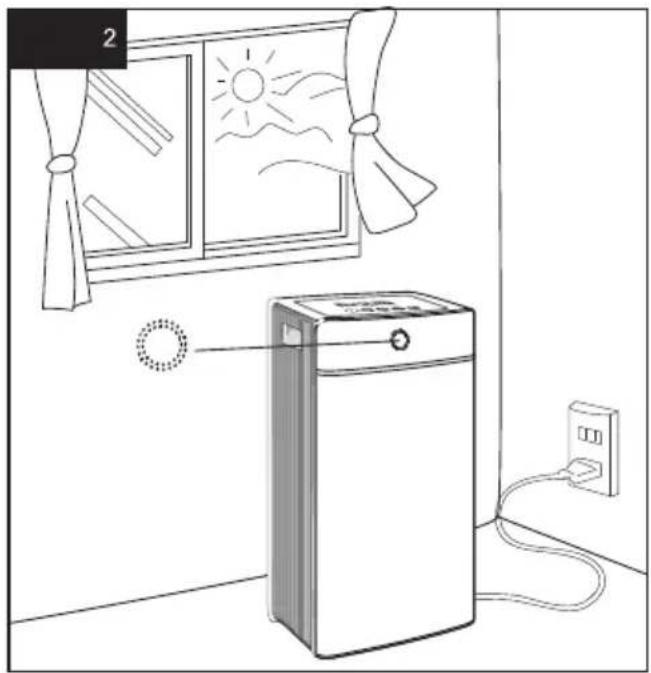
natural_image
Line drawing of a kitchen appliance with a fan window, sun, and power outlet (no text or symbols)* Place the appliance on a hard surface. Make sure that the ventilation parts are not blocked by other objects and that there are no candles or flames near the unit.
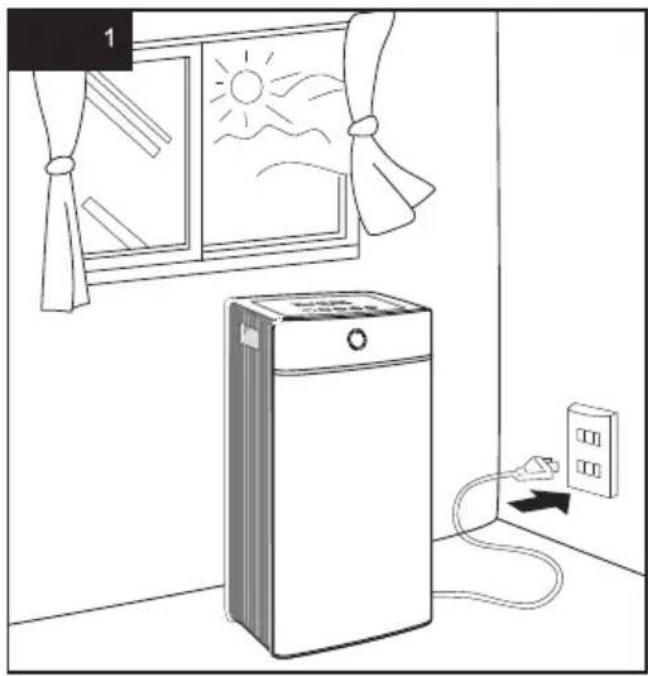
* Before plugging the appliance, please open the windows in the room that you will use. Ventilate the room that you will use for 2 or 3 hours if possible. After ventilating the room, close the windows and plug the appliance (Figure 1).
* Plug the appliance to the nearest electrical outlet.
* When you press on the power button, the appliance will start in Automatic mode.
* The air cleaning indicator will change alternately for one minute and the clean sign will return to the current air condition. (Figure 2).

CAUTION:
- Wait 3-5 minutes for the sensors to activate when you unplug the appliance and restart it or when you use the device for the first time. If the current air quality is not good, it is recommended to correct the air quality manually and then switch to automatic mode. Otherwise, the sensitivity of the sensor may decrease.
- The sensitivity of the sensor may decrease if you do not use the appliance for a long period. It will return to normal within one or two days.
1. On / Off Button

Press the On/Off button, the appliance will start in automatic mode (AUTO).
Then it can be switched to the desired mode. The appliance turns off once the same button is pressed.
2. Mode Setting Button
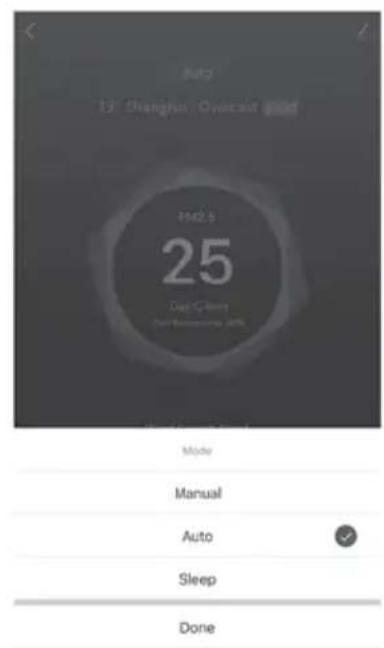
Press the mode button. This appliance has 4 different fan modes. Fan mode is switched as follows for each press on the button

flowchart
graph LR
    A["→ AUTO → Low → Medium → High"] --> B["End"]
Automatic Mode:

In this mode, the appliance automatically switches to the other fan modes as per the level of air pollution detected by the sensor. The appliance switches to quiet mode when the air is cleaned.
Low Mode (1)
It provides quiet operating environment.
Medium Mode (Ⅱ)
It is suitable for normal operating conditions.
High Mode ( )
It is suitable for maximum cleaning.
3) UV Light On/Off Button
When this button is pressed, the UV (G) text shall be displayed on the screen and the UV mode shall be activated. When this button is pressed again, the UV text shall disappear and the function shall be deactivated. Your appliance eliminates viruses and bacteria in the air thanks to the activated UV-C technology. When you turn off the UV function, your appliance shall continue filtering the particles in the air, however the virus and bacteria elimination capacity shall be greatly reduced.
4) Timer
The appliance is operated without the timer active.
By pressing the timer button, you may set the desired operating time (1-9 hours). The time set on the indicator panel appears on the display, the 88 sign indicates that the timer is not active. When the timer is set, the appliance operates in countdown mode and when the time ends, it is turned off
5) Sleep Mode

When the sleep mode button is pressed, display switches to the lowest brightness level. The appliance switches to the lowest operation mode and continues to run on quiet mode. Press this button again to cancel this mode.

NOTE!
Other buttons are not active in this mode. Cancel by pressing the sleep mode button first.
6) CLEANING INDICATOR-Clean Cell CLEAN CELL
We recommend you to clean the appliance when CLEAN CELL message is displayed on the screen. Place the collector cell into its place after cleaning. Turn on the appliance.
Press and hold the sleep button E 📄 for 3 seconds. The CLEAN CELL message on the screen shall disappear.
7) PM 2.5 Indicator Function
PM 2.5 is a fine particle that cannot be seen with the human eye, which is about 3% the size of a human hair. These particles, called PM 2.5, may originate from various sources. These include power plants, factories, motor vehicles and aircraft fuel residues, wood and coal use in households, forest fires, agricultural burnings, volcanic eruptions and dust storms. Unfortunately, our body's own filtering system is not effective in preventing these fine particles. Your appliance is able to filter and eliminate the particles up to 0.1 microns. When the appliance starts to operate, the PM 2.5 indicator will automatically turn on next to the timer on the screen. Values begin to decrease with the increase of air quality.

NOTE!
The value may increase when window is opened
8) PLASMA Indicator Function
If the plasma light (J) is illuminated on the display (on position), it means that your collector cell is working normally, if the indicator is disappeared (off position), check your collector cell and clean it again if necessary.
9) Application Instructions for Wi-Fi Use

- Scan the Smart Life with your barcode reader that you downloaded with your phone application or download the Smart Life application.
- Sign up and sign in.
Network Connection
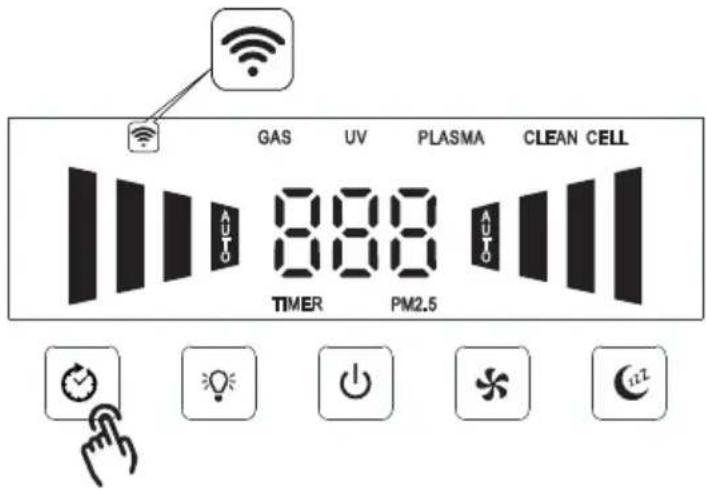
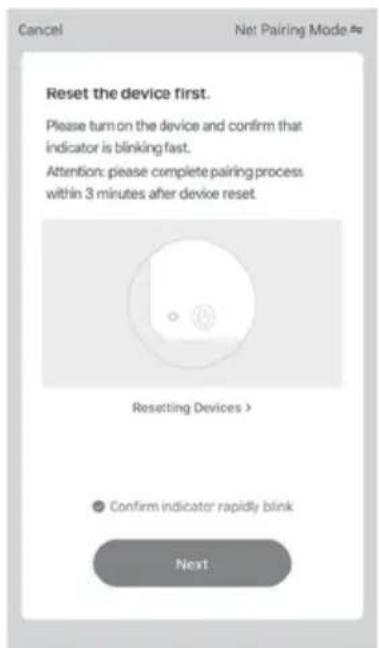
- Press and hold the D buttons for 3 seconds until the “ ” symbol flashes quickly, this means that it is ready for connection to the network. - In case the network connection is not established within 3 minutes, repeat the network connection
Add Appliance

NOTE!
Make sure to update your phone before adding your appliance to your phone, otherwise the application may not work.
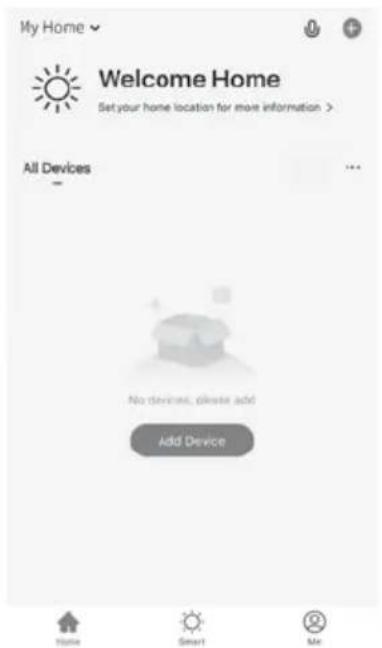
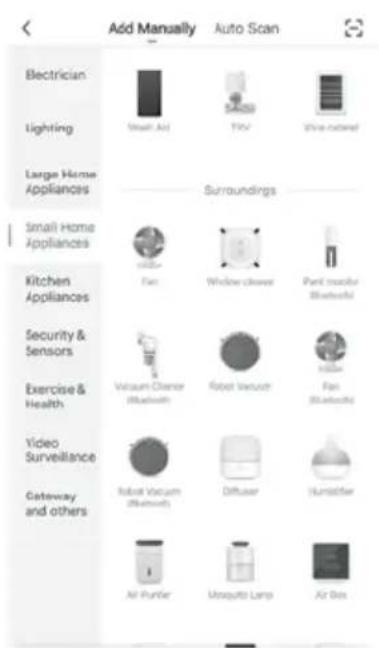
- Click on "Add Appliance".
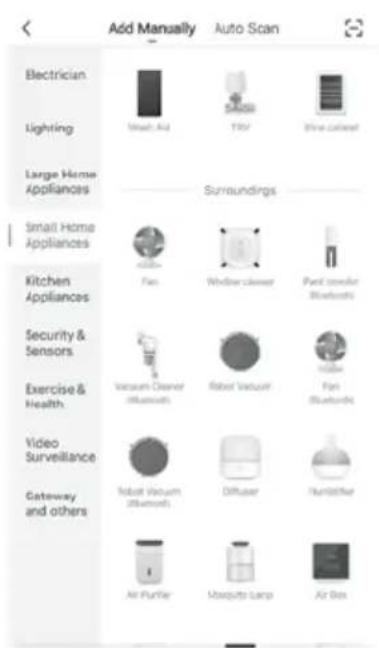
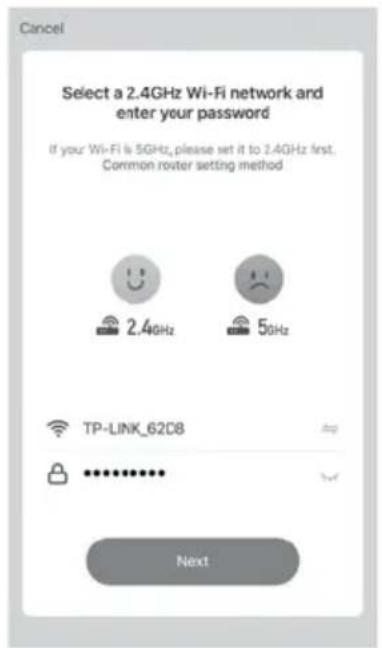
- Select a 224 BHD 'Wir Fihet'wonder
"Small Household Appliances"
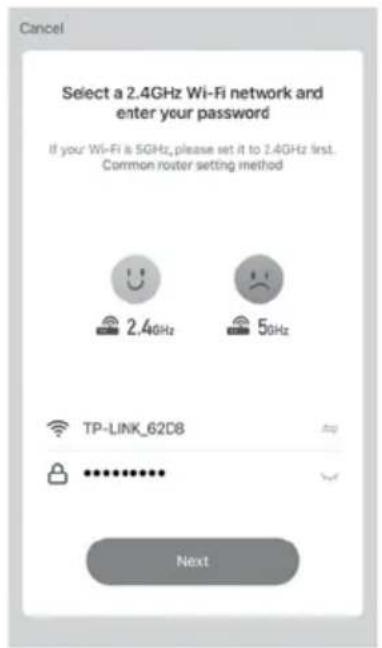
and enter your password
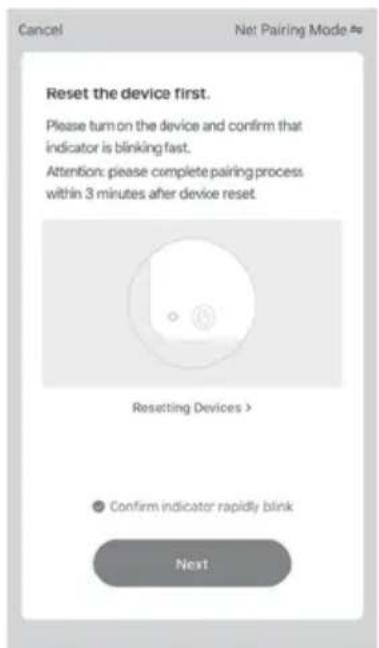
- Select "Confirm fast flashing indicator" and click on "Next"
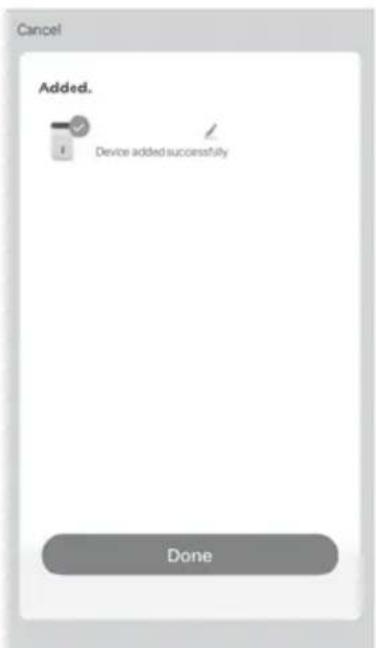
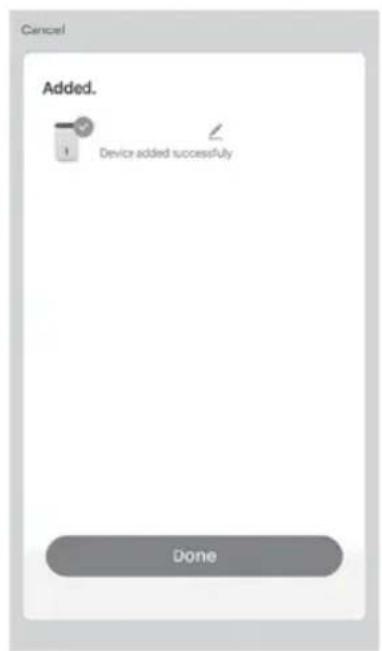
- Click on "Done" 6. Main menu
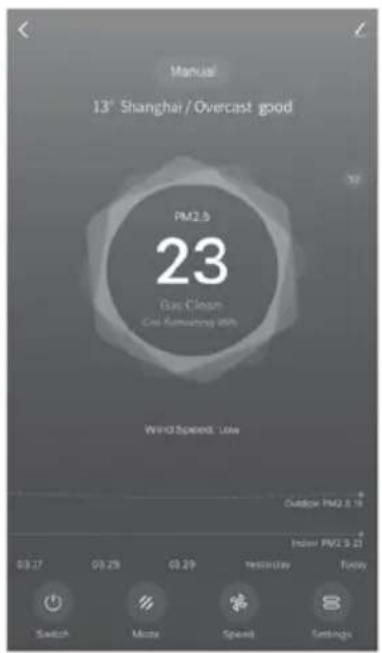
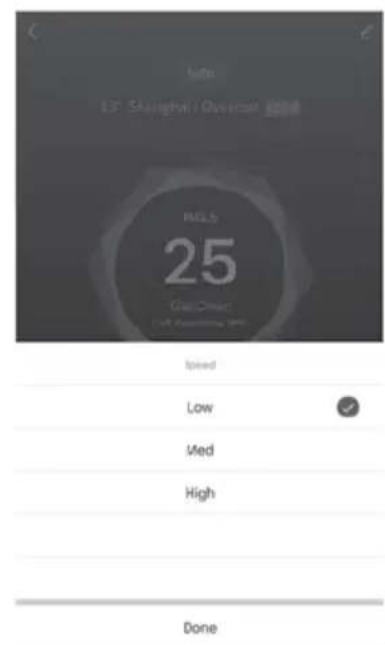
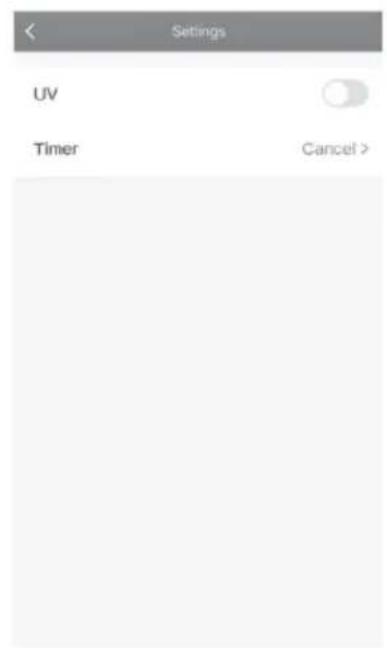
The Use of the Application
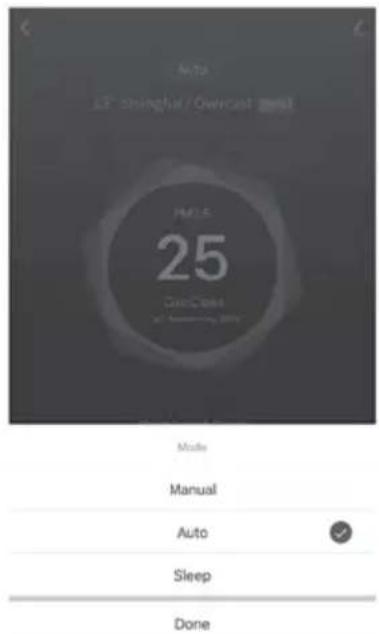
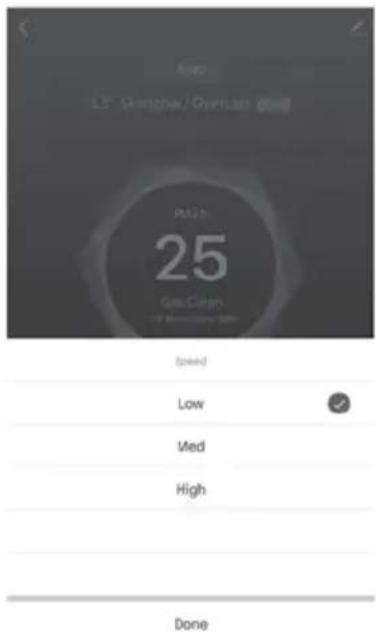
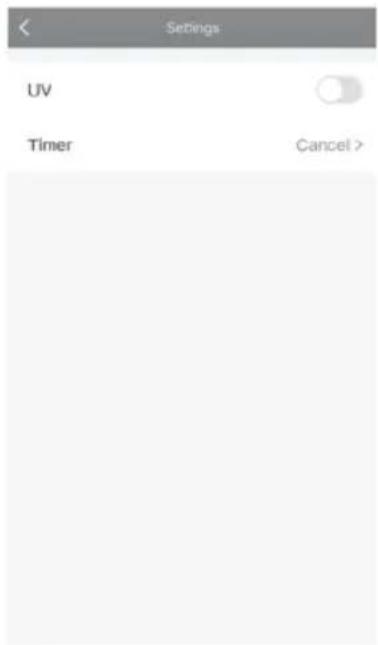
Setting Mode Speed setting UV and Timer Setting
Troubleshooting
Q: Why is the appliance unable to connect to the Wi-Fi network continuously?
- Please check whether the Wi-Fi signal is present.
- Please check whether the Wi-Fi password is correct.
- Please check whether the Wi-Fi signal of the router supports standard IEEE 802.11/b/g/n, if your router supports both 2.4 GHz and 5 GHz signal, please turn off the 5 GHz signal by setting the router.
Please check whether the IP connections of the router exceeded the maximum limit. If this is the case, close the unnecessary connections and try again.
Q: How does the network connection move to the new router after replaced with a new one?
Please follow the Application instructions for use in the manual and reconnect it.
Q: Can the appliance be controlled only by a cell phone within the same Wi-Fi network?
The appliance can be controlled anywhere and anytime as long as your cell phone can connect to the network regardless of whether it is 2G/3G/4G or any other Wi-Fi network.
Q: How can I share an appliance?
* To share a single appliance:
* On the appliance control page tap on the icon in the upper right corner to access the appliance setting page.
* Select Share Appliance - Add Appliance, enter the cell phone numbers/e-mail addresses of your family members and tap on complete.
* To share the family appliances:
Go to the homepage of the application and select I - Family Management.
Go to the family that needs adjusting, click on Add Member and select the family members and friends that want to share their appliances with your family, so all the appliances within the family will be shared. The single appliances do not need to be re-shared in this process.
Wireless Access Connection (AP MODE)
If you cannot connect to the network while the Wi-Fi symbol flashes quickly, try connecting in AP mode (Wi-Fi symbol flashes slowly).
Press and hold the D button twice for 3 seconds until the Wi-Fi icon flashes slowly, then it will be ready to connect to the network.
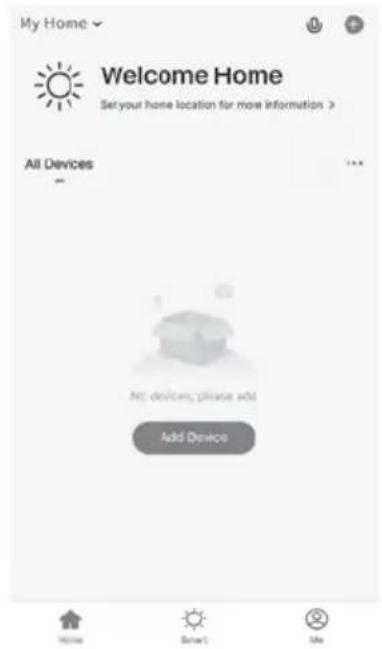
- Click on "Add Appliance".
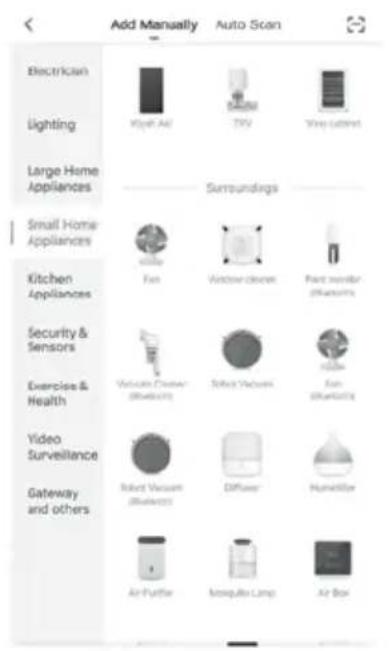
- Find "Air Filter" under
"Small Household Appliances"
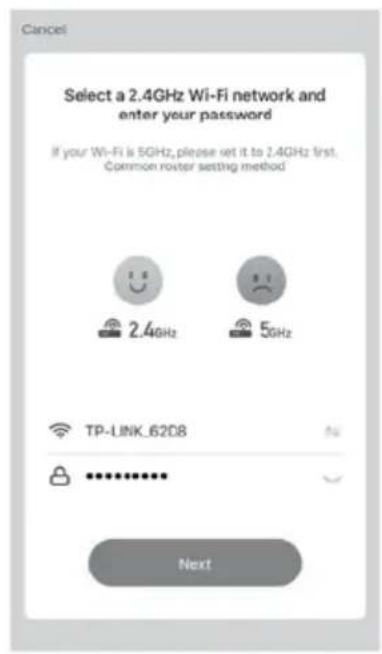
- Select a 2.4 GHz Wi-Fi network and enter your password
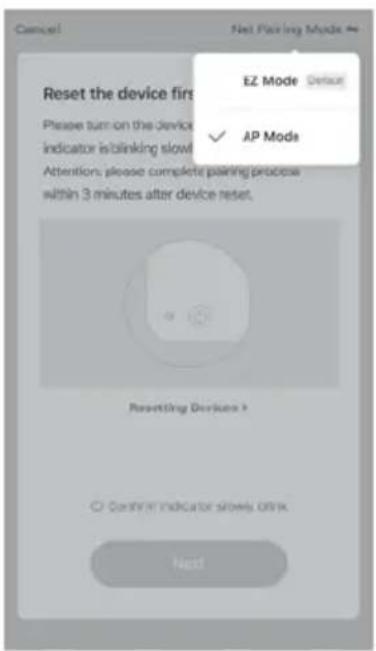
- Click on "Network Mapping Mode" and select "AP mode"; Then select "Confirm slow flashing indicator" and click on "Next"
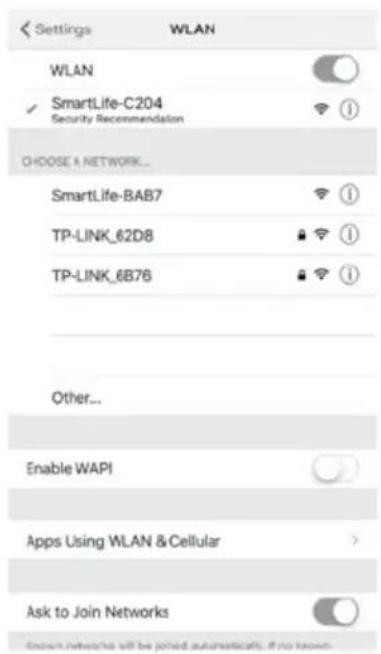
- Change your Wi-Fi signal to SmartLife-XXXX and click on
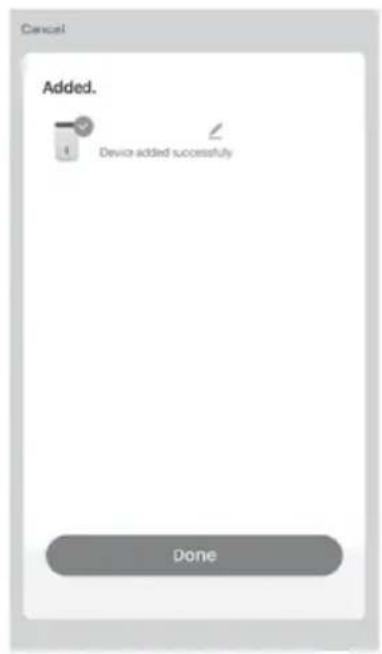
- Click on "Done"
EN
Cleaning and Maintenance of the Appliance

WARNING!
Make sure to unplug your appliance from the electrical outlet before cleaning and maintenance.
Cleaning of the Pre-Filter
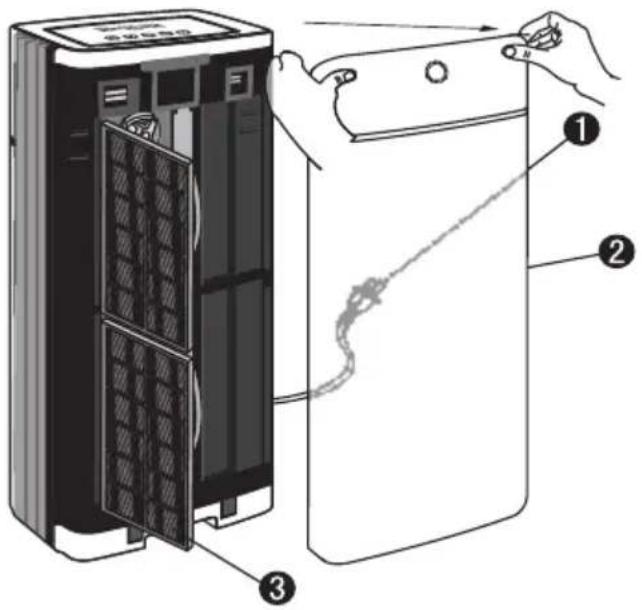
- Pull off the electricity plug.
- Remove the front cover of the appliance by pulling it towards you gently as shown in the figure.
- Remove the front filter carefully. Clean the filter gently under warm or cold running water.
- Reinstall it once you are sure that it is dried.

NOTE!
The temperature of the water should not exceed 40 degrees.
Cleaning of the Collector Cell

WARNING!
The arc is a sharp sound that occurs when large particles are collected in the collector cell or in the appliance that is used in damp rooms. The collector cell should be cleaned if long-time and continuous arc occurs.
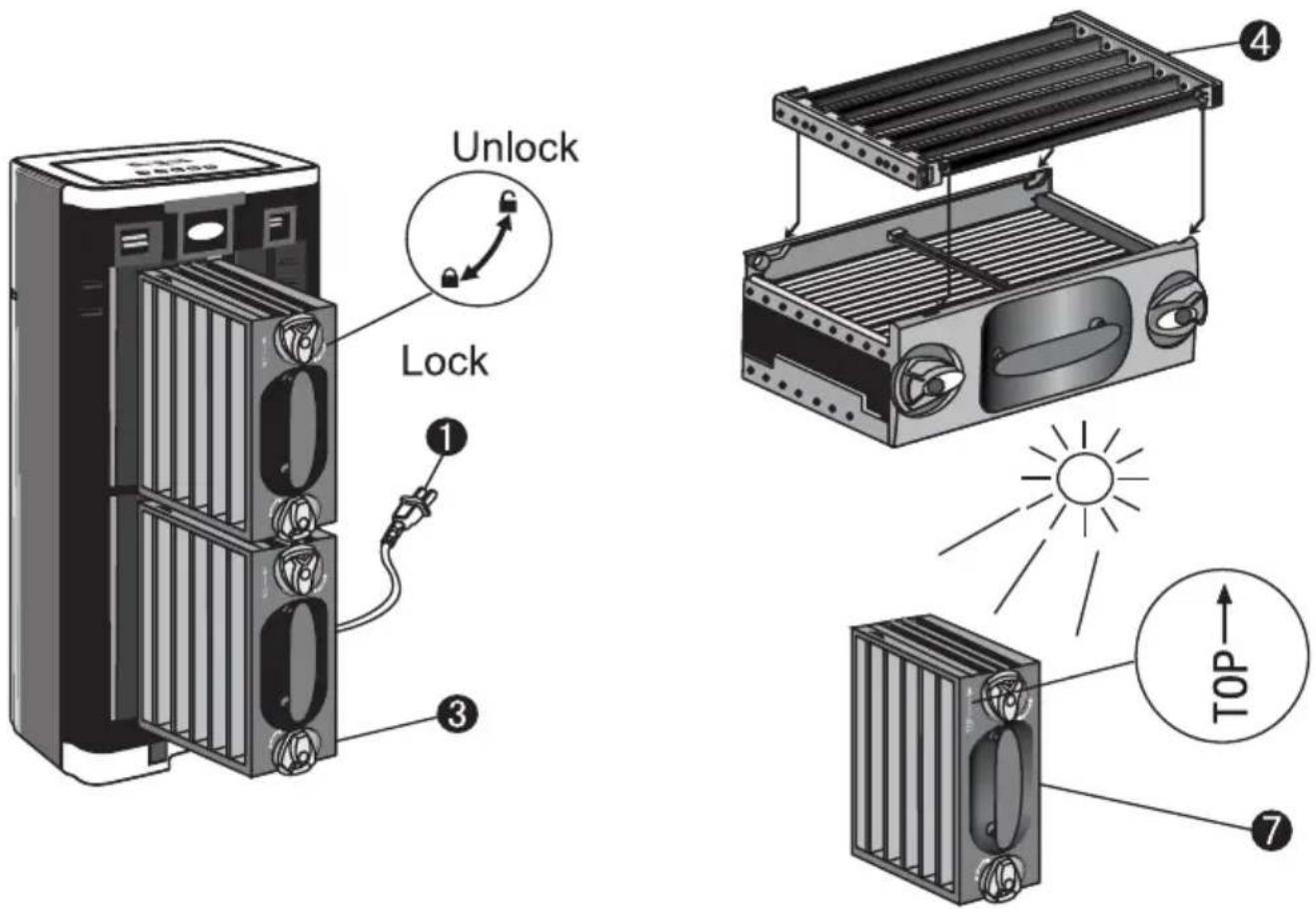
- Pull off the electricity plug.
- Open the front cover by pulling it gently from the top corners.
- Remove the collector cell by unlocking the upper and lower buttons and pulling it out firmly.
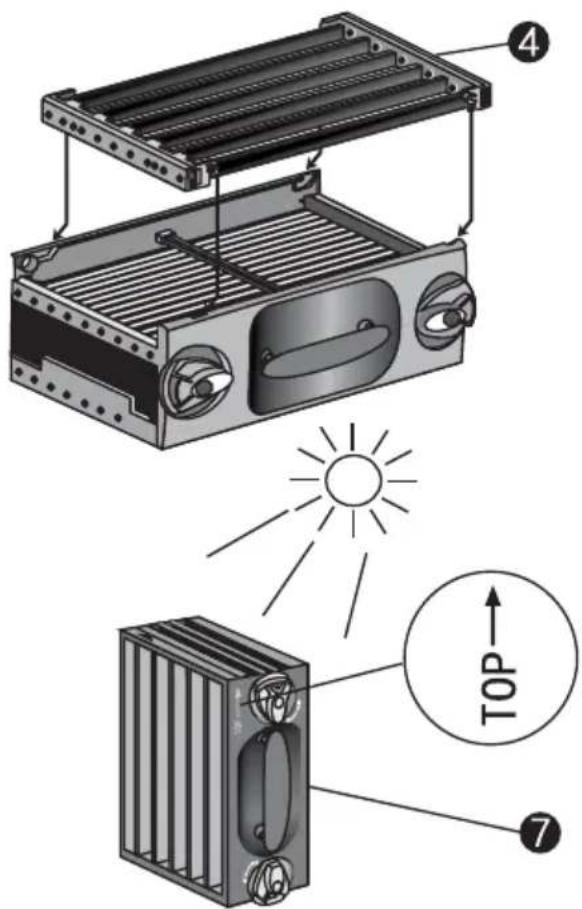
- Separate the Collector Electrostatic filter from the pre-electrostatic filter for ease of cleaning.
- Place each piece in a location suitable for cleaning in a way that there is no gap.
- Spray cleaner (detergent, dish soap, etc.) between each cell plate and spread on every surface. Rinse the collector cell under clean running water properly.
- Leave the collector cell to dry under sunlight for at least 3 hours. Rinse out the excess water inside the collector cell to speed up the drying time. When placing the cell back, make sure that it is not wet and damp.
EN
- Reassemble the beam on the outer edges of the front electrostatic filter by inserting it into the recessed channels of the Collector Electrostatic filter. After directing the beam into the recessed channels, slide the front electrostatic filter until it clicks into its place.
- Place the collector cell back in the unit by sliding it firmly and turning each knob to the lock position. The collector cell is specially designed to be installed in one direction only.
- Place the front cover back carefully.
PLACING VOC/FORMALDEHYDE FILTER
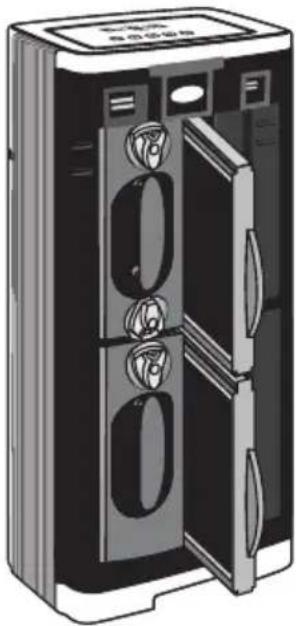
natural_image
Illustration of a closed refrigerator with three doors and three ovens (no text or symbols visible)- Pull off the electricity plug
- Remove the front cover by pulling it gently from the top corners.
- Remove the filter out of the cabin directly.
- Replace it with a new filter
- Close the front cover safely.

NOTE!
Recommended replacement interval for VOC/FORMALDEHYDE Filters is 6 months
Cleaning Air Outlet Grill
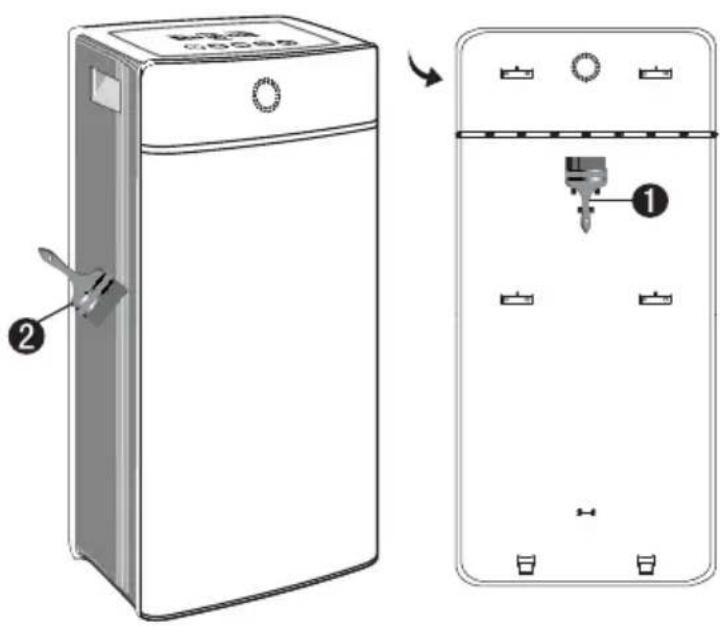
- Take the cleaning brush located under the front cover out of the storage slot.
- Clean the debris between the grill slots by means of a brush.
- Place the cleaning brush back into the storage slot after cleaning completed.
Troubleshooting
| Problem Possible | Cause Solution | |
| Appliance does not operate. | There may be a connection problem. | Check whether the appliance is plugged to the outlet correctly. |
| Appliance may not be turned on. | Press the On/Off button. | |
| Filters or front panel may not be installed correctly. | Reinstall the filters or the front panel. | |
| Appliance may be faulty if it does not operate after you have performed all the inspections specified above. | ||
| Unplug the appliance and take it to the Fakir Authorised Service. | ||
| Cleaned air does not come out of its outlet easily | The pre-filter may be blocked. | Clean the pre-filter (see ‘Cleaning and maintenance’ section). |
| Clean the filters (see ‘Cleaning and maintenance’ section). If this does not work, unplug the appliance and take it to the Fakir Authorised Service. | ||
| Odours are not removed properly | Environmental factors | You may be using the appliance in an environment with a poor air quality. Reinforce air circulation by opening the windows. |
| Place the appliance in a smaller room. Recommended room sizes are between 50 m2 and 100 m2. | ||
| You may be using the appliance in a room larger than the proper sized room. | ||
| Fans are not operating although the appliance is plugged and turned on | Appliance may be faulty. | Turn off and unplug the appliance. Consult Fakir Authorised Service. |
| The Clean Cell appears in red on the display | It may derive from the collector cell. | Clean the collector cell and press and hold the sleep icon for 3 seconds and you will see the clean cell indicator disappear from the display |
| The plasma indicator does not operate | A large piece may be entered the collector cell. | Check and remove if any and restart your machine |
| The collector cell may not be installed properly | Try placing it again | |
| The collector cell may be too dirty or may not be cleaned | Check the cell and clean it, replace it if damaged. | |
| The collector cell cannot filter the particles | The collector cell may not be dried enough after cleaning | Make sure again that it is dried completely. |
| It may derive from the collector cell. | Clean the collector cell | |
| The collector cell may be defective and damaged | In this case, contact the nearest Fakir Authorised Service. | |
| The automatic indicator flashes | It may derive from the environmental factor. | If the air quality is poor, ensure air flow by the opening windows |
| Sensor may be faulty. | In this case, call the authorised service for repair or replace it with a new one | |
| The Clean Sign indicator always indicates Dirty (Red) | It may derive from the environmental factor. | Open the windows and ensure air flow |
| It may derive from the sensors. | It may take some time for the device to be effective if the environment is heavily exposed to polluted air (cigarette, etc.) | |
| The Clean Sign indicator always indicates Clean (Green) | It may derive from the sensors. | The sensors may not detect if the sensors are too far from dust or any odours inside the room. |
| Position the appliance to a closer place that may be dirty | ||
| To test, you can spray air freshener, etc where the device is in; if the sensor turns red, it means that your device is working properly. | ||
| The appliance sounds abnormal noises (swishing or cracking sounds) | The pre-filter may be blocked. | Clean the pre-filter (see ‘Cleaning and maintenance’ section). |
| You may have forget to remove the plastic packaging of the new filter. | Remove the plastic packaging before switching on the appliance again. | |
| Air inlet or outlet may be blocked by an external object. | Remove the object blocking the air inlet or outlet. | |
| Appliance may be faulty. | Turn off and unplug the appliance. Take the appliance to the Fakir Authorised Service. | |
| A smell of burnt rubber occurs | Appliance may be faulty. | Turn off and unplug the appliance. Take the appliance to the Fakir Authorised Service. |

NOTE!
Before calling the customer services, check if you can fix the problem/error by yourself. For this purpose, please see the "TROUBLESHOOTING" section. If you cannot solve the problem/error, please call the customer services. Before calling please make ready the model name and product serial number. You can find this information on the TYPE LABEL of your product. Hotline: (+90 212) 444 0 241
Recycling
If the service life of the appliance expires, cut the power cord and make it unusable. According to the applicable laws in your country, throw the appliance into the waste bins identified specially for such appliances.
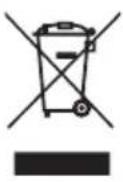
Electrical waste should not be disposed of with regular waste.
Throw the appliance into waste bins designated for electrical waste.
The packaging elements of the appliance are made of recyclable materials. Throw them into suitable recycling bins.

The appliance complies with WEEE Regulation.
Shipping
Carry the appliance in the original package or a similar, well-padded package to prevent damage to the appliance.
natural_image
Line drawing of a kitchen appliance next to a wall-mounted electrical outlet, with a window showing sun and curtains in the background (no text or symbols)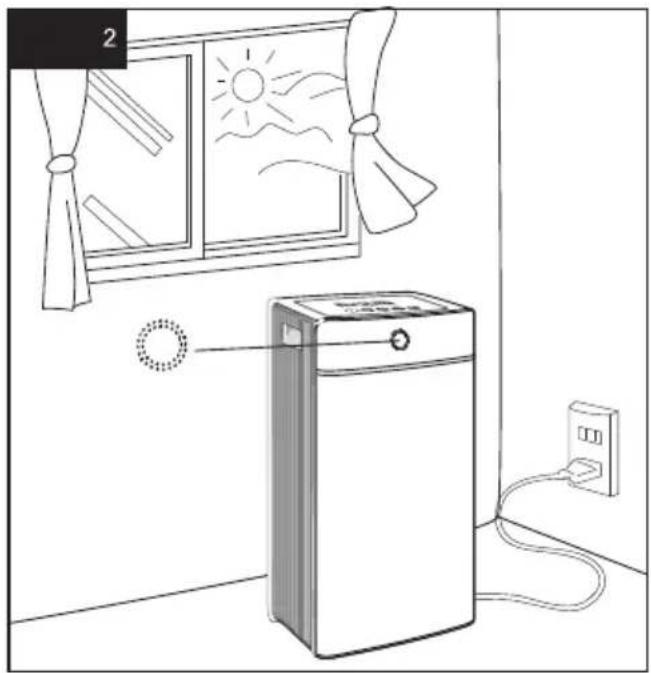
natural_image
Line drawing of a kitchen appliance with a fan window, sun, and power outlet (no text or symbols)ve şifrenizi girin
natural_image
Illustration of a double-door refrigerator with three doors and three lockers (no text or symbols visible)natural_image
Line drawing of a kitchen appliance next to a window with sun and curtains, connected to an electrical outlet (no text or symbols)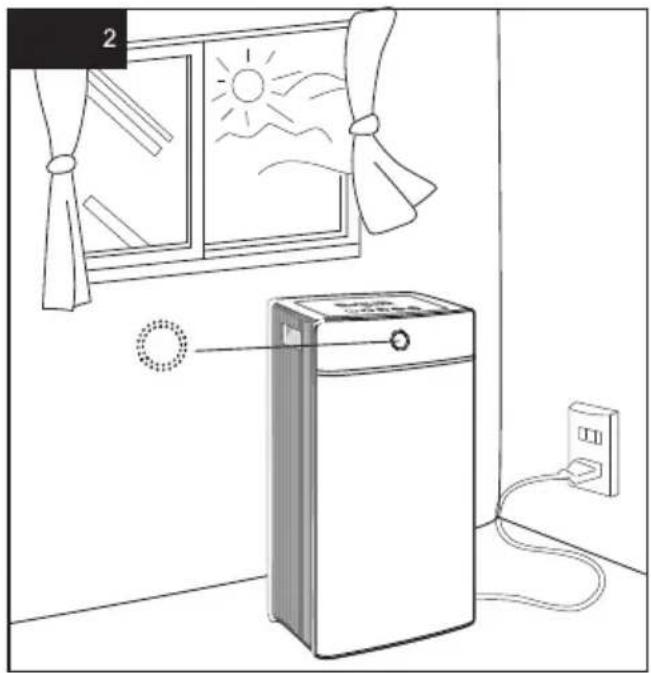
natural_image
Line drawing of a kitchen appliance with a fan window, a door, and a power unit connected to a wall (no text or symbols)AUTO → Low → Medium → High
- Измените сигнал WIFI на SmartLife-XXXX и нажмите
- Нажмите «Готово»
natural_image
Illustration of a double door with three doors and a top panel, showing internal compartments (no text or symbols)natural_image
Line drawing of a household air conditioner unit connected to an electrical outlet, with a window showing sun and curtains in the background (no text or symbols)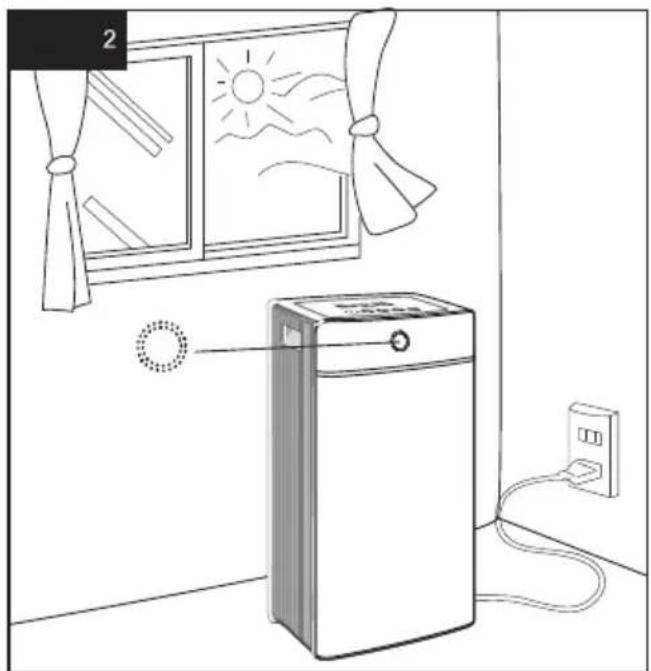
natural_image
Line drawing of a kitchen appliance with a window, fan, and power outlet (no text or symbols)AUTO → Low → Medium → High
AUTO
النمط التلقاني:
الاتصال بالشبكة
استخدام Sysطبيق
- انقر فوق "تم"
natural_image
Illustration of a refrigerator with doors open and three drawers on the door (no text or symbols visible)*same number as on rating label

- TECHNOSPHERE Smart
- Dear Customer,
- About Using Instructions
- Meanings of the Symbols
- WARNING!
- CAUTION:
- NOTE!
- Liability
- CE Declaration of Conformity
- Intended Use
- Unauthorised Use
- Safety is important
- Safety Warnings
- Unpacking
- Box Contents
- Technical Information
- Sound Level
- Air Indicator Light Colours
- Operation
- On / Off Button
- Mode Setting Button
- Automatic Mode:
- Low Mode (1)
- Medium Mode (Ⅱ)
- High Mode ( )
- 3) UV Light On/Off Button
- 4) Timer
- 5) Sleep Mode
- 6) CLEANING INDICATOR-Clean Cell CLEAN CELL
- 7) PM 2.5 Indicator Function
- 8) PLASMA Indicator Function
- 9) Application Instructions for Wi-Fi Use
- Network Connection
- Add Appliance
- Troubleshooting
- Wireless Access Connection (AP MODE)
- Cleaning and Maintenance of the Appliance
- Cleaning of the Pre-Filter
- Cleaning of the Collector Cell
- PLACING VOC/FORMALDEHYDE FILTER
- Recycling
- Shipping
Brand : FAKIR
Model : Technosphere Smart
Category : Air purifier