
H6542BD - Vidéo-projecteur ACER - Free user manual and instructions
Find the device manual for free H6542BD ACER in PDF.


| Product Type | Video Projector |
| Resolution | 1920 x 1080 (Full HD) |
| Brightness | 3000 ANSI Lumens |
| Contrast Ratio | 20,000:1 |
| Lamp Life | Up to 5,000 hours (Normal) / 10,000 hours (Eco) |
| Aspect Ratio | 16:9 (native), 4:3 compatible |
| Lens Zoom | 1.1x Manual Zoom |
| Keystone Correction | Vertical: ±40° |
| Inputs | HDMI (x2), VGA (x1), USB-A (x1), Composite Video (x1) |
| Outputs | Audio 3.5mm, USB-A (power only) |
| Noise Level | 30 dB (Eco) / 34 dB (Standard) |
| Power Consumption | 260W (Max), <0.5W (Standby) |
| Dimensions (W x D x H) | 315 x 214 x 98 mm |
| Weight | 2.5 kg |
| Color | White |
| Mounting | Ceiling mount (optional), tabletop |
| Replacement Lamp | Acer lamp module (model number in manual) |
| Cleaning Instructions | Clean lens with a soft, dry cloth; clean vents with compressed air |
| Safety Warnings | Do not look directly into the lens; allow proper ventilation; replace lamp with compatible model |
| Eco Mode | Reduces lamp brightness and noise to extend lamp life |
| Remote Control | Infrared remote (batteries included) |
Frequently Asked Questions - H6542BD ACER
User questions about H6542BD ACER
0 question about this device. Answer the ones you know or ask your own.
Ask a new question about this device
Download the instructions for your Vidéo-projecteur in PDF format for free! Find your manual H6542BD - ACER and take your electronic device back in hand. On this page are published all the documents necessary for the use of your device. H6542BD by ACER.
USER MANUAL H6542BD ACER
Copyright © 2019. Acer Incorporated.
natural_image
Symbol of a trash bin crossed with a diagonal line and a horizontal bar below (no text or labels)viii
natural_image
Line drawing of a projector with a lens and screen (no text or symbols)| # Beschreibung # Beschreibung | ||
| 1 Netzkabel 8 RS232-Kabel | ||
| 2 Audiokabel 9 WirelessHD Dongle | ||
| 3 HDMI (MHL)-Kabel 10 Wireless Dongle | ||
| 4 VGA-auf-Component-Video/HDTV-Adapter | 11 Kabelfernbedienung | |
| 5 VGA-Kabel 12 RJ45-Kabel | ||
| 6 3 RCA Component-Kabel 13 12V DC Kabel | ||
| 7 Composite-Videokabel | ||

natural_image
Line drawing of a projector with a circular diagram showing rotational motion (no text or symbols)Winkelverstellfuß
4. Laden des Bildes

natural_image
Technical line drawing of a mechanical assembly with circular components and internal components (no text or symbols)Abbildung 1
natural_image
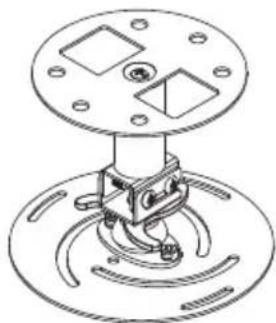
Technical line drawing of a mechanical assembly with mounting flange and base mount (no text or symbols)Abbildung 2
natural_image
Technical line drawing of a mechanical clamp or bracket assembly with 360° angle annotation (no text or symbols on the diagram itself)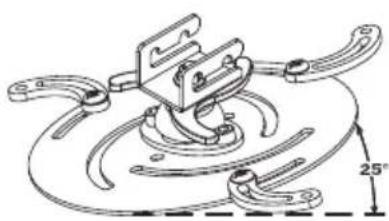
natural_image
Technical line drawing of a mechanical clamp or bracket assembly with a 25° angle标注 (no text or symbols beyond the angle marker)Operation conditions
Canada — Low-power license-exempt radio communication devices (RSS-247)
a Ein CIM (Common Information Model)-
Declaration of Conformity
We,
Acer Incorporated
8F, 88, Sec. 1, Xintai 5th Rd., Xizhi, New Taipei City 221, Taiwan
And,
Acer Italy s.r.l.
Via Lepetit, 40, 20020 Lainate (MI) Italy
Tel: +39-02-939-921, Fax: +39-02-9399-2913
www.acer.it
Product:
Projector
Trade Name:
Acer
Model Number:
A1P1803/AWU1804/A1P1805/AWU1808
Marketing Name:
H6531BD/E353D/HE-F24J/H6530BD+/GM523/VH-423/
P1655/M461/PE-U50/PR625/MF-525/P1555/M455+/PE-
F50/N348/AF600/PR525/MF-425/X1626AH/D567D/EV-W
U58H/M446+/M447/DX626/BS-526
We, Acer Incorporated, hereby declare under our sole responsibility that the product described above is in conformity with the relevant Union harmonization legislations as below Directive and following harmonized standards and/or other relevant standards have been applied:
EMC Directive: 2014/30/EU
EN 55032:2012+AC:2013, Class B
EN 61000-3-2:2014
EN 55024:2010/A1:2015
EN 61000-3-3:2013
LVD Directive: 2014/35/EU
EN 60950-1:2006/A11:2009/A1:2010/A12:2011/A2:2013
RoHS Directive: 2011/65/EU
EN 50581:2012
ErP Directive: 2009/125/EC
□ Regulation (EU) No. 617/2013
Regulation (EC) No. 1275/2008; EN 50564:2011
☐ Regulation (EC) No. 278/2009; EN 50563:2011
Year to begin affixing CE marking 2019.
NuJan
RU Jan/Sr. Manager
Acer Incorporated (Taipei, Taiwan)
Apr. 1, 2019
Date
Declaration of Conformity
We,
Acer Incorporated
8F, 88, Sec. 1, Xintai 5th Rd., Xizhi, New Taipei City 221, Taiwan
And,
Acer Italy s.r.l
We, Acer Incorporated, hereby declare under our sole responsibility that the product described above is in conformity with the relevant Union harmonization legislations as below Directive and following harmonized standards and/or other relevant standards have been applied:
EMC Directive: 2014/30/EU
EN 55032:2015+AC:2016-07, Class B
EN 61000-3-2:2014
EN 55024:2010/A1:2015
EN 61000-3-3:2013
LVD Directive: 2014/35/EU
EN 60950-1:2006/A11:2009/A1:2010/A12:2011/A2:2013
EN62368-1:2014
RoHS Directive: 2011/65/EU
EN 50581:2012
ErP Directive: 2009/125/EC
□Regulation (EU) No. 617/2013
☐ Regulation (EC) No. 278/2009; EN 50563:2011
Regulation (EC) No. 1275/2008; EN 50564:2011
Year to begin affixin g CE marking 2020.
NuJum
RU Jan/Sr. Manager
Acer Incorporated (Taipei, Taiwan)
Apr. 1, 2020
Date

Federal Communications Commission Declaration of Conformity
This device complies with Part 15 of the FCC Rules. Operation is subject to the following two conditions: (1) this device may not cause harmful interference, and (2) this device must accept any interference received, including interference that may cause undesired operation.
The following local Manufacturer /Importer is responsible for this declaration:
Product: DLP Projector
Model Number: A1P1803/AWU1804/A1P1805/
AWU1808/A1P1911 series
Name of Responsible Party: Acer America Corporation
Address of Responsible Party: 333 West San Carlos St.
Suite 1500
San Jose, CA 95110
U. S. A.
Contact Person: Acer Representative
Phone No.: 254-298-4000
Fax No.: 254-298-4147

Brand : ACER
Model : H6542BD
Category : Vidéo-projecteur