
MOD-51 - Vacuum Cleaner MPM - Free user manual and instructions
Find the device manual for free MOD-51 MPM in PDF.


| Product Type | Bagged Canister Vacuum Cleaner |
| Model | MPM MOD-51 |
| Dust Bag Capacity | 4 liters |
| Power Cord Length | 4.5 meters |
| Working Radius | 7 meters |
| Suction Power Control | 5 electronic levels (MOD-51) with preset icons for surfaces |
| Filtration System | Motor filter (washable) + HEPA filter (non-washable) |
| Accessories Included | Metal telescopic wand, floor/carpet tool with bristle mode, slit attachment with movable brush |
| Bag Full Indicator | Red light activates when bag full or hose clogged |
| Cord Winder | Automatic cord rewinding with button |
| Weight (approx.) | 4.5 kg |
| Dimensions (approx.) | 40 x 25 x 30 cm |
| Power Rating (estimated) | 1000 W |
| Noise Level | Not specified |
| Safety Features | Thermal overload protection, auto shut-off if overheating |
| Maintenance | Monthly filter cleaning; HEPA filter replacement when dirty; dust bag replacement |
| Warranty | Not specified |
Frequently Asked Questions - MOD-51 MPM
User questions about MOD-51 MPM
0 question about this device. Answer the ones you know or ask your own.
Ask a new question about this device
Download the instructions for your Vacuum Cleaner in PDF format for free! Find your manual MOD-51 - MPM and take your electronic device back in hand. On this page are published all the documents necessary for the use of your device. MOD-51 by MPM.
USER MANUAL MOD-51 MPM
natural_image
Black and white photo of a vacuum cleaner with coiled black hose and red/gray body (no text or symbols visible)ODKURZACZ WORKOWY MOD-50/MOD-51
Vacuum cleaner/Пылесос/Staubsauger
PRZED PIERWSZYM UŻYCIEM ZAPOZNAJ SIĘ Z INSTRUKCJĄ OBSŁUGI
PL INSTRUKCJA OBSŁUGI....3
GB USER MANUAL 9
RU ИНСТРУКЦИЯ ПО ОБСЛУЖИВАНИЮ....15
Read carefully this manual before using the appliance.
Always remove the plug from the power outlet when not used, or before cleaning the appliance.
Before the first use check if mains voltage conform with vacuum cleaner.
Do not hang the power cord over sharp edges and do not allow the power cord to touch hot surfaces.
Do not pull the cord to unplug the appliance.
Do not leave the operating vacuum cleaner unattended.
- Close supervision is necessary when using the appliance near children.
Do not allow the vacuum cleaner to go over the power cord in case it can damage its insulation.
Do not try to use the vacuum cleaner if you suspect any technical damage.
Do not use the appliance, also if the power cord or plug is damaged - return the appliance for repair to an authorized service centre.
To avoid the risk of damage, fire or injury, always use the attachments recommended by the manufacturer.
Take extreme caution when cleaning the stairs.
Do not immerse the appliance, its cord and plug in water or any other liquids, keep it dry at all times.
Do not use the vacuum cleaner to collect flammable and corrosive liquids, solvents, matches, ash, cigarette ends, oil, sharp items etc. It can cause damage or even fire! Do not vacuum-clean near flammable liquids and substances!
Because of the vacuum cleaner plastic housing keep the appliance away from any heat sources (heaters, stoves etc.)
Do not cover the vacuum cleaner outlet and inlet!
This vacuum cleaner is designed for domestic use only.
This appliance is not intended for use by children under 8 years of age and individuals with reduced physical, sensory or mental capabilities, or lack of experience and knowledge, unless they have been given supervision or instruction concerning use of the appliance in a safe way and if they understand the hazards involved. Cleaning and user maintenance shall not be carried out by children without supervision.
Children should be supervised to ensure that they do not play with the appliance.
- Store the appliance and its cord out of reach of children under 8 years of age.
Do not vacuum-clean people or animals, take special care not to move suction nozzles near eyes and ears.
Turn off and disconnect the appliance from supply circuit before replacing accessories.
Do not vacuum without bag, filters and in case of damage.
Check the hose, wand and suction nozzles and remove any litter from them.
Use the vacuum cleaner only indoors and on dry surfaces. Dry the washed carpets before vacuum-cleaning.
Keep your children safe: do not leave any parts of the packaging readily accessible (i.e. plastic bags, cardboard boxes, polystyrene inserts, etc.).
WARNING! Never let children play with plastic film or bags. Choking/asphyxiation hazard!
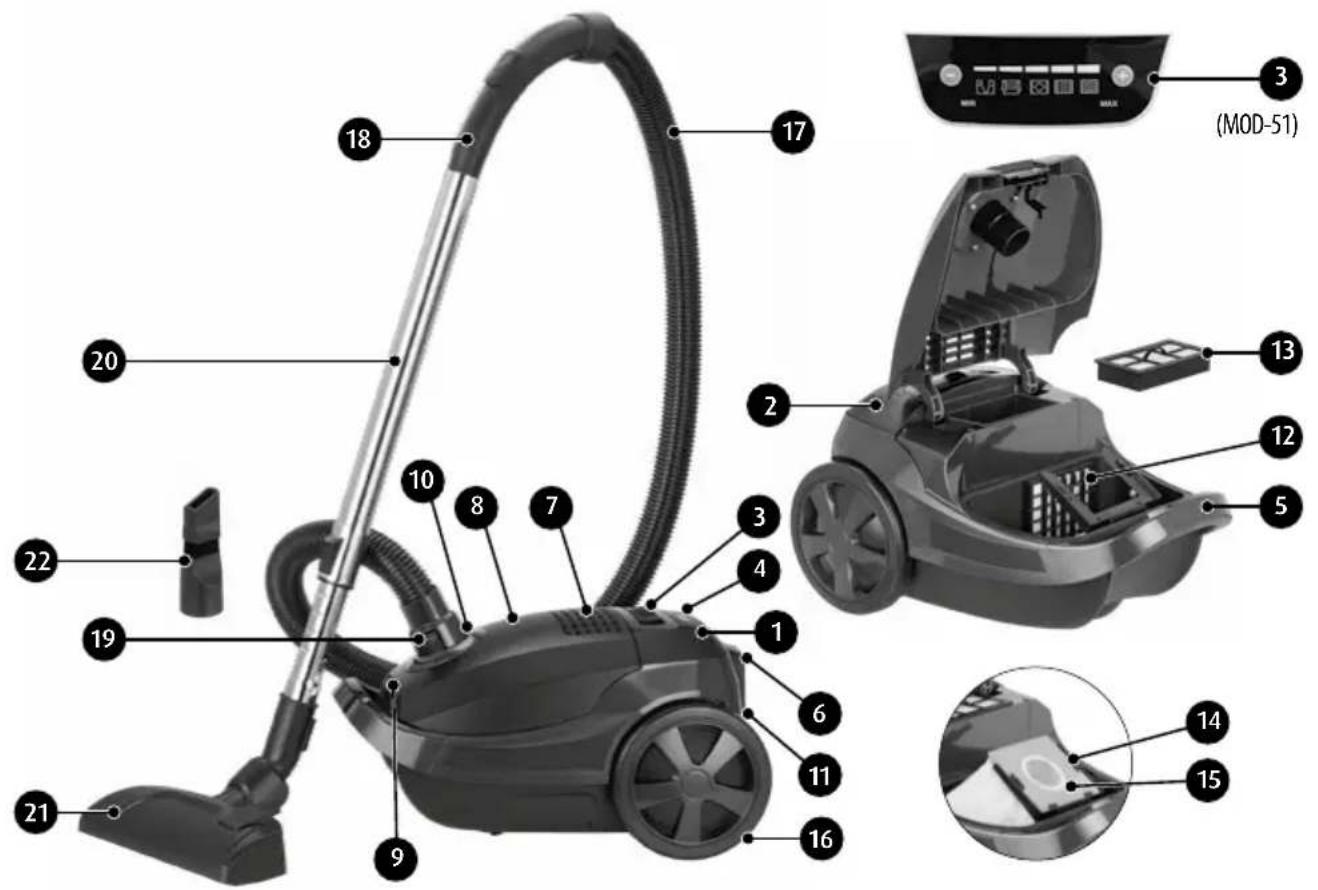
- ON/OFF switch
- Cord winder buton
- Suction force control
- Dust bag filling indicato
- Carrying handle
- Guide
- Air outlet grille
- Upper cover
- Upper cover opening buton
- Suction hose connection opening
-
Power cord
-
Motor filter
- Hepa filter
- Dust bag frame
- Dust bag (4l)
- Wheel
- Suction hose
- Suction hose handle
- Suction hose mounting ring
- Metal telescopic Wand
- Floor and carpet tool
- Slit attachment with movable brush
STATIC ELECTRICITY
Vacuum cleaning certain surfaces at a low air humidity may cause slight electrification of the appliance. This is natural, does not damage the appliance and does not constitute its defect. To minimise this phenomenon, it is recommended to:
- frequently discharge the appliance by touching items in the room with the metal pipe,
▶ increase air humidity in the room,
use generally available anti-electrostatic products.
APPLIANCE ASSEMBLY
- Press both latches on the suction hose mounting ring (19), insert the ring into the opening (10) and release the latches. To disassemble, press the latches again and remove the ring (19) from the opening (10).
- Connect the wand (20) to the handle (18). Install one of the tools, (21) or (22), on the end of the wand.
- The length of the telescopic suction pipe (20) can be changed by pressing the button in the middle part of the suction pipe.
USING THE APPLIANCE
- Before turning on the vacuum cleaner, unwind the power cord (11) to a suitable length and plug it into the mains socket. The yellow mark on the power cord indicates the optimum length. Do not pull out the cord beyond the red mark! While unwinding the cord, do not press the cord winder button (2).
- Press the switch (1) to turn on the vacuum cleaner.
- To wind the power cord, press the cord winder button (2) with one hand, while holding the cord with another hand to prevent a sudden movement that could damage it.
- Setting the correct sucking power of the vacuum cleaner:
a. In the MOD-50 model, slide the regulator (3) to the desired position: b. In the MOD-51 model with +/- buttons on the regulator (3), set one of the five available power levels. The icons on the panel indicate preset power levels for various surfaces to be vacuum cleaned:
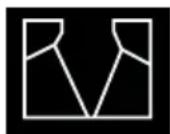
draperies, curtains
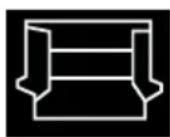
upholstered furniture, pillows

carpets, carpeting
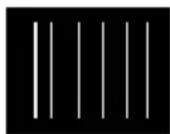
floor panels, heavily dusted carpets

hard flooring, heavily dusted items
NOTE!!! For the MOD-50 model, it is recommended to set the suction regulator (3) to MIN before switching the vacuum cleaner on!
Dust bag filling level indicator light (4) turns red when the suction hose is clogged or the dust bag is full. You need to replace the dust bag or remove the clogging from the suction hose.
- To ensure optimum appliance setting upon the completion of work, use the guide (6) in the rear of the vacuum cleaner. Place the rail in the rear of the floor-carpet attachment with connected suction hose and telescopic pipe on the guide. The second guide that facilitates vacuum cleaner storage in the vertical position is under the bottom of the appliance.
ACCESSORIES OVERVIEW
FLOOR-CARPET ATTACHMENT
Designed for cleaning large flat surfaces. It is equipped with castors that facilitate movement in difficult to access places and a flexible joint, connecting it with the suction hose, which allows directing at various angles. When you press the button on the upper attachment housing (switch it to the brush mode), a row of rigid bristles will appear on the bottom to facilitate cleaning hard floors.
SLIT ATTACHMENT WITH MOVABLE BRUSH
Used for cleaning difficult to access areas, such as in room corners, by and below pieces of furniture and in bends and slits. It is also perfect for cleaning computer keyboards, drawers, radiators or window frames.
REPLACING THE DUST BAG
To replace the dust bag, turn off the vacuum cleaner with the power switch (1) and disconnect it from the power source. Remove the suction pipe (17) and press the (5) button to open the upper cover (8). Remove the dust bag support (14), remove the old bag from the support and insert a new one. The support can be placed in the vacuum cleaner in one position only. Close the cover (8) and connect the suction pipe (17).
AIR FILTER CLEANING AND REPLACEMENT
Normal use of the vacuum cleaner requires periodical replacement or cleaning of the air filter, which protects the motor from the side of the dust bag, and the air outlet filter. For this purpose, disconnect the appliance from the power supply and detach the suction pipe.
- Remove the motor filter (12) and HEPA filter (13). You will access the filter by lifting the cover (8) and removing the dust bag (15). Remove the filter element (12).
- Use a fine bristle to clean the HEPA filter (13) from accumulated dust in it. Do not wet clean the HEPA filter.
- Wash the engine filter element (12) in running and cool water. Dry thoroughly after washing. Clean the filters every month or more often (depending on frequency of use). If any of the filters are too dirty or damaged, replace them with a new one.
- When installing the filter elements, carefully align them in the housing and the vacuum cleaner.
CAUTION: The filter cartridge being mounted must be completely dry. Mounting a wet filter may cause an electric shock.
CLEANING AND MAINTENANCE
- Periodically clean the vacuum cleaner housing and other external elements with a damp cloth. This will allow maintaining good appearance of the appliance.
- For this purpose, do not use sharp objects or any strong detergents (e.g. solvents), as this will cause permanent damage to the vacuum cleaner housing.
- For air filters and dust bag, follow the above instructions.
IN CASE OF FAILURE
| Failure type: Possible causes: Instructions: | ||
| front cover not thoroughly closed | dust bag not attached or attached improperly | attach the dust bag properly |
| vacuum cleaner housing overheating | a slight housing temperature increase is normal, but if the temperature increases considerably, immediately turn off the vacuum cleaner and contact the service | |
| strongly contaminated filters clean or replace the filters | ||
| low suction power | full dust bag replace the dust bag or empty the textilebag | |
| blocked hose or extension pipe remove all items blocking the hose or pipe | ||
TECHNICAL DATA
Technical parameters are indicated on the product nameplate. Length of power cord: 4,5 m Working radius: 7,0 m

Note! MPM agd S.A. reserves its right to modify the technical data.
PROPER DISPOSAL OF THE PRODUCT (waste electrical and electronic equipment)
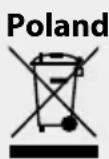
Marking on the product indicates that after the service–life of the product expires, it should not be disposed with other type of municipal waste. Used equipment may have a negative impact on the environment and health of people due to potentially containing hazardous substances, mixtures and components. Mixing electric waste with other types of waste or disassembling those in an unprofessional manner may cause release of substances that are hazardous to the environment and health. Used equipment should be handed-over to a point for collection of electric waste. In order to obtain detailed information regarding the electric waste collection points, the user should contact the municipal point of electric waste collection or used equipment processing department.
We wish you satisfaction from using the product and invite you to check a wide range of other MPM appliances
natural_image
Line drawing of a vacuum cleaner with a cat silhouette and bulb (no text or symbols)MPM agd S.A.
- ODKURZACZ WORKOWY MOD-50/MOD-51
- Vacuum cleaner/Пылесос/Staubsauger
- STATIC ELECTRICITY
- APPLIANCE ASSEMBLY
- USING THE APPLIANCE
- ACCESSORIES OVERVIEW
- FLOOR-CARPET ATTACHMENT
- SLIT ATTACHMENT WITH MOVABLE BRUSH
- REPLACING THE DUST BAG
- AIR FILTER CLEANING AND REPLACEMENT
- CLEANING AND MAINTENANCE
- TECHNICAL DATA
- PROPER DISPOSAL OF THE PRODUCT (waste electrical and electronic equipment)
Brand : MPM
Model : MOD-51
Category : Vacuum Cleaner