
ProHome easy - Alarm OLYMPIA - Free user manual and instructions
Find the device manual for free ProHome easy OLYMPIA in PDF.


| Product Type | Alarm Gateway (Interface for Compatible Sensors) |
| Brand | Olympia |
| Model | ProHome easy |
| Dimensions (H × W × D) | 99.7 × 53.3 × 69 mm |
| Weight | 128 g |
| Power Supply | 100-250 V AC, 50/60 Hz |
| Radio Frequencies | 2.4 GHz (WiFi) and 868 MHz |
| Max Transmission Power | 100 mW (WiFi), 10 mW (868 MHz) |
| Maximum Number of Sensors | Up to 64 |
| Compatible Sensor Series | ProHome/Protect series |
| Ambient Operating Temperature | 0°C to +40°C |
| Humidity Range | 30% to 75% relative humidity |
| App Compatibility | iOS 8+ (iPhone 5S/iPad Air/Mini 2+), Android 5.0+ |
| Night Light | Built-in, toggle via function key |
| LED Indicators | Green/Yellow for WiFi and sensor status |
| Setup Method | QR code scan or manual UID/PIN/SSID entry |
| Gateway Function | Interface for sensors, home monitoring and automation |
| Safety Features | Child safety (age 8+), no self-repair, indoor use only |
| Cleaning Instructions | Soft, lint-free cloth; no solvents |
| Disposal | Electronic waste, separate collection per local laws |
| Guarantee | Return with receipt and original packaging to point of sale |
| Certification | CE compliant (Directive 2014/53/EU) |
| Declaration of Conformity Available At | http://productip.com/?f=a5a6f |
| Included Accessories | Gateway, operating manual |
| Function Key | Reset WiFi (10s press) and toggle night light |
Frequently Asked Questions - ProHome easy OLYMPIA
User questions about ProHome easy OLYMPIA
0 question about this device. Answer the ones you know or ask your own.
Ask a new question about this device
Download the instructions for your Alarm in PDF format for free! Find your manual ProHome easy - OLYMPIA and take your electronic device back in hand. On this page are published all the documents necessary for the use of your device. ProHome easy by OLYMPIA.
USER MANUAL ProHome easy OLYMPIA
natural_image
White handheld device with circular top and handle, no visible text or symbolsProHome easy
Bedienungsanleitung
Operating Manual
Inhaltsverzeichnis
natural_image
Simple icon of a person using a tablet (no text or symbols)natural_image
Blue circular icon with a house and Wi-Fi symbol, labeled 'LYMPIA' below (no additional text or symbols)Google PlayApp Store
natural_image
Simple line drawing of a light bulb with radiating lines (no text or symbols)natural_image
Symbol of a trash bin with no text or numbers presentBefore You Start .....17
Intended Use ....17
Package Contents ....18
Safety Information ....18
General View .....20
Putting the Gateway into Operation .....21
Connecting the Gateway 21
Installing the ProHome App ..... 21
Setting Up the Gateway 22
Significance of LED Lamps .....24
Function key ⏻....25
Resetting the WiFi Settings ..... 25
Switching the Night Light On ..... 26
Appendix....26
Restating the Gateway 26
Care Instructions 27
Disposal 27
Guarantee 28
Declaration of Conformity 28
Technical Data 29
Before You Start

natural_image
Simple icon of a person using a tablet (no text or symbols)Read the operating manual carefully and pay attention to the information when using the ProHome easy gateway. Keep the operating manual close by for future reference.

Pay attention to this symbol. Texts which are highlighted by this symbol provide helpful information on handling the ProHome easy gateway.
Intended Use
The ProHome easy gateway, subsequently referred to simply as the gateway, has been designed for use as an interface for compatible sensors in order to monitor rooms and homes as well as automate specific processes.
The gateway is suitable for use in rooms indoors.
Any other use is considered unintended use. Unauthorised modifications or reconstructions are not permitted and could cause damage to the gateway.
Package Contents
Before starting up the gateway, check the package contents. If anything is missing or damaged, please contact our Service Department.
ProHome easy gateway
Operating manual
Safety Information
The following warnings apply to the entire document. Read and observe all the warnings to protect yourself and the environment from any harm.

WARNING! Risk of fatal injury from electric shock! NEVER use the device if you suspect damage to the device or power plug or there are visible signs of damage to the device or power plug.

WARNING! Risk of suffocation! Children can swallow small parts, packaging and protective foils. Keep the device and packaging out of reach of children.

CAUTION! This device can be used by children from the age of 8 and persons with restricted physical, sensory or mental capabilities or a lack of experience and knowledge as long as they are supervised or have been instructed with regard to safe use of the device and are aware of the potential risks involved with its use.
Children may not be allowed to play with the device. Cleaning and user maintenance may not be completed by children without any supervision.

ATTENTION! Risk of property damage through environmental influences! Prevent exposing the device to environmental influences such as smoke, dust, vibration, chemicals, moisture, heat or direct sunlight.
NEVER complete any repairs to the device yourself. Never open the device because it contains no components which you may service yourself. In the event of a fault, contact our Service Department (refer to the back cover of this operating manual).
General View
The following illustration shows details of the gateway.
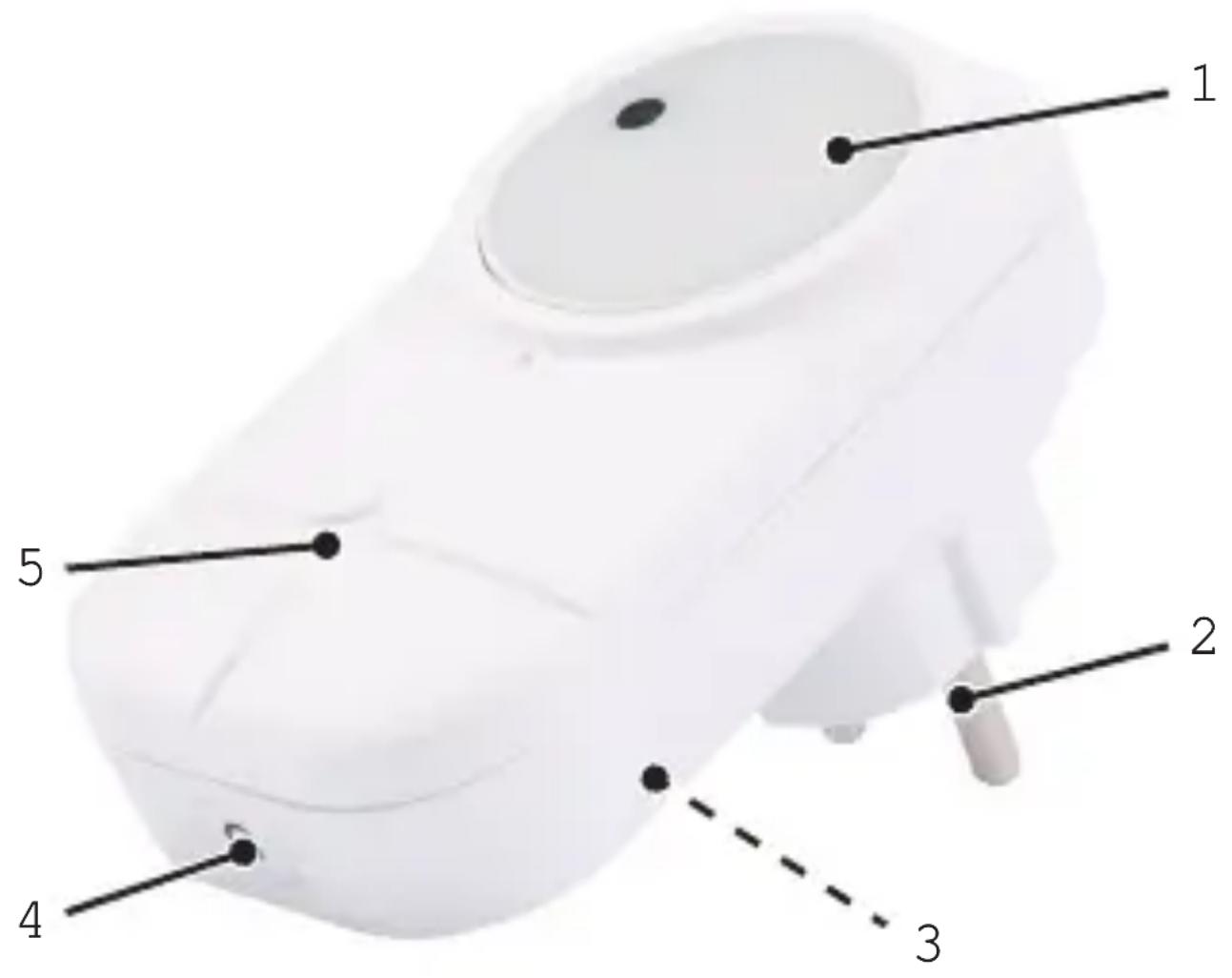
1 Night light with twilight switch
2 Power plug
3 QR code (with UID, PIN and SSID)
4 Function key
5 LED

Putting the Gateway into Operation
The following pages describe:
- how to connect the gateway
- how to install the ProHome app
- how to set-up the gateway in the ProHome app
Connecting the Gateway

The gateway must be connected to a power socket so that all the sensors are in range of the gateway.
Connect the gateway to a properly installed power socket.
Installing the ProHome App
You can configure and control the gateway and sensors with the ProHome app.
natural_image
Blue circular icon with a house and Wi-Fi symbol, labeled 'LYMPIA' below (no additional text or symbols)The ProHome app works under iOS from version 8 (iPhone 5S / iPad Air / iPad Mini 2 or newer) and Android from version 5.0.
Google PlayApp Store
- Download the ProHome app from the App Store or Google Play.
- Enable the ProHome app access to the camera and mobile internet of your terminal device.

You can also enable or disable access to the camera and mobile internet later using the settings of your terminal device.
Setting Up the Gateway

The following describes the set-up procedure using the ProHome app for iOS. All the steps are identical for Android.
Before you can set-up the gateway in the ProHome app, the following conditions must be fulfilled:
- You have connected the gateway to a power socket.
- You have installed the ProHome app on your terminal device.
The terminal device with which you are setting up the gateway is connected to your home network.
Follow the instructions to set-up the gateway as a base unit in the ProHome app.

The set-up guide of the ProHome app displays the ProHome base unit. The instructions provided also apply for the gateway.
- Start the ProHome app on your terminal device.
-
Read the instructions carefully and tap on Continue until your camera of the terminal device is activated.
-
Scan the QR code on the gateway.

If you cannot scan the QR code, tap on Manual input of the UID and enter the UID, PIN and SSID manually (to be found beside the QR code).
- Follow the subsequent instructions.
After completing all the tasks required in the instructions, the gateway appears in the list of available devices as base unit.
Significance of LED Lamp
The LED on the front of the gateway indicates various operating states.
The following table indicates the significance of the flashing and lighting behaviour of the LED on the front of the gateway.
Col-Behaviour Significance our
| Green Flashing No connection to wifi | ||
| Green Lights up continuously | Connected to wifi; sensors are not active | |
| Yellow Green | Flashing alternately | Connected to wifi; a sensor has been triggered |
| Yellow Lights up continuously | Connected to wifi; sensors are active | |
Function Key Ⓧ
The ⏻function key is located on the underside of the gateway. The ⏻key has the following functions assigned to it:
- Resetting the wifi settings of the gateway to the factory values
■ Switching the night light on and off
Resetting the WiFi Settings
Please note that if you reset the wifi settings, the connection to your network is lost. The registration of the sensors is retained.
- Press and hold the ⏻ key for 10 seconds.

natural_image
Simple line drawing of a light bulb with radiating lines (no text or symbols)The wifi settings of your gateway are reset to their default factory settings. The LED on the front flashes green.

During the course of setting it up again (refer to Setting Up the Gateway in the ProHome App on Page 22), the PIN provided on the label at the side of the gateway is valid.
Switching the Night Light On
The gateway is provided with a built-in night light.
- Press the ⏻ key.

Press the ⏻key again to switch the night light off.
Appendix
This section provides information on restarting the gateway, cleaning, disposal, guarantee, Declaration of Conformity and technical data.
Restarting the Gateway
If a feature is not working properly or the gateway no longer reacts, try to restart the gateway.
- Disconnect the gateway from the power socket.
- Wait 10 seconds and connect the gateway to the power socket again.
Care Instructions
Clean the surface of the housing with a soft, lint-free cloth. Do not use any solvents or cleaning agents.
Disposal
natural_image
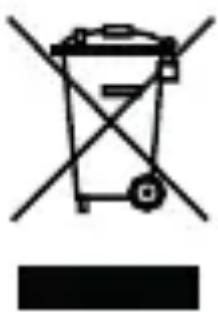
Simple line drawing of a trash bin with crossed lines indicating no waste or plastic (no text or symbols)In order to dispose of your device, take it to a collection point provided by your local public waste authorities (e.g. recycling centre). According to laws on the disposal of electronic and electrical devices, owners are obliged to dispose of old electronic and electrical devices in a separate waste container. The symbol indicates that the device must not be disposed of in normal domestic waste!

Packaging materials must be disposed of according to local regulations.
Guarantee
Dear customer,
we are delighted that you have chosen this equipment.
In the case of a defect, please return the device together with the receipt and original packing material to the point of sale.
Declaration of Conformity
CE GO Europe GmbH, Zum Kraftwerk 1, 45527 Hattingen, Germany hereby declares that this device fulfils the basic requirements and other relevant provisions stipulated in the Directive 2014/53/EU. The CE mark on the device confirms its conformity.
The Declaration of Conformity for this product is available at http://productip.com/?f=a5a6f
Technical Data
| Power supply 100 to 250 V AC, 50/60 Hz | |
| Max. number of sensors | Up to 64 |
| Radio frequencies | 2.4 GHz (wifi)868 MHz |
| Max. transmission power | 100 mW (wifi)10 mW (868 MHz) |
| Compatible with | Sensors from ProHome/Protect series |
| Dimensions 99.7 × 53.3 × 69 mm(H × W × D) | |
| Weight 128 g | |
| Ambient conditions | 0 °C to +40 °C at 30% to 75% rel. humidity |
Apple and the Apple logo are trademarks of Apple Inc., registered in the U.S. and other countries. App Store is a service mark of Apple Inc. Android is a trademark of Google Inc. Google Play is a trademark of Google Inc.


- ProHome easy
- Bedienungsanleitung
- Operating Manual
- Inhaltsverzeichnis
- Before You Start
- Intended Use
- Package Contents
- Safety Information
- General View
- Putting the Gateway into Operation
- Connecting the Gateway
- Installing the ProHome App
- Setting Up the Gateway
- Significance of LED Lamp
- Function Key Ⓧ
- Resetting the WiFi Settings
- Switching the Night Light On
- Appendix
- Restarting the Gateway
- Care Instructions
- Disposal
- Guarantee
- Declaration of Conformity
Brand : OLYMPIA
Model : ProHome easy
Category : Alarm