
Hokkaido 110 - Receiver BLAUPUNKT - Free user manual and instructions
Find the device manual for free Hokkaido 110 BLAUPUNKT in PDF.


| Product Type | Car stereo receiver |
| Brand | Blaupunkt |
| Model | Hokkaido 110 |
| Dimensions (W x D x H) | 180 x 120 x 55 mm |
| Weight | 0.318 kg |
| Power Supply | 12V DC (11-16V), max 10A |
| Max Power Output | 4 x 50W |
| Speaker Impedance | 4 ohms |
| FM Frequency Range | 87.5 - 108 MHz |
| Preset Memory Stations (FM) | 18 |
| FM Sensitivity | < 20 dB |
| FM Stereo Separation | > 25 dB |
| FM SNR | > 60 dB |
| Audio Frequency Response | 20 Hz - 20 kHz |
| Audio Distortion | < 0.3% |
| Playback Media | USB, SD, AUX-IN, Bluetooth |
| Supported File Formats | MP3, WMA |
| Bluetooth Profile | A2DP |
| Bluetooth Pairing Name | Hokkaido 110 |
| Operating Temperature | -20°C to 60°C |
| Front Panel | Detachable control panel |
| Display | LCD with ID3 tag support |
| Remote Control | IR sensor (not included) |
| Installation Type | DIN slot, vehicle 12V system |
| Included Accessories | Trim ring, mounting bar, installation keys, connecting cable, manual |
Frequently Asked Questions - Hokkaido 110 BLAUPUNKT
User questions about Hokkaido 110 BLAUPUNKT
0 question about this device. Answer the ones you know or ask your own.
Ask a new question about this device
Download the instructions for your Receiver in PDF format for free! Find your manual Hokkaido 110 - BLAUPUNKT and take your electronic device back in hand. On this page are published all the documents necessary for the use of your device. Hokkaido 110 by BLAUPUNKT.
USER MANUAL Hokkaido 110 BLAUPUNKT
This car radio has been manufactured according to established safety guidelines. However, dangers may still occur if the safety notes in this manual are not observed. This manual is intended to familiarize the user with the car radio's important functions. Read this carefully prior to using the car radio. Keep this manual in an easily accessible location. In addition, do observe the instructions of the devices used in conjunction with this car radio.
Road Safety
Always observe the following notes for road safety:
- The car radio must be used in a way that complements the safety of the user when driving the vehicle. It is recommended for the user to park at an appropriate location when operating the car radio. While driving, the user is not recommended to use applications that can be prone to distraction, e.g., streaming to media, etc.
- Radios with Navigation: The user is recommended to proceed with proposed driving routes only if it does not violate any traffic regulations. Local traffic signs and regulations always prevail over the routes proposed.
The user is advised to keep the volume of the car radio at a moderate level for the protection of the ears and to increase the ability to hear any emergency warning signals (e.g., police and ambulance sirens). Do not increase the car radio volume while the car radio is muted as it is not audible. The car radio volume can be too loud when the car radio is unmuted.
General Safety Notes:
Observe the following for protection against injuries:
- This car radio is intended for installation and operation in a vehicle with a 12V vehicle system voltage, hence the radio unit must be installed in a DIN slot. Observe the output limits of the car radio. Do not dismantle or modify the car radio. Installation and repairs, if necessary, should be performed by a specialist. We are not liable for any loss or damage caused or resulting from unauthorized disassembly or modification to the product.
- This car radio's core components may result in damage when the car is driven on bumpy roads for a prolonged period of time or if it is used to play non-standard or severely damaged discs.
- Please do not operate the car radio under extreme temperature conditions (extremely high temperature or extremely low temperature); make sure that the temperature within the car ranges from -20°C to 80°C before you connect the car radio to the power supply.
- For abnormalities, please refer to the "Troubleshooting" section. If the problem cannot be resolved, please press the Reset button to recover its factory settings. Otherwise, please contact the respective installer/seller directly for help.
- As SD/USB file formats, codecs, bitrate, resolution, and other parameters available in the market are not all the same, there is no guarantee that this car radio can play all media file formats.
- Different cars may have different configurations. It is normal that some CAN-Bus functions cannot be enabled because they are not supported by the user's car or this car radio.
- Solvents, cleaning and scouring agents as well as dashboard spray and plastics care products may contain materials which can damage the surface and screen of the car radio. Use only dry or slightly moistened cloth to clean the car radio surface and screen.
This manual may be updated from time to time without any notice.
Disclaimer
In no event shall Blaupunkt be liable for any direct, indirect, punitive, incidental, special consequential damages to property or life and whatsoever arising out of or connected with the use or misuse of our products.
USA & CANADA: This product is not intended for sale in the United States and Canada. If purchased in the U.S. or Canada, this product is purchased on as-is basis. No warranty, whether expressed or implied is provided in the U.S. or Canada.
CAUTIONS
Disposal Notes
Do not dispose of your old unit in the household trash!
Use the return and collection systems available to dispose of the old device.
Radios with Detachable Panel - Damage to the control panel
• Never drop the control panel. - Transport the control panel so that it is protected against impacts and the contacts cannot become dirty. - Do not expose the control panel to direct sunlight or another heat source. - Avoid direct skin contact
Scope of Delivery
- Car sound system • Operating / installation instructions
- Connecting cable • Installation keys
- Trim ring
- Mounting bar
KEY FUNCTIONS
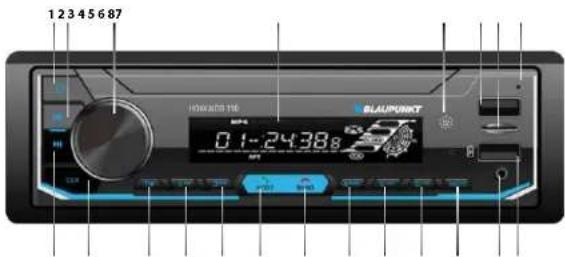
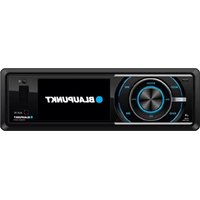
1 Press once to turn on or off. 2 Radio mode - Press to decrease radio frequency manually. Press and hold to increase radio frequency automatically. Phone (BT) mode • Press to return to beginning of current song. Playback mode - Press to skip to previous track/chapter. Press & hold to fast reverse current track. 3 Turn knob left/right to increase/decrease volume or press knob to switch between BAS: Bass, TRRE: Treble, BAL: Balance, FAD: Fader, LOD: Loud, FO: Equalizer and turn left/right to adjust. 4 LCD Display 5 IR Sensor 6 USB (Media) 7 SD 8 Microphone 9 USB (Charging)
10 AUX-IN
11 MUTE
12 Radio mode
- Use digit to select radio station or press and hold to save the station.
Playback mode
- Press to skip to previous 10th song or press and hold to skip to previous folder.
13 Radio mode
- Use digit to select radio station or press and hold to save the station.
Playback mode
- Press to skip to previous 10th song or press and hold to skip to the previous folder
14 Radio mode
- Use digit to select radio station or press and hold to save the station.
Playback mode
- Press to turn on or off shuffle play
15 Radio mode
- Press to switch between radio band FM1 - FM2 - FM3 or press and hold for automatic radio stations scan and save.
Playback mode
• Press to enter manual selection.
Phone (BT) mode
- Press to end call.
KEY FUNCTIONS
- Press to switch between media RADIO - USB - SD - BT - AUXIN. Phone (BT) mode
- Press to answer call.
17 Radio mode
- Use digit to select radio station or press and hold to save the station. Playback mode
- Press to repeat 1/All
18 Radio mode
- Use digit to select radio station or press and hold to save the station. Playback mode
- Press to play the first 10sec of each track.
19 Radio mode
- Use digit to select radio station or press and hold to save the station. Playback mode
- Press to PAUSE/PLAY.
20 Press to view time or press and hold to adjust time setting.
21 Radio mode
- Press to increase radio frequency manually. Press and hold to increase radio frequency automatically. Phone (BT) mode
- Press to skip to next song. Playback mode
- Press to skip to next track/chapter. Press & hold to fast forward current track.
BLUETOOTH
Pre-pair Bluetooth
- Ensure mobile phone supports Bluetooth function before pairing. Different mobile phone will have different emissive power. To get the best connection, the recommended distance range is 3m without any object obstruction.
Pairing
- Turn on your mobile phone's Bluetooth to set up. (Please refer to the instruction manual of your mobile phone on how to operate Bluetooth.) • "Hokkaido 110" should appear on your available Bluetooth scanning list.
- Select "Hokkaido 110". Pairing is successful when your phone's Paired Device list shows "Connected" under Hokkaido 110.
General
Power supply (12V) 11~16V Current consumption max. 10A Max. power output 4 x 50W Dimensions (WxDxH)....180 x 120 x 55mm Weight 0.318kg Operating temperature....-20°~60°
FM Stereo Radio
Frequency range....87.5 - 108MHz Preset memory stations....18 Sensitivity <20dB Stereo separation ....>25dB SNR >60dB
Audio Specification
Frequency response 20Hz - 20kHz Speaker impedance 4 ohms
Playback
USB/SD MP3, WMA Display....ID3 display Distortion <0.3% SNR >60dB
Bluetooth
Profile A2DP Aux-In 3.5mm jack
If any of the following problems occur, please refer to Troubleshooting for possible solutions. Consult a Blaupunkt authorized dealer if the problem persists.
| Problems | Possible Causes | Solutions |
| Unable to start up | The car key is not inserted into the ignition; ignition is off | Insert the car key and turn on the ignition. |
| Power Cable is not inserted into the main body. | Insert the power cable. | |
| Burnt power fuse . | Replace it with a new fuse. | |
| Drained car battery. | Charge or replace the car battery. | |
| No sound | Audio cables are not properly connected to the unit. | Ensure proper connection of the audio cables. |
| Mute setting is on. | Unmute the volume. | |
| Low volume. | Adjust the volume. | |
| No sound from front, rear, left & right speakers due to Fade-Balance settings. | Select Equalizer from Home Page to adjust setting. | |
| Slow in SD card reading | SD card may contain corrupted files or virus. | Replace it with a new audio/video SD card with compatible file formats. |
| Unable to search radio stations | Radio's antenna is not well inserted. | Ensure radio antenna is properly installed. |
WIRING DIAGRAM
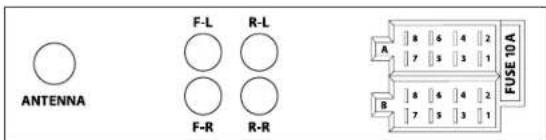
| NO. | WIRE | A |
| 1 | REAR LEFT - | |
| 2 | REAR LEFT + | |
| 3 | FRONT LEFT - | |
| 4 | FRONT LEFT + | |
| 5 | FRONT RIGHT - | |
| 6 | FRONT RIGHT + | |
| 7 | REAR RIGHT - | |
| 8 | REAR RIGHT + | |
| NO. | WIRE | B |
| 1 | BLACK | GND |
| 2 | RED | ACC |
| 3 | - | - |
| 4 | BLUE | ANT |
| 5 | YELLOW | B+ |
| 6 | - | - |
| 7 | - | - |
| 8 | - | - |
INSTALLATION INSTRUCTION
SAFETY
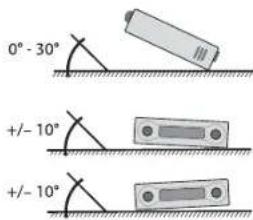
- Assign a mounting location that will not obstruct the driver in any circumstances, or cause injuries to drivers and passengers in case of emergency braking or accidents.
- Ensure all wires are connected properly, and that the unit is functioning well before fitting the unit into the mount.
- Any unauthorized installation and modification may cause malfunction to the unit. Always use only the parts that are included with the unit.
CAUTION
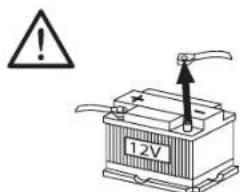
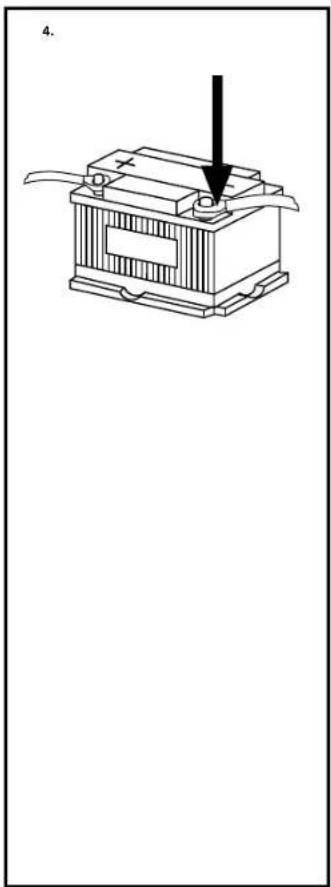
- Disconnect the negative terminal of the battery (refer to the vehicle manufacturer's safety instructions). Be careful not to damage vehicle components when drilling holes.
- The cross sections of the positive and negative cables must not be less than 1.5 mm².
- Do not connect the vehicle's plug connectors to the radio!
- Your vehicle may differ from the description provided here. Blaupunkt is not liable for any damage caused by incorrect installation or connection.
- Please contact Blaupunkt dealers or the vehicle's manufacturer if the information provided here does not fit your specific installation requirements.
When installing the amplifier, first connect the device ground connections before connecting the plugs for the line-out jacks.
The ground connection of external devices may not be connected to the ground of the car sound system (housing).
Supplied mounting hardware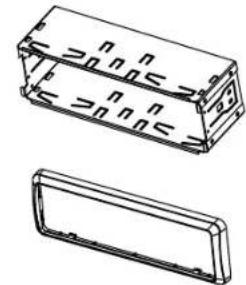
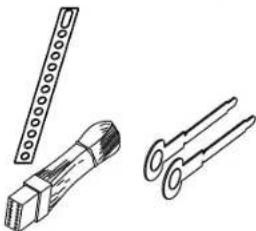
Optional accessories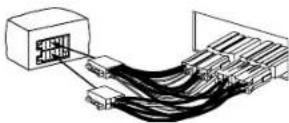
INSTALLATION INSTRUCTION
Installation kit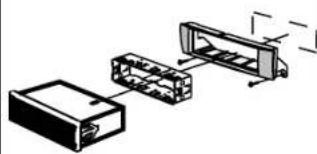
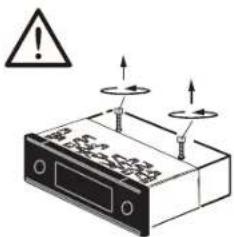
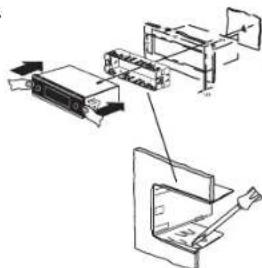
DISMANTLE INSTRUCTION
![graph TD A["1. Screen"] --> B["2. Pin"] B --> C["3. Rotation Arrow"] C --> D["4. Display with Pin"] style A fill:#f9f,stroke:#333 style B fill:#ccf,stroke:#333 style C fill:#cfc,stroke:#333](/content/2026/05/820909/images/7bc5476fc6a591fb5e78ca34c0a08857e20ead4445d842d647656719461fea23.jpg)

Designed and engineered by Blaupunkt Competence Centre
1 101 21 020 29 01
- ROAD SAFETY
- GENERAL SAFETY NOTES
- DISCLAIMER
- CAUTIONS
- DISPOSAL NOTES
- RADIOS WITH DETACHABLE PANEL - DAMAGE TO THE CONTROL PANEL
- SCOPE OF DELIVERY
- KEY FUNCTIONS
- RADIO MODE
- PRESS TO VIEW TIME OR PRESS AND HOLD TO ADJUST TIME SETTING
- BLUETOOTH
- PRE-PAIR BLUETOOTH
- PAIRING
- GENERAL
- FM STEREO RADIO
- AUDIO SPECIFICATION
- PLAYBACK
- WIRING DIAGRAM
- INSTALLATION INSTRUCTION
- SAFETY
- CAUTION
- DISMANTLE INSTRUCTION
Brand : BLAUPUNKT
Model : Hokkaido 110
Category : Receiver