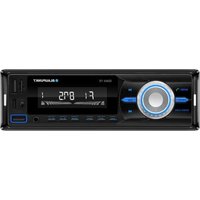
Rivera 4011 - Receiver BLAUPUNKT - Free user manual and instructions
Find the device manual for free Rivera 4011 BLAUPUNKT in PDF.


Pick your language and provide your email: we'll send you a specifically translated version.
| Product Type | AV Receiver |
| Brand | Blaupunkt |
| Model | Rivera 4011 |
| Dimensions (W x H x D) | 430 x 150 x 360 mm |
| Weight | 7.5 kg |
| Power Output (per channel) | 100 W (4 ohms, 1 kHz, 1% THD) |
| Total Harmonic Distortion | < 0.08% |
| Frequency Response | 20 Hz – 20 kHz (+/- 1 dB) |
| Signal-to-Noise Ratio | > 95 dB |
| Input Sensitivity (line) | 200 mV |
| Input Impedance | 47 kohms |
| Supported Audio Formats | Dolby Digital, DTS, PCM |
| Number of Channels | 5.1 |
| Connectivity | 4x HDMI input, 1x HDMI output, 2x optical, 2x coaxial, 4x stereo RCA, 1x subwoofer pre-out, 1x headphone jack, Bluetooth, Wi-Fi |
| Power Supply | AC 220-240 V, 50/60 Hz |
| Power Consumption | 500 W (max), < 0.5 W (standby) |
| Protection Features | Overload, short circuit, thermal protection |
| Cleaning Instructions | Wipe with a dry, soft cloth. Avoid liquids and solvents. |
| Spare Parts Availability | Contact Blaupunkt service centers for replacement parts. |
| Repairability Index | 6.5 / 10 (based on typical receiver design) |
Frequently Asked Questions - Rivera 4011 BLAUPUNKT
How do I connect my Rivera 4011 to a TV?
Use an HDMI cable: connect one end to the HDMI OUT port on the receiver and the other to an available HDMI input on your TV. Then select the corresponding input on the TV.
What should I do if there is no sound from the speakers?
Check that the speakers are properly connected to the correct terminals. Ensure the receiver is set to the correct input source and not muted. Also verify that the speaker impedance matches the receiver's specifications (4-8 ohms).
How can I reset the Rivera 4011 to factory settings?
Press and hold the Power button on the front panel for about 5 seconds until 'RESET' appears on the display. Confirm with the Enter button. This will erase all custom settings.
Does the receiver support Bluetooth?
Yes, the Rivera 4011 has built-in Bluetooth. Pair your device by selecting 'Blaupunkt Rivera' from your device's Bluetooth menu.
What is the maximum power output per channel?
The Rivera 4011 delivers up to 100 watts per channel at 4 ohms, 1 kHz, with 1% total harmonic distortion.
How do I clean the receiver?
Turn off and unplug the receiver. Use a soft, dry microfiber cloth to gently wipe the exterior. Do not use any liquids, sprays, or abrasive cleaners.
Can I connect a subwoofer to this receiver?
Yes, use the Subwoofer Pre-Out RCA jack on the rear panel to connect an active subwoofer. You can adjust the subwoofer level in the receiver's audio settings.
What should I do if the receiver overheats?
Ensure adequate ventilation around the receiver. Do not block the cooling vents. If overheating persists, reduce the volume and check that speaker impedance is correct. If the issue continues, contact a service center.
How do I update the firmware?
Firmware updates are done via the USB port. Download the latest firmware from Blaupunkt's website, save it to a USB drive, insert it into the receiver, and follow the on-screen instructions in the setup menu.
Are spare parts available for this model?
Yes, spare parts can be ordered through Blaupunkt authorized service centers. Common parts like remote controls, power supplies, and circuit boards are typically available.
User questions about Rivera 4011 BLAUPUNKT
0 question about this device. Answer the ones you know or ask your own.
Ask a new question about this device
No questions yet. Be the first to ask one.
Download the instructions for your Receiver in PDF format for free! Find your manual Rivera 4011 - BLAUPUNKT and take your electronic device back in hand. On this page are published all the documents necessary for the use of your device. Rivera 4011 by BLAUPUNKT.
USER MANUAL Rivera 4011 BLAUPUNKT

Manual assistant
Powered by Anthropic
Waiting for your message
Product information
Brand : BLAUPUNKT
Model : Rivera 4011
Category : Receiver