Texas City 800 - Receiver BLAUPUNKT - Free user manual and instructions
Find the device manual for free Texas City 800 BLAUPUNKT in PDF.


Pick your language and provide your email: we'll send you a specifically translated version.
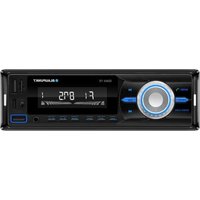
| Product Type | Car Stereo Receiver |
| Brand | Blaupunkt |
| Model | Texas City 800 |
| Category | Receiver |
| Radio Tuner | AM/FM with RDS support and 30 preset stations |
| Audio Power Output | 4 x 50 watts maximum power |
| Built-in Bluetooth | Yes, for hands-free calling and audio streaming |
| Playback Sources | USB, SD card, AUX-IN |
| Display | LCD with adjustable illumination |
| Sound Controls | Bass, treble, balance and fader adjustments |
| Steering Wheel Remote Support | Yes (requires compatible adapter) |
| Detachable Faceplate | Yes, for theft protection |
| Remote Control | Included wireless remote control |
| Dimensions (W x H x D) | 178 x 50 x 160 mm (standard 1-DIN) |
| Weight | Approximately 1.4 kg |
| Power Supply | 12V DC (negative ground) |
| Operating Voltage | 10.5 - 16V DC |
| Antenna Connector | ISO standard |
| Clock | Yes, with RDS time sync |
| Cleaning and Maintenance | Use a soft, dry cloth; avoid chemical solvents |
| Repair and Spare Parts | Contact certified Blaupunkt service centers |
Frequently Asked Questions - Texas City 800 BLAUPUNKT
How do I set the clock on the Blaupunkt Texas City 800?
Press and hold the clock button until the time flashes, then use the volume knob or tuning buttons to adjust hours and minutes. Confirm by pressing the clock button again.
Can I connect my smartphone via Bluetooth?
Yes, the Bluetooth function allows you to stream audio and make hands-free calls. Pair your phone in the Bluetooth menu and select the device.
What is the maximum power output of the receiver?
The amplifier provides up to 50 watts per channel across four channels, giving a total maximum power of 200 watts.
Does the device support USB drives?
Yes, you can connect a USB drive via the front or rear USB port to play MP3 and other audio files. Supported file systems are typically FAT16/FAT32.
How do I save radio stations?
Tune to the desired station, then press and hold one of the preset buttons (1-6) until you hear a beep. The station is stored in that memory slot.
How can I reset the receiver to factory settings?
Use a thin pin to press the reset button located on the front panel. This clears all settings and restores defaults.
How do I adjust bass and treble?
Press the sound or menu button to cycle through bass, treble, balance and fader. Use the volume knob to change the selected value.
Can I use steering wheel controls with this radio?
Yes, the unit is steering wheel remote-ready. You may need an appropriate adapter (sold separately) to connect to your vehicle's existing controls.
What is the standard installation size?
The device has a 1-DIN chassis (approximately 178 x 50 x 160 mm). Use the included installation kit to fit it into your dashboard.
How should I clean the faceplate?
Wipe with a soft, dry cloth to remove dust and fingerprints. Do not use abrasive cleaners or solvents, as they may damage the surface.
User questions about Texas City 800 BLAUPUNKT
0 question about this device. Answer the ones you know or ask your own.
Ask a new question about this device
No questions yet. Be the first to ask one.
Download the instructions for your Receiver in PDF format for free! Find your manual Texas City 800 - BLAUPUNKT and take your electronic device back in hand. On this page are published all the documents necessary for the use of your device. Texas City 800 by BLAUPUNKT.
USER MANUAL Texas City 800 BLAUPUNKT

Manual assistant
Powered by Anthropic
Waiting for your message
Product information
Brand : BLAUPUNKT
Model : Texas City 800
Category : Receiver