
TCH 7091ER - Auxiliary heating DELONGHI - Free user manual and instructions
Find the device manual for free TCH 7091ER DELONGHI in PDF.


| Product type | Ceramic fan heater |
| Brand | DELONGHI |
| Model | TCH 7091ER |
| Power supply | Mains (220-240 V ~ 50/60 Hz) |
| Maximum power | 2000 W (approx.) |
| Operating modes | Fan, Anti-freeze, Heating 1 (min), Heating 2 (max) |
| ECO function | Automatic power adjustment for energy saving |
| Oscillation | Yes, left/right (activation/deactivation via button) |
| Timer | 24-hour programmable (delayed start and stop) |
| Remote control | Yes, with included CR2032 lithium battery |
| Display | Digital, temperature in °C or °F (switchable) |
| Air filter | Removable, cleanable (regular dusting) |
| Safety - Overheating | Automatic shut-off with manual reset (unplug and replug) |
| Safety - Tip-over | Tip-over switch: automatic shut-off if knocked over |
| Minimum distance to objects | 50 cm |
| Minimum room area | 4 m² |
| Use | Indoors, on a hard, horizontal surface |
| Maintenance | Clean air grilles with vacuum; dust the filter |
| Spare parts | Contact Delonghi after-sales service |
Frequently Asked Questions - TCH 7091ER DELONGHI
User questions about TCH 7091ER DELONGHI
0 question about this device. Answer the ones you know or ask your own.
Ask a new question about this device
Download the instructions for your Auxiliary heating in PDF format for free! Find your manual TCH 7091ER - DELONGHI and take your electronic device back in hand. On this page are published all the documents necessary for the use of your device. TCH 7091ER by DELONGHI.
USER MANUAL TCH 7091ER DELONGHI
natural_image
Illustration of a portable electric fan with a flat top and side panel (no text or symbols)Instructions
Mode d'emploi
Bedienungsanleitung
A) If your appliance comes fitted with a plug, it will incorporate a 13 Amp fuse. If it does not fit your socket, the plug should be cut off from the mains lead, and an appropriate plug fitted, as below.
WARNING: Very carefully dispose of the cut off plug after removing the fuse: do not insert in a 13 Amp socket elsewhere in the house as this could cause a shock hazard.
With alternative plugs not incorporating a fuse, the circuit must be re-fitted when changing the fuse using a 13 Amp Asta approved fuse to BS 1362. In the event of losing the fuse cover, the plug must NOT be used until a replacement fuse cover can be obtained from your nearest electrical dealer. The colour of the correct replacement fuse cover is that as marked on the base of the plug.
B) If your appliance is not fitted with a plug, please follow the instructions provided below:
IMPORTANT
The wires in the mains lead are coloured in accordance with the following code:
Blue:
Neutral
Brown:
Live
As the colours of the wires in the mains lead of this appliance may not correspond with the coloured markings identifying the terminals in your plug, proceed as follows:
The wire which is coloured blue must be connected to the terminal which is marked with the letter N or coloured black.
The wire which is coloured brown must be connected to the terminal which si marked with the letter L or coloured red.
Fig. 1
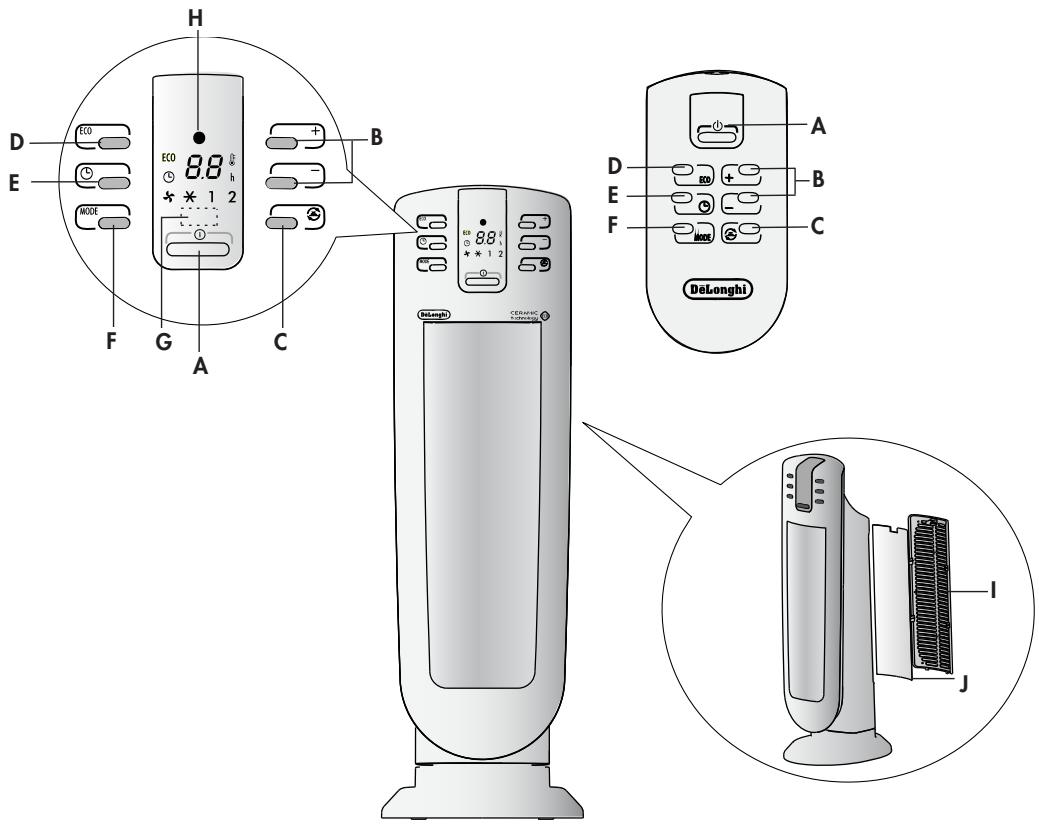
DESCRIPTION
A ON/STAND-BY button
B +/- Adjustment buttons
C Oscillation button
D "ECO" function button
E Timer button
F MODE button
(for selecting the operating mode)
G Receiver for remote control
H Power indicator light
I Back cover
J Filter
ELECTRICAL CONNECTION
- Before connecting the plug to the power outlet, make sure that the voltage of your electrical system corresponds to the voltage shown on the appliance rating label and the outlet you are going to use is in good condition.
- THIS APPLIANCE COMPLIES WITH DIRECTIVE 2004/108/EEC ON RADIO INTERFERENCE SUPPRESSION.
INSTALLATION
The appliance may be used on any rigid horizontal surface. Do not use the same socket for more than one appliance.
OPERATION AND USE
- Make sure the appliance is off before plugging into the mains.
- The appliance emits a beep and the power indicator light (H) also comes on and remains lit while power to the appliance is on.
- The appliance goes into STAND-BY and the display shows a dot “●”. If the dot is blinking it means that the tip over switch has been activated. See paragraph: “Additional safety features” page 6.
- Press the ON/STAND-BY button (A) to turn on the appliance. It will begin to heat with the predefined settings.
- Press the MODE button (E) to select one of the following functions available:
Ventilation (✗) → Anti-freeze (✗) → Heating at minimum power (1) → Heating at maximum power (2)
5.1 Ventilation (✗)
In this operating mode only the fan operates, so the appliance does not heat the room.
5.2 Anti-freeze (✗)
In this operating mode the appliance keeps the room at a temperature of 7^ C ( 45^ F) to prevent freezing temperatures.
5.3 Heating 1 and Heating 2
In this operating mode you can set the desired temperature by pressing the + and - adjustment buttons (B).
Heating 1 (minimum power level):
The appliance operates at the minimum power, reducing noise and energy consumption to the minimum.
Heating 2 (maximum power level):
The appliance operates at the maximum power for rapid heating of the room.
6. Eco function
In this operating mode the appliance will automatically set the power level to guarantee the best comfort reducing the energy consumption. In this operating mode the unit may switch the heating power level from maximum to minimum and vice versa, several time in an hour. The maximum temperature setting is 26 °C (79 °F). To activate this function, press the ECO button (D). The unit, will always start at the maximum power.
-
If you want the appliance to distribute the airflow over a larger area, press the oscillation button (C) (☑). The appliance will then oscillate right and left. To stop the oscillation in the desired position, just press oscillation button (C) again.
-
To turn off the appliance press button ON/STAND-BY (A). The display could show the count down for about 6 seconds. To completely turn off the appliance, remove the plug from the socket.
NOTE: The display can show the temperature in both °C and °F. To change the temperature scale, press and hold the + key for few seconds, then release. Please be informed that as this is not a precision device, the showed temperature not necessary corresponds to the real one.
24-HOUR DIGITAL TIMER
This function can be activated from any operating mode.
Delayed switch-on: with the appliance in the STAND-BY position, press the timer button (E) (L). The display shows the symbol and the time remaining before switch-on. To set the timer, use the + and - adjustment buttons (B), then wait a few seconds for the programming to be set. The display returns to show “●” for stand-by and the symbol to indicate you have set the timer. When the programmed time has been reached, the appliance turns on with the same settings it had during the previous operation.
Delayed shut-off: With the appliance on, press the timer button (E) (L). The display shows the symbol L and the time remaining before shut-off.
To set the timer, use the + and - adjustment buttons (B), then wait a few seconds for the programming to be set. The display returns to show the current settings and the symbol ⏻ to indicate you have set the timer. When the programmed time as been reached the appliance shuts off automatically.
If you want to go back to operation without the timer, press the timer button (F) twice.
The timer symbol ⏻ disappears from the display.
USING THE REMOTE CONTROL
The remote control functions correspond to those on the control panel. See the section "Operation and Use" on the previous page for a description of the functions.
Inserting or replacing the batteries
- The remote control is provided with a lithium battery CR2032. To let the appliance function, remove the battery cover strip, by pulling it.
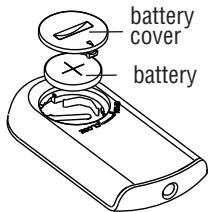
Fig. 2
- To replace the batteries, remove the battery cover by rotating it. Replace the battery paying attention to respect the right polarity as shown in figure 2.
- Replace the cover rotating it towards the
position "CLOSE".
- Old batteries must be removed and disposed off in accordance with current legislation as they are harmful to the environment.
MAINTENANCE
- Before carrying out any maintenance, always unplug from the mains socket.
- During the season when the appliance is in use, clean the air intake and outlet grilles regularly using a vacuum cleaner.
- Never use abrasive powders or solvents to clean the appliance.
- Remove the back grille by pulling it outward (Fig. 1).
- Remove the dust filter which retains impurities in the air drawn in from the room, blow on it lightly then replace in the appliance.
TROUBLE-SHOOTING
In case “PF” is displayed and a warning sound is emitted, there is a fault on the temperature sensor. If the problem persists contact the Service Centre.
If the appliance shuts off unexpectedly:
- Make sure power to the appliance is on.
- Make sure the appliance is in a vertical position on a flat surface as otherwise the tip over safety device may have tripped.
- Check the temperature set and the timer. The appliance may have gone off because the temperature set has been reached or the time set on the timer has elapsed.
IMPORTANT SAFEGUARDS
- Do not use this heater near showers, bath-tubs, sinks, swimming pools, etc.
- Always use the heater in an upright position.
-
Do not use the heater to dry laundry. Never obstruct the intake and outlet grilles (danger of overheating). The appliance is not intended for use by persons (including children) with reduced physical, sensory or mental capabilities, or lack of experience and knowledge, unless they have been given supervision or instruction concerning use of the appliance by a person responsible for their safety. Children should be supervised to ensure that they do not play with the appliance.
-
The heater must be positioned at least 50 cm from furniture or other objects.
- Do not use the appliance near walls, furniture, curtains, etc.
- The use of extension leads is not recommended.
However if they cannot be avoided, follow the instructions accompanying the extension lead and never exceed the power limit marked on the extension.
- If the power cable is damaged, it must be replaced by the manufacturer, an authorised service centre or a qualified electrician in order to eliminate all risk.
- The appliance must not be placed immediately under a fixed power socket.
- Do not use the appliance in rooms with a floor area of less than 4 m^2 .
- Before storing the appliance, check it is completely off and the cable is unplugged. At this point wrap the cord around the base. Do not store in a dusty room. The room temperature should be between 0-30°C (32-86°F). Do not load anything above it.

IMPORTANT: To avoid overheating, never under any circumstances cover the appliance during operation as this would lead to a dangerous rise in temperature.
WARNING: to avoid the safety system resetting accidentally, this appliance must not be powered through an external on/off device such as a timer, or connected to a circuit which is turned off and on regularly by the energy supplier.
Additional safety features
- Safety device: The heater is fitted with a safety device which switches it off in the event of accidental overheating (e.g. obstruction of air intake and outlet grilles, motor turning slowly or not at all). To reset, unplug the appliance from the mains socket for a few minutes, remove the cause of overheating then plug in again.
- Tip over safety switch: a safety tip-over switch turns the ceramic heater off if it tips over or is positioned in an improper way that could jeopardize safety. The appliance emits a beep and the display will show a blinking dot. After the appliance has been restored in the vertical position it will take just few seconds to start on again.
Important information for correct disposal of the product in accordance with EC Directive 2002/96/EC.
At the end of its working life, the product must not be disposed of as urban waste. It must be taken to a special local authority differentiated waste collection centre or to a dealer providing this service. Disposing of a household appliance separately avoids possible negative consequences for the environment and health deriving from inappropriate disposal and enables the constituent materials to be recovered to obtain significant savings in energy and resources. As a reminder of the need to dispose of household appliances separately, the product is marked with a crossed-out wheeled dustbin.
- IMPORTANT
- DESCRIPTION
- ELECTRICAL CONNECTION
- INSTALLATION
- OPERATION AND USE
- Ventilation (✗)
- Anti-freeze (✗)
- Heating 1 and Heating 2
- Heating 1 (minimum power level):
- Heating 2 (maximum power level):
- Eco function
- 24-HOUR DIGITAL TIMER
- USING THE REMOTE CONTROL
- Inserting or replacing the batteries
- MAINTENANCE
- TROUBLE-SHOOTING
- IMPORTANT SAFEGUARDS
- Additional safety features
Brand : DELONGHI
Model : TCH 7091ER
Category : Auxiliary heating