
TCH 7091ER - Chauffage d'appoint DELONGHI - Notice d'utilisation et mode d'emploi gratuit
Retrouvez gratuitement la notice de l'appareil TCH 7091ER DELONGHI au format PDF.
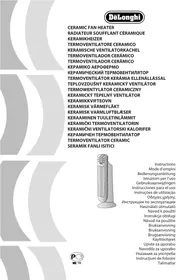


| Type de produit | Radiateur soufflant céramique |
| Marque | DELONGHI |
| Modèle | TCH 7091ER |
| Alimentation | Secteur (220-240 V ~ 50/60 Hz) |
| Puissance maximale | 2000 W (environ) |
| Modes de fonctionnement | Ventilation, Anti-gel, Chauffage 1 (min), Chauffage 2 (max) |
| Fonction ECO | Régulation automatique de la puissance pour économie d'énergie |
| Oscillation | Oui, droite/gauche (activation/désactivation via bouton) |
| Minuterie | 24 heures programmable (allumage et extinction différés) |
| Télécommande | Oui, avec pile lithium CR2032 incluse |
| Affichage | Numérique, température en °C ou °F (commutable) |
| Filtre à air | Amovible, nettoyable (dépoussiérage régulier) |
| Sécurité - Surchauffe | Arrêt automatique avec réarmement manuel (débrancher puis rebrancher) |
| Sécurité - Basculement | Interrupteur tip-over : arrêt automatique en cas de chute |
| Distance minimale aux objets | 50 cm |
| Surface minimale de la pièce | 4 m² |
| Utilisation | Intérieur, sur surface rigide horizontale |
| Entretien | Nettoyer les grilles d'air à l'aspirateur ; dépoussiérer le filtre |
| Pièces détachées | Contacter le service après-vente Delonghi |
FOIRE AUX QUESTIONS - TCH 7091ER DELONGHI
Questions des utilisateurs sur TCH 7091ER DELONGHI
0 question sur cet appareil. Repondez a celles que vous connaissez ou posez la votre.
Poser une nouvelle question sur cet appareil
Téléchargez la notice de votre Chauffage d'appoint au format PDF gratuitement ! Retrouvez votre notice TCH 7091ER - DELONGHI et reprennez votre appareil électronique en main. Sur cette page sont publiés tous les documents nécessaires à l'utilisation de votre appareil TCH 7091ER de la marque DELONGHI.
MODE D'EMPLOI TCH 7091ER DELONGHI
DeLonghi
Radiateur soufflant céramique
Radiateur soufflant céramique
Radiateur soufflant céramique
Radiateur soufflant céramique
Radiateur soufflant céramique
Radiateur soufflant céramique
Radiateur soufflant céramique
Radiateur soufflant céramique
Radiateur soufflant céramique
Radiateur soufflant céramique
Radiateur soufflant céramique
Radiateur soufflant céramique
Radiateur soufflant céramique
Radiateur soufflant céramique
RADIOATEUR CÉRAMIQUE À VENTILATEUR
SOUFFLEUR D'AIR CHAUD CÉRAMIQUE
RADIATEUR SOUFFLANT CÉRAMIQUE
RADIATEUR SOUFFLANT CÉRAMIQUE
RADIATEUR SOUFFLANT CÉRAMIQUE
RADIATEUR SOUFFLANT CÉRAMIQUE
RADIATEUR SOUFFLANT CÉRAMIQUE
RADIATEUR SOUFFLANT CÉRAMIQUE
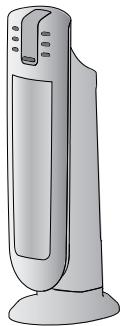
Instructions
Mode d'emploi
Manuel d'utilisation
Instructions pour l'utilisation
Instructions d'utilisation
Instructions pour l'utilisation
Instructions d'utilisation
Mode d'emploi
Mode d'emploi
Mode d'emploi
Mode d'emploi
Mode d'emploi
Mode d'emploi
Mode d'emploi
Mode d'emploi
Mode d'emploi
Mode d'emploi
Mode d'emploi
Mode d'emploi
Mode d'emploi
Mode d'emploi
Mode d'emploi
| Voltage Wattage | See rating label | Napięcie, moc | zob. tabliczka z danymi urządzenia |
| Tension puissance | Voir la plaque signalétique | Napätie Výkon | Pozrite výrobný štítok s technický-mi údajmi |
| Spannung Leistung | siehe Typenschild | Spenning kraft | Se merkeskilt |
| Tensione potenza | vedi targa caratteristiche | Spänning, effekt | se märkplát |
| Spanning vermogen | caratteristichezie typeplaatje | Spænding | se specifikationsmærkatet |
| Tension Potencia | véase placa de características | Virtajännite | katso arvokylttiä |
| Voltagem Potencia | ver placa de especificações | Napon Snaga | Vidi pločicu s tehničkim podacima |
| Táση ισχύς | βλέπε πινακίδα характерπριστικών | Napetost Moč | Glejte tablico z lastnostmi |
| Напряжение питания | см. табличку с характеристиками | Захранва-що напре-жение | Вж. табелката с характеристи-стиките |
| Feszültség teljesítmény | lásd adattábla | Tensiune Putere | Vezi plăcuța cu caracteristici |
| Napětí Výkon | viz identifikační štítek s technickými údaji | Voltaj Watt | Güç etiketine bakın |
CONNEXION ÉLECTRIQUE (ROYAUME-UNI UNIQUEMENT)
A) Si votre appareil est livré avec une fiche, celle-ci comportera un fusible de 13 ampères. Si elle ne correspond pas à votre prise, la fiche doit être coupée du câble d'alimentation et une fiche appropriée doit être installée, comme ci-dessous.
AVERTISSEMENT : Éliminez très soigneusement la fiche coupée après avoir retiré le fusible : ne l'insérez pas dans une prise de 13 ampères ailleurs dans la maison, car cela pourrait présenter un risque de choc électrique.
Avec des fiches alternatives ne comportant pas de fusible, le circuit doit être rééquipé lors du changement du fusible en utilisant un fusible de 13 ampères approuvé par l'ASTA conformément à la norme BS 1362. En cas de perte du couvercle du fusible, la fiche ne doit PAS être utilisée jusqu'à ce qu'un couvercle de remplacement puisse être obtenu auprès de votre revendeur d'électricité le plus proche. La couleur du couvercle de remplacement correct est celle indiquée sur la base de la fiche.
B) Si votre appareil n'est pas équipé d'une fiche, veuillez suivre les instructions fournies ci-dessous :
IMPORTANT
Les fils du câble d'alimentation sont colorés conformément au code suivant :
Bleu :
Neutre
Marron :
Phase
Comme les couleurs des fils du câble d'alimentation de cet appareil peuvent ne pas correspondre aux marques de couleur identifiant les bornes de votre fiche, procédez comme suit :
Le fil de couleur bleue doit être connecté à la borne marquée de la lettre N ou de couleur noire.
Le fil de couleur marron doit être connecté à la borne marquée de la lettre L ou de couleur rouge.
Fig. 1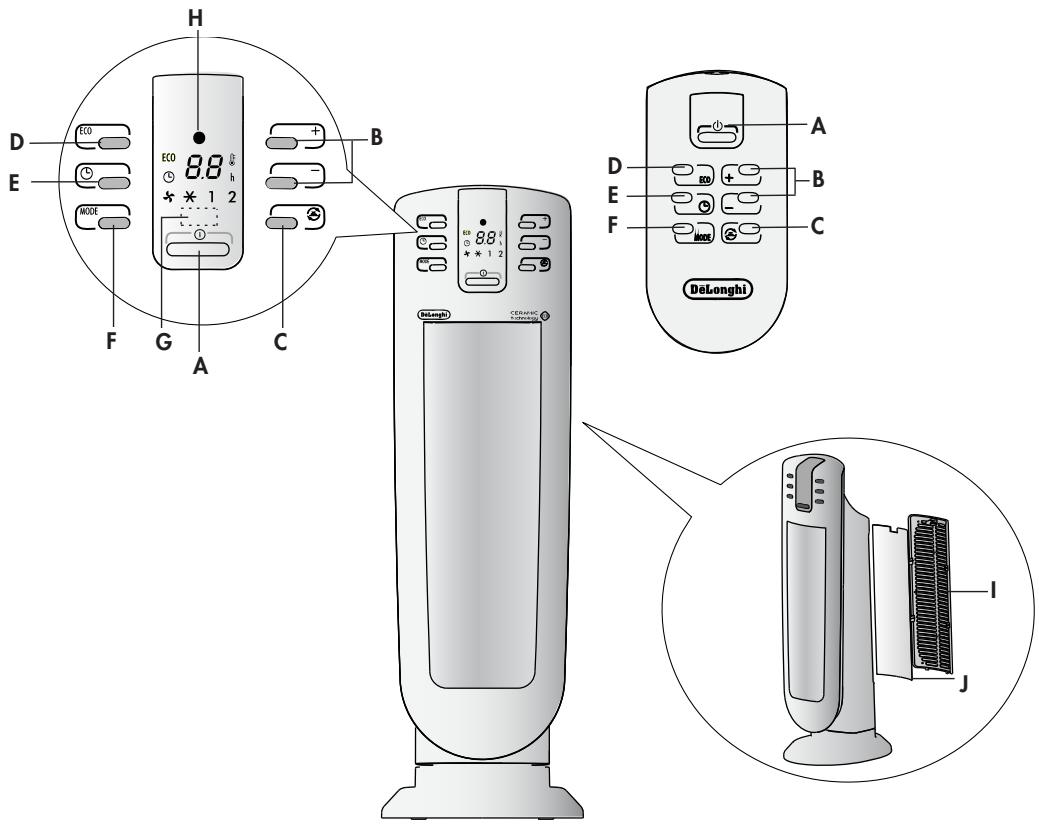
DESCRIPTION
Bouton A ON/STAND-BY, boutons B de réglage +/-, bouton C d'oscillation, bouton D de fonction "ECO", bouton E de minuterie, bouton F MODE (pour sélectionner le mode de fonctionnement), récepteur G pour télécommande, voyant H d'alimentation, couvercle I, filtre J
CONNEXION ÉLECTRIQUE
- Avant de brancher la fiche dans la prise de courant, assurez-vous que la tension de votre installation électrique correspond à celle indiquée sur la plaque signalétique de l'appareil et que la prise que vous allez utiliser est en bon état.
- CET APPAREIL EST CONFORME À LA DIRECTIVE 2004/108/CE SUR LA SUPPRESSION DES INTERFÉRENCES RADIOÉLECTRIQUES.
INSTALLATION
L'appareil peut être utilisé sur toute surface horizontale rigide. N'utilisez pas la même prise pour plus d'un appareil.
FONCTIONNEMENT ET UTILISATION
- Assurez-vous que l'appareil est éteint avant de le brancher sur le secteur.
- L'appareil émet un bip et le voyant d'alimentation (H) s'allume également et reste allumé tant que l'appareil est sous tension.
- L'appareil passe en mode VEILLE et l'écran affiche un point « ● ». Si le point clignote, cela signifie que l'interrupteur d'inclinaison a été activé. Voir le paragraphe : « Caractéristiques de sécurité supplémentaires » page 6.
- Appuyez sur le bouton ON/STAND-BY (A) pour allumer l'appareil. Il commencera à chauffer avec les réglages prédéfinis.
- Appuyez sur le bouton MODE (E) pour sélectionner l'une des fonctions disponibles suivantes :
Ventilation (✗) → Anti-gel (✗) → Chauffage à puissance minimale (1) → Chauffage à puissance maximale (2)
5.1 Ventilation (✗)
Dans ce mode de fonctionnement, seul le ventilateur fonctionne, l'appareil ne chauffe donc pas la pièce.
5.2 Anti-gel (✗)
Dans ce mode de fonctionnement, l'appareil maintient la pièce à une température de 7 °C (45 °F) pour éviter les températures de gel.
5.3 Chauffage 1 et Chauffage 2
Dans ce mode de fonctionnement, vous pouvez régler la température souhaitée en appuyant sur les boutons de réglage + et - (B).
Chauffage 1 (niveau de puissance minimal) :
L'appareil fonctionne à la puissance minimale, réduisant le bruit et la consommation d'énergie au minimum.
Chauffage 2 (niveau de puissance maximal) :
L'appareil fonctionne à la puissance maximale pour un chauffage rapide de la pièce.
6. Fonction Éco
Dans ce mode de fonctionnement, l'appareil règle automatiquement le niveau de puissance pour garantir le meilleur confort tout en réduisant la consommation d'énergie. Dans ce mode, l'appareil peut passer du niveau de puissance maximal au minimal et vice versa, plusieurs fois par heure. Le réglage de température maximal est de 26 °C (79 °F). Pour activer cette fonction, appuyez sur le bouton ECO (D). L'appareil démarrera toujours à la puissance maximale.
- Si vous souhaitez que l'appareil répartisse le flux d'air sur une plus grande surface, appuyez sur le bouton d'oscillation (C) (☑). L'appareil oscillera alors de droite à gauche. Pour arrêter l'oscillation dans la position souhaitée, appuyez à nouveau sur le bouton d'oscillation (C).
- Pour éteindre l'appareil, appuyez sur le bouton ON/VEILLE (A). L'écran peut afficher le compte à rebours pendant environ 6 secondes. Pour éteindre complètement l'appareil, retirez la fiche de la prise.
REMARQUE : L'écran peut afficher la température en °C et en °F. Pour changer l'échelle de température, maintenez enfoncée la touche + pendant quelques secondes, puis relâchez. Veuillez noter que, comme il ne s'agit pas d'un appareil de précision, la température affichée ne correspond pas nécessairement à la température réelle.
MINUTERIE NUMÉRIQUE 24 HEURES
Cette fonction peut être activée à partir de n'importe quel mode de fonctionnement.
Mise en marche différée : avec l'appareil en position VEILLE, appuyez sur le bouton de la minuterie (E) (L). L'écran affiche le symbole et le temps restant avant la mise en marche. Pour régler la minuterie, utilisez les boutons de réglage + et - (B), puis attendez quelques secondes pour que la programmation soit enregistrée. L'écran revient à l'affichage de « ● » pour la veille et du symbole indiquant que la minuterie est réglée. Lorsque le temps programmé est atteint, l'appareil s'allume avec les mêmes réglages que lors de la dernière utilisation.
Arrêt différé : avec l'appareil allumé, appuyez sur le bouton de la minuterie (E) (L). L'écran affiche le symbole L et le temps restant avant l'arrêt.
Pour régler la minuterie, utilisez les boutons de réglage + et - (B), puis attendez quelques secondes pour que la programmation soit enregistrée. L'écran revient à l'affichage des réglages actuels et du symbole ⏻ indiquant que la minuterie est réglée. Lorsque le temps programmé est atteint, l'appareil s'éteint automatiquement.
Si vous souhaitez revenir à un fonctionnement sans minuterie, appuyez deux fois sur le bouton de la minuterie (F).
Le symbole de la minuterie ⏻ disparaît de l'écran.
UTILISATION DE LA TÉLÉCOMMANDE
Les fonctions de la télécommande correspondent à celles du panneau de commande. Voir la section « Fonctionnement et utilisation » à la page précédente pour une description des fonctions.
Insertion ou remplacement des piles
- La télécommande est fournie avec une pile au lithium CR2032. Pour faire fonctionner l'appareil, retirez la languette de protection de la pile en la tirant.
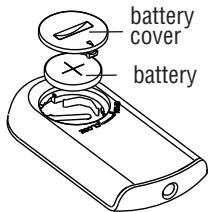
Fig. 2
- Pour remplacer les piles, retirez le couvercle du compartiment à piles en le faisant tourner. Remplacez la pile en respectant la polarité correcte, comme indiqué sur la figure 2.
- Replacez le couvercle en le faisant tourner vers le
position "CLOSE".
Les piles usagées doivent être retirées et éliminées conformément à la législation en vigueur, car elles sont nocives pour l'environnement.
ENTRETIEN
- Avant toute opération d'entretien, débranchez toujours l'appareil de la prise secteur.
- Pendant la saison d'utilisation de l'appareil, nettoyez régulièrement les grilles d'entrée et de sortie d'air à l'aide d'un aspirateur.
- N'utilisez jamais de poudres abrasives ou de solvants pour nettoyer l'appareil.
- Retirez la grille arrière en la tirant vers l'extérieur (Fig. 1).
- Retirez le filtre à poussière qui retient les impuretés de l'air aspiré dans la pièce, soufflez légèrement dessus puis remettez-le en place dans l'appareil.
DÉPANNAGE
Si « PF » s'affiche et qu'un signal sonore est émis, il y a un défaut sur le capteur de température. Si le problème persiste, contactez le centre de service.
Si l'appareil s'éteint de manière inattendue :
- Assurez-vous que l'alimentation de l'appareil est activée.
- Assurez-vous que l'appareil est en position verticale sur une surface plane, sinon le dispositif de sécurité anti-basculement a pu se déclencher.
- Vérifiez la température réglée et la minuterie. L'appareil a pu s'éteindre parce que la température réglée a été atteinte ou que le temps réglé sur la minuterie est écoulé.
IMPORTANTES MESURES DE SÉCURITÉ
- Ne pas utiliser cet appareil de chauffage à proximité de douches, de baignoires, de lavabos, de piscines, etc.
- Toujours utiliser l'appareil de chauffage en position verticale.
- Ne pas utiliser l'appareil pour sécher du linge. Ne jamais obstruer les grilles d'entrée et de sortie d'air (risque de surchauffe). L'appareil n'est pas destiné à être utilisé par des personnes (y compris les enfants) dont les capacités physiques, sensorielles ou mentales sont réduites, ou qui manquent d'expérience ou de connaissances, à moins qu'elles ne soient sous la surveillance d'une personne responsable de leur sécurité ou qu'elles aient reçu des instructions concernant l'utilisation de l'appareil. Les enfants doivent être surveillés pour s'assurer qu'ils ne jouent pas avec l'appareil.
- L'appareil de chauffage doit être placé à au moins 50 cm des meubles ou autres objets.
- Ne pas utiliser l'appareil à proximité de murs, de meubles, de rideaux, etc.
- L'utilisation de rallonges électriques n'est pas recommandée.
Cependant, si elles ne peuvent être évitées, suivez les instructions fournies avec la rallonge et ne dépassez jamais la limite de puissance indiquée sur la rallonge.
- Si le câble d'alimentation est endommagé, il doit être remplacé par le fabricant, un centre de service agréé ou un électricien qualifié afin d'éliminer tout risque.
- L'appareil ne doit pas être placé directement sous une prise de courant fixe.
- Ne pas utiliser l'appareil dans des pièces dont la surface au sol est inférieure à 4 m².
- Avant de ranger l'appareil, vérifiez qu'il est complètement éteint et que le câble est débranché. À ce moment, enroulez le cordon autour de la base. Ne pas ranger dans une pièce poussiéreuse. La température ambiante doit être comprise entre 0 et 30 °C (32-86 °F). Ne placez rien au-dessus.

IMPORTANT : Pour éviter toute surchauffe, ne couvrez jamais l'appareil en fonctionnement, car cela entraînerait une élévation dangereuse de la température.
AVERTISSEMENT : Pour éviter que le système de sécurité ne se réinitialise accidentellement, cet appareil ne doit pas être alimenté par un dispositif externe de mise en marche/arrêt tel qu'une minuterie, ni être connecté à un circuit qui est régulièrement mis sous et hors tension par le fournisseur d'énergie.
Caractéristiques de sécurité supplémentaires
- Dispositif de sécurité : L'appareil est équipé d'un dispositif de sécurité qui l'éteint en cas de surchauffe accidentelle (par exemple, obstruction des grilles d'entrée et de sortie d'air, moteur tournant lentement ou pas du tout). Pour réinitialiser, débranchez l'appareil de la prise secteur pendant quelques minutes, éliminez la cause de la surchauffe, puis rebranchez-le.
- Interrupteur de sécurité anti-basculement : un interrupteur de sécurité anti-basculement éteint le radiateur céramique s'il bascule ou s'il est positionné d'une manière inappropriée qui pourrait compromettre la sécurité. L'appareil émet un bip et l'écran affiche un point clignotant. Après avoir remis l'appareil en position verticale, il ne faudra que quelques secondes pour qu'il redémarre.
Informations importantes pour une élimination correcte du produit conformément à la directive CE 2002/96/CE.
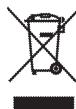
En fin de vie, le produit ne doit pas être éliminé avec les déchets urbains. Il doit être déposé dans un centre de collecte sélective des déchets géré par les autorités locales ou chez un revendeur offrant ce service. L'élimination séparée d'un appareil électroménager évite d'éventuelles conséquences négatives pour l'environnement et la santé dues à une élimination inappropriée et permet de récupérer les matériaux constitutifs afin de réaliser des économies significatives d'énergie et de ressources. Pour rappeler la nécessité d'éliminer séparément les appareils électroménagers, le produit est marqué d'un symbole de poubelle barrée.
- DELONGHI
- CONNEXION ÉLECTRIQUE (ROYAUME-UNI UNIQUEMENT)
- IMPORTANT
- DESCRIPTION
- CONNEXION ÉLECTRIQUE
- INSTALLATION
- FONCTIONNEMENT ET UTILISATION
- VENTILATION (✗)
- ANTI-GEL (✗)
- CHAUFFAGE 1 ET CHAUFFAGE
- CHAUFFAGE 1 (NIVEAU DE PUISSANCE MINIMAL)
- CHAUFFAGE 2 (NIVEAU DE PUISSANCE MAXIMAL)
- FONCTION ÉCO
- MINUTERIE NUMÉRIQUE 24 HEURES
- UTILISATION DE LA TÉLÉCOMMANDE
- INSERTION OU REMPLACEMENT DES PILES
- ENTRETIEN
- DÉPANNAGE
- IMPORTANTES MESURES DE SÉCURITÉ
- CARACTÉRISTIQUES DE SÉCURITÉ SUPPLÉMENTAIRES
Marque : DELONGHI
Modèle : TCH 7091ER
Catégorie : Chauffage d'appoint