
LPR110 - Wi-Fi repeater Black Box - Free user manual and instructions
Find the device manual for free LPR110 Black Box in PDF.


| Product Type | PoE Repeater / Ethernet Extender |
| Brand | Black Box |
| Model | LPR110 |
| Interface | IEEE 802.3x, 10BASE-T/100BASE-TX, full-/half-duplex, Auto MDI/MDI-X |
| Connectors | 2× RJ-45 (IN and OUT) |
| Indicators | 3 LEDs: Power, OUT, IN |
| Max Distance with 2 Repeaters | 300 meters (984 feet) |
| Max Distance with 1 Repeater | 200 meters (656 feet) |
| Power Input | IEEE 802.3af Class 0 (max 12.95W) |
| Power Output | IEEE 802.3af Class 1 or 2 (max 6.49W) |
| Power Dissipation | 2.5 watts |
| Temperature Tolerance | 32 to 122°F (0 to 50°C) |
| Humidity Tolerance | 5–95% noncondensing |
| Dimensions (H × W × D) | 1.1 × 4.7 × 3.5 inches (2.8 × 12 × 9 cm) |
| Weight | Approx. 0.2 kg (7 oz) |
| Supported Cable | 24 AWG CAT5, CAT5e, CAT6 |
| Standards | IEEE 802.3af (PoE), FCC Class A, CE |
| Installation | Plug-and-play, no configuration required |
| Special Features | Extends PoE data and power, auto MDI/MDI-X, no crossover cable needed |
| Maintenance | Clean with a dry cloth; no liquids or solvents. No user-serviceable parts. |
| Safety Certifications | FCC Part 15 Class A, Industry Canada Class A, CE (EN55022/EN55024) |
| Spare Parts / Repairability | No spare parts available. Contact Black Box for returns or repairs (RA required). |
| General Information | Use with PoE switches/injectors to extend connections for IP cameras, access points, etc. Max 2 units in daisy chain. |
Frequently Asked Questions - LPR110 Black Box
User questions about LPR110 Black Box
0 question about this device. Answer the ones you know or ask your own.
Ask a new question about this device
Download the instructions for your Wi-Fi repeater in PDF format for free! Find your manual LPR110 - Black Box and take your electronic device back in hand. On this page are published all the documents necessary for the use of your device. LPR110 by Black Box.
USER MANUAL LPR110 Black Box
Extend PoE data and power up to 300 meters.
Break through the Ethernet 100-meter limit.
Plug-and-play.
Autosensing, autonegotiating 10-/100-Mbps Ethernet ports.
Auto MDI/MDI-X means you don't need a crossover cable.
FEDERAL COMMUNICATIONS COMMISSION AND INDUSTRY CANADA RADIO FREQUENCY INTERFERENCE STATEMENTS
This equipment generates, uses, and can radiate radio-frequency energy, and if not installed and used properly, that is, in strict accordance with the manufacturer's instructions, may cause interference to radio communication. It has been tested and found to comply with the limits for a Class A computing device in accordance with the specifications in Subpart B of Part 15 of FCC rules, which are designed to provide reasonable protection against such interference when the equipment is operated in a commercial environment. Operation of this equipment in a residential area is likely to cause interference, in which case the user at his own expense will be required to take whatever measures may be necessary to correct the interference.
Changes or modifications not expressly approved by the party responsible for compliance could void the user's authority to operate the equipment.
This digital apparatus does not exceed the Class A limits for radio noise emission from digital apparatus set out in the Radio Interference Regulation of Industry Canada.
Electrical Safety Statement
European Community (CE) Electromagnetic Compatibility Directive
This equipment has been tested and found to comply with the protection requirements of European Emission
Standard EN55022/EN61000-3 and the Generic European Immunity Standard EN55024.
EMC:
EN55022(2003)/CISPR-2(2002): Class A
IEC61000-4-2 (2001): 4 KV CD, 8 KV AD
IEC61000-4-3(2002): 3V/m
IEC61000-4-4(2001): 1 KV (power line), 0.5 KV (signal line)
Trademarks Used in This Manual
Black Box and the Double Diamond logo are registered trademarks of BB Technologies, Inc.
Any other trademarks mentioned in this manual are acknowledged to be the property of the trademark owners.
Table of Contents
- Specifications....6
- Overview....7
2.1 Introduction 7
2.2 Typical Application ....7
- Installation....8
- About PoE 802.af....8
- Troubleshooting 9
5.1 Problems/Solutions....9
5.2 Calling Black Box....9
5.3 Shipping and Packaging....9
1. Specifications
Interface: IEEE 802.3x, autodetects for 10BASE-T/100BASE-TX and full-/half-duplex, Auto MDI/MDI-X
Connectors: Ethernet: (2) RJ-45
Indicators: (3) LEDs: (1) Power, (1) OUT, (1) IN
Temperature Tolerance: 32 to 122°F (0 to 50°C)
Humidity Tolerance: 5–95% noncondensing
Power: Input: IEEE 802.3af Class 0 (Maximum 12.95 watts);
Output: IEEE 802.3af Class 1 or 2 (Maximum 6.49 watts);
Maximum Power Dissipation: 2.5 watts
Size: 1.1 "H x 4.7"W x 3.5"D (2.8 x 12 x 9 cm)
2. Overview
2.1 Introduction
Use the PoE Repeater to extend PoE connections beyond the Ethernet limit of 100 meters to access distant Class 2 PoE devices. Data and power both run over the same cable, so you don't need a separate power supply. The maximum distance using two repeaters is 300 meters (984 feet). The maximum distance with one repeater is 200 meters (656 feet).
Each repeater uses about 2.5 watts, so we don't recommend daisychaining more than two units. Two repeaters daisychained support a PoE PD end device up to 6.49 watts.
2.2 Typical Application
Figure 2-1 shows a sample application using two repeaters.
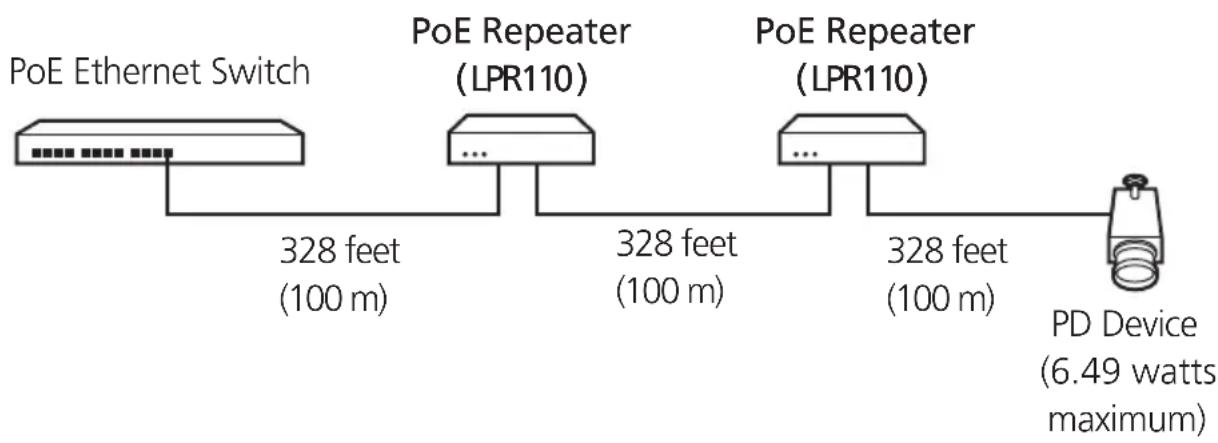
flowchart
graph LR
    A["PoE Ethernet Switch"] --> B["328 feet (100 m)"]
    B --> C["PoE Repeater (LPR110)"]
    C --> D["328 feet (100 m)"]
    D --> E["PoE Repeater (LPR110)"]
    E --> F["328 feet (100 m)"]
    F --> G["PD Device (6.49 watts maximum)"]
Figure 2-1. Typical application.
3. Installation
To install the repeater, simply plug in the Ethernet cable. Then follow these steps:
- Connect the first repeater's RJ-45 connector that's labeled "IN" to the incoming line (from the PoE switch or injector).
- Connect the next repeater or an IP camera or access point to the RJ-45 port that's labeled "OUT" on the first repeater.
NOTE: The repeaters require no special configuration. Operation is plug-and-play.
4. About PoE 802.3af
PoE 802.3af divides devices into classes. These classes refer to the power demand.
Table 4-1 shows which applications are possible with the LPR110.
Table 4-1. PoE applications.
PD Device Class Maximum Device Power Range with 15.4-Watt PSE Switch
0 12.95 watts N/A
1 or 2 6.49 watts 328 feet (100 meters)
NOTE: Distances shown in Table 4-1 apply when using 24 AWG CAT5, CAT5e, or CAT6 cable.
5. Troubleshooting
5.1 Problems/Solutions
Problem: The PoE device is not working but makes a strange sound.
Cause/Solution: Either the power demand from your PoE device is too high or you have too many LPR110 units installed.
Problem: The repeater only transmits switched data. VLAN traffic and other special Ethernet frames do not pass through the LPR110.
Cause/Solution: LPR110 does not support Jumbo frames or other frame sizes beyond the standard Ethernet limits.
5.2 Calling Black Box
If you determine that your PoE Repeater is malfunctioning, do not attempt to alter or repair the unit. It contains no user-serviceable parts. Contact Black Box Technical Support at 724-746-5500.
Before you do, make a record of the history of the problem. We will be able to provide more efficient and accurate assistance if you have a complete description, including:
- the nature and duration of the problem.
- when the problem occurs.
- the components involved in the problem.
- any particular application that, when used, appears to create the problem or make it worse.
5.3 Shipping and Packaging
If you need to transport or ship your PoE Repeater:
- Package it carefully. We recommend that you use the original container.
- If you are returning the unit, make sure you include everything you received with it. Before you ship the PoE Repeater for return or repair, contact Black Box to get a Return Authorization (RA) number.
Black Box Tech Support: FREE! Live. 24/7.
Tech support the way it should be.

natural_image
Black-and-white portrait of a smiling woman wearing a headset (no text or symbols visible)Great tech support is just 20 seconds away at 724-746-5500 or blackbox.com.

BLACK BOX®
NETWORK SERVICES
About Black Box
Black Box Network Services is your source for more than 118,000 networking and infrastructure products. You'll find everything from cabinets and racks and power and surge protection products to media converters and Ethernet switches all supported by free, live 24/7 Tech support available in 20 seconds or less.
© Copyright 2009. All rights reserved.
- Extend PoE data and power up to 300 meters.
- FEDERAL COMMUNICATIONS COMMISSION AND INDUSTRY CANADA RADIO FREQUENCY INTERFERENCE STATEMENTS
- Electrical Safety Statement
- European Community (CE) Electromagnetic Compatibility Directive
- Trademarks Used in This Manual
- Table of Contents
- Specifications
- Overview
- Introduction
- Typical Application
- Installation
- About PoE 802.3af
- Troubleshooting
- Problems/Solutions
- Calling Black Box
- Shipping and Packaging
- About Black Box
Brand : Black Box
Model : LPR110
Category : Wi-Fi repeater