K8 - Smartphone Keneksi - Free user manual and instructions
Find the device manual for free K8 Keneksi in PDF.


User questions about K8 Keneksi
0 question about this device. Answer the ones you know or ask your own.
Ask a new question about this device
Download the instructions for your Smartphone in PDF format for free! Find your manual K8 - Keneksi and take your electronic device back in hand. On this page are published all the documents necessary for the use of your device. K8 by Keneksi.
USER MANUAL K8 Keneksi
ADD: 402, West Wing, Huamei Building, Zhenxing Road, Futian District, Shenzhen, China
Safety requirements
Please read these instructions carefully. Improper use of the device is dangerous, and in some cases is illegal. More information is given in this user's guide.
Electrical shock, fire or explosion prevention
- Use only genuine batteries and chargers.
- Do not touch the device with wet hands.
- Turn your phone off when in any area with a potentially explosive atmosphere (gas stations, tanks and containers with highly flammable substances).
- Avoid bending and gripping a power cable.
- Don't use an abnormal battery, such as leakage, swelling, deformation, etc.
- Do not expose battery pack to direct sunlight (fire).
- Do not place it near any heat source that emits large amounts of heat.
- Do not use the device while charging.
- NEVER use your phone outdoors during a thunderstorm-unplug the base from the telephone line and the mains socket when there are storms in your area.
- Do not place the telephone in microwave ovens.
- Do not leave your phone in a hot car as the temperature in the cabin can reach 80^ which can cause an explosion of the device.
- Do not try to repair the phone. The repairs should be performed by a qualified technician.
Safety rules when using the phone and accessories.
Pacemaker
Keep your cell phone at least 15 cm from your pacemaker. Turn off your phone immediately, if you have any reason to suspect that interference is occurring with your pacemaker.
Other medical devices
If you use any electronic medical device, consult its manufacturer if it is subject to the influence of the RF signal. Perhaps your doctor will help you to get this information.
Health care facilities
Switch off your phone in health care facilities if it is prohibited to use the device. Health care facilities can be equipped with devices to be affected by the RF signal.
Vehicles
Do not leave the phone near car airbags, this can lead to serious injury when airbag deployment.
It is not recommended to use the device while driving, and in some countries it is even illegal.
Vehicle's electronic systems can be affected by RF signals. Consult the manufacturer of your vehicle or its representative.
Airplane
Turn off your cell phone before boarding any airplane. If turned on, the phone might interfere with airline avionics.
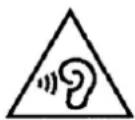
Protect your hearing and ears when using a headset
- Excessive exposure to loud sounds can cause hearing damage.
- Exposure to loud sounds while driving may distract your attention and cause an accident.
• Always turn the volume down before plugging the earphones into an audio source and use only the minimum
volume setting necessary to hear your conversation or music.
- In dry environments, static electricity can build up in the headset. Avoid using headsets in dry environments or touch a metal object to discharge static electricity before connecting a headset to the device.
Battery maintenance information
• It is not necessary to discharge the battery completely before recharging.
- Use only genuine batteries and chargers.
• Do not disassemble or open, crush, bend or deform, puncture or shred the battery. A damaged battery can cause serious injury.
- Keep the battery contacts on the circuit and metallic conductive objects. Do not short circuit a battery or allow metallic conductive objects to contact battery terminals.
- Promptly dispose of used batteries in accordance with local regulations.
- Keep your battery out of the reach of small children and pets.
- Do not drop your device or battery. If you drop the device on a hard surface and detect any damage, contact your authorized service center.
• Use of an incorrect battery can result in ignition or explosion of the battery.
Others
- Keep your phone, and all parts and accessories, out of the reach of small children and pets.
- All magnetic objects (such as credit cards, magnetic media, etc.) should be kept outside the device. This might damage both the items above and the phone itself.
- Long telephone conversation might cause poor quality of the speaker's sound.
- When it is not being used, and is not expected to be used for extended periods of time, store the device in a safe place.
- When used near a TV, radio set, etc., the device efficiency might be affected.
• Do not use the phone if the antenna is damaged. Contact an Authorized Service Center for repairs.
- Do not immerse your phone in water. If this happens, remove the battery immediately. If the phone does not work, take it to an Authorized Service Centre.
- Do not paint your phone.
- When you use the phone in public places, set the ringtone to vibration so as not to disturb others.
- Do not use the device where it is prohibited.
- Do not turn your phone on or off when putting it near your ear.
• Use accessories, such as earphones and headsets, with caution. Check cable before using.
• The charger has been designed for indoor use only.
• Never store your phone in settings that may expose it to temperatures less than -20^ C or greater than 50^ C.
• Do not use harsh chemicals (such as alcohol, benzene, thinners, etc.) or detergents to clean your phone.
• Do not drop, strike, or shake your phone severely. Such actions may harm the internal circuit boards of the phone.
• Always use genuine accessories. Failure to do this may void your warranty.
- Only authorized personnel should service the phone and its accessories. Faulty installation or service may result in accidents and consequently invalidate the warranty.
- Information stored in your phone may be deleted due to improper use, repair or upgrade of the phone. Before formatting the memory card, remember to make backup copies of all important data stored on the device. The manufacturer's warranty does not cover loss of data resulting from user actions.
- Save one or more emergency calls within your area to call to an emergency service if necessary, even if your phone is blocked. In some cases, you cannot make a call to emergency services, for example, if there is no signal or a cell phone signal is blocked.
Warning! Misuse of the cell phone could cause bodily injury or even death.
Specific Absorption Rate (SAR) certification information. Your device conforms to European Union (EU) standards that limit human exposure to radio frequency (RF) energy emitted by radio and telecommunications equipment. These standards prevent the sale of mobile devices that exceed a maximum exposure level (known as the Specific Absorption Rate, or SAR) of 2.0 W/kg.
During testing, the maximum SAR recorded for this model was 0.885 W/kg. In normal use, the actual SAR is likely to be much lower, as the device has been designed to emit only the RF energy necessary to transmit a signal to the nearest base station. By automatically emitting lower levels when possible, your device reduces your overall exposure to RF energy.
Correct disposal of this product
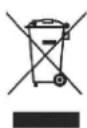
(Waste Electrical & Electronic Equipment)
(Applicable in the European Union and other European countries with separate collection systems)
This marking on the product, accessories or literature indicates that the product and its electronic accessories (e.g. charger, headset, USB cable) should not be disposed of with other household waste at the end of their working life.
To prevent possible harm to the environment or human health from uncontrolled waste disposal, please separate these items from other types of waste and recycle them responsibly to promote the sustainable reuse of material resources. Household users should contact either the retailer where they purchased this product, or their local government office, for details of where and how they can take these items for environmentally safe recycling. Business users should contact their supplier and check the terms and conditions of the purchase contract. This product and its electronic accessories should not be mixed with other commercial wastes for disposal.
Reduction of hazardous substances
This device is compliant with the REACH Regulation [Regulation (EC) No 1907/2006] and RoHS Directive Recast (Directive 2011/65/EU). Batteries (if included) are compliant with the Battery Directive (Directive 2006/66/EC).
EU regulatory conformance Body worn operation
The device complies with RF specifications when used near your ear or at a distance of 1.5 cm from your body. Ensure that the device accessories, such as a device case and device holster, are not composed of metal components. Keep the device away from your body to meet the distance requirement.
Correct disposal of batteries in this product
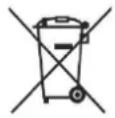
(Applicable in the European Union and other European countries with separate battery return systems)
This marking on the battery, manual or packaging indicates that the batteries in this product should not be disposed of with other household waste at the end of their working life. Where marked, the chemical symbols Hg, Cd or Pb indicate that the battery contains mercury, cadmium or lead above the reference levels in EC Directive 2006/66. If batteries are not properly disposed of, these substances can cause harm to human health or the environment. To protect natural resources and to
promote material reuse, please separate batteries from other types of waste and recycle them through your local, free battery return system. Declaration of Conformity KENEKSI declares that this device complies with the essential requirements and relevant provisions of Directive 1999/5/EC.Go to www.keneksi.com\certification to view the Declaration of Conformity.
The following marking is included in the product:
C€0700
Introduction
Thank you for having bought the KENEKSI cell phone. Besides the GSM network access, the device combines: best quality sound, original slim design, bright display, easy-to-use menus in multiple languages.
Important
- Please read this guide before using the device to ensure safe and proper use. Here is information on the functions available on your device.
• Additional features and services depend on a cell phone model, software, or a service provider.
• Any changes in the device may lead to loss of warranty.
Work with the device
Battery
Note:
Charge the battery before using it for the first time.
The battery is supplied with the device. The battery level is shown in the upper corner of the display.
Installing the battery
- Remove the back cover.
- Insert the battery so that the metal battery contacts touch the contacts in the phone.
- Replace the back cover.
Removing the battery
- Turn off the phone.
- Open the back cover.
- Remove the battery.
Charging the battery
Use the charger supplied with the phone.
Warning! If you use inappropriate chargers, it may damage the phone and the device.
- Connect the charger plug into the phone connector.
- Charging time depends on the remaining battery level.
Battery level
The battery level is shown in the upper corner of the display. The device will automatically notify about low battery level (a sound alarm is heard or a system message is displayed or the battery level icon will blink). When the battery level is critically low, the phone automatically turns off.
Turning the phone on and off
Turning the phone on
- Insert the battery in the phone, and if the battery is discharged, connect the phone to an external power source.
- Tap and hold the Call completion key for 3 seconds till the display turns on.
Turning the phone off
- Unlock your phone (if it is locked).
- Tap and hold the Call completion key for 3 seconds till the display turns off.
Signal level
Voice call quality depends on the signal strength in your area. The signal level is shown at the top of the display. With a weak signal level, try to find an open space, if you are in a building, go to the window, it may raise the level of the signal.
Note:
The signal quality also depends upon other factors, such as weather conditions or magnetic storms.
General operations
Menu access
You can enter the menu:
• by tapping the device joystick
• by tapping the left function key.
Call
- Make sure the phone is turned on. If not, tap and hold the Call completion key for 3 seconds till the phone turns on.
- Enter the phone number (including the country code, if necessary).
- Tap the «Call» key.
- To end the call, tap a corresponding key.
Redialing
- Tap the «Call» key, a recent calls log appears. Up to 30 calls appear in the recent calls log, you can choose any of them to redial.
Receiving a call
- When you receive a call, tap the «Call» key to receive the call.
- To end the call, tap a corresponding key.
Caller's data
During an incoming or outgoing call the caller's data appear including phone number and name (if this information is kept in «Contacts»).
Contacts
Saving a contact
- In Screen timeout mode, dial the number you want to save.
- Tap the left functional key, in the pop-up menu select «Save a contact».
- Enter the caller's name, tap «Options» and «Save».
Using the application «Contacts»
If you have a list of saved contacts, it makes it easy to make calls.
Choose one of the contacts, and tap then «Call».
Messaging
Text messages will be available since the phone is switched on.
• If you receive an incoming message and you want to call the contact, you have to open the message and tap the «Call» key.
- The phone memory can store up to 100 messages.
Incoming message signal
Incoming message signal may be in the form of:
- a system message
- a sound message
- an icon at the top of the display.
Sending text messages
- Open the «Messages» menu.
- Select «Enter message».
- Enter the message.
- Tap «Options» and select «Send».
- Add the contact from the Contacts or dial up its number manually.
- Tap «Options» and select «Send».
Settings and applications
Attachments
- Alarm
The application is in the «Organizer» menu.
Select a required alarm and tap «Edit»:
- Set time needed
- Select a repeating alarm
○ Select a ringtone
o Turn on the alarm
- Calculator
Use this application for simple calculations. The app. is in the «Organizer» menu.
- Flashlight
Use the phone as a flashlight. The app. is in the «Organizer» menu.
- Calendar
The app. is in the «Additionally» menu.
To enable viewing by month, tap «Options» - «Viewing by months»
To enable viewing by weeks, tap «Options» - «Viewing by weeks»
To pass to a specific date, tap «Options» - «Data». Enter the date and tap «OK»
To pass to a current date, tap «Options» - «Today's Date».
- Camera
The app. is in the «Multimedia» menu.
To adjust the flash, exposure, contrast, etc., tap «Options» - «Settings». Select a desired menu item and set the desired value.
- To zoom in / out objects, use the joystick, tapping up / down.
- To take a picture, tap a central button on the joystick.
- Gallery
The app. is in the «Multimedia» menu.
To open an image, select the file, tap then a central joystick key or «Options» - «View»
To delete an image, select the file first, then tap «Options» - «Delete»
To delete all the images, tap «Options» - «Delete all the files»
To change the storage of search, tap «Options» - «Storage», select then required one
It is possible to send files via Bluetooth. Select a file, tap then «Options» - «Send» - «Via Bluetooth». Select a device from the list or perform new search.
- Camcorder
The app. is in the «Multimedia» menu.
o To start recording, tap a central joystick key.
To stop recording, tap «Stop». If you want to pause, tap the central joystick key.
- To zoom in / out objects, use the joystick, tapping up / down.
To adjust video quality, tap «Options» - «Quality»
- Video player
The app. is in the «Multimedia» menu.
To play video, select a file, tap then the central joystick key or «Options» - «Playback»
- When playing video, the audio is set up by «*» and «#» keys
To delete the video, first select the file, then tap «Options» - «Delete»
To delete all the videos, tap «Options» - «Delete all the files»
To change the storage of search, tap «Options» - «Storage», select then required one
It is possible to send files via Bluetooth. Select a file, tap then «Options» - «Send» - «Via Bluetooth». Select a device from the list or perform new search.
- Voice recorder
The app. is in the «Multimedia» menu.
To start recording, tap «Options» - «New record»
To stop the record, tap «Stop». To pause the record, tap «Pause»
To get a list of recorded files, tap «Options» - «List». Here you can listen to audio files recorded
- Radio
The app. is in the «Multimedia» menu».
To search channels automatically, tap «Options» - «Auto search»
To set a channel frequency manually, tap «Options» - «Manual input» or use a joystick (left/right keys search for previous/next radio stations, up/down keys increase/decrease a current frequency by 0.1)
To listen to radio, connect headphones first, since they serve as an antenna. Select then a channel to be listened to by tapping «Options» - «Channels»
- Audio player
The app. is in the «Audio player» menu.
If the playlist contains no tracks, they may be added manually. Tap «List» - «Options» - «Settings» and in the «Automatically created list» item select «Off». Add then required tracks. Tap «List» - «Options» - «Add» and select all the required files.
- Since the audio files appear in the list, they can be played. Tap a central joystick key, if tapped twice, the playback stops.
o To stop playback, tap the joystick down
o To listen to a next track, tap the joystick to the right
o To listen to a previous track, tap the joystick to the left
o Tapping the joystick up is used to playback the track or the list in a nonstop manner.
To playback the track, the sound is adjusted by «*» and «#» keys.
Settings
- Sounds
The sound can be adjusted in «Profiles». Here you can select one of the preset profiles. Parameters values of some of these profiles can be adjusted.
- Telephone
The settings as the interface language, the date and time, display brightness, wallpaper, input method are found in the «Settings – Telephone» menu.
- Security
Security settings (SIM cards, phone locking) are in «Settings – Security»
Descriptions are based on the device's default settings. All information and images used in the guide are actual by the time of the guide writing, and are subject to change without prior notice. For the latest version of the guide, refer to the KENEKSI website, www.keneksi.com
KENEKSI
ADD: 402, West Wing, Huamei Building, Zhenxing Road, Futian District, Shenzhen, China
ADD: 402, West Wing, Huamei Building, Zhenxing Road, Futian District, Shenzhen, China
Правила безпеки
ADD: 402, West Wing, Huamei Building, Zhenxing Road, Futian District, Shenzhen, China
ADD: 402, West Wing, Huamei Building, Zhenxing Road, Futian District, Shenzhen, China
Reguli de siguranță
ADD: 402, West Wing, Huamei Building, Zhenxing Road, Futian District, Shenzhen, China