SmartRig Di - Hi-Fi System Saramonic - Free user manual and instructions
Find the device manual for free SmartRig Di Saramonic in PDF.


User questions about SmartRig Di Saramonic
0 question about this device. Answer the ones you know or ask your own.
Ask a new question about this device
Download the instructions for your Hi-Fi System in PDF format for free! Find your manual SmartRig Di - Saramonic and take your electronic device back in hand. On this page are published all the documents necessary for the use of your device. SmartRig Di by Saramonic.
USER MANUAL SmartRig Di Saramonic
text_image
Saramonic®SmartRig+ Di
Two Channel Mic & Guitar Interface with Lightning Connector for iOS Devices
Product Introduction
1 General Introductions
The Saramonic SmartRig+ Di is a two channel audio interface. It allows you to connect professional microphones/guitars to record quality sound or create music with your iPhone, iPad and iPod touch.
The Lightning connector allows you to record great stereo sound to your iOS devices.
The SmartRig+ Di makes your recording work much easier. It provides 48V phantom power for microphones and 3.5mm headphone output for real-time monitoring. The two gain control thumbwheels make it easy to set levels of each channel separately.
2 Highlights
- Two 1/8" (3.5mm) mic inputs
- Two XLR mic inputs
- Two 1/4"(6.35mm) guitar inputs
• Lightning output connector - Mono/Stereo switch (M/S)
- REC/PLAY switch
- +48V phantom power
• 3.5mm headphone output for monitoring - Gain control
3 Specifications
| Frequency Response | 20 Hz to 20 Khz, +/-0.5 dB |
| THD less than 0.01%@1KHZ, -30dBu input | |
| SNR 78 DB @1KHZ,-30dBu input | |
| Sample Rate 44.1Khz | or 48khz |
| Input1 | 1x XLR mic input |
| 1 x 1/4" (6.35mm) guitar input | |
| 1 x 1/8" (3.5mm) input | |
| Input2 | 1 x XLR mic input |
| 1 x 1/4" (6.35mm) guitar input | |
| 1 x 1/8" (3.5mm) input | |
| Output Lightning con | nector output cable |
| Phone Out 1 x 1/8" (3 | 5mm) jack |
| Gain + 25dBu to -∞ | |
| Phantom Power 48V | power supplies |
| Power Requirements | One 9V alkaline or lithium battery |
| Dimensions L 120 x W | 40 x H 40 mm |
| Weight 130g (excluding battery) | |
4 Product Structure
text_image
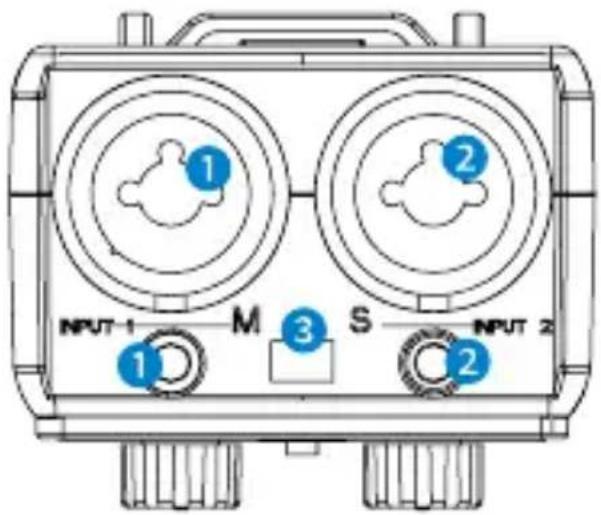
INPUT 1 M S INPUT 2 1 2 3 21 Input1:
For Microphone:
One balanced XLR input
One 1/8" (3.5mm) mono input
For Guitar:
One 1/4" (6.35mm) mono standard input
② Input2:
For Microphone:
One balanced XLR input
One 1/8" (3.5mm) mono input
For Guitar:
One 1/4" (6.35mm) mono standard input
Note: Other instruments with 1/4" (6.35mm) input connector can also be used with the SmartRig+ Di.
③ M/S switch
Select mono/stereo output mode
When recording on one channel, use the mono (M) setting. The signal will be sent to both left and right channels.
When recording on two channels, use the stereo (S) setting. The level of each channel can be controlled individually.
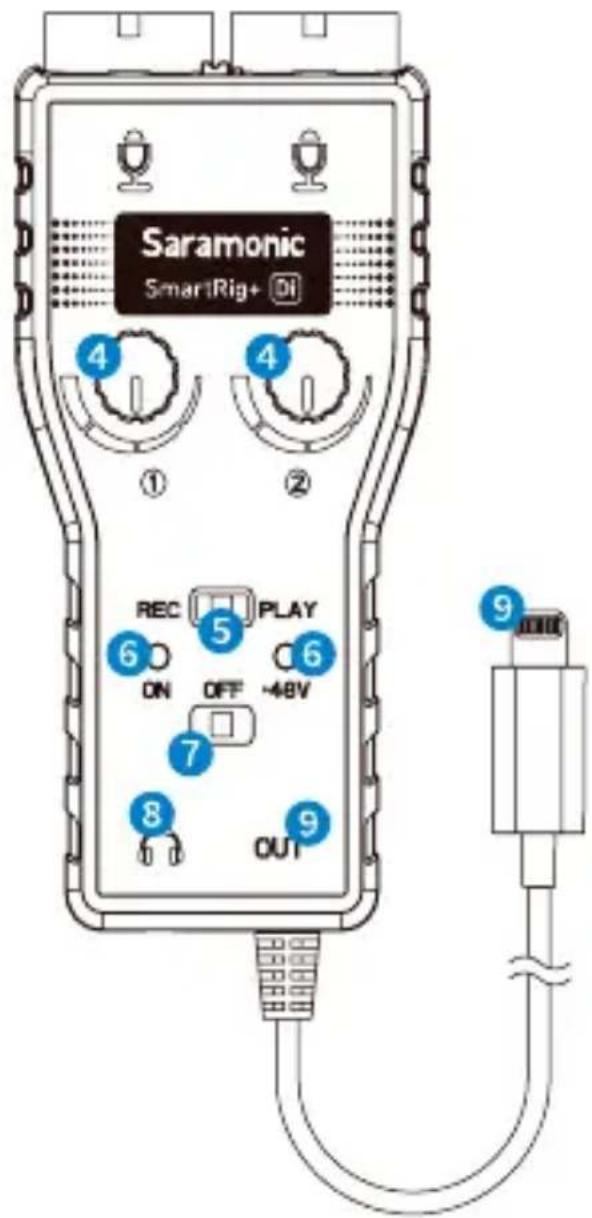
4 ① and ② Control Knobs
Adjust the signal level of each channel to the optimum recording levels.
Knob ① controls the volume of input group 1 and knob ② is for input group 2.
5 REC/PLAY Switch
Select REC to monitor audio directly from the microphone or audio sources while recording.
Select PLAY to monitor playback audio from the iOS devices.
text_image
Saramonic SmartRig+ Di ① ② ④ ④ REC 5 PLAY 6 ON OFF -48V 6 7 8 OUT 96 LED Indicator
When turn on the SmartRig+ Di, the green indicator is on.
When choose +48V phantom power, the red and green indicators are both on.
When it is low battery, the red and green indicators will be dim.
7 ON/OFF/+48V Switch
Select the ON/OFF switch to turn on/off the SmartRig+ Di.
Select +48V phantom power for microphones that require phantom power to operate.

text_image
11 10Please note that only the XLR inputs offer +48V phantom power, the 1/8" (3.5mm) mic inputs do not offer +48V phantom power.
8 Headphone Jack
Monitor the audio.
9 Output
Lightning output cable to iOS devices.
10 Battery Compartment
Operate on one 9V alkaline or lithium battery (not included).
11 1/4" Female Screw
5 Quick Start Guide
a. Install a 9V battery. Gently slide out the battery cover in the direction of the arrow at the back of unit. Insert the battery with the "+" positive terminal lined up with the "+" indicator on the battery compartment.
b. Connect your microphones to the XLR inputs or 3.5mm inputs, or connect guitars or other musical instruments to the 1/4" (6.35mm) inputs.
c. Set the M/S switch
When recording on one channel, switch to the mono (M) setting. The signal will be sent to both left and right channels.
When recording on two channels, switch to the stereo (S) setting. The level of each channel can be controlled individually.
d. Connect the SmartRig+ Di to the lightning interface of your iOS devices.
e. Please download professional recording APP which support real-time input/output pass-through and install them on your iOS device.
f. Turn on the SmartRig+ Di. Slide the power switch to the ON position and the green indicator is on.
g. If your microphone needs phantom power, please slide the power switch to the +48V position.
The red and green indicators are both on.
h. Please connect your headphone to the headphone jack in case you need to monitor recording.
Set the REC/PLAY switch
When you need to monitor audio directly from the microphone or audio sources when recording, slide to REC.
When you need to monitor playback audio from the iOS devices, slide to PLAY.
i. You are now ready to record. Adjust the two gain controls flexibly to get the optimum signal levels.
6 Tips
- Be careful not to turn the phantom power ON when recording with microphones that do not operate on phantom power, as the current may damage it.
- Please set the GAIN properly during recording. Audio recording will be distorted if the GAIN is too high or too low.
- If you hear echoes when using high GAIN settings, please lower the device volume with the volume button.
- If you can't hear audio when monitoring, please make sure the applications you choose can support real-time input/output pass-through.
7 Compatibility
Compatible with iPhone/iPad/iPod touch.
Any types of microphones: Dynamic, Ribbon, or Condenser.
Musical instrument: Guitars or other musical instruments with a 6.35mm input.
8 Packing List
The SmartRig+ Di x1
Velcro Strip x1
User Manual x1
Warranty Card x1
www.saramonic.com
The Saramonic logo is trademark which is registered and owned by
Saramonic International.
COPYRIGHT 2011-2021 SARAMONIC INTERNATIONAL ( A brand of DSQN )
Email: info@saramonic.com