
SmartMic MTV500 - Microphone Saramonic - Free user manual and instructions
Find the device manual for free SmartMic MTV500 Saramonic in PDF.


| Product Type | Lavalier Microphone |
| Brand | Saramonic |
| Model | SmartMic MTV500 |
| Microphone Directionality | Omnidirectional |
| Frequency Response | 35 Hz - 18 kHz |
| Signal-to-Noise Ratio | 78 dB SPL |
| Sensitivity | -30 ± 3 dB |
| Connector | 3.5mm TRS/TRRS |
| Compatibility | Smartphones, cameras, audio recorders |
| Power Supply | Plug-in power (no battery required) |
| Cable Length | 1.2 meters (approx. 4 feet) |
| Weight | Approx. 15 g (0.5 oz) |
| Dimensions | 60 x 20 x 10 mm (microphone capsule) |
| Material | ABS plastic with metal mesh grille |
| Accessories Included | Furry windscreen, clip, carrying pouch |
| Cleaning Instructions | Wipe with a dry soft cloth; avoid moisture |
| Storage | Store in a cool, dry place; use pouch |
| Safety Warnings | Do not expose to liquids or extreme temperatures |
| Spare Parts Availability | Replacement cables and windscreens available from Saramonic |
| Repairability | Not user-serviceable; contact support for repairs |
Frequently Asked Questions - SmartMic MTV500 Saramonic
User questions about SmartMic MTV500 Saramonic
0 question about this device. Answer the ones you know or ask your own.
Ask a new question about this device
Download the instructions for your Microphone in PDF format for free! Find your manual SmartMic MTV500 - Saramonic and take your electronic device back in hand. On this page are published all the documents necessary for the use of your device. SmartMic MTV500 by Saramonic.
USER MANUAL SmartMic MTV500 Saramonic
USB Desktop Microphone
USB桌面式麦克风
User Manual
羹忖怯謀
Statement
Please read this manual carefully before using and strictly operate and store in accordance with the instructions. Please save it for your future reference. If the user manual can not help you to solve problems, please ask your retailer for help or email us: info@saramonic.com.
Cautions
- Do not use the unit under moisture condition or water, don't expose it to rain. Please store it in a cool, dry place.
- Please use and store it in normal temperature. Do not move it from overheat ed to supercooled condition frequently as well as keep away from heat sources such as heater or oven.
- When using and storing, please pay attention to dust and moisture.
- Be careful to violent collision.
- To avoid acoustical feedback, do not hold the microphone close to the loudspeakers.
- For the best pick-up pattern, do not hold your hand against the microphone cover.
Introduction
The Saramonic SmartMic MTV500 is an USB microphone that delivers a professional, broadcast-quality sound to your computer in a variety of applications, such as home-recording, studio, podcasting and much more.
Easy-to-operate, gain control, mute button features, you can create a clear and ample audio as you wish.
The SmartMic MTV500 also incorporates real-time monitoring features, like a built-in headphone jack with a volume control, allowing you to directly monitor zero-latency microphone signal.
No need to install any driver, the SmartMic MTV500 can be directly connected to the computer through the supplied cable.
Product Structure
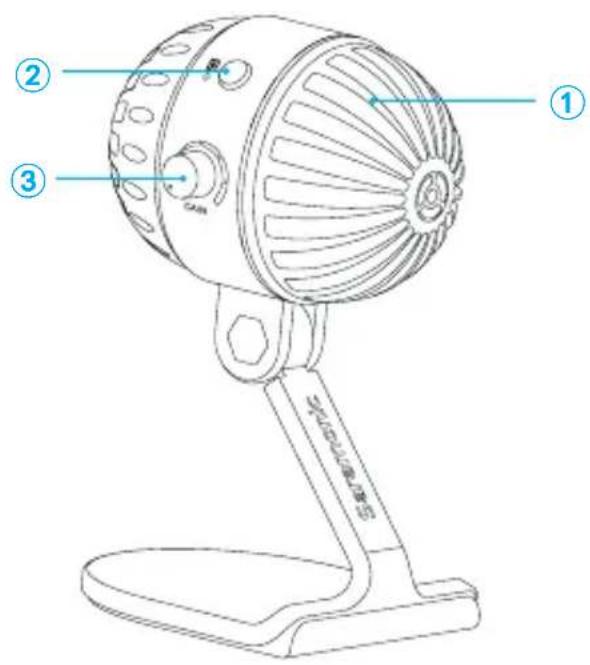
① Pop filter
② Polar pattern switch
| Mode Indicator Status |
| Omnidirectional Lights off |
| Cardioid Green Light |
③ Gain control
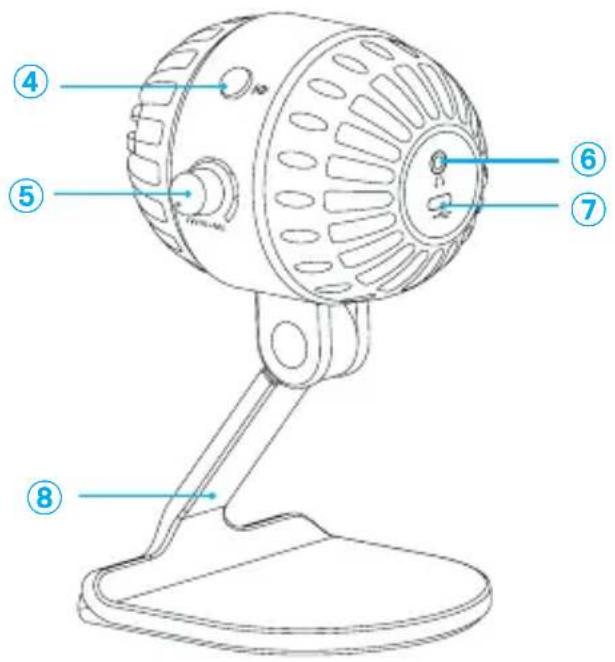
④ Power/Mute button
| Mode Indicator Status |
| Power ON Solid Green Light |
| Mute ON Flashes Green Light |
⑤ Volume control
⑥3.5mm headphone jack
Connect a headphone to monitor the audio output.
⑦ Standard USB-C output (DC 5V)
⑧ Desktop stand
Operational Instruction
- Unfold the microphone and lay it flat on the table, adjust it to an ideal angle, And always face the front side of the microphone's pop filter to you.

natural_image
Line drawings of two different portable devices, one with a fan-shaped handle and the other with a stand-mounted fan (no text or symbols)- Adjust the "VOLUME" and "GAIN" control to 80% level position. If your pick-up subject is too quiet, you can slightly turn up the volume.


- No need to install any driver, the SmartMic MTV500 can be directly connected to the computer. Connect to the computer through the supplied cable, and plug into the USB-C output at the back of the microphone. The POWER indicator lights green.

natural_image
Technical line drawing of a gear with a screwdriver inserted, showing toothed circular components (no text or symbols)- Select SmartMic MTV500 as the input/output device on your computer.
5. Polar Pattern Introduction
○ Omnidirectional
Pick up sound equally from all directions, capturing a natural blend of voice and ambiance with low sensitivity to wind and handling noise, as well as to vocal plosives.
Cardioid
Maximizes the rejection of sound coming from the sides and rear of the mic and can be used as a directional microphone to capture full, rich, natural-sounding audio for podcast, speech, dialog, instrument etc.

-
Choose an appropriate pick-up pattern and keep a certain distance before you recording.
-
You are ready to record. (The headphone jack supports the real-time monitoring, so you can secure the intelligibility of audio.)
Setups Procedure
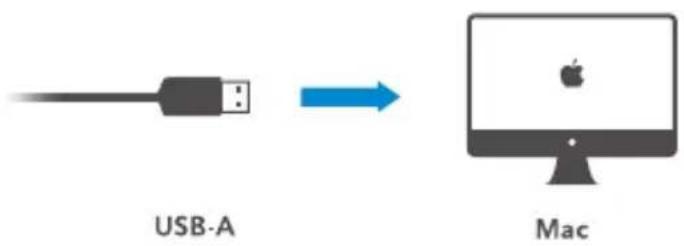
Mac OSX Setup Procedure
- Connect the microphone to your computer via the supplied USB-C to USB-A output cables.
2.Open the Apple interface and select the "System Preferences" - Select the icon of "Sound".
- Choose "SmartMic MTV500" as input device and click "OK".
5.Choose "SmartMic MTV500" as output device and click "OK".

Windows Setup Procedure
- Connect the microphone to your computer via the supplied USB-C to USB-A cable.
- Open the control panel and select the "SmartMic MTV500"
- Select "Audio" tab and choose "SmartMic MTV500" as input device.
Tips

To get optimum sound performance, adjust the microphone's pick-up angle. For maximum clarity and intelligibility, position the microphone pointed directly at the subject's mouth.
Before adjusting the angle, slightly loosen the knobs. Avoid tightening or loosening knobs with great force as it might damage the screw threads.
Always mount the pop filter to avoid plosive when recording.
Specifications
| Polar Pattern Omnidirectional/Cardioid | ||
| Frequency Response 20-20kHz | ||
| Sensitivity -36±3dB(0dB=1V/Pa,1kH 1.5V 2.2K) | ||
| Signal-to-noise ratio 80dB | ||
| Maximum SPL 130dB | ||
| Gain Control 0~39dB | ||
| Operating Voltage 5V 150mA | ||
| Headphone Amplifier | Impedance | >16ohms |
| Output power | 130mW | |
| THD | 0.01% | |
| Frequency Response | 15Hz-20,000Hz | |
| Signal-to-noise ratio | 100dB | |
| Headphone gain | 0~35 dB | |
| Material ABS housing | ||
| Output USB-C | ||
| Dimensions 88×100×171mm (3.5*3.9*6.7") | ||
| Weight 300.5g (10.6 oz.) | ||
Packing Lists
- SmartMic MTV500 Microphone
• 1.2m (3.9') USB-C to USB-A audio cable - Warranty Card
- User Manual


Brand : Saramonic
Model : SmartMic MTV500
Category : Microphone