
HF-33W - Phone Accessories NOKIA - Free user manual and instructions
Find the device manual for free HF-33W NOKIA in PDF.


| Product type | Bluetooth hands-free car kit |
| Brand | NOKIA |
| Model | HF-33W |
| Dimensions (approx) | 5 x 3 x 2 cm (inclinable cigarette lighter plug) |
| Weight (approx) | 50 g |
| Power supply | Car battery 12V via cigarette lighter socket |
| Wireless technology | Bluetooth 1.2, hands-free profile 1.5 |
| Maximum range | 10 meters (30 feet) |
| Pairing code | 0000 |
| Main functions | Hands-free calls, voice dialing, call rejection, call transfer, last number redial, volume adjustment |
| Buttons | Call button, volume up/down |
| LED indicators | Blue (connected), green (in call) |
| Built-in microphone | Yes, adjustable |
| Built-in speaker | Yes |
| Installation | Plug into cigarette lighter socket, tilt up to 100° |
| Compatibility | Bluetooth phones with hands-free profile |
| Care and cleaning | Clean with a soft, dry cloth. Do not use abrasive products. Avoid moisture. |
| Safety | Do not use while driving if it distracts. Follow local laws. Do not obstruct airbags. |
| Spare parts and repairability | No user-serviceable parts. Repair only by an authorized center. Do not attempt to open the device. |
| General information | Compliant with European directives 1999/5/EC and 2004/104/EC. Mandatory recycling at end of life (crossed-out wheelie bin). |
Frequently Asked Questions - HF-33W NOKIA
User questions about HF-33W NOKIA
0 question about this device. Answer the ones you know or ask your own.
Ask a new question about this device
Download the instructions for your Phone Accessories in PDF format for free! Find your manual HF-33W - NOKIA and take your electronic device back in hand. On this page are published all the documents necessary for the use of your device. HF-33W by NOKIA.
USER MANUAL HF-33W NOKIA
Nokia Wireless Plug-in Car Handsfree HF-33W
DECLARATION OF CONFORMITY
Hereby, NOKIA CORPORATION declares that this HF-33W product is in compliance with the essential requirements and other relevant provisions of Directive 1999/5/EC. The product is in conformity with the limits defined in Directive 2004/104/EC (amending Directive 72/245/EEC), Annex I, paragraph 6.5, 6.6, 6.8 and 6.9.
A copy of the Declaration of Conformity can be found at: http://www.nokia.com/phones/ declaration_of_conformity/.
C€0560

The crossed-out wheeled bin means that within the European Union the product must be taken to separate collection at the product end-of-life. Do not dispose
of these products as unsorted municipal waste.
© 2006 Nokia. All rights reserved.
Reproduction, transfer, distribution or storage of part or all of the contents in this
document in any form without the prior written permission of Nokia is prohibited. Nokia and Nokia Connecting People are registered trademarks of Nokia Corporation. Other product and company names mentioned herein may be trademarks or tradenames of their respective owners. Bluetooth is a registered trademark of Bluetooth SIG, Inc.
Nokia operates a policy of continuous development. Nokia reserves the right to make changes and improvements to any of the products described in this document without prior notice.
Under no circumstances shall Nokia be responsible for any loss of data or income or any special, incidental, consequential or indirect damages howsoever caused.
The contents of this document are provided "as is". Except as required by applicable law, no warranties of any kind, either express or implied, including, but not limited to, the implied warranties of merchantability and fitness for a particular purpose, are made in relation to the accuracy, reliability or contents of this document. Nokia reserves
the right to revise this document or withdraw it at any time without prior notice. The availability of particular products may vary by region. Please check with the Nokia dealer nearest to you. Unauthorized changes or modifications to this device may void the user's authority to operate the equipment.
For your safety
Read these simple guidelines. Not following them may be dangerous or illegal.

ROAD SAFETY COMES FIRST
Obey all local laws. Always keep your hands free to operate the vehicle while driving. Your
Introduction
The Nokia Wireless Plug-in Car Handsfree HF-33W allows you to
Export Controls
This device may contain commodities, technology or software subject to export laws and regulations from the US and other countries. Diversion contrary to law is prohibited.
first consideration while driving should be road safety.

INTERFERENCE
All wireless devices may be susceptible to interference, which could affect performance.
make and receive hands-free calls in your car. You can connect the
handsfree to a compatible phone that supports Bluetooth wireless technology.
Read this user guide carefully before using the handsfree. Also read the user guide for your phone, which provides important safety and maintenance information. Keep the handsfree out of reach of small children.
Bluetooth wireless technology
Bluetooth wireless technology allows you to connect compatible devices without cables. In a Bluetooth connection, the phone and the
Get started
Before using the handsfree, you must install it in the car, and pair it with a compatible phone.
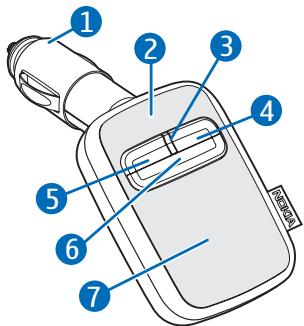
The handsfree contains the following parts shown at the start of this guide:
handsfree should be within 10 meters (30 feet) of each other. Connections can be subject to interference from obstructions, such as other electronic devices.
The handsfree is compliant with the Bluetooth Specification 1.2 supporting the Handsfree Profile 1.5. Check with the manufacturers of other devices to determine their compatibility with this device.
There may be restrictions on using Bluetooth technology in some locations. Check with your local authorities or service provider.
tiltable cigarette lighter plug (1), microphone (2), indicator light (3), volume up key (4), volume down key (5), call key (6), and speaker (7).
Install the handsfree
To function properly, the handsfree must be connected to the cigarette lighter socket of the car, and power must be supplied by the 12-volt car battery.
Insert the handsfree into the cigarette lighter socket. The cigarette lighter plug is provided with a removable cap. If the plug does not fit in the socket, remove the cap by sliding it from the plug. You can tilt the cigarette lighter plug to the desired angle (up to 100 degrees). Do not try to force the plug to tilt more.
Ensure that the handsfree is properly inserted in the cigarette lighter socket, and does not interfere with the normal operation of the car.
In some car models, the cigarette lighter socket is powered by the car battery even when you remove the ignition key. In those cases, the car
battery might be discharged even if the handsfree is not used. Contact the vehicle manufacturer for more information.
Switch on or off
To switch on, plug the handsfree into the cigarette lighter socket. The indicator light turns on.
To switch off, pull the handsfree out from the cigarette lighter socket.
Pair the handsfree
- Switch on your phone.
- Ensure that the handsfree is plugged properly into the cigarette lighter socket.
- Activate the Bluetooth feature on the phone, and set the phone to search for Bluetooth devices.
-
Select the handsfree from the list of found devices.
-
Enter the Bluetooth passcode 0000 to pair and connect the handsfree to your phone. In some phones you may need to make the connection separately after pairing.
If the pairing is successful, the handsfree sounds a beep and appears in the phone menu where you can view the currently paired Bluetooth devices. When the handsfree is connected with your phone, the blue indicator light is displayed.
You can set your phone to connect with the handsfree automatically when the handsfree is switched on. To do this in Nokia phones, change your
Call handling
To adjust the volume during a call, use the volume keys on the handsfree.
paired device settings in the Bluetooth menu.
To disconnect the handsfree from your phone, pull the handsfree out from the cigarette lighter socket, or disconnect the handsfree in the Bluetooth menu of the phone.
To reconnect the paired handsfree to your phone, plug the handsfree into the cigarette lighter socket.
To pair and connect the handsfree with a new phone, first disconnect the handsfree in the Bluetooth menu of the currently connected phone, and then pair and connect the new phone.
To make a call, use your phone in the normal way when the handsfree is connected to your phone. Speak
toward the handsfree microphone. For optimal performance, check that there are no objects in front of the microphone and that the microphone is in front of the user, not beneath or behind. The green indicator light is displayed during a call.
If your phone supports last number redial with the handsfree, press the call key twice when no call is in progress.
If your phone supports voice dialing with the handsfree, press and hold the call key when no call is in progress,
Care and maintenance
Your device is a product of superior design and craftsmanship and should be treated with care. The suggestions below will help you protect your warranty coverage.
and proceed as described in the user guide of your phone.
When you receive a call, you hear a ringing tone through the handsfree speaker and the green indicator light flashes. To answer the call, press the call key, or use the phone keys. To reject the call, press the call key twice. To transfer the active call between the handsfree and your phone, press and hold the call key.
To end a call, press the call key, or use the phone keys.
- Keep all accessories and enhancements out of the reach of small children.
- Keep the device dry. Precipitation, humidity, and all types of liquids or moisture can contain minerals that will corrode electronic circuits. If your
device does get wet, allow it to dry completely.
- Do not use or store the device in dusty, dirty areas. Its moving parts and electronic components can be damaged.
- Do not store the device in hot areas. High temperatures can shorten the life of electronic devices, damage batteries, and warp or melt certain plastics.
-
Do not store the device in cold areas. When the device returns to its normal temperature, moisture can form inside the device and damage electronic circuit boards.
-
Do not attempt to open the device.
- Do not drop, knock, or shake the device. Rough handling can break internal circuit boards and fine mechanics.
- Do not use harsh chemicals, cleaning solvents, or strong detergents to clean the device.
- Do not paint the device. Paint can clog the moving parts, microphone, or speaker, and prevent proper operation.
If the device is not working properly, take it to the nearest authorized service facility for service.
Additional safety information
Vehicles
RF signals may affect improperly installed or inadequately shielded electronic systems in motor vehicles such
as electronic fuel injection systems, electronic antiskid (antilock) braking systems, electronic speed control systems, and air bag systems. For more
information, check with the manufacturer or its representative of your vehicle or any equipment that has been added.
Faulty installation or service may be dangerous and may invalidate any warranty that may apply to the device. Check regularly that all wireless device equipment in your vehicle is mounted and operating properly. Do not store or carry flammable liquids, gases, or explosive materials in the same compartment as the device, its parts, or enhancements. For vehicles equipped with an air bag, remember that air bags inflate with great force. Do not place objects, including installed or portable wireless equipment in the area over the air bag or in the air bag deployment area. If in-vehicle wireless equipment is improperly installed and the air bag inflates, serious injury could result.
- NOKIA WIRELESS PLUG-IN CAR HANDSFREE HF-33W
- DECLARATION OF CONFORMITY
- C€0560
- FOR YOUR SAFETY
- ROAD SAFETY COMES FIRST
- INTRODUCTION
- INTERFERENCE
- BLUETOOTH WIRELESS TECHNOLOGY
- GET STARTED
- INSTALL THE HANDSFREE
- SWITCH ON OR OFF
- PAIR THE HANDSFREE
- CALL HANDLING
- CARE AND MAINTENANCE
- ADDITIONAL SAFETY INFORMATION
- VEHICLES
Brand : NOKIA
Model : HF-33W
Category : Phone Accessories