
CA-55 - Phone Accessories NOKIA - Free user manual and instructions
Find the device manual for free CA-55 NOKIA in PDF.


| Product Type | Car hands-free kit adapter |
| Brand | Nokia |
| Model | CA-55 |
| Dimensions (approx.) | 10 cm x 2 cm x 1 cm |
| Weight (approx.) | 50 g |
| Power Supply | Powered by the hands-free kit via system cable |
| Connector | Pop-Port™ |
| Main Functions | Allows use of the CARK-91 kit with a compatible Nokia phone with Pop-Port connector |
| Installation | Connects between the HFU-2 hands-free unit and the mobile holder |
| Compatible Microphone | MP-2 (sold separately) |
| Maintenance and Cleaning | Clean with a soft, dry cloth; do not use chemicals |
| Safety | Follow road safety instructions; do not connect incompatible products |
| Spare Parts and Repairability | Microphone sold separately; no user-serviceable parts |
| Operating Temperature | 0 °C to 45 °C |
| General Information | Designed for use with CARK-91 kits and Nokia phones with Pop-Port connector |
Frequently Asked Questions - CA-55 NOKIA
User questions about CA-55 NOKIA
0 question about this device. Answer the ones you know or ask your own.
Ask a new question about this device
Download the instructions for your Phone Accessories in PDF format for free! Find your manual CA-55 - NOKIA and take your electronic device back in hand. On this page are published all the documents necessary for the use of your device. CA-55 by NOKIA.
USER MANUAL CA-55 NOKIA
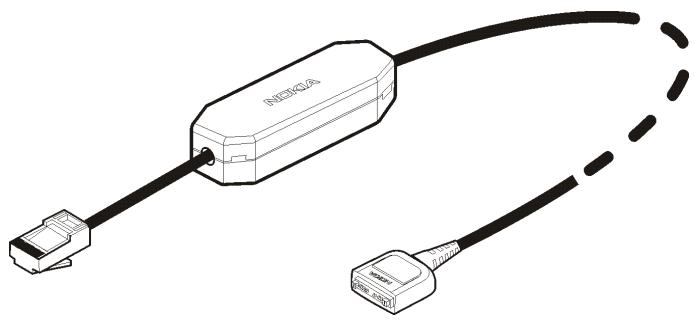
Nokia Converter (CA-55) Installation guide
natural_image
Diagram of a network device with two connectors, one labeled 'INDIGICA' connected to the other (no text or symbols beyond label)9238687
Issue 1
Reproduction, transfer, distribution or storage of part or all of the contents in this document in any form without the prior written permission of Nokia is prohibited.
Nokia, Nokia Connecting People, and Pop-Port are trademarks of Nokia Corporation. Other product and company names mentioned herein may be trademarks or tradenames of their respective owners.
Nokia operates a policy of ongoing development. Nokia reserves the right to make changes to any of the products described in this document without prior notice.
UNDER NO CIRCUMSTANCES SHALL NOKIA BE RESPONSIBLE FOR ANY LOSS OF DATA OR INCOME OR ANY SPECIAL, INCIDENTAL, CONSEQUENTIAL OR INDIRECT DAMAGES HOWSOEVER CAUSED. THE CONTENTS OF THIS DOCUMENT ARE PROVIDED "AS IS". EXCEPT AS REQUIRED BY APPLICABLE LAW, NO WARRANTIES OF ANY KIND, EITHER EXPRESS OR IMPLIED, INCLUDING, BUT NOT LIMITED TO, THE IMPLIED WARRANTIES OF MERCHANTABILITY AND FITNESS FOR A PARTICULAR PURPOSE, ARE MADE IN RELATION TO THE ACCURACY, RELIABILITY OR CONTENTS OF THIS DOCUMENT. NOKIA RESERVES THE RIGHT TO REVISE THIS DOCUMENT OR WITHDRAW IT AT ANY TIME WITHOUT PRIOR NOTICE.
The availability of particular products may vary by region. Please check with the Nokia dealer nearest to you. Unauthorized changes or modifications to this device may void the user's authority to operate the equipment.
Export Controls
This device may contain commodities, technology or software subject to export laws and regulations from the US and other countries. Diversion contrary to law is prohibited.
Read these simple guidelines. Breaking the rules may be dangerous or illegal. Further detailed information is given in this installation guide.

ROAD SAFETY COMES FIRST
Obey all local laws. Always keep your hands free to operate the vehicle while driving. Your first consideration while driving should be road safety.

INTERFERENCE
All wireless phones may be susceptible to interference, which could affect performance.

CONNECTING TO OTHER DEVICES
When connecting to any other device, read its user guide for detailed safety instructions. Do not connect incompatible products.
■ General information
The CA-55 converter allows you to use your CARK-91 car kit with compatible Nokia phones and compatible mobile holders that have a Pop-Port™ connector.
The CA-55 converter is designed to give optimal performance when used with the MP-2 microphone that can be purchased separately.
Read this installation guide carefully before installing the converter cable. For details regarding your CARK-91 car kit, see its installation guide that is also available on the product pages of the CA-55 converter at www.nokia.com or from your local Nokia dealer.
Note that the illustrations in this guide are for reference only.
1. Installation
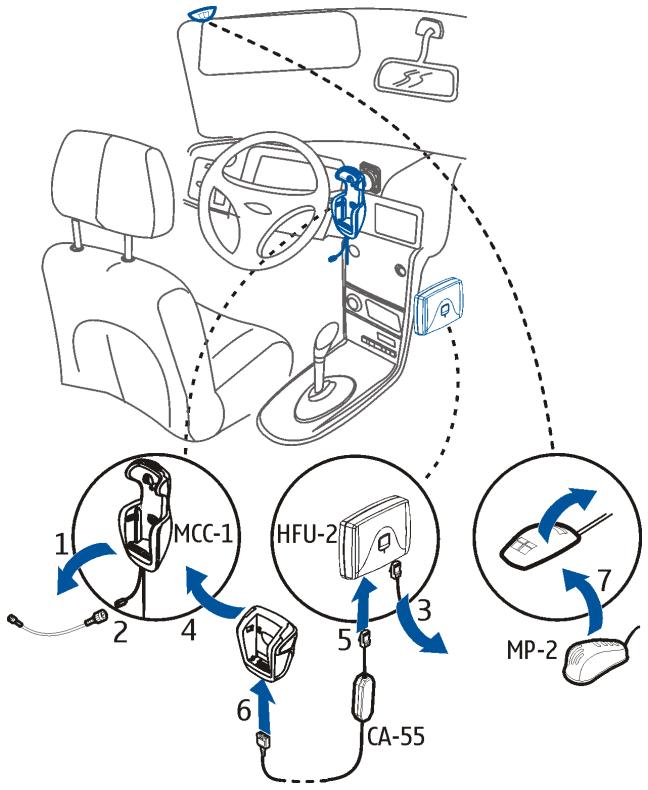
Before you install the converter, it is necessary to remove some parts of the car interior. After the installation, re-attach those parts.
- When the car ignition is turned off, remove the MCC-1 mobile holder from your car.
- Disconnect the antenna cable of the MCC-1 mobile holder from the external antenna.
- Disconnect the system cable of the MCC-1 mobile holder from the HFU-2 hands-free unit that is supplied with your CARK-91 car kit.
- Mount your new compatible mobile holder securely to the original place of the holder. If necessary, also mount the appropriate antenna coupler. For details, see the sales package of your new mobile holder.
- Plug the converter cable into the HFU-2 hands-free unit.
- Plug the converter cable into the mobile holder.
- If necessary, replace the original microphone with the MP-2 microphone.
- If necessary, connect the antenna cable of your antenna coupler or mobile holder with the cable of the external antenna.
flowchart
graph TD
    A["Car Top"] --> B["Wheel"]
    B --> C["Motor 1"]
    C --> D["MCC-1"]
    D --> E["Motor 2"]
    E --> F["Motor 3"]
    F --> G["Motor 4"]
    G --> H["Motor 5"]
    H --> I["Motor 6"]
    I --> J["Motor 7"]
    J --> K["Motor 8"]
    K --> L["Motor 9"]
    L --> M["Motor 10"]
Copyright © 2005 Nokia. All rights
Care and maintenance
Your device is a product of superior design and craftsmanship and should be treated with care. The suggestions below will help you protect your warranty coverage.
- Do not attempt to open the device except as instructed in this guide.
- Do not use harsh chemicals, cleaning solvents or strong detergents to clean the car kit.
- Do not paint the car kit. Paint can clog the moving parts and prevent proper operation.
If the device is not working properly, take it to your nearest authorized service facility for service.
Brand : NOKIA
Model : CA-55
Category : Phone Accessories