
POCO F2 Pro - Smartphone Xiaomi - Free user manual and instructions
Find the device manual for free POCO F2 Pro Xiaomi in PDF.
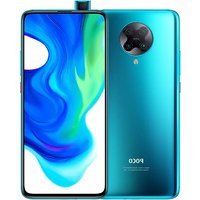


| Product Type | Smartphone |
| Brand | Xiaomi |
| Model | POCO F2 Pro |
| Dimensions (H x W x D) | 163.3 x 75.4 x 8.9 mm |
| Weight | 219 g |
| Display | AMOLED 6.67 inches, 1080 x 2400 pixels |
| Processor | Qualcomm Snapdragon 865 |
| RAM | 6 or 8 GB |
| Internal storage | 128 or 256 GB |
| Main camera | Quad camera 64 MP + 13 MP + 5 MP + 2 MP |
| Front camera | 20 MP, pop-up |
| Battery | 4700 mAh, fast charging 30 W |
| Operating system | Android 10 with MIUI 11 |
| Connectivity | 5G, Wi-Fi 6, Bluetooth 5.1, USB-C |
| Sensors | Fingerprint (under display), accelerometer, gyroscope, proximity, compass |
| Power | Rechargeable lithium-ion battery, USB-C 30 W charger |
| Maintenance and cleaning | Clean with a soft, dry cloth. Avoid liquids. |
| Safety | Do not expose to moisture or shocks. Use original charger. |
| Spare parts and repairability | Screen, battery, connectors available. Repair possible at authorized center. |
Frequently Asked Questions - POCO F2 Pro Xiaomi
User questions about POCO F2 Pro Xiaomi
0 question about this device. Answer the ones you know or ask your own.
Ask a new question about this device
Download the instructions for your Smartphone in PDF format for free! Find your manual POCO F2 Pro - Xiaomi and take your electronic device back in hand. On this page are published all the documents necessary for the use of your device. POCO F2 Pro by Xiaomi.
USER MANUAL POCO F2 Pro Xiaomi
Thank you for choosing POCO F2 Pro
Long press the power button to turn on the device.
Follow the on-screen instructions to configure the device.
For more information, visit our official website:
www.mi.com/global/service/userguide
MIUI
POCO F2 Pro comes pre-installed with MIUI, our customized Android-based OS which provides frequent updates and user-friendly features based on suggestions from over 200 million active users worldwide. For more information, please visit en.miui.com
SIM Card Tray:
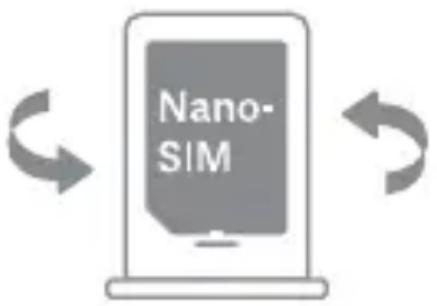
About Dual SIM:
- Supports Dual SIM cards with no carrier restrictions, single 5G or dual 4G connectivity ①
- Supports Dual Nano-SIM card slots, either card can be set as the primary card • Supports single SIM 5G/4G+/4G/3G/2G • Supports Dual SIM 4G+/4G/3G/2G • Supports Dual SIM VoLTE HD calling ②
Note ①: 5G support depends on the local telecom operator's network; if the primary card 5G is enabled, the secondary card will not be available; subsequent software upgrades will include support for primary 5G and secondary 4G/3G/2G card mode function in dual-card situations.
Note ②: VoLTE service availability depends on the local telecom operator's network and service deployment
- Please do not insert non-standard SIM cards into the SIM card slot. They may damage the SIM card slot.
- WARNING: Do not disassemble this device.
WEEE

Special precautions must be taken to safely dispose of this product. This marking indicates that this product may not be discarded with other household waste in the EU.
To prevent harm to the environment or human health from inappropriate waste disposal, and to promote sustainable reuse of
material resources, please recycle responsibly.
To safely recycle your device, please use return and collection systems or contact the retailer where the device was originally purchased.
To view our Environmental Declaration, please refer to the following link: www.mi.com/en/about/environment
CAUTION
RISK OF EXPLOSION IF BATTERY IS REPLACED BY AN INCORRECT TYPE. DISPOSE OF USED BATTERIES ACCORDING TO INSTRUCTIONS.
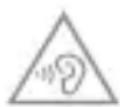
To prevent possible hearing damage, do not listen at high volume levels for long periods.
Additional safety information and precautions can be accessed at
the following link: www.mi.com/en/certification
Important Safety Information
Read all safety information below before using your device:
- Use of unauthorized cables, power adapters, or batteries can cause fire, explosion, or pose other risks.
- Use only authorized accessories which are compatible with your device.
- This device's operating temperature range is 0°C to 40°C. Using this device in an environment outside of this temperature range may damage the device.
- If your device is provided with a built-in battery, to avoid damaging the battery or the device, do not attempt to replace the battery yourself.
- Charge this device only with the included or authorized cable and power adapter. Using other adapters may cause fire, electric shock, and damage to the device and the adapter.
- After charging is complete, disconnect the adapter from both the device and the power outlet. Do not charge the device for more than 12 hours.
- The battery must be recycled or disposed of separately from household waste. Mishandling the battery may cause fire or explosion. Dispose of or recycle the device, its battery, and accessories according to your local regulations.
- Do not disassemble, hit, crush, or burn the battery. If the battery appears deformed or damaged, stop using it immediately.
- Do not short circuit the battery, as this may cause overheating, burns, or other injury.
- Do not place the battery in a high-temperature environment.
- Overheating may cause explosion.
- Do not disassemble, hit, or crush the battery, as this may cause the battery to leak, overheat, or explode.
- Do not burn the battery, as this may cause fire or explosion.
- If the battery appears deformed or damaged, stop using it immediately.
- The user shall not remove or alter the battery. Removal or repair of the battery shall only be done by an authorized repair center of the manufacturer.
- Keep your device dry.
- Do not try to repair the device yourself. If any part of the device does not work properly, contact Mi customer support or bring your device to an authorized repair center.
- Connect other devices according to their instruction manuals. Do not connect incompatible devices to this device.
- For AC/DC adapters, the socket-outlet shall be installed near the equipment and shall be easily accessible.

Safety Precautions
- Observe all applicable laws and rules restricting use of mobile phones in specific situations and environments.
- Do not use your phone at petrol stations or in any explosive atmosphere or potentially explosive environment, including fueling areas, below decks on boats, fuel or chemical transfer or storage facilities, or areas where the air may contain chemicals or particles such as grain, dust, or metal powders. Obey all posted signs to turn off wireless devices such as your phone or other radio equipment. Turn off your mobile phone or wireless device when in a blasting area or in areas requiring “two-way radios” or “electronic devices” to be turned off to prevent potential hazards.
- Do not use your phone in hospital operating rooms, emergency rooms, or intensive care units. Always comply with all rules and regulations of hospitals and health centers. If you have a medical device, please consult your doctor and the device manufacturer to determine whether your phone may interfere with the device's operation. To avoid potential interference with a pacemaker, always maintain a minimum distance of 15 cm between your mobile phone and the pacemaker. This can be done by using your phone on the ear opposite to your pacemaker and not carrying your phone in a breast pocket. To avoid interference with medical equipment, do not use your phone near hearing aids, cochlear implants, or other similar devices.
- Observe all aircraft safety regulations and turn off your phone on board aircraft when required.
- When driving a vehicle, use your phone in accordance with relevant traffic laws and regulations.
- To avoid being struck by lightning, do not use your phone outdoors during thunderstorms.
- Do not use your phone to make calls while it is charging.
- Do not use your phone in places with high humidity, such as bathrooms. Doing so may result in electric shock, injury, fire, and charger damage.
Security Statement
Please update your phone's operating system using the built-in software update feature, or visit any of our authorized service outlets. Updating software through other means may damage the device or result in data loss, security issues, and other risks.
EU Regulations
RED Declaration of Conformity

Xiaomi Communications Co., Ltd. hereby declares that this GSM / GPRS / EDGE / UMTS / LTE / 5G NR Digital Mobile Phone with Bluetooth and Wi-Fi M2004J11G is in compliance with the essential requirements and other relevant provisions of the RE Directive 2014/53/EU. The full text of the EU declaration of conformity is available at the following internet address: www.mi.com/en/certification
RF Exposure Information (SAR)
This device is in compliance with Specific Absorption Rate (SAR) limits for general population/uncontrolled exposure (Localized 10-gram SAR for head and trunk, limit: 2.0W/kg) specified in Council Recommendation 1999/519/EC, ICNIRP Guidelines, and RED (Directive 2014/53/EU).
During SAR testing, this device was set to transmit at its highest certified power level in all tested frequency bands and placed in positions that simulate RF exposure during use against the head with no separation and near the body with a separation of 5 mm.
SAR compliance for body operation is based on a separation distance of 5 mm between the unit and the human body. This device should be carried at least 5 mm away from the body to ensure RF exposure level is compliant or lower than the reported level. When attaching the device near the body, a belt clip or holster should be used which does not contain metallic components and allows a separation of at least 5 mm to be maintained between the device and the body. RF exposure compliance was not tested or certified with any accessory containing metal worn on the body, and use of such an accessory should be avoided.
Certification Information (Highest SAR)
SAR 10 g limit: 2.0 W/Kg,
SAR Value: Head: 0.789 W/Kg, Body: 1.031 W/Kg (5 mm distance).
Legal Information
This device may be operated in all member states of the EU.
Observe national and local regulations where the device is used.
This device is restricted to indoor use only when operating in the 5150 to 5350 MHz frequency range in the following countries:
| AT BE BG HR CY CZ DK |  | |||
| EE F FR DE EL HU IE | ||||
| IT LV LTLU MT NL PL | ||||
| PT RO SK SI ES SE UK |
Receiver Category 2
Ensure the power adapter used meets the requirements of Clause 6.4.5 in IEC/EN 62368-1 and has been tested and approved according to national or local standards.
Frequency Bands and Power
This mobile phone offers the following frequency bands in EU areas only and maximum radio-frequency power:
GSM 900: 35 dBm
GSM 1800: 32 dBm
UMTS band 1/8: 25 dBm
LTE band 1/3/7/8/20/28/38/40: 25.7 dBm
5G NR band n77/n78: 26 dBm
Bluetooth: 20 dBm
Wi-Fi 2.4 GHz band: 20 dBm
Wi-Fi 5 GHz: 5150 to 5250 MHz: 20 dBm, 5250 to 5350 MHz: 20 dBm,
5470 to 5725 MHz: 20 dBm, 5725 to 5825 MHz: 14 dBm
NFC: 13.56 MHz < -14.67 dBuA/m at 10m
FCC Regulations
This mobile phone complies with part 15 of the FCC Rules. Operation is subject to the following two conditions: (1) This device may not cause harmful interference, and (2) this device must accept any interference received, including interference that may cause undesired operation.
This mobile phone has been tested and found to comply with the limits for a Class B digital device, pursuant to Part 15 of the FCC Rules.
These limits are designed to provide reasonable protection against harmful interference in a residential installation.
This equipment generates, uses and can radiate radio frequency energy and, if not installed and used in accordance with the instructions, may cause harmful interference to radio communications.
However, there is no guarantee that interference will not occur in a particular installation. If this equipment does cause harmful interference to radio or television reception, which can be determined by turning the equipment off and on, the user is encouraged to try to correct the interference by one or more of the following measures:
- Reorient or relocate the receiving antenna.
- Increase the separation between the equipment and receiver.
- Connect the equipment into an outlet on a circuit different from that to which the receiver is connected.
- Consult the dealer or an experienced radio/TV technician for help.
RF Exposure Information (SAR)
This device meets the government's requirements for exposure to radio waves. This device is designed and manufactured not to exceed the emission limits for exposure to radio frequency (RF) energy. The exposure standard for wireless devices employs a unit of measurement known as Specific Absorption Rate, or SAR.
The SAR limit set by the FCC is 1.6 W/Kg. For body-worn operation, this device has been tested and meets the FCC RF exposure guidelines for use with an accessory that contains no metal and positions the device a minimum of 1.5 cm from the body. RF exposure compliance with any body-worn accessory that contains metal was not tested and certified, and use of such body-worn accessory should be avoided. Any accessory used with this device for body-worn operation must keep the device a minimum of 1.5 cm away from the body.
FCC Note
Changes or modifications not expressly approved by the party responsible for compliance could void the user's authority to operate the equipment.
E-label
This device has an electronic label for certification information.
To access it, please go to Settings > About phone > Certification, or open
Settings and type "Certification" into the search bar.
Model: M2004J11G
2004 indicates that this product will be launched after 202004.
Disclaimer
This User Guide is published by Xiaomi or its local affiliated company.
Improvements and changes to this User Guide necessitated by typographical errors, inaccuracies of current information, or improvements to programs and/or equipment may be made by Xiaomi at any time and without notice.
Such changes will, however, be incorporated into new editions of this User Guide. All illustrations are for reference purposes only and may not accurately depict the actual device.
This smartphone is designed with Corning® Gorilla® Glass 5.
CORNING
Gorilla*Glass
SAT. 16 AUG.
Volume buttons
www.mi.com/global/service/userguide
MIUI
019, 9th Floor, Building 6, 33 Xi'erqi Middle Road, Haidian District, Beijing, China, 100085
SAR limit 10 g: 2.0 W/kg,
www.mi.com/global/service/userguide
MIUI
www.mi.com/en/about/environment
WARNING
SAR limit 10 g: 2.0 W/kg,
www.mi.com/global/service/userguide
MIUI
www.mi.com/global/service/userguide
MIUI
www.mi.com/global/service/userguide
MIUI
www.mi.com/en/about/environment
WARNING
USING AN INCORRECT TYPE OF REPLACEMENT BATTERY MAY CAUSE AN EXPLOSION.
DISPOSE OF USED BATTERIES ACCORDING TO THE INSTRUCTIONS.
www.mi.com/en/certification
SAR limit 10 g: 2.0 W/kg
www.mi.com/global/service/userguide
MIUI
Manufacturer: Xiaomi Communications Co., Ltd.
Manufacturer postal address:
019, 9th Floor, Building 6, 33 Xi'erqi Middle Road, Haidian District, Beijing, China, 100085
Brand: POCO
Model:
M2004J11G
© Xiaomi Inc. All rights reserved.
- THANK YOU FOR CHOOSING POCO F2 PRO
- MIUI
- SIM CARD TRAY
- ABOUT DUAL SIM
- WEEE
- CAUTION
- IMPORTANT SAFETY INFORMATION
- SAFETY PRECAUTIONS
- SECURITY STATEMENT
- EU REGULATIONS
- RED DECLARATION OF CONFORMITY
- RF EXPOSURE INFORMATION (SAR)
- CERTIFICATION INFORMATION (HIGHEST SAR)
- LEGAL INFORMATION
- FREQUENCY BANDS AND POWER
- FCC REGULATIONS
- FCC NOTE
- E-LABEL
- DISCLAIMER
- TH FLOOR, BUILDING 6, 33 XI'ERQI MIDDLE ROAD, HAIDIAN DISTRICT, BEIJING, CHINA
- WARNING
Brand : Xiaomi
Model : POCO F2 Pro
Category : Smartphone