
IAN 322267 - Uncategorized ULTIMATE SPEED - Free user manual and instructions
Find the device manual for free IAN 322267 ULTIMATE SPEED in PDF.


| Product Type | Smartphone Holder (Car Mount) |
| Brand | Ultimate Speed |
| Model Number | IAN 322267 |
| Intended Use | Mounting smartphones in vehicles on the inside of the windscreen |
| Mounting Method | Vacuum suction cup |
| Smartphone Compatibility | Width approximately 58 – 84 mm |
| Rotation | 360° via ball joint |
| Tilt Adjustment | Yes, via adjustment wheel on ball joint |
| Holding Mechanism | Spring-loaded clamp and adjustable holding tabs |
| Cable Management | Two cable clips for charging cables (2.4-3.0 mm and 3.5-4.1 mm) |
| Material | Plastic and metal |
| Installation Location | Inside windscreen, away from airbags and steering wheel |
| Safety Precautions | Do not install near airbags; do not use while driving; check stability before each ride |
| Cleaning | Use a dry, lint-free cloth; do not use alcohol or flammable liquids |
| Disposal | Packaging at recycling points; product in residual waste according to local regulations |
| Warranty Period | 3 years from date of purchase (first purchaser, non-transferable) |
| Warranty Coverage | Material or production faults; not for wear parts or damage due to incorrect use |
| Spare Parts Availability | 3 years from date of purchase |
| Package Contents | 1 support bracket with support arm and suction cup, 1 user manual |
| Manufacturer | INTER-UNION TECHNOHANDEL GMBH, Carl-Benz-Str. 2, DE-76761 Rülzheim, Germany |
| Operating Temperature Note | Avoid direct sunlight; do not exceed 70°C (158°F) inside vehicle |
| Suction Cup Maintenance | Reattach at least every 3 months to maintain vacuum |
Frequently Asked Questions - IAN 322267 ULTIMATE SPEED
User questions about IAN 322267 ULTIMATE SPEED
0 question about this device. Answer the ones you know or ask your own.
Ask a new question about this device
Download the instructions for your Uncategorized in PDF format for free! Find your manual IAN 322267 - ULTIMATE SPEED and take your electronic device back in hand. On this page are published all the documents necessary for the use of your device. IAN 322267 by ULTIMATE SPEED.
USER MANUAL IAN 322267 ULTIMATE SPEED
natural_image
3D rendered image of a smartphone with a handheld strap, no visible text or symbolsSMARTPHONE HOLDER
RS
DRŽAČ ZA PAMETNI TELEFON
Instructions for use and safety guidelines
DE
SMARTPHONEHALTERUNG
3. Fiksiranje uređaja u kućište za držanje
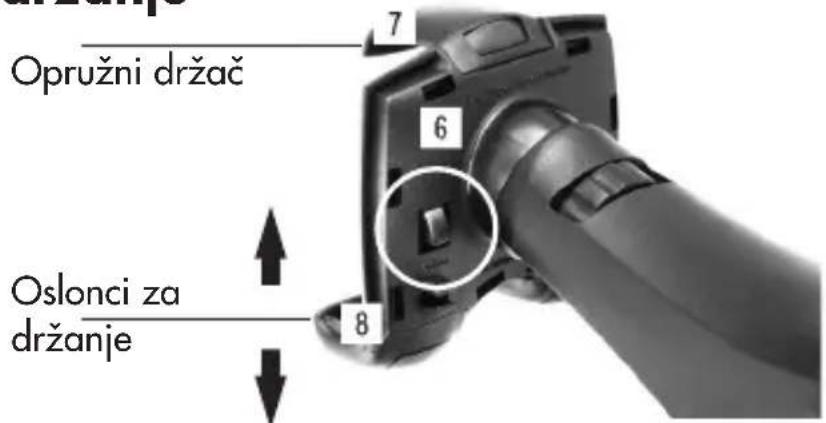
- Donji oslonci za držanje 8 su podesivi i prilagođavaju se u skladu sa veličinom uređaja. Pritiskom na dugmad na zadnjoj strani kućišta za držanje 6 (sa natpisom „press“), oslonci 8 se mogu izvući i podesiti.
Podesite oba oslonca za držanje u skladu sa veličinom vašeg pametnog telefona i vodite računa o tome da oba oslonca za držanje budu isto podešena.
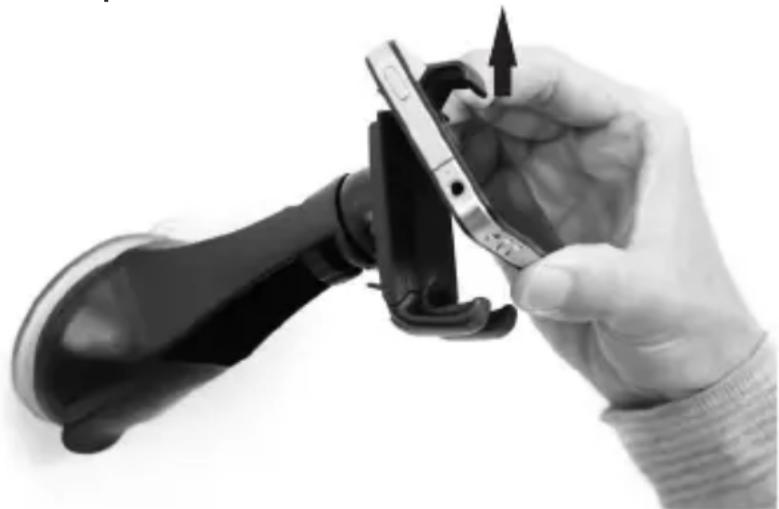
Umetnuti željeni uređaj i pritisnuti ga prema opružnom držaču 7 koji će popustiti, zahvaljujući čemu će kućište za držanje 6 jednostavno prihvatiti uređaj. Sada otpusti opružni držač, tako da uređaj bude pritisnut prema osloncima za držanje i na taj način zabravljen. Uređaj pozicionirati tako da pristup bočnim elementima za rukovanje ostane slobodan.
natural_image
Close-up of a hand holding a smartphone with a black strap, showing the grip and handle (no text or symbols visible)- Za vađenje uređaj jednostavno ponovo pritisnuti prema opružnom držaču 7 dok ne popusti, a zatim izvaditi uređaj pod blago kosim uglom.
Kućište za držanje 6 se zahvaljujući kugličnom zglobu 5a može okretati za 360°. Umetnuti uređaj se na taj način može postaviti u različite položaje, npr. vertikalno (npr. za korišćenje kamere) ili horizontalno (npr. za navigacijsku funkciju). Na zadnjoj strani kućišta za držanje 6 se nalaze dve stezaljke za kablove 9, pomoću kojih može da se fiksira kabl za punjenje (kabl nije obuhvaćen obimom isporuke).
Stezaljke za kablove: uske stezaljke za kablove za debljine kablova od: 2,4 – 3,0 mm, šire stezaljke za kablove za debljine kablova od: 3,5 – 4,1 mm.
- Čišćenje i nega
Ne koristiti sredstva za čišćenje sa aloholom ili drugim zapaljivim tečnostima/materija-ma. Proizvod čistiti suvom krpom koja ne ostavlja vlakna.
- Odlaganje na otpad
Ambalaža se sastoji od ekološki prihvatljivih materijala, koji se mogu odložiti na otpad preko lokalnih centara za reciklažu. Nakon veka trajanja, proizvod odložiti na otpad u skladu sa važećim propisima u vašoj zemlji!
• Garancija
3 godine na ovaj uređaj, od datuma kupovine, važi samo za prvog kupca, ne može se prenositi dalje. Sačuvati fiskalni račun kao dokaz. Garancija važi samo za greške u materijalu ili u proizvodnji, ali ne i za potrošne delove ili oštećenja usled nepravilne upotrebe. Garancija se gubi stranom intervencijom. Vaša zakonska prava ovom garancijom neće biti ograničena. U slučaju garancije obratiti se servisnom centru. Samo tako se može osigurati besplatna dostava vašeg uređaja.
Dostupnost rezervnih delova: 3 godine od datuma kupovine.
Servis / proizvođač
natural_image
Hand holding a smartphone with a black strap, showing the grip and handle (no text or symbols visible)natural_image
Hand holding a handheld device with an arrow pointing to the screen (no visible text or symbols)natural_image
Hand holding a smartphone with a black strap, showing the grip and handle (no text or symbols visible)- Za vađenje uređaj jednostavno pritisnite o zatezač 7 dok ovaj ne popusti, zatim uređaj izvadite pod malim nagibom. Tijelo 6 se može okretati za 360° zahvaljujući kugličnom zglobu 5a. Umetnuti uređaj tako se može postaviti u različite položaje, npr. okomito (kad se npr. želi koristiti kao kamera) ili vodoravno (npr. za navigaciju). Na poleđini tijela 6 nalaze se dvije kopče za kabele 9 kojima se može fiksirati kabel za punjenje (kabel nije sadržan u opsegu isporuke). Kopče za kabele: tanka kopča za debljine kablova: 2,4 – 3,0 mm široka kopča za debljine kablova od: 3,5 – 4,1 mm.
Instructions for use and safety guidelines
- Intended use
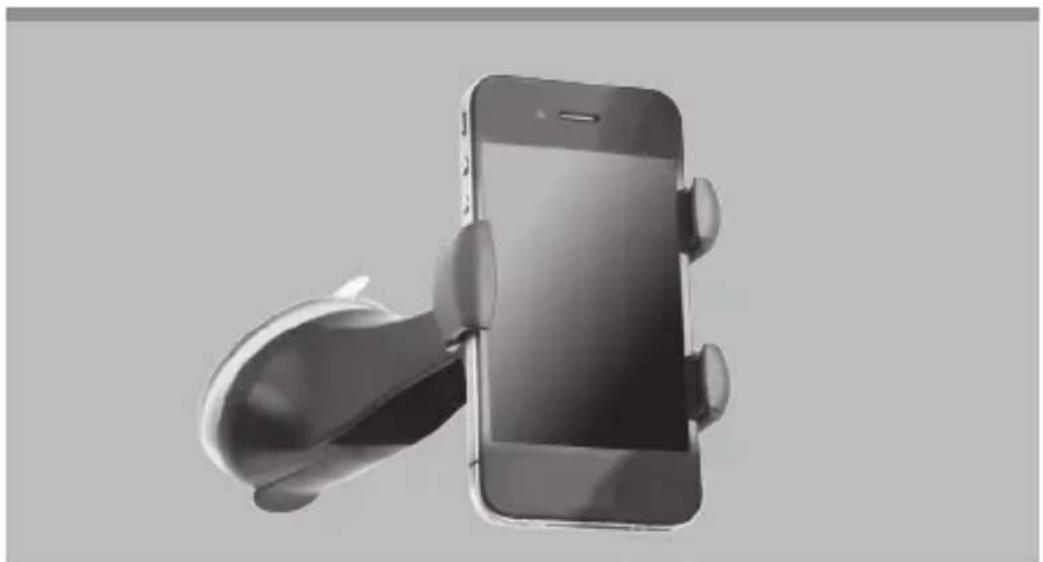
Congratulations! You have chosen a high-quality product to purchase. This product is intended as a holder in vehicles for smartphones. The mount is designed for the inside windscreen pane. Use the product only for the intended use.
- Delivery content
1 support bracket with support arm and vacuum suction cup
1 user manual
- Parts Description
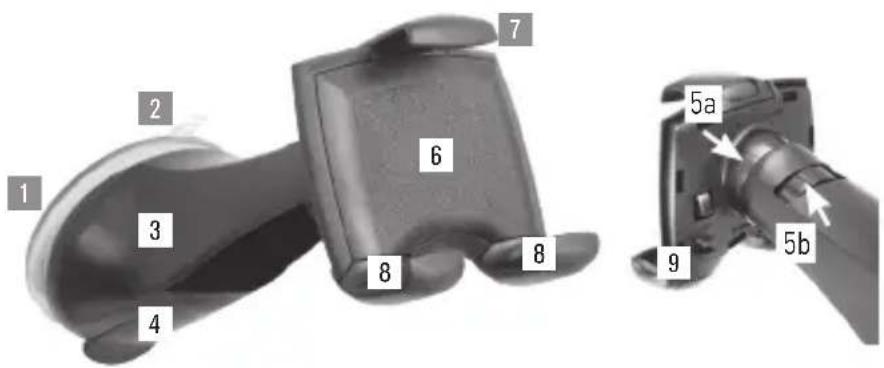
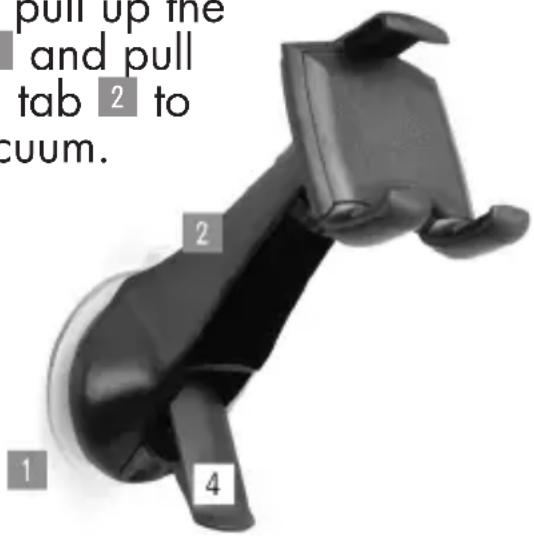
1 Vacuum suction cup
2 with vacuum tab
3 Support arm
4 Suction lever
5a Ball joint
5b Adjustment wheel
6 Holder
7 clamp
8 adjustable holding tabs
9 Cable clips for cable thicknesses of 2.4 - 3.0 mm & 3.5 - 4.1 mm
- Technical Data
Suitable for appliances with a width of approx. 58 - 84 mm
Safety Guidelines

WARNING!
- Do not install the product within the operating parameter of an airbag or near the steering wheel. This may lead to accidents and injuries, in particular in the impact zone of the head or body.
■ The positioning of the product must not impair the driver in any way. The field of view must be free. - Do not use, install or adjust whilst driving. Installation of the product or any accessories must not impair the driver whilst he/she is driving a vehicle.
■ Do not pick up or look for any fallen objects during the journey. Risk of an accident!
■ Lay all feed lines so that they pose no danger (tripping hazard) and cannot be damaged. Risk of an accident!
■ Supply cables may be damaged if incorrectly handled!
- Check the mounting support for stability before each time taking a ride.
In case of failure to observe the safety guidelines, the holder or the appliance may come loose and be damaged. Consequential damages cannot be ruled out. Risk of an accident!
■ When passing on to third parties, please include the user manual and safety guidelines. Store the safety guidelines together with the appliance.
- Notes
■ Strong sunlight can affect functioning of the product.
- Direct sunlight can damage the suction cup and adhesion if the temperature inside the vehicle exceeds 70°C (158°F).
- The suction cup is suitable for attaching to a smooth and clean surface for a limited time only.
■ Free the suction cup at regular intervals (at least every 3 months) and reattach it to create a new vacuum. - No liability is accepted for damages caused by misuse of the product or by failure to observe the safety guidelines.
In order to avoid break-ins, you should not leave your device unattended in the holder.
• Installation Instructions
1. Fastening the suction cup to the windscreen
- The ambient temperature should be above 15°C (59°F) for an optimal and secure adhesion of the suction cup. If the ambient temperature is not above 15°C (59°F), warm the surface with a hairdryer. Press the sucker 1 firmly onto the base and move the suction lever 4 to create a vacuum between the base and the sucker.
In order to remove the fastening system from the base, pull up the
suction lever 4 and pull on the vacuum tab 2 to release the vacuum.
2. Setting the ball joint for the desired tilt angle
■ Loosen the adjustment wheel 5b on the ball joint 5a behind the support and set the desired vertical or horizontal position, as well as the prefer
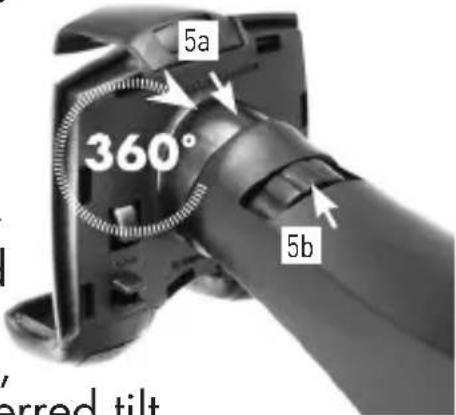
Then fasten again the adjustment wheel 5b.
3. Attaching a device to the holder
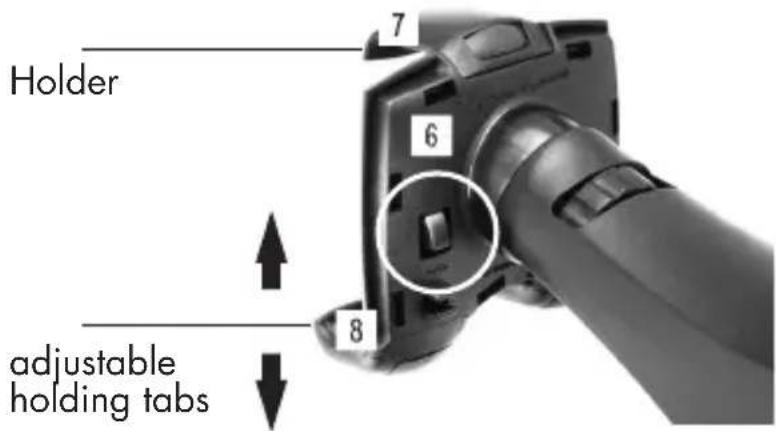
- The lower holding tabs 8 can be adjusted to fit the size of the device. The tabs 8 can be pulled out and pushed in by pressing the buttons on the back of the holder 6 (marked "Press"). Adjust both the holding tabs to fit the size of your smartphone and make sure that both the holding tabs are set the same.
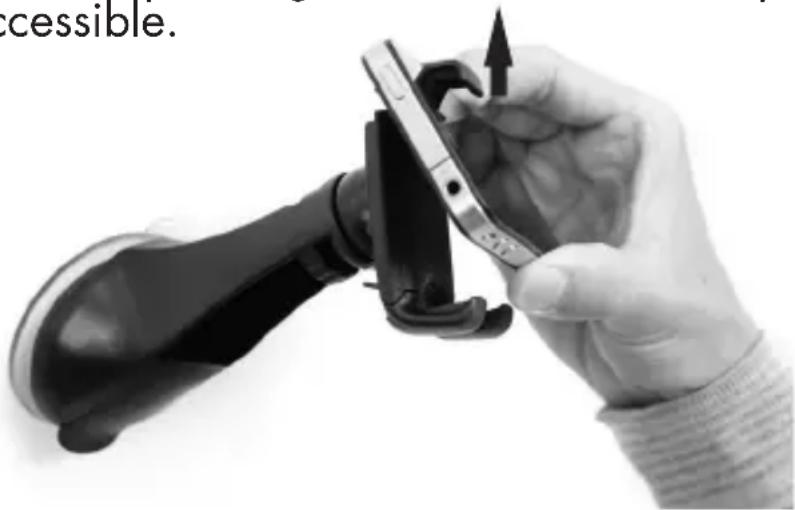
- Insert the desired device and press against the clamp 7. This will give and the device will simply be held by the holder 6. Now remove the pressure from the clamp so that the device is pressing against the holding tabs and is therefore locked. Place the device so that all side operating elements remain freely accessible.
natural_image
Hand holding a smartphone with a device being inserted, showing mechanical components and a pointing arrow (no text or symbols visible)- To remove the device, simply press it against the clamp 7 again until it gives, then remove the device at a slight angle. The holder 6 can rotate through 360^ thanks to the ball joint 5a, so the device installed can be put in various positions e.g. vertical (for instance for use as a camera) or horizontal (for instance for the satnav function). On the back of the holder 6 there are two cable clips 9 with which a charging cable may be attached (cable not supplied with the holder).
Cable clips: narrow cable clip for cable thicknesses of 2.4 - 3.0 mm wide cable clip for cable thicknesses of 3.5 - 4.1 mm
- Cleaning and care
Do not use any cleaning agents with alcohol or other flammable liquids/substances. Clean the product with a dry, lint-free cloth.
- Disposal
The packaging consists of environmentally friendly materials that you can dispose of at local recycling points. Dispose of the product in the residual waste at the end of its lifespan in accordance with regulations and legislation applicable in your country.
- Warranty
3 years warranty on this product from the date of purchase, only applies to the first purchaser, not transferable. Please keep the receipt as proof. The warranty only applies to material or production faults, not for wear parts or for damage due to incorrect use. The warranty is void in the case of external intervention. Your legal rights remain unaffected by this warranty. In the case of a warranty claim, please contact the service point. This ensures that your device can be sent to us free of charge.
Availability of spare parts: 3 years from date of purchase.
Service / Manufacturer
IU Item no.: 97379-7
Model no.: 220 106 51
Serial no.: 42/2019
As at: 05/2019
Version: 4.0
SMARTPHONEHALTERUNG
natural_image
Close-up of a hand holding a smartphone with a black strap, showing the grip and handle (no text or symbols visible)INTER-UNION TECHNOHANDEL GMBH
Carl-Benz-Str. 2
DE-76761 Rülzheim
DEUTSCHLAND
www.mts-gruppe.com
E-Mail: servicecenter@mts-gruppe.com
Stanje / Editja / Актуално към / Stanje /
As at / Stand: 05/2019
Verzija / Versiunea / Версия / Verzija /
Version / Version: 4.0
IAN 322267_1901

- SMARTPHONE HOLDER
- DRŽAČ ZA PAMETNI TELEFON
- SMARTPHONEHALTERUNG
- Fiksiranje uređaja u kućište za držanje
- - Čišćenje i nega
- - Odlaganje na otpad
- • Garancija
- Servis / proizvođač
- - Intended use
- - Delivery content
- - Parts Description
- - Technical Data
- Safety Guidelines
- WARNING!
- - Notes
- • Installation Instructions
- Fastening the suction cup to the windscreen
- Setting the ball joint for the desired tilt angle
- Attaching a device to the holder
- - Cleaning and care
- - Disposal
- - Warranty
- INTER-UNION TECHNOHANDEL GMBH
Brand : ULTIMATE SPEED
Model : IAN 322267
Category : Uncategorized