
CAF-X116XPL - Air purifier TOSHIBA - Free user manual and instructions
Find the device manual for free CAF-X116XPL TOSHIBA in PDF.


| Product Type | Air Purifier |
| Brand | Toshiba |
| Model | CAF-X116XPL |
| Filtration System | 2-piece composite filter with Pre-filter, PET filter, HEPA filter, Activated Carbon filter |
| CADR (Clean Air Delivery Rate) | Up to 700 m³/h |
| Fan Speeds | 3 (Low, Medium, High) |
| Operating Modes | Auto, Sleep, Rapid (Turbo) |
| Air Quality Monitor | PM2.5 digital display and color indicator (Blue, Green, Orange, Red) |
| Gaseous Pollutant Indicator | Color indicator (Blue, Green, Orange, Red) |
| Ionizer | Yes, releases negative ions |
| Control Type | Touch control panel |
| Display | Digital display with PM2.5 value, filter life indicators, child lock icon |
| Child Lock | Yes |
| Light Dimming | Yes (can turn off display light) |
| Sensors | PM2.5 dual sensor, gaseous pollutant sensor, light sensor |
| Mobility | 4 casters for easy movement |
| Safety Features | Disassembly protection, auto-restart after power failure |
| Filter Replacement Indicators | Pre-filter and HEPA filter life indicators |
| Warranty | 24 months (from date of purchase) |
| Usage | Indoor residential use |
Frequently Asked Questions - CAF-X116XPL TOSHIBA
User questions about CAF-X116XPL TOSHIBA
0 question about this device. Answer the ones you know or ask your own.
Ask a new question about this device
Download the instructions for your Air purifier in PDF format for free! Find your manual CAF-X116XPL - TOSHIBA and take your electronic device back in hand. On this page are published all the documents necessary for the use of your device. CAF-X116XPL by TOSHIBA.
USER MANUAL CAF-X116XPL TOSHIBA
Please Read This Manual Inside you will find many helpful hints on how to use and maintain your Air Purifier properly. Just a little preventive care on your part can save you a great deal of time and money over the life of your Air Purifier.
natural_image
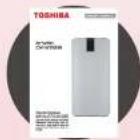
White cylindrical electronic device with a digital display showing 'TOSHIBA' and control buttons (no visible text or symbols on body)Union Distribution s.r.o.; Rosmarin Business Center; Delnická 21312/, Praha 7; Czech Republic
Check on Receiving 3
Key Features 4
Instructions before use 5
Preparation 7
Installation 8
Operation 10
Product Manual 14
Fault self-in-spection 15
Troubleshooting 16
E-Waste Management Guidelines 18
Product Warranty Terms & Conditions 19
Memo 22
Warranty Card 23
Check on Receiving
On receiving your Toshiba Air Purifier
Toshiba adopts a stringent policy to ensure safe delivery of all it's products. All product shipments are thoroughly checked, packed and quality certified before leaving our manufacturing. Please don't accept any product if there is any visible loss or damage of the goods and ask the delivery person to make the note on the freight bill or receipt.
On Opening the box
When a shipment has been delivered to you in apparent good conditions, but upon opening the box, if there is any loss or damage that has taken place due to transit, please inform the Union Distribution s.r.o.
About your instruction/usage manual
This manual is a guide to good usage and operating instructions for your new Toshiba Air Purifier.
This manual does not contain all product service related procedures required for continued successful operation of this product. The services of Toshiba Authorized Service Person must be employed on periodical basis for the same.
Do not operate the product before reading the manual supplied with this product and follow instructions to ensure personal safety and proper operation.
Union Distribution s.r.o. assumes no liability for installation performed by any unauthorized Person.
Always install, operate, inspect and maintain this product in accordance with all applicable standards.
Please store this user manual carefully for any future reference.



Key Features

TRUE HEPA FILTRATION
This air purifier designed with 2Pcs filters, each combined 4 different filtration layers: a Pre filter, a PET filter, a HEPA filter and an activated carbon filter, to assure remarkable filtration.

WHOLE ROOM VORTEX CIRCULATION
Clean air delivery rate up to 700 M ^1 /H, further enhanced by whole room vortex circulation technology. Toshiba air purifiers able to deliver purer and fresher air to all corners of your indoor environment.
AIR QUALITY MONITOR
Air purity display show numeric measurement of PM2.5, to help you understand room air quality all the time.

3 FAN SPEED SETTINGS
3 fan speed setting by touch control, low speed comes with ultra-low noise level to ensure your family sleeps undisturbed. High speed helps improve air quality in your room faster.

IONIZER
The Ionizer releases negative ions to eliminate odour, dust, smoke and pollen particles to give you fresh and healthy air, it also makes the air beneficial for people suffering from respiratory ailments, allergies as it reduces allergens in the air.
Instructions before use
If the power socket used to power the appliance has poor connections, the plug of the appliance becomes hot. Make sure that you plug the appliance into a properly connected power socket

Must be repaired by professionals.
Non-professionals and unauthorized repairmen should not repair or transform this machine.

Please do not operate with wet hands.
Operating with wet hands may result in electric shock.

When do cleanings, please stop operation and turn off the machine.
Prevent accidental electric shock due to electric leakage.

Please do not Insert things to the air inlet and outlet
There is a wind wheel rotating at a high speed, so prevent accidental injury and damage of machine.

Do not put air purifier to the place where there is
flammable and combustible air. Avoid long-term direct sunshine.

Do not use at the place where it is humid and easy to
contact water, such as bathrooms.
Prevent electric shock.
Instructions before use

Do not exchange power cords without authorization.
If power lines are broken, please ask local service network for help with maintenance.

Never place this machine on inclined surfaces.
If the machine falls, may cause damage to the machine body or inner parts.

Do not use this machine in environment with oil and smoke, such as kitchens
May damage machines.

Do not use this machine at outdoors.
Children should be supervised to ensure that they do not play with the appliance.
Prohibit the use of foreign objects into the inlet and exit of the vent.
Safe Placement
Please read the following correct placement methods, thus avoiding failure in the use process.
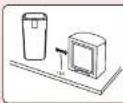
- Please keep this machine at least 1 meter away from televisions, radio and other appliances.
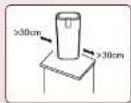
- Please keep this machine atleast 30cm away from all sides.
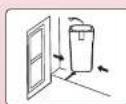
- Please place this machine in a place facilitating air circulation.
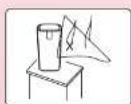
- Please don't place this machine near the curtains.
Preparation
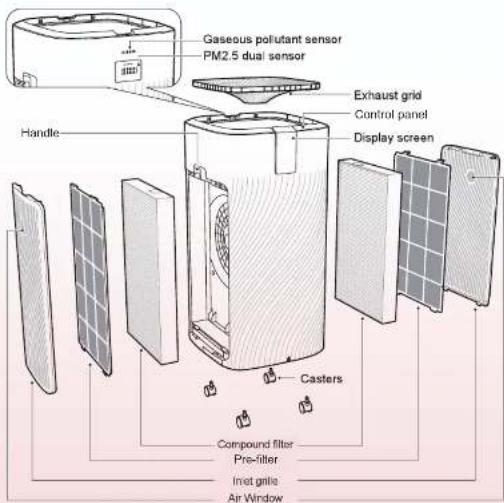
Installation
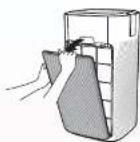
Remove the inlet grille Grasp the buckle and pull it outward, remove the inlet grille
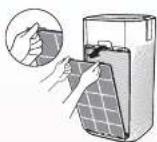
2 Remove the primary filter screen
Press down the U-shaped buckle and pull it outward, remove the primary filter screen
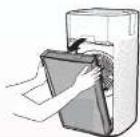
⑤ Remove the compound filter screen
Hold two sides of the compound filter screen with both hands and remove the compound filter screen
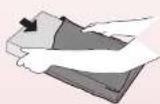
4 Remove the protective film of filter screen
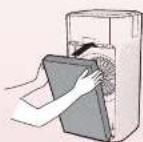
⑤ Install compound filter screen
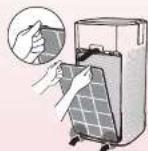
⑥ Install primary filter screen
Align the bottom slot and buckle the upper U-shaped buckle in place
Installation
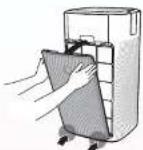
7 Install the inlet grille Align the bottom slot, press the upper part of the inlet grille on two sides, buckle the inlet grille
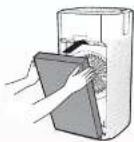
⑧ Install filter screen for the other side
Repeat steps 1-7 to install the filter screen for the other side
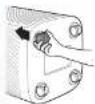
Install casters
Tilt the machine body, press four casters on the bottom by force
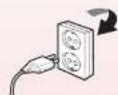
10 Connect power, then machine runs


Operation
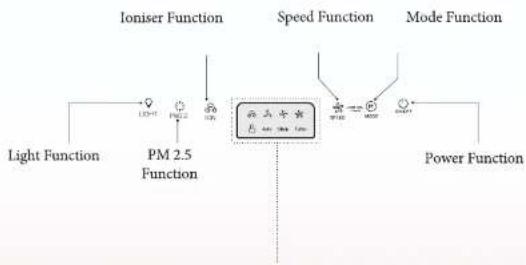
flowchart
graph LR
    A["Light Function"] --> B["PM 2.5 Function"]
    B --> C["Ioniser Function"]
    C --> D["Speed Function"]
    D --> E["Mode Function"]
    E --> F["Power Function"]
    F --> G["Output"]
Power function ⏻
Press the power button to switch on and off your air purifier
Ioniser Mode
Press the Ioniser mode to activate /deactivate the Plasma ion function
Speed Function ✿
Increase or decrease the fan speed to regulate purification as per your requirement
Light dimming Function
With the light dimming button, you can switch on or off the air quality light, the display screen and the function indicators if needed.
10
Operation
PM 2.5 function
Press the PM 2.5 function to check PM 2.5 concentration on display panel
Mode function
Mode function enables users to chose from Automatic, Sleep and rapid mode
Child lock function
Mode function enables users to chose from Automatic, Sleep and rapid mode
11
Operation : Display Panel explanation
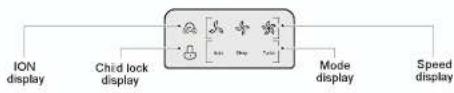
flowchart
graph LR
    A["ION display"] --> B["Chid lock display"]
    B --> C["Mode display"]
    C --> D["Speed display"]
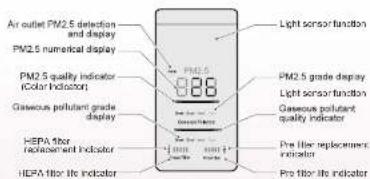
Understand the PM2.5 quality light
| Color of the PM2.5 Quality light bar | Air quality level |
| Blue | Great |
| Green | Good |
| Orange | Med |
| Red | Poor |
The air quality light automatically goes on when the purifier is switched on.
12
Operation : Display Panel explanation
Understand the Gaseous pollutant grade
| Color of the gaseours pollutant grade light bar | Air quality level |
| Blue | Great |
| Green | Good |
| Orange | Med |
| Red | Poor |
The air quality light automatically goes on when the purifier is switched on.
13
Product Manual
- Preparation
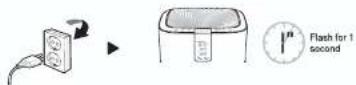
After powered on for the first time, the display panel will flash for 1 second, then the screen will turn off, the whole machine enters into standby mode;
- Switch
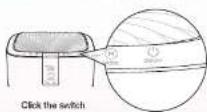
- Preheating
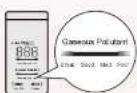
The odor sensor is to be preheated, displaying great, good, medium, poor alternatively, then displaying after 1 minute
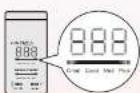
Particle sensor enters into the preheating state, PM2.5 displays “---” in digital by great, good, medium, poor alternatively, then display normally after 15 seconds.
- Work
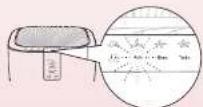
The purifier is powered on for the first time and then enters into automatic mode

Caution The machine has disassembly protection function, which cannot be started until the inlet gnie and outlet gnie are properly installed. Being powered on, the machine enters into standby mode after started Power on the machine after unexpected power outage (if home power failure or by unplugging the power supply line during normal operation), then the machine will automatic recover to the working state before power failure.
Fault self-in-spection
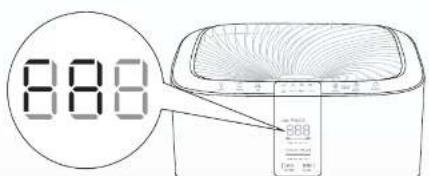

Prompt for removal of filter screen protective film
Remove the protective film of filter screen

Prompt for that the current filter screen protective film is not the original one or there is filter protective film installed
Select original filter screen in complete set

Prompt for disassembly protection
Install the inlet grille and outlet grille properly

Prompt for reversal installation of filter screen
Install the filter screen properly

Hardware malfunction
Contact aftersales for treatment

Hardware malfunction
Contact aftersales for treatment

Air inlet sensor failure
Contact aftersales for treatment

Air outlet sensor fault
Contact aftersales for treatment

Fan stall
Contact aftersales for treatment
Troubleshooting
This section summarizes the most common problems you could encounter with the appliance. If you are unable to solve the problem with the information below, contact the Midea Consumer Care Center
| Problem | Possible solution |
| The appliance does not work even though it is plugged in. | The filter replacement code has been displaying on the screen but you have not replaced the corresponding filter yet. The appliance will be locked if youkeep using the expired filter. In this case, replace the filter and reset the filter lifetime counter. |
| The appliance does not work even though it is switched on. | The filter replacement code has been on continuously but you have not replaced the corresponding filter, and the appliance is now locked. In this case, replace the filter and reset the filter lifetime counter. |
| The appliance accidentally powers off. | The appliance restarts automatically and goes to the previous mode when the power resumes. |
| The airflow that comes out of the air outlet is significantly weaker than before. | The pre-filter is dirty. Clean the pre-filter |
| The air quality does not improve, even though the appliance has been operating for a long time. | One of the filters has not been placed in the appliance. Make sure that all filters are properly installed in the following order, starting with the innermost filter: |
| The air quality sensor is wet. The humidity level in your room is high and causes condensation. Make sure that the air quality sensor is clean and dry. |
Troubleshooting
| Problem | Possible solution |
| The color of the air quality light always stays the same. | The air quality sensor is dirty. Clean the air quality sensor |
| The appliance produces a strange smell. | The first few times you use the appliance, it may produce a plastic smell. This is normal. However, if the appliance produces a burnt smell, contact your Midea dealer or an authorized Midea service centre. The appliance may also produce an unpleasant smell when the filter is dirty. In this case, clean or replace the filter concerned. |
| The appliance is extra loud. | If the appliance is too loud, you can change the fan speed to a lower fan speed level. When using the appliance in a bedroom at night, choose the sleep mode. |
E-Waste Management Guidelines
PROPER HANDLING AND/OR RECYCLING OF THE WATER HEATER
Under the E-Waste (Management & Handling) Rules, 2011 [hereafter referred to as the "E-Waste Rules"), it is incumbent for all consumers, including the purchaser of this air purifier, to properly recycle and dispose of all electrical and electronic equipment through authorized recyclers. E-Waste has been defined as waste electrical and electronic equipment, whole or in part or rejects from their manufacturing and repair process, which are intended to be discarded. E-Waste contains various hazardous materials like lead, mercury, cadmium, hexavalent chromium, polybrominated biphenyls and polybrominateddiphenyls ethers. Hence, improper handling and disposal of e-waste releases these hazardous material in the environment causing pollution, contamination of soil and water and various health hazards. Though the product purchased by you does not contain any hazardous material above the prescribed limit under the E-Waste Rules, it is imperative that the product should be handled with utmost caution and as per the guidelines mentioned in this manual including the following Do's and Don't —
| Do's | Dont's |
| Hand over the E-Waste to the Company / Authorised recycler | Never sell the e-waste to any unauthorized agencies, scrap dealer/kabadiwalahs. |
| E-Waste should never be thrown in household bins. | Never throw E-Waste in bins as part of household waste. |
| Keep the product in isolated area, after it becomes non-functional/un-repairable so as to prevent its accidental breakage. | Never keep E-Waste in open and exposed area, accessible by a l. |
| The product should not be opened by the User himself/ herself, but only by authorised service personnel. | Never open/dismantle any e-waste on your own. |
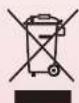
The following marking/symbol on the product or carton indicates that the product and its accessories/parts (e.g. remote controller, batteries, spare parts etc.) should not be disposed of with other household waste at the end of their working life. Please separate these items from other types of waste and recycle them responsibly for conservation of the environment and collective well-being.
Product Warranty Terms & Conditions
Union Distribution s.r.o. (hereinafter referred to as the "Company"), hereby warrants to the original domestic purchaser (here in after called the "Purchaser") of the product (as detailed within the Warranty Registration Card and here in after referred to as the "Said Unit"); that the Said Unit is free from defects in materials and workmanship under normal use and service and under specified voltage conditions, and that during a period of twelve (24) months commencing from the date of invoice ("Warranty Period"), as provided in the Warranty Registration Card, the Company undertakes to repair or to replace as it deems fit in sole discretion, free of charge, any part or parts of the Said Unit which proves to be defective in materials or workmanship.
Warranty Exclusions:
This warranty does not cover:
a. Noise or vibration that are considered normal for product operations like warning beeps and reject water sound;
b. Normal maintenance which is recommended by the user's manual;
c. Removal of foreign objects / substances from the machine, including the pump and any set of filters;
d. Replace fuses in or correct house wiring or correct house plumbing;
e. Any type of painting, plating including rusting etc., or defects thereof;
f. Consumable components such as filters and plastic parts.
Conditions of Warranty
- The Purchaser shall promptly notify the Company of any defect(s) noticed and shall allow the Company or its duly authorized agents to inspect, test and carry out necessary repairs;
- At the time of repair/service, the Purchaser is mandatorily required to show the original invoice to the authorized service personnel of the Company. If the Purchaser fails to do so, then all repair work and service shall be carried out on a chargeable basis;
- The Warranty shall be valid only for the Warranty Period irrespective of whether the Said Unit has been in use or not for any reason whatsoever;
Product Warranty Terms & Conditions
- The Warranty Period shall include time taken for repairs, replacements, testing of unit, technical breakdowns, transit time etc;
- The Warranty Period shall not be extended, renewed or otherwise affected due to subsequent resale, repair or replacement of the Said Unit. Parts of the Said Unit replaced or repaired under the terms of this warranty are warranted only for the remaining period of the original Warranty Period.
- For attending any service call under this warranty beyond the Municipal limits of the locality in which the authorized representative/dealer is situated (outstation locations), all to and fro traveling and other incidental expenses as prevailing from time to time incurred in connection with the visit of the service personnel, technicians etc., shall be borne by the Purchaser and shall be payable in advance. Additionally, all expenses incurred by the authorized representative/dealer in collecting the unit or any part thereof from such outstation locations for repair and its return to the original location shall be borne exclusively by the Purchaser.
- While the Authorized Dealers/Company will make every effort to carry out repair and/or if the part is not repairable then replacement of parts under this warranty as soon as the complaint is received, it is expressly made clear that the Authorized Dealer/Company shall not be liable to do so within any specified period of time.
- It shall be absolute discretion of the Company to
(a) carry out repairs or replacement of parts whether at the site of installation or at any service center;
(b) replace the defective parts by functionally operating equivalent parts which may be different from the one originally fitted.
(c) retain any defective part or components replaced under this warranty. - Limitation of Warranty:
The Warranty is not applicable in any of the following cases
a. Defects arising due to failure of the Purchaser to follow the instructions given in the User Manual for installing, servicing, cleaning or operating the Said Unit;
b. The Said Unit is serviced, repaired, installed, de-installed, re-installed or otherwise attended to by and person other that the authorized representative / Dealer of the Company;
c. Any damage/fault caused due to accident, sabotage, tampering, improper handling or treatment, carelessness, accident, fire, flood, earthquake or any act of God, or any corrosive action on the original fittings, valves etc;
d. The Said Unit is used for any purpose other than the residential use of the Purchaser;
e. Any damage caused by power surges and dips, improper electrical circuit outside the unit or by any defective electrical supply;
f. If the Said Unit or any parts thereof is damaged by insects, rats, pests or any other external factors like fire, flood, earthquake, lighting and/or any other act of God/natural calamities.
Product Warranty Terms & Conditions
g. Any defect due to substitution of original components with non-genuine components;
h. Damage to the Said Unit due to use of any ancillary equipment which is not authenticated or recommended by the Company;
1. The serial number on the unit or any part thereof is damaged, defaced, altered, obliterated, or tampered with or removed for any reason whatsoever;
If the iron content is high (more than 0.3 ppm).
10. The Company shall not in any event be liable for any indirect, incidental or consequential loss or damages to either the said purchaser and/or his property or any other third party arising out of the use or inability to use the Said Unit.
11. The Company shall not be liable for any loss, damage, delay in repairs, and replacement of parts due to factors beyond the reasonable control of the Company;
12. All claims under this Warranty is limited to the repair or replacement of the defective parts only. The liability of the Company under this Warranty shall under no circumstances exceed the price paid by the Purchaser for the Said Unit.
13. None of the employees and/or dealers of the Company have the authority whatsoever to vary the terms and conditions of this warranty.
THIS WARRANTY IS NOT TRANSFERABLE AND
APPLIES TO ORIGINAL PURCHASER ONLY.
COMPLETE THIS RECORD AND KEEP IT
TOGETHER WITH YOUR PURCHASE DOCKET IN A SAFE PLACE YOU WILL HAVE TO PRODUCE
TERMS OF THIS WARRANTY,
PLEASE CONTACT US.

Memo
22
WARRANTY CARD
TOSHIBA
Invoice no.: ____ Date of Purchase: ____
Customer Name: ____
Address :
Product Name: ____ Model No.: ____
Sr. No. of the Unit : ____
Dealer's Name & Address :
Signature of the Dealer : ____ Dealer's Seal : ____
Union Distribution s.r.o.
TOSHIBA
Invoice no.: ____ Date of Purchase: ____
Customer Name: ____
Address :
Product Name: ____ Model No.: ____
Sr. No. of the Unit : ____
Dealer's Name & Address : ____
Signature of the Dealer: ____ Dealer's Seal: ____
Union Distribution s.r.o.
23
Installation Installation
- Check on Receiving
- On receiving your Toshiba Air Purifier
- On Opening the box
- About your instruction/usage manual
- Key Features
- TRUE HEPA FILTRATION
- WHOLE ROOM VORTEX CIRCULATION
- AIR QUALITY MONITOR
- FAN SPEED SETTINGS
- IONIZER
- Instructions before use
- Must be repaired by professionals.
- Please do not operate with wet hands.
- When do cleanings, please stop operation and turn off the machine.
- Please do not Insert things to the air inlet and outlet
- Do not put air purifier to the place where there is
- Do not use at the place where it is humid and easy to
- Safe Placement
- Preparation
- Installation
- Operation
- Power function ⏻
- Ioniser Mode
- Speed Function ✿
- Light dimming Function
- PM 2.5 function
- Mode function
- Child lock function
- Operation : Display Panel explanation
- Product Manual
- Fault self-in-spection
- Troubleshooting
- E-Waste Management Guidelines
- PROPER HANDLING AND/OR RECYCLING OF THE WATER HEATER
- Product Warranty Terms & Conditions
- Warranty Exclusions:
- Conditions of Warranty
- WARRANTY CARD
- TOSHIBA
- Installation Installation
Brand : TOSHIBA
Model : CAF-X116XPL
Category : Air purifier