
WAG160N v2 - Router LINKSYS - Free user manual and instructions
Find the device manual for free WAG160N v2 LINKSYS in PDF.


| Product Type | ADSL2+ Wireless-N Router |
| Model Number | WAG160N v2 |
| Ports | Power, DSL, Ethernet (1-4), USB |
| Buttons | On/Off, Reset, Wi-Fi Protected Setup |
| LEDs | Power, Ethernet (1-4), Ethernet WAN, Security, USB, Wireless, DSL, Internet |
| Antennas | 2 internal |
| ADSL Standards | T1.413i2, G.992.1 (G.DMT), G.992.2 (G.Lite), G.992.3 (ADSL2) |
| Wireless Standards | 802.11b/g/n |
| Wireless Modulations | 802.11b: CCK/QPSK, BPSK; 802.11g: OFDM/BPSK, QPSK, 16-QAM, 64-QAM; 802.11n: OFDM/BPSK, QPSK, 16-QAM, 64-QAM |
| Transmit Power | 802.11b: 17.0 ± 1.0 dBm; 802.11g: 15.0 ± 1.0 dBm; 802.11n: 13.0 ± 1.5 dBm |
| Security Features | Wi-Fi Protected Setup, WPA, WPA2 |
| Certifications | FCC, CE, Telepermit, K.21, UL, CB, Wi-Fi (802.11b/g), WMM |
| Cable Type | CAT5, RJ-11 (Annex A), RJ-45 (Annex B) |
| Dimensions | Approx. 200 x 140 x 30 mm (estimated) |
| Weight | Approx. 0.3 kg (estimated) |
| Power Supply | External 12V DC adapter (estimated) |
| Operating Temperature | 0°C to 40°C (estimated) |
| Storage Temperature | -20°C to 70°C (estimated) |
Frequently Asked Questions - WAG160N v2 LINKSYS
User questions about WAG160N v2 LINKSYS
0 question about this device. Answer the ones you know or ask your own.
Ask a new question about this device
Download the instructions for your Router in PDF format for free! Find your manual WAG160N v2 - LINKSYS and take your electronic device back in hand. On this page are published all the documents necessary for the use of your device. WAG160N v2 by LINKSYS.
USER MANUAL WAG160N v2 LINKSYS
European Union 14
Australia .21
New Zealand .21
United States of America....21
Canada....23
ADSL: T1.413i2, G.992.1 (G.DMT),
G.992.2 (G.Lite), G.992.3 (ADSL2),
Wi-Fi Protected Setup™
LED's Power (Voeding), Ethernet (1-4),
Security (Beveiliging), Wireless
(Draadloos), DSL, Internet
Bekabelingstype CAT5, RJ-11 (voor Annex A), RJ-45 (voor Annex B)
Antennes 2 intern
Modulaties 802.11b: CCK/QPSK, BPSK
802.11g: OFDM/BPSK, QPSK,
16-QAM, 64-QAM
802.11n: OFDM/BPSK, QPSK,
16-QAM, 64-QAM
Zendvermogen 802.11b: 17,0 ± 1,0 dBm
802.11g: 15,0 ± 1,0 dBm
802.11n: 13,0 ± 1,5 dBm
Certificering FCC, CE, Telepermit, K.21, UL, CB, Wi-Fi (802.11b/g), WPA™, WPA2™, WMM, Wi-Fi Protected Setup™
ADSL: T1.413i2, G.992.1 (G.DMT),
G.992.2 (G.Lite), G.992.3 (ADSL2),
Poorten Power (Voeding), DSL, Ethernet (1-4)
Knoppen On/Off (Aan-uitknop), Reset
Wi-Fi Protected Setup™
LED's Power (Voeding), Ethernet (1-4),
Ethernet WAN, Security
(Beveiliging), Wireless
(Draadloos), DSL, Internet
Bekabelingstype CAT5, RJ-11 (voor Annex A), RJ-45 (voor Annex B)
Antennes 2 intern
Modulaties 802.11b: CCK/QPSK, BPSK
802.11g: OFDM/BPSK, QPSK,
16-QAM, 64-QAM
802.11n: OFDM/BPSK, QPSK,
16-QAM, 64-QAM
Zendvermogen 802.11b: 17,0 ± 1,0 dBm
802.11g: 15,0 ± 1,0 dBm
802.11n: 13,0 ± 1,5 dBm
ADSL: T1.413i2, G.992.1 (G.DMT),
G.992.2 (G.Lite), G.992.3 (ADSL2),
Poorten Power (Voeding), DSL,
Ethernet (1-4), USB
Knoppen On/Off (Aan-uitknop), Reset
Wi-Fi Protected Setup™
LED's Power (Voeding), Ethernet (1-4),
Ethernet WAN, Security
(Beveiliging), USB, Wireless
(Draadloos), DSL, Internet
Bekabelingstype CAT5, RJ-11 (voor Annex A)
Antennes 3 intern
Modulaties 802.11a: OFDM/BPSK, QPSK,
16-QAM, 64-QAM
802.11b: CCK/QPSK, BPSK
802.11g: OFDM/BPSK, QPSK,
16-QAM, 64-QAM
802.11n: OFDM/BPSK, QPSK,
16-QAM, 64-QAM
Zendvermogen 2,4 GHz:
802.11b: 17,5 ± 1,5 dBm normaal
Certificering FCC, CE, Wi-Fi®, A-Tick, Telepermit,
WPA™, WPA2™
The following information applies if you use the product within the European Union.
Declaration of Conformity with Regard to EU Directive 1999/5/EC (R&TTE Directive)
Compliance Information for 2,4-GHz and 5-GHz Wireless Products Relevant to the EU and Other Countries Following the EU Directive 1999/5/EC (R&TTE Directive)

NOTE: The 5 GHz information does not apply to Wireless-G (802.11g) only products.
| Български [Bulgarian] | Това оборудване отговаря на съществените изисквания и приложими клаузи на Директива 1999/5/EC. |
| Česky [Czech]: | Toto zařízení je v souladu se základními požadavky a ostatními odpovídajícími ustanoveními Směrnice 1999/5/EC. |
| Dansk [Danish]: | Dette udstyr er i overensstemmelse med de væsentlige krav og andre relevante bestemmelser i Direktiv 1999/5/EF. |
| Deutsch [German]: | Dieses Gerät entspricht den grundlegenden Anforderungen und den weiteren entsprechenden Vorgaben der Richtlinie 1999/5/EU. |
| Eesti [Estonian]: | See seade vastab direktiivi 1999/5/EÜ olulistele nõuetele ja teistele asjakohastele sätetele. |
| English: | This equipment is in compliance with the essential requirements and other relevant provisions of Directive 1999/5/EC. |
| Español [Spanish]: | Este equipo cumple con los requisitos esenciales asi como con otras disposiciones de la Directiva 1999/5/CE. |
| Ελληνική [Greek]: | Αυτός ο εξοπλισμός είναι σε συμμόρφωση με τις ουσιώδεις απαιτήσεις και άλλες σχετικές διατάξεις της Οδηγίας 1999/5/EC. |
| Français [French]: | Cet appareil est conforme aux exigences essentielles et aux autres dispositions pertinentes de la Directive 1999/5/EC. |
| [slenska [Icelandic]: | Petta tæki er samkvæmt grunnkröfum og öðrum viðeigandi ákvæðum Tilskipunar 1999/5/EC. |
| Italiano [Italian]: | Questo apparato é conforme ai requisiti essenziali ed agli altri principi sanciti dalla Direttiva 1999/5/CE. |
| Latviski [Latvian]: | Ši iekārta atbilst Direktīvas 1999/5/EK būtiskajām prasībām un citiem ar to saistītajiem noteikumiem. |
| Lietuvių [Lithuanian]: | Šis įrenginys tenkina 1999/5/EB Direktyvos esminius reikalavimus ir kitas šios direktyvos nuostatas. |
| Nederlands [Dutch]: | Dit apparaat voldoet aan de essentiele eisen en andere van toepassing zijnde bepalingen van de Richtlijn 1999/5/EC. |
| Malti [Maltese]: | Dan l-apparat huwa konformi mal-ħtigiet essenzjali u l-provedimenti l-ôħra rilevanti tad-Direttiva 1999/5/EC. |
| Magyar [Hungarian]: | Ez a készülék teljesiti az alapvető követelményeket és más 1999/5/EK irányelvben meghatározott vonatkozó rendelkezéseket. |
| Norsk [Norwegian]: | Dette utstyret er i samsvar med de grunnleggende krav og andre relevante bestemmelser i EU-direktiv 1999/5/EF. |
| Polski [Polish]: | Urządzenie jest zgodne z ogólnymi wymaganiami oraz szczególnymi warunkami określonymi Dyrektywą UE: 1999/5/EC. |
| Português [Portuguese]: | Este equipamento está em conformidade com os requisitos essenciais e outras provisões relevantes da Directiva 1999/5/EC. |
| Română [Romanian] | Acest echipament este in conformitate cu cerintele esentiale si cu alte prevederi relevante ale Directivei 1999/5/EC. |
| Slovensko [Slovenian]: | Ta naprava je skladna z bistvenimi zahtevami in ostalimi relevantnimi pogoji Direktive 1999/5/EC. |
| Slovensky [Slovak]: | Toto zariadenie je v zhode so základnými požiadavkami a inými príslušnými nariadeniami direktív: 1999/5/EC. |
| Suomi [Finnish]: | Tämä laite täyttää direktiivin 1999/5/EY olennaiset vaatimukset ja on siinä asetettujen muiden laitetta koskevien määräysten mukainen. |
| Svenska [Swedish]: | Denna utrustning är i överensstämmelse med de väsentliga kraven och andra relevanta bestämmelser i Direktiv 1999/5/EC. |
For all products, the Declaration of Conformity (DofC) is available through one or more of these options:
- A pdf file is included on the product's CD.
• A print copy is included with the product. - A pdf file is available on the product's webpage. Visit www.linksysbycisco.com/international and select your country or region. Then select your product.
If you need any other technical documentation, see the "Technical Documents on www.linksysbycisco.com/international" section, as shown later in this appendix.
Non-Wireless Equipment (ADSL Modems/Gateways)
The following standards were applied during the assessment of the product against the requirements of the Directive 1999/5/EC:
• EMC: EN 55 022 and EN 55 024
• Safety: EN 60950-1
CE Marking
For the Linksys products such as the ADSL modems/gateways, the following CE mark is added to the equipment.
CE
Wireless Equipment (Wireless-N/G/A/B Products)
The following standards were applied during the assessment of the product against the requirements of the Directive 1999/5/EC:
• Radio: EN 300 328 and/or EN 301 893 as applicable
• EMC: EN 301 489-1, EN 301 489-17
• Safety: EN 60950-1 and either EN 50385 or EN 50371
For the Linksys Wireless-N, -G, -B, and/or -A products, the following CE mark, and class 2 identifier are added to the equipment.
CE!
National Restrictions
This product may be used in all EU countries (and other countries following the EU directive 1999/5/EC) without any limitation except for the countries mentioned below:
In the majority of the EU and other European countries, the 2,4- and 5-GHz bands have been made available for the use of wireless local area networks (LANs). Later in this document you will find an overview of countries in which additional restrictions or requirements or both are applicable.
The requirements for any country may evolve. Linksys recommends that you check with the local authorities for the latest status of their national regulations for both the 2,4- and 5-GHz wireless LANs.
The following countries have restrictions and/or requirements in addition to those given in the table labeled "Overview of Regulatory Requirements for Wireless LANs":
Denmark
In Denmark, the band 5150 - 5350 MHz is also allowed for outdoor usage.
For 2,4 GHz, the product should not be used outdoors in the band 2454 - 2483,5 MHz. There are no restrictions when used in other parts of the 2,4 GHz band OR when used indoors. Check http://www.arcep.fr/ for more details.
This product meets the National Radio Interface and the requirements specified in the National Frequency Allocation Table for Italy. Unless this 2,4-GHz wireless LAN product is operating within the boundaries of the owner's property, its use requires a "general authorization". Bands 5150-5350 MHz and 5470-5725 MHz require general authorization if used outdoors. Please check http://www.comunicazioni.it/it/ for more details.
The outdoor usage of the 2,4 GHz band requires an authorization from the Electronic Communications Office. Please check http://www.esd.lv for more details.
- Although Norway, Switzerland and Liechtenstein are not EU member states, the EU Directive 1999/5/EC has also been implemented in those countries.
- The regulatory limits for maximum output power are specified in EIRP. The EIRP level (in dBm) of a device can be calculated by adding the gain of the antenna used (specified in dBi) to the output power available at the connector (specified in dBm).
Product Usage Restrictions
This product is designed for indoor usage only. Outdoor usage is not recommended, unless otherwise noted. Outdoor usage may even be prohibited (see below).
2,4 GHz Restrictions
This product is designed for use with the standard, integral or dedicated (external) antenna(s) that is/are shipped together with the equipment. However, some applications may require the antenna(s), if removable, to be separated from the product and installed remotely from the device by using extension cables. For these applications, Linksys offers an R SMA extension cable (AC9SMA) and an R-TNC extension cable (AC9TNC). Both of these cables are 9 meters long and have a cable loss (attenuation) of 5 dB. To compensate for the attenuation, Linksys also offers higher gain antennas, the HGA7S (with R-SMA connector) and HGA7T (with R-TNC connector). These antennas have a gain of 7 dBi and may only be used with either the R-SMA or R-TNC extension cable.
Combinations of extension cables and antennas resulting in a radiated power level exceeding 20 dBm (100 mW) EIRP (2,4 GHz band) are illegal.
5 GHz Restrictions
Products that operate in any frequency within 5150 to 5350 MHz are restricted to indoor use only, in all European countries except Denmark.
Third-Party Software or Firmware
The use of software or firmware not supported/provided by Linksys may result that the equipment is no longer compliant with the regulatory requirements.
Technical Documents on www.linksysbycisco.com/international
Follow these steps to access technical documents:
- Enter http://www.linksysbycisco.com/international in your web browser.
- Select the country or region in which you live.
- Click the Products tab.
- Select the appropriate product category.
- Select the product sub-category, if necessary.
- Select the product.
- Select the type of documentation you want from the More Information section. The document will open in PDF format if you have Adobe Acrobat installed on your computer.

NOTE: If you have questions regarding the compliance of this product or you cannot find the information you need, please contact your local sales office or visit www.linksysbycisco.com/international
User Information for Consumer Products Covered by EU Directive 2002/96/EC on Waste Electric and Electronic Equipment (WEEE)
This document contains important information for users with regards to the proper disposal and recycling of Linksys products. Consumers are required to comply with this notice for all electronic products bearing the following symbol:
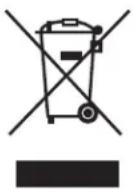
English - Environmental Information for Customers in the European Union
European Directive 2002/96/EC requires that the equipment bearing this symbol on the product and/or its packaging must not be disposed of with unsorted municipal waste. The symbol indicates that this product should be disposed of separately from regular household waste streams. It is your responsibility to dispose of this and other electric and electronic equipment via designated collection facilities appointed by the government or local authorities. Correct disposal and recycling will help prevent potential negative consequences to the environment and human health. For more detailed information about the disposal of your old equipment, please contact your local authorities, waste disposal service, or the shop where you purchased the product.
WEB: For additional information, please visit www.linksysbycisco.com/international
Australia
The following information applies if you use the product within Australia.
Safety Notice

WARNING: To ensure compliance with exposure limits to radiofrequency fields, the antenna of the device should be no closer than 20 cm from the body during use.
New Zealand
The following information applies if you use the product within New Zealand.
Telepermit Statement
The cabling between the phone port and the phone shall not exceed 100 metres.
PTC200 General Warning
The grant of a Telepermit for any item of terminal equipment indicates only that Telecom has accepted that the item complies with minimum conditions for connection to its network. It indicates no endorsement of the product by Telecom, nor does it provide any sort of warranty. Above all, it provides no assurance that any item will work correctly in all respects with another item of Telepermitted equipment of a different make or model, nor does it imply that any product is compatible with all of Telecom's network services.
Wireless Connectivity Security on Cisco-Linksys ADSL2+ Devices
Setting up the security of the wireless connection associated with ADSL2+ device is the user's responsibility. Telecom will take no responsibility for charges made to user's accounts due to poorly organized wireless security allowing unknown users to connect to the Internet via this device. Do not complain to the Telecom Fault Service or Jetstream Helpdesk should this occur.
General Warning for Cisco-Linksys ADSL2+ Devices and ADSL2+ Capability
This device has been tested and found suitable to connect to the Telecom ADSL2+ capability. This indicates only that Telecom has accepted that this device complies with the spectrum management plan for ADSL2+ on copper cable and with simple voiceband compatibility tests included in PTC273. It does not indicate that this device is fully compatible with all services accessed via the ADSL2+ capability. Contact the supplier of the device when issues occur. Do not call the Telecom Fault Service or the Jetstream Helpdesk.
Cisco-Linksys ADSL2+ Devices on Long Lines
ADSL2+ devices may not achieve the type of "high speed" operation expected when attached to a line that is longer than intended by the ITU-T Rec. G.996.1 ADSL standard i.e. >3 km of 0.4mm cable or a shorter cable length with several tails or multiples. If the device is installed in such conditions and does not give the expected "download" performance, then do not refer the matter to the Telecom Fault Service or ADSL Helpdesk.
United States of America
The following information applies if you use the product within the United States of America.
FCC Statement
This device complies with Part 15 of the FCC Rules. Operation is subject to the following two conditions: (1) This device may not cause harmful interference, and (2) this device must accept any interference received, including interference that may cause undesired operation.
This product has been tested and complies with the specifications for a Class B digital device, pursuant to Part 15 of the FCC Rules. These limits are designed to provide reasonable protection against harmful interference in a residential installation. This equipment generates, uses, and can radiate radio frequency energy and, if not installed and used according to the instructions, may cause harmful interference to radio communications. However, there is no guarantee that interference will not occur in a particular installation. If this equipment does cause harmful interference to radio or television reception, which is found by turning the equipment off and on, the user is encouraged to try to correct the interference by one or more of the following measures:
• Reorient or relocate the receiving antenna
- Increase the separation between the equipment or devices
- Connect the equipment to an outlet other than the receiver's
- Consult a dealer or an experienced radio/TV technician for assistance
FCC Caution: Any changes or modifications not expressly approved by the party responsible for compliance could void the user's authority to operate this equipment.
FCC Radiation Exposure Statement
This equipment complies with FCC radiation exposure limits set forth for an uncontrolled environment. This equipment should be installed and operated with minimum distance 20cm between the radiator and your body.
This transmitter must not be co-located or operating in conjunction with any other antenna or transmitter. IEEE 802.11b or 802.11g operation of this product in the USA is firmware-limited to channels 1 through 11.
FCC Part 68 Statement
This equipment complies with Part 68 of the FCC Rules. A label is attached to the equipment that contains, among other information, its FCC registration number and ringer equivalence number. If requested, this information must be provided to the telephone company.
This equipment uses the following USOC Jack: RJ-11.
An FCC compliant telephone cord and modular plug is provided with this equipment. This equipment is designed to be connected to the telephone network or premises wiring using a compatible modular jack, which is FCC Part 68 compliant. Connection to the telephone network should be made by using the standard modular telephone jack.
The REN is useful to determine the quantity of devices that may be connected to the telephone line and still have all of those devices ring when your telephone number is called. In most, but not all areas, the sum of RENs should not exceed 5. To be certain of the number of devices that may be connected to the line, as determined by the total RENs, contact the telephone company to determine the maximum REN for the calling area.
If this equipment causes harm to the telephone network, the telephone company may discontinue your service temporarily. If advance notice is not practical, the telephone company will notify the customer as soon as possible. Also, you will be advised of your right to file a complaint with the FCC if you believe it is necessary.
The telephone company may make changes in its facilities, equipment, operations, or procedures that could affect the operation of the equipment. If this happens, the telephone company will provide advance notice in order for you to make the necessary modifications in order to maintain uninterrupted service.
In the event this equipment should fail to operate properly, disconnect the unit from the telephone line. Try using another FCC approved device in the same telephone jack. If the trouble persists, call the telephone company repair service bureau. If the trouble does not persist and appears to be with this unit, disconnect the unit from the telephone line and discontinue use of the unit until it is repaired. Please note that the telephone company may ask that you disconnect the equipment from the telephone network until the problem has been corrected or until you are sure that the equipment is not malfunctioning. The user must use the accessories and cables supplied by the manufacturer to get optimum performance from the product.
No repairs may be done by the customer. If trouble is experienced with this equipment, please contact your authorized support provider for repair and warranty information. If the trouble is causing harm to the telephone network, the telephone company may request you remove the equipment from the network until the problem is resolved. This equipment cannot be used on telephone company provided coin service. Connection to Party Line Service is subject to state tariffs.
Safety Notices

WARNING: To reduce the risk of fire, use only No.26 AWG or larger telecommunication line cord.

WARNING: Do not use this product near water, for example, in a wet basement or near a swimming pool.

WARNING: Avoid using this product during an electrical storm. There may be a remote risk of electric shock from lightning.

WARNING: This equipment will be inoperable when main power fails.

WARNING: To ensure compliance with exposure limits to radiofrequency fields, the antenna of the device should be no closer than 20 cm from the body during use.
Canada
The following information applies if you use the product within Canada.
Industry Canada Statement
This device complies with Industry Canada ICES-003 and RSS210 rules.
Operation is subject to the following two conditions:
-
This device may not cause interference and
-
This device must accept any interference, including interference that may cause undesired operation of the device. This device has been designed to operate with an antenna having a maximum gain of 2dBi. Antenna having a higher gain is strictly prohibited per regulations of Industry Canada. The required antenna impedance is 50 ohms.
To reduce potential radio interference to other users, the antenna type and its gain should be so chosen that the EIRP is not more than required for successful communication.
Industry Canada Radiation Exposure Statement:
This equipment complies with IC radiation exposure limits set forth for an uncontrolled environment. This equipment should be installed and operated with minimum distance 20cm between the radiator & your body.
This transmitter must not be co-located or operating in conjunction with any other antenna or transmitter.
The maximum performance for wireless is derived from IEEE Standard 802.11 specifications. Actual performance can vary, including lower wireless network capacity, data throughput rate, range and coverage. Performance depends on many factors, conditions and variables, including distance from the access point, volume of network traffic, building materials and construction, operating system used, mix of wireless products used, interference and other adverse conditions.
- Declaration of Conformity with Regard to EU Directive 1999/5/EC (R&TTE Directive)
- Non-Wireless Equipment (ADSL Modems/Gateways)
- CE Marking
- CE
- Wireless Equipment (Wireless-N/G/A/B Products)
- CE!
- National Restrictions
- Denmark
- Product Usage Restrictions
- 2,4 GHz Restrictions
- GHz Restrictions
- Third-Party Software or Firmware
- Technical Documents on www.linksysbycisco.com/international
- User Information for Consumer Products Covered by EU Directive 2002/96/EC on Waste Electric and Electronic Equipment (WEEE)
- English - Environmental Information for Customers in the European Union
- Australia
- Safety Notice
- New Zealand
- Telepermit Statement
- PTC200 General Warning
- Wireless Connectivity Security on Cisco-Linksys ADSL2+ Devices
- General Warning for Cisco-Linksys ADSL2+ Devices and ADSL2+ Capability
- Cisco-Linksys ADSL2+ Devices on Long Lines
- United States of America
- FCC Statement
- FCC Radiation Exposure Statement
- FCC Part 68 Statement
- Safety Notices
- Canada
- Industry Canada Statement
- Industry Canada Radiation Exposure Statement:
Brand : LINKSYS
Model : WAG160N v2
Category : Router