SC-411 - Multicooker Scarlett - Free user manual and instructions
Find the device manual for free SC-411 Scarlett in PDF.


| Product Type | Multicooker |
| Brand | Scarlett |
| Model | SC-411 |
| Capacity | 5 L (approx.) |
| Power | 800 W (estimated) |
| Dimensions (approx.) | 30 x 30 x 28 cm |
| Weight (approx.) | 4.5 kg |
| Power Supply | 220-240 V ~ 50 Hz |
| Control Panel | Touch buttons with LCD display |
| Cooking Programs | Pastry/Soup, Aspic/Braising, Food Steamer, Yoghurt/Heating, Milk Porridge/Cereals, Roasting/Home-made Preserves |
| Delay Start | Yes, up to 24 hours |
| Timer Adjustment | Yes, for select programs |
| Keep Warm Function | Yes, automatically after cooking (65-85 °C) |
| Non-Stick Inner Pot | Yes, with measuring scale |
| Included Accessories | Baking pan, steamer, measuring cup, ladle, container for condensed water |
| Safety Features | Overheat protection, automatic shut-off, steam release valve |
| Cleaning | Wipe with damp cloth; wash pot with mild detergent; avoid abrasives |
| Maintenance | Regular cleaning of steam outlet and condensation container |
| Repairability | Contact authorized service center for repairs (e.g., error codes E1-E5) |
Frequently Asked Questions - SC-411 Scarlett
User questions about SC-411 Scarlett
0 question about this device. Answer the ones you know or ask your own.
Ask a new question about this device
Download the instructions for your Multicooker in PDF format for free! Find your manual SC-411 - Scarlett and take your electronic device back in hand. On this page are published all the documents necessary for the use of your device. SC-411 by Scarlett.
USER MANUAL SC-411 Scarlett
- Body
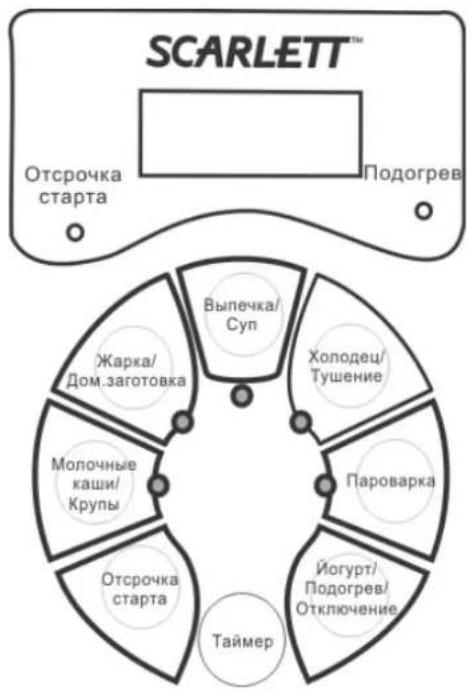
- Control panel
- Display panel
- Flap cover
- Lid release button
- Baking pan
- Steamer
- Measuring cup
- Ladle
- Container for collecting condensed water
- Steam outlet valve
UA СКЛАД ВИРОБУ
Important safety instructions. Please read carefully and save for future reference.
- Incorrect use of the device may damage the device and harm the user.
- Before switching on the appliance for the first time please check if the technical specifications indicated on the unit correspond to the mains parameters.
CAUTION! The plug of the power cord is grounding type and has a wire. Plug the device only into the corresponding grounded sockets.
- Use the device only for household purposes and in accordance with this Operating Manual. The device is not intended for industrial use
- Do not use outside.
- Always unplug the device from the socket before cleaning the device or if You are not using the device.
- The device may not be used by persons (including children) with underdeveloped physical, mental and sensual abilities when these persons do not have the experience or the knowledge or if they are not supervised or guided by a person who is responsible for their safety.
- Children should be supervised at all times and should never play with the device.
- Do not leave switched-on device unattended.
- Do not use the parts which are not included in the package.
- Do not use the device if the power cord or/and the plug are damaged. To avoid danger the damaged cord should be replaced by an authorized service center.
- Do not submerge the device or the power cord in water or other liquids. However, if this happened unplug the device from the socket immediately and before using the device again have qualified specialists check the operability of the device.
- Make sure that the power cord doesn't touch sharp edges and hot surfaces.
- Do not pull the power cord and do not twist or wrap the cord around the device.
- The multicooker is to be used only for cooking food. Never use the multicooker for drying clothes, paper and other items.
- Do not turn the multicooker when the pot is empty.
- Do not use the multicooker without the pot.
- Do not put the foodstuffs on the bottom of the multicooker, always use the pot.
- Do not replace the pot with any other container.
- Do not use metal items which may scratch the pot.
- The inner coating of the pot may initially wear off, therefore be careful when using the pot.
- Follow cooking recipes.
- Do not let water get into the vent holes in order to avoid short circuit.
- If using an extension cord make sure that maximum capacity of the cord corresponds to the capacity of the device.
- Caution! The device becomes hot during operation! If you need to touch the multicooker when it is operating use tacks or cooking gloves.
- Protect Your face and hands from the steam coming out of the valve.
- Do not insert metal and other items into the outlet hole or into any other parts of the device.
- Do not cover the cover of the multicooker with the towels or other items.
- If the product has been exposed to temperatures below 0^ C for some time it should be kept at room temperature for at least 2 hours before turning it on.
- The manufacturer reserves the right to introduce minor changes into the product design without prior notice, unless such changes influence significantly the product safety, performance, and functions.
INSTALLATION
- Make sure that there is no packaging material or any other items inside the multicooker.
- Check whether the following remained undamaged during the transportation: the cover; the casing; additional appliances; the removable pot.
- In case you notice any defects do not turn on the device and contact the salesperson or the service center.
- Place the device on a dry, even and heat-proof surface. Do not place the device close to combustible materials, explosives and self-igniting gases. Do not place the device close to a gas or electric stove or any other sources of heat. Do not place the device very close to walls or furniture.
- Do not put anything on top of the multicooker. Do not cover the vent holes.
- Do not place the multicooker in a kitchen cabinet. For proper operation the device needs free space for ventilation: at least 20 cm from the top, 10 cm from the back and 5 cm from the sides.
- Before first use wipe the removable pot, the steamer, the measuring cup, the spoon, the inside and the outside surface of the multicooker with a clean wet cloth. Remove protective film from the control panel.
- The inside surface of the pot contains a conventional scale for cereal and water: the scale on the right marks the number of cups for rice, the scale on the left marks liters of water. The maximum amount of cereal to be cooked – 8 cups and 1.5 liters of liquid.
PASTRY / SOUP PROGRAM (ВЫПЕЧКА / СУП)
- This program is used for making pastry, soups.
- Put all ingredients and seasonings into the pot of the multi-cooker in accordance with the recipe.
- Place the pot in the multi-cooker.
-
Close the lid and press it down until it snaps shut.
-
Connect the multi-cooker to the power supply. Never connect the appliance to the electrical supply network before all the preparations have been completed as this may cause breakage.
- Press the «Pastry/Soup» button on the control panel. The indicator of the button will illuminate.
- The display will show 00:40. The «Pastry / Soup» program will start in 5 seconds.
- Under the default settings the multi-cooker will cook pastry or soup for 40 minutes. If necessary, you can prolong or shorten the cooking time with the use of the timer. For this press the «Timer» button in the centre of the panel. You can set the cooking time from 30 minutes to 2 hours. One step is 5 minutes.
- When the food is done the indicator of this mode will go out and you'll hear a sound signal, the multi-cooker will automatically switch to the heating mode, the indicator of the heating mode will illuminate.
- Disconnect the multi-cooker from the power supply.
ASPIC / BRAISING PROGRAM (ХОЛОДЕЦ / ТУШЕНИЕ)
- This program is used for braising products and preparing aspic.
- Put all ingredients and seasonings into the pot of the multi-cooker in accordance with the recipe.
- Place the pot in the multi-cooker.
- Close the lid and press it down until it snaps shut.
- Connect the multi-cooker to the power supply. Never connect the appliance to the electrical supply network before all the preparations have been completed as this may cause breakage.
- Press the «Aspic/Braising» button on the control panel. The indicator of the button will illuminate.
- The display will show 01:00. The «Aspic / Braising» program will start in 5 seconds.
- Under the default settings the multi-cooker will work for 60 minutes. If necessary, you can prolong or shorten the cooking time with the use of the timer. To change time press the «Timer» button in the centre of the panel. You can set the cooking time within the range from 30 minutes to 5,5 hours. One step is 30 minutes.
- When the food is done the indicator of this mode will go out and you'll hear a sound signal, the multi-cooker will automatically switch to the heating mode, the indicator of the heating mode will illuminate.
- Disconnect the multi-cooker from the power supply.
FOOD STEAMER PROGRAM (ПАРОВАРКА)
- This program is used for steaming products.
- Food Steamer program operates when a steamer container is used. It's important to know that the time of steaming is limited by the amount of water poured into the pot. Make sure you pure enough water to last through the entire cooking process. In case the water is completely evaporated the program will automatically stop.
- Pour enough water into the pot (see the table below for the approximate amount of water).
| Cooking time | Approximate amount of water, measuring cups |
| 10-30 minutes | 4 |
| 30-60 minutes | 5 |
- Put products in the steamer container and place it in the pot. Place the pot in the multi-cooker.
- Close the lid and press it down until it snaps shut.
- Connect the multi-cooker to the power supply. Never connect the appliance to the electrical supply network before all the preparations have been completed as this may cause breakage.
- Press the «Food Steamer» button on the control panel. The indicator of the button will illuminate.
- The display will show 00:10. The «Food Steamer» program will start in 5 seconds.
- Under the default settings the multi-cooker will steam food for 10 minutes. If necessary, you can prolong or shorten the cooking time with the use of the timer. To change time press the «Timer» button in the centre of the panel. You can set the cooking time within the range from 1 minute to 60 minutes. One step is 1 minute.
- When the food is done the indicator of this mode will go out and you'll hear a sound signal, the multi-cooker will automatically switch to the heating mode, the indicator of the heating mode will illuminate.
- Disconnect the multi-cooker from the power supply.
YOGHURT/HEATING/SHUTDOWN BUTTON (ЙОГУРТ / ПОДОГРЕВ / ОТКЛЮЧЕНИЕ)
- This mode is used for preparing yoghurts, turning on of the heating mode and shutting down of the multi-cooker.
- To prepare a yoghurt pour a little water into the pot of the multi-cooker and put previously prepared jars with special mixture into the water (see the cookbook for the composition of the mixture).
- Close the lid and press it down until it snaps shut.
- Connect the multi-cooker to the power supply. Never connect the appliance to the electrical supply network before all the preparations have been completed as this may cause breakage.
- Press the «Yoghurt/Heating/Shutdown» button. The indicator of the button will illuminate. The display won't show the cooking time.
- When the required time runs out (see the cookbook) disconnect the multi-cooker from the power supply.
- The «Keep Warm» mode switches on automatically after the programmes: «Roasting/Int. Products», «Pastry/Soup», «Milk Porridge/Cereals», «Steamer», «Aspic/Braising» finish.
- This programme keeps the food's temperature at 65-85°C.
- To stop the «Keep Warm» function press and hold the «Yogurt/Keep Warm/Off» button.
- To switch on the Keep Warm function press the «Yogurt/Keep Warm/Off» button.
- The «Off» function is used to stop the cooking programme. To stop cooking press and hold the «Yogurt/Keep Warm/Off» button.
MILK PORRIDGE / CEREALS PROGRAM (МОЛОЧНЫЕ КАШИ / КРУПЫ)
- This program is used for preparing different types of porridge and pilaf.
-
Measure cereal with a measuring cup in accordance with the recipe. If necessary, you should previously wash the cereal. Never use for this purpose the pot of the multi-cooker as you may damage its covering.
-
Pour the cereal into the pot of the multi-cooker. Pour water into the pot in accordance with the recipe.
- Place the pot in the multi-cooker.
- Close the lid and press it down until it snaps shut.
- Connect the multi-cooker to the power supply. Never connect the appliance to the electrical supply network before all the preparations have been completed as this may cause breakage.
- Press the «Milk porridge/Cereals» button on the control panel. The indicator of the button will illuminate.
- The display will show 00:50. The «Milk porridge/Cereals» program will start in 5 seconds.
- The multi-cooker is set by default for cooking cereals for 50 minutes. When needed you can extend or reduce the time with the countdown timer; to do this press the «Timer» button at the centre of the control panel. You can change cooking time within the range from 30 minutes to 2 hours. It advances 5 min at a time.
- When the cooking process finishes the indicator of this mode will go out and a beep will sound, the multi-cooker will automatically switch to the «Keep Warm» mode, and the «Keep Warm» indicator will light.
- Unplug the multi-cooker from the power supply network.
- Disconnect the multi-cooker from the power supply.
ROASTING/ HOME-MADE PRESERVES PROGRAM (ЖАРКА / ДОМ.ЗАГОТОВКА)
- Using this program you may sauté vegetables with the lid open to further use them for preparing home-made products (preserved food), soups and various stir-fries.
- Put all ingredients and seasonings into the pot of the multi-cooker in accordance with the recipe.
- Place the pot in the multi-cooker.
- Do not close the lid.
- Connect the multi-cooker to the power supply. Never connect the appliance to the electrical supply network before all the preparations have been completed as this may cause breakage.
- Press the «Roasting/Home» –made preserves button on the control panel. The indicator of the button will illuminate.
- The display will show 00:00. The Roasting/ Home –made preserves program will start in 5 seconds. The display won't show the time.
- The multi-cooker defines the cooking time and the temperature itself depending on the weight of the products used.
- When the food is done the indicator of this mode will go out and you'll hear a sound signal, the multi-cooker will automatically switch to the heating mode, the indicator of the heating mode will illuminate and the display will show "bb".
- Disconnect the multi-cooker from the power supply.
DELAY START (OTCPOЧКА СТАРТА)
- This function allows delaying the cooking processing for the time range from 30 minutes to 24 hours.
- The “Delayed Start” function is possible for the following programmes: “Roasting/Int. Products”, “Milk Porridge/Cereals”, “Pastry/Soup”, “Steamer”, “Aspic/Braising”.
- Press the «Delay Start» button and the «Delay Start» indicator will illuminate. Using the Timer button set the delay cooking start time (from 30 minutes to 24 hours with the step of 30 minutes). Press the button of the chosen program. In a minute the display will show the delay cooking start time and the countdown with the step of 1 minute will start.
- The "Start Delay" function can be switched on in a different way. First press the button of the desired mode, then the "Start Delay" button and set the delay time using the "Timer" button.
TIMER CHANGE OF THE COOKING TIME (ТАЙМЕР)
- In 4 programs («Aspic/Braising», «Pastry/Soup», «Food Steamer», «Milk porridge/ Cereals2) the cooking time is defined by the microprocessor, but you can change. To set the time do the following:
- Choose the necessary cooking program. The display will show the preset cooking time (see the table of time setting below).
- Use the Timer button to set the required time.
- The chosen cooking program will start in 5 seconds after the time is set.
Table of time settings.
| Cooking mode | Preset cooking time, min | Range of cooking time, min |
| Milk porridge/ Cereals | 50 | 30-120 |
| Pastry/Soup | 40 | 30-120 |
| Aspic/Braising | 60 | 30-330 |
| Food Steamer | 10 | 1-60 |
CLEANING AND MAINTENANCE
- The device needs to be cleaned regularly; remove all of the food residue from the surface of the multicooker
- Before cleaning turn off the multicooker and unplug it from the socket. Let the device cool off completely.
- Wipe the control panel, the outer and the inner surfaces of the multicooker with a wet cloth and detergent, wipe dry.
- Wash the pot in warm water with detergent and wipe dry. You should wash the pot immediately after you finished cooking. Wash the container for collecting the condensed water and the steam outlet valve.
Do not use aggressive substances or abrasive materials.
STORAGE
- Make sure that the device is unplugged from the socket and is completely cooled off.
- Follow all of the steps mentioned in "CLEANING AND MAINTENANCE" section.
- Store the multicooker with the cover half open in a dry and clean place.
DEVICE TROUBLESHOOTING
| The description of the trouble | Reasons | Eliminating the trouble |
| The display shows E1 | The bottom indicator is defective | Call the service center for repairs. |
| The display shows E2 | There is a break or short circuit in the circuit of the bottom indicator. | Call the service center for repairs. |
| The display shows E3 | The top indicator is defective | Call the service center for repairs. |
| The display shows E4 | There is a break or short circuit in the circuit of the top indicator. | Call the service center for repairs. |
| The display shows E5 | The control panel is defective | Call the service center for repairs. |
- UA СКЛАД ВИРОБУ
- INSTALLATION
- PASTRY / SOUP PROGRAM (ВЫПЕЧКА / СУП)
- ASPIC / BRAISING PROGRAM (ХОЛОДЕЦ / ТУШЕНИЕ)
- FOOD STEAMER PROGRAM (ПАРОВАРКА)
- YOGHURT/HEATING/SHUTDOWN BUTTON (ЙОГУРТ / ПОДОГРЕВ / ОТКЛЮЧЕНИЕ)
- MILK PORRIDGE / CEREALS PROGRAM (МОЛОЧНЫЕ КАШИ / КРУПЫ)
- ROASTING/ HOME-MADE PRESERVES PROGRAM (ЖАРКА / ДОМ.ЗАГОТОВКА)
- DELAY START (OTCPOЧКА СТАРТА)
- TIMER CHANGE OF THE COOKING TIME (ТАЙМЕР)
- CLEANING AND MAINTENANCE
- STORAGE
Brand : Scarlett
Model : SC-411
Category : Multicooker